2016 FORD EXPEDITION EL keyless entry
[x] Cancel search: keyless entryPage 136 of 421
To return the seatback to its originalposition, lift the seatback until it latchesinto place.
PowerFold™ Third Row Seat (If
Equipped)
Note:The power fold down seats operatefor 10 minutes after you switch the ignitionoff. The transmission must be in park (P)and the liftgate, or liftgate glass must beopen. Similar to the battery saver feature,the power third row seat disables 10 minutesafter you switch the ignition off.
Note:Be sure that the head restraints arefolded down before powering the third rowseat down.
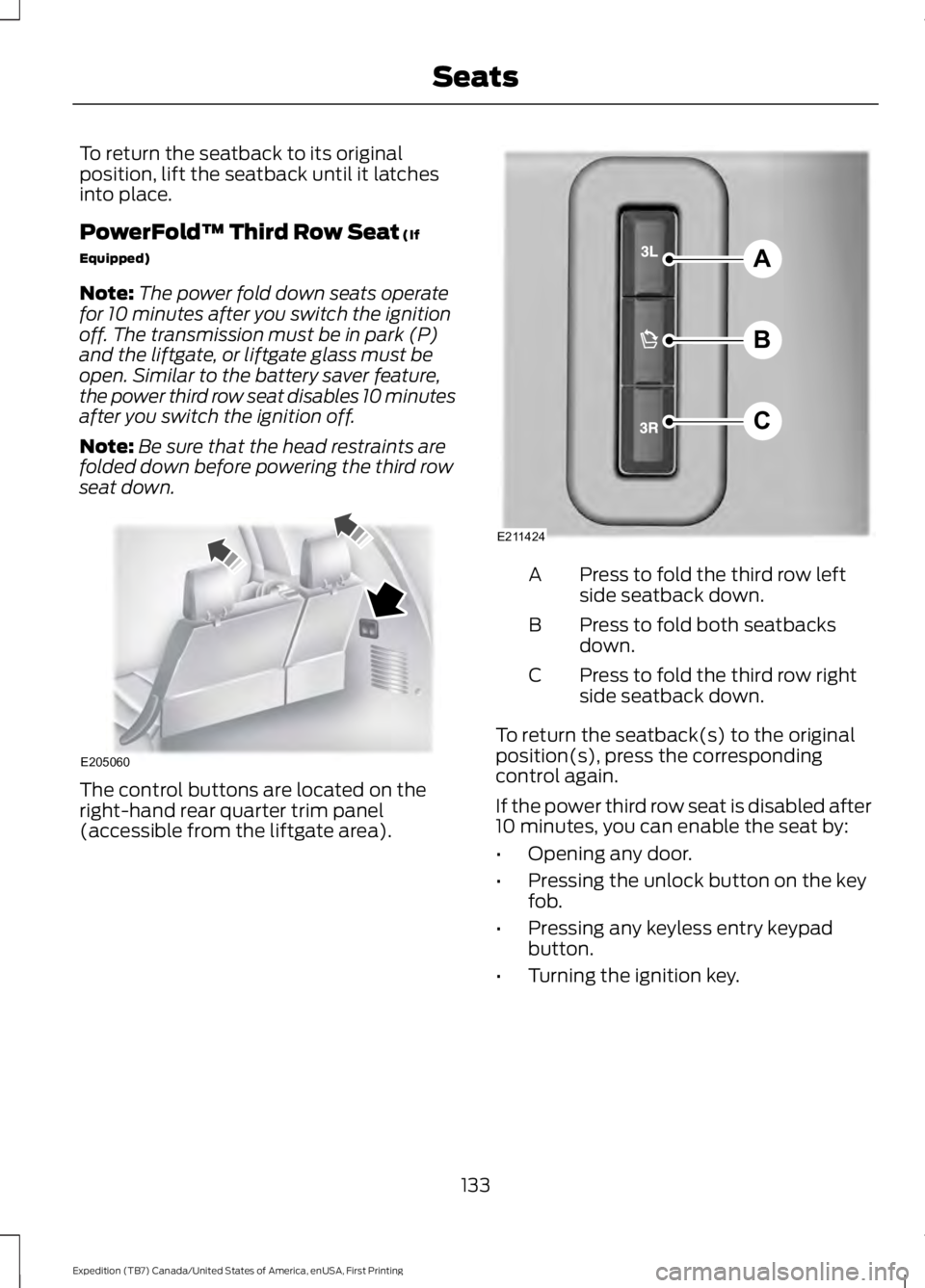
The control buttons are located on theright-hand rear quarter trim panel(accessible from the liftgate area).
Press to fold the third row leftside seatback down.A
Press to fold both seatbacksdown.B
Press to fold the third row rightside seatback down.C
To return the seatback(s) to the originalposition(s), press the correspondingcontrol again.
If the power third row seat is disabled after10 minutes, you can enable the seat by:
•Opening any door.
•Pressing the unlock button on the keyfob.
•Pressing any keyless entry keypadbutton.
•Turning the ignition key.
133
Expedition (TB7) Canada/United States of America, enUSA, First Printing
SeatsE205060 A
B
C
E211424
Page 221 of 421
Note:If completed successfully, theinformation display shows NEUTRAL TOWLEAVE IN N or NEUTRAL TOW ENABLEDLEAVE TRANSMISSION IN NEUTRAL.This indicates that your vehicle is safe totow with all wheels on the ground.
Note:If you do not see the message in thedisplay, you must perform the procedureagain from the beginning.
Note:You may hear an audible noise as thetransfer case shifts into its neutral position.This is normal.
6. Leave the transmission in position Nand turn the ignition as far as it will gotoward the off position (it will not turnfully off when the transmission is inposition N). If your vehicle has anignition key, you must leave the key inthe ignition while towing. To lock andunlock your vehicle, use the keylessentry keypad or extra set of keys. If yourvehicle has intelligent access, press theengine START/STOP button oncewithout pressing the brake pedal. Youdo not need to leave your keys in thevehicle. You can lock and unlock yourvehicle as you normally do.
7. Release the brake pedal.
WARNINGS
Do not disconnect the battery duringrecreational towing. Doing so willprevent the transfer case fromshifting properly and may cause the vehicleto roll even if the transmission is in P(Park).
Shifting the transfer case to itsneutral position for recreationaltowing may cause the vehicle to beable to roll even if the transmission is in P(Park). The driver or others could beinjured. Make sure the foot brake isdepressed and the vehicle is in a secureand safe position while the transfer caseis being shifted to its neutral position.
WARNINGS
Failing to put the transfer case in itsneutral position will damage vehiclecomponents.
Note:You can check four-wheel-downtowing status at any time by opening thedriver's door or turning the ignition to theaccessory or on position and verifying theNEUTRAL TOW ENABLED messagedisplays in the cluster.
Exiting Four-wheel-down Towing
To exit four-wheel-down towing and returnthe transfer case to its 2H position:
1.With your vehicle still properly securedto the tow vehicle, put the ignition inthe on position, but do not start theengine. If your vehicle has an ignitionkey, turn the key to on. If your vehiclehas intelligent access, press the engineSTART/STOP button twice withoutpressing the brake pedal.
2. Press and hold the brake pedal.
3.Shift the transmission out of N and intoany gear.
4. Release the brake pedal.
Note:If completed successfully, theinstrument cluster displays 4X2, andNEUTRAL TOW DISABLED.
Note:If the indicator light and message donot display, you must perform the procedureagain from the beginning.
Note:You may hear an audible noise as thetransfer case shifts out of its neutralposition. This is normal.
Note:If SHIFT DELAY PULL FORWARDdisplays in the instrument cluster, transfercase gear tooth blockage is present. See theinstructions after this section.
5. Apply the parking brake, and thendisconnect the vehicle from the towvehicle.
218
Expedition (TB7) Canada/United States of America, enUSA, First Printing
Towing
Page 371 of 421

For a complete listing of the accessoriesthat are available for your vehicle, pleasecontact your authorized dealer or visit theonline store web site:
Web Address (United States)
www.Accessories.Ford.com
Web Address (Canada)
www.Accessories.Ford.ca
Ford Accessories are available for yourvehicle through an authorized Ford dealer.Ford Motor Company will repair or replaceany properly authorized dealer-installedFord Original Accessory found to bedefective in factory-supplied materials orworkmanship during the warranty period,as well as any component damaged by thedefective accessories.
Ford Motor Company will warrant yourvehicle's accessories through the warrantythat provides the greatest benefit:
•24 months, unlimited mileage.
•The remainder of your new vehiclelimited warranty.
Contact an authorized dealer for detailsand a copy of the warranty.
Exterior Style
•Keyless entry.
•Side window deflectors.
•Splash guards.
Interior Style
•Floor mats.
•Rear seat entertainment system*.
•Seat covers.
Lifestyle
•Ash cup or coin holder.
•Cargo organization and management.
•Roof rack and carriers*.
•SUV camping tent*.
•Trailer hitches, wiring harnesses andaccessories.
Peace of Mind
•Back-up alarm.
•Bumper protector.
•Car cover*.
•Cargo area protector.
•Cargo security shade.
•Hood deflector.
•Locking fuel plug.
•Park assist sensors.
•Remote start.
•Vehicle security system.
•Wheel locks.
*Ford Licensed Accessory. The accessorymanufacturer designs, develops andtherefore warrants Ford LicensedAccessories, and does not design or testthese accessories to Ford Motor Companyengineering requirements. Contact anauthorized Ford dealer for the accessorymanufacturer's limited warranty detailsand request a copy of the Ford LicensedAccessories product limited warranty fromthe accessory manufacturer.
368
Expedition (TB7) Canada/United States of America, enUSA, First Printing
Accessories
Page 414 of 421
Information Display Control.......................70Information Displays.....................................92General Information............................................92Information Messages................................1034WD Messages.....................................................112AdvanceTrac™ / Traction ControlMessages..........................................................104Alarm Messages.................................................104Battery and Charging SystemMessages..........................................................104Blind Spot Information SystemMessages..........................................................105Brake System Messages..................................105Door Messages....................................................105Engine Messages................................................106Fuel Messages.....................................................106Keys and Intelligent AccessMessages.........................................................106Maintenance Messages....................................107MyKey™ Messages............................................108Off Road Messages...........................................108Park Aid Messages.............................................109Power Steering Messages...............................109Remote Start Messages...................................110Suspension System Messages.......................110Tire Messages.......................................................110Trailer Messages..................................................110Transmission Messages.....................................111Installing Child Restraints............................16Child Seats...............................................................16Combining Safety Belt and LATCH LowerAnchors for Attaching Child SafetySeats....................................................................20Using Lap and Shoulder Belts .........................17Using Lower Anchors and Tethers forCHildren (LATCH)............................................19Using Tether Straps.............................................20Instrument Cluster........................................85Instrument Lighting Dimmer......................76Interior Lamps.................................................78Front Row Map and Dome Lamps.................78Front Row Map Lamps.......................................78Rear Cargo Lamp..................................................79Second Row Map Lamps..................................78Interior Mirror...................................................82Auto-Dimming Mirror..........................................82Introduction.........................................................7
J
Jump Starting the Vehicle........................225Connecting the Jumper Cables....................225Jump Starting......................................................226Preparing Your Vehicle.....................................225Removing the Jumper Cables.......................226
K
Keyless Entry....................................................59SECURICODE™ KEYLESS ENTRYKEYPAD..............................................................59Unlocking and Locking the Doors...................61Keyless Starting............................................145Ignition Modes.....................................................146Keys and Remote Controls..........................41Principle of Operation.........................................41
L
Lighting Control...............................................74Headlamp Flasher................................................75High Beams.............................................................74Lighting...............................................................74General Information............................................74Limited Slip Differential...............................171Load CarriersSee: Roof Racks and Load Carriers..............197Load Carrying.................................................196Load Limit.......................................................198Special Loading Instructions for Owners ofPick-up Trucks and Utility-typeVehicles............................................................204Vehicle Loading - with and without aTrailer.................................................................198
411
Expedition (TB7) Canada/United States of America, enUSA, First Printing
Index