2016 FORD ESCAPE USB
[x] Cancel search: USBPage 339 of 393

Phone issues
Possible solution(s)
Possible cause(s)
Issue
Turn off the Auto phone-book download setting.
Go to the website to review your phone's compatibility.
This is a phone-dependent
feature.
Text messaging is not working on SYNC. Try turning off the device,
resetting the device orremoving the device's
battery, then trying again.
This may be a possible
phone malfunction. USB and media issues
Possible solution(s)
Possible cause(s)
Issue
Try turning off the device,resetting the device,
removing the device's
battery, then trying again.
This may be a possible device malfunction.
I am having trouble
connecting my device. Make sure you are using the
manufacturer's cable.
Make sure you insert the
USB cable correctly into the device and the USB port.
Make sure that the device does not have an auto-
install program or active security settings.
Make sure you are not
leaving the device in your vehicle during very hot or cold temperatures.
This is a device limitation.
SYNC does not recognize
my device when I turn on the car.
Review the device compatib-ility chart on the SYNC
website to confirm your phone supports the
Bluetooth audio streaming function.
This is a phone-dependent
feature.
Bluetooth audio does not
stream.
336
Escape/Kuga (TM2), enUSA, First Printing SYNC™ (If Equipped)
Page 340 of 393

USB and media issues
Possible solution(s)
Possible cause(s)
Issue
Make sure you correctly
connect the device to SYNC, and that you have pressed play on your device.
The device is not connected.
Make sure that all songdetails are populated.
Your music files may not
contain the correct artist,
song title, album or genre information.
SYNC does not recognize
music that is on my device. The file may be corrupted.
Some devices require you tochange the USB settings
from mass storage to MTP class.
The song may have copy-
right protection, which does not allow it to play. Voice command issues
Possible solution(s)
Possible cause(s)
Issue
Review the phone voice
commands and the media voice commands at the
beginning of their respective sections.
You may be using the wrong
voice commands.
SYNC does not understand what I am saying. After pressing the voice icon,
wait until after the tonesounds and Listening
appears before saying a
command. Any command
spoken before this does not register with the system.
You may be speaking too
soon or at the wrong time.
Review the media voice
commands at the beginning of the media section.
You may be using the wrong
voice commands.
SYNC does not understand
the name of a song or artist.
337
Escape/Kuga (TM2), enUSA, First Printing SYNC™ (If Equipped)
Page 342 of 393

Voice command issues
Possible solution(s)
Possible cause(s)
Issue
The system works better if
you list full names, such as "Joe Wilson" rather than "Joe".
The system may not be
reading the name the same way you are saying it.
Do not use special charac-ters, such as 123 or ICE, as
the system does not recog- nize them.
Contacts in your phonebook
may be very short and
similar, or they may contain special characters.
If a contact is in CAPS, youhave to spell it. JAKE
requires you to say "Call J- A-K-E".
Your phonebook contacts
may be in CAPS. AppLink issues
Possible solution(s)
Possible cause(s)
Issue
Ensure you have a compat-
ible smartphone; an Android with OS 2.3 or higher or aniPhone 3GS or newer with
iOS 5.0 or higher. Addition- ally, ensure your phone is
An AppLink capable phone
is not connected to SYNC.
AppLink Mobile Applica-
tions: When I select "Find
New Apps," SYNC does not find any applications. paired and connected to
SYNC in order to find
AppLink-capable apps on your device. iPhone users must also connect to
SYNC's USB port with an Apple USB cable.
Ensure you have down-
loaded and installed the latest version of the app
from your phone's app store.
Ensure the app is running on your phone. Some apps
AppLink-enabled apps are
not installed and running on your mobile device.
My phone is connected, but
I still cannot find any apps.
require you to register or
339
Escape/Kuga (TM2), enUSA, First Printing SYNC™ (If Equipped)
Page 344 of 393
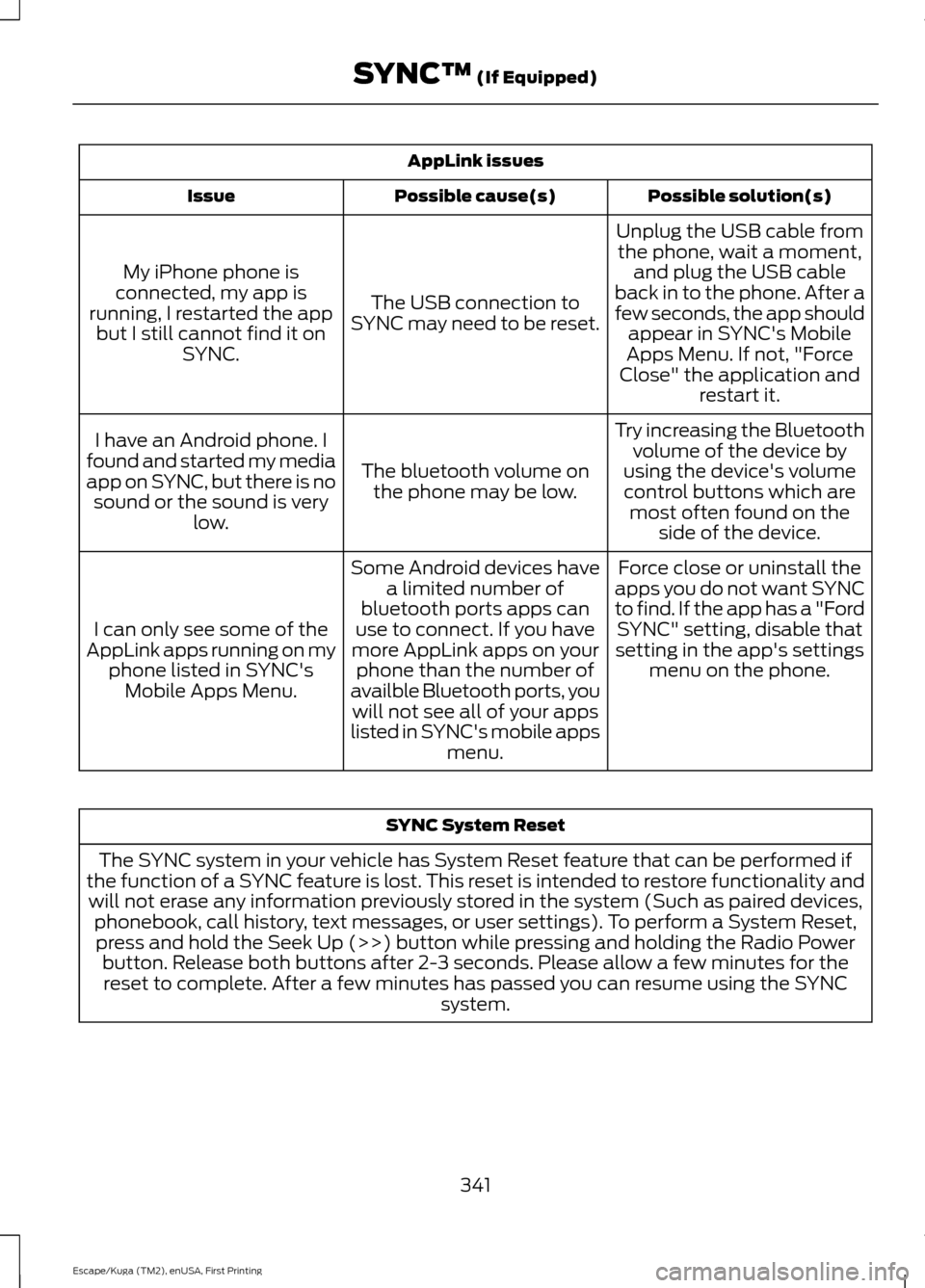
AppLink issues
Possible solution(s)
Possible cause(s)
Issue
Unplug the USB cable fromthe phone, wait a moment, and plug the USB cable
back in to the phone. After a
few seconds, the app should appear in SYNC's Mobile
Apps Menu. If not, "Force
Close" the application and restart it.
The USB connection to
SYNC may need to be reset.
My iPhone phone is
connected, my app is
running, I restarted the app but I still cannot find it on SYNC.
Try increasing the Bluetoothvolume of the device by
using the device's volume control buttons which are most often found on the side of the device.
The bluetooth volume on
the phone may be low.
I have an Android phone. I
found and started my media
app on SYNC, but there is no sound or the sound is very low.
Force close or uninstall the
apps you do not want SYNC
to find. If the app has a "Ford SYNC" setting, disable that
setting in the app's settings menu on the phone.
Some Android devices have
a limited number of
bluetooth ports apps can
use to connect. If you have
more AppLink apps on your phone than the number of
availble Bluetooth ports, you will not see all of your apps
listed in SYNC's mobile apps menu.
I can only see some of the
AppLink apps running on my phone listed in SYNC'sMobile Apps Menu. SYNC System Reset
The SYNC system in your vehicle has System Reset feature that can be performed if
the function of a SYNC feature is lost. This reset is intended to restore functionality and will not erase any information previously stored in the system (Such as paired devices, phonebook, call history, text messages, or user settings). To perform a System Reset,press and hold the Seek Up (>>) button while pressing and holding the Radio Power button. Release both buttons after 2-3 seconds. Please allow a few minutes for thereset to complete. After a few minutes has passed you can resume using the SYNC system.
341
Escape/Kuga (TM2), enUSA, First Printing SYNC™ (If Equipped)
Page 392 of 393

Tire Care..........................................................244
Glossary of Tire Terminology......................... 245
Information About Uniform Tire Quality Grading............................................................. 244
Information Contained on the Tire Sidewall........................................................... 246
Temperature A B C............................................ 245
Traction AA A B C.............................................. 244
Treadwear............................................................ 244
Tire Pressure Monitoring System..........258 Changing Tires With a Tire Pressure
Monitoring System....................................... 259
Understanding Your Tire Pressure Monitoring System ...................................... 259
Tires See: Wheels and Tires...................................... 241
Towing a Trailer
..............................................179
Load Placement.................................................. 179
Towing Points
................................................185
Installing the Recovery Hook......................... 185
Recovery Hook Location.................................. 185
Towing the Vehicle on Four Wheels............185
Towing the Vehicle on Four Wheels..........................................................186
Emergency Towing............................................ 186
Recreational Towing.......................................... 187
Towing...............................................................179
Traction Control
............................................149
Principle of Operation....................................... 149
Trailer Sway Control....................................180
Transmission Code Designation
.............274
Transmission..................................................138
Transmission See: Transmission.............................................. 138
Transporting the Vehicle...........................186
Trip Computer
..................................................91
All Value.................................................................... 91
Average Fuel........................................................... 91
Digital Speedo........................................................ 91
Distance to E........................................................... 91
Instantaneous Fuel.............................................. 91
Resetting the Trip Computer............................ 91
Trip Odometer........................................................ 91
Trip Timer................................................................. 91U
Under Hood Overview - 1.6L
EcoBoost™..................................................214
Under Hood Overview - 2.0L EcoBoost™..................................................215
Under Hood Overview - 2.5L....................216
Universal Garage Door Opener................116 HomeLink Wireless Control System.............116
USB Port
.........................................................303
Using Cruise Control.....................................161 Switching Cruise Control Off........................... 161
Switching Cruise Control On........................... 161
Using Four-Wheel Drive
..............................141
Driving in Special Conditions With
Four-Wheel Drive............................................ 141
Using MyKey With Remote Start Systems..........................................................53
Using Snow Chains......................................257
Using Stability Control.................................151 AdvanceTrac® with Roll Stability Control ™
(RSC®)............................................................... 151
Using SYNC™ With Your Media Player.............................................................325
Accessing Your USB Song Library...............329
Bluetooth Devices and System Settings.............................................................. 331
Connecting Your Digital Media Player to the USB Port........................................................... 325
Media Menu Features...................................... 329
Media Voice Commands................................. 326
USB 2....................................................................... 331
Voice Commands for Audio Sources..........332
Using SYNC™ With Your Phone...........308 Accessing Features through the Phone
Menu................................................................... 313
Accessing Your Phone Settings.................... 316
Bluetooth Devices............................................... 317
Making Calls........................................................... 311
Pairing a Phone for the First Time..............308
Pairing Subsequent Phones......................... 309
Phone Options during an Active Call..........312
Phone Voice Commands................................. 310
Receiving Calls...................................................... 311
System Settings.................................................. 318
Text Messaging.................................................... 314
389
Escape/Kuga (TM2), enUSA, First Printing Index