Page 253 of 451
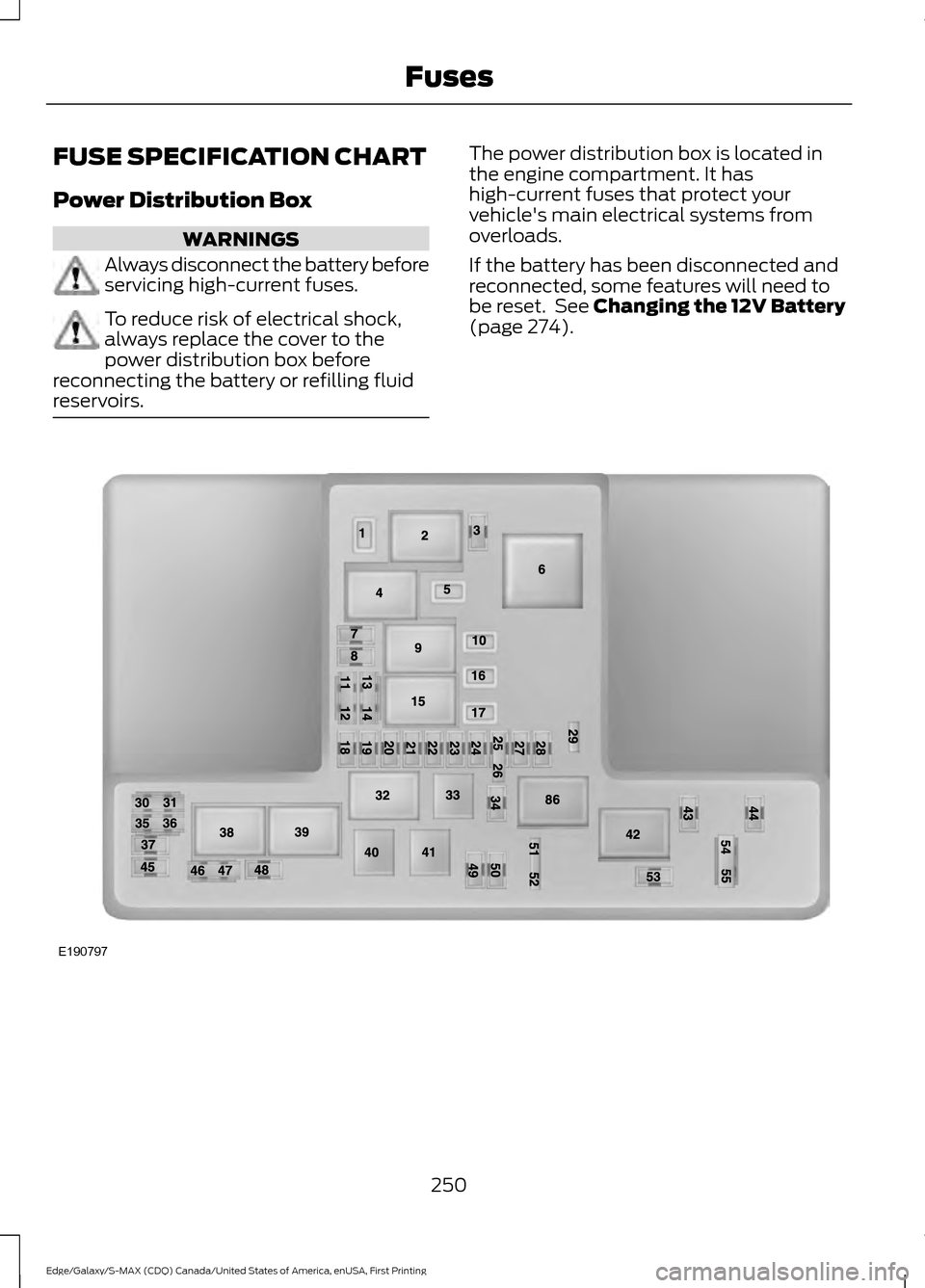
FUSE SPECIFICATION CHART
Power Distribution Box
WARNINGS
Always disconnect the battery before
servicing high-current fuses.
To reduce risk of electrical shock,
always replace the cover to the
power distribution box before
reconnecting the battery or refilling fluid
reservoirs. The power distribution box is located in
the engine compartment. It has
high-current fuses that protect your
vehicle's main electrical systems from
overloads.
If the battery has been disconnected and
reconnected, some features will need to
be reset. See Changing the 12V Battery
(page 274).
250
Edge/Galaxy/S-MAX (CDQ) Canada/United States of America, enUSA, First Printing FusesE190797
Page 257 of 451
1. Release the two latches, located on
both sides of the fuse box.
2. Raise the inboard side of the fuse box from the cradle.
3. Move the fuse box toward the center of the engine compartment.
4. Pivot the outboard side of the fuse box
to access the bottom side. 254
Edge/Galaxy/S-MAX (CDQ) Canada/United States of America, enUSA, First Printing FusesE145983 E190798
Page 264 of 451

GENERAL INFORMATION
Have your vehicle serviced regularly to help
maintain its roadworthiness and resale
value. There is a large network of
authorized dealers that are there to help
you with their professional servicing
expertise. We believe that their specially
trained technicians are best qualified to
service your vehicle properly and expertly.
They are supported by a wide range of
highly specialized tools developed
specifically for servicing your vehicle.
If your vehicle requires professional service,
an authorized dealer can provide the
necessary parts and service. Check your
warranty information to find out which
parts and services are covered.
Use only recommended fuels, lubricants,
fluids and service parts conforming to
specifications. Motorcraft® parts are
designed and built to provide the best
performance in your vehicle.
Precautions
•
Do not work on a hot engine.
• Make sure that nothing gets caught in
moving parts.
• Do not work on a vehicle with the
engine running in an enclosed space,
unless you are sure you have enough
ventilation.
• Keep all open flames and other burning
material (such as cigarettes) away
from the battery and all fuel related
parts.
Working with the Engine Off
1. Set the parking brake and shift to park
(P).
2. Switch off the engine.
3. Block the wheels. Working with the Engine On WARNING
To reduce the risk of vehicle damage
and/or personal burn injuries, do not
start your engine with the air cleaner
removed and do not remove it while the
engine is running. 1.
Set the parking brake and shift to park
(P).
2. Block the wheels.
OPENING AND CLOSING THE
HOOD
Opening the Hood 1.
Inside the vehicle, pull the hood release
handle located under the left-hand
side of the instrument panel.
261
Edge/Galaxy/S-MAX (CDQ) Canada/United States of America, enUSA, First Printing MaintenanceE142457
Page 266 of 451
UNDER HOOD OVERVIEW - 2.0L ECOBOOST™
Engine coolant reservoir. See Engine Coolant Check (page 267).
A
Brake fluid reservoir (right-hand drive).
See Brake Fluid Check (page 272).
B
Engine oil dipstick.
See Engine Oil Dipstick (page 266).
C
Engine oil filler cap.
See Engine Oil Check (page 266).
D
Brake fluid reservoir (left-hand drive).
See Brake Fluid Check (page 272).
E
Battery.
See Changing the 12V Battery (page 274).
F
Power distribution box.
See Fuses (page 250).
G
Air filter assembly.
See Changing the Engine Air Filter (page 282).
H
Windshield washer fluid reservoir.
See Washer Fluid Check (page 273).
I
263
Edge/Galaxy/S-MAX (CDQ) Canada/United States of America, enUSA, First Printing MaintenanceA
IH
EBCDFG
E188729
Page 267 of 451
UNDER HOOD OVERVIEW - 2.7L ECOBOOST™
Engine coolant reservoir. See Engine Coolant Check (page 267).
A
Brake fluid reservoir. See
Brake Fluid Check (page 272).
B
Battery. See
Changing the 12V Battery (page 274).
C
Power distribution box. See
Fuses (page 250).
D
Air filter assembly. See
Changing the Engine Air Filter (page 282).
E
Automatic transmission fluid dipstick. See
Automatic Transmission Fluid
Check (page 271).
F
Engine oil dipstick. See
Engine Oil Dipstick (page 266).
G
Engine oil filler cap. See
Engine Oil Check (page 266).
H
Windshield washer fluid reservoir. See
Washer Fluid Check (page 273).
I
264
Edge/Galaxy/S-MAX (CDQ) Canada/United States of America, enUSA, First Printing MaintenanceA
IEFGH
BCD
E188730
Page 268 of 451
UNDER HOOD OVERVIEW - 3.5L
Engine coolant reservoir. See Engine Coolant Check (page 267).
A
Brake fluid reservoir. See
Brake Fluid Check (page 272).
B
Battery. See
Changing the 12V Battery (page 274).
C
Engine compartment fusebox. See
Fuse Specification Chart (page 250).
D
Air filter assembly. See
Changing the Engine Air Filter (page 282).
E
Automatic transmission fluid dipstick. See
Automatic Transmission Fluid
Check (page 271).
F
Engine oil dipstick. See
Engine Oil Dipstick (page 266).
G
Engine oil filler cap. See
Engine Oil Check (page 266).
H
Windshield washer fluid reservoir. See
Washer Fluid Check (page 273).
I
265
Edge/Galaxy/S-MAX (CDQ) Canada/United States of America, enUSA, First Printing MaintenanceIEFGH
ABCD
E223186
Page 269 of 451

ENGINE OIL DIPSTICK - 2.0L
ECOBOOST™
Minimum.
A
Maximum.
B
ENGINE OIL DIPSTICK - 2.7L
ECOBOOST™/3.5L Minimum.
A
Maximum.
B
ENGINE OIL CHECK
1. Make sure that your vehicle is on level ground. 2. Check the oil level before starting the
engine, or switch the engine off and
wait 15 minutes for the oil to drain into
the oil pan.
3. Remove the dipstick and wipe it with a clean, lint free cloth. Replace the
dipstick and remove it again to check
the oil level.
If the oil level is at the minimum mark, add
oil immediately. See Maintenance (page
261).
Do not use supplemental engine oil
additives because they are unnecessary
and could lead to engine damage that may
not be covered by your vehicle warranty.
Note: Make sure that the oil level is
between the minimum and the maximum
marks.
Note: The oil consumption of new engines
reaches its normal level after approximately
3,000 mi (5,000 km)
.
Adding Engine Oil 266
Edge/Galaxy/S-MAX (CDQ) Canada/United States of America, enUSA, First Printing MaintenanceE161560
AB AB
E169062 E142732
Page 270 of 451

Only use oils certified for gasoline engines
by the American Petroleum Institute (API).
An oil with this trademark symbol
conforms to the current engine and
emission system protection standards and
fuel economy requirements of the
International Lubricants Specification
Advisory Council (ILSAC), comprised of
U.S. and Japanese automobile
manufacturers.
WARNINGS
Only add oil when the engine is cold.
If the engine is hot, wait 10 minutes
for the engine to cool down.
Do not remove the filler cap when
the engine is running.
1. Remove the engine oil filler cap.
2. Add engine oil that meets Ford
specifications. See Maintenance
(page 261).
3. Wipe off any spilled oil.
4. Replace the engine oil filler cap. Turn it clockwise until you feel a strong
resistance.
Note: Do not add oil further than the
maximum mark. Oil levels above the
maximum mark may cause engine damage.
Note: Soak up any spillage with an
absorbent cloth immediately.
OIL CHANGE INDICATOR
RESET
Use the information display controls on
the steering wheel to reset the oil change
indicator. From the main menu scroll to: Action and description
Message
Press the right arrow button,
then from this menu scroll
to the following message.
Settings
Press the right arrow button,
then from this menu scroll
to the following message.
Vehicle
Press the right arrow button,
then from this menu scroll
to the following message.
Oil Life
Press and hold the
OK
button until the instrument
cluster displays the
following message.
Hold OK to
Reset
Reset Successful
When the oil change indic-
ator resets the instrument
cluster displays 100%.
Remaining Life
{00}%
If the instrument cluster
displays one of the following
messages, repeat the
process.
Not Reset
Reset Cancelled
ENGINE COOLANT CHECK WARNINGS
Do not add engine coolant when the
engine is hot. Steam and scalding
liquids released from a hot cooling
system can burn you badly. Also, spilling
coolant on hot engine parts can burn you.
267
Edge/Galaxy/S-MAX (CDQ) Canada/United States of America, enUSA, First Printing Maintenance