Page 21 of 664

To Arm The System
Follow these steps to arm the Vehicle Security Alarm:
1. Make sure the vehicle ignition system is�OFF�(refer to
�Starting Procedures� in�Starting And Operating� for
further information).
2. Perform one of the following methods to lock the vehicle:
• Push LOCK on the interior power door lock switch
with the driver and/or passenger door open.
• Push the LOCK button on the exterior Passive Entry
Door Handle with a valid Key Fob available in the
same exterior zone (refer to �Keyless Enter-N-Go�in
�Things To Know Before Starting Your Vehicle� for
further information).
• Push the LOCK button on the Remote Keyless Entry
(RKE) transmitter.
3. If any doors are open, close them.
To Disarm The System
The Vehicle Security Alarm can be disarmed using any of
the following methods:
• Push the UNLOCK button on the Remote Keyless
Entry (RKE) transmitter.
• Grasp the Passive Entry Unlock Door Handle with a
valid Key Fob within 5 ft (1.5 m) of the passive entry
door handle (if equipped, refer to �Keyless Enter-N-
Go� in�Things To Know Before Starting Your Vehicle�
for further information).
• Cycle the vehicle ignition system out of the OFF
position.
• For vehicles equipped with Keyless Enter-N-Go,
push the Keyless Enter-N-Go Start/Stop button (re-
quires at least one valid Key Fob in the vehicle).
2
THINGS TO KNOW BEFORE STARTING YOUR VEHICLE 19
Page 24 of 664

To Unlock The Doors And Liftgate
Push and release the UNLOCK button on the RKE
transmitter once to unlock the driver’s door or twice
within five seconds to unlock all doors and liftgate. The
turn signal lights will flash to acknowledge the unlock
signal. The illuminated entry system will also turn on.If the vehicle is equipped with Passive Entry, refer to
“Keyless Enter-N-Go” in “Things To Know Before Start-
ing Your Vehicle” for further information.
1st Press Of Key Fob Unlocks
This feature lets you program the system to unlock either
the driver’s door or all doors on the first push of the
UNLOCK button on the RKE transmitter. To change the
current setting, refer to “Uconnect Settings” in “Under-
standing Your Instrument Panel” for further information.
Flash Lamps With Lock
This feature will cause the turn signal lights to flash when
the doors are locked or unlocked with the RKE transmit-
ter. This feature can be turned on or turned off. To change
the current setting, refer to “Uconnect Settings” in “Un-
derstanding Your Instrument Panel” for further informa-
tion.Key Fob With RKE Transmitter
22 THINGS TO KNOW BEFORE STARTING YOUR VEHICLE
Page 25 of 664
Headlight Illumination On Approach
This feature activates the headlights for up to 90 seconds
when the doors are unlocked with the RKE transmitter.
The time for this feature is programmable on vehicles
equipped through Uconnect. To change the current set-
ting, refer to “Uconnect Settings” in “Understanding
Your Instrument Panel” for further information.
To Lock The Doors And Liftgate
Push and release the LOCK button on the RKE transmit-
ter to lock all doors and liftgate. The turn signal lights
will flash, and the horn will chirp to acknowledge the
signal.
If the vehicle is equipped with Passive Entry, refer to
“Keyless Enter-N-Go” in “Things To Know Before Start-
ing Your Vehicle” for further information.
Sound Horn With Lock
This feature will cause the horn to chirp when the doors
are locked with the RKE transmitter. This feature can be
turned on or turned off. To change the current setting,
refer to “Uconnect Settings” in “Understanding Your
Instrument Panel” for further information.
Using The Panic Alarm
To turn the Panic Alarm feature on or off, push and hold
the PANIC button on the RKE transmitter for at least one
second and release. When the Panic Alarm is activated,
the turn signals will flash, the horn will pulse on and off,
and the interior lights will turn on.
The Panic Alarm will stay on for three minutes unless
you turn it off by either pushing the PANIC button a
second time or drive the vehicle at a speed of 15 MPH
(24 km/h) or greater.
2
THINGS TO KNOW BEFORE STARTING YOUR VEHICLE 23
Page 34 of 664

The doors can also be locked and unlocked with the
Keyless Enter-N-Go (Passive Entry) system. Refer to
“Keyless Enter-N-Go” in “Things To Know Before Start-
ing Your Vehicle” for further information.If you push the power door lock switch, with the ignition
in the ON/RUN or ACC position and any front door is
open, the power locks will not operate. This prevents you
from accidentally locking the Key Fob in the vehicle.
Turning off the ignition or closing the door will allow the
locks to operate. If a door is open, and the ignition is in
the ON/RUN or ACC position, a chime will sound as a
reminder to remove the Key Fob.
Automatic Door Locks — If Equipped
The auto door lock feature default condition is enabled.
When enabled, the door locks will lock automatically
when the vehicle’s speed exceeds 15 mph (24 km/h). The
auto door lock feature can be enabled or disabled by your
authorized dealer or through the Uconnect Settings in
your radio.
Power Door Lock Switch Location
32 THINGS TO KNOW BEFORE STARTING YOUR VEHICLE
Page 38 of 664

3. Repeat steps 1 and 2 for the opposite rear door.
NOTE:After disengaging the Child-Protection Door
Lock system, always test the door from the inside to
make certain it is in the desired position.
KEYLESS ENTER-N-GO
The Passive Entry system is an enhancement to the
vehicle’s Remote Keyless Entry (RKE) system and a
feature of Keyless Enter-N-Go. This feature allows you to
lock and unlock the vehicle’s door(s) without having to
push the RKE transmitter lock or unlock buttons.
NOTE:
• Passive Entry may be programmed ON/OFF; refer to
“Uconnect Settings” in “Understanding Your Instru-
ment Panel” for further information.
• If wearing gloves on your hands, or if it has been
raining on the Passive Entry door handle, the unlock
sensitivity can be affected, resulting in a slower re-
sponse time.
• If the vehicle is unlocked by Passive Entry and no door
is opened within 60 seconds, the vehicle will re-lock
and if equipped will arm the security alarm.
Child-Protection Door Lock Function
36 THINGS TO KNOW BEFORE STARTING YOUR VEHICLE
Page 39 of 664
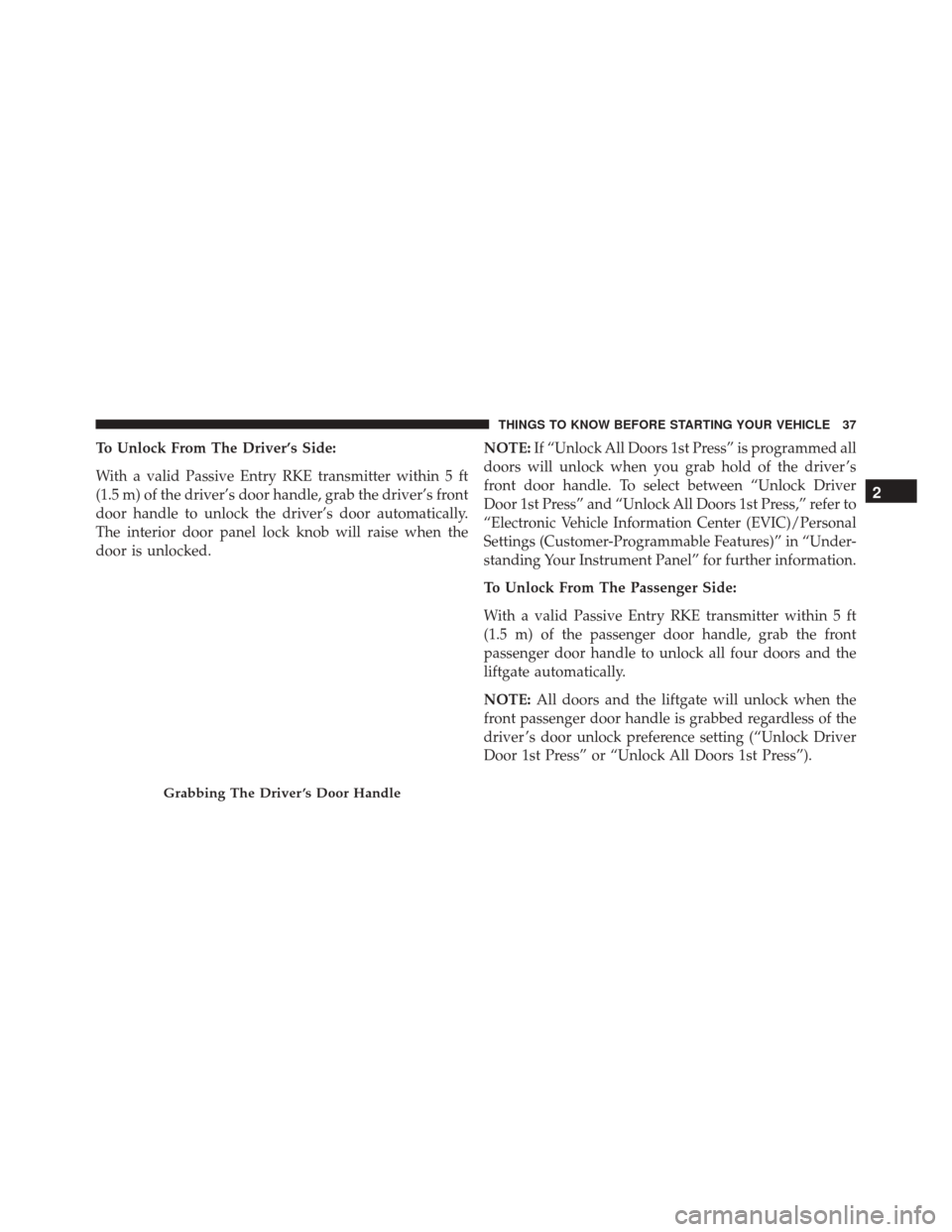
To Unlock From The Driver’s Side:
With a valid Passive Entry RKE transmitter within 5 ft
(1.5 m) of the driver’s door handle, grab the driver’s front
door handle to unlock the driver’s door automatically.
The interior door panel lock knob will raise when the
door is unlocked.NOTE:
If “Unlock All Doors 1st Press” is programmed all
doors will unlock when you grab hold of the driver ’s
front door handle. To select between “Unlock Driver
Door 1st Press” and “Unlock All Doors 1st Press,” refer to
“Electronic Vehicle Information Center (EVIC)/Personal
Settings (Customer-Programmable Features)” in “Under-
standing Your Instrument Panel” for further information.
To Unlock From The Passenger Side:
With a valid Passive Entry RKE transmitter within 5 ft
(1.5 m) of the passenger door handle, grab the front
passenger door handle to unlock all four doors and the
liftgate automatically.
NOTE: All doors and the liftgate will unlock when the
front passenger door handle is grabbed regardless of the
driver ’s door unlock preference setting (“Unlock Driver
Door 1st Press” or “Unlock All Doors 1st Press”).
Grabbing The Driver ’s Door Handle
2
THINGS TO KNOW BEFORE STARTING YOUR VEHICLE 37
Page 40 of 664

Preventing Inadvertent Locking Of Passive Entry RKE
Transmitter In Vehicle:
To minimize the possibility of unintentionally locking a
Passive Entry RKE transmitter inside your vehicle, the
Passive Entry system is equipped with an automatic door
unlock feature which will function if the ignition is OFF.
If one of the vehicle doors is open and the door panel
switch is used to lock the vehicle, once all open doors
have been closed the vehicle checks the inside and
outside of the vehicle for any valid Passive Entry RKE
transmitters. If one of the vehicle’s Passive Entry RKE
transmitters is detected inside the vehicle, and no other
valid Passive Entry RKE transmitters are detected out-
side the vehicle, the Passive Entry System automatically
unlocks all vehicle doors and chirps the horn three times
(on the third attempt ALL doors will lock and the Passive
Entry RKE transmitter can be locked in the vehicle).To Enter The Liftgate:
With a valid Passive Entry RKE transmitter within 3 ft
(1.0 m) of the liftgate, push the button underneath the left
side of the accent bar, which is located on the liftgate
below the glass, to lock or unlock the vehicle.
Liftgate Unlock/Lock Button
38 THINGS TO KNOW BEFORE STARTING YOUR VEHICLE
Page 41 of 664
To Lock The Vehicle’s Doors:
With one of the vehicle’s Passive Entry RKE transmitters
within 5 ft (1.5 m) of the driver or passenger front door
handle, push the door handle LOCK button to lock all
four doors and liftgate.Do NOT grab the door handle, when pushing the door
handle button. This could unlock the door(s).
Push The Door Handle Button To Lock
Do NOT Grab The Door Handle When Locking
2
THINGS TO KNOW BEFORE STARTING YOUR VEHICLE 39
