Page 400 of 707
Play A DVD Using The Touchscreen Radio
NOTE:Headunit DVD player does not play Blu-ray
Discs.
1. Push the OPEN/CLOSE or LOAD button on the radio faceplate (Touchscreen).
2. Insert the DVD with the label facing up. The radio automatically selects the appropriate mode after the
disc is recognized and displays the menu screen or
starts playing the first track.
3. To watch a DVD on Screen 1 for second row passen- gers, ensure the Remote Control and Headphone
switch is on Channel 1.
4. To watch a DVD on Screen 2 for third row passengers, ensure the Remote Control and Headphone switch is
on Channel 2.
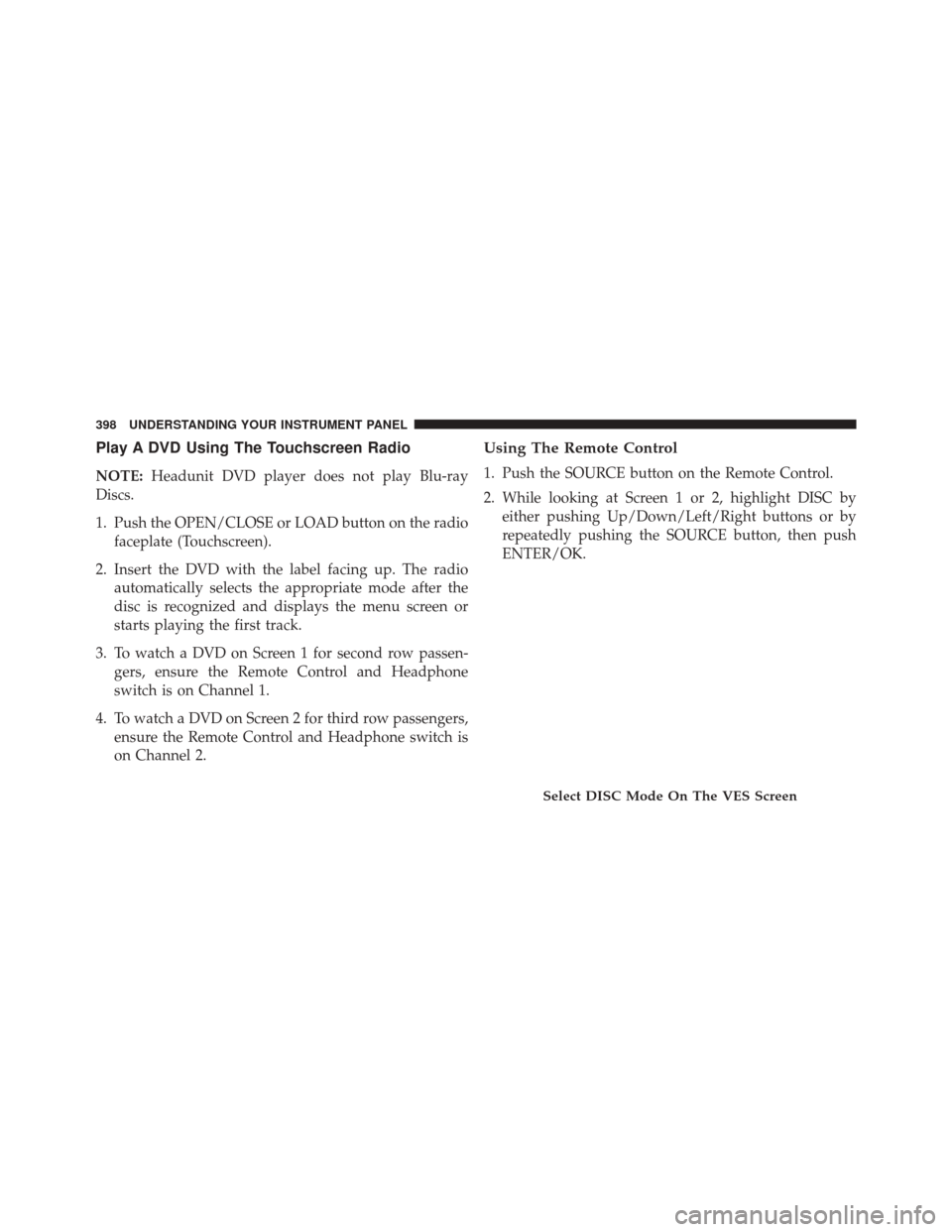
Using The Remote Control
1. Push the SOURCE button on the Remote Control.
2. While looking at Screen 1 or 2, highlight DISC byeither pushing Up/Down/Left/Right buttons or by
repeatedly pushing the SOURCE button, then push
ENTER/OK.
Select DISC Mode On The VES Screen
398 UNDERSTANDING YOUR INSTRUMENT PANEL
Page 403 of 707
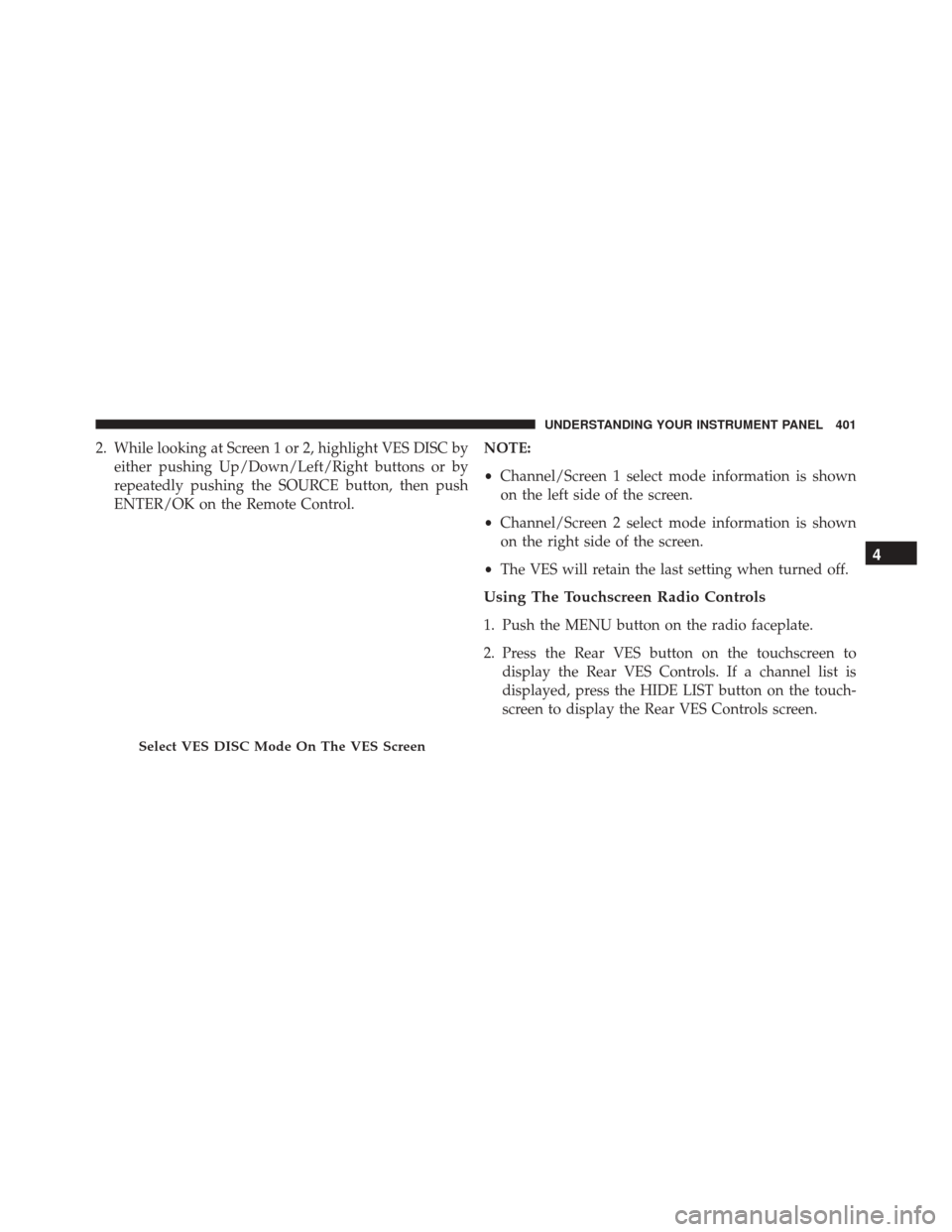
2. While looking at Screen 1 or 2, highlight VES DISC byeither pushing Up/Down/Left/Right buttons or by
repeatedly pushing the SOURCE button, then push
ENTER/OK on the Remote Control. NOTE:
•
Channel/Screen 1 select mode information is shown
on the left side of the screen.
• Channel/Screen 2 select mode information is shown
on the right side of the screen.
• The VES will retain the last setting when turned off.
Using The Touchscreen Radio Controls
1. Push the MENU button on the radio faceplate.
2. Press the Rear VES button on the touchscreen to
display the Rear VES Controls. If a channel list is
displayed, press the HIDE LIST button on the touch-
screen to display the Rear VES Controls screen.
Select VES DISC Mode On The VES Screen
4
UNDERSTANDING YOUR INSTRUMENT PANEL 401
Page 405 of 707
•Viewing a DVD on the Touchscreen radio screen is not
available in all states/provinces. If available, the ve-
hicle must be stopped and the shift lever must be in the
PARK position for vehicles with an automatic trans-
mission. In vehicles with a manual transmission the
parking brake must be engaged.
Play A Blu-ray Disc Using The Blu-ray Player — If
Equipped
1. Insert the Blu-ray Disc with the label facing up. The Blu-ray Player automatically selects the appropriate
mode after the disc is recognized and starts playing
the Blu-ray Disc.
NOTE: The Blu-ray Player has basic control functions
such as Menu, Play, Pause, FF, RW and Stop.
2. To watch a Blu-ray Disc on Screen 1 for second row passengers, ensure the Remote Control and Head-
phone switch is on Channel 1. 3. To watch a Blu-ray Disc on Screen 2 for third row
passengers, ensure the Remote Control and Head-
phone switch is on Channel 2.
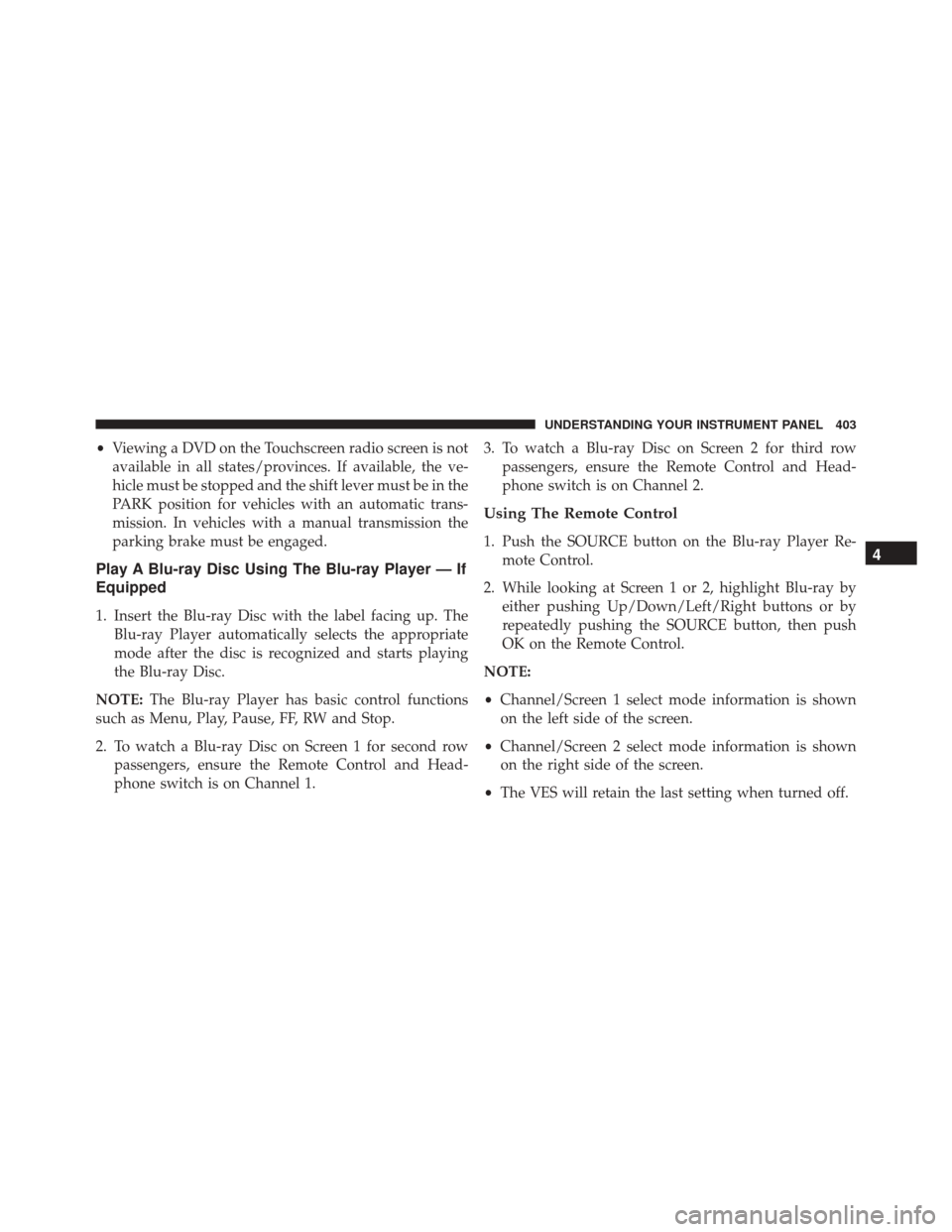
Using The Remote Control
1. Push the SOURCE button on the Blu-ray Player Re-mote Control.
2. While looking at Screen 1 or 2, highlight Blu-ray by either pushing Up/Down/Left/Right buttons or by
repeatedly pushing the SOURCE button, then push
OK on the Remote Control.
NOTE:
• Channel/Screen 1 select mode information is shown
on the left side of the screen.
• Channel/Screen 2 select mode information is shown
on the right side of the screen.
• The VES will retain the last setting when turned off.4
UNDERSTANDING YOUR INSTRUMENT PANEL 403
Page 414 of 707
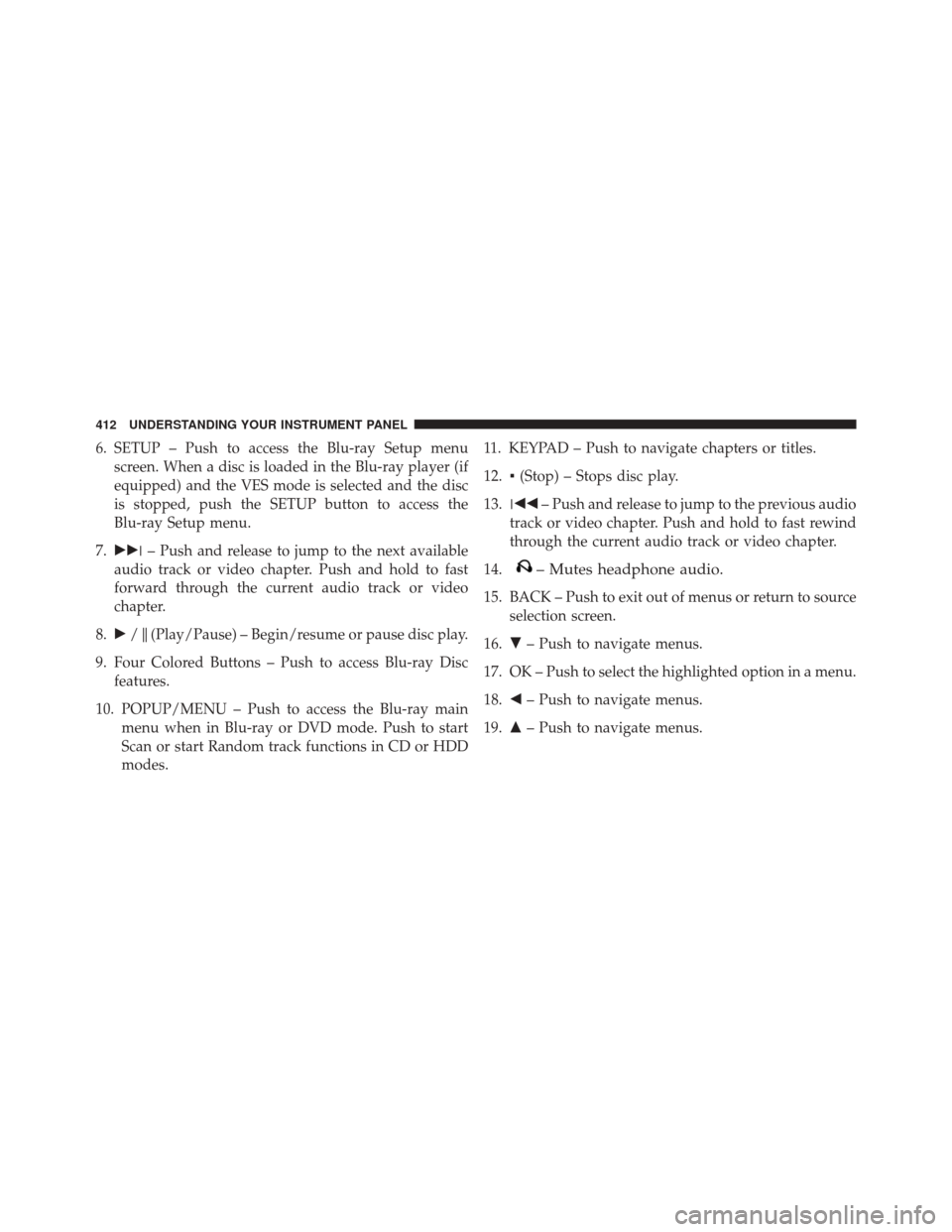
6. SETUP – Push to access the Blu-ray Setup menuscreen. When a disc is loaded in the Blu-ray player (if
equipped) and the VES mode is selected and the disc
is stopped, push the SETUP button to access the
Blu-ray Setup menu.
7. ��� – Push and release to jump to the next available
audio track or video chapter. Push and hold to fast
forward through the current audio track or video
chapter.
8. �/�(Play/Pause) – Begin/resume or pause disc play.
9. Four Colored Buttons – Push to access Blu-ray Disc features.
10. POPUP/MENU – Push to access the Blu-ray main menu when in Blu-ray or DVD mode. Push to start
Scan or start Random track functions in CD or HDD
modes. 11. KEYPAD – Push to navigate chapters or titles.
12.
▪(Stop) – Stops disc play.
13. ��� – Push and release to jump to the previous audio
track or video chapter. Push and hold to fast rewind
through the current audio track or video chapter.
14.
– Mutes headphone audio.
15. BACK – Push to exit out of menus or return to source selection screen.
16. �– Push to navigate menus.
17. OK – Push to select the highlighted option in a menu.
18. �– Push to navigate menus.
19. �– Push to navigate menus.
412 UNDERSTANDING YOUR INSTRUMENT PANEL
Page 420 of 707

4. When the Mode Selection menu appears on screen,use the cursor buttons on the remote control to navi-
gate to the available modes and push the OK button to
select the new mode.
5. To cancel out of the Mode Selection menu, push the BACK button on the remote control.
Replacing The Headphone Batteries
Each set of headphones requires two AAA batteries for
operation. To replace the batteries:
1. Locate the battery compartment on the left ear cup ofthe headphones, and then slide the battery cover
downward.
2. Replace the batteries, making sure to orient them according to the polarity diagram shown.
3. Replace the battery compartment cover.
Unwired Stereo Headphone Lifetime Limited
Warranty
Who Does This Warranty Cover? This warranty covers
the initial user or purchaser (�you� or�your�) of this
particular Unwired Technology LLC (�Unwired�) wire-
less headphone (�Product�). The warranty is not transfer-
able.
How Long Does The Coverage Last? This warranty lasts
as long as you own the Product.
What Does This Warranty Cover? Except as specified
below, this warranty covers any Product that in normal
use is defective in workmanship or materials.
What Does This Warranty Not Cover? This warranty
does not cover any damage or defect that results from
misuse, abuse or modification of the Product other than
by Unwired. Foam earpieces, which will wear over time
through normal use, are specifically not covered (replace-
ment foam is available for a nominal charge). UNWIRED
418 UNDERSTANDING YOUR INSTRUMENT PANEL
Page 424 of 707

When the display for either Channel 1 or Channel 2
shows DIRECT TUNE, pushing the remote control’s OK
button activates a numeric keypad menu. This screen
makes it easy to enter a specific tuner frequency, satellite
channel, or track number. To enter the desired digit:
1. Push the remote control’s navigation buttons (�,�,�,
�) to navigate to the desired digit.
2. When the digit is highlighted, push the remote con- trol’s ENTER/OK button to select the digit. Repeat
these steps until all digits are entered.
3. To delete the last digit, navigate to the Del button and push the remote control’s ENTER/OK button.
4. After all of the digits are entered, navigate to the Go button and push the remote control’s ENTER/OK
button.Station List Menu
When listening to Satellite audio, pushing the remote
control’s POP UP/MENU button displays a list of all
available channels. Navigate this list using the remote
control’s navigation buttons (�, �) to find the desired
station, push the remote control’s ENTER/OK button to
tune to that station. To jump through the list more
quickly, navigate to the Page Up and Page Down icons on
the screen.
422 UNDERSTANDING YOUR INSTRUMENT PANEL
Page 425 of 707

Disc Menu
When listening to a CD Audio or CD Data disc, pushing
the remote control’s POP UP/MENU button displays a
list of all commands which control playback of the disc.
Using the options you can activate or cancel Scan play
and Random play.
Display Settings
When watching a video source (DVD Video with the disc
in Play mode, Aux Video, etc.), pressing the remote
control’s SETUP button activates the Display Settings
menu. These settings control the appearance of the video
on the screen. The factory default settings are already set
for optimum viewing, so there is no need to change these
settings under normal circumstances.
To change the settings, press the remote control’s navi-
gation buttons (�,�) to select an item, then press the
remote control’s navigation buttons (�, �) to change the
value for the currently selected item. To reset all values
back to the original settings, select the Default Settings
menu option and press the remote control’s ENTER/OK
button.
Disc Features control the remote DVD / Blu-ray Disc
Player’s (if equipped) settings of DVD being watched in
the remote player.
Disc Menu For CDs
4
UNDERSTANDING YOUR INSTRUMENT PANEL 423
Page 430 of 707
•The DVD player always uses the file extension to
determine the audio format, so MP3 files must always
end with the extension �.mp3�or�.MP3� and WMA
files must always end with the extension �.wma�or
�.WMA.� AAC files must always end with the exten-
sion �aac� or�AAC.� To prevent incorrect playback, do
not use these extensions for any other types of files.
• For MP3 files, only version 1 ID3 tag data (such as
artist name, track title, album, etc.) are supported.
• For Blu-ray files, only version 1.0 / 1.1 / 2.2 / 2.3 and
2.4 ID3 tag data (such as artist name, track title, album,
etc.) are supported.
• Any file that is copy protected (such as those down-
loaded from many online music stores) will not play.
The DVD player will automatically skip the file and
begin playing the next available file. •
Other compression formats such as AAC, MP3 Pro,
Ogg Vorbis, and ATRAC3 will not play. The DVD
player will automatically skip the file and begin play-
ing the next available file.
• If you are creating your own files, the recommended
fixed bit rate for MP3 files is between 96 and 192 Kbps
and the recommended fixed bit rate for WMA files is
between 64 and 192 Kbps. Variable bit rates are also
supported. For both formats, the recommended
sample rate is either 44.1 kHz or 48 kHz.
• To change the current file, use the DVD player ’s �
button to advance to the next file, or the �button to
return to the start of the current or previous file.
• To change the current directory, use the remote con-
trol’s PROG UP and Down buttons or Rewind/skip
back and fast fwd/skip forward.
428 UNDERSTANDING YOUR INSTRUMENT PANEL