Page 210 of 634
NOTE:The LaneSense system operates with the similar
behavior for a right lane departure when only the right
lane marking has been detected.
Left Lane Departure — Both Lanes Detected
• When the LaneSense system is ON, the lane lines turn
from gray to white to indicate that both of the lane
markings have been detected. The LaneSense indicator
is solid green when both lane markings have been
detected and the system is “armed” to provide visual
warnings in the DID and a torque warning in the
steering wheel if an unintentional lane departure oc-
curs.
•When the LaneSense system senses a lane drift situa-
tion, the left thick lane line and left thin line turn solid
yellow. The LaneSense indicator changes from solid
green to solid yellow. At this time torque is applied to
the steering wheel in the opposite direction of the lane
boundary.
Lanes Sensed (White Lines/Green Indicator)
208 UNDERSTANDING THE FEATURES OF YOUR VEHICLE
Page 212 of 634
NOTE:The LaneSense system operates with the similar
behavior for a right lane departure.
Changing LaneSense Status
The LaneSense system settings can be configured
through the Uconnect system screen. Follow these steps to change the LaneSense settings:
1. Press the “Controls” button on touchscreen located on
the bottom of the Uconnect display.
2. Press the “Settings” button.
3. Press the “Safety & Driving Assistance” button.
When in the Safety & Driving Assistance screen, you can
configure the intensity of the torque warning and the
warning zone sensitivity (early/late) through the person-
alization settings.
NOTE:
• When enabled the system operates above 37 mph
(60 km/h) and below 112 mph (180 km/h).
• Use of the turn signal suppresses the warnings.
Lane Approached (Flashing Yellow Thick Line, Solid
Yellow Thin Line/Flashing Yellow Indicator)
210 UNDERSTANDING THE FEATURES OF YOUR VEHICLE
Page 213 of 634

•The system will not apply torque to the steering wheel
whenever a safety system engages. (anti-lock brakes,
traction control system, electronic stability control,
forward collision warning, etc.)
PARKSENSE REAR PARK ASSIST — IF
EQUIPPED
The ParkSense Rear Park Assist system provides visual
and audible indications of the distance between the rear
fascia and a detected obstacle when backing up, e.g.
during a parking maneuver. Refer to “ParkSense System
Usage Precautions” in this section for limitations of this
system and recommendations.
ParkSense will retain the last system state (enabled or
disabled) from the last ignition cycle when the ignition is
changed to the ON/RUN position.
ParkSense can be active only when the gear selector is in
REVERSE. If ParkSense is enabled at this gear selector position, the system will remain active until the vehicle
speed is increased to approximately 7 mph (11 km/h) or
above. The system will become active again if the vehicle
speed is decreased to speeds less than approximately
6 mph (9 km/h).
ParkSense Sensors
The four ParkSense sensors, located in the rear fascia/
bumper, monitor the area behind the vehicle that is
within the sensors’ field of view. The sensors can detect
obstacles from approximately 12 inches (30 cm) up to 79
inches (200 cm) from the rear fascia/bumper in the
horizontal direction, depending on the location, type and
orientation of the obstacle.
ParkSense Warning Display
The ParkSense Warning screen will only be displayed if
Sound and Display is selected from the Uconnect System.
Refer to
�Uconnect Settings” in “Understanding Your
Instrument Panel” for further information.
3
UNDERSTANDING THE FEATURES OF YOUR VEHICLE 211
Page 214 of 634
The ParkSense Warning screen is located within the
Driver Information Display (DID). It provides visual
warnings to indicate the distance between the rear
fascia/bumper and the detected obstacle. Refer to
“Driver Information Display (DID)” in “Understanding
Your Instrument Panel” for further information.
ParkSense Display
When the vehicle is in REVERSE and an obstacle has
been detected, the warning display will turn ON indicat-
ing the system status.
The system will indicate a detected obstacle by showing
a single arc in one or more regions based on the obstacle’s
distance and location relative to the vehicle.
If an obstacle is detected in the center rear region, the
display will show a single solid arc in the center rear
region and will produce a one-half second tone. As the
vehicle moves closer to the obstacle, the display willshow the single arc moving closer to the vehicle and the
sound tone will change from slow, to fast, to continuous.
If an obstacle is detected in the left and/or right rear
region, the display will show a single flashing arc in the
left and/or right rear region and will produce a fast
sound tone. As the vehicle moves closer to the obstacle,
the display will show the single arc moving closer to the
vehicle and the sound tone will change from fast, to
continuous.
212 UNDERSTANDING THE FEATURES OF YOUR VEHICLE
Page 216 of 634
The vehicle is close to the obstacle when the warning
display shows one flashing arc and sounds a continuous
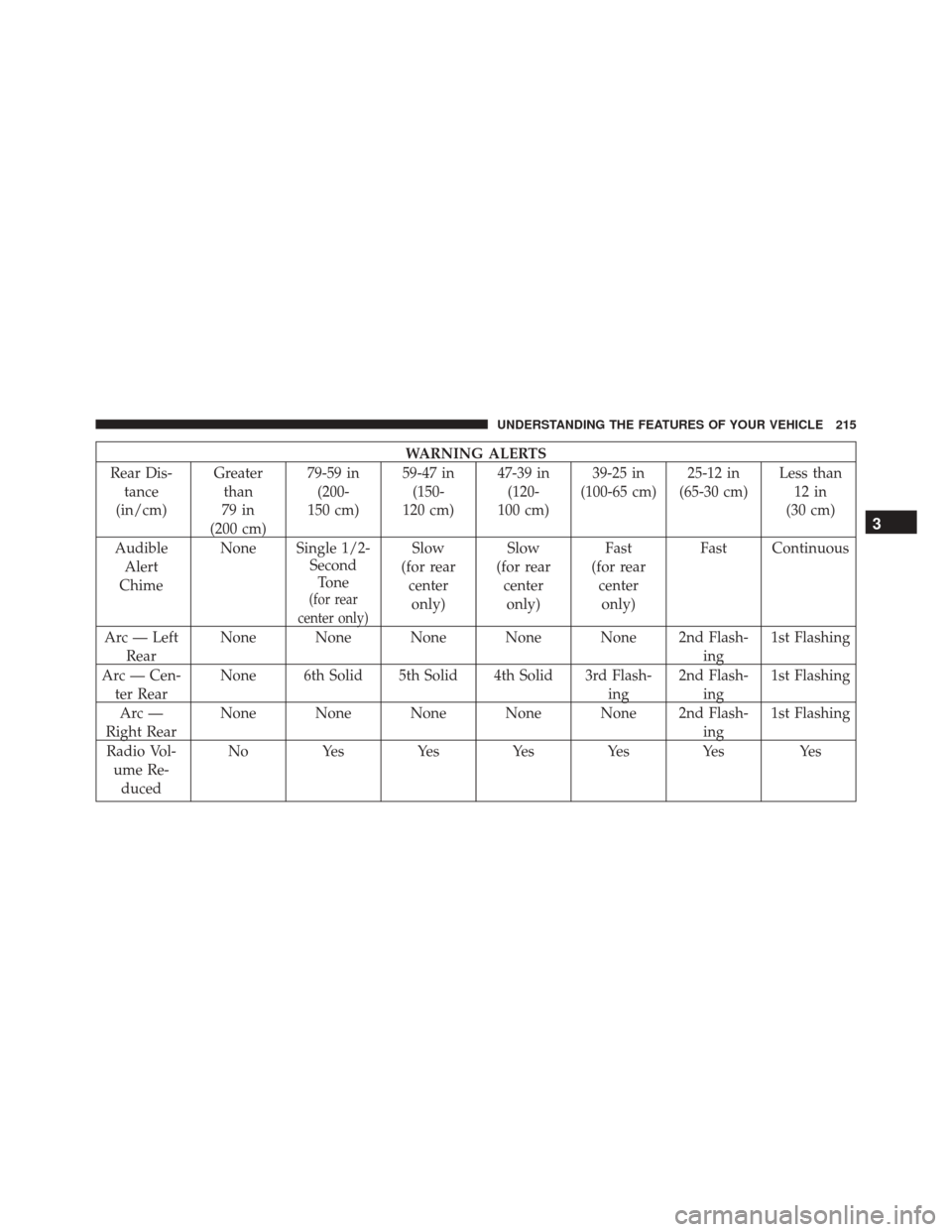
tone. The following chart shows the warning alert opera-
tion when the system is detecting an obstacle:
Fast Tone/Flashing ArcContinuous Tone/Flashing Arc
214 UNDERSTANDING THE FEATURES OF YOUR VEHICLE
Page 217 of 634
WARNING ALERTS
Rear Dis- tance
(in/cm) Greater
than
79 in
(200 cm) 79-59 in
(200-
150 cm) 59-47 in
(150-
120 cm) 47-39 in
(120-
100 cm) 39-25 in
(100-65 cm) 25-12 in
(65-30 cm) Less than
12 in
(30 cm)
Audible Alert
Chime None Single 1/2-
SecondTone
(for rear
center only)
Slow
(for rear centeronly) Slow
(for rear centeronly) Fast
(for rear centeronly) Fast Continuous
Arc — Left Rear None None None None None 2nd Flash-
ing1st Flashing
Arc — Cen- ter Rear None 6th Solid 5th Solid 4th Solid 3rd Flash-
ing2nd Flash-
ing 1st Flashing
Arc —
Right Rear None None None None None 2nd Flash-
ing1st Flashing
Radio Vol- ume Re- duced No
Yes Yes Yes Yes Yes Yes
3
UNDERSTANDING THE FEATURES OF YOUR VEHICLE 215
Page 221 of 634

CAUTION!(Continued)
the sensors will not be detected when they are in
close proximity.
• The vehicle must be driven slowly when using
ParkSense in order to be able to stop in time when
an obstacle is detected. It is recommended that the
driver looks over his/her shoulder when using
ParkSense.
WARNING!
Drivers must be careful when backing up even when
using the Rear Park Assist system. Always check
carefully behind your vehicle, and be sure to check
for pedestrians, animals, other vehicles, obstructions,
or blind spots before backing up. You are responsible
for the safety of your surroundings and must con-
tinue to pay attention while backing up. Failure to do
so can result in serious injury or death.
PARKVIEW REAR BACK UP CAMERA — IF
EQUIPPED
Your vehicle may be equipped with the ParkView Rear
Back Up Camera that allows you to see an on-screen
image of the rear surroundings of your vehicle whenever
the gear selector is put into REVERSE. The ParkView
camera is located on the rear of the vehicle above the rear
license plate. The image will be displayed in the touch-
screen display along with a caution note to “check entire
surroundings” across the top of the screen. After five
seconds this note will disappear.
NOTE: The ParkView Rear Back Up Camera has pro-
grammable modes of operation that may be selected
through the Uconnect System. Refer to “Uconnect Set-
tings” in “Understanding Your Instrument Panel” for
further information.
If your vehicle is equipped with the Camera Delay
feature and it is turned ON, the rear camera image will be
3
UNDERSTANDING THE FEATURES OF YOUR VEHICLE 219
Page 223 of 634
WARNING!
Drivers must be careful when backing up even when
using the ParkView Rear Back Up Camera. Always
check carefully behind your vehicle, and be sure to
check for pedestrians, animals, other vehicles, ob-
structions, or blind spots before backing up. You are
responsible for the safety of your surroundings and
must continue to pay attention while backing up.
Failure to do so can result in serious injury or death.
CAUTION!
•To avoid vehicle damage, ParkView should only be
used as a parking aid. The ParkView camera is
unable to view every obstacle or object in your
drive path.
• To avoid vehicle damage, the vehicle must be
driven slowly when using ParkView to be able to
(Continued)
CAUTION! (Continued)
stop in time when an obstacle is seen. It is recom-
mended that the driver look frequently over his/her
shoulder when using ParkView.
NOTE: If snow, ice, mud, or any foreign substance builds
up on the camera lens, clean the lens, rinse with water,
and dry with a soft cloth. Do not cover the lens.
3
UNDERSTANDING THE FEATURES OF YOUR VEHICLE 221