Page 187 of 616

Changing the FCW status to the “Near” setting, allows
the system to warn you of a possible collision with the
vehicle in front of you when you are much closer. This
setting provides less reaction time than the “Far” setting,
which allows for a more dynamic driving experience.
NOTE:
•The system will retain the last setting selected by the
driver after ignition shut down.
• FCW may not react to irrelevant objects such as
overhead objects, ground reflections, objects not in the
path of the car, stationary objects that are far away,
oncoming traffic, or leading vehicles with the same or
higher rate of speed.
• FCW will be disabled like ACC, with the unavailable
screens.Service FCW Warning
If the system turns off, and the DID displays:
• ACC/FCW Unavailable Service Required
• Cruise/FCW Unavailable Service Required
This indicates there is an internal system fault. Although
the vehicle is still drivable under normal conditions, have
the system checked by an authorized dealer.
PARKSENSE REAR PARK ASSIST — IF
EQUIPPED
The ParkSense Rear Park Assist system provides visual
and audible indications of the distance between the rear
fascia and a detected obstacle when backing up, e.g.
during a parking maneuver. Refer to “ParkSense System
Usage Precautions” in this section for limitations of this
system and recommendations.
3
UNDERSTANDING THE FEATURES OF YOUR VEHICLE 185
Page 188 of 616

ParkSense will retain the last system state (enabled or
disabled) from the last ignition cycle when the ignition is
changed to the ON/RUN position.
ParkSense can be active only when the gear selector is in
REVERSE. If ParkSense is enabled at this gear selector
position, the system will remain active until the vehicle
speed is increased to approximately 7 mph (11 km/h) or
above. The system will become active again if the vehicle
speed is decreased to speeds less than approximately
6 mph (9 km/h).
ParkSense Sensors
The four ParkSense sensors, located in the rear fascia/
bumper, monitor the area behind the vehicle that is
within the sensors’ field of view. The sensors can detect
obstacles from approximately 12 inches (30 cm) up to 79
inches (200 cm) from the rear fascia/bumper in the
horizontal direction, depending on the location, type and
orientation of the obstacle.
ParkSense Warning Display
The ParkSense Warning screen will only be displayed if
Sound and Display is selected from the Uconnect System.
Refer to�Uconnect Settings” in “Understanding Your
Instrument Panel” for further information.
The ParkSense Warning screen is located within the
Driver Information Display (DID). It provides visual
warnings to indicate the distance between the rear
fascia/bumper and the detected obstacle. Refer to
“Driver Information Display (DID)” in “Understanding
Your Instrument Panel” for further information.
186 UNDERSTANDING THE FEATURES OF YOUR VEHICLE
Page 189 of 616

ParkSense Display
When the vehicle is in REVERSE and an obstacle has
been detected, the warning display will turn ON indicat-
ing the system status.
The system will indicate a detected obstacle by showing
a single arc in one or more regions based on the obstacle’s
distance and location relative to the vehicle.
If an obstacle is detected in the center rear region, the
display will show a single solid arc in the center rear
region and will produce a one-half second tone. As the
vehicle moves closer to the obstacle, the display will
show the single arc moving closer to the vehicle and the
sound tone will change from slow, to fast, to continuous.
If an obstacle is detected in the left and/or right rear
region, the display will show a single flashing arc in the
left and/or right rear region and will produce a fast
sound tone. As the vehicle moves closer to the obstacle,the display will show the single arc moving closer to the
vehicle and the sound tone will change from fast, to
continuous.
Single 1/2 Second Tone/Solid Arc
3
UNDERSTANDING THE FEATURES OF YOUR VEHICLE 187
Page 191 of 616
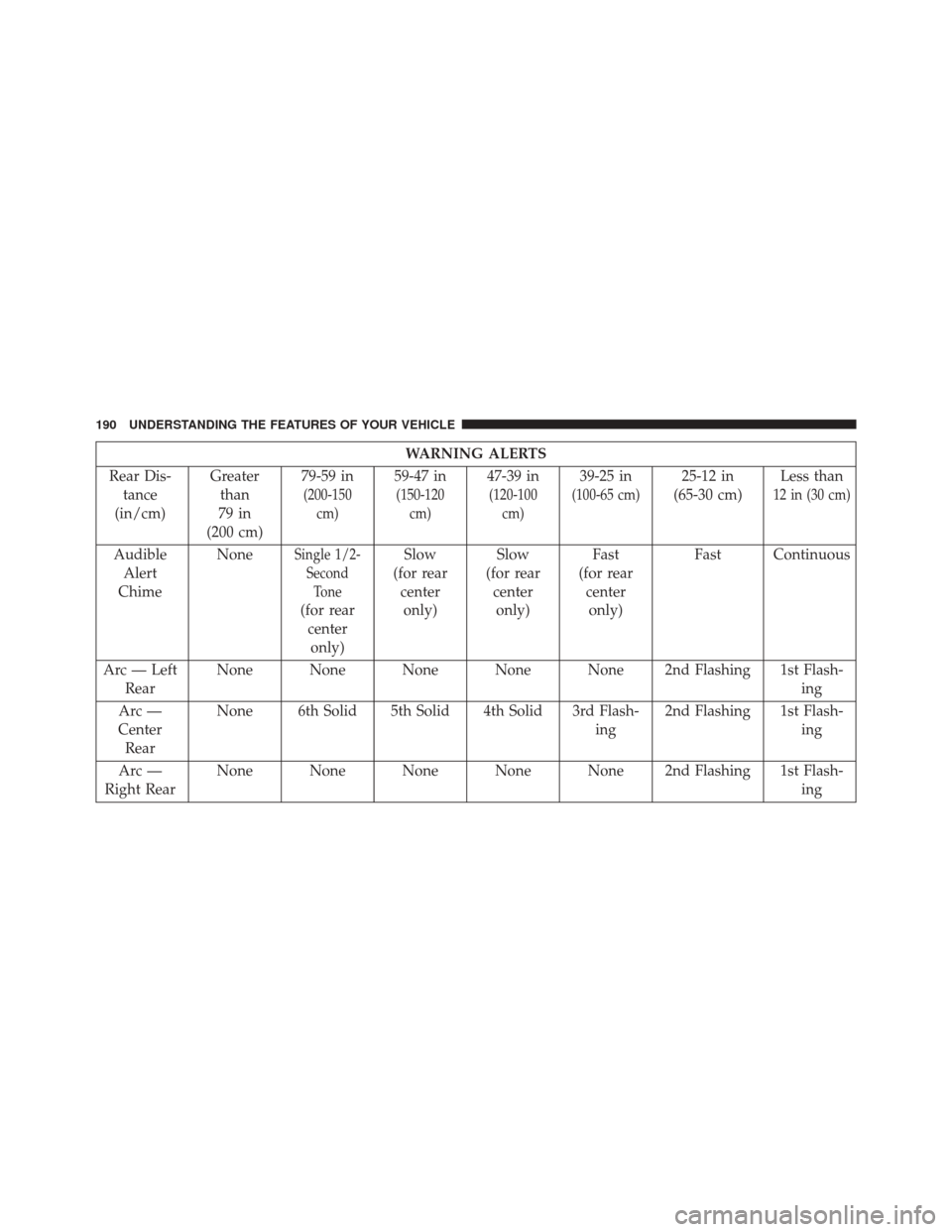
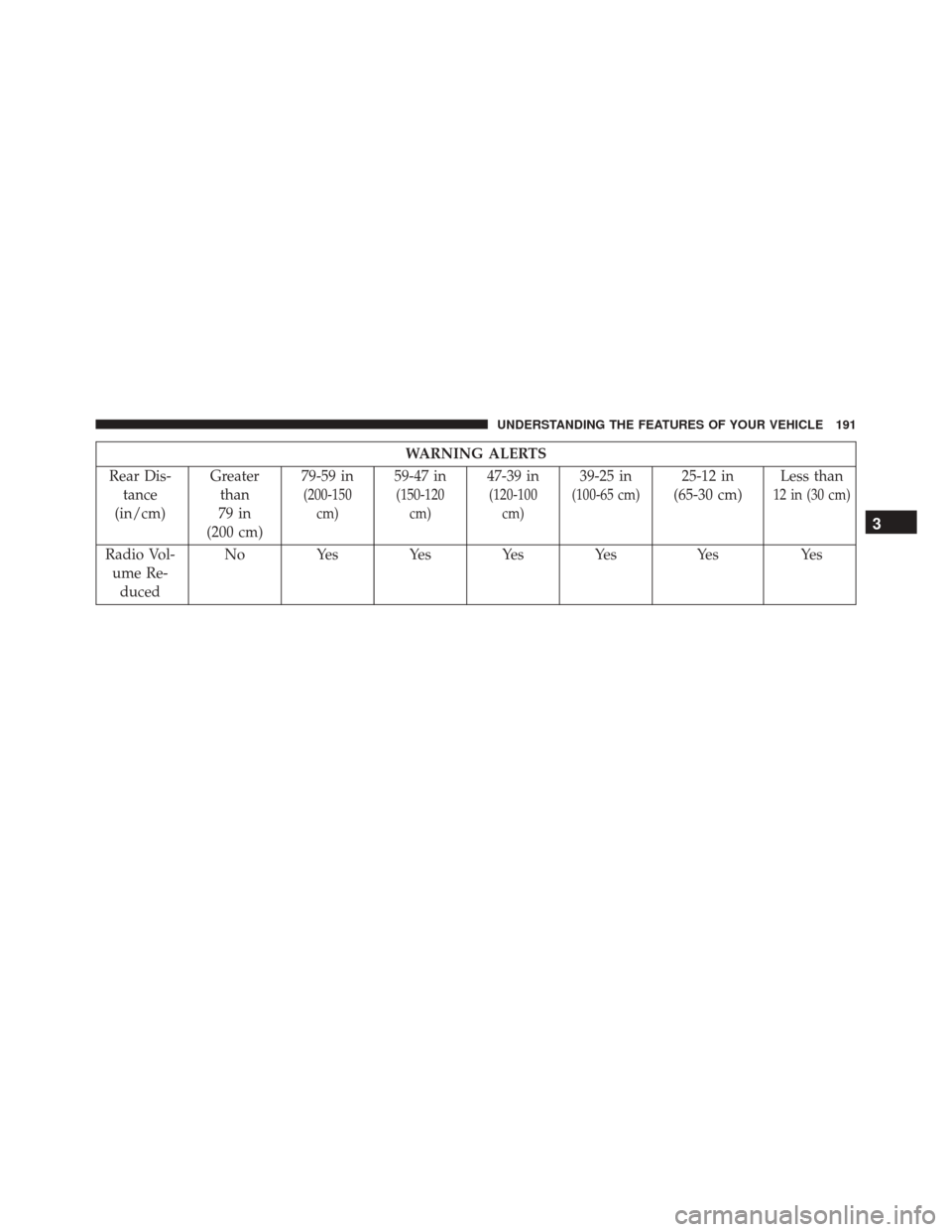
The vehicle is close to the obstacle when the warning
display shows one flashing arc and sounds a continuous
tone. The following chart shows the warning alert opera-
tion when the system is detecting an obstacle:
Continuous Tone/Flashing Arc
3
UNDERSTANDING THE FEATURES OF YOUR VEHICLE 189
Page 192 of 616
WARNING ALERTS
Rear Dis- tance
(in/cm) Greater
than
79 in
(200 cm) 79-59 in
(200-150
cm)
59-47 in
(150-120cm)
47-39 in
(120-100cm)
39-25 in
(100-65 cm)
25-12 in
(65-30 cm) Less than
12 in (30 cm)
Audible
Alert
Chime NoneSingle 1/2-
SecondTone
(for rearcenteronly) Slow
(for rear centeronly) Slow
(for rear centeronly) Fast
(for rear centeronly) Fast Continuous
Arc — Left Rear None None None None None 2nd Flashing 1st Flash-
ing
Arc —
Center Rear None 6th Solid 5th Solid 4th Solid 3rd Flash-
ing2nd Flashing 1st Flash-
ing
Arc —
Right Rear None None None None None 2nd Flashing 1st Flash-
ing
190 UNDERSTANDING THE FEATURES OF YOUR VEHICLE
Page 193 of 616
WARNING ALERTS
Rear Dis- tance
(in/cm) Greater
than
79 in
(200 cm) 79-59 in
(200-150
cm)
59-47 in
(150-120cm)
47-39 in
(120-100cm)
39-25 in
(100-65 cm)
25-12 in
(65-30 cm) Less than
12 in (30 cm)
Radio Vol-
ume Re- duced No Yes Yes Yes Yes Yes Yes
3
UNDERSTANDING THE FEATURES OF YOUR VEHICLE 191
Page 197 of 616

CAUTION!
•ParkSense is only a parking aid and it is unable to
recognize every obstacle, including small obstacles.
Parking curbs might be temporarily detected or not
detected at all. Obstacles located above or below
the sensors will not be detected when they are in
close proximity.
• The vehicle must be driven slowly when using
ParkSense in order to be able to stop in time when
an obstacle is detected. It is recommended that the
driver looks over his/her shoulder when using
ParkSense.
WARNING!
Drivers must be careful when backing up even when
using the Rear Park Assist system. Always check
(Continued)
WARNING! (Continued)
carefully behind your vehicle, and be sure to check
for pedestrians, animals, other vehicles, obstructions,
or blind spots before backing up. You are responsible
for the safety of your surroundings and must con-
tinue to pay attention while backing up. Failure to do
so can result in serious injury or death.
PARKVIEW REAR BACK UP CAMERA — IF
EQUIPPED
Your vehicle may be equipped with the ParkView Rear
Back Up Camera that allows you to see an on-screen
image of the rear surroundings of your vehicle whenever
the gear selector is put into REVERSE. The ParkView
camera is located on the rear of the vehicle above the rear
3
UNDERSTANDING THE FEATURES OF YOUR VEHICLE 195
Page 199 of 616
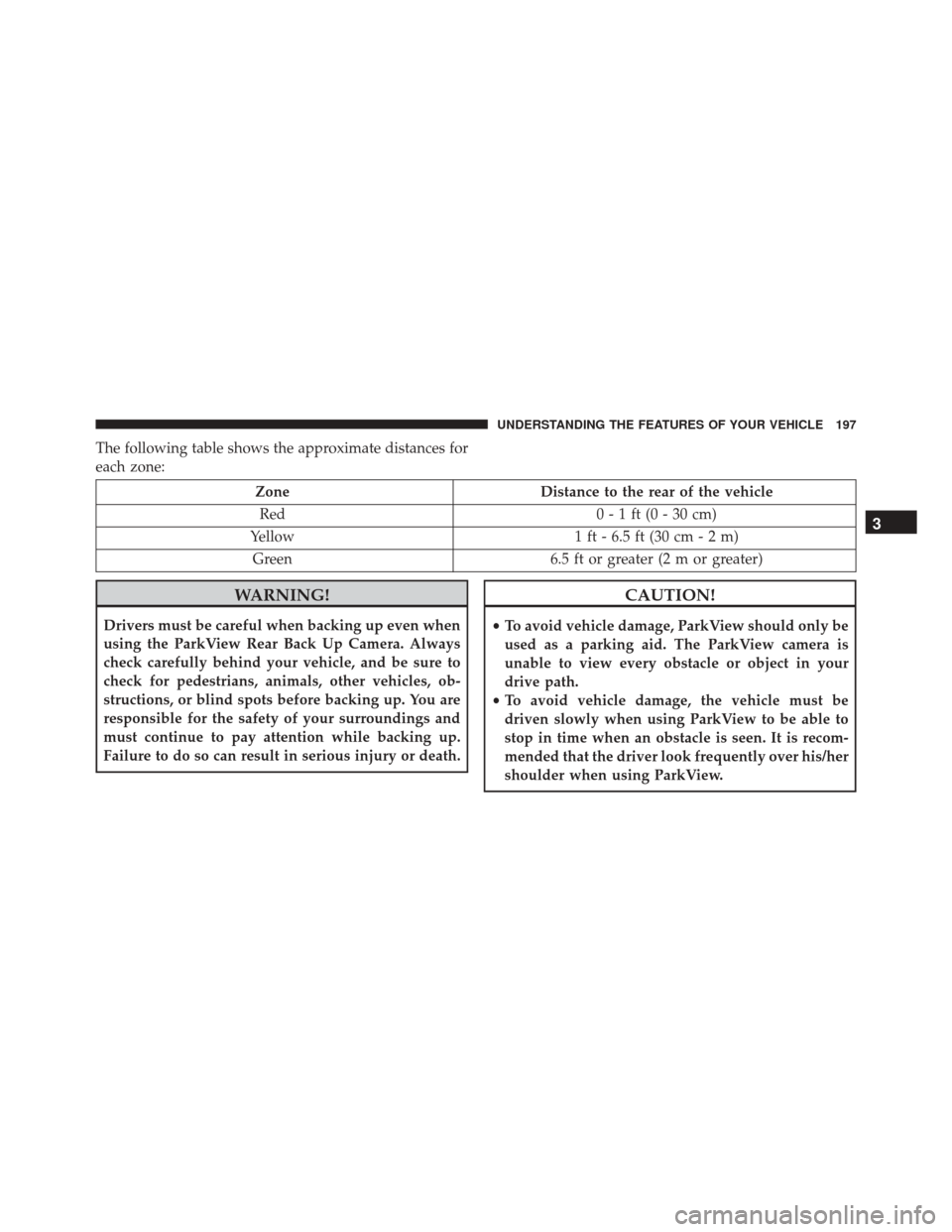
The following table shows the approximate distances for
each zone:
ZoneDistance to the rear of the vehicle
Red 0 - 1 ft (0 - 30 cm)
Yellow 1 ft - 6.5 ft (30 cm - 2 m)
Green 6.5 ft or greater (2 m or greater)
WARNING!
Drivers must be careful when backing up even when
using the ParkView Rear Back Up Camera. Always
check carefully behind your vehicle, and be sure to
check for pedestrians, animals, other vehicles, ob-
structions, or blind spots before backing up. You are
responsible for the safety of your surroundings and
must continue to pay attention while backing up.
Failure to do so can result in serious injury or death.
CAUTION!
•To avoid vehicle damage, ParkView should only be
used as a parking aid. The ParkView camera is
unable to view every obstacle or object in your
drive path.
• To avoid vehicle damage, the vehicle must be
driven slowly when using ParkView to be able to
stop in time when an obstacle is seen. It is recom-
mended that the driver look frequently over his/her
shoulder when using ParkView.
3
UNDERSTANDING THE FEATURES OF YOUR VEHICLE 197