Page 500 of 651

2. Disconnect the Tire Service Kit from the valve stem,reinstall the cap on the valve stem and unplug from 12
Volt outlet.
3. Place the Tire Service Kit in its proper storage area in the vehicle.
4. Have the tire inspected and repaired or replaced at the earliest opportunity at an authorized dealer or tire
service center.
5. Remove the Speed Limit sticker from the instrument panel after the tire has been repaired.
6. Replace the Sealant Bottle (1) and Sealant Hose (6) assembly at your authorized dealer as soon as pos-
sible. Refer to (F) “Sealant Bottle and Hose Replace-
ment”.
NOTE: When having the tire serviced, advise the autho-
rized dealer or service center that the tire has been sealed
using the Tire Service Kit.(F) Sealant Bottle And Hose Replacement:
1. Uncoil the Sealant Hose (6) (clear in color).
2. Locate the round Sealant Bottle release button in the recessed area under the sealant bottle.
3. Push the Sealant Bottle release button. The Sealant Bottle (1) will pop up. Remove the bottle and dispose
of it accordingly.
4. Clean any remaining sealant from the Tire Service Kit housing.
5. Position the new Sealant Bottle (1) in the housing so that the Sealant Hose (6) aligns with the hose slot in
the front of the housing. Push the bottle into the
housing. An audible click will be heard indicating the
bottle is locked into place.
498 WHAT TO DO IN EMERGENCIES
Page 501 of 651
6. Verify that the cap is installed on the fitting at the endof the Sealant Hose (6) and return the hose to its
storage area (located on the bottom of the air pump).
7. Return the Tire Service Kit to its storage location in the vehicle.
WHEEL AND TIRE TORQUE SPECIFICATIONS
Proper lug nut/bolt torque is very important to ensure
that the wheel is properly mounted to the vehicle. Any
time a wheel has been removed and reinstalled on the
vehicle the lug nuts/bolts should be torqued using a
properly calibrated torque wrench.
Torque Specifications
Lug Nut/Bolt Torque **Lug Nut/ Bolt SizeLug Nut/
Bolt Socket Size
130 Ft-Lbs (176 N·m) M14 x 1.50 22 mm
**Use only your Authorized Dealer recommended lug
nuts/bolts and clean or remove any dirt or oil before
tightening.
Inspect the wheel mounting surface prior to mounting
the tire and remove any corrosion or loose particles.
6
WHAT TO DO IN EMERGENCIES 499
Page 503 of 651

JACKING AND TIRE CHANGING
WARNING!
•Do not attempt to change a tire on the side of the
vehicle close to moving traffic. Pull far enough off
the road to avoid the danger of being hit when
operating the jack or changing the wheel.
• Being under a jacked-up vehicle is dangerous. The
vehicle could slip off the jack and fall on you. You
could be crushed. Never put any part of your body
under a vehicle that is on a jack. If you need to get
under a raised vehicle, take it to a service center
where it can be raised on a lift.
• Never start or run the engine while the vehicle is
on a jack.
• The jack is designed to be used as a tool for
changing tires only. The jack should not be used to
(Continued)
WARNING! (Continued)
lift the vehicle for service purposes. The vehicle
should be jacked on a firm level surface only.
Avoid ice or slippery areas.
Jack Location/Spare Tire Stowage
The jack and spare tire are both stowed under an access
cover in the trunk. Follow these steps to access the jack
and spare tire.
NOTE:The spare tire must be removed in order to
access the jack.
1. Open the trunk.
2. Lift the access cover using the pull strap.
6
WHAT TO DO IN EMERGENCIES 501
Page 507 of 651
WARNING!(Continued)
•Do not let anyone sit in the vehicle when it is on a
jack.
• Do not get under the vehicle when it is on a jack. If
you need to get under a raised vehicle, take it to a
service center where it can be raised on a lift.
• Only use the jack in the positions indicated and for
lifting this vehicle during a tire change.
• If working on or near a roadway, be extremely
careful of motor traffic.
CAUTION!
Do not attempt to raise the vehicle by jacking on
locations other than those indicated in the Jacking
Instructions for this vehicle.
1. Remove the spare tire, jack, and lug wrench.
Jack Warning LabelJack Engagement Locations
6
WHAT TO DO IN EMERGENCIES 505
Page 520 of 651
2. Rotate the Manual Park Release lever forward anddown, to its original position, until the locking tab
snaps into place to secure the lever.
3. Pull up gently on the tether strap to confirm that the lever is locked in its stowed position. 4. Tuck the tether strap into the base of the console.
Reinstall the console storage bin.
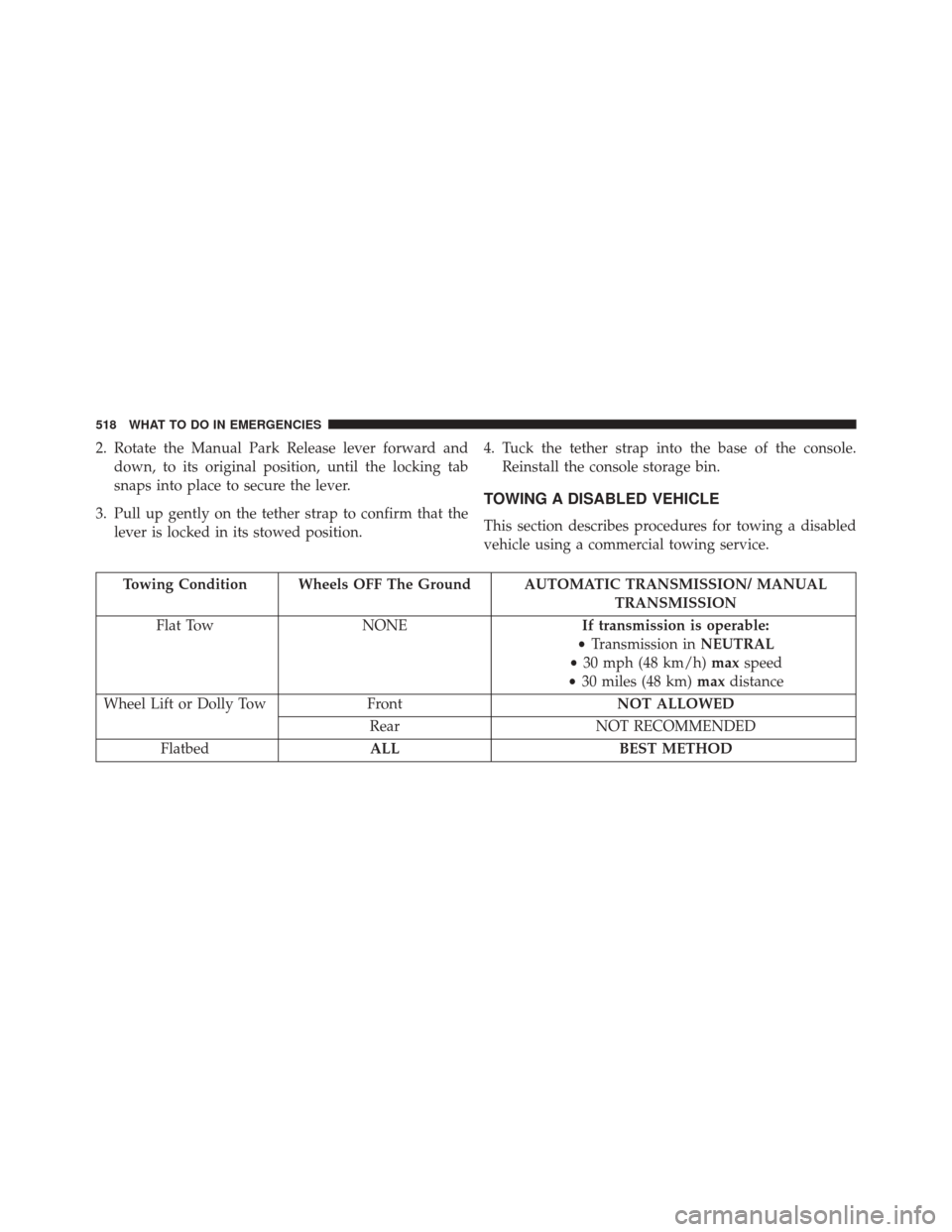
TOWING A DISABLED VEHICLE
This section describes procedures for towing a disabled
vehicle using a commercial towing service.
Towing Condition Wheels OFF The Ground AUTOMATIC TRANSMISSION/ MANUAL TRANSMISSION
Flat Tow NONE If transmission is operable:
• Transmission in NEUTRAL
• 30 mph (48 km/h) maxspeed
• 30 miles (48 km) maxdistance
Wheel Lift or Dolly Tow FrontNOT ALLOWED
Rear NOT RECOMMENDED
Flatbed ALL BEST METHOD
518 WHAT TO DO IN EMERGENCIES
Page 523 of 651
MAINTAINING YOUR VEHICLE
CONTENTS
�ENGINE COMPARTMENT — 3.6L ..........524
� ENGINE COMPARTMENT — 5.7L ..........525
� ENGINE COMPARTMENT — 6.4L
(392 HEMI) .......................... .526
� ONBOARD DIAGNOSTIC SYSTEM — OBD II . .527
▫ Onboard Diagnostic System (OBD II)
Cybersecurity ....................... .527
▫ Loose Fuel Filler Cap ..................528
� EMISSIONS INSPECTION AND
MAINTENANCE PROGRAMS .............529
� REPLACEMENT PARTS ..................530 �
DEALER SERVICE ..................... .530
� MAINTENANCE PROCEDURES ...........531
▫ Engine Oil ......................... .532
▫ Engine Oil Filter ..................... .538
▫ Engine Air Cleaner Filter ................539
▫ Maintenance-Free Battery ...............539
▫ Air Conditioner Maintenance .............541
▫ Body Lubrication .....................545
▫ Windshield Wiper Blades ...............545
▫ Adding Washer Fluid ..................546
7
Page 529 of 651
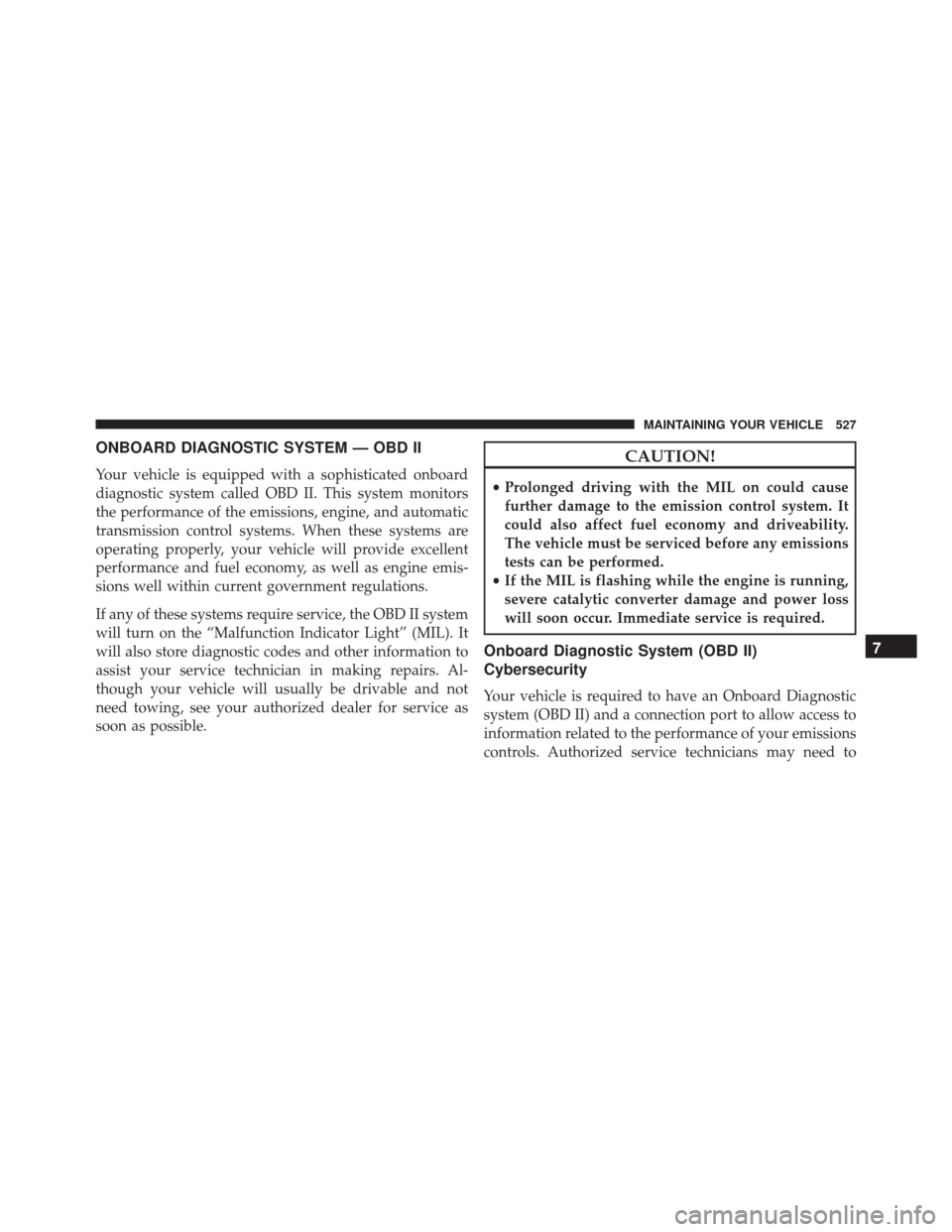
ONBOARD DIAGNOSTIC SYSTEM — OBD II
Your vehicle is equipped with a sophisticated onboard
diagnostic system called OBD II. This system monitors
the performance of the emissions, engine, and automatic
transmission control systems. When these systems are
operating properly, your vehicle will provide excellent
performance and fuel economy, as well as engine emis-
sions well within current government regulations.
If any of these systems require service, the OBD II system
will turn on the “Malfunction Indicator Light” (MIL). It
will also store diagnostic codes and other information to
assist your service technician in making repairs. Al-
though your vehicle will usually be drivable and not
need towing, see your authorized dealer for service as
soon as possible.
CAUTION!
•Prolonged driving with the MIL on could cause
further damage to the emission control system. It
could also affect fuel economy and driveability.
The vehicle must be serviced before any emissions
tests can be performed.
• If the MIL is flashing while the engine is running,
severe catalytic converter damage and power loss
will soon occur. Immediate service is required.
Onboard Diagnostic System (OBD II)
Cybersecurity
Your vehicle is required to have an Onboard Diagnostic
system (OBD II) and a connection port to allow access to
information related to the performance of your emissions
controls. Authorized service technicians may need to
7
MAINTAINING YOUR VEHICLE 527
Page 530 of 651

access this information to assist with the diagnosis and
service of your vehicle and emissions system.
WARNING!
•ONLY an authorized service technician should con-
nect equipment to the OBD II connection port in
order to diagnose or service your vehicle.
• If unauthorized equipment is connected to the
OBD II connection port, such as a driver-behavior
tracking device, it may:
• Be possible that vehicle systems, including
safety related systems, could be impaired or a
loss of vehicle control could occur that may result
in an accident involving serious injury or death.
• Access, or allow others to access, information
stored in your vehicle systems, including per-
sonal information. For further information, refer to “Privacy Practices — If
Equipped With Uconnect 8.4 Radio” and “Uconnect
CyberSecurity” in “All About Uconnect Access” in your
Owner ’s Manual Radio Supplement and “Cybersecurity”
in “Understanding Your Instrument Panel” in your Own-
er ’s Manual on the DVD.
Loose Fuel Filler Cap
If the vehicle diagnostic system determines that the fuel
filler cap is loose, improperly installed, or damaged, a
”gASCAP” message will display in the odometer or a
“Check Gascap” message will display in the Driver
Information Display (DID). If this occurs, tighten the fuel
filler cap properly and press the Trip Odometer button to
turn off the message. If the problem continues, the
message will appear the next time the vehicle is started.
A loose, improperly installed, or damaged fuel filler cap
may also turn on the MIL.
528 MAINTAINING YOUR VEHICLE