2016 Citroen JUMPY carplay
[x] Cancel search: carplayPage 445 of 595
443
Jumpy_en_Chap10c_RCC-1_ed01-2016
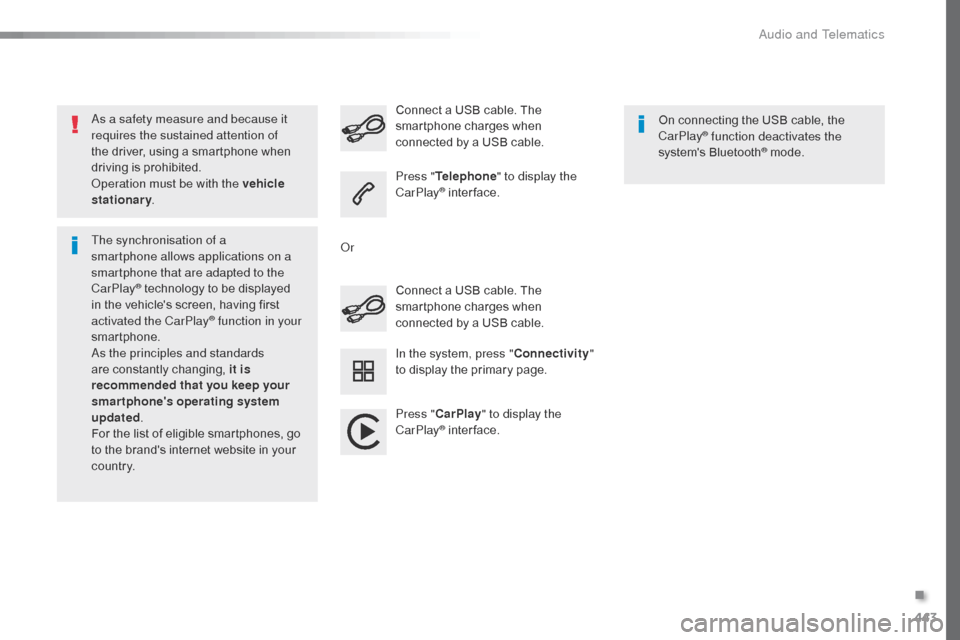
As a safety measure and because it
requires the sustained attention of
the driver, using a smartphone when
driving is prohibited.
Operation must be with the vehicle
stationary.
The synchronisation of a
smartphone allows applications on a
smartphone that are adapted to the
CarPlay
® technology to be displayed
i
n the vehicle's screen, having first
activated the CarPlay
® function in your
smartphone.
As the principles and standards
are constantly changing, it is
recommended that you keep your
smartphone's operating system
updated .
For the list of eligible smartphones, go
to the brand's internet website in your
c o unt r y. Connect a USB cable. The
smartphone charges when
connected by a USB cable. Connect a USB cable. The
smartphone charges when
connected by a USB cable.
Press "
Telephone " to display the
CarPlay
® inter face.
Press " CarPlay " to display the
CarPlay
® inter face. On connecting the USB cable, the
CarPlay
® function deactivates the
system's Bluetooth® mode.
In the system, press " Connectivity"
to display the primary page.
Or
.
Audio and Telematics
Page 508 of 595

506
Jumpy_en_Chap11_index-alpha_ed01-2016
180° rear vision .............................................259
ABS
........
....................................................... 161
Access, AdBlue tank
..................................... 28
5
Accessories
..............................
.... 203, 271, 272
Access to the spare wheel
............................2
97
Active Safety Brake........................ 23, 243, 246
AdBlue
® ............................... . 26, 35 -37, 283 -285
Additive, AdBlue ................... 2 6, 35 -37, 283 -285
Additive, Diesel
...............................
......280, 281
Adjusting headlamp beam height
.................15
5
Adjusting headlamps
.................................... 15
5
Adjusting head restraints
......................10
3, 104
Adjusting seat
.........................................9
9, 102
Adjusting the air distribution
.........................12
8
Adjusting the air flow
..................................... 12
8
Adjusting the date
...........................4
6, 420, 476
Adjusting the height and reach of the steering wheel
...............................
.........99
Adjusting the lumbar support
........................10
0
Adjusting the seat belt height
.......................16
6
Adjusting the temperature
............................12
8
Adjusting the time
........................... 4
6, 421, 477
Advice on driving
..............................
....19 6 -198
Airbags
...............
............................. 24, 170, 177
Airbags, curtain
............................................. 17
3
Airbags, front......................................... 171, 173
Airbags, lateral
...................................... 17
2 , 173
Air conditioning
............... 1
2, 127, 129, 130, 137
Air conditioning, automatic
...........................13
5
Air conditioning, digital
......................... 13
2, 13 6Air conditioning, dual-zone automatic
..........
12
8
Air conditioning, manual
....... 1
26, 132, 135, 136
Air intake
...............
................ 125, 126, 128, 131
Alarm
............................................................... 95
A
larm, volumetric
............................................
95
A
nti-lock braking system (ABS)
....................
16
1
Anti-theft
..............................
............. 52, 67, 205
Area, loading
...............................
........ 47, 55, 73
Armrest, front
................................................
10
3
ASR
............................................................... 16
1
Assistance call
...............................
.......160, 338
Assistance, emergency braking
........... 1
61, 247
Audio streaming (Bluetooth)
........ 3
98, 454, 495
Audio system
...........................8
9, 150 -152, 158,
226, 245, 247, 250, 256, 264, 483
Auxiliary ............................................... 3 98, 454
A
C
B
Boot .................................................................
94
Boot lid ............... .................64, 65, 94, 313, 314
Brake discs
.................................................... 28
2
Brake lamps
........................... 31
0, 311, 313 - 315
Brakes
...............................................1
8, 22, 282
Braking, automatic emergency
............................ 2
3, 243, 245 -247
Bulbs (changing)
...................3
03, 304, 310, 313
Bulbs (changing, type)
..................................3
03
Cable, audio
......................................... 3
98, 454
Cable, jack
..............................
............. 398, 454
Capacity, fuel tank
..............................
..........265
Cap, fuel filler
................................................ 26
5
CarPlay connection .............................. 386, 442
CD
..............................
.................. 398, 454, 494
CD, MP3
....................................... 3
98, 454, 494
Central locking
..........................................5
9, 64
Changing a bulb
..... 3
03, 304, 310, 311, 313 -315
Changing a bulb (boot lid))............................ 313
Changing a bulb (side-hinged doors)
.................................... 3
10
Changing a fuse
............................ 3
16, 317, 320
Changing a wheel
...............................
..........296
Changing a wiper blade
........................ 1
59, 274
Changing the remote control battery
........5
4, 70
Checking the engine oil level
..........................34
C
hecking the levels
...............................2
78-280
Checking tyre pressures (using the kit)
..............................
................290
Battery
...............................
.....270, 281, 321-325
Battery capacity
...............................
............. 325
Battery, charging
...............................
............ 323
Battery, remote control
............... 5
4, 70, 71, 139
Bench seat, one-piece, fixed
........................ 11
0
Blind spot monitoring system
......... 2
9, 252, 254
Blinds, side
.................................................... 12
3
BlueHDi
...............................
......31, 35, 208, 283
Bluetooth (hands-free)
............... 4
06, 407, 462, 463, 497
Bluetooth (telephone)
............ 4
06 - 408, 462- 464
Bonnet
...............
............................................ 276
Alphabetical index
Page 526 of 595

100
21,518,5
Transversal-Citroen_en_Chap02_RCC-2-2-0_ed01-2016
Menus
Radio Media
Applications
Select an audio source or radio station.
Access configurable equipment.
Air conditioning
Manage the different temperature and air flow
settings.
Navigation
Configure the guidance and select your
destination via MirrorLinkTM or CarPlay®.
According to version.
Audio and Telematics
Page 527 of 595

101
Transversal-Citroen_en_Chap02_RCC-2-2-0_ed01-2016
SettingsDriving
Telephone
Configure a personal profile and/or configure
the sound (balance, ambience,
...) and the
display (language, units, date, time,
...).Activate, deactivate or configure certain vehicle
functions.
Connect a telephone by Bluetooth®.
Operate certain applications on a smartphone
connected via MirrorLink
TM or CarPlay®.
.
Audio and Telematics
Page 545 of 595

119
1
2
3
4
Transversal-Citroen_en_Chap02_RCC-2-2-0_ed01-2016
Level 1Level 2 Level 3 Comments
Telephone Bluetooth search
PHONE Bluetooth connection
Search
Start the search for a device to be connected.
Delete Delete one or more devices.
MirrorLink Open the MirrorLink function.
CarPlay Open the CarPlay function.
Telephone
Bluetooth search
Keypad Enter a telephone number.
Telephone Bluetooth search
Recent calls All
View the calls according to the presentation
selected.
Select a contact to make the call.
Outgoing
Missed
Incoming
Telephone Bluetooth search
Contacts Search
ConfirmSearch for a contact in the contacts directory.
Telephone Go to the details of the contact sheet.
.
Audio and Telematics
Page 552 of 595

126
1
Transversal-Citroen_en_Chap02_RCC-2-2-0_ed01-2016
CarPlay® smartphone connection
Audio and Telematics
Page 553 of 595
127
1
Transversal-Citroen_en_Chap02_RCC-2-2-0_ed01-2016
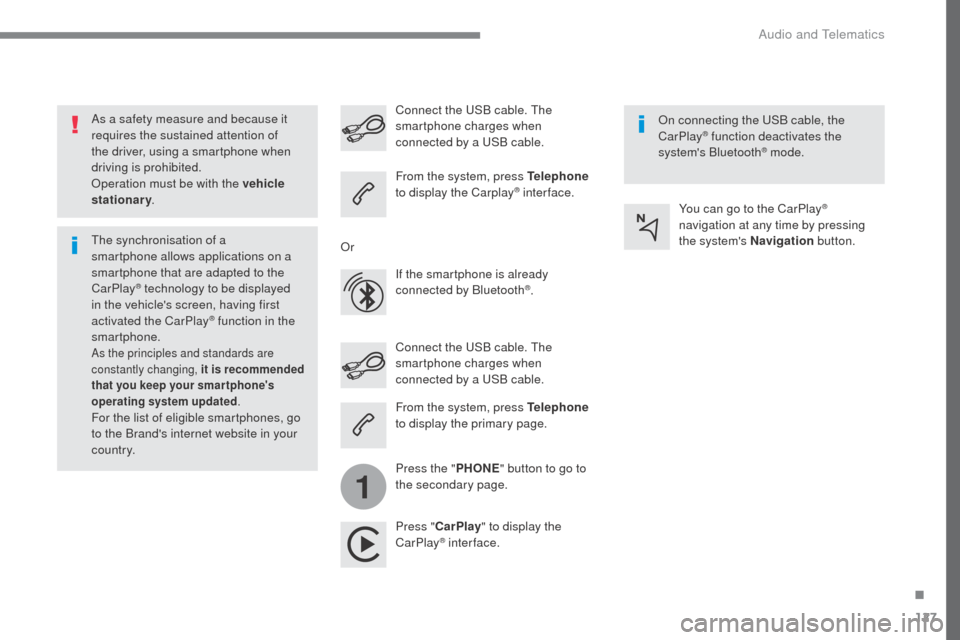
As a safety measure and because it
requires the sustained attention of
the driver, using a smartphone when
driving is prohibited.
Operation must be with the vehicle
stationary.
The synchronisation of a
smartphone allows applications on a
smartphone that are adapted to the
CarPlay
® technology to be displayed
i
n the vehicle's screen, having first
activated the CarPlay
® function in the
smartphone.
As the principles and standards are
constantly changing, it is recommended
that you keep your smar tphone's
operating system updated .
For the list of eligible smartphones, go
to the Brand's internet website in your
c o unt r y. Connect the USB cable. The
smartphone charges when
connected by a USB cable. Connect the USB cable. The
smartphone charges when
connected by a USB cable.
From the system, press Telephone
to display the Carplay
® inter face.
Press " CarPlay " to display the
CarPlay
® inter face. On connecting the USB cable, the
CarPlay
® function deactivates the
system's Bluetooth® mode.
From the system, press Telephone
to display the primary page.
Press the " PHONE" button to go to
the secondary page.
Or
If the smartphone is already
connected by Bluetooth
®. You can go to the CarPlay
®
navigation at any time by pressing
the system's Navigation button.
.
Audio and Telematics