Page 40 of 292

38
IGnItIOn SWItcH
StOP position: steering lock.
The ignition is off.
MA
r position: ignition on.
Certain accessories can be used.
AV V position: starter.
The starter is operated.
Starting the engine
Engine immobiliser warning lamp
If this warning lamp comes
on, use another key and have
the faulty key checked by a
CITROËN dealer.
d
iesel pre-heating warning lamp
With the parking brake applied
and the gearbox in neutral, turn
the key to the MA
r position.
Wait for this warning lamp to go off then
operate the starter (AV V position) until the
engine starts.
The period of illumination of the warning
lamp depends on the climatic conditions.
d
oor or bonnet open warning lamp
If this warning lamp comes on,
check that the doors and bonnet
are closed correctly.
Switching off the engine
Stop the vehicle and apply the parking
brake, then, with the engine at idle, return
the key to the S
t
OP
position.
In low temperatures
In mountainous and/or cold areas, it is
advisable to use a "winter" type fuel suited
to low or minus temperatures.
Avoid attaching heavy objects to the
key or the remote control, which would
weigh down on its blade in the ignition
switch and could cause a malfunction.
It could adversely affect the deployment of
the front airbag. With the engine hot, the warning lamp
comes on for a few moments, you can start
the engine without waiting.
As soon as the engine is running, release
the key.
Starting and switching off
Page 69 of 292
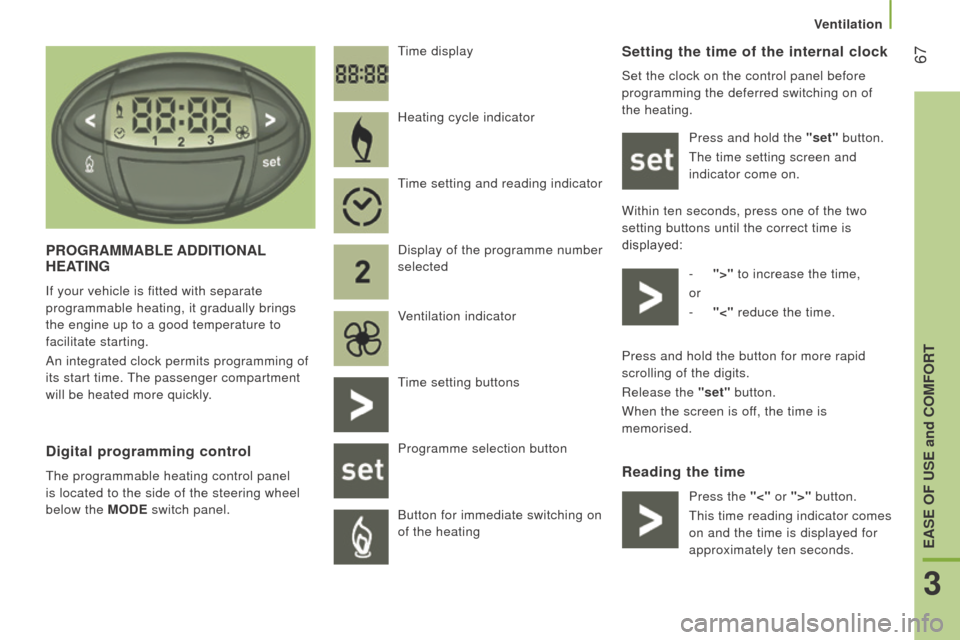
67Setting the time of the internal clock
Set the clock on the control panel before
programming the deferred switching on of
the heating.Press and hold the "set" button.
The time setting screen and
indicator come on.
Within ten seconds, press one of the two
setting buttons until the correct time is
displayed: -
">"
to increase the time,
or
-
"<"
reduce the time.
reading the time
Pr
OG
r
AMMABLE
A
dd
I
t
IO
n
AL
HEAt
I
n
G
If your vehicle is fitted with separate
programmable heating, it gradually brings
the engine up to a good temperature to
facilitate starting.
An integrated clock permits programming of
its start time. The passenger compartment
will be heated more quickly. Time display
digital programming control
The programmable heating control panel
is located to the side of the steering wheel
below the MO
d E switch panel. Heating cycle indicator
Time setting and reading indicator
Display of the programme number
selected
Ventilation indicator
Time setting buttons
Programme selection button
Button for immediate switching on
of the heating
Press and hold the button for more rapid
scrolling of the digits.
Release the "set" button.
When the screen is off, the time is
memorised.
Press the "<" or ">" button.
This time reading indicator comes
on and the time is displayed for
approximately ten seconds.
3
EASE OF uSE and cOMFOrt
Ventilation
Page 73 of 292
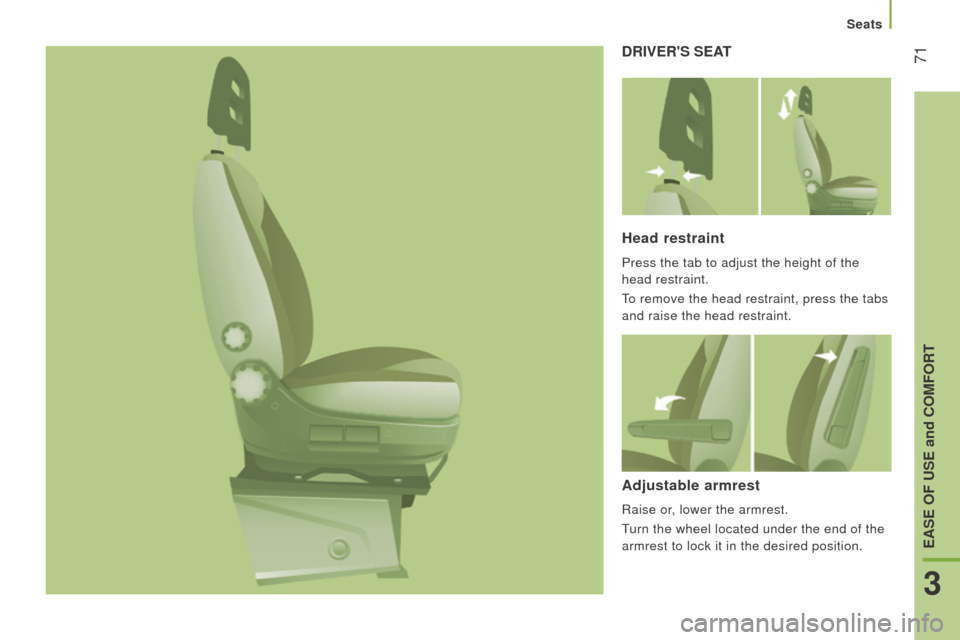
71drIVEr'S SEAt
Head restraint
Press the tab to adjust the height of the
head restraint.
To remove the head restraint, press the tabs
and raise the head restraint.
Adjustable armrest
Raise or, lower the armrest.
Turn the wheel located under the end of the
armrest to lock it in the desired position.
3
EASE OF uSE and cOMFOrt
Seats
Page 78 of 292
76
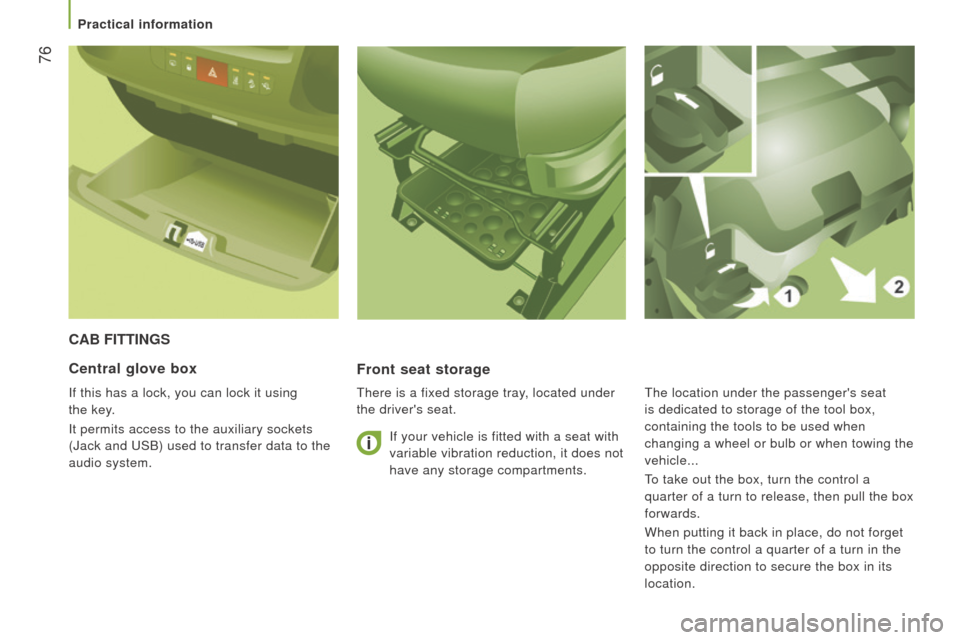
cAB FIttInGS
Front seat storage
There is a fixed storage tray, located under
the driver's seat.
central glove box
If this has a lock, you can lock it using
the key.
It permits access to the auxiliary sockets
(Jack and USB) used to transfer data to the
audio system. If your vehicle is fitted with a seat with
variable vibration reduction, it does not
have any storage compartments.The location under the passenger's seat
is dedicated to storage of the tool box,
containing the tools to be used when
changing a wheel or bulb or when towing the
vehicle...
To take out the box, turn the control a
quarter of a turn to release, then pull the box
forwards.
When putting it back in place, do not forget
to turn the control a quarter of a turn in the
opposite direction to secure the box in its
location.
Practical information
Page 82 of 292
80
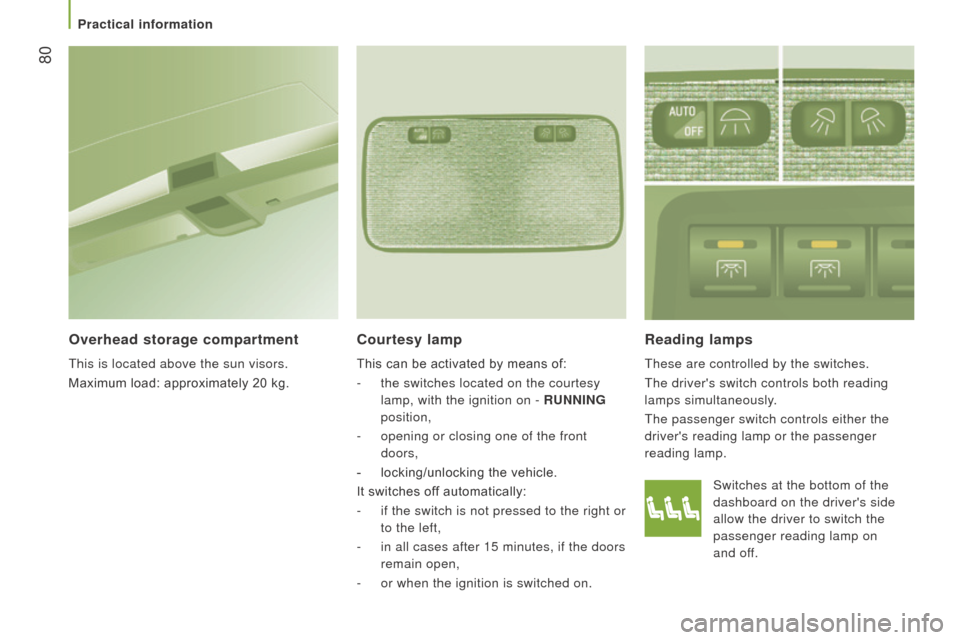
reading lamps
These are controlled by the switches.
The driver's switch controls both reading
lamps simultaneously.
The passenger switch controls either the
driver's reading lamp or the passenger
reading lamp.
courtesy lamp
This can be activated by means of:
-
the switches located on the courtesy
lamp, with the ignition on -
runn I n G
position,
-
opening or closing one of the front
doors,
-
locking/unlocking the vehicle.
It switches of
f automatically:
-
if the switch is not pressed to the right or
to the left,
-
in all cases after 15 minutes, if the doors
remain open,
-
or when the ignition is switched on.
Overhead storage compartment
This is located above the sun visors.
Maximum load: approximately 20 kg. Switches at the bottom of the
dashboard on the driver's side
allow the driver to switch the
passenger reading lamp on
and
off.
Practical information
Page 90 of 292
88Menu...Press... Sub-menu… Press... Select…c onfirm
and exit Enables you to...
1
Speed
beep ON
Increase
Activate/deactivate the audible
signal indicating exceeding of
the programmed speed and
select the speed.
Decrease
OFF
2
Headlamp
sensor Increase
Set the sensitivity of the
sunshine sensor (1 to 3).
Decrease
3
Activation
Trip B Activate
Display a second distance
"Trip
B".
Deactivate
4
Setting
the time Hours/
Minutes Increase
Set the clock.
Decrease
Time format 24
Select the clock display mode.
12
5
Setting
the date Year/Month/
Day Activate
Set the date.
Deactivate
6 Autoclose While
moving ON
Activate/Deactivate automatic
door locking above approx
12
mph (20 km/h).
OFF
Vehicle configuration
Page 92 of 292
90
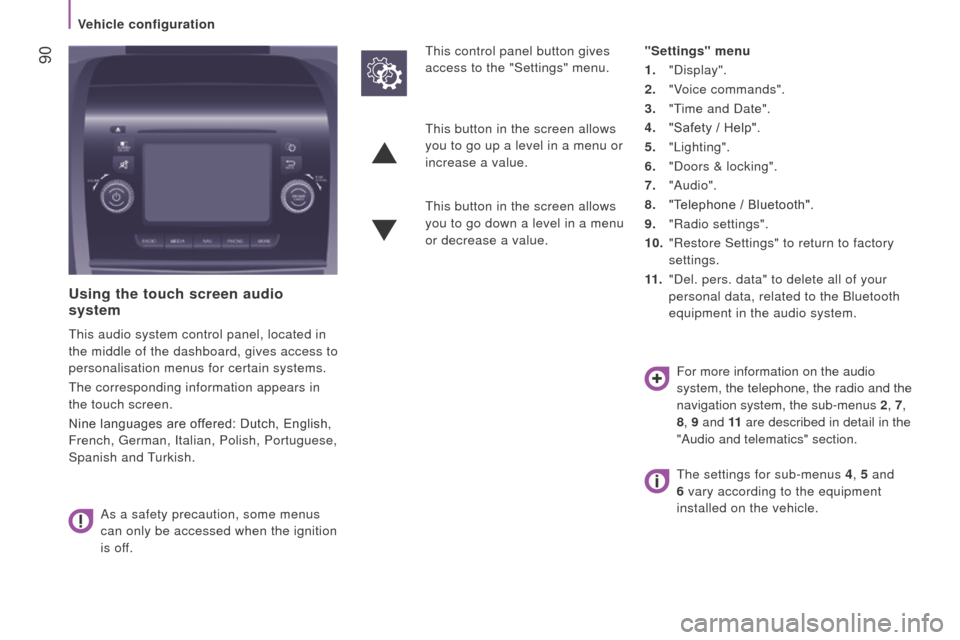
using the touch screen audio
system
This audio system control panel, located in
the middle of the dashboard, gives access to
personalisation menus for certain systems.
The corresponding information appears in
the touch screen.
Nine languages are offered: Dutch, English,
French, German, Italian, Polish, Portuguese,
Spanish and Turkish.
As a safety precaution, some menus
can only be accessed when the ignition
is off. This control panel button gives
access to the "Settings" menu.
"Settings" menu
1. "Display".
2.
"V
oice commands".
3.
"T
ime and Date".
4.
"Safety / Help".
5.
"Lighting".
6.
"Doors & locking".
7.
"Audio".
8.
"T
elephone / Bluetooth".
9.
"Radio settings".
10.
"Restore Settings" to return to factory
settings.
11 .
"Del. pers. data" to delete all of your
personal data, related to the Bluetooth
equipment in the audio system.
This button in the screen allows
you to go up a level in a menu or
increase a value.
This button in the screen allows
you to go down a level in a menu
or decrease a value.
For more information on the audio
system, the telephone, the radio and the
navigation system, the sub-menus 2, 7,
8 , 9 and 11 are described in detail in the
"Audio and telematics" section.
The settings for sub-menus 4 , 5 and
6 vary according to the equipment
installed on the vehicle.
Vehicle configuration
Page 93 of 292

91From the "Safety / Help" sub menu, you can:
-
select "Parkview Camera", then
"Reversing camera" to activate or
deactivate its use (On, Off),
-
select "Parkview Camera", then "Camera
delay" to activate or deactivate the
maintaining of the display for 10 seconds
or up to 11 mph (18 km/h) (On, Off),
-
select "Passenger airbag" to activate or
deactivate its use (On, Off).
From the "Lighting" sub-menu, you can:
-
select "Day lamps" to activate or
deactivate their use (On, Off),
-
select "Headlamp sensor" to adjust its
sensitivity (1, 2, 3).
From the "Doors & locking", you can:
-
select "Autoclose" to activate or
deactivate its use (On, Off).
From the "Display" sub-menu, you can:
-
select "Languages" and choose one of
the languages listed above,
-
select "Units of measurement" to
choose the units for fuel consumption
(l/100
km, mpg), distance (miles, km)
and temperature (°C, °F),
-
select "Display
Trip B" to switch trip B
On or Off in the trip computer.
From the "Time and Date" sub-menu, you
can:
-
select "Adjust time and format" to set the
hour, minutes and seconds and choose
the format (24 h, 12 h with am or pm),
-
select "Adjust Date" to set the day
,
month and year.
To set the time manually, "Synch Time"
must be Off.
4
TECHNOLOGY ON BOARD
Vehicle configuration