2016 Citroen DS5 RHD ignition
[x] Cancel search: ignitionPage 403 of 512

1 Audio and Telematics
DS Connect Nav
GPS satellite navigation - Connectivity - Multimedia audio - Bluetooth ®
telephone
Contents
First steps 2
Steering mounted controls 4
Menus 5
Voice commands 6
Navigation 12
Connected navigation 28
Connectivity 38
Radio Media 50
Te l e p h o n e 6 2
Settings 74
Frequently asked questions 84
The system is protected in such a way that it will only operate in
your vehicle.
The link below gives access to OSS (Open Source Software)
codes for the system.
http://www.psa-peugeot-citroen.com/oss
As a safety measure and because it requires sustained attention
by the driver, the pairing of a Bluetooth mobile telephone with
the Bluetooth hands-free system of your audio system must be
done with the vehicle stationary
and the ignition on.
The display of the energy economy mode message signals that
a change to standby is imminent. Refer to the Energy economy
(mode) section of your vehicle's handbook.
Page 404 of 512

First steps
With the engine running, a press
mutes the sound.
With the ignition off, a press turns the
system on.
Volume.
Use the buttons below the touch screen for
access to the menus, then press the virtual
buttons in the touch screen. All of the touch
areas of the screen are white.
Each menu is displayed in one or two pages
(primary page and secondary page).
Secondary page
Primary page
The touch screen is of the "capacitive"
type.
To clean the screen, use a soft,
non-abrasive cloth (spectacles cloth)
with no additional product.
Do not use sharp objects on the
screen.
Do not touch the screen with wet
hands.
Page 444 of 512
1
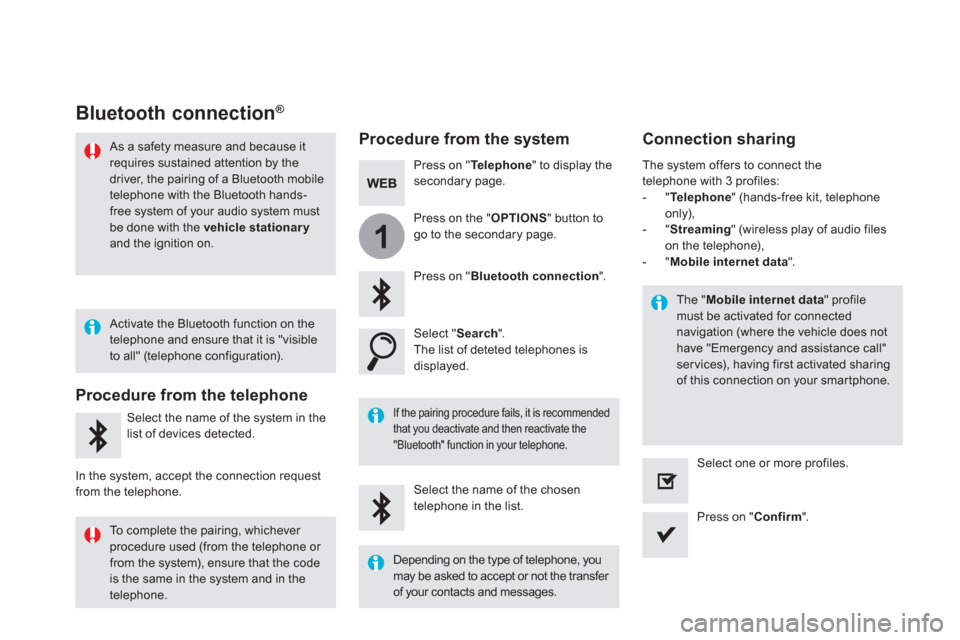
Bluetooth connection ®
Procedure from the system
Connection sharing
Press on " Te l e p h o n e
" to display the
secondary page.
Press on " Bluetooth connection
".
Select " Search
".
The list of deteted telephones is
displayed.
If the pairing procedure fails, it is recommended
that you deactivate and then reactivate the
"Bluetooth" function in your telephone.
The " Mobile internet data
" profile
must be activated for connected
navigation (where the vehicle does not
have "Emergency and assistance call"
ser vices), having first activated sharing
of this connection on your smartphone.
The system offers to connect the
telephone with 3 profiles:
- " Te l e p h o n e
" (hands-free kit, telephone
only),
- " Streaming
" (wireless play of audio files
on the telephone),
- " Mobile internet data
".
Select the name of the chosen
telephone in the list.
Press on " Confirm
".
Select one or more profiles.
Press on the " OPTIONS
" button to
go to the secondary page.
As a safety measure and because it
requires sustained attention by the
driver, the pairing of a Bluetooth mobile
telephone with the Bluetooth hands-
free system of your audio system must
be done with the vehicle stationary
and the ignition on.
Procedure from the telephone
Select the name of the system in the
list of devices detected.
In the system, accept the connection request
from the telephone.
Activate the Bluetooth function on the
telephone and ensure that it is "visible
to all" (telephone configuration).
To complete the pairing, whichever
procedure used (from the telephone or
from the system), ensure that the code
is the same in the system and in the
telephone.
Depending on the type of telephone, you
may be asked to accept or not the transfer
of your contacts and messages.
Page 462 of 512

Media
USB player
Selecting the source
Select " Source
".
Press on Radio Media
to display the
primary page.
The system builds playlists (in temporary
memory), an operation which can take from
a few seconds to several minutes at the first
connection.
Reduce the number of non-music files and the
number of folders to reduce the waiting time.
The playlists are updated every time the
ignition is switched off or connection of a USB
memory stick. The lists are memorised: if they
are not modified, the subsequent loading time
will be shorter.
Insert the USB memory stick into the USB port
or connect the USB device to the USB port
using a suitable cable (not supplied).
Auxiliary (AUX) socket
CD player
Insert the CD in the player (depending on
equipment).
First adjust the volume of your portable device
(to a high level). Then adjust the volume of your
audio system.
Display and management of the controls are
via the portable device.
This source is only available if "Auxiliary input"
has been checked in the audio settings.
Connect the portable device (MP3 player…) to
the auxiliary Jack socket using an audio cable
(not supplied).
Choose the source.
Bluetooth ®
audio streaming
Streaming allows you to listen to music from
your telephone.
The Bluetooth profile must be activated. First
adjust the volume on your portable device
(to a high level).
Then adjust the volume of your audio system.
If play does not start automatically, it may be
necessary to star t the audio playback from the
telephone.
Control is from the portable device or by using
the audio system buttons.
Once connected in streaming mode,
the telephone is considered to be a
media source.
Page 470 of 512
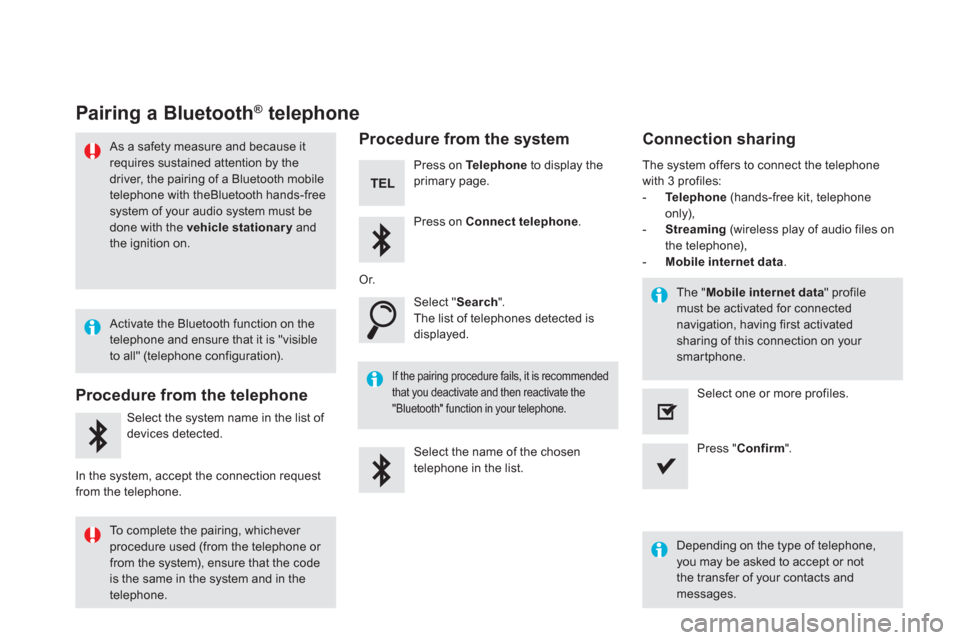
Pairing a Bluetooth ®
telephone
As a safety measure and because it
requires sustained attention by the
driver, the pairing of a Bluetooth mobile
telephone with theBluetooth hands-free
system of your audio system must be
done with the vehicle stationary
and
the ignition on.
Procedure from the telephone
Select the system name in the list of
devices detected.
In the system, accept the connection request
from the telephone.
Procedure from the system
Press on Te l e p h o n e
to display the
primary page.
Press on Connect telephone
.
Select " Search
".
The list of telephones detected is
displayed.
If the pairing procedure fails, it is recommended
that you deactivate and then reactivate the
"Bluetooth" function in your telephone.
The system offers to connect the telephone
with 3 profiles:
- Te l e p h o n e
(hands-free kit, telephone
only),
- Streaming
(wireless play of audio files on
the telephone),
- Mobile internet data
.
Depending on the type of telephone,
you may be asked to accept or not
the transfer of your contacts and
messages.
Select the name of the chosen
telephone in the list.
Press " Confirm
".
Select one or more profiles.
Or.
Activate the Bluetooth function on the
telephone and ensure that it is "visible
to all" (telephone configuration).
To complete the pairing, whichever
procedure used (from the telephone or
from the system), ensure that the code
is the same in the system and in the
telephone.
The " Mobile internet data
" profile
must be activated for connected
navigation, having first activated
sharing of this connection on your
smartphone.
Connection sharing
Page 471 of 512

1
69 Audio and Telematics
Press on Te l e p h o n e
to display the
primary page.
Select " Bluetooth connection
" to
display the list of paired devices.
On return to the vehicle, if the last
telephone connected is present again,
it is automatically recognised and
within about 30 seconds of switching
on the ignition, the connection is
established without any action on your
part (Bluetooth activated).
The ser vices available depend on
the network, the SIM card and the
compatibility of the Bluetooth devices
used. Check in your telephone's
manual and with your service provider
for the services available to you.
The ability of the system to connect
with just one profile depends on the
telephone.
All three profiles may connect by default.
Go to the brand's website for more information
(compatibility, additional help, ...).
To modify the connection profile
:
Automatic reconnection
Press on the "details" button.
Press the " OPTIONS
" button to go to
the secondary page.
Press on " Confirm
".
Select one or more profiles.
The profiles compatible with the system
are HFP, OPP, PBAP, A 2DP, AVRCP,
MAP and PAN.
Page 511 of 512

12Audio and Telematics
DS5_Additif_en_Chap11b_BTA_ed03-2015
* Depending on the geographic cover for "Localised Emergency Call", "Localised Assistance Call" and the official national language selected by the owner of the vehicle. The list of countries covered by Telematic services is available at dealers or on the website in your country.
Localised Assistance Call
If you purchased your vehicle outside the Brand's dealer network, we suggest that you have a dealer check and, if desired, modify the configuration of these services. In a multi-lingual country, configuration is possible in the official national language of your choice.
For technical reasons, particularly to improve the quality of Telematic services to customers, the manufacturer reserves the right to carry out updates to the vehicle's on-board telematic system.
Press this button for more than 2 seconds to request assistance if the vehicle breaks down. A voice message confirms that the call has been made * .
Pressing this button again immediately cancels
the request. The cancellation is confirmed by a voice message.
Operation of the system
When the ignition is switched on, the green indicator lamp comes on for 3 seconds indicating that the system is operating correctly.
If the orange indicator lamp is on fixed: the back-up battery should be replaced. In both cases, the emergency and assistance calls service may not work. Contact a qualified repairer as soon as possible.
If the orange indicator lamp flashes then goes off: the system
has a fault.
The fault with the system does not prevent the vehicle being driven.
Geo-location
You can deactivate geo-location by simultaneously pressing the "Localised Emergency Call" and "Localised Assistance Call" buttons, followed by a press on "Localised Assistance Call" to confirm.
To reactivate geo-location, simultaneously press the "Localised Emergency Call" and "Localised Assistance Call" buttons again, followed by a press on "Localised Assistance Call" to confirm.