OFF
OFF
65
DS5_en_Chap02_ouvertures_ed02-2015
Reactivation of the interior
volumetric and anti-tilt monitoring
Triggering of the alarm
This is indicated by sounding of the siren
and flashing of the direction indicators for
thirty
s
econds.
The monitoring functions remain active until
the alarm has been triggered eleven times in
succession.
F
Pr
ess the unlocking button on
the remote control or unlock the
vehicle using the Keyless Entry
and Starting system to deactivate
the exterior perimeter monitoring.
F
Pr
ess the locking button on the
remote control or lock the vehicle
using the Keyless Entry and
Starting system to activate all the
monitoring functions.
The indicator lamp in the button
again flashes once per second. When the vehicle is unlocked using
the remote control or unlocked
using the Keyless Entry and Starting
system, rapid flashing of the indicator
lamp in the button informs you that the alarm
was triggered during your absence. When
the ignition is switched on, this flashing stops
immediately.
Failure of the remote control
In this case, carry out the operations below to
deactivate the monitoring functions:
F
Un
lock the vehicle using the key (integral
with the remote control) in the driver's door
lock.
F
Op
en the door; the alarm is triggered.
F
Sw
itch on the ignition; the alarm stops. The
indicator lamp in the button goes off.
Locking the vehicle without
activating the alarm
F Lock or deadlock the vehicle using the key
( integral with the remote control) in the
driver's door lock.
Operating fault
When the ignition is switched on, fixed
illumination of the indicator lamp in the button
indicates a fault in the system.
Have it checked by a CITROËN dealer or a
qualified workshop.
* Depending on the country of sale.
Automatic activation*
2 minutes after the last door or the boot is
closed, the system is activated automatically.
F
To a
void triggering the alarm on entering
the vehicle, first press the unlocking button
on the remote control or unlock the vehicle
using the Keyless Entry and Starting
system.
Access
221
DS5_en_Chap08_info-pratiques_ed02-2015
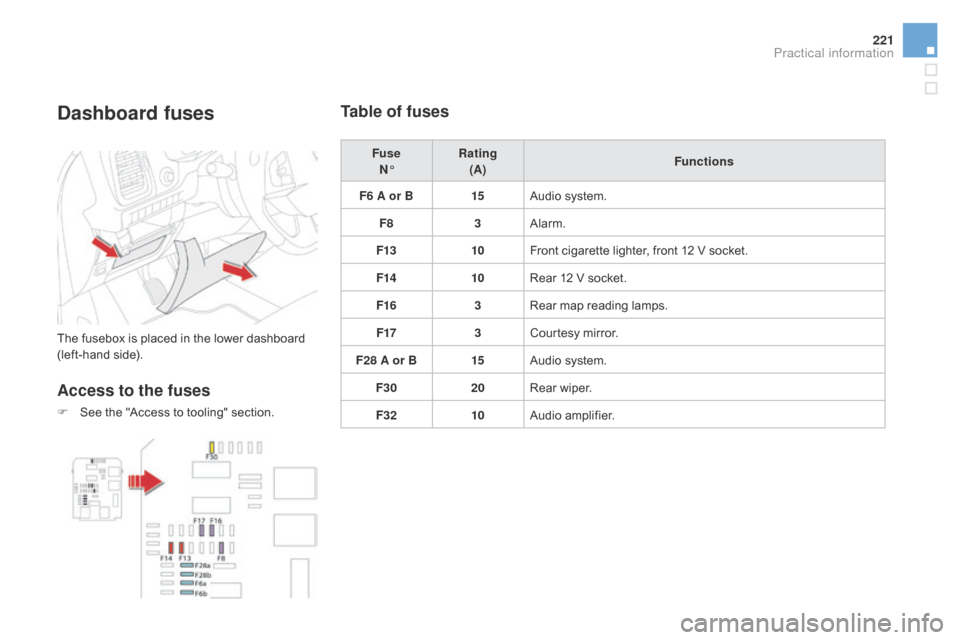
dashboard fuses
The fusebox is placed in the lower dashboard
(left-hand side).
Access to the fuses
F See the "Access to tooling" section.
Table of fuses
Fuse N° Rating
(A) Functions
F6 A or B 15Audio system.
F8 3Alarm.
F13 10Front cigarette lighter, front 12 V socket.
F14 10Rear 12 V socket.
F16 3Rear map reading lamps.
F17 3Courtesy mirror.
F28 A or B 15Audio system.
F30 20Rear wiper.
F32 10Audio amplifier.
Practical information
DS5_en_Chap08_info-pratiques_ed02-2015
Accessories
A wide range of accessories and genuine parts is available from the CITROËN dealer network.
These accessories and parts are all suitable for your vehicle and benefit from CITROËN's recommendation and warranty.
"comfort":
door deflectors, side window blinds, rear
screen blind, isotherm module, coat hanger
fixed to head restraint, mobile reading lamp,
mirror for caravan, parking sensors, scented air
freshener, cigarette lighter, ...
"Transport systems":
child seats and booster cushions, boot carpet,
boot liner, boot net, boot spacers, transverse
roof bars, bicycle carrier, ski carrier, roof boxes,
towbars, wiring harnesses...
"Styling":
aluminium pedals, aluminium foot rest, alloy
wheels, chrome mirror shells, ...*
To a
void any risk of jamming the pedals:
-
en
sure that mats are correctly positioned
and secured,
-
ne
ver fit one mat on top of another.
"Security and safety":
anti-intrusion alarm, anti-tilt unit, stolen vehicle
tracking system, child seats and booster
cushions, dog guard, breathalyser, first aid
kit, fire extinguisher, warning triangle, belt
cutter/glass breaker, high visibility vest, wheel
security bolts, snow chains, snow socks, ...
"Protection":
mats*, mud flaps, bumper protection strips,
boot sill protector, vehicle cover...
If a towbar and wiring harness are fitted
outside the CITROËN dealer network,
the installation must be done using
the vehicle's electrical pre-equipment
and fitted following the manufacturer's
recommendations. The rear bodywork has been designed
to avoid spray.
11
23
24
25
32
Risk areas / Danger zone
alert settings
Press on Navigation
to display the
primary page.
Press on the secondary page.
Select " Settings
".
Select " Alarm!
" (Alert).
It is then possible to activate Risk areas alerts
then:
- "Audible warning"
- "Alert only when navigating"
- "Alert only for overspeed"
- "Display speed limits"
- Timing: the choice of timing allows the
time before giving a Risk areas alert to be
defined.
Select " Confirm
".
This series of alerts and displays is
only available if Risk areas have first
been downloaded and installed on the
system.
Tr a ffi c
Traffic information
Display of messages
Press on Navigation
to display the
primary page.
Press on the secondary page.
Select " Tr a f f i c m e s s a g e s
".
Choose filter settings for:
" On the route
",
" Around
",
" Near destination
", filters to fine-
tune the list of messages.
Press again to remove the filter.