2016 Citroen C4 steering
[x] Cancel search: steeringPage 239 of 396

237
C4-2_en_Chap07_infos-pratiques_ed02-2015
"Multimedia":
audio systems, steering mounted audio controls, speakers, Hi-Fi module, Bluetooth
h
ands-free system, portable satellite navigation
s
ystem, semi-integral support bracket for
p
ortable navigation system, mapping update
C
D, driving assistant, portable video screen,
p
ortable video support bracket, 230 V/50 Hz
s
ocket, 230 V/50 Hz adaptor, iPhone
®
compatible
mobile
phone
charger,
mobile
p
hone/smartphone
bracket,
Wi-Fi
on
board...
By
going to a CITROËN dealer, you can also
o
btain cleaning and maintenance products
(
interior and exterior) - including ecological
p
roducts in the "TECHNATURE" range -,
p
roducts for topping up (screenwash...), touch-
up
pens and paint aerosols for the exact colour
o
f your vehicle, recharges (cartridge for the
t
emporary puncture repair kit...), ...
Installation of radio
communication
transmitters
Before installing any after-market radio communication transmitter, you can
c
ontact a CITROËN dealer for the
specification
of transmitters which can
b
e fitted (frequency, maximum power,
a
erial position, specific installation
requirements),
in line with the Vehicle
E
lectromagnetic
C
ompatibility
D
irective (2004/104/EC). The
fitting of electrical equipment or
a
ccessories which are not recommended
b
y CITROËN may result in a failure of
y
our vehicle's electronic system and
e
xcessive electrical consumption.
Contact a CITROËN dealer
for
information on the range of
r
ecommended equipment and
a
ccessories.
Depending
on the legislation in force in
t
he country, certain safety equipment
m
ay be compulsory: high visibility s
afety vests, warning triangles, b
reathalyzers, spare bulbs, spare fuses,
fire
extinguisher, first aid kit, mud flaps
a
t the rear of the vehicle.
7
Practical information
Page 241 of 396
239
C4-2_en_Chap08_en-cas-de-panne_ed02-2015
Temporary puncture r epair k it
Access to the kit
This kit is installed i n t he s torage b ox, u nder t he b
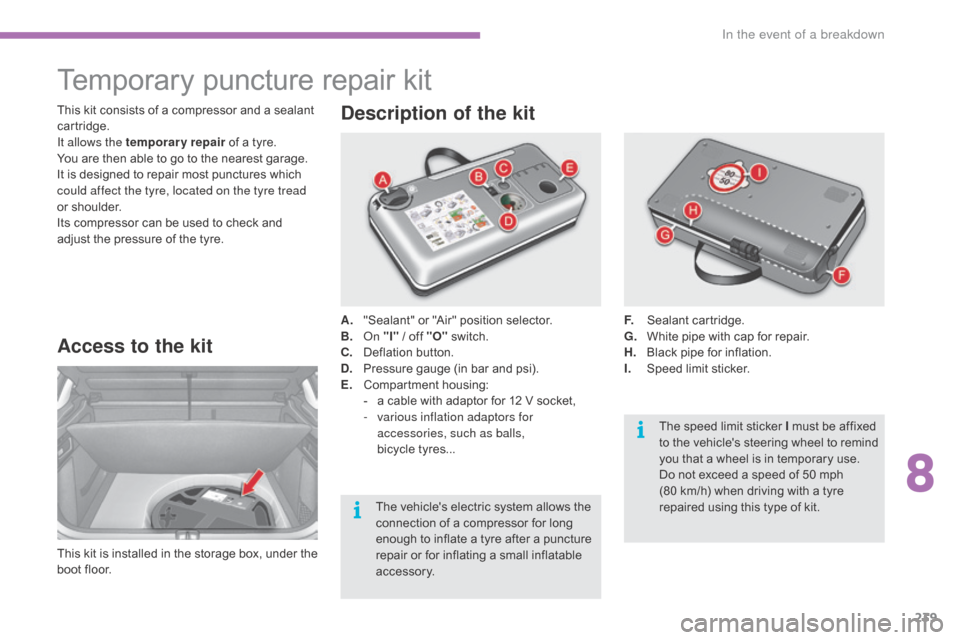
oot floor. A.
"
Sealant" or "Air" position selector.
B.
On
"I"
/ off "O"
s
witch.
C.
D
eflation button.
D.
P
ressure gauge (in bar and psi).
E.
C
ompartment
h
ousing:
-
a
cable with adaptor for 12 V socket,
-
v
arious inflation adaptors for
accessories, such as balls,
bicycle tyres...
Description of the kit
F. Sealant c artridge.
G. W hite pipe with cap for repair.
H.
B
lack pipe for inflation.
I.
S
peed limit sticker.
This
kit
consists
of
a
compressor
and
a
sealant
c
artridge.
It allows the temporary repair
of
a
tyre.
You
are
then
able
to
go
to
the
nearest
garage.
It
is
designed
to
repair
most
punctures
which
c
ould affect the tyre, located on the tyre tread
or
shoulder.
Its
compressor
can
be
used
to
check
and
a
djust
the
pressure
of
the
tyre.
The
vehicle's
electric
system
allows
the
c
onnection
of
a
compressor
for
long
e
nough
to
inflate
a
tyre
after
a
puncture
r
epair
or
for
inflating
a
small
inflatable
a
ccessory. The
speed limit sticker I must be affixed
t
o the vehicle's steering wheel to remind
y
ou that a wheel is in temporary use.
Do
not exceed a speed of 50 mph
(80
km/h) when driving with a tyre
r
epaired using this type of kit.
8
In the event of a breakdown
Page 271 of 396

269
C4-2_en_Chap08_en-cas-de-panne_ed02-2015
Towing the vehicle
The towing eye is installed in the boot under the floor.
To
gain access to it:
F
o
pen the boot,
F
r
aise the floor,
F
s
ecure it by hooking its cord on the hook
o
n the rear parcel shelf support,
F
r
emove the towing eye from the holder.
Access to the tools General recommendations
In the following cases, you must always call o
n a professional recovery service:
-
v
ehicle broken down on a motor way or
f
ast road,
-
f
our-wheel drive vehicle,
-
w
hen it is not possible to put the
gearbox
into neutral, unlock the
s
teering, or release the parking brake,
-
t
owing with only two wheels on the
g
round,
-
w
here there is no approved towing arm
a
vailable...
Procedure
for
having
your
vehicle
towed
or
for
towing
another
vehicle
using
a
removable
towing
eye.
Observe
the
legislation
in
force
in
your
c
o unt r y.
Ensure
that
the
weight
of
the
towing
vehicle
i
s
higher
than
that
of
the
towed
vehicle.
The
driver
must
remain
at
the
wheel
of
the
t
owed
vehicle
and
must
have
a
valid
driving
l
icence.
When
towing
a
vehicle
with
all
four
wheels
o
n
the
ground,
always
use
an
approved
t
owing
arm;
rope
and
straps
are
prohibited.
The
towing
vehicle
must
move
off
gently.
When
towing
a
vehicle
with
the
engine
off,
t
here
is
no
longer
any
power
assistance
for
b
raking
or
steering.
8
In the event of a breakdown
Page 285 of 396

283
C4-2_en_Chap10b_SMEGplus_ed02-2015
7-inch touch screen tablet
GPS satellite navigation - Multimedia audio - Bluetooth® telephone
Contents
First
steps
2 84
Steering
mounted
controls
2
86
Menus
2
87
Navigation
2
88
Navigation
-
Guidance
2
96
Tr a f fi c
3
0 0
Radio
Media
3
02
Radio
308
D
AB
(Digital
Audio
Broadcasting)
radio
3
10
M edia
3
12
Settings
3
16
Connected
services
3
24
Internet
browser
3
25
MirrorLink
TM 32 8
CarPlay® 3 32
Telephone
3
36
Frequently
asked questions
3
44
The
system
is
protected
in
such
a
way
that
it
will
only
operate
in
y
our
vehicle. As
a
safety
measure,
the
driver should only carry out operations
w
hich
require
prolonged
attention while the vehicle is stationary.
The
display
of
the
energy
economy mode message signals
t
hat
the
system
is
about
to
go into standby. Refer to the energy
ec
onomy
mo
de
s
ection.
.
Audio and Telematics
Page 288 of 396

286
C4-2_en_Chap10b_SMEGplus_ed02-2015
Steering mounted controls
Media: change the multimedia source.
Telephone:
start a call.
Call
in progress: access to the
t
elephone menu (End call, Secret
m
ode, Hands-free mode).
Telephone,
press and hold: reject an
i
ncoming call, end a call in progress;
o
ther than a call in progress, access
t
o the telephone menu. Decrease
volume.
Radio,
turn: automatic search for the
p
revious / next station.
Media,
turn: previous / next track.
Press:
confirm a selection. Radio:
display the list of stations.
Media: display the list of tracks.
Radio,
press and hold: update the list
o
f stations received.
Increase
volume.
Audio and Telematics
Page 314 of 396

312
C4-2_en_Chap10b_SMEGplus_ed02-2015
Media
USB playerSelecting the source
The steering mounted SRC (source) b
utton can be used to go to the next
m
edia source, available if the source
i
s active.
Select
change of source.
Press on Radio Media
to display the
primary
pag
e.
The
system
builds
playlists
(in
temporary
m
emory),
an
operation
which
can
take
from
a
few
seconds
to
several
minutes
at
the
first
c
onnection.
Reduce
the
number
of
non-music
files
and
the
n
umber
of
folders
to
reduce
the
waiting
time.
The
playlists
are
updated
every
time
the
i
gnition
is
switched
off
or
connection
of
a
USB
m
emory
stick.
The
lists
are
memorised:
if
they
a
re
not
modified,
the
subsequent
loading
time
w
ill
be
shorter.
Insert
the
USB
memory
stick
into
the
USB
port
o
r
connect
the
USB
device
to
the
USB
port
u
sing
a
suitable
cable
(not
supplied).
Auxiliary socket (AUX)
Connect the portable device (MP3 player…) to t
he auxiliary Jack socket using an audio cable
(
not
sup
plied).
First
adjust the volume of your portable device
(
to a high level). Then adjust the volume of your
a
udio system.
Display
and management of the controls are
v
ia the portable device. Choose
the source.
Press OK
to confirm the selection.
CD player
Insert the CD in the player.
Audio and Telematics
Page 344 of 396

342
C4-2_en_Chap10b_SMEGplus_ed02-2015
Managing paired
telephones
This function allows the connection or
disconnection of a peripheral device as
well as the deletion of a pairing. Using
the telephone is not r
ecommended while driving.
Park
the vehicle.
Make
the call using the steering
m
ounted controls.
Press on Telephone
to display the
primary
pag
e.
Press
on the secondary page.
Select " Bluetooth " to display the list
of
paired peripheral devices.
Select
the peripheral in the list.
Select " Search for devices "
Or "Connect / Disconnect " to start or
end the Bluetooth connection with
the
selected device.
Or "Delete "
to delete the pairing.
Receiving a call
An incoming call is announced by a ring and a superimposed display in the screen.
Make
a short press on the steering
m
ounted TEL button to accept an
incoming
c
all.
Make
a long press
on
the steering mounted TEL button
to
reject the call.
Or Select "End call".
Making a call
Calling a new number
Press on Telephone to display the
primary pag e.
Enter
the phone number using the
d
igital
k
eypad.
Press " Call"
to start the call.
Calling a contact
Press on Telephone to display the
primary pag e.
Or
make a long press
on
the steering mounted TEL
button.
Audio and Telematics
Page 348 of 396
346
C4-2_en_Chap10b_SMEGplus_ed02-2015
Radio
QUESTIONANSWER SOLUTION
The
quality of reception of
t
he radio station listened
to
gradually deteriorates
o
r the stored stations do
not
function (no sound,
87
.5 Mhz is displayed...). The
vehicle is too far from the transmitter used by the station
l
istened to or there is no transmitter in the geographical area
t
hrough which the vehicle is travelling.Activate
the "RDS" function by means of the
s
hort-cut menu to enable the system to check
w
hether there is a more power ful transmitter in
t
he geographical area.
The
environment (hills, buildings, tunnels, basement car parks...)
b
lock reception, including in RDS mode.This
phenomenon is normal and does not
i
ndicate a fault with the audio system.
The
aerial is absent or has been damaged (for example when going
t
hrough a car wash or into an underground car park).Have
the aerial checked by a CITROËN dealer.
I
cannot find some radio
s
tations in the list of
stations
r
eceived. The
station is not received or its name has changed in the list.Press
and hold the "List" button at the steering
m
ounted controls to update the list of stations
r
eceived or press on the system update function:
"
Update list".
Some
radio stations send other information in place of their name
(
the title of the song for example).
The
system interprets this information as the name of the station.
The
name of the radio
s
tation
c
hanges.
Audio and Telematics