Page 363 of 702
SettingsTranslation Message Submenu
8 Auto Unlock Doors Auto Unlock DoorsOn, Off
9 Passive Entry Passive Entry On, Off
10 Remote Unlock Sequence Remote UnlockDriver Door, All Doors
11 Key Fob Linked to Memory Key in Memory On, Off
12 Remote Start Comfort System Rmt Start Comfort Off, Remote Starts Only, All Starts
13 Sound Horn with Remote Start Horn w/ Rmt Start
On, Off
14 Sound Horn with Remote Lock Horn w/ Rmt Lock
Off, 1st Press, 2nd Press
15 Flash Lights with Lock Lights w/ LockOn, Off
16 Daytime Running Lights Daytime LightsOn, Off
17 Automatic Highbeams Auto HighbeamsOn, Off
18 Headlights On with Wipers Lights w/ Wipers On, Off
19 Rain Sensing Wipers Auto WipersOn, Off
4
UNDERSTANDING YOUR INSTRUMENT PANEL 361
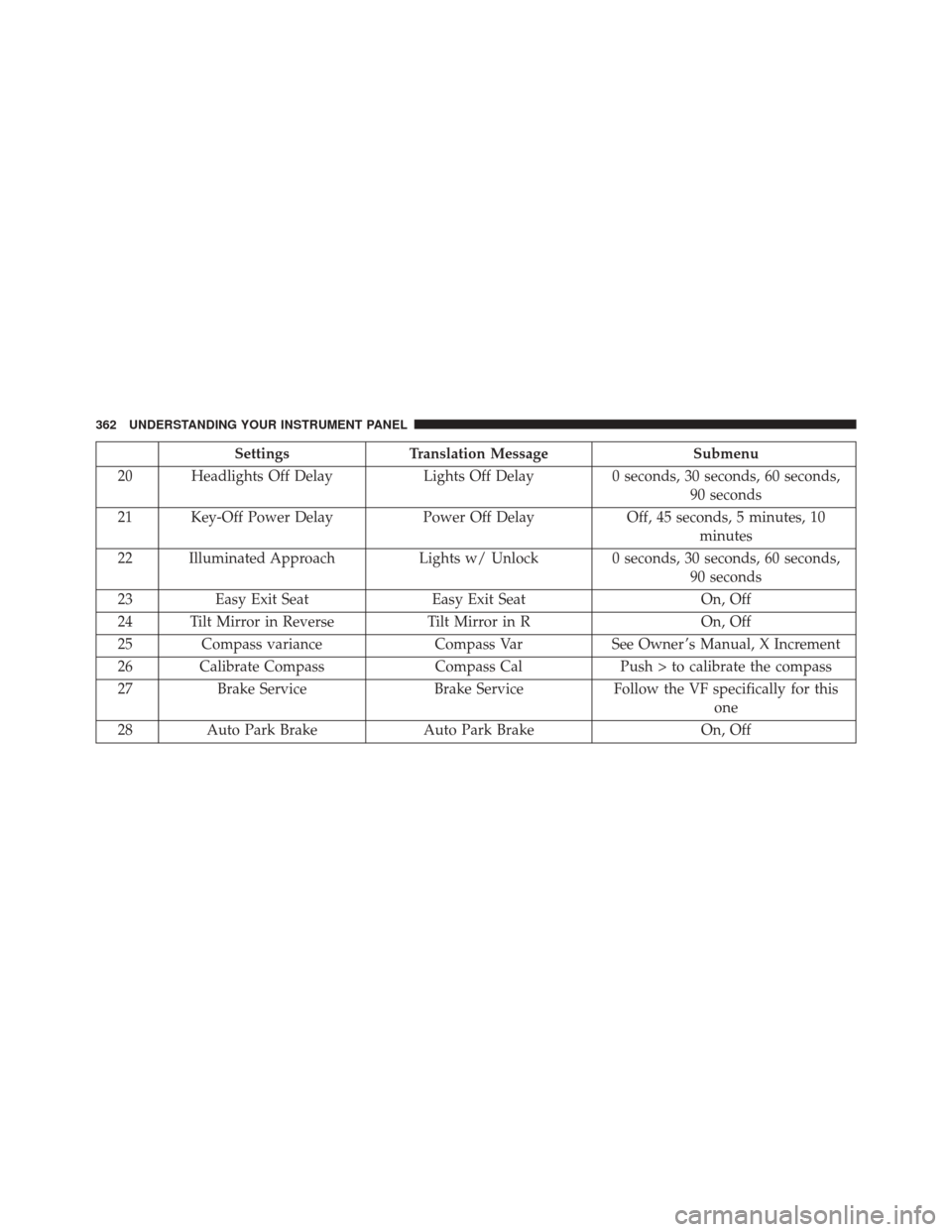
Page 364 of 702
SettingsTranslation Message Submenu
20 Headlights Off Delay Lights Off Delay0 seconds, 30 seconds, 60 seconds,
90 seconds
21 Key-Off Power Delay Power Off DelayOff, 45 seconds, 5 minutes, 10
minutes
22 Illuminated Approach Lights w/ Unlock 0 seconds, 30 seconds, 60 seconds,
90 seconds
23 Easy Exit Seat Easy Exit Seat On, Off
24 Tilt Mirror in Reverse Tilt Mirror in ROn, Off
25 Compass variance Compass VarSee Owner ’s Manual, X Increment
26 Calibrate Compass Compass CalPush > to calibrate the compass
27 Brake Service Brake ServiceFollow the VF specifically for this
one
28 Auto Park Brake Auto Park Brake On, Off
362 UNDERSTANDING YOUR INSTRUMENT PANEL
Page 370 of 702
•Service Airbag System
• Traction Control Off
• Washer Fluid Low
• Oil Pressure Low
• Oil Change Due
• Fuel Low
• Service Antilock Brake System
• Service Electronic Throttle Control
• Service Power Steering
• Cruise Off
• Cruise Ready
• Cruise Set To XXX MPH
• Cruise Set To XXX KM/H •
Tire Pressure Screen With Low Tire(s) “Inflate Tire to
XX”
• Service Tire Pressure System
• Parking Brake Engaged
• Brake Fluid Low
• Service Electronic Braking System
• Engine Temperature Hot
• Battery Voltage Low
• Service Electronic Throttle Control
• Lights On
• Right Turn Signal Light Out
• Left Turn Signal Light Out
• Turn Signal On
368 UNDERSTANDING YOUR INSTRUMENT PANEL
Page 371 of 702
•Vehicle Not in Park
• Key in Ignition
• Key in Ignition Lights On
• Remote Start Active Key to Run
• Remote Start Active Push Start Button
• Remote Start Aborted Fuel Low
• Remote Start Aborted Too Cold
• Remote Start Aborted Door Open
• Remote Start Aborted Hood Open
• Remote Start Aborted Trunk Open
• Remote Start Aborted Time Expired
• Remote Start Disabled Start to Reset
• Service Airbag System •
Service Airbag Warning Light
• Door Open
• Doors Open
• Gear Not Available
• Shift Not Allowed
• Shift to Neutral then Drive or Reverse
• Transmission Getting Hot Push Brake
• Trans. Hot Stop Safely Shift to Park Wait to Cool
• Service Transmission
• Service Shifter
• Engage Park Brake to Prevent Rolling
• Washer Fluid Low
4
UNDERSTANDING YOUR INSTRUMENT PANEL 369
Page 380 of 702

Buttons On The Touchscreen
Buttons on the touchscreen are accessible on the
Uconnect display.
Customer Programmable Features/Personal
Settings — Uconnect 5.0/8.4A/8.4AN Settings
Uconnect 5.0 — If a SETTINGS button on the faceplate
exists, push this button. If not, push the MORE button on
the faceplate and press the�Settings�button on the touch-
screen. The remaining settings are defined for the Uconnect
8.4A/8.4AN — Press the “Apps” button on the touch-
screen, then press the “Settings” button on the touchscreen
to display the menu setting screen. In this mode the
Uconnect system allows you to access programmable fea-
tures that may be equipped such as Display, Voice, Clock,
Safety & Driving Assistance (if equipped), Lights, Doors &
Locks, Auto-On Comfort (if equipped), Engine Off Op-
tions, Audio, Phone/Bluetooth, SiriusXM Setup, Restore
Settings, Clear Personal Data (if equipped).
NOTE: Only one category may be selected at a time.
To adjust the setting of a programmable feature, press the
desired setting option. Once in the desired setting option,
press and release the preferred setting until a check-mark
appears next to the setting, showing that the setting has
been selected. Once the setting is complete, either press
the back arrow button on the touchscreen or the Back
button on the faceplate to return to the previous menu or
press the “X” button on the touchscreen to close out of
the settings screen. Pressing the Up or Down Arrow
buttons on the right side of the screen will allow you to
toggle up or down through the list of available settings.
378 UNDERSTANDING YOUR INSTRUMENT PANEL
Page 381 of 702

Display
After pressing the “Display” button on the touchscreen
the following settings will be available:
•Display Mode
This feature allows you to select one of the auto display
settings. To change Mode status, press and release the
Auto or Manual button on the touchscreen.
• Display Brightness With Headlights On
This feature allows you to select the display brightness
when the headlights are on. Adjust the brightness with
the + and – setting buttons on the touchscreen.
• Display Brightness With the Headlights Off
This feature allows you to select the display brightness
when the headlights are off. Adjust the brightness with
the + and – setting buttons on the touchscreen. •
Set Language
This feature allows you to select one of the languages for
all display nomenclature, including the trip functions
and the navigation system (if equipped). Press the “Set
Language” button on the touchscreen and then press the
desired language button on the touchscreen until a
check-mark appears next to the language, showing that
setting has been selected.
• Units
This feature allows you to select US or Metric units of
measure in the EVIC/DID, odometer, and navigation
system (if equipped). Press “US” or “Metric” until a
check-mark appears next to the setting, showing that
setting has been selected.
• Touchscreen Beep
This feature allows you to turn on or shut off the sound
heard when a touchscreen button is pressed. Press the
4
UNDERSTANDING YOUR INSTRUMENT PANEL 379
Page 386 of 702

•Blind Spot Alert — If Equipped
When this feature is selected, the Blind Spot Alert feature
can be set to Off, Lights Only or Lights and Chime. The
Blind Spot Alert feature can be activated in Lights category.
When this category is selected, the Blind Spot Monitor
(BSM) system is activated and will only show a visual alert
in the outside mirrors. When Lights & Chime category is
activated, the Blind Spot Monitor (BSM) will show a visual
alert in the outside mirrors as well as an audible alert when
the turn signal is on. When Off is selected, the Blind Spot
Monitor (BSM) system is deactivated. To change the Blind
Spot Alert status, press the “Off,” “Lights” or “Lights &
Chime” button on the touchscreen.
NOTE: If your vehicle has experienced any damage in
the area where the sensor is located, even if the fascia is
not damaged, the sensor may have become misaligned.
Take your vehicle to an authorized dealer to verify sensor
alignment. Having a sensor that is misaligned will result
in the BSM not operating to specification. •
ParkView Backup Camera Active Guidelines — If
Equipped
When this feature is enabled, active (dynamic) grid lines
are overlaid on the Rear Backup Camera image to
illustrate the width of the vehicle and its projected back
up path based on the steering wheel position. A dashed
center line overlay indicates the center of the vehicle to
assist with parking or aligning to a hitch/receiver.
• ParkView Backup Camera Fixed Guidelines — If
Equipped
When this feature is enabled, fixed (static) grid lines are
overlaid on the Rear Backup Camera image to illustrate
the width of the vehicle.
• ParkView Backup Camera Delay
When this feature is enabled, it will allow the ParkView
Backup Camera display to remain on while in drive for
up to 10 seconds, or 8 mph (13 km/h).
384 UNDERSTANDING YOUR INSTRUMENT PANEL
Page 387 of 702

•Rain Sensing Auto Wipers
When this feature is selected, the system will automati-
cally activate the windshield wipers if it senses moisture
on the windshield and the wipers are set to an intermit-
tent position. To make your selection, press the “Rain
Sensing” button on the touchscreen, until a check-mark
appears next to the setting, showing that setting has been
selected.
• Electric Park Brake Service Mode — If Equipped
This feature provides a means for a technician or vehicle
owner to utilize a vehicle integrated, menu driven sys-
tem, to command the electric park brake retraction, to
service the rear foundation brakes (brake pads, calipers,
rotors, etc.).
For further information, refer to “Electric Parking Brake
(EPD)” in “Starting and Operating.” •
Auto Park Brake
Auto Park Brake will set the park brake once the vehicle
is set in park (or at key off for a manual transmission)
• Hill Start Assist
This setting will hold the brake if the driver is on a hill
and takes their foot off the brake to accelerate.
Lights
After pressing the “Lights” button on the touchscreen the
following settings will be available.
• Headlights Off Delay
When this feature is selected, it allows the adjustment of
the amount of time the headlights remain on after the
engine is shut off. To change the Headlights Off Delay
setting, press the “Headlights Off Delay” button on the
4
UNDERSTANDING YOUR INSTRUMENT PANEL 385