Page 399 of 702
Nevertheless, the wireless radio will be used in such a
manner that the radio is 20 cm or further from the human
body.
The internal wireless radio operates within guidelines
found in radio frequency safety standards and recom-
mendations, which reflect the consensus of the scientific
community.
The radio manufacturer believes the internal wireless
radio is safe for use by consumers. The level of energy
emitted is far less than the electromagnetic energy emit-
ted by wireless devices such as mobile phones. However,
the use of wireless radios may be restricted in some
situations or environments, such as aboard airplanes. If
you are unsure of restrictions, you are encouraged to ask
for authorization before turning on the wireless radio.This device complies with Part 15 of the FCC Rules and
with Industry Canada license-exempt RSS standard(s).
Operation is subject to the following two conditions:
1. This device may not cause harmful interference.
2.
This device must accept any interference received, in-
cluding interference that may cause undesired operation.
NOTE:
•
This equipment has been tested and found to comply
with the limits for a Class B digital device, pursuant to
Part 15 of the FCC Rules. These limits are designed to
provide reasonable protection against harmful inter-
ference in a residential installation. This equipment
generates, uses and can radiate radio frequency energy
and, if not installed and used in accordance with the
instructions, may cause harmful interference to radio
communications. However, there is no guarantee that
interference will not occur in a particular installation.
4
UNDERSTANDING YOUR INSTRUMENT PANEL 397
Page 425 of 702

Get Started
All you need to control your Uconnect system with your
voice are the buttons on your steering wheel.
1. VisitUconnectPhone.com to check mobile device and
feature compatibility and to find phone pairing in-
structions.
2.
Reduce background noise. Wind and passenger conversa-
tions are examples of noise that may impact recognition.
3. Speak clearly at a normal pace and volume while facing straight ahead. The microphone is positioned
on the rearview mirror and aimed at the driver.
4. Each time you give a Voice Command, you must first push either the VR or Phone button, wait until after
the beep, then say your Voice Command.
5. You can interrupt the help message or system prompts by pushing the VR or Phone button and saying a Voice
Command from current category.
Uconnect Voice Command Buttons
1 — Push To Initiate Or To Answer A Phone Call, Send Or Re-
ceive A Text
2 — For All Radios: Push To Begin Radio Or Media functions. For
8.4A/8.4AN Only: Push To Begin Navigation, Apps And Climate
Functions.
3 — Push To End Call
4
UNDERSTANDING YOUR INSTRUMENT PANEL 423
Page 430 of 702
Phone
Making and answering hands-free phone calls is easy
with Uconnect. When the Phonebook button is illumi-
nated on your touchscreen, your system is ready. Check
UconnectPhone.com for mobile phone compatibility and
pairing instructions.
Push the Phone button
. After the beep, say one of
the following commands �
•Call John Smith
• Dial 123-456-7890 and follow the system prompts
• Redial (call previous outgoing phone number)
• Call back (call previous incoming phone number)
Uconnect 8.4A/8.4AN Media
428 UNDERSTANDING YOUR INSTRUMENT PANEL
Page 431 of 702
TIP:When providing a Voice Command, push the Phone
button
and say “Call,”then pronounce the name
exactly as it appears in your phone book. When a
contact has multiple phone numbers, you can say
“Call John Smith work.”
Uconnect 5.0 Phone
Uconnect 8.4A/8.4AN Phone
4
UNDERSTANDING YOUR INSTRUMENT PANEL 429
Page 432 of 702
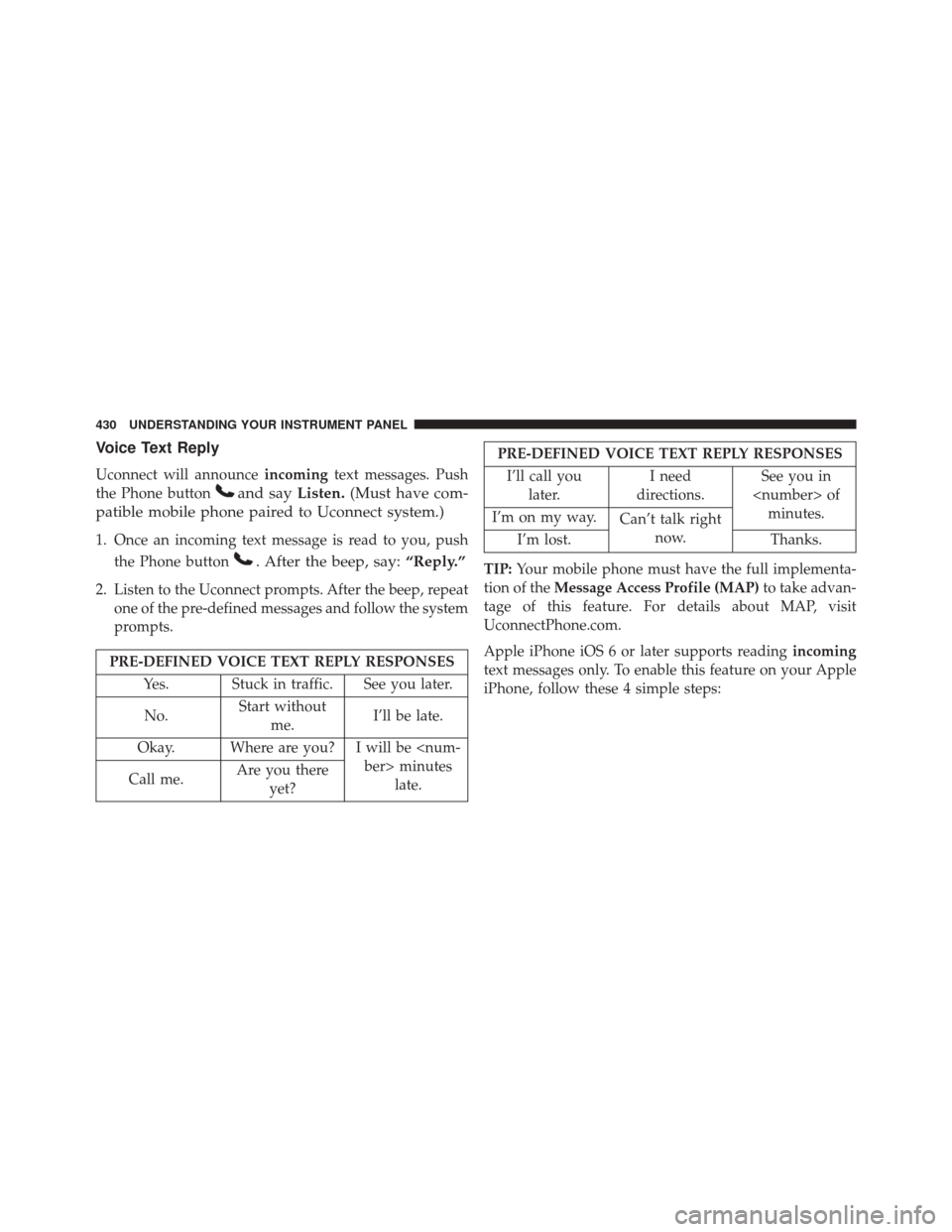
Voice Text Reply
Uconnect will announceincomingtext messages. Push
the Phone button
and say Listen.(Must have com-
patible mobile phone paired to Uconnect system.)
1. Once an incoming text message is read to you, push
the Phone button
. After the beep, say: “Reply.”
2. Listen to the Uconnect prompts. After the beep, repeat
one of the pre-defined messages and follow the system
prompts.
PRE-DEFINED VOICE TEXT REPLY RESPONSES
Yes. Stuck in traffic. See you later.
No. Start without
me. I’ll be late.
Okay. Where are you? I will be minuteslate.
Call me. Are you there
yet?
PRE-DEFINED VOICE TEXT REPLY RESPONSES
I’ll call you later. I need
directions. See you in
of minutes.
I’m on my way. Can’t talk right
now.
I’m lost. Thanks.
TIP: Your mobile phone must have the full implementa-
tion of the Message Access Profile (MAP) to take advan-
tage of this feature. For details about MAP, visit
UconnectPhone.com.
Apple iPhone iOS 6 or later supports reading incoming
text messages only. To enable this feature on your Apple
iPhone, follow these 4 simple steps:
430 UNDERSTANDING YOUR INSTRUMENT PANEL
Page 433 of 702
TIP:Voice Text Reply is not compatible with iPhone, but
if your vehicle is equipped with Siri Eyes Free, you can
use your voice to send a text message.
Climate (8.4A/8.4AN)
Too hot? Too cold? Adjust vehicle temperatures hands-
free and keep everyone comfortable while you keep
moving ahead. (If vehicle is equipped with climate
control.)
Push the VR button
. After the beep, say one of the
following commands:
• Set driver temperature to 70degrees
• Set passenger temperature to 70degreesiPhone Notification Settings
1 — Select “Settings”
2 — Select “Bluetooth”
3 — Select the (i) for the paired vehicle
4 — Turn on “Show Notifications”
4
UNDERSTANDING YOUR INSTRUMENT PANEL 431
Page 437 of 702
2. Press the “Uconnect Care” button on the touchscreen.
3. A helpful Uconnect Care Agent will register yourvehicle and handle all of the details.
Signing up is easy! Simply follow the steps above. Or,
press the “Apps
” button on the touchscreen to “Reg-
ister By Web” to complete the process using your smart-
phone or computer. For further information please visit DriveUconnect.com.
Mobile App (8.4A/8.4AN)
You’re only a few steps away from using remote com-
mands and playing your favorite music in your vehicle.
Mobile App
4
UNDERSTANDING YOUR INSTRUMENT PANEL 435
Page 438 of 702

To link your internet radio accounts:
1. Download the Uconnect Access App to your mobiledevice.
2. Press the Via Mobile icon on the navigation bar at the bottom of the app.
3. Press the app you’d like to connect to your vehicle.
4. Enter your login information for the selected app and press Link.
5. Next time you’re in your vehicle, enable Bluetooth, pair your phone and select the Via Mobile app you
want to play from the Uconnect touchscreen to stream
your personalized music.
NOTE:
• You can also complete this process on the web. Simply
visit moparownerconnect.com log in and click Set Up
Via Mobile Profile (under Quick Links). •
Once you download the app to your compatible
mobile device, you will also be able to start your
vehicle and lock/unlock its doors from virtually any-
where.
Voice Texting (8.4A/8.4AN)
1. To send a message, push the Phone button. After
the beep, say the following command: “Send mes-
sage to John Smith.”
2. Listen to the prompt. After the beep, dictate the
message you would like to send. Wait for Uconnect to
process your message.
3. The Uconnect system will repeat your message and provide a variety of options to add to, delete, send or
hear the message again. After the beep, tell Uconnect
what you’d like to do. For instance, if you’re happy
with your message, after the beep, say: “Send.”
436 UNDERSTANDING YOUR INSTRUMENT PANEL