2016 CHEVROLET SUBURBAN four wheel drive
[x] Cancel search: four wheel drivePage 261 of 453
Chevrolet Tahoe/Suburban Owner Manual (GMNA-Localizing-U.S./Canada/
Mexico-9159366) - 2016 - crc - 5/20/15
260 Driving and Operating
SeeTow/Haul Mode Light 0149 and
Hill and Mountain Roads 0237.
Also see “Tow/Haul Mode” under
Towing Equipment 0302.
Tow/Haul Mode Grade Braking
Tow/Haul Mode Grade Braking is
only enabled while the Tow/Haul
Mode is selected and the vehicle is
not in the Range Selection Mode.
See “Tow/Haul Mode” listed
previously and Manual Mode0257.
Tow/Haul Mode Grade Braking
assists in maintaining desired
vehicle speeds when driving on
downhill grades by using the engine
and transmission to slow the
vehicle. To disable or enable Tow/Haul
Grade Braking within the current
ignition key cycle, press and hold
the Tow/Haul button for
five seconds. When the button is
released, the requested mode
change is made. A DIC message is
displayed. See
Transmission
Messages 0170.
See Towing Equipment 0302.
For other forms of grade braking,
see Automatic Transmission 0255
and Cruise Control 0271.
Drive Systems
Four-Wheel Drive
If equipped, four-wheel drive
engages the front axle for extra
traction. Read the appropriate
section for transfer case operation
before using.
Caution
Do not drive on clean, dry
pavement in 4
mand 4n(if
equipped) for an extended period
of time. These conditions may
cause premature wear on the
vehicle’s powertrain.
Driving on clean, dry pavement in
four-wheel drive may:
. Cause a vibration to be felt in
the steering system.
. Cause tires to wear faster.
. Make the transfer case harder to
shift, and cause it to run noisier.
Page 262 of 453
Chevrolet Tahoe/Suburban Owner Manual (GMNA-Localizing-U.S./Canada/
Mexico-9159366) - 2016 - crc - 5/20/15
Driving and Operating 261
{Warning
Shifting the transfer case to
N (Neutral) can cause the vehicle
to roll even if the transmission is
in P (Park). You or someone else
could be seriously injured. Be
sure to set the parking brake
before placing the transfer case in
N (Neutral). SeeParking Brake
0 265.
Caution
Extended high-speed operation in
4
nmay damage or shorten the
life of the drivetrain.
Engagement noise and bump when
shifting between 4
nand 4mor from
N (Neutral), with the engine running,
is normal.
Shifting into 4
nwill turn Traction
Control and StabiliTrak®off. See
Traction Control/Electronic Stability
Control 0267.
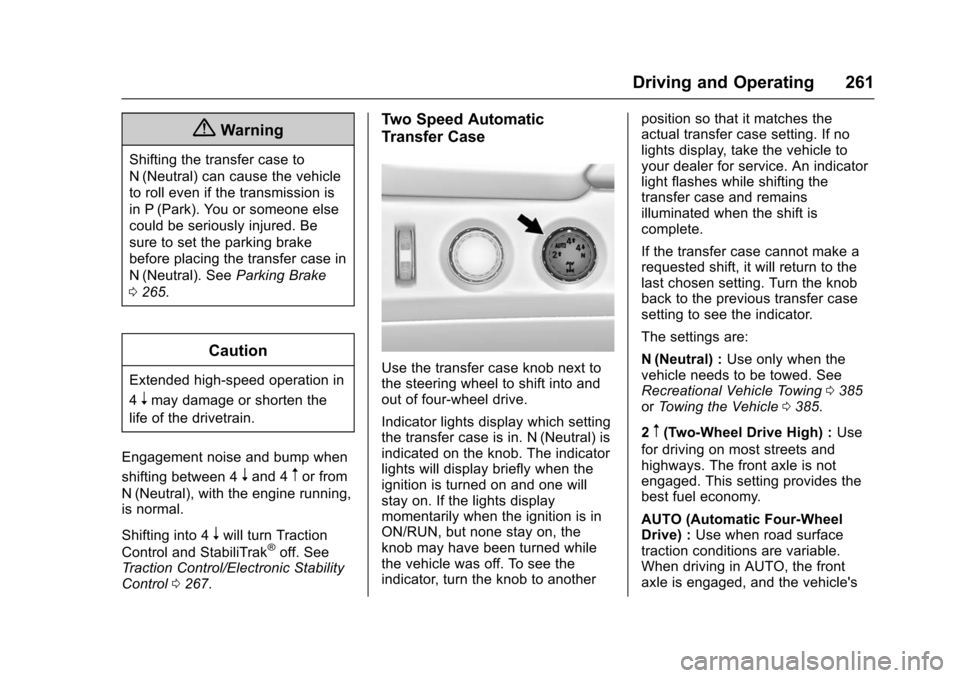
Two Speed Automatic
Transfer Case
Use the transfer case knob next to
the steering wheel to shift into and
out of four-wheel drive.
Indicator lights display which setting
the transfer case is in. N (Neutral) is
indicated on the knob. The indicator
lights will display briefly when the
ignition is turned on and one will
stay on. If the lights display
momentarily when the ignition is in
ON/RUN, but none stay on, the
knob may have been turned while
the vehicle was off. To see the
indicator, turn the knob to another position so that it matches the
actual transfer case setting. If no
lights display, take the vehicle to
your dealer for service. An indicator
light flashes while shifting the
transfer case and remains
illuminated when the shift is
complete.
If the transfer case cannot make a
requested shift, it will return to the
last chosen setting. Turn the knob
back to the previous transfer case
setting to see the indicator.
The settings are:
N (Neutral) :
Use only when the
vehicle needs to be towed. See
Recreational Vehicle Towing 0385
or Towing the Vehicle 0385.
2
m(Two-Wheel Drive High) : Use
for driving on most streets and
highways. The front axle is not
engaged. This setting provides the
best fuel economy.
AUTO (Automatic Four-Wheel
Drive) : Use when road surface
traction conditions are variable.
When driving in AUTO, the front
axle is engaged, and the vehicle's
Page 263 of 453
Chevrolet Tahoe/Suburban Owner Manual (GMNA-Localizing-U.S./Canada/
Mexico-9159366) - 2016 - crc - 5/20/15
262 Driving and Operating
power is sent to the front and rear
wheels automatically based on
driving conditions. This setting
provides slightly lower fuel economy
than 2
m.
4
m(Four-Wheel Drive High) : Use
this position when extra traction is
needed, such as when driving on
snowy or icy roads, when
off-roading, or when plowing snow.
4
n(Four-Wheel Drive Low) : This
setting engages the front axle and
delivers extra torque. Choose 4
n
when driving off-road in deep sand,
deep mud, or deep snow, and while
climbing or descending steep hills.
Shifting into 4
nwill turn Traction
Control and StabiliTrak off. See
Traction Control/Electronic Stability
Control 0267.
Shifting Into 4
mor AUTO
Turn the knob to the 4
mor AUTO
position at any speed, except from 4
n. The indicator light will flash while
shifting and will remain on when the
shift is completed. Shifting Into 2
m
Turn the knob to 2mat any speed,
except when shifting from 4
n. The
indicator light will flash while shifting
and will remain on when the shift is
completed.
Shifting Into 4
n
When 4nis engaged, keep vehicle
speed below 72 km/h (45 mph).
To shift into 4
n:
1. The ignition must be in ON/ RUN and the vehicle must be
stopped or moving less than
5 km/h (3 mph) with the
transmission in N (Neutral). It is
best for the vehicle to be
moving 1.6 to 3.2 km/h
(1 to 2 mph).
2. Turn the knob to 4
n. Wait for
the 4
nindicator light to stop
flashing before shifting the
transmission into gear.
Caution
Shifting the transmission into gear
before the requested mode
indicator light has stopped
flashing could damage the
transfer case.
If the transmission is in gear and/or
moving more than 5 km/h (3 mph),
the 4
nindicator light will flash for
30 seconds and not complete the
shift. After 30 seconds the transfer
case will shift to 4
m. Turn the knob
to 4
mto display the indicator. With
the vehicle moving less than 5 km/h
(3 mph), and the transmission in
N (Neutral), attempt the shift again.
Shifting Out of 4
n
To shift:
1. The vehicle must be stopped or moving less than 5 km/h
(3 mph) with the transmission
in N (Neutral) and the ignition in
ON/RUN. It is best for the
vehicle to be moving
1.6 to 3.2 km/h (1 to 2 mph).
Page 265 of 453
Chevrolet Tahoe/Suburban Owner Manual (GMNA-Localizing-U.S./Canada/
Mexico-9159366) - 2016 - crc - 5/20/15
264 Driving and Operating
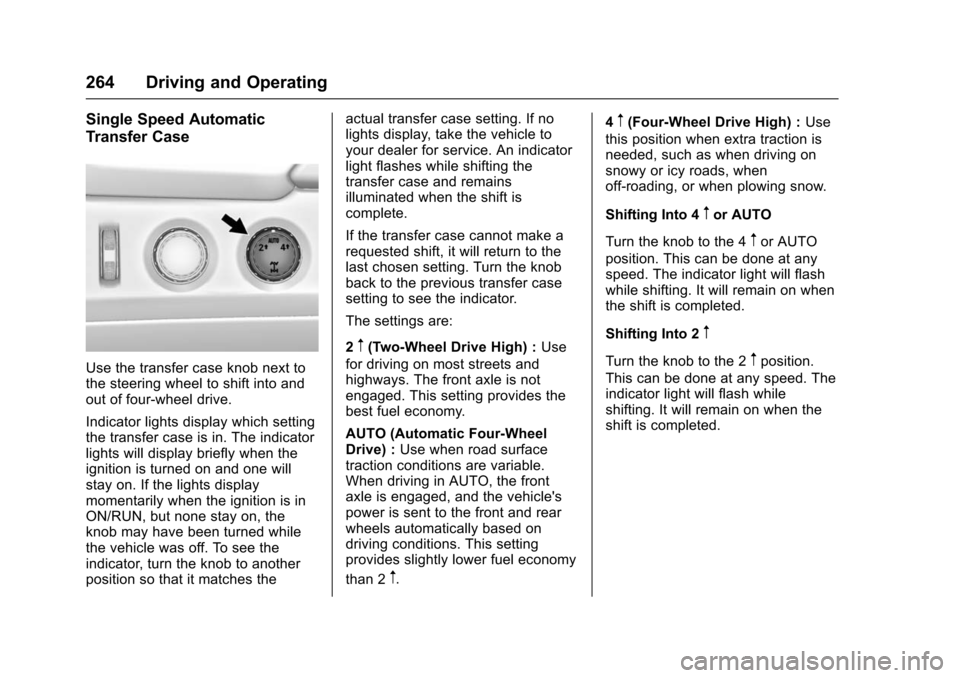
Single Speed Automatic
Transfer Case
Use the transfer case knob next to
the steering wheel to shift into and
out of four-wheel drive.
Indicator lights display which setting
the transfer case is in. The indicator
lights will display briefly when the
ignition is turned on and one will
stay on. If the lights display
momentarily when the ignition is in
ON/RUN, but none stay on, the
knob may have been turned while
the vehicle was off. To see the
indicator, turn the knob to another
position so that it matches theactual transfer case setting. If no
lights display, take the vehicle to
your dealer for service. An indicator
light flashes while shifting the
transfer case and remains
illuminated when the shift is
complete.
If the transfer case cannot make a
requested shift, it will return to the
last chosen setting. Turn the knob
back to the previous transfer case
setting to see the indicator.
The settings are:
2
m(Two-Wheel Drive High) :
Use
for driving on most streets and
highways. The front axle is not
engaged. This setting provides the
best fuel economy.
AUTO (Automatic Four-Wheel
Drive) : Use when road surface
traction conditions are variable.
When driving in AUTO, the front
axle is engaged, and the vehicle's
power is sent to the front and rear
wheels automatically based on
driving conditions. This setting
provides slightly lower fuel economy
than 2
m. 4
m(Four-Wheel Drive High) :
Use
this position when extra traction is
needed, such as when driving on
snowy or icy roads, when
off-roading, or when plowing snow.
Shifting Into 4
mor AUTO
Turn the knob to the 4
mor AUTO
position. This can be done at any
speed. The indicator light will flash
while shifting. It will remain on when
the shift is completed.
Shifting Into 2
m
Turn the knob to the 2mposition.
This can be done at any speed. The
indicator light will flash while
shifting. It will remain on when the
shift is completed.
Page 268 of 453
Chevrolet Tahoe/Suburban Owner Manual (GMNA-Localizing-U.S./Canada/
Mexico-9159366) - 2016 - crc - 5/20/15
Driving and Operating 267
Control (ITBC) system, HSA may
also apply the trailer brakes. It will
not activate if the vehicle is in a
drive gear and facing downhill or if
the vehicle is facing uphill and in
R (Reverse). There may be
situations on minor hills (less than
5% grade) with a loaded vehicle or
while pulling a trailer where HSA
may activate.Ride Control Systems
Traction Control/
Electronic Stability
Control
System Operation
The vehicle has a Traction Control
System (TCS) and StabiliTrak®, an
electronic stability control system.
These systems help limit wheel spin
and assist the driver in maintaining
control, especially on slippery road
conditions.
TCS activates if it senses that any
of the drive wheels are spinning or
beginning to lose traction. When this
happens, TCS applies the brakes to
the spinning wheels and reduces
engine power to limit wheel spin.
StabiliTrak activates when the
vehicle senses a difference between
the intended path and the direction
the vehicle is actually traveling.
StabiliTrak selectively applies
braking pressure to any one of the
vehicle wheel brakes to assist the
driver in keeping the vehicle on the intended path. Trailer Sway Control
(TSC) is also on automatically when
the vehicle is started. See
Trailer
Sway Control (TSC) 0308.
If cruise control is being used and
traction control or StabiliTrak begins
to limit wheel spin, cruise control will
disengage. Cruise control may be
turned back on when road
conditions allow.
Both systems come on
automatically when the vehicle is
started and begins to move. The
systems may be heard or felt while
they are operating or while
performing diagnostic checks. This
is normal and does not mean there
is a problem with the vehicle.
It is recommended to leave both
systems on for normal driving
conditions, but it may be necessary
to turn TCS off if the vehicle gets
stuck in sand, mud, ice, or snow.
See If the Vehicle Is Stuck 0238
and “Turning the Systems Off and
On” later in this section.
When the transfer case is in
Four-Wheel Drive Low, the stability
system is automatically disabled,
Page 311 of 453
Chevrolet Tahoe/Suburban Owner Manual (GMNA-Localizing-U.S./Canada/
Mexico-9159366) - 2016 - crc - 5/19/15
310 Vehicle Care
Vehicle Care
General Information
General Information . . . . . . . . . . 311
California Proposition65 Warning . . . . . . . . . . . . . . . . . . 311
California Perchlorate Materials Requirements . . . . . 312
Accessories and Modifications . . . . . . . . . . . . . . . . 312
Vehicle Checks
Doing Your OwnService Work . . . . . . . . . . . . . . . 312
Hood . . . . . . . . . . . . . . . . . . . . . . . . . 313
Engine Compartment Overview . . . . . . . . . . . . . . . . . . . . 314
Engine Oil . . . . . . . . . . . . . . . . . . . . 315
Engine Oil Life System . . . . . . . 317
Automatic Transmission Fluid . . . . . . . . . . . . . . . . . . . . . . . . 318
Engine Air Cleaner/Filter . . . . . . 321
Cooling System . . . . . . . . . . . . . . 322
Engine Coolant . . . . . . . . . . . . . . . 323
Engine Overheating . . . . . . . . . . 326
Engine Fan . . . . . . . . . . . . . . . . . . . 327
Power Steering Fluid . . . . . . . . . 328
Washer Fluid . . . . . . . . . . . . . . . . . 328
Brakes . . . . . . . . . . . . . . . . . . . . . . . 328
Brake Fluid . . . . . . . . . . . . . . . . . . . 329 Battery - North America . . . . . . 331
Four-Wheel Drive . . . . . . . . . . . . . 331
Front Axle . . . . . . . . . . . . . . . . . . . . 332
Rear Axle . . . . . . . . . . . . . . . . . . . . 332
Noise Control System . . . . . . . . 333
Starter Switch Check . . . . . . . . . 334
Automatic Transmission Shift
Lock Control Function
Check . . . . . . . . . . . . . . . . . . . . . . . 334
Ignition Transmission Lock Check . . . . . . . . . . . . . . . . . . . . . . . 335
Park Brake and P (Park) Mechanism Check . . . . . . . . . . 335
Wiper Blade Replacement . . . . 335
Glass Replacement . . . . . . . . . . 336
Windshield Replacement . . . . . 336
Headlamp Aiming
Headlamp Aiming . . . . . . . . . . . . 337
Bulb Replacement
Bulb Replacement . . . . . . . . . . . . 337
Halogen Bulbs . . . . . . . . . . . . . . . . 337
High Intensity Discharge (HID) Lighting . . . . . . . . . . . . . . . . . . . . . 338
LED Lighting . . . . . . . . . . . . . . . . . 338
Headlamps . . . . . . . . . . . . . . . . . . . 338
Fog Lamps . . . . . . . . . . . . . . . . . . . 338
Front Turn Signal Lamps . . . . . 339 Taillamps, Turn Signal,
Stoplamps, and Back-Up
Lamps . . . . . . . . . . . . . . . . . . . . . . 339
License Plate Lamp . . . . . . . . . . 340
Replacement Bulbs . . . . . . . . . . . 341
Electrical System
Electrical System Overload . . . 341
Fuses . . . . . . . . . . . . . . . . . . . . . . . . 342
Engine Compartment Fuse Block . . . . . . . . . . . . . . . . . . . . . . . . 342
Instrument Panel Fuse Block (Left) . . . . . . . . . . . . . . . . . 345
Instrument Panel Fuse Block (Right) . . . . . . . . . . . . . . . . . . . . . . 348
Rear Compartment Fuse Block . . . . . . . . . . . . . . . . . . . . . . . . 350
Wheels and Tires
Tires . . . . . . . . . . . . . . . . . . . . . . . . . . 351
All-Season Tires . . . . . . . . . . . . . . 352
Winter Tires . . . . . . . . . . . . . . . . . . 352
Low-Profile Tires . . . . . . . . . . . . . 353
All-Terrain Tires . . . . . . . . . . . . . . . 353
Tire Sidewall Labeling . . . . . . . . 353
Tire Designations . . . . . . . . . . . . . 354
Tire Terminology and
Definitions . . . . . . . . . . . . . . . . . . 355
Tire Pressure . . . . . . . . . . . . . . . . . 358
Tire Pressure for High-Speed
Operation . . . . . . . . . . . . . . . . . . . 359
Page 332 of 453
Chevrolet Tahoe/Suburban Owner Manual (GMNA-Localizing-U.S./Canada/
Mexico-9159366) - 2016 - crc - 5/19/15
Vehicle Care 331
Battery - North America
The original equipment battery is
maintenance free. Do not remove
the cap and do not add fluid.
Refer to the replacement number
shown on the original battery label
when a new battery is needed. See
Engine Compartment Overview
0314 for battery location.
{Warning
WARNING: Battery posts,
terminals, and related
accessories contain lead and lead
compounds, chemicals known to
the State of California to cause
cancer and birth defects or other
reproductive harm. Batteries also
contain other chemicals known to
the State of California to cause
cancer. WASH HANDS AFTER
HANDLING. SeeCalifornia
Proposition 65 Warning 0311.
Vehicle Storage
{Warning
Batteries have acid that can burn
you and gas that can explode.
You can be badly hurt if you are
not careful. See Jump Starting -
North America 0382 for tips on
working around a battery without
getting hurt.
Infrequent Usage: Remove the
black, negative (−) cable from the
battery to keep the battery from
running down.
Extended Storage: Remove the
black, negative (−) cable from the
battery or use a battery trickle
charger.
Four-Wheel Drive
Transfer Case
When to Check Lubricant
Refer to Maintenance Schedule
0 401 to determine when to check
the lubricant. How to Check Lubricant
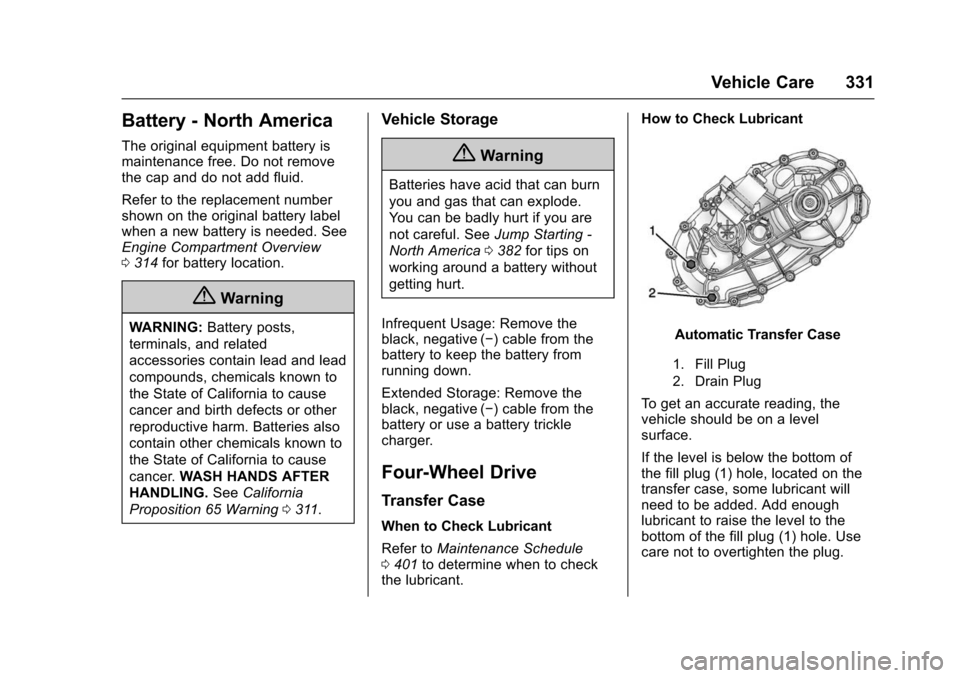
Automatic Transfer Case
1. Fill Plug
2. Drain Plug
To get an accurate reading, the
vehicle should be on a level
surface.
If the level is below the bottom of
the fill plug (1) hole, located on the
transfer case, some lubricant will
need to be added. Add enough
lubricant to raise the level to the
bottom of the fill plug (1) hole. Use
care not to overtighten the plug.
Page 364 of 453

Chevrolet Tahoe/Suburban Owner Manual (GMNA-Localizing-U.S./Canada/
Mexico-9159366) - 2016 - crc - 5/19/15
Vehicle Care 363
passenger side front tire, passenger
side rear tire, and driver side rear.
See your dealer for service or to
purchase a relearn tool. A TPMS
relearn tool can also be purchased.
See Tire Pressure Monitor Sensor
Activation Tool at
www.gmtoolsandequipment.com or
call 1-800-GM TOOLS
(1-800-468-6657).
There are two minutes to match the
first tire/wheel position, and
five minutes overall to match all four
tire/wheel positions. If it takes
longer, the matching process stops
and must be restarted.
The TPMS sensor matching
process is:1. Set the parking brake.
2. Turn the ignition to ON/RUN with the engine off or place the
vehicle power mode in ON/
RUN/START.
3. Uplevel DIC Only: Make sure the Tire Pressure info page
option is turned on. The info
pages on the DIC can be
turned on and off through the Settings menu. See
Driver
Information Center (DIC) (Base
Level) 0153 orDriver
Information Center (DIC)
(Uplevel) 0155.
4. If the vehicle has an uplevel DIC, use the DIC controls on
the right side of the steering
wheel to scroll to the Tire
Pressure screen under the DIC
info page.
If the vehicle has a base level
DIC, use the trip odometer
reset stem to scroll to the Tire
Pressure screen.
5. If the vehicle has an uplevel DIC, press and hold the
V
(Set/Reset) button located in
the center of the DIC controls.
If the vehicle has a base level
DIC, press and hold the trip
odometer reset stem for about
five seconds. A message
asking if the process should
begin should appear. Select
yes and press the trip
odometer reset stem to confirm
the selection. The horn sounds twice to
signal the receiver is in relearn
mode and the TIRE
LEARNING ACTIVE message
displays on the DIC screen.
6. Start with the driver side front tire.
7. Place the relearn tool against the tire sidewall, near the valve
stem. Then press the button to
activate the TPMS sensor.
A horn chirp confirms that the
sensor identification code has
been matched to this tire and
wheel position.
8. Proceed to the passenger side front tire, and repeat the
procedure in Step 7.
9. Proceed to the passenger side rear tire, and repeat the
procedure in Step 7.
10. Proceed to the driver side rear tire, and repeat the procedure
in Step 7. The horn sounds two
times to indicate the sensor
identification code has been
matched to the driver side rear
tire, and the TPMS sensor