2016 CHEVROLET SUBURBAN automatic
[x] Cancel search: automaticPage 22 of 453
Chevrolet Tahoe/Suburban Owner Manual (GMNA-Localizing-U.S./Canada/
Mexico-9159366) - 2016 - crc - 5/19/15
In Brief 21
While using Range Selection Mode,
cruise control and the Tow/Haul
Mode can be used.
Grade Braking is not available when
Range Selection Mode is active.
SeeTow/Haul Mode 0259.
Four-Wheel Drive
If the vehicle has four-wheel drive,
you can send the engine's driving
power to all four wheels for extra
traction.
Automatic Transfer Case
Two Speed Transfer Case
Single Speed Transfer Case
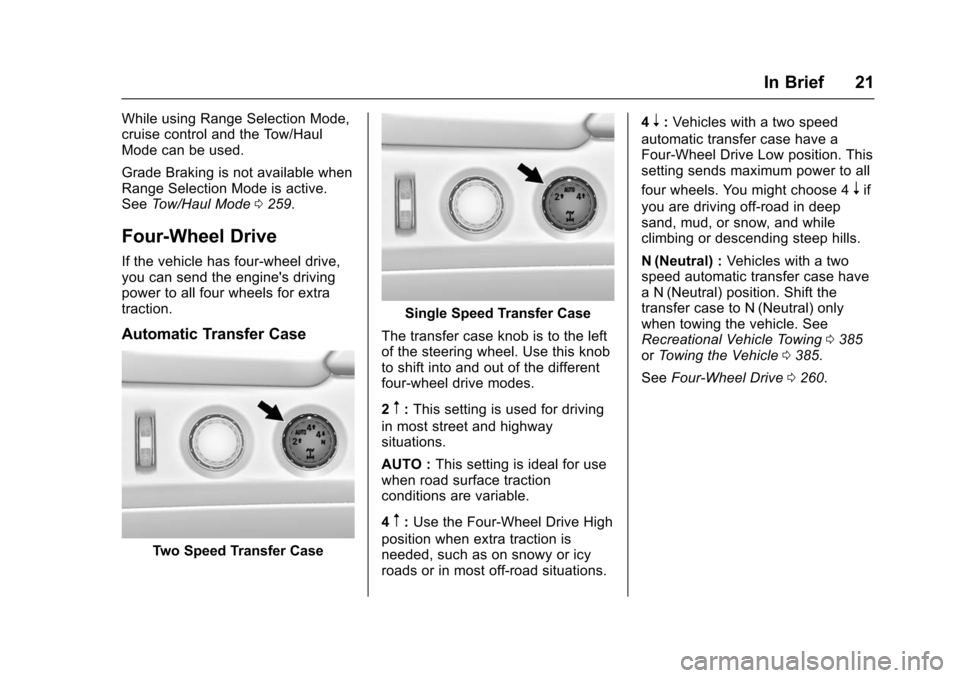
The transfer case knob is to the left
of the steering wheel. Use this knob
to shift into and out of the different
four-wheel drive modes.
2
m: This setting is used for driving
in most street and highway
situations.
AUTO : This setting is ideal for use
when road surface traction
conditions are variable.
4
m: Use the Four-Wheel Drive High
position when extra traction is
needed, such as on snowy or icy
roads or in most off-road situations. 4
n:
Vehicles with a two speed
automatic transfer case have a
Four-Wheel Drive Low position. This
setting sends maximum power to all
four wheels. You might choose 4
nif
you are driving off-road in deep
sand, mud, or snow, and while
climbing or descending steep hills.
N (Neutral) : Vehicles with a two
speed automatic transfer case have
a N (Neutral) position. Shift the
transfer case to N (Neutral) only
when towing the vehicle. See
Recreational Vehicle Towing 0385
or Towing the Vehicle 0385.
See Four-Wheel Drive 0260.
Page 26 of 453
Chevrolet Tahoe/Suburban Owner Manual (GMNA-Localizing-U.S./Canada/
Mexico-9159366) - 2016 - crc - 5/19/15
In Brief 25
V:Press to open a menu or select
a menu item. Press and hold to
reset values on certain screens.
See Driver Information Center (DIC)
(Base Level) 0153 orDriver
Information Center (DIC) (Uplevel)
0 155.
Forward Collision Alert
(FCA) System
If equipped, FCA may help avoid or
reduce the harm caused by
front-end crashes. FCA provides a
green indicator,
V, when a vehicle
is detected ahead. This indicator
displays amber if you follow a
vehicle much too closely. When
approaching a vehicle ahead too
quickly, FCA provides a flashing red
alert on the windshield and rapidly
beeps or pulses the driver seat.
See Forward Collision Alert (FCA)
System 0283.
Front Automatic Braking
(FAB) System
If the vehicle has Adaptive Cruise
Control (ACC), it also has FAB,
which includes Intelligent Brake
Assist (IBA). When the system
detects a vehicle ahead in your path
that is traveling in the same
direction that you may be about to
crash into, it can provide a boost to
braking or automatically brake the
vehicle. This can help avoid or
lessen the severity of crashes when
driving in a forward gear.
See Front Automatic Braking (FAB)
System 0286.
Lane Keep Assist (LKA)
If equipped, LKA may help avoid
crashes due to unintentional lane
departures. It may assist by gently
turning the steering wheel if the
vehicle approaches a detected lane
marking without using a turn signal
in that direction. It may also provide
a Lane Departure Warning (LDW)
alert as the lane marking is crossed.
The system will not assist or alert if it detects that you are actively
steering. Override LKA by turning
the steering wheel. LKA uses a
camera to detect lane markings
between 60 km/h (37 mph) and
180 km/h (112 mph).
See
Lane Departure Warning (LDW)
0 289 andLane Keep Assist (LKA)
0 289.
Lane Change Alert (LCA)
If equipped, the LCA system is a
lane-changing aid that assists
drivers with avoiding lane change
crashes that occur with moving
vehicles in the side blind zone (or
spot) areas or with vehicles rapidly
approaching these areas from
behind. The LCA warning display
will light up in the corresponding
outside side mirror and will flash if
the turn signal is on. The Side Blind
Zone Alert (SBZA) system is
included as part of the LCA system.
See Side Blind Zone Alert (SBZA)
0 287 andLane Change Alert (LCA)
0 287.
Page 28 of 453
Chevrolet Tahoe/Suburban Owner Manual (GMNA-Localizing-U.S./Canada/
Mexico-9159366) - 2016 - crc - 5/19/15
In Brief 27
Universal Remote System
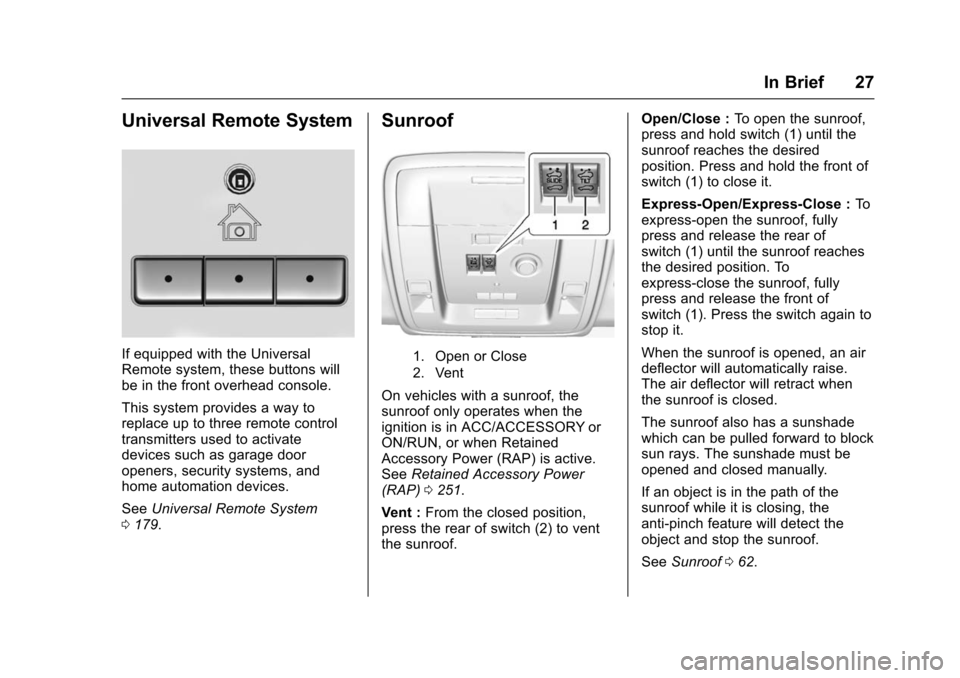
If equipped with the Universal
Remote system, these buttons will
be in the front overhead console.
This system provides a way to
replace up to three remote control
transmitters used to activate
devices such as garage door
openers, security systems, and
home automation devices.
SeeUniversal Remote System
0 179.
Sunroof
1. Open or Close
2. Vent
On vehicles with a sunroof, the
sunroof only operates when the
ignition is in ACC/ACCESSORY or
ON/RUN, or when Retained
Accessory Power (RAP) is active.
See Retained Accessory Power
(RAP) 0251.
Vent : From the closed position,
press the rear of switch (2) to vent
the sunroof. Open/Close :
To open the sunroof,
press and hold switch (1) until the
sunroof reaches the desired
position. Press and hold the front of
switch (1) to close it.
Express-Open/Express-Close : To
express-open the sunroof, fully
press and release the rear of
switch (1) until the sunroof reaches
the desired position. To
express-close the sunroof, fully
press and release the front of
switch (1). Press the switch again to
stop it.
When the sunroof is opened, an air
deflector will automatically raise.
The air deflector will retract when
the sunroof is closed.
The sunroof also has a sunshade
which can be pulled forward to block
sun rays. The sunshade must be
opened and closed manually.
If an object is in the path of the
sunroof while it is closing, the
anti-pinch feature will detect the
object and stop the sunroof.
See Sunroof 062.
Page 29 of 453

Chevrolet Tahoe/Suburban Owner Manual (GMNA-Localizing-U.S./Canada/
Mexico-9159366) - 2016 - crc - 5/19/15
28 In Brief
Performance and
Maintenance
Traction Control/
Electronic Stability
Control
The vehicle has a traction control
system that limits wheel spin and
the StabiliTrak system that assists
with directional control of the vehicle
in difficult driving conditions. Both
systems come on automatically
when the vehicle is started and
begins to move.
.To turn off traction control, press
and release
gon the instrument
panel to the left of the steering
wheel. The traction off light
i
displays in the instrument
cluster. The appropriate DIC
message displays. See Ride
Control System Messages
0 167.
. To turn off both traction control
and StabiliTrak, press and
hold
guntiliandgilluminate in the instrument cluster and the
appropriate DIC message
displays. See
Ride Control
System Messages 0167.
. Press and release
gagain to
turn on both systems.
StabiliTrak will automatically turn on
if the vehicle exceeds 56 km/h
(35 mph). Traction control will
remain off.
See Traction Control/Electronic
Stability Control 0267.
Tire Pressure Monitor
This vehicle may have a Tire
Pressure Monitor System (TPMS).
The low tire pressure warning light
alerts to a significant loss in
pressure of one of the vehicle's
tires. If the warning light comes on,
stop as soon as possible and inflate the tires to the recommended
pressure shown on the Tire and
Loading Information label. See
Vehicle Load Limits
0240. The
warning light will remain on until the
tire pressure is corrected.
The low tire pressure warning light
may come on in cool weather when
the vehicle is first started, and then
turn off as the vehicle is driven. This
may be an early indicator that the
tire pressures are getting low and
the tires need to be inflated to the
proper pressure.
The TPMS does not replace normal
monthly tire maintenance. Maintain
the correct tire pressures.
See Tire Pressure Monitor System
0 360.
Engine Oil Life System
The engine oil life system calculates
engine oil life based on vehicle use
and, on most vehicles, displays a
DIC message when it is necessary
to change the engine oil and filter.
The oil life system should be reset
to 100% only following an oil
change.
Page 31 of 453
Chevrolet Tahoe/Suburban Owner Manual (GMNA-Localizing-U.S./Canada/
Mexico-9159366) - 2016 - crc - 5/19/15
30 In Brief
Roadside Assistance
Program
U.S.: 1-800-243-8872
TTY Users (U.S. Only):
1-888-889-2438
Canada: 1-800-268-6800
New Chevrolet owners are
automatically enrolled in the
Roadside Assistance Program.
SeeRoadside Assistance Program
0 421.
Page 32 of 453

Chevrolet Tahoe/Suburban Owner Manual (GMNA-Localizing-U.S./Canada/
Mexico-9159366) - 2016 - crc - 5/19/15
Keys, Doors, and Windows 31
Keys, Doors, and
Windows
Keys and Locks
Keys (Key Access) . . . . . . . . . . . . 31
Keys (Keyless Access) . . . . . . . . 34
Remote Keyless Entry (RKE)System . . . . . . . . . . . . . . . . . . . . . . . 35
Remote Keyless Entry (RKE) System Operation (Key
Access) . . . . . . . . . . . . . . . . . . . . . . 35
Remote Keyless Entry (RKE) System Operation (Keyless
Access) . . . . . . . . . . . . . . . . . . . . . . 37
Remote Vehicle Start . . . . . . . . . . 43
Door Locks . . . . . . . . . . . . . . . . . . . . 44
Power Door Locks . . . . . . . . . . . . . 45
Delayed Locking . . . . . . . . . . . . . . . 45
Automatic Door Locks . . . . . . . . . 45
Lockout Protection . . . . . . . . . . . . . 46
Safety Locks . . . . . . . . . . . . . . . . . . . 46
Doors
Liftgate . . . . . . . . . . . . . . . . . . . . . . . . 47
Power Assist Steps . . . . . . . . . . . . 51
Vehicle Security
Vehicle Security . . . . . . . . . . . . . . . . 52
Vehicle Alarm System . . . . . . . . . 52 Immobilizer . . . . . . . . . . . . . . . . . . . . 54
Immobilizer Operation (Key
Access) . . . . . . . . . . . . . . . . . . . . . . 54
Immobilizer Operation (Keyless Access) . . . . . . . . . . . . . . . . . . . . . . 54
Exterior Mirrors
Convex Mirrors . . . . . . . . . . . . . . . . 55
Power Mirrors . . . . . . . . . . . . . . . . . . 56
Folding Mirrors . . . . . . . . . . . . . . . . . 56
Heated Mirrors . . . . . . . . . . . . . . . . . 57
Blind Spot Mirrors . . . . . . . . . . . . . . 57
Reverse Tilt Mirrors . . . . . . . . . . . . 58
Interior Mirrors
Interior Rearview Mirrors . . . . . . . 58
Manual Rearview Mirror . . . . . . . . 58
Automatic Dimming Rearview
Mirror . . . . . . . . . . . . . . . . . . . . . . . . . 59
Child-View Mirror . . . . . . . . . . . . . . 59
Windows
Windows . . . . . . . . . . . . . . . . . . . . . . . 59
Power Windows . . . . . . . . . . . . . . . 59
Sun Visors . . . . . . . . . . . . . . . . . . . . . 61
Roof
Sunroof . . . . . . . . . . . . . . . . . . . . . . . . 62
Keys and Locks
Keys (Key Access)
{Warning
Leaving children in a vehicle with
an ignition key or Remote
Keyless Entry (RKE) transmitter is
dangerous and children or others
could be seriously injured or
killed. They could operate the
power window or other controls or
make the vehicle move. The
windows will function with the key
in the ignition or with the RKE
transmitter in the vehicle, and
children or others could be caught
in the path of a closing window.
Do not leave children in a vehicle
with the ignition key or an RKE
transmitter.
Page 40 of 453
Chevrolet Tahoe/Suburban Owner Manual (GMNA-Localizing-U.S./Canada/
Mexico-9159366) - 2016 - crc - 5/19/15
Keys, Doors, and Windows 39
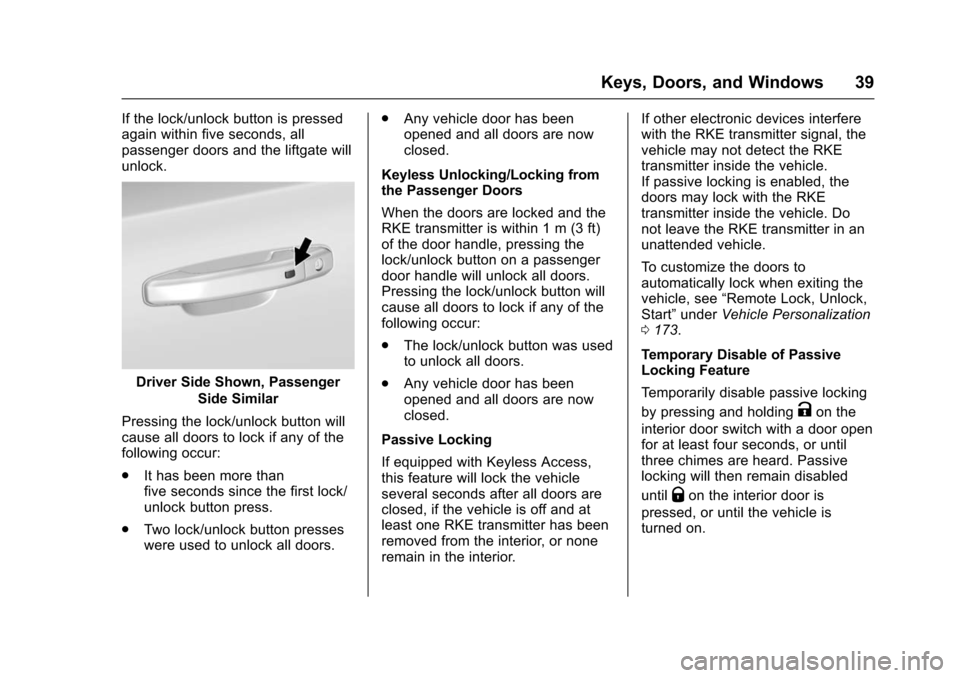
If the lock/unlock button is pressed
again within five seconds, all
passenger doors and the liftgate will
unlock.
Driver Side Shown, PassengerSide Similar
Pressing the lock/unlock button will
cause all doors to lock if any of the
following occur:
. It has been more than
five seconds since the first lock/
unlock button press.
. Two lock/unlock button presses
were used to unlock all doors. .
Any vehicle door has been
opened and all doors are now
closed.
Keyless Unlocking/Locking from
the Passenger Doors
When the doors are locked and the
RKE transmitter is within 1 m (3 ft)
of the door handle, pressing the
lock/unlock button on a passenger
door handle will unlock all doors.
Pressing the lock/unlock button will
cause all doors to lock if any of the
following occur:
. The lock/unlock button was used
to unlock all doors.
. Any vehicle door has been
opened and all doors are now
closed.
Passive Locking
If equipped with Keyless Access,
this feature will lock the vehicle
several seconds after all doors are
closed, if the vehicle is off and at
least one RKE transmitter has been
removed from the interior, or none
remain in the interior. If other electronic devices interfere
with the RKE transmitter signal, the
vehicle may not detect the RKE
transmitter inside the vehicle.
If passive locking is enabled, the
doors may lock with the RKE
transmitter inside the vehicle. Do
not leave the RKE transmitter in an
unattended vehicle.
To customize the doors to
automatically lock when exiting the
vehicle, see
“Remote Lock, Unlock,
Start” under Vehicle Personalization
0 173.
Temporary Disable of Passive
Locking Feature
Temporarily disable passive locking
by pressing and holding
Kon the
interior door switch with a door open
for at least four seconds, or until
three chimes are heard. Passive
locking will then remain disabled
until
Qon the interior door is
pressed, or until the vehicle is
turned on.
Page 46 of 453
Chevrolet Tahoe/Suburban Owner Manual (GMNA-Localizing-U.S./Canada/
Mexico-9159366) - 2016 - crc - 5/19/15
Keys, Doors, and Windows 45
.Pushing down the manual lock
knob on the driver door will lock
all doors. Pushing down the
manual lock knob on a
passenger door will lock only
that door.
. Pulling an interior door handle
will unlock the door. Pulling the
door handle again unlatches it.
Keyless Access
If equipped, the RKE transmitter
must be within 1 m (3 ft) of the door
being opened. Press the button on
the door handle to open. See
“Keyless Access Operation” in
Remote Keyless Entry (RKE)
System Operation (Key Access)
0 35 orRemote Keyless Entry
(RKE) System Operation (Keyless
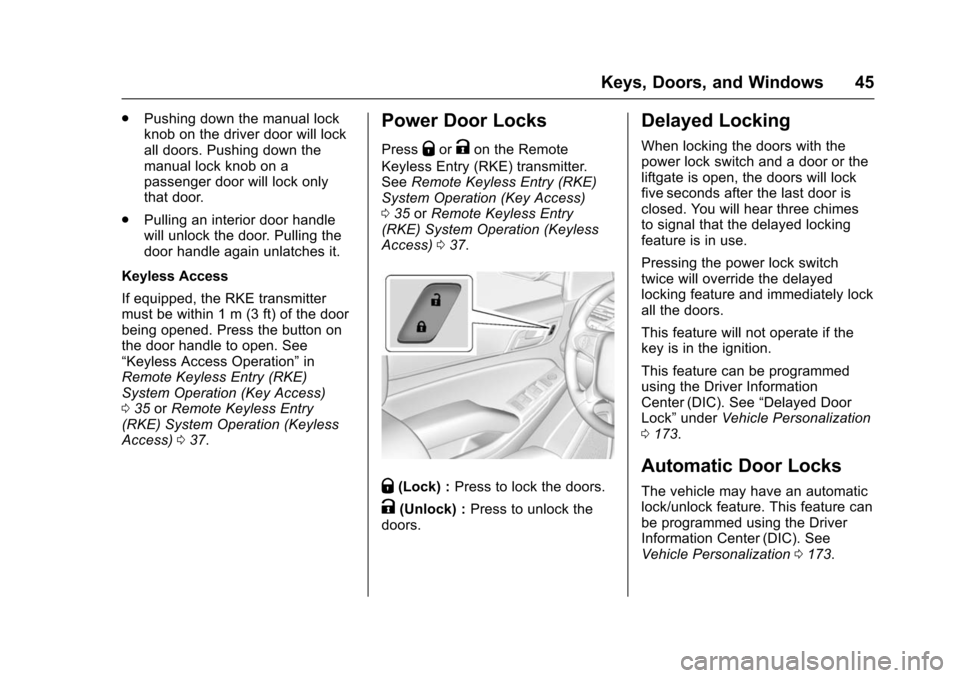
Access) 037.Power Door Locks
PressQorKon the Remote
Keyless Entry (RKE) transmitter.
See Remote Keyless Entry (RKE)
System Operation (Key Access)
0 35 orRemote Keyless Entry
(RKE) System Operation (Keyless
Access) 037.
Q(Lock) : Press to lock the doors.
K(Unlock) : Press to unlock the
doors.
Delayed Locking
When locking the doors with the
power lock switch and a door or the
liftgate is open, the doors will lock
five seconds after the last door is
closed. You will hear three chimes
to signal that the delayed locking
feature is in use.
Pressing the power lock switch
twice will override the delayed
locking feature and immediately lock
all the doors.
This feature will not operate if the
key is in the ignition.
This feature can be programmed
using the Driver Information
Center (DIC). See “Delayed Door
Lock” under Vehicle Personalization
0 173.
Automatic Door Locks
The vehicle may have an automatic
lock/unlock feature. This feature can
be programmed using the Driver
Information Center (DIC). See
Vehicle Personalization 0173.