2016 CHEVROLET SS seat adjustment
[x] Cancel search: seat adjustmentPage 6 of 397

Chevrolet SS Sedan Owner Manual (GMNA-Localizing-U.S.-9234782) - 2016 -
CRC - 8/24/15
In Brief 5
In Brief
Instrument Panel
Instrument Panel Overview . . . . . . 6
Initial Drive Information
Initial Drive Information . . . . . . . . . . 8
Remote Keyless Entry (RKE)System . . . . . . . . . . . . . . . . . . . . . . . . 8
Remote Vehicle Start . . . . . . . . . . . 8
Door Locks . . . . . . . . . . . . . . . . . . . . . 9
Windows . . . . . . . . . . . . . . . . . . . . . . . 10
Seat Adjustment . . . . . . . . . . . . . . . 10
Memory Features . . . . . . . . . . . . . . 11
Heated and Ventilated Seats . . . 11
Head Restraint Adjustment . . . . 12
Safety Belts . . . . . . . . . . . . . . . . . . . . 12
Passenger Sensing System . . . 12
Mirror Adjustment . . . . . . . . . . . . . . 12
Steering Wheel Adjustment . . . . 13
Interior Lighting . . . . . . . . . . . . . . . . 13
Exterior Lighting . . . . . . . . . . . . . . . 14
Windshield Wiper/Washer . . . . . . 15
Climate Controls . . . . . . . . . . . . . . . 16
Transmission . . . . . . . . . . . . . . . . . . 16
Vehicle Features
Steering Wheel Controls . . . . . . . 17
Cruise Control . . . . . . . . . . . . . . . . . 18 Driver Information
Center (DIC) . . . . . . . . . . . . . . . . . 18
Forward Collision Alert (FCA) System . . . . . . . . . . . . . . . . . . . . . . . 18
Lane Departure
Warning (LDW) . . . . . . . . . . . . . . . 19
Side Blind Zone Alert (SBZA) . . . . . . . . . . . . . . . . . . 19
Rear Vision Camera (RVC) . . . . 19
Rear Cross Traffic Alert (RCTA) System . . . . . . . . . . . . . . . . . . . . . . . 19
Parking Assist . . . . . . . . . . . . . . . . . 19
Automatic Parking Assist (APA) . . . . . . . . . . . . . . . . . . 19
Power Outlets . . . . . . . . . . . . . . . . . 20
Sunroof . . . . . . . . . . . . . . . . . . . . . . . . 20
Performance and Maintenance
Traction Control/Electronic Stability Control . . . . . . . . . . . . . . 21
Tire Pressure Monitor . . . . . . . . . . 21
Engine Oil Life System . . . . . . . . 21
Driving for Better Fuel Economy . . . . . . . . . . . . . . . . . . . . . 22
Battery . . . . . . . . . . . . . . . . . . . . . . . . . 22
Roadside Assistance Program . . . . . . . . . . . . . . . . . . . . . . 22
ProCarManuals.com
Page 8 of 397

Chevrolet SS Sedan Owner Manual (GMNA-Localizing-U.S.-9234782) - 2016 -
CRC - 8/24/15
In Brief 7
1.Air Vents 0212ii.
2. Turn Signal Lever. See Turn
and Lane-Change Signals
0 125
ii.
Driver Information Center (DIC)
Controls. See Driver
Information Center (DIC)
0 105
ii.
3. Paddle Shifter Up. See Manual
Mode 0236
ii.
4. Cruise Control 0248
ii.
Lane Departure Warning
(LDW) 0259
ii(If Equipped).
Forward Collision Alert (FCA)
System 0255
ii(If Equipped).
5. Instrument Cluster 093
ii.
6. Horn 090
ii.
7. Steering Wheel Controls 089
ii.
8. Paddle Shifter Down. See Manual Mode 0236
ii.
9. Windshield Wiper/Washer
090
ii.
10. Ignition. See Ignition Positions
0 227
ii. 11. Solar Sensor. See
Dual
Automatic Climate Control
System 0208
ii.
12. Infotainment 0128
ii.
13. Heated and Ventilated Front
Seats 048
ii.
14. Hazard Warning Flashers
0124
ii.
15. Dual Automatic Climate Control
System 0208
ii.
16. Power Outlets 091
ii(Out
of View).
17. Traction Control/Electronic
Stability Control 0242
ii.
Front and Rear Parking Assist
Button (If Equipped). See
Assistance Systems for
Parking or Backing 0251
ii.
Automatic Parking Assist (APA)
Button (If Equipped). See
Assistance Systems for
Parking or Backing 0251
ii.
18. Driver Mode Control 0244
ii.
19. Electric Parking Brake 0240
ii. 20. Shift Lever. See
Automatic
Transmission 0234
iior Manual
Transmission 0238ii(If
Equipped).
21. Steering Wheel Adjustment
089
ii.
22. Head-Up Display (HUD) 0108
ii.
23. Instrument Panel Illumination
Control 0125
ii.
24. Hood Release. See Hood
0 269
ii.
25. Exterior Lamp Controls 0123
ii.
ProCarManuals.com
Page 11 of 397

Chevrolet SS Sedan Owner Manual (GMNA-Localizing-U.S.-9234782) - 2016 -
CRC - 8/24/15
10 In Brief
Windows
Press the switch down to open the
window. Pull the switch up to
close it.
The power windows only operate
with the ignition in ACC/
ACCESSORY or ON/RUN/START,
or when Retained Accessory
Power (RAP) is active. See
Retained Accessory Power (RAP)
0230
ii.
Express Window Operation
Windows with an express-down or
express-up feature allow the window
to be lowered or raised without holding the switch. Pull a window
switch up or press it down all the
way, release it, and the window
goes up or down automatically. Stop
the window by pressing or pulling
the switch in the same direction a
second time, or by briefly operating
the switch to the first detent in either
direction.
See
Power Windows 039
ii.
Seat Adjustment
Power Seats
To adjust the seat:
.
Move the seat forward or
rearward by sliding the control
forward or rearward.
. Raise or lower the seat by
moving the rear of the control up
or down.
. Raise or lower the front part of
the seat cushion by moving the
front of the control up or down.
See Power Seat Adjustment 045
ii.
Lumbar Adjustment
To increase or decrease lumbar
support, slide the switch forward or
rearward.
ProCarManuals.com
Page 12 of 397

Chevrolet SS Sedan Owner Manual (GMNA-Localizing-U.S.-9234782) - 2016 -
CRC - 8/24/15
In Brief 11
SeeLumbar Adjustment 045ii.
Reclining Seatbacks
To adjust the seatback:
.
Tilt the top of the control
rearward to recline.
. Tilt the top of the control forward
to raise.
See Reclining Seatbacks 046
ii.
Memory Features
The SET, 1, 2, andS(Exit) buttons
on the driver door are used to
manually save and recall memory
settings for the driver seat, outside
mirrors, and power tilt and
telescoping steering column.
Automatic Memory Recall
(Automatic Only) and/or Easy Exit
Recall features may be enabled in
the personalization menus to
automatically recall positions stored
to the 1, 2, and
Sbuttons.
See Memory Seats 046
iiand
Vehicle Personalization 0117ii.
Heated and Ventilated
Seats
The buttons are below the air vents
on the center stack. To operate, the
engine must be running.
Press
LorMto heat the driver or
passenger seat.
Press
{orCto ventilate the driver
or passenger seat. A ventilated seat
has a fan that pulls or pushes air
through the seat. The air is not
cooled.
See Heated and Ventilated Front
Seats 048
ii.
ProCarManuals.com
Page 13 of 397

Chevrolet SS Sedan Owner Manual (GMNA-Localizing-U.S.-9234782) - 2016 -
CRC - 8/24/15
12 In Brief
Head Restraint
Adjustment
Do not drive until the head restraints
for all occupants are installed and
adjusted properly.
To achieve a comfortable seating
position, change the seatback
recline angle as little as necessary
while keeping the seat and the head
restraint height in the proper
position.
SeeHead Restraints 044
iiand
Power Seat Adjustment 045ii.
Safety Belts
Refer to the following sections for
important information on how to use
safety belts properly.
.
Safety Belts 050
ii.
. How to Wear Safety Belts
Properly 051
ii.
. Lap-Shoulder Belt 052
ii.
. Lower Anchors and Tethers for
Children (LATCH System) 074
ii.
Passenger Sensing
System
The passenger sensing system will
turn off the front outboard
passenger frontal airbag and knee
airbag under certain conditions. No
other airbag is affected by the
passenger sensing system. See
Passenger Sensing System 062
ii. The passenger airbag status
indicator lights in the rearview mirror
are visible when the vehicle is
started. See
Passenger Airbag
Status Indicator 096
ii.
Mirror Adjustment
Adjust the rearview mirror for a clear
view of the area behind the vehicle.
The mirror automatically dims to
reduce the glare of the headlamps
from behind.
Exterior Mirrors
ProCarManuals.com
Page 44 of 397

Chevrolet SS Sedan Owner Manual (GMNA-Localizing-U.S.-9234782) - 2016 -
CRC - 8/24/15
Seats and Restraints 43
Seats and
Restraints
Head Restraints
Head Restraints . . . . . . . . . . . . . . . 44
Front Seats
Power Seat Adjustment . . . . . . . . 45
Lumbar Adjustment . . . . . . . . . . . . 45
Reclining Seatbacks . . . . . . . . . . . 46
Memory Seats . . . . . . . . . . . . . . . . . 46
Heated and Ventilated FrontSeats . . . . . . . . . . . . . . . . . . . . . . . . . 48
Rear Seats
Rear SeatPass-Through Door . . . . . . . . . . 49
Safety Belts
Safety Belts . . . . . . . . . . . . . . . . . . . . 50
How to Wear Safety BeltsProperly . . . . . . . . . . . . . . . . . . . . . . 51
Lap-Shoulder Belt . . . . . . . . . . . . . 52
Safety Belt Use During Pregnancy . . . . . . . . . . . . . . . . . . . . 54
Safety Belt Extender . . . . . . . . . . . 54
Safety System Check . . . . . . . . . . 54
Safety Belt Care . . . . . . . . . . . . . . . 55 Replacing Safety Belt System
Parts after a Crash . . . . . . . . . . . 55
Airbag System
Airbag System . . . . . . . . . . . . . . . . . 56
Where Are the Airbags? . . . . . . . 57
When Should an AirbagInflate? . . . . . . . . . . . . . . . . . . . . . . . 59
What Makes an Airbag Inflate? . . . . . . . . . . . . . . . . . . . . . . . 60
How Does an Airbag Restrain? . . . . . . . . . . . . . . . . . . . . . 60
What Will You See after an Airbag Inflates? . . . . . . . . . . . . . . 60
Passenger Sensing System . . . 62
Servicing the Airbag-Equipped Vehicle . . . . . . . . . . . . . . . . . . . . . . . 66
Adding Equipment to the Airbag-Equipped Vehicle . . . . . 66
Airbag System Check . . . . . . . . . . 67
Replacing Airbag System Parts after a Crash . . . . . . . . . . . . . . . . . 67
Child Restraints
Older Children . . . . . . . . . . . . . . . . . 68
Infants and Young Children . . . . 69
Child Restraint Systems . . . . . . . 72
Where to Put the Restraint . . . . . 73
Lower Anchors and Tethers forChildren (LATCH System) . . . . 74 Replacing LATCH System Parts
After a Crash . . . . . . . . . . . . . . . . . 80
Securing Child Restraints (Rear Seat) . . . . . . . . . . . . . . . . . . . 80
Securing Child Restraints (Front
Passenger Seat) . . . . . . . . . . . . . 82
ProCarManuals.com
Page 46 of 397

Chevrolet SS Sedan Owner Manual (GMNA-Localizing-U.S.-9234782) - 2016 -
CRC - 8/24/15
Seats and Restraints 45
Front Seats
Power Seat Adjustment
{Warning
You can lose control of the
vehicle if you try to adjust a driver
seat while the vehicle is moving.
Adjust the driver seat only when
the vehicle is not moving.
To adjust the seat:
.Move the seat forward or
rearward by sliding the control
forward or rearward.
. Raise or lower the seat by
moving the rear of the control up
or down.
. Raise or lower the front part of
the seat cushion by moving the
front of the control up or down.
To adjust the seatback, see
Reclining Seatbacks 046
ii.
To adjust the lumbar support, see
Lumbar Adjustment 045
ii.
Lumbar Adjustment
To increase or decrease lumbar
support, slide the control forward or
rearward.
ProCarManuals.com
Page 109 of 397
Chevrolet SS Sedan Owner Manual (GMNA-Localizing-U.S.-9234782) - 2016 -
CRC - 8/24/15
108 Instruments and Controls
Head-Up Display (HUD)
{Warning
If the HUD image is too bright or
too high in your field of view, it
may take you more time to see
things you need to see when it is
dark outside. Be sure to keep the
HUD image dim and placed low in
your field of view.
With HUD, some information
concerning the operation of the
vehicle is projected onto the
windshield. The image is projected
through the HUD lens on top of the
instrument panel. The information
appears as an image focused out
toward the front of the vehicle.
Caution
If you try to use the HUD image
as a parking aid, you may
misjudge the distance and
damage your vehicle. Do not use
the HUD image as a parking aid. The HUD may display some of the
following alerts or information for
vehicles equipped with these
features:
.
Speedometer
. Tachometer
. High Beam Indicator Symbol
. Forward Collision Alert Warnings
. Audio Functions
. Navigation
. Transmission Position
. Shift Up Meter
. Cruise Control Active
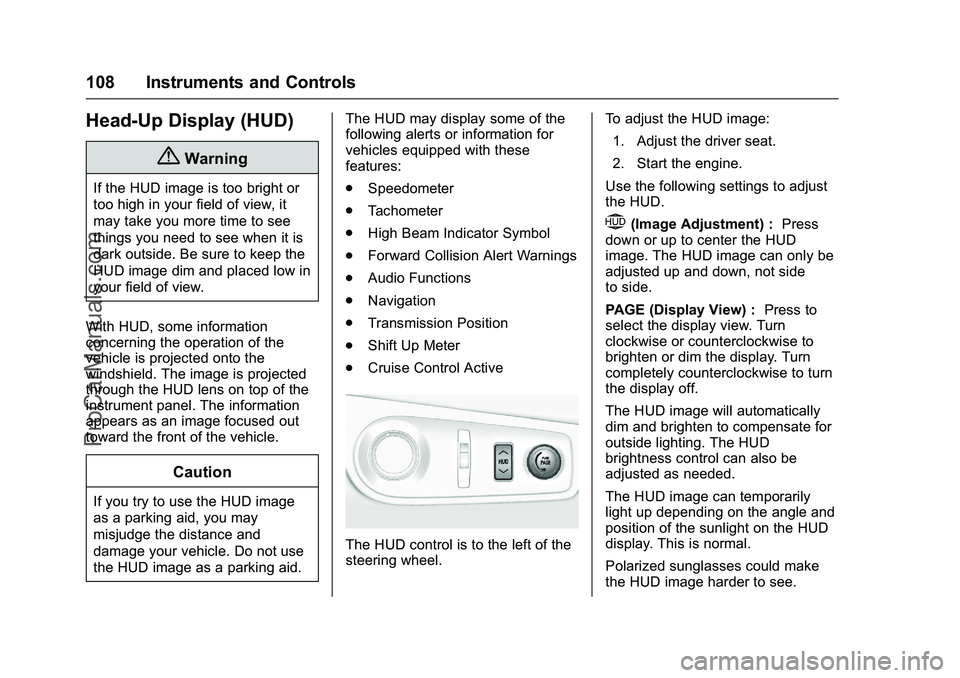
The HUD control is to the left of the
steering wheel. To adjust the HUD image:
1. Adjust the driver seat.
2. Start the engine.
Use the following settings to adjust
the HUD.
$(Image Adjustment) : Press
down or up to center the HUD
image. The HUD image can only be
adjusted up and down, not side
to side.
PAGE (Display View) : Press to
select the display view. Turn
clockwise or counterclockwise to
brighten or dim the display. Turn
completely counterclockwise to turn
the display off.
The HUD image will automatically
dim and brighten to compensate for
outside lighting. The HUD
brightness control can also be
adjusted as needed.
The HUD image can temporarily
light up depending on the angle and
position of the sunlight on the HUD
display. This is normal.
Polarized sunglasses could make
the HUD image harder to see.
ProCarManuals.com