2016 CHEVROLET SS automatic transmission
[x] Cancel search: automatic transmissionPage 6 of 397

Chevrolet SS Sedan Owner Manual (GMNA-Localizing-U.S.-9234782) - 2016 -
CRC - 8/24/15
In Brief 5
In Brief
Instrument Panel
Instrument Panel Overview . . . . . . 6
Initial Drive Information
Initial Drive Information . . . . . . . . . . 8
Remote Keyless Entry (RKE)System . . . . . . . . . . . . . . . . . . . . . . . . 8
Remote Vehicle Start . . . . . . . . . . . 8
Door Locks . . . . . . . . . . . . . . . . . . . . . 9
Windows . . . . . . . . . . . . . . . . . . . . . . . 10
Seat Adjustment . . . . . . . . . . . . . . . 10
Memory Features . . . . . . . . . . . . . . 11
Heated and Ventilated Seats . . . 11
Head Restraint Adjustment . . . . 12
Safety Belts . . . . . . . . . . . . . . . . . . . . 12
Passenger Sensing System . . . 12
Mirror Adjustment . . . . . . . . . . . . . . 12
Steering Wheel Adjustment . . . . 13
Interior Lighting . . . . . . . . . . . . . . . . 13
Exterior Lighting . . . . . . . . . . . . . . . 14
Windshield Wiper/Washer . . . . . . 15
Climate Controls . . . . . . . . . . . . . . . 16
Transmission . . . . . . . . . . . . . . . . . . 16
Vehicle Features
Steering Wheel Controls . . . . . . . 17
Cruise Control . . . . . . . . . . . . . . . . . 18 Driver Information
Center (DIC) . . . . . . . . . . . . . . . . . 18
Forward Collision Alert (FCA) System . . . . . . . . . . . . . . . . . . . . . . . 18
Lane Departure
Warning (LDW) . . . . . . . . . . . . . . . 19
Side Blind Zone Alert (SBZA) . . . . . . . . . . . . . . . . . . 19
Rear Vision Camera (RVC) . . . . 19
Rear Cross Traffic Alert (RCTA) System . . . . . . . . . . . . . . . . . . . . . . . 19
Parking Assist . . . . . . . . . . . . . . . . . 19
Automatic Parking Assist (APA) . . . . . . . . . . . . . . . . . . 19
Power Outlets . . . . . . . . . . . . . . . . . 20
Sunroof . . . . . . . . . . . . . . . . . . . . . . . . 20
Performance and Maintenance
Traction Control/Electronic Stability Control . . . . . . . . . . . . . . 21
Tire Pressure Monitor . . . . . . . . . . 21
Engine Oil Life System . . . . . . . . 21
Driving for Better Fuel Economy . . . . . . . . . . . . . . . . . . . . . 22
Battery . . . . . . . . . . . . . . . . . . . . . . . . . 22
Roadside Assistance Program . . . . . . . . . . . . . . . . . . . . . . 22
ProCarManuals.com
Page 8 of 397

Chevrolet SS Sedan Owner Manual (GMNA-Localizing-U.S.-9234782) - 2016 -
CRC - 8/24/15
In Brief 7
1.Air Vents 0212ii.
2. Turn Signal Lever. See Turn
and Lane-Change Signals
0 125
ii.
Driver Information Center (DIC)
Controls. See Driver
Information Center (DIC)
0 105
ii.
3. Paddle Shifter Up. See Manual
Mode 0236
ii.
4. Cruise Control 0248
ii.
Lane Departure Warning
(LDW) 0259
ii(If Equipped).
Forward Collision Alert (FCA)
System 0255
ii(If Equipped).
5. Instrument Cluster 093
ii.
6. Horn 090
ii.
7. Steering Wheel Controls 089
ii.
8. Paddle Shifter Down. See Manual Mode 0236
ii.
9. Windshield Wiper/Washer
090
ii.
10. Ignition. See Ignition Positions
0 227
ii. 11. Solar Sensor. See
Dual
Automatic Climate Control
System 0208
ii.
12. Infotainment 0128
ii.
13. Heated and Ventilated Front
Seats 048
ii.
14. Hazard Warning Flashers
0124
ii.
15. Dual Automatic Climate Control
System 0208
ii.
16. Power Outlets 091
ii(Out
of View).
17. Traction Control/Electronic
Stability Control 0242
ii.
Front and Rear Parking Assist
Button (If Equipped). See
Assistance Systems for
Parking or Backing 0251
ii.
Automatic Parking Assist (APA)
Button (If Equipped). See
Assistance Systems for
Parking or Backing 0251
ii.
18. Driver Mode Control 0244
ii.
19. Electric Parking Brake 0240
ii. 20. Shift Lever. See
Automatic
Transmission 0234
iior Manual
Transmission 0238ii(If
Equipped).
21. Steering Wheel Adjustment
089
ii.
22. Head-Up Display (HUD) 0108
ii.
23. Instrument Panel Illumination
Control 0125
ii.
24. Hood Release. See Hood
0 269
ii.
25. Exterior Lamp Controls 0123
ii.
ProCarManuals.com
Page 17 of 397

Chevrolet SS Sedan Owner Manual (GMNA-Localizing-U.S.-9234782) - 2016 -
CRC - 8/24/15
16 In Brief
Climate Controls
The heating, cooling, and ventilation for the vehicle can be controlled with
this system.
1. Driver Temperature Control
2. AUTO (Automatic Operation)
3. Air Conditioning
4. Air Delivery Mode Controls
5. Front Defrost6. ZONE
7. Passenger Temperature
Control
8. Rear Window Defogger
9. Fan Control
10. Recirculation See
Dual Automatic Climate Control
System 0208
ii.
Transmission
Automatic Transmission
Sport Shift Mode
For Sport Shift mode, move the shift
lever to D (Drive), then push to the
right.
While in Sport Shift mode, move the
shift lever to the + (Plus) or −
(Minus) position to enable Active
Select mode.
ProCarManuals.com
Page 18 of 397

Chevrolet SS Sedan Owner Manual (GMNA-Localizing-U.S.-9234782) - 2016 -
CRC - 8/24/15
In Brief 17
Tap Shift
Tap Shift allows the driver to
manually control the automatic
transmission. Vehicles with this
feature have controls on the back of
the steering wheel. Tap the left
control to downshift, and the right
control to upshift. A Driver
Information Center (DIC) message
indicates the gear the vehicle is in.
SeeAutomatic Transmission 0234
ii.
Vehicle Features
Steering Wheel Controls
Some audio functions can be
controlled through the steering
wheel controls.
b/g:Press to interact with
Bluetooth or voice recognition. See
Bluetooth 0193
iior Voice
Recognition 0187ii.
$/i:Press to decline an
incoming call, or to end a current
call. Press to silence the vehicle
speakers while using the
infotainment system. Press again to
turn the sound on. Press to cancel
voice recognition.
_SRC^: Press to select an audio
source.
Use the thumbwheel to select the
next or previous favorite radio
station, MP3 track, USB track, and
Bluetooth Audio track.
Use
_SRC to skip to the next song
or show using Pandora or Stitcher®.
See Pandora Internet Radio 0146iior Stitcher Internet Radio 0150ii.
+
x− :Press + to increase the
volume. Press −to decrease.
See Steering Wheel Controls 089
ii.
ProCarManuals.com
Page 33 of 397

Chevrolet SS Sedan Owner Manual (GMNA-Localizing-U.S.-9234782) - 2016 -
CRC - 8/24/15
32 Keys, Doors, and Windows
Power Door Locks
K(Unlock) :Press to unlock the
doors.
Q(Lock) : Press to lock the doors.
Delayed Locking
This feature delays the actual
locking of the doors until
five seconds after all doors are
closed.
Delayed locking can only be turned
on when the Open or Unlocked
Door Anti Lockout feature has been
turned off. When
Qis pressed on the power
door lock switch with the door open,
a chime will sound three times
indicating that delayed locking is
active.
The doors will then lock
automatically five seconds after all
doors are closed. If a door is
reopened before five seconds have
elapsed, the five-second timer will
reset once all the doors are closed
again.
Press
Qon the door lock switch
again, or press
Qon the RKE
transmitter, to override this feature
and lock the doors immediately.
Delayed locking can be
programmed through the Driver
Information Center (DIC). See
Vehicle Personalization 0117
ii.
Automatic Door Locks
When the doors are closed, the
ignition is on, and the shift lever is
moved out of P (Park) for an
automatic transmission, or the vehicle speed is above 13 km/h
(8 mph) for a manual transmission,
the doors will lock.
To unlock the doors:
.
Press
K.
. For automatic transmissions,
shift the vehicle into P (Park).
. For manual transmissions and a
keyed ignition system, remove
the key from the ignition when
parked.
. For manual transmissions and a
pushbutton start system, turn the
vehicle off when parked.
The automatic door lock feature
cannot be disabled.
See Vehicle Personalization 0117
ii.
Lockout Protection
Keyed Ignition : When locking is
requested with the driver door open
and the key in the ignition, all the
doors will lock and then the driver
door will unlock.
ProCarManuals.com
Page 35 of 397

Chevrolet SS Sedan Owner Manual (GMNA-Localizing-U.S.-9234782) - 2016 -
CRC - 8/24/15
34 Keys, Doors, and Windows
Doors
Trunk
{Warning
Exhaust gases can enter the
vehicle if it is driven with the
liftgate or trunk/hatch open,
or with any objects that pass
through the seal between the
body and the trunk/hatch or
liftgate. Engine exhaust contains
carbon monoxide (CO) which
cannot be seen or smelled. It can
cause unconsciousness and even
death.
If the vehicle must be driven with
the liftgate or trunk/hatch open:. Close all of the windows.
. Fully open the air outlets on
or under the instrument
panel.
. Adjust the climate control
system to a setting that
brings in only outside air
(Continued)
Warning (Continued)
and set the fan speed to the
highest setting. See
“Climate Control Systems”
in the Index.
. If the vehicle is equipped
with a power liftgate, disable
the power liftgate function.
See Engine Exhaust 0233
ii.
Trunk Release
For automatic transmissions the
vehicle must be in P (Park). For
manual transmissions the vehicle
must be off, or stationary with the
parking brake set. See Electric
Parking Brake 0240
ii.
From inside the vehicle, press|
on the driver door.
Remote Trunk Release
From outside the vehicle, press and
hold
Yon the RKE transmitter.
ProCarManuals.com
Page 48 of 397

Chevrolet SS Sedan Owner Manual (GMNA-Localizing-U.S.-9234782) - 2016 -
CRC - 8/24/15
Seats and Restraints 47
The 1, 2 SET, andS(Exit) buttons
on the driver door are used to
manually store and recall memory
settings for the driver seat, and
outside mirrors.
Storing Memory Positions
To store positions to the 1 and 2
buttons:
1. Place the ignition in ON/RUN or ACCESSORY.
2. Adjust the driver seat and the outside mirrors to the desired
driving position.
3. Press and release SET. A beep will sound.
4. Immediately press and hold 1 until two beeps sound.
5. Repeat Steps 1–4 for a second driver using 2.
To store positions to the
S(Exit)
button and easy exit features,
repeat steps 1–4 using
Sto store
your position for getting out of the
vehicle. Manually Recalling Memory
Positions
Press and hold 1, 2, or
Sto
manually recall the previously
stored memory positions. Releasing
1, 2, or
Sbefore the stored
positions are reached stops the
recall.
Automatically Recalling Memory
Positions (Auto Memory Recall)
If programmed in the Vehicle
Personalization Menu, the Auto
Memory Recall feature (Automatic
Transmission Vehicles Only)
automatically recalls the current
driver ’s previously stored 1 or 2
position when the ignition is
changed from OFF to ON/RUN or
ACCESSORY.
See “Auto Memory Recall” under
“Comfort and Convenience” in
Vehicle Personalization 0117
ii.
To stop recall movement, press one
of the memory, power mirror,
or power seat controls. RKE transmitters are not labeled
with a number. If your memory seat
position is stored to 1 or 2, but this
position is not automatically
recalling, then store your positions
to the other button or switch RKE
transmitters with the other driver.
Easy Exit Driver
’s Seat
If programmed on in the vehicle
personalization menu, the easy exit
feature automatically moves the
driver ’s seat rearwards to a preset
position when exiting the vehicle.
See Vehicle Personalization 0117
ii.
Easy exit driver ’s seat automatically
activates when one of the following
occurs:
. The vehicle is turned off and the
driver door is opened within a
short time.
. The vehicle is turned off with the
driver door open.
To stop recall movement, press one
of the memory, driver seat,
or outside mirror controls.
ProCarManuals.com
Page 109 of 397
Chevrolet SS Sedan Owner Manual (GMNA-Localizing-U.S.-9234782) - 2016 -
CRC - 8/24/15
108 Instruments and Controls
Head-Up Display (HUD)
{Warning
If the HUD image is too bright or
too high in your field of view, it
may take you more time to see
things you need to see when it is
dark outside. Be sure to keep the
HUD image dim and placed low in
your field of view.
With HUD, some information
concerning the operation of the
vehicle is projected onto the
windshield. The image is projected
through the HUD lens on top of the
instrument panel. The information
appears as an image focused out
toward the front of the vehicle.
Caution
If you try to use the HUD image
as a parking aid, you may
misjudge the distance and
damage your vehicle. Do not use
the HUD image as a parking aid. The HUD may display some of the
following alerts or information for
vehicles equipped with these
features:
.
Speedometer
. Tachometer
. High Beam Indicator Symbol
. Forward Collision Alert Warnings
. Audio Functions
. Navigation
. Transmission Position
. Shift Up Meter
. Cruise Control Active
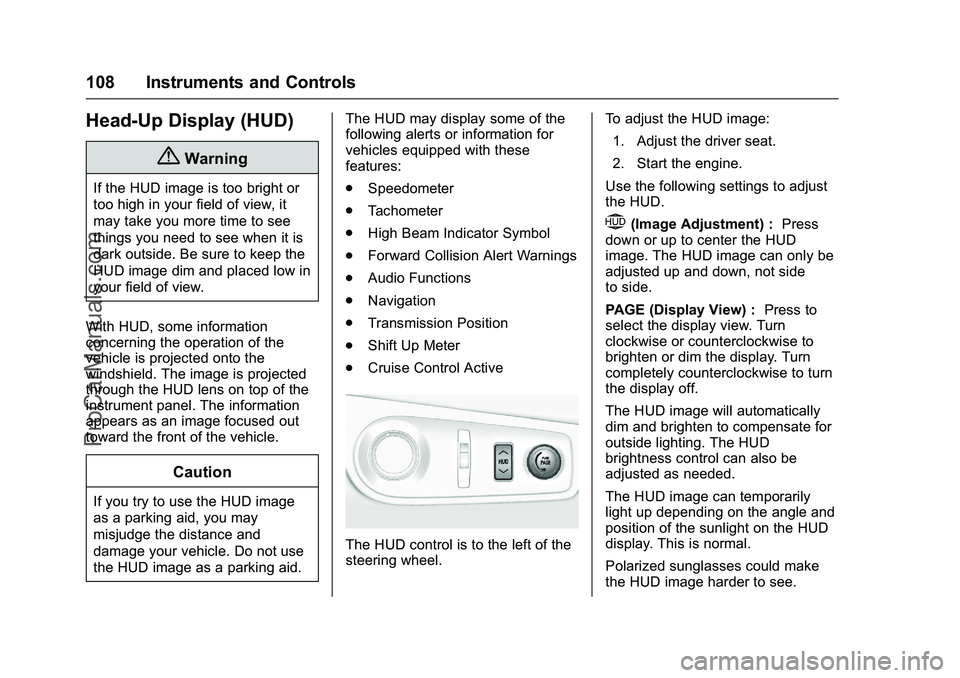
The HUD control is to the left of the
steering wheel. To adjust the HUD image:
1. Adjust the driver seat.
2. Start the engine.
Use the following settings to adjust
the HUD.
$(Image Adjustment) : Press
down or up to center the HUD
image. The HUD image can only be
adjusted up and down, not side
to side.
PAGE (Display View) : Press to
select the display view. Turn
clockwise or counterclockwise to
brighten or dim the display. Turn
completely counterclockwise to turn
the display off.
The HUD image will automatically
dim and brighten to compensate for
outside lighting. The HUD
brightness control can also be
adjusted as needed.
The HUD image can temporarily
light up depending on the angle and
position of the sunlight on the HUD
display. This is normal.
Polarized sunglasses could make
the HUD image harder to see.
ProCarManuals.com