2016 CHEVROLET SONIC instrument cluster
[x] Cancel search: instrument clusterPage 200 of 353
Chevrolet Sonic Owner Manual (GMNA-Localizing-U.S/Canada-9085902) -
2016 - CRC - 5/27/15
Driving and Operating 199
{Warning
Shifting into a drive gear while the
engine is running at high speed is
dangerous. Unless your foot is
firmly on the brake pedal, the
vehicle could move very rapidly.
You could lose control and hit
people or objects. Do not shift
into a drive gear while the engine
is running at high speed.
Caution
Shifting out of P (Park) or
N (Neutral) with the engine
running at high speed may
damage the transmission. The
repairs would not be covered by
the vehicle warranty. Be sure the
engine is not running at high
speed when shifting the vehicle.D :
This position is for normal
driving. It provides the best fuel
economy. If you need more power
for passing, and you are:
. Going less than 56 km/h
(35 mph), push the accelerator
pedal about halfway down.
. Going about 56 km/h (35 mph) or
more, push the accelerator all
the way down.
M : This position allows you to
change gears similar to a manual
transmission. If the vehicle has this
feature, see “Manual Mode”
following.Manual Mode
To use this feature:
1. Move the shift lever from D (Drive) rearward to
M (Manual Mode).
While driving in manual mode,
the transmission will remain in
the driver selected gear. When
coming to a stop in the manual
position, the vehicle will
automatically shift into
1 (First) gear.
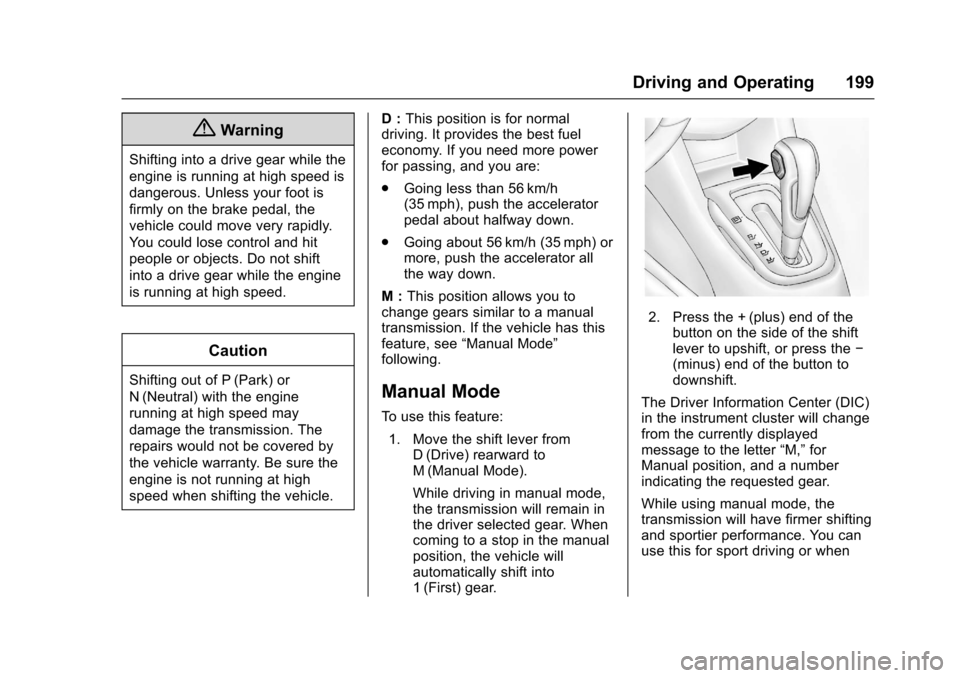
2. Press the + (plus) end of the
button on the side of the shift
lever to upshift, or press the −
(minus) end of the button to
downshift.
The Driver Information Center (DIC)
in the instrument cluster will change
from the currently displayed
message to the letter “M,”for
Manual position, and a number
indicating the requested gear.
While using manual mode, the
transmission will have firmer shifting
and sportier performance. You can
use this for sport driving or when
Page 205 of 353
Chevrolet Sonic Owner Manual (GMNA-Localizing-U.S/Canada-9085902) -
2016 - CRC - 5/27/15
204 Driving and Operating
Ride Control Systems
Traction Control/
Electronic Stability
Control
System Operation
The vehicle has a Traction Control
System (TCS) and StabiliTrak®, an
electronic stability control system.
These systems help limit wheel slip
and assist the driver in maintaining
control, especially on slippery road
conditions.
TCS activates if it senses that any
of the drive wheels are spinning or
beginning to lose traction. When this
happens, TCS applies the brakes to
the spinning wheels and reduces
engine power to limit wheel spin.
StabiliTrak activates when the
vehicle senses a difference between
the intended path and the direction
the vehicle is actually traveling.
StabiliTrak selectively applies
braking pressure to any one of the vehicle wheel brakes to assist the
driver in keeping the vehicle on the
intended path.
If cruise control is being used and
traction control or StabiliTrak begins
to limit wheel spin, cruise control will
disengage. Cruise control may be
turned back on when road
conditions allow.
Both systems come on
automatically when the vehicle is
started and begins to move. The
systems may be heard or felt while
they are operating or while
performing diagnostic checks. This
is normal and does not mean there
is a problem with the vehicle.
It is recommended to leave both
systems on for normal driving
conditions, but it may be necessary
to turn TCS off if the vehicle gets
stuck in sand, mud, ice, or snow.
See
If the Vehicle Is Stuck 0186
and “Turning the Systems Off and
On” later in this section.
The indicator light for both systems
is in the instrument cluster. This
light will:
.
Flash when TCS is limiting
wheel spin.
. Flash when StabiliTrak is
activated.
. Turn on and stay on when either
system is not working.
If either system fails to turn on or to
activate, a message displays in the
Driver Information Center (DIC), and
dcomes on and stays on to
indicate that the system is inactive
and is not assisting the driver in
maintaining control. The vehicle is
safe to drive, but driving should be
adjusted accordingly.
Page 206 of 353
Chevrolet Sonic Owner Manual (GMNA-Localizing-U.S/Canada-9085902) -
2016 - CRC - 5/27/15
Driving and Operating 205
Ifdcomes on and stays on:
1. Stop the vehicle.
2. Turn the engine off and wait 15 seconds.
3. Start the engine.
Drive the vehicle. If
dcomes on
and stays on, the vehicle may need
more time to diagnose the problem.
If the condition persists, see your
dealer.
Turning the Systems Off
and On
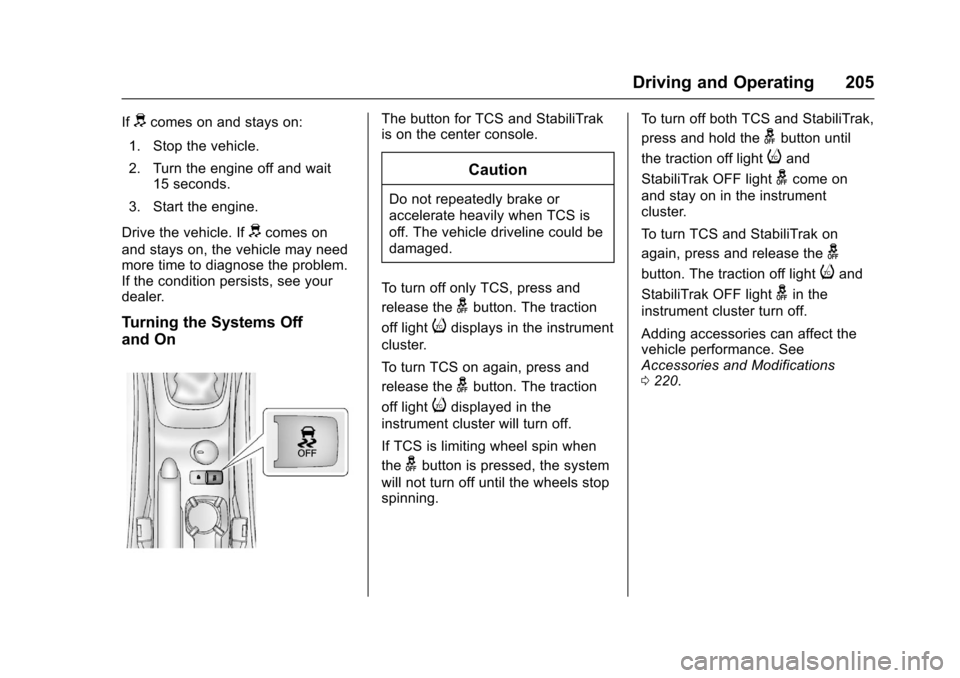
The button for TCS and StabiliTrak
is on the center console.
Caution
Do not repeatedly brake or
accelerate heavily when TCS is
off. The vehicle driveline could be
damaged.
To turn off only TCS, press and
release the
gbutton. The traction
off light
idisplays in the instrument
cluster.
To turn TCS on again, press and
release the
gbutton. The traction
off light
idisplayed in the
instrument cluster will turn off.
If TCS is limiting wheel spin when
the
gbutton is pressed, the system
will not turn off until the wheels stop
spinning. To turn off both TCS and StabiliTrak,
press and hold the
gbutton until
the traction off light
iand
StabiliTrak OFF light
gcome on
and stay on in the instrument
cluster.
To turn TCS and StabiliTrak on
again, press and release the
g
button. The traction off lightiand
StabiliTrak OFF light
gin the
instrument cluster turn off.
Adding accessories can affect the
vehicle performance. See
Accessories and Modifications
0 220.
Page 207 of 353
Chevrolet Sonic Owner Manual (GMNA-Localizing-U.S/Canada-9085902) -
2016 - CRC - 5/27/15
206 Driving and Operating
Cruise Control
If the vehicle is equipped with cruise
control, a speed of about 40 km/h
(25 mph) or more can be maintained
without keeping your foot on the
accelerator. Cruise control does not
work at speeds below 40 km/h
(25 mph).
{Warning
Cruise control can be dangerous
where you cannot drive safely at
a steady speed. Do not use
cruise control on winding roads or
in heavy traffic.
Cruise control can be dangerous
on slippery roads. On such roads,
fast changes in tire traction can
cause excessive wheel slip, and
you could lose control. Do not use
cruise control on slippery roads.
If the vehicle's Traction Control
System (TCS) or StabiliTrak system
begins to limit wheel spin while
using cruise control, the cruise
control will automatically disengage. See
Traction Control/Electronic
Stability Control 0204. If a collision
alert occurs when cruise control is
activated, cruise control is
disengaged. See Forward Collision
Alert (FCA) System 0210. When
road conditions allow you to safely
use it again, the cruise control can
be turned back on.
If the brakes are applied, cruise
control disengages.
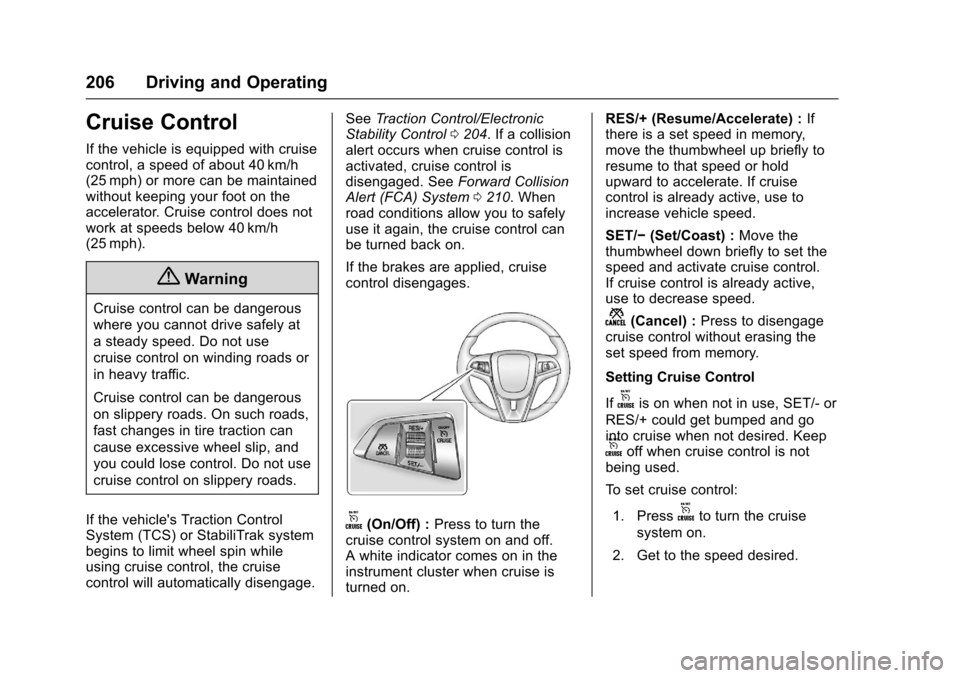
o(On/Off) : Press to turn the
cruise control system on and off.
A white indicator comes on in the
instrument cluster when cruise is
turned on. RES/+ (Resume/Accelerate) :
If
there is a set speed in memory,
move the thumbwheel up briefly to
resume to that speed or hold
upward to accelerate. If cruise
control is already active, use to
increase vehicle speed.
SET/− (Set/Coast) : Move the
thumbwheel down briefly to set the
speed and activate cruise control.
If cruise control is already active,
use to decrease speed.
n(Cancel) : Press to disengage
cruise control without erasing the
set speed from memory.
Setting Cruise Control
If
ois on when not in use, SET/- or
RES/+ could get bumped and go
into cruise when not desired. Keep
ooff when cruise control is not
being used.
To set cruise control:
1. Press
oto turn the cruise
system on.
2. Get to the speed desired.
Page 208 of 353
Chevrolet Sonic Owner Manual (GMNA-Localizing-U.S/Canada-9085902) -
2016 - CRC - 5/27/15
Driving and Operating 207
3. Move the thumbwheel down toSET/- and release it.
4. Take your foot off the accelerator pedal.
The cruise control indicator on the
instrument cluster turns green after
cruise control has been set to the
desired speed. See Instrument
Cluster 096.
Resuming a Set Speed
If the cruise control is set at a
desired speed and then the brakes
or clutch for manual transmissions
are applied or
nis pressed, the
cruise control is disengaged without
erasing the set speed from memory.
Once the vehicle reaches about
40 km/h (25 mph) or more, move the
thumbwheel up toward RES/+
briefly. The vehicle returns to the
previous set speed.
Increasing Speed While Using
Cruise Control
If the cruise control system is
already activated: .
Move the thumbwheel up toward
RES/+ and hold it until the
desired speed is reached, then
release it.
. To increase the vehicle speed in
small increments, move the
thumbwheel up toward RES/+
briefly and then release it. For
each press, the vehicle goes
about 1.6 km/h (1 mph) faster.
The speedometer reading can be
displayed in either English or metric
units. See Driver Information Center
(DIC) 0109. The increment value
used depends on the units
displayed.
Reducing Speed While Using
Cruise Control
If the cruise control system is
already activated:
. Move the thumbwheel toward
SET/− and hold until the desired
lower speed is reached, then
release it.
. To decrease the vehicle speed in
smaller increments, move the
thumbwheel toward SET/− briefly. For each press, the
vehicle goes about 1.6 km/h
(1 mph) slower.
The speedometer reading can be
displayed in either English or metric
units. See Driver Information Center
(DIC) 0109. The increment value
used depends on the units
displayed.
Passing Another Vehicle While
Using Cruise Control
Use the accelerator pedal to
increase the vehicle speed. When
you take your foot off the pedal, the
vehicle slows down to the previous
set cruise control speed. While
pressing the accelerator pedal or
shortly following the release to
override cruise control, briefly
moving the thumbwheel toward
SET/- will result in cruise control set
to the current vehicle speed.
Using Cruise Control on Hills
How well cruise control works on
hills depends on the vehicle speed,
load, and the steepness of the hills.
When going up steep hills, you
might have to step on the
Page 227 of 353

Chevrolet Sonic Owner Manual (GMNA-Localizing-U.S/Canada-9085902) -
2016 - CRC - 5/27/15
226 Vehicle Care
1.Engine Air Cleaner/Filter 0230.
2. Engine Oil Dipstick. See Engine Oil 0226.
3. Engine Cooling Fan (Out of View). See Cooling System
0 232.
4. Engine Oil Fill Cap. See Engine Oil 0226.
5. Engine Coolant Surge Tank and Pressure Cap. See
Cooling System 0232.
6. Brake/Clutch Fluid Reservoir. See Brake Fluid 0239 and
Hydraulic Clutch 0230.
7. Battery - North America 0240.
8. Engine Compartment Fuse
Block 0249.
9. Windshield Washer Fluid Reservoir. See Washer Fluid
0 237.Engine Oil
To ensure proper engine
performance and long life, careful
attention must be paid to engine oil.
Following these simple, but
important steps will help protect
your investment:
.
Always use engine oil approved
to the proper specification and of
the proper viscosity grade. See
“Selecting the Right Engine Oil”
in this section.
. Check the engine oil level
regularly and maintain the
proper oil level. See “Checking
Engine Oil” and“When to Add
Engine Oil” in this section.
. Change the engine oil at the
appropriate time. See Engine Oil
Life System 0228.
. Always dispose of engine oil
properly. See “What to Do with
Used Oil” in this section.
If the engine oil pressure light
comes on, check the engine oil level
right away. The oil pressure light is
on the instrument cluster. See
Engine Oil Pressure Light 0106.
Check the engine oil level regularly;
this is an added reminder.
Checking Engine Oil
It is a good idea to check the engine
oil level at each fuel fill. In order to
get an accurate reading, the oil
must be warm and the vehicle must
be on level ground. The engine oil
dipstick handle is a loop. See
Engine Compartment Overview
0 223 for the location of the engine
oil dipstick.
1. If the engine has been running recently, turn off the engine and
allow several minutes for the oil
to drain back into the oil pan.
Checking the oil level too soon
Page 254 of 353

Chevrolet Sonic Owner Manual (GMNA-Localizing-U.S/Canada-9085902) -
2016 - CRC - 5/27/15
Vehicle Care 253
The vehicle may not be equipped
with all of the fuses, relays, and
features shown.Number Usage
1 DLIS
2 Data Link Connector
3 Airbag
4 Liftgate
5 Spare
6 Body Control Module 8
7 Body Control Module 7
8 Body Control Module 6
9 Body Control Module 5
10 Body Control Module 4
11 Body Control Module 3
12 Body Control Module 2
13 Body Control Module 1 Number Usage
14 Instrument Cluster
15 OnStar
16 Rear Parking Assist
17 Rain Sensing Wiper
18 Audio
19 Trailer
20 VLBS/FCA/LDW
21 CHEVYSTAR
22 Heating, Ventilation, Air
Conditioning
23 HDLP ALC
24 Clutch
25 Instrument Cluster/ Automatic
Occupant Sensing
26 Airbag Run/Crank
27 Run Relay
28 Liftgate Release
Page 265 of 353

Chevrolet Sonic Owner Manual (GMNA-Localizing-U.S/Canada-9085902) -
2016 - CRC - 5/27/15
264 Vehicle Care
the tires and transmit the tire
pressure readings to a receiver
located in the vehicle.
When a low tire pressure condition
is detected, the TPMS illuminates
the low tire pressure warning light
located on the instrument cluster.
If the warning light comes on, stop
as soon as possible and inflate the
tires to the recommended pressure
shown on the Tire and Loading
Information label. SeeVehicle Load
Limits 0187.
The low tire pressure warning light
comes on at each ignition cycle until
the tires are inflated to the correct
inflation pressure.
The low tire pressure warning light
may come on in cool weather when
the vehicle is first started, and then
turn off as the vehicle is driven. This could be an early indicator that the
air pressure is getting low and must
be inflated to the proper pressure.
A Tire and Loading Information label
shows the size of the original
equipment tires and the correct
inflation pressure for the tires when
they are cold. See
Vehicle Load
Limits 0187, for an example of the
Tire and Loading Information label
and its location. Also see Tire
Pressure 0261.
The TPMS can warn about a low
tire pressure condition but it does
not replace normal tire
maintenance. See Tire Inspection
0 266, Tire Rotation 0266 andTires
0 254.
Caution
Tire sealant materials are not all
the same. A non-approved tire
sealant could damage the TPMS
sensors. TPMS sensor damage
caused by using an incorrect tire
sealant is not covered by the
vehicle warranty. Always use only
(Continued)
Caution (Continued)
the GM approved tire sealant
available through your dealer or
included in the vehicle.
Factory-installed Tire Inflator Kits
use a GM-approved liquid tire
sealant. Using non-approved tire
sealants could damage the TPMS
sensors. See Tire Sealant and
Compressor Kit 0275 for
information regarding the inflator kit
materials and instructions.
TPMS Malfunction Light
The TPMS will not function properly
if one or more of the TPMS sensors
are missing or inoperable. When the
system detects a malfunction, the
low tire warning light flashes for
about one minute and then stays on
for the remainder of the ignition
cycle. The malfunction light comes
on at each ignition cycle until the
problem is corrected. Some of the
conditions that can cause this to
come on are: