2016 CHEVROLET SONIC remote control
[x] Cancel search: remote controlPage 49 of 353
Chevrolet Sonic Owner Manual (GMNA-Localizing-U.S/Canada-9085902) -
2016 - CRC - 5/27/15
48 Seats and Restraints
be canceled when the ignition is
turned on. Press the heated seat
controls to use the heated seats
after the vehicle is started.
The heated seat indicator lights do
not turn on during a remote start.
The temperature performance of an
unoccupied seat may be reduced.
This is normal.
SeeRemote Vehicle Start 029.Rear Seats
Folding the Seatback
Either side of the seatback can be
folded down for more cargo space.
Fold a seatback only when the
vehicle is not moving.
Caution
Folding a rear seat with the safety
belts still fastened may cause
damage to the seat or the safety
belts. Always unbuckle the safety
belts and return them to their
normal stowed position before
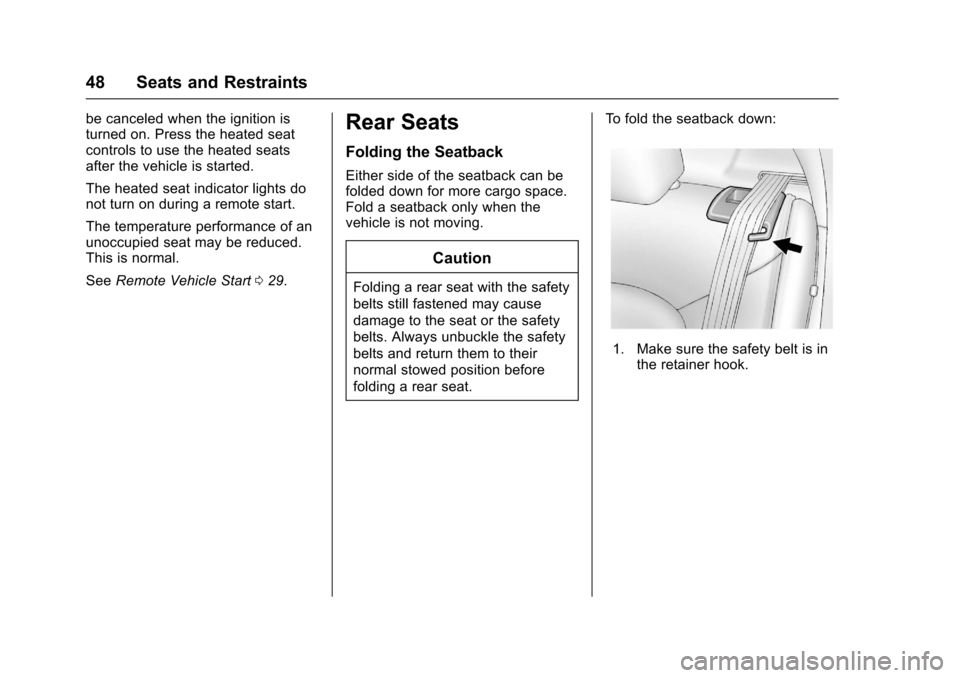
folding a rear seat. To fold the seatback down:
1. Make sure the safety belt is in
the retainer hook.
Page 115 of 353
Chevrolet Sonic Owner Manual (GMNA-Localizing-U.S/Canada-9085902) -
2016 - CRC - 5/27/15
114 Instruments and Controls
Entering the Personalization
Menus1. Press CONFIG to access the Configuration Settings menu.
2. Turn the MENU/TUNE knob to highlight Vehicle Settings.
3. Press MENU/TUNE to select the Vehicle Settings menu.
The following list of menu items may
be available:
. Comfort and Convenience
. Language
. Lighting
. Power Door Locks
. Remote Lock, Unlock, Start
. Return to Factory Settings
Comfort and Convenience
Select the Comfort and
Convenience menu and the
following may display:
.
Chime Volume
. Auto Wipe in Reverse Gear Chime Volume
This allows selection of the chime
volume level.
Select Normal or High.
Auto Wipe in Reverse Gear
When on and the vehicle is on, this
feature will turn the rear wipers on
when the vehicle is placed in
R (Reverse) with the front wipers on.
Select On or Off.
Language
Select Language, then select from
the available language(s).
Lighting
Select the Lighting menu and the
following may display:
.
Exterior Vehicle Locator Lights
. Exit Lighting
Exterior Vehicle Locator Lights
This allows selection of whether the
exterior lamps will turn on when
unlocking the vehicle.
Select On or Off. Exit Lighting
Select Off, 30 Seconds, 1 Minute,
or 2 Minutes.
Power Door Locks
Select Power Door Locks and the
following may display:
.
Auto Door Unlock
. Unlock Door Anti Lock Out
. Delayed Door Lock
Auto Door Unlock
This allows selection of which of the
doors will automatically unlock when
the vehicle is shifted into P (Park) or
the key is removed.
Select All Doors, Driver Door, or Off.
Unlock Door Anti Lock Out
When on, this feature will keep the
driver door from locking when the
door is open. If Off is selected, the
Unlock Door Anti Lock Out menu
will be available and the door will
lock as programmed through
this menu.
Select On or Off.
Page 116 of 353
Chevrolet Sonic Owner Manual (GMNA-Localizing-U.S/Canada-9085902) -
2016 - CRC - 5/27/15
Instruments and Controls 115
Delayed Door Lock
When on, this feature will delay the
locking of the doors until
five seconds after the last door is
closed. Three chimes will signal that
delayed locking is in use. Pressing
will override the delayed locking
feature and immediately lock all of
the doors.
Select On or Off.
Remote Lock, Unlock, Start
Select Remote Lock, Unlock, Start
and the following may display:
.Remote Unlock Feedback
. Remote Lock Feedback
. Remote Door Unlock
Remote Unlock Feedback
When on, the exterior lamps will
flash when unlocking the vehicle
with the RKE transmitter.
Select On or Off.
Remote Lock Feedback
This allows selection of what type of
feedback is given when locking the
vehicle with the RKE transmitter. Select Lights and Horn, Lights Only,
Horn Only, or Off.
Remote Door Unlock
This allows selection of which doors
will unlock when pressing
Kon the
RKE transmitter.
Select All Doors or Driver Door
Only. When set to Driver Door Only,
the driver door will unlock the first
time
Kis pressed and all doors will
unlock when
Kis pressed a second
time. When set to All Doors, all of
the doors will unlock at the first
press of
K.
Return to Factory Settings
Select Return to Factory Settings to
return all of the vehicle
personalization to the default
settings.
Select Yes or No.
Personalization Menu (Radio
with Touchscreen)
Settings can be made with the
ignition on and the vehicle not
moving. Use the audio system controls to
access the personalization menus
for customizing vehicle features.
The following are all possible
personalization features. Depending
on the vehicle, some may not be
available.
D(Home) :
Press to access the
Home Page Menu.
QorR: Press to scroll through the
menus or setup items.
4: Press to exit, or return to the
previous screen or menu.
To access the menu:
1. Press
D.
2. Press Settings.
The following list of menu items may
be available:
. Time & Date Settings
. Radio Settings
. Connection Settings
. Vehicle Settings
. Language
. Text Scroll
Page 118 of 353

Chevrolet Sonic Owner Manual (GMNA-Localizing-U.S/Canada-9085902) -
2016 - CRC - 5/27/15
Instruments and Controls 117
Bluetooth Settings
Select this feature to:
.Connect, disconnect, or delete a
device
. Change or set a Personal
Identification Number (PIN)
. Turn on or off the Bluetooth
connection
. Make the infotainment system
discoverable by Bluetooth
devices
. Check the device information
Change Ringtone
Select to set different ringtones.
Ringtone Volume
Select to set the ringtone volume.
Press
SorT.
Vehicle Settings
Select and the following may
display:
. Climate & Air Quality
. Comfort & Convenience
. Collision/Detection .
Lighting
. Power Door Locks
. Lock, Unlock Settings
. Rear Camera Option
. Vehicle Factory Settings
Climate & Air Quality
Select and Remote Start Heated
Seats may display.
Select On or Off.
Comfort & Convenience
Select and the following may
display:
.Chime Volume
. Auto Wipe in Reverse Gear
Chime Volume
Select to set the chime volume
level.
Select Normal or High. Auto Wipe in Reverse Gear
Select to set this feature on or off.
When on, and the front wipers are
on, the rear window wiper will turn
on automatically when the vehicle is
shifted into R (Reverse).
Select On or Off.
Collision/Detection
Select and Park Assist may display.
Select On or Off.
Lighting
Select and the following may
display:
.
Exit Lighting
. Vehicle Locator Lights
Exit Lighting
Select to set how long the exterior
lamps stay on when leaving the
vehicle and it is dark outside.
Select Off, 30 Sec, 60 Sec,
or 120 Sec.
Page 119 of 353
Chevrolet Sonic Owner Manual (GMNA-Localizing-U.S/Canada-9085902) -
2016 - CRC - 5/27/15
118 Instruments and Controls
Vehicle Locator Lights
This allows selection of how long
the exterior lamps stay on when
leaving the vehicle and it is dark
outside.
Select On or Off.
Power Door Locks
Select and the following may
display:
.Auto Door Unlock
. Unlocked Door Anti Lock Out
. Delayed Door Lock
Auto Door Unlock
Select to set which of the doors will
automatically unlock when the
vehicle is shifted into P (Park).
Select All Doors, Driver Door, or Off.
Unlocked Door Anti Lock Out
When on, this feature will keep the
driver door from locking when the
door is open. If Off is selected, the
Delayed Door Lock menu will be
available and the door will lock as
programmed through this menu.
Select On or Off. Delayed Door Lock
When on, this feature will delay the
locking of the doors until
five seconds after the last door is
closed. Three chimes will signal that
delayed locking is in use. Pressing
either
QorKon the RKE
transmitter twice will override the
delayed locking feature and
immediately lock all of the doors.
Select On or Off.
Lock, Unlock Settings
Select and the following may
display:
. Remote Unlock Light Feedback
. Remote Lock Light & Horn
Feedback
. Remote Door Unlock
Remote Unlock Light Feedback
When on, the exterior lamps will
flash when unlocking the vehicle
with the RKE transmitter.
Select Flash Lights or Lights Off. Remote Lock Light & Horn
Feedback
Select to set what type of feedback
is given when pressing
Qon the
RKE transmitter.
Select Lights Only, Lights & Horn,
Horn Only, or Off.
Remote Door Unlock
Select to set which doors will unlock
when pressing
Kon the RKE
transmitter.
Select All Doors or Driver Door.
When set to Driver Door, the driver
door will unlock the first time
Kis
pressed and all doors will unlock
when the button is pressed a
second time. When set to All Doors,
all of the doors will unlock at the first
press of
K.
Rear Camera Option
Select and the following may
display:
. Guidelines
Page 126 of 353
Chevrolet Sonic Owner Manual (GMNA-Localizing-U.S/Canada-9085902) -
2016 - CRC - 5/27/15
Lighting 125
Lighting Features
Entry Lighting
Some exterior lamps and interior
lamps turn on briefly at night, or in
areas with limited lighting, when
K
is pressed on the Remote Keyless
Entry (RKE) transmitter. When a
door is opened, the interior lamps
come on if the dome lamp control is
in the Door position. They stay on
for about 20 seconds. When all of
the doors have been closed or the
ignition is turned to ON/RUN, they
gradually fade out.
This feature can be changed. See
“Vehicle Locator Lights”under
Vehicle Personalization 0113.
Exit Lighting
Some exterior lamps and interior
lamps come on at night, or in areas
with limited lighting, when the key is
removed from the ignition. The
dome lamp comes on after the
ignition is changed to the OFF
position. The exterior lamps and dome lamp remain on for a set
amount of time, then automatically
turn off.
The exterior lamps turn off
immediately by turning the exterior
lamp control off.
This feature can be changed. See
Vehicle Personalization
0113.
Battery Load
Management
The vehicle has Electric Power
Management (EPM) that estimates
the battery's temperature and state
of charge. It then adjusts the voltage
for best performance and extended
life of the battery.
When the battery's state of charge
is low, the voltage is raised slightly
to quickly bring the charge back up.
When the state of charge is high,
the voltage is lowered slightly to
prevent overcharging. If the vehicle
has a voltmeter gauge or a voltage
display on the Driver Information
Center (DIC), you may see the voltage move up or down. This is
normal. If there is a problem, an
alert will be displayed.
The battery can be discharged at
idle if the electrical loads are very
high. This is true for all vehicles.
This is because the generator
(alternator) may not be spinning fast
enough at idle to produce all the
power needed for very high
electrical loads.
A high electrical load occurs when
several of the following are on, such
as: headlamps, high beams, fog
lamps, rear window defogger,
climate control fan at high speed,
heated seats, engine cooling fans,
trailer loads, and loads plugged into
accessory power outlets.
EPM works to prevent excessive
discharge of the battery. It does this
by balancing the generator's output
and the vehicle's electrical needs.
It can increase engine idle speed to
generate more power, whenever
needed. It can temporarily reduce
the power demands of some
accessories.
Page 347 of 353
Chevrolet Sonic Owner Manual (GMNA-Localizing-U.S/Canada-9085902) -
2016 - CRC - 5/27/15
346 Index
General InformationService and Maintenance . . . . . 301
Towing . . . . . . . . . . . . . . . . . . . . . . . . 217
Vehicle Care . . . . . . . . . . . . . . . . . . 220
Glove Box . . . . . . . . . . . . . . . . . . . . . . . 86
GM Mobility Reimbursement Program . . . . . . . . . . . . . . . . . . . . . . . 322
H
Halogen Bulbs . . . . . . . . . . . . . . . . . . 243
Hands-Free Phone . . . . . . . . . . . . . 158
Hazard Warning Flashers . . . . . . . 122
Head Restraints . . . . . . . . . . . . . . . . . 43
Headlamps
Aiming . . . . . . . . . . . . . . . . . . . . . . . . 243
Automatic . . . . . . . . . . . . . . . . . . . . . 122
Bulb Replacement . . . . . . . . . . . . 243
Daytime RunningLamps (DRL) . . . . . . . . . . . . . . . . 121
Daytime Running Lamps (DRL) Indicator Light . . . . . . . . 108
Flash-to-Pass . . . . . . . . . . . . . . . . . 121
High-Beam On Light . . . . . . . . . . 108
High/Low Beam Changer . . . . . 121
Lamps On Reminder . . . . . . . . . 108
Heated Front Seats . . . . . . . . . . . . . . 47
Heated Mirrors . . . . . . . . . . . . . . . . . . . 39
Heater
Engine . . . . . . . . . . . . . . . . . . . . . . . . 193 Heating and Air Conditioning . . . 176
High-Beam On Light . . . . . . . . . . . . 108
Hill and Mountain Roads . . . . . . . . 185
Hill Start Assist (HSA) . . . . . . . . . . 203
Home Page . . . . . . . . . . . . . . . . . . . . . 131
Hood . . . . . . . . . . . . . . . . . . . . . . . . . . . 222
Horn . . . . . . . . . . . . . . . . . . . . . . . . . . . . . 90
How to Wear Safety Belts
Properly . . . . . . . . . . . . . . . . . . . . . . . . 51
Hydraulic Clutch . . . . . . . . . . . . . . . . 230
I
Ignition Positions . . . . . . . . . . . . . . . 191
Ignition Transmission Lock Check . . . . . . . . . . . . . . . . . . . . . . . . . 241
Immobilizer . . . . . . . . . . . . . . . . . . . . . . 37 Light . . . . . . . . . . . . . . . . . . . . . . . . . . 107
Indicator Owner Manual . . . . . . . . . . . . . . . . 102
Vehicle Ahead . . . . . . . . . . . . . . . . 104
Infants and Young Children,
Restraints . . . . . . . . . . . . . . . . . . . . . . 69
Infotainment . . . . . . . . . . . . . . . . . . . . 127
Instrument Cluster . . . . . . . . . . . . . . . 96
Instrument Panel Storage Area . . . . . . . . . . . . . . . . . . . 86
Introduction . . . . . . . . . . . . . . . . . . . . . . . 2
J
Jump Starting - North America . . . . . . . . . . . . . . . . . . . . . . . 287
K
Keyless EntryRemote (RKE) System . . . . . . . . . 27
Keys . . . . . . . . . . . . . . . . . . . . . . . . . . . . . 25
L
Labeling, Tire Sidewall . . . . . . . . . . 256
Lamps Courtesy . . . . . . . . . . . . . . . . . . . . . . 124
Daytime Running (DRL) . . . . . . 121
Dome . . . . . . . . . . . . . . . . . . . . . . . . . 124
Exterior Controls . . . . . . . . . . . . . . 120
Exterior Lighting BatterySaver . . . . . . . . . . . . . . . . . . . . . . . 126
Headlamps, Front Turn Signal, and Parking
Lamps . . . . . . . . . . . . . . . . . . . . . . 244
License Plate . . . . . . . . . . . . . . . . . 246
Malfunction Indicator . . . . . . . . . 100
On Reminder . . . . . . . . . . . . . . . . . 108
Reading . . . . . . . . . . . . . . . . . . . . . . 124
Lane Departure Warning (LDW) . . . . . . . . . . . . . . . . 212
Lane Departure Warning Light . . . . . . . . . . . . . . . . . . . . . . . . . . 104
Page 350 of 353
Chevrolet Sonic Owner Manual (GMNA-Localizing-U.S/Canada-9085902) -
2016 - CRC - 5/27/15
Index 349
Rear Seats . . . . . . . . . . . . . . . . . . . . . . 48
Rear Vision Camera (RVC) . . . . . 208
Rear Window Washer/Wiper . . . . . 92
Rearview Mirrors . . . . . . . . . . . . . . . . 39
Reclining Seatbacks . . . . . . . . . . . . . 46
Recommended Fluids andLubricants . . . . . . . . . . . . . . . . . . . . . 311
Records Maintenance . . . . . . . . . . . . . . . . . . 313
Recreational Vehicle Towing . . . . 290
Reduced Engine Power Light . . . 107
Reimbursement Program, GM Mobility . . . . . . . . . . . . . . . . . . . 322
Remote Keyless Entry (RKE) System . . . . . . . . . . . . . . . . . . . . . . . . . 27
Remote Vehicle Start . . . . . . . . . . . . 29
Replacement Bulbs . . . . . . . . . . . . . 247
Replacement Parts
Airbags . . . . . . . . . . . . . . . . . . . . . . . . . 67
Maintenance . . . . . . . . . . . . . . . . . . 312
Replacing Airbag System . . . . . . . . 67
Replacing LATCH System
Parts after a Crash . . . . . . . . . . . . . 80
Replacing Safety Belt System Parts after a Crash . . . . . . . . . . . . . 55
Reporting Safety Defects Canadian Government . . . . . . . . 329
General Motors . . . . . . . . . . . . . . . 329 Reporting Safety Defects (cont'd)
U.S. Government . . . . . . . . . . . . . 329
Restraints Where to Put . . . . . . . . . . . . . . . . . . . 73
Retained Accessory Power (RAP) . . . . . . . . . . . . . . . . . . 194
Roads Driving, Wet . . . . . . . . . . . . . . . . . . 184
Roadside Assistance
Program . . . . . . . . . . . . . . . . . . . . . . . 322
Roof Sunroof . . . . . . . . . . . . . . . . . . . . . . . . . 42
Rotation, Tires . . . . . . . . . . . . . . . . . . 266
Routing, Engine Drive Belt . . . . . . 317
Running the Vehicle While Parked . . . . . . . . . . . . . . . . . . . . . . . . 197
S
Safety Belts . . . . . . . . . . . . . . . . . . . . . 50Care . . . . . . . . . . . . . . . . . . . . . . . . . . . . 55
Extender . . . . . . . . . . . . . . . . . . . . . . . . 55
How to Wear Safety BeltsProperly . . . . . . . . . . . . . . . . . . . . . . . 51
Lap-Shoulder Belt . . . . . . . . . . . . . . 52
Reminders . . . . . . . . . . . . . . . . . . . . . . 98
Replacing after a Crash . . . . . . . . 55
Use During Pregnancy . . . . . . . . . . 54
Safety Defects Reporting
Canadian Government . . . . . . . . 329 Safety Defects Reporting (cont'd)
General Motors . . . . . . . . . . . . . . . 329
U.S. Government . . . . . . . . . . . . . 329
Safety Locks . . . . . . . . . . . . . . . . . . . . . 32
Safety System Check . . . . . . . . . . . . 55
Satellite Radio . . . . . . . . . . . . . . . . . . 140
Satellite Radio Antenna . . . . . . . . . 142
Scheduling Appointments . . . . . . . 324
Sealant Kit, Tire . . . . . . . . . . . . . . . . 275
Seats
Adjustment, Front . . . . . . . . . . . . . . . 45
Head Restraints . . . . . . . . . . . . . . . . 43
Heated Front . . . . . . . . . . . . . . . . . . . 47
Rear . . . . . . . . . . . . . . . . . . . . . . . . . . . . 48
Reclining Seatbacks . . . . . . . . . . . . 46
Securing Child Restraints . . . . 80, 82
Security OnStar®. . . . . . . . . . . . . . . . . . . . . . 333
Vehicle . . . . . . . . . . . . . . . . . . . . . . . . . 36
Vehicle Alarm . . . . . . . . . . . . . . . . . . . 36
Service Accessories andModifications . . . . . . . . . . . . . . . . 220
Climate Control System . . . . . . . 176
Doing Your Own Work . . . . . . . . 221
Engine Soon Light . . . . . . . . . . . . 100
Maintenance Records . . . . . . . . 313