2016 CHEVROLET SONIC AUX
[x] Cancel search: AUXPage 144 of 353
Chevrolet Sonic Owner Manual (GMNA-Localizing-U.S/Canada-9085902) -
2016 - CRC - 5/27/15
Infotainment System 143
Radio with Touchscreen
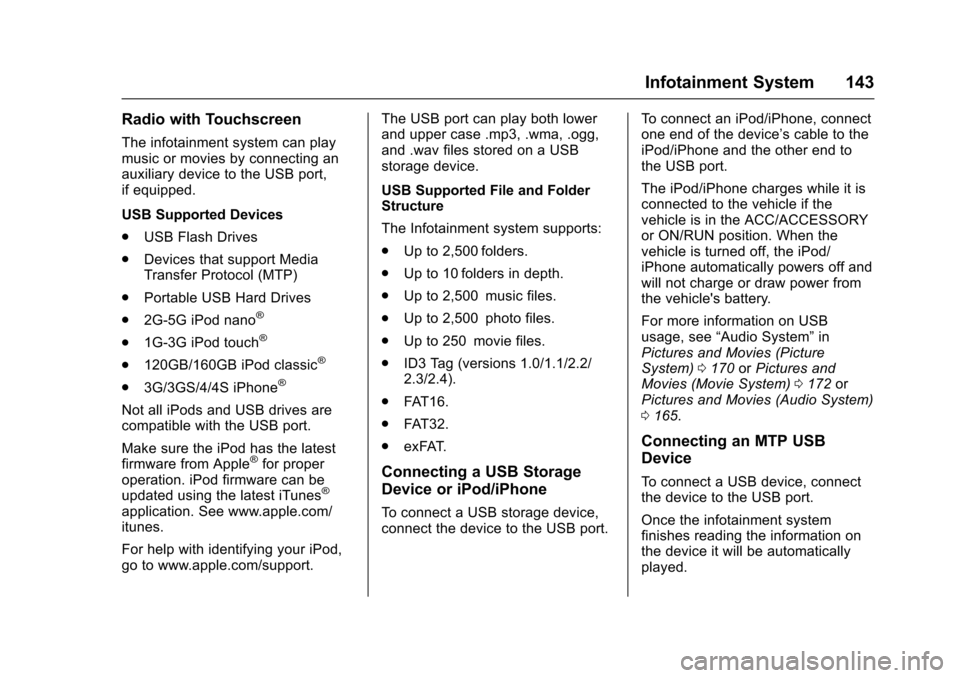
The infotainment system can play
music or movies by connecting an
auxiliary device to the USB port,
if equipped.
USB Supported Devices
.USB Flash Drives
. Devices that support Media
Transfer Protocol (MTP)
. Portable USB Hard Drives
. 2G-5G iPod nano
®
.1G-3G iPod touch®
.
120GB/160GB iPod classic®
.3G/3GS/4/4S iPhone®
Not all iPods and USB drives are
compatible with the USB port.
Make sure the iPod has the latest
firmware from Apple
®for proper
operation. iPod firmware can be
updated using the latest iTunes
®
application. See www.apple.com/
itunes.
For help with identifying your iPod,
go to www.apple.com/support. The USB port can play both lower
and upper case .mp3, .wma, .ogg,
and .wav files stored on a USB
storage device.
USB Supported File and Folder
Structure
The Infotainment system supports:
.
Up to 2,500 folders.
. Up to 10 folders in depth.
. Up to 2,500 music files.
. Up to 2,500 photo files.
. Up to 250 movie files.
. ID3 Tag (versions 1.0/1.1/2.2/
2.3/2.4).
. FAT16.
. FAT32.
. exFAT.
Connecting a USB Storage
Device or iPod/iPhone
To connect a USB storage device,
connect the device to the USB port. To connect an iPod/iPhone, connect
one end of the device’
s cable to the
iPod/iPhone and the other end to
the USB port.
The iPod/iPhone charges while it is
connected to the vehicle if the
vehicle is in the ACC/ACCESSORY
or ON/RUN position. When the
vehicle is turned off, the iPod/
iPhone automatically powers off and
will not charge or draw power from
the vehicle's battery.
For more information on USB
usage, see “Audio System” in
Pictures and Movies (Picture
System) 0170 orPictures and
Movies (Movie System) 0172 or
Pictures and Movies (Audio System)
0 165.
Connecting an MTP USB
Device
To connect a USB device, connect
the device to the USB port.
Once the infotainment system
finishes reading the information on
the device it will be automatically
played.
Page 145 of 353

Chevrolet Sonic Owner Manual (GMNA-Localizing-U.S/Canada-9085902) -
2016 - CRC - 5/27/15
144 Infotainment System
If a non-readable device that
supports MTP is connected, then an
error message will appear and the
infotainment system will be
automatically switched to the
previous audio function.
All files may not play. File loading
may take a few minutes. An MTP
device that has external memory
may be recognized as USB1/USB2.
Auxiliary Devices
The optional AUX input allows
portable devices to connect to the
vehicle using the 3.5 mm (1/8 in)
input jack. If equipped with a
touchscreen radio, the AUX input
jack is in the storage area to the
right of the infotainment system.
If equipped with a non-touchscreen
radio, the AUX input is on the front
of the infotainment system. See
Overview (Radio with Touchscreen)
0131 orOverview (AM-FM Radio)
0 129.
Portable devices are controlled by
using the menu system described in
Operation 0132.1. 3.5 mm (1/8 in) Auxiliary
Input Jack
2. USB Port. See USB Port
0 142.
Radio without Touchscreen
Connect a 3.5 mm (1/8 in) cable to
the auxiliary input jack to use a
portable audio player.
Playback of an audio device that is
connected to the 3.5 mm (1/8 in)
jack can only be controlled using
the controls on the device. Adjusting the Volume
Turn the
O/VOL knob to adjust the
volume of the infotainment system
after the volume level has been set
on the portable audio device.
Radio with Touchscreen
The infotainment system can play
music or movies connected by the
auxiliary device.
Play will begin when the system has
finished reading the information on
the device.
Playing Music
Page 146 of 353

Chevrolet Sonic Owner Manual (GMNA-Localizing-U.S/Canada-9085902) -
2016 - CRC - 5/27/15
Infotainment System 145
To play the music from the device,
if the device is already connected:1. Press
D.
2. Press audio.
3. Press Source
R.
4. Press AUX/USB.
To adjust the tone settings, see
“Tone Settings” under“Radio
Controls with Touchscreen” in
Operation 0132.
Playing Movies
Movies are not available while
driving.
If the USB storage device is already
connected:
1. Press
D.
2. Press picture and movie.
3. Press Source
R.
4. Press USB (Movie).
For iPod/iPhone, connect the iPod/
iPhone to the AUX input terminal by
using the AUX cable for iPod/
iPhone to play movie files. iPhone 5 cell phones have a
connector that no longer supports
AUX connections to the radio. This
feature is limited to older versions of
iPhone.
Using the AUX Movie Menu
1. Press MENU from the AUX
movie screen. The AUX menu
is displayed.
2. Press the desired menu. .tone settings: Adjust the
sound setup. See “Tone
Settings” under“Radio
Controls with Touchscreen”
in Operation 0132.
. clock/temp display: To
display the clock and
temperature on the full
screen, select On or Off. .
display settings: Adjust the
brightness and contrast of
the screen.
3. Press
4.
Bluetooth Audio
Streaming Audio
If equipped, music may be played
from a paired Bluetooth. See
Bluetooth (Voice Recognition) 0153
or Bluetooth (Overview) 0146 or
Bluetooth (Infotainment Controls)
0 147 for help pairing a device.
The music can be controlled by
controls on the device.
To play music via Bluetooth:
1. Power on the device, pair, and connect the device. The device
will display “GM Audio Source.”
2. Once paired, press MEDIA to select Bluetooth Audio.
3. Press the play button on the device to begin playback.
Page 167 of 353

Chevrolet Sonic Owner Manual (GMNA-Localizing-U.S/Canada-9085902) -
2016 - CRC - 5/27/15
166 Infotainment System
.The time it takes to process files
will depend on the USB storage
device type and capacity, and
the type of files stored.
. Some USB storage device files
may not be compatible.
. Up to two USB devices and one
iPod can be played through a
USB hub. All devices may not be
supported, depending on the
performance of the USB hub.
If there is not enough power
supply, it may not operate
normally.
. Do not disconnect the USB
storage device while it is playing.
This may cause damage to the
product or affect the
performance of the USB device.
. Disconnect the USB storage
device when the ignition is
turned off. If the ignition is turned
on while the USB device is
connected, the USB device may
be damaged or may not operate
normally. .
USB storage devices can only
be connected for playing music/
movies, viewing photo files,
or upgrading.
. Do not use the USB terminal to
charge USB accessory
equipment. The heat generated
may cause performance issues
or damage.
. Store files in the top-level drive
of the USB storage device.
When the logical drive is
separated from the device, only
the USB music files from the
top-level logical drive can be
played. Music files stored on
USB storage devices may not
play normally if an application is
loaded by partitioning a separate
drive.
. Music files to which Digital Right
Management (DRM) is applied
cannot be played.
. USB storage device capacity
limit is 2,500 music files, 2,500
photo files, 250 movie files,
2,500 folders, and 10 stages of
folder structure. The iPod/iPhone
can play all music files supported, but will only display
up to 2,500 files on the screen in
alphabetical order.
. Some iPod/iPhone product
models may not support the
connectivity or functionality of
this product.
. Only connect the iPod/iPhone
with connection cables
supported by iPod/iPhone
products. Other connection
cables cannot be used.
. The iPod/iPhone may be
damaged if it is connected to the
vehicle with the ignition on.
When not in use, disconnect the
iPod/iPhone.
. When the iPod/iPhone is
connected to the USB port by
using the iPod/iPhone cable, the
Bluetooth music is not
supported.
. Connect the iPod/iPhone to the
USB port by using the iPod/
iPhone cable to play the music
files. When the iPod/iPhone is
connected to the AUX input
Page 344 of 353
Chevrolet Sonic Owner Manual (GMNA-Localizing-U.S/Canada-9085902) -
2016 - CRC - 5/27/15
Index 343
AutomaticDoor Locks . . . . . . . . . . . . . . . . . . . . . 32
Headlamp System . . . . . . . . . . . . 122
Transmission . . . . . . . . . . . . . . . . . 198
Transmission Fluid . . . . . . . . . . . 229
Automatic Transmission Manual Mode . . . . . . . . . . . . . . . . . 199
Shift Lock Control Function
Check . . . . . . . . . . . . . . . . . . . . . . . 241
Auxiliary Devices . . . . . . . . . . . . . . . . . . . . . . . 144
B
Battery
Exterior Lighting BatterySaver . . . . . . . . . . . . . . . . . . . . . . . 126
Load Management . . . . . . . . . . . . 125
Power Protection . . . . . . . . . . . . . 126
Battery - North America . . . . 240, 287
Blade Replacement, Wiper . . . . . 242
Bluetooth Overview . . . . . . . . . . . 146, 147, 153
Bluetooth Audio . . . . . . . . . . . . . . . . 145
Brake System Warning Light . . . . . . . . 102
Brakes . . . . . . . . . . . . . . . . . . . . . . . . . . 238
Antilock . . . . . . . . . . . . . . . . . . . . . . . 202
Assist . . . . . . . . . . . . . . . . . . . . . . . . . 203
Fluid . . . . . . . . . . . . . . . . . . . . . . . . . . 239 Brakes (cont'd)
Parking . . . . . . . . . . . . . . . . . . . . . . . 202
Braking . . . . . . . . . . . . . . . . . . . . . . . . . 182
Break-In, New Vehicle . . . . . . . . . . 190
Bulb Replacement . . . . . . . . . . . . . . 247 Fog Lamps . . . . . . . . . . . . . . 123, 245
Halogen Bulbs . . . . . . . . . . . . . . . . 243
Headlamp Aiming . . . . . . . . . . . . . 243
Headlamps . . . . . . . . . . . . . . . . . . . 243
Headlamps, Front TurnSignal, and Parking
Lamps . . . . . . . . . . . . . . . . . . . . . . 244
License Plate Lamps . . . . . . . . . 246
Taillamps, Turn Signal, Stoplamps, and Back-up
Lamps . . . . . . . . . . . . . . . . . . . . . . 245
Buying New Tires . . . . . . . . . . . . . . . 268
C
Calibration . . . . . . . . . . . . . . . . . . . . . . . 92
California Fuel Requirements . . . . . . . . . . . 214
Perchlorate MaterialsRequirements . . . . . . . . . . . . . . . 220
California Proposition
65 Warning . . . . . . . . . .220, 240, 287
Camera
Rear Vision (RVC) . . . . . . . . . . . . 208 Canadian Vehicle Owners . . . . . . . . 2
Capacities and
Specifications . . . . . . . . . . . . . . . . . 315
Carbon Monoxide Engine Exhaust . . . . . . . . . . . . . . . 197
Liftgate . . . . . . . . . . . . . . . . . . . . . . . . . 35
Trunk . . . . . . . . . . . . . . . . . . . . . . . . . . . 33
Winter Driving . . . . . . . . . . . . . . . . 185
Cargo Cover . . . . . . . . . . . . . . . . . . . . . . . . . . . 87
Caution, Danger, and Warning . . . . 2
Chains, Tire . . . . . . . . . . . . . . . . . . . . 273
Charging System Light . . . . . . . . . 100
Check
Ignition Transmission Lock . . . 241
Malfunction IndicatorEngine Light . . . . . . . . . . . . . . . . 100
Child Restraints Infants and Young Children . . . . . 69
Lower Anchors and Tethersfor Children . . . . . . . . . . . . . . . . . . . 74
Older Children . . . . . . . . . . . . . . . . . . 68
Securing . . . . . . . . . . . . . . . . . . . . 80, 82
Systems . . . . . . . . . . . . . . . . . . . . . . . . 72
Circuit Breakers . . . . . . . . . . . . . . . . 248
Cleaning
Exterior Care . . . . . . . . . . . . . . . . . 292
Interior Care . . . . . . . . . . . . . . . . . . 297
Page 345 of 353
Chevrolet Sonic Owner Manual (GMNA-Localizing-U.S/Canada-9085902) -
2016 - CRC - 5/27/15
344 Index
Climate Control Systems . . . . . . . 176Air Conditioning . . . . . . . . . . . . . . 176
Heating . . . . . . . . . . . . . . . . . . . . . . . 176
Clock . . . . . . . . . . . . . . . . . . . . . . . . . . . . 93
Cluster, Instrument . . . . . . . . . . . . . . 96
Clutch, Hydraulic . . . . . . . . . . . . . . . 230
Collision Damage Repair . . . . . . . 325
Compact Spare Tire . . . . . . . . . . . . 286
Compartment . . . . . . . . . . . . . . . . . . . . 87 Load . . . . . . . . . . . . . . . . . . . . . . . . . . . . 87
Compartments
Storage . . . . . . . . . . . . . . . . . . . . . . . . . 86
Compass . . . . . . . . . . . . . . . . . . . . . . . . 92
Compressor Kit, Tire Sealant . . . 275
Computer, Trip . . . . . . . . . . . . . . . . . . 111
Connections OnStar
®. . . . . . . . . . . . . . . . . . . . . . 334
Control Traction and ElectronicStability . . . . . . . . . . . . . . . . . . . . . 204
Control of a Vehicle . . . . . . . . . . . . . 182
Convex Mirrors . . . . . . . . . . . . . . . . . . 38
Coolant
Engine . . . . . . . . . . . . . . . . . . . . . . . . 233
Engine TemperatureWarning Light . . . . . . . . . . . . . . . 106
Cooling System . . . . . . . . . . . . . . . . . 232
Courtesy Lamps . . . . . . . . . . . . . . . . 124 Courtesy Transportation
Program . . . . . . . . . . . . . . . . . . . . . . . 324
Cover Cargo . . . . . . . . . . . . . . . . . . . . . . . . . . . 87
Cruise Control . . . . . . . . . . . . . . . . . . 206 Light . . . . . . . . . . . . . . . . . . . . . . . . . . 108
Customer Assistance . . . . . . . . . . . 321
Offices . . . . . . . . . . . . . . . . . . . . . . . . 320
Text Telephone (TTY)Users . . . . . . . . . . . . . . . . . . . . . . . 321
Customer Information
Service PublicationsOrdering Information . . . . . . . . 327
Customer Satisfaction Procedure . . . . . . . . . . . . . . . . . . . . . 318D
Damage Repair, Collision . . . . . . . 325
Danger, Warning, and Caution . . . . 2
Data Recorders, Event . . . . . . . . . 330
Daytime RunningLamps (DRL) . . . . . . . . . . . . . . . . . . 121
Indicator Light . . . . . . . . . . . . . . . . 108
Defensive Driving . . . . . . . . . . . . . . . 181
Delayed Locking . . . . . . . . . . . . . . . . . 31
Devices Auxiliary . . . . . . . . . . . . . . . . . . . . . . 144
Diagnostics OnStar
®. . . . . . . . . . . . . . . . . . . . . . 336 Distracted Driving . . . . . . . . . . . . . . . 181
Dome Lamps . . . . . . . . . . . . . . . . . . . 124
Door
Ajar Light . . . . . . . . . . . . . . . . . . . . . 109
Delayed Locking . . . . . . . . . . . . . . . . 31
Locks . . . . . . . . . . . . . . . . . . . . . . . . . . . 30
Drive Belt Routing, Engine . . . . . . 317
Driver Information
Center (DIC) . . . . . . . . . . . . . . . . . . 109
Driving Defensive . . . . . . . . . . . . . . . . . . . . . 181
Drunk . . . . . . . . . . . . . . . . . . . . . . . . . 181
For Better Fuel Economy . . . . . . . 24
Hill and Mountain Roads . . . . . . 185
If the Vehicle is Stuck . . . . . . . . . 186
Loss of Control . . . . . . . . . . . . . . . 183
Off-Road Recovery . . . . . . . . . . . 183
Vehicle Load Limits . . . . . . . . . . . 187
Wet Roads . . . . . . . . . . . . . . . . . . . 184
Winter . . . . . . . . . . . . . . . . . . . . . . . . 185
E
Electrical Equipment,
Add-On . . . . . . . . . . . . . . . . . . . . . . . 217
Electrical System Engine Compartment Fuse
Block . . . . . . . . . . . . . . . . . . . . . . . . 249
Fuses and Circuit Breakers . . . 248