2016 CHEVROLET SILVERADO AUX
[x] Cancel search: AUXPage 8 of 533

Chevrolet Silverado Owner Manual (GMNA-Localizing-U.S./Canada/Mexico-
9159338) - 2016 - crc - 10/21/15
In Brief 7
1.Instrument Panel Illumination
Control 0184.
2. Integrated Trailer Brake Control (ITBC) System (If Equipped).
See Towing Equipment 0345.
3. Exterior Lamp Controls 0178.
Fog Lamps 0183 (If
Equipped).
4. Air Vents 0257.
5. Turn Signal Lever. See Turn
and Lane-Change
Signals 0183.
Windshield Wiper/
Washer 0126.
6. Favorite Switches (Out of View). See Steering Wheel
Controls 0125.
Volume Switches (Out of View).
See Steering Wheel
Controls 0125.
7. Instrument Cluster 0132.
8. Hazard Warning
Flashers 0182.
9. Shift Lever. See Automatic
Transmission 0289. Tow/Haul Selector Button (If
Equipped). See
Tow/Haul
Mode 0295.
Range Selection Mode (If
Equipped). See Manual
Mode 0292.
10. Light Sensor. See Automatic
Headlamp System 0181.
11. Infotainment 0189.
12. Passenger Airbag On-Off Switch (If Equipped) (Out of
View). See Airbag On-Off
Switch 080.
13. Heated and Ventilated Seats
013 (If Equipped).
14. Power Outlet 110/120 Volt Alternating Current (If
Equipped). See Power
Outlets 0128.
15. Power Outlets 0128 (If
Equipped).
16.
gTraction Control/Electronic
Stability Control 0308.
0Pedal Adjust Switch (If
Equipped). See Adjustable
Throttle and Brake
Pedal 0280.
{Cargo Lamp 0185.
XParking Assist Button (If
Equipped). See Assistance
Systems for Parking or
Backing 0314.
ALane Keep Assist (LKA)
(1500 Series) 0320 (If
Equipped).
5Hill Descent Control Switch
(If Equipped). See Hill Descent
Control (HDC) 0310.
qExhaust Brake (If
Equipped). See “Exhaust
Brake” in the Duramax diesel
supplement.
gPower Take Off (PTO)
Switch (If Equipped). See the
Duramax diesel supplement.
Auxiliary Button (If Equipped).
See Add-On Electrical
Equipment 0355.
Page 25 of 533
Chevrolet Silverado Owner Manual (GMNA-Localizing-U.S./Canada/Mexico-
9159338) - 2016 - crc - 10/21/15
24 In Brief
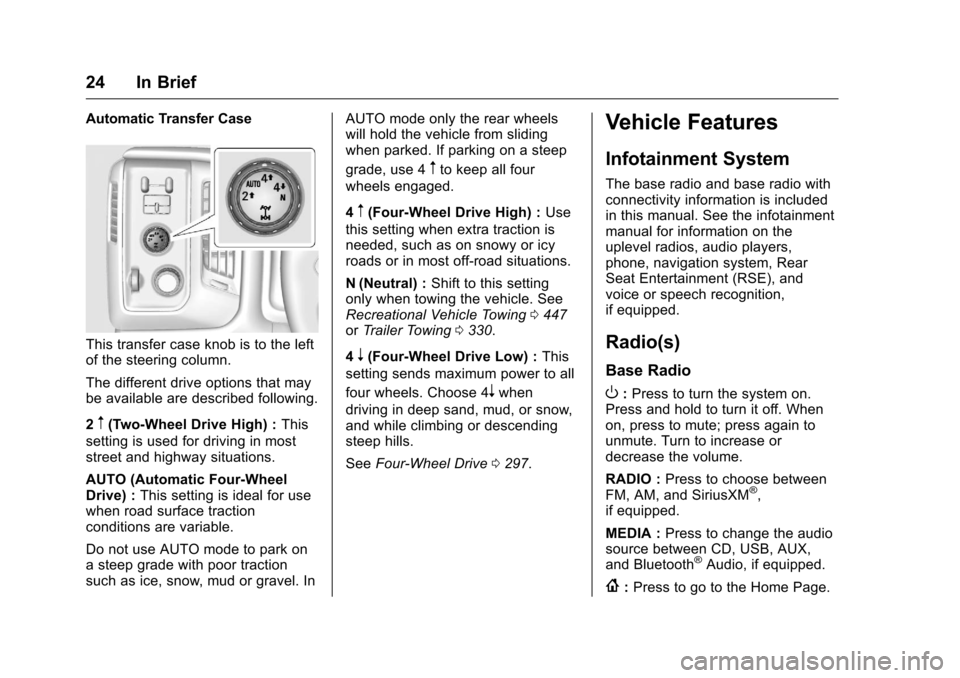
Automatic Transfer Case
This transfer case knob is to the left
of the steering column.
The different drive options that may
be available are described following.
2
m(Two-Wheel Drive High) :This
setting is used for driving in most
street and highway situations.
AUTO (Automatic Four-Wheel
Drive) : This setting is ideal for use
when road surface traction
conditions are variable.
Do not use AUTO mode to park on
a steep grade with poor traction
such as ice, snow, mud or gravel. In AUTO mode only the rear wheels
will hold the vehicle from sliding
when parked. If parking on a steep
grade, use 4
mto keep all four
wheels engaged.
4
m(Four-Wheel Drive High) : Use
this setting when extra traction is
needed, such as on snowy or icy
roads or in most off-road situations.
N (Neutral) : Shift to this setting
only when towing the vehicle. See
Recreational Vehicle Towing 0447
or Trailer Towing 0330.
4
n(Four-Wheel Drive Low) : This
setting sends maximum power to all
four wheels. Choose 4
nwhen
driving in deep sand, mud, or snow,
and while climbing or descending
steep hills.
See Four-Wheel Drive 0297.
Vehicle Features
Infotainment System
The base radio and base radio with
connectivity information is included
in this manual. See the infotainment
manual for information on the
uplevel radios, audio players,
phone, navigation system, Rear
Seat Entertainment (RSE), and
voice or speech recognition,
if equipped.
Radio(s)
Base Radio
O:Press to turn the system on.
Press and hold to turn it off. When
on, press to mute; press again to
unmute. Turn to increase or
decrease the volume.
RADIO : Press to choose between
FM, AM, and SiriusXM
®,
if equipped.
MEDIA : Press to change the audio
source between CD, USB, AUX,
and Bluetooth
®Audio, if equipped.
{: Press to go to the Home Page.
Page 26 of 533

Chevrolet Silverado Owner Manual (GMNA-Localizing-U.S./Canada/Mexico-
9159338) - 2016 - crc - 10/21/15
In Brief 25
MENU :Press to select a menu.
g:Press to seek the previous
station or track.
l: Press to seek the next station
or track.
See “Base Radio” inOverview
(Base Radio) 0189 orOverview
(Base Radio with
Touchscreen) 0193.
Base Radio with Touchscreen
O:Press to turn the system on.
Press and hold to turn it off. When
on, press to mute; press again to
unmute. Turn to increase or
decrease the volume.
{: Press to go to the Home Page.
7:Press to seek the previous
station or track.
6: Press to seek the next station
or track.
See “Base Radio with Touchscreen”
in Overview (Base Radio) 0189 or
Overview (Base Radio with
Touchscreen) 0193.
Setting the Clock
See Clock 0127.
Satellite Radio
Vehicles with a SiriusXM®satellite
radio tuner and a valid SiriusXM
satellite radio subscription can
receive SiriusXM programming.
SiriusXM Satellite Radio
Service
SiriusXM is a satellite radio service
based in the 48 contiguous United
States and 10 Canadian provinces.
SiriusXM satellite radio has a wide
variety of programming and
commercial-free music, coast to
coast, and in digital-quality sound.
A fee is required to receive the
SiriusXM service.
For more information refer to:
. www.siriusxm.com or call
1-866-635-2349 (U.S.).
. www.xmradio.ca or call
1-877-209-0079 (Canada). See
Satellite Radio (Base Radio)
0 201 orSatellite Radio (Base
Radio with Touchscreen) 0201.
Portable Audio Devices
This vehicle may have a 3.5 mm
(1/8 in) auxiliary input jack and USB
ports in the center console or
armrest. There may be a USB port
in the upper glove box. External
devices such as iPods
®, laptop
computers, MP3 players, and USB
storage devices may be connected,
depending on the audio system.
See USB Port (Base Radio) 0209
or USB Port (Base Radio with
Touchscreen) 0212 andAuxiliary
Jack 0213.
Bluetooth®
The Bluetooth®system allows users
with a Bluetooth-enabled cell phone
to make and receive hands-free
calls using the vehicle audio system
and controls.
Page 49 of 533
Chevrolet Silverado Owner Manual (GMNA-Localizing-U.S./Canada/Mexico-
9159338) - 2016 - crc - 10/21/15
48 Keys, Doors, and Windows
Using hood-mounted air deflectors
and add-on convex mirror
attachments could decrease mirror
performance.
Trailer-Tow Mirrors
If equipped, adjust trailer-tow
mirrors for a clear view of the area
behind you. Manually pull out the
mirror head to extend it for better
visibility when towing a trailer.
The lower portion of the mirror is
convex. A convex mirror's surface is
curved to see more from the driverseat. The convex mirror can be
adjusted manually to the driver
preferred position for better vision.
The mirror may have a turn signal
arrow that flashes in the direction of
the turn or lane change.
If equipped, the mirror housing may
have auxiliary cargo and clearance
lamps. See
Cargo Lamp 0185 and
Exterior Lamp Controls 0178.
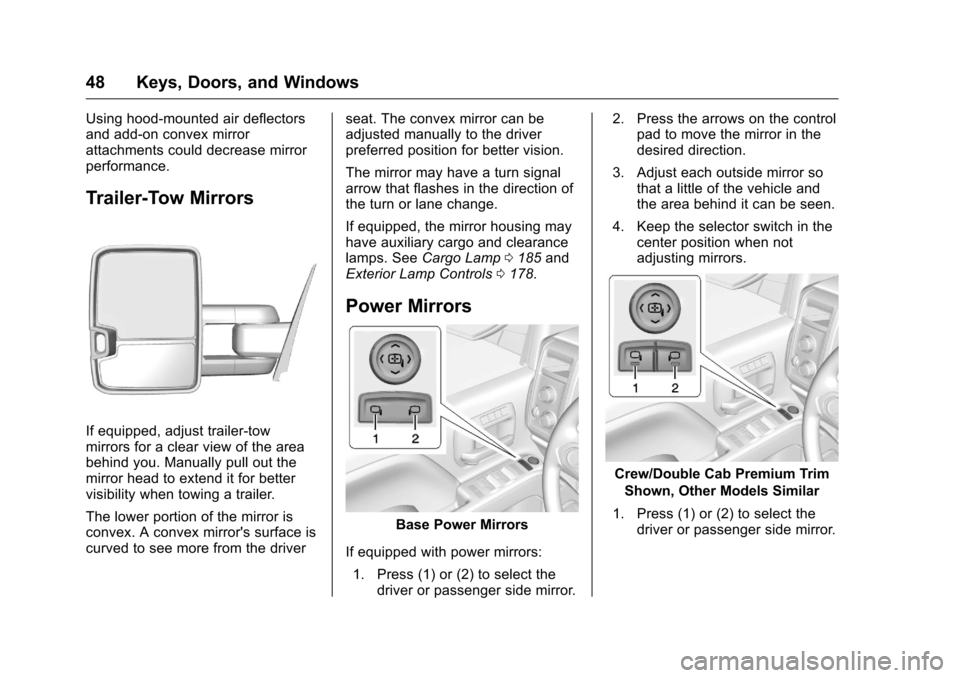
Power Mirrors
Base Power Mirrors
If equipped with power mirrors: 1. Press (1) or (2) to select the driver or passenger side mirror. 2. Press the arrows on the control
pad to move the mirror in the
desired direction.
3. Adjust each outside mirror so that a little of the vehicle and
the area behind it can be seen.
4. Keep the selector switch in the center position when not
adjusting mirrors.
Crew/Double Cab Premium Trim
Shown, Other Models Similar
1. Press (1) or (2) to select the driver or passenger side mirror.
Page 121 of 533
Chevrolet Silverado Owner Manual (GMNA-Localizing-U.S./Canada/Mexico-
9159338) - 2016 - crc - 10/21/15
120 Storage
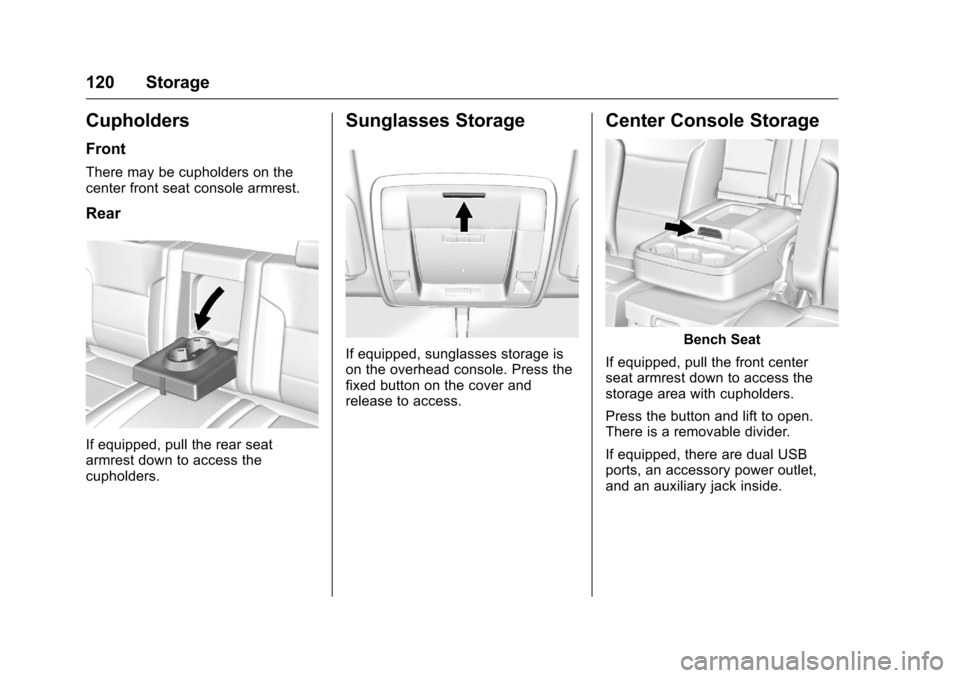
Cupholders
Front
There may be cupholders on the
center front seat console armrest.
Rear
If equipped, pull the rear seat
armrest down to access the
cupholders.
Sunglasses Storage
If equipped, sunglasses storage is
on the overhead console. Press the
fixed button on the cover and
release to access.
Center Console Storage
Bench Seat
If equipped, pull the front center
seat armrest down to access the
storage area with cupholders.
Press the button and lift to open.
There is a removable divider.
If equipped, there are dual USB
ports, an accessory power outlet,
and an auxiliary jack inside.
Page 122 of 533
Chevrolet Silverado Owner Manual (GMNA-Localizing-U.S./Canada/Mexico-
9159338) - 2016 - crc - 10/21/15
Storage 121
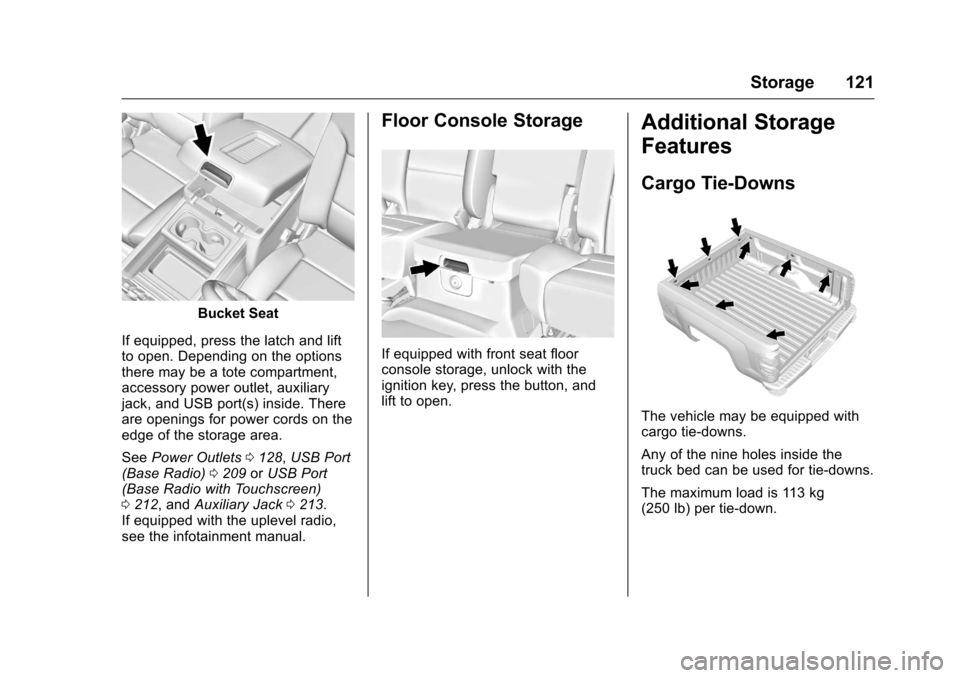
Bucket Seat
If equipped, press the latch and lift
to open. Depending on the options
there may be a tote compartment,
accessory power outlet, auxiliary
jack, and USB port(s) inside. There
are openings for power cords on the
edge of the storage area.
See Power Outlets 0128, USB Port
(Base Radio) 0209 orUSB Port
(Base Radio with Touchscreen)
0 212, and Auxiliary Jack 0213.
If equipped with the uplevel radio,
see the infotainment manual.
Floor Console Storage
If equipped with front seat floor
console storage, unlock with the
ignition key, press the button, and
lift to open.
Additional Storage
Features
Cargo Tie-Downs
The vehicle may be equipped with
cargo tie-downs.
Any of the nine holes inside the
truck bed can be used for tie-downs.
The maximum load is 113 kg
(250 lb) per tie-down.
Page 179 of 533
Chevrolet Silverado Owner Manual (GMNA-Localizing-U.S./Canada/Mexico-
9159338) - 2016 - crc - 10/21/15
178 Lighting
Lighting
Exterior Lighting
Exterior Lamp Controls . . . . . . . 178
Exterior Lamps OffReminder . . . . . . . . . . . . . . . . . . . 180
Headlamp High/Low-Beam Changer . . . . . . . . . . . . . . . . . . . . 180
Flash-to-Pass . . . . . . . . . . . . . . . . 181
Daytime Running Lamps (DRL) . . . . . . . . . . . . . . . 181
Automatic Headlamp System . . . . . . . . . . . . . . . . . . . . . . 181
Hazard Warning Flashers . . . . . 182
Turn and Lane-Change Signals . . . . . . . . . . . . . . . . . . . . . . 183
Fog Lamps . . . . . . . . . . . . . . . . . . . 183
Auxiliary Roof-Mounted Lamp . . . . . . . . 184
Interior Lighting
Instrument Panel IlluminationControl . . . . . . . . . . . . . . . . . . . . . . 184
Cargo Lamp . . . . . . . . . . . . . . . . . . 185
Dome Lamps . . . . . . . . . . . . . . . . . 185
Reading Lamps . . . . . . . . . . . . . . 185
Lighting Features
Entry Lighting . . . . . . . . . . . . . . . . 186
Exit Lighting . . . . . . . . . . . . . . . . . . 186
Battery Load Management . . . 186
Battery Power Protection . . . . . 187
Exterior Lighting
Exterior Lamp Controls
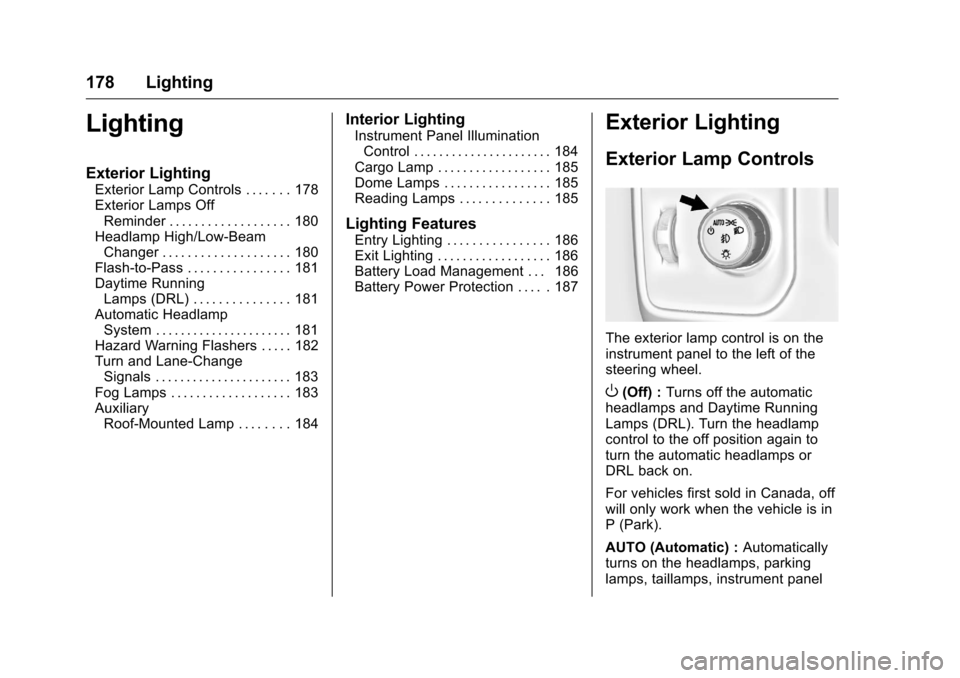
The exterior lamp control is on the
instrument panel to the left of the
steering wheel.
O(Off) : Turns off the automatic
headlamps and Daytime Running
Lamps (DRL). Turn the headlamp
control to the off position again to
turn the automatic headlamps or
DRL back on.
For vehicles first sold in Canada, off
will only work when the vehicle is in
P (Park).
AUTO (Automatic) : Automatically
turns on the headlamps, parking
lamps, taillamps, instrument panel
Page 185 of 533
Chevrolet Silverado Owner Manual (GMNA-Localizing-U.S./Canada/Mexico-
9159338) - 2016 - crc - 10/21/15
184 Lighting
Some localities have laws that
require the headlamps to be on with
the fog lamps.
Auxiliary
Roof-Mounted Lamp
If equipped, this button includes
wiring provisions for a dealer or a
qualified service center to install an
auxiliary roof lamp.
This button is on the overhead
console.
When the wiring is connected to an
auxiliary roof-mounted lamp,
pressing the bottom of the button
will activate the lamp and illuminate
an indicator light at the bottom ofthis button. Pressing the top of the
button will turn off the roof-mounted
lamp and indicator.
The emergency roof lamp circuit is
fused at 30 amps, so the total
current draw of the attached lamps
should be less than this value. The
attachment points for the roof lamp
circuits are two blunt cut wires
above the overhead console: a dark
green with blue stripe switched
power wire and a black ground wire.
For information on roof-mounted
emergency lamp installation, see
www.gmupfitter.com or contact your
dealer.
If the vehicle has this button, the
vehicle may have the snow plow
prep package. See
Add-On
Electrical Equipment 0355.
Interior Lighting
Instrument Panel
Illumination Control
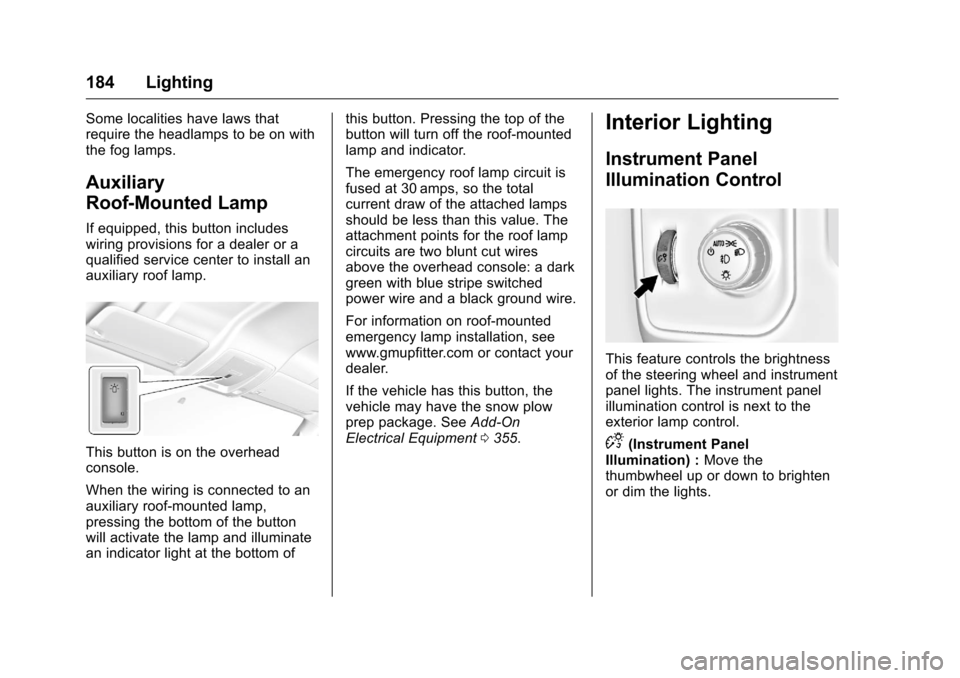
This feature controls the brightness
of the steering wheel and instrument
panel lights. The instrument panel
illumination control is next to the
exterior lamp control.
D(Instrument Panel
Illumination) : Move the
thumbwheel up or down to brighten
or dim the lights.