2016 CHEVROLET SILVERADO steering
[x] Cancel search: steeringPage 321 of 533

Chevrolet Silverado Owner Manual (GMNA-Localizing-U.S./Canada/Mexico-
9159338) - 2016 - crc - 10/27/15
320 Driving and Operating
Warning (Continued)
departing the lane on the side
where it has detected a lane
marking. Always keep your
attention on the road and
maintain proper vehicle position
within the lane, or vehicle
damage, injury, or death could
occur. Always keep the
windshield, headlamps, and
camera sensors clean and in
good repair. Do not use LDW in
bad weather conditions.
How the System Works
The LDW camera sensor is on the
windshield ahead of the rearview
mirror.
To turn LDW on and off, press
@on
the center stack. The control
indicator will light when LDW is on.
When LDW is on,@is green if
LDW is available to warn of a lane
departure. If the vehicle crosses a
detected lane marking without using
the turn signal in that direction,
@
changes to amber and flashes.
Additionally, there will be three
beeps, or the driver seat will pulse
three times on the right or left,
depending on the lane departure
direction.
When the System Does Not
Seem to Work Properly
The system may not detect lanes as
well when there are:
. Close vehicles ahead.
. Sudden lighting changes, such
as when driving through tunnels.
. Banked roads. If the LDW system is not functioning
properly when lane markings are
clearly visible, cleaning the
windshield may help.
LDW alerts may occur due to tar
marks, shadows, cracks in the road,
temporary or construction lane
markings, or other road
imperfections. This is normal system
operation; the vehicle does not need
service. Turn LDW off if these
conditions continue.
Lane Keep Assist (LKA)
(1500 Series)
If equipped, LKA may help avoid
crashes due to unintentional lane
departures. It may assist by gently
turning the steering wheel if the
vehicle approaches a detected lane
marking without using a turn signal
in that direction. It may also provide
a Lane Departure Warning (LDW)
system alert as the lane marking is
crossed. The LKA system will not
assist or provide an LDW alert if it
detects that you are actively
steering. Override LKA by turning
the steering wheel. LKA uses a
Page 322 of 533

Chevrolet Silverado Owner Manual (GMNA-Localizing-U.S./Canada/Mexico-
9159338) - 2016 - crc - 10/27/15
Driving and Operating 321
camera to detect lane markings
between 60 km/h (37 mph) and
180 km/h (112 mph).
{Warning
The LKA system does not
continuously steer the vehicle.
It may not keep the vehicle in the
lane or give a Lane Departure
Warning (LDW) alert, even if a
lane marking is detected.
The LKA and LDW systems
may not:. Provide an alert or enough
steering assist to avoid a
lane departure or crash.
. Detect lane markings under
poor weather or visibility
conditions. This can occur if
the windshield or
headlamps are blocked by
dirt, snow, or ice, if they are
not in proper condition, or if
the sun shines directly into
the camera.
. Detect road edges.
(Continued)
Warning (Continued)
.Detect lanes on winding or
hilly roads.
If LKA only detects lane markings
on one side of the road, it will
only assist or provide an LDW
alert when approaching the lane
on the side where it has detected
a lane marking. Even with LKA
and LDW, you must steer the
vehicle. Always keep your
attention on the road and
maintain proper vehicle position
within the lane, or vehicle
damage, injury, or death could
occur. Always keep the
windshield, headlamps, and
camera sensors clean and in
good repair. Do not use LKA in
bad weather conditions.
{Warning
Using LKA while towing a trailer
or on slippery roads could cause
loss of control of the vehicle and
a crash. Turn the system off.
How the System Works
The LKA camera sensor is on the
windshield ahead of the rearview
mirror.
To turn LKA on and off, press
A
on the center stack.
When on,Ais green if LKA is
available to assist and provide LDW
alerts. It may assist by gently
turning the steering wheel and
display
Aas amber if the vehicle
approaches a detected lane marking
without using a turn signal in that
Page 323 of 533
Chevrolet Silverado Owner Manual (GMNA-Localizing-U.S./Canada/Mexico-
9159338) - 2016 - crc - 10/27/15
322 Driving and Operating
direction. It may also provide an
LDW alert by flashing
Aamber
as the lane marking is crossed.
Additionally, there will be three
beeps, or the driver seat will pulse
three times, on the right or left,
depending on the lane departure
direction.
The LKA system does not
continuously steer the vehicle.
If LKA does not detect active driver
steering, an alert and chime may be
provided. Move the steering wheel
to dismiss.
When the System Does Not
Seem to Work Properly
The system performance may be
affected by:
. Close vehicles ahead.
. Sudden lighting changes, such
as when driving through tunnels.
. Banked roads.
. Roads with poor lane markings,
such as two-lane roads. If the LKA system is not functioning
properly when lane markings are
clearly visible, cleaning the
windshield may help.
LKA assistance and/or LDW alerts
may occur due to tar marks,
shadows, cracks in the road,
temporary or construction lane
markings, or other road
imperfections. This is normal system
operation; the vehicle does not need
service. Turn LKA off if these
conditions continue.
Fuel
For diesel engine vehicles, see
“Fuel for Diesel Engines”
in the
Duramax diesel supplement.
Use of the recommended fuel is an
important part of the proper
maintenance of this vehicle. When
driving in the U.S. and Canada, to
help keep the engine clean and
maintain optimum vehicle
performance, we recommend using
TOP TIER Detergent Gasolines.
See www.toptiergas.com for a list of
TOP TIER Detergent Gasolines.
Page 330 of 533
Chevrolet Silverado Owner Manual (GMNA-Localizing-U.S./Canada/Mexico-
9159338) - 2016 - crc - 10/27/15
Driving and Operating 329
Following Distance
Stay at least twice as far behind the
vehicle ahead as you would when
driving the vehicle without a trailer.
This can help to avoid heavy
braking and sudden turns.
Passing
More passing distance is needed
when towing a trailer. The
combination will not accelerate as
quickly and is longer so it is
necessary to go much farther
beyond the passed vehicle before
returning to the lane.
Backing Up
Hold the bottom of the steering
wheel with one hand. To move the
trailer to the left, move that hand to
the left. To move the trailer to the
right, move your hand to the right.
Always back up slowly and,
if possible, have someone
guide you.
Making TurnsCaution
Making very sharp turns while
trailering could cause the trailer to
come in contact with the vehicle.
The vehicle could be damaged.
Avoid making very sharp turns
while trailering.
When turning with a trailer, make
wider turns than normal. Do this so
the trailer will not strike soft
shoulders, curbs, road signs, trees,
or other objects. Avoid jerky or
sudden maneuvers. Signal well in
advance.
If the trailer turn signal bulbs burn
out, the arrows on the instrument
cluster will still flash for turns. It is
important to check occasionally to
be sure the trailer bulbs are still
working.
Driving on Grades
Reduce speed and shift to a lower
gear before starting down a long or
steep downgrade. If the transmission is not shifted down, the
brakes might get hot and no longer
work well.
Vehicles can tow in D (Drive). Shift
the transmission to a lower gear if
the transmission shifts too often
under heavy loads and/or hilly
conditions.
The Tow/Haul Mode may be used if
the transmission shifts too often.
See
Tow/Haul Mode 0295.
When towing at high altitude on
steep uphill grades, consider the
following: Engine coolant will boil at
a lower temperature than at normal
altitudes. If the engine is turned off
immediately after towing at high
altitude on steep uphill grades, the
vehicle may show signs similar to
engine overheating. To avoid this,
let the engine run while parked,
preferably on level ground, with the
transmission in P (Park) for a few
minutes before turning the engine
off. If the overheat warning comes
on, see Engine Overheating 0382.
Page 352 of 533
Chevrolet Silverado Owner Manual (GMNA-Localizing-U.S./Canada/Mexico-
9159338) - 2016 - crc - 10/27/15
Driving and Operating 351
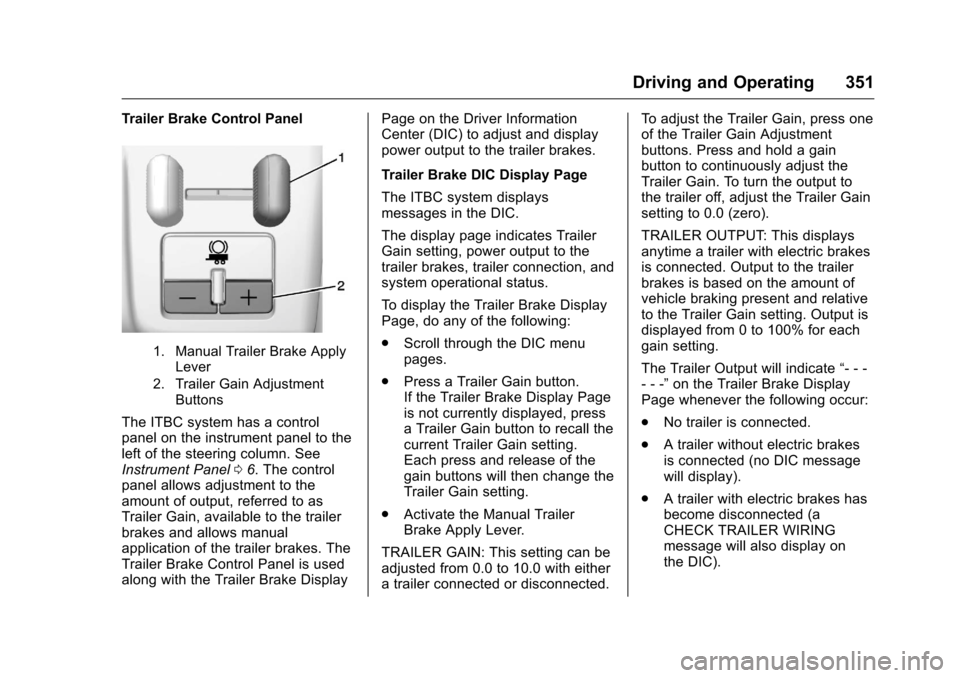
Trailer Brake Control Panel
1. Manual Trailer Brake ApplyLever
2. Trailer Gain Adjustment Buttons
The ITBC system has a control
panel on the instrument panel to the
left of the steering column. See
Instrument Panel 06. The control
panel allows adjustment to the
amount of output, referred to as
Trailer Gain, available to the trailer
brakes and allows manual
application of the trailer brakes. The
Trailer Brake Control Panel is used
along with the Trailer Brake Display Page on the Driver Information
Center (DIC) to adjust and display
power output to the trailer brakes.
Trailer Brake DIC Display Page
The ITBC system displays
messages in the DIC.
The display page indicates Trailer
Gain setting, power output to the
trailer brakes, trailer connection, and
system operational status.
To display the Trailer Brake Display
Page, do any of the following:
.
Scroll through the DIC menu
pages.
. Press a Trailer Gain button.
If the Trailer Brake Display Page
is not currently displayed, press
a Trailer Gain button to recall the
current Trailer Gain setting.
Each press and release of the
gain buttons will then change the
Trailer Gain setting.
. Activate the Manual Trailer
Brake Apply Lever.
TRAILER GAIN: This setting can be
adjusted from 0.0 to 10.0 with either
a trailer connected or disconnected. To adjust the Trailer Gain, press one
of the Trailer Gain Adjustment
buttons. Press and hold a gain
button to continuously adjust the
Trailer Gain. To turn the output to
the trailer off, adjust the Trailer Gain
setting to 0.0 (zero).
TRAILER OUTPUT: This displays
anytime a trailer with electric brakes
is connected. Output to the trailer
brakes is based on the amount of
vehicle braking present and relative
to the Trailer Gain setting. Output is
displayed from 0 to 100% for each
gain setting.
The Trailer Output will indicate
“- - -
- - -” on the Trailer Brake Display
Page whenever the following occur:
. No trailer is connected.
. A trailer without electric brakes
is connected (no DIC message
will display).
. A trailer with electric brakes has
become disconnected (a
CHECK TRAILER WIRING
message will also display on
the DIC).
Page 361 of 533
Chevrolet Silverado Owner Manual (GMNA-Localizing-U.S./Canada/Mexico-
9159338) - 2016 - crc - 10/21/15
360 Vehicle Care
Vehicle Care
General Information
General Information . . . . . . . . . . 361
California Proposition65 Warning . . . . . . . . . . . . . . . . . 361
California Perchlorate Materials Requirements . . . . . 362
Accessories and Modifications . . . . . . . . . . . . . . . . 362
Vehicle Checks
Doing Your OwnService Work . . . . . . . . . . . . . . . 363
Hood . . . . . . . . . . . . . . . . . . . . . . . . . 363
Engine Compartment Overview . . . . . . . . . . . . . . . . . . . . 364
Engine Oil . . . . . . . . . . . . . . . . . . . . 369
Engine Oil Life System . . . . . . . 372
Automatic Transmission Fluid (6 Speed Transmission) . . . . . 373
Automatic Transmission Fluid (8 Speed Transmission) . . . . . 376
Manual Transmission Fluid . . . 376
Hydraulic Clutch . . . . . . . . . . . . . . 376
Engine Air Cleaner/Filter . . . . . . 377
Cooling System . . . . . . . . . . . . . . 378
Engine Coolant . . . . . . . . . . . . . . . 379
Engine Overheating . . . . . . . . . . 382 Overheated Engine Protection
Operating Mode . . . . . . . . . . . . . 384
Engine Fan . . . . . . . . . . . . . . . . . . . 384
Power Steering Fluid (1500 Series) . . . . . . . . . . . . . . . . . . . . . . 385
Power Steering Fluid (2500/ 3500 Series) . . . . . . . . . . . . . . . . 385
Washer Fluid . . . . . . . . . . . . . . . . . 385
Brakes . . . . . . . . . . . . . . . . . . . . . . . 386
Brake Fluid . . . . . . . . . . . . . . . . . . . 387
Battery - North America . . . . . . 388
Four-Wheel Drive . . . . . . . . . . . . . 389
Front Axle . . . . . . . . . . . . . . . . . . . . 390
Rear Axle . . . . . . . . . . . . . . . . . . . . 390
Noise Control System . . . . . . . . 392
Starter Switch Check . . . . . . . . . 393
Automatic Transmission Shift Lock Control Function
Check . . . . . . . . . . . . . . . . . . . . . . . 393
Ignition Transmission Lock Check . . . . . . . . . . . . . . . . . . . . . . . 393
Park Brake and P (Park) Mechanism Check . . . . . . . . . . 394
Wiper Blade Replacement . . . . 394
Glass Replacement . . . . . . . . . . 395
Headlamp Aiming
Headlamp Aiming . . . . . . . . . . . . 395
Bulb Replacement
Bulb Replacement . . . . . . . . . . . . 395 Halogen Bulbs . . . . . . . . . . . . . . . . 395
High Intensity Discharge (HID)
Lighting . . . . . . . . . . . . . . . . . . . . . 395
LED Lighting . . . . . . . . . . . . . . . . . 396
Headlamps, Front Turn Signal, Sidemarker, and Parking
Lamps . . . . . . . . . . . . . . . . . . . . . . 396
Fog Lamps . . . . . . . . . . . . . . . . . . . 396
Taillamps (Chassis Cab Models) . . . . . . . . . . . . . . . . . . . . . 397
Taillamps, Turn Signal, Stoplamps, and Back-Up
Lamps . . . . . . . . . . . . . . . . . . . . . . 397
Center High-Mounted Stoplamp (CHMSL) and
Cargo Lamp . . . . . . . . . . . . . . . . . 398
Replacement Bulbs . . . . . . . . . . . 399
Electrical System
High Voltage Devices and Wiring . . . . . . . . . . . . . . . . . . . . . . . 399
Electrical System Overload . . . 399
Fuses . . . . . . . . . . . . . . . . . . . . . . . . 400
Engine Compartment Fuse Block . . . . . . . . . . . . . . . . . . . . . . . . 400
Instrument Panel Fuse Block (Right) . . . . . . . . . . . . . . . . . . . . . . 403
Instrument Panel Fuse Block (Left) . . . . . . . . . . . . . . . . . 405
Page 364 of 533
Chevrolet Silverado Owner Manual (GMNA-Localizing-U.S./Canada/Mexico-
9159338) - 2016 - crc - 10/21/15
Vehicle Care 363
Vehicle Checks
Doing Your Own
Service Work
{Warning
It can be dangerous to work on
your vehicle if you do not have
the proper knowledge, service
manual, tools, or parts. Always
follow owner manual procedures
and consult the service manual
for your vehicle before doing any
service work.
If doing some of your own service
work, use the proper service
manual. It tells you much more
about how to service the vehicle
than this manual can. To order the
proper service manual, see Service
Publications Ordering
Information 0495.
This vehicle has an airbag system.
Before attempting to do your own
service work, see Servicing the
Airbag-Equipped Vehicle 087. Keep a record with all parts receipts
and list the mileage and the date of
any service work performed. See
Maintenance Records
0476.
Caution
Even small amounts of
contamination can cause damage
to vehicle systems. Do not allow
contaminants to contact the fluids,
reservoir caps, or dipsticks.
Hood
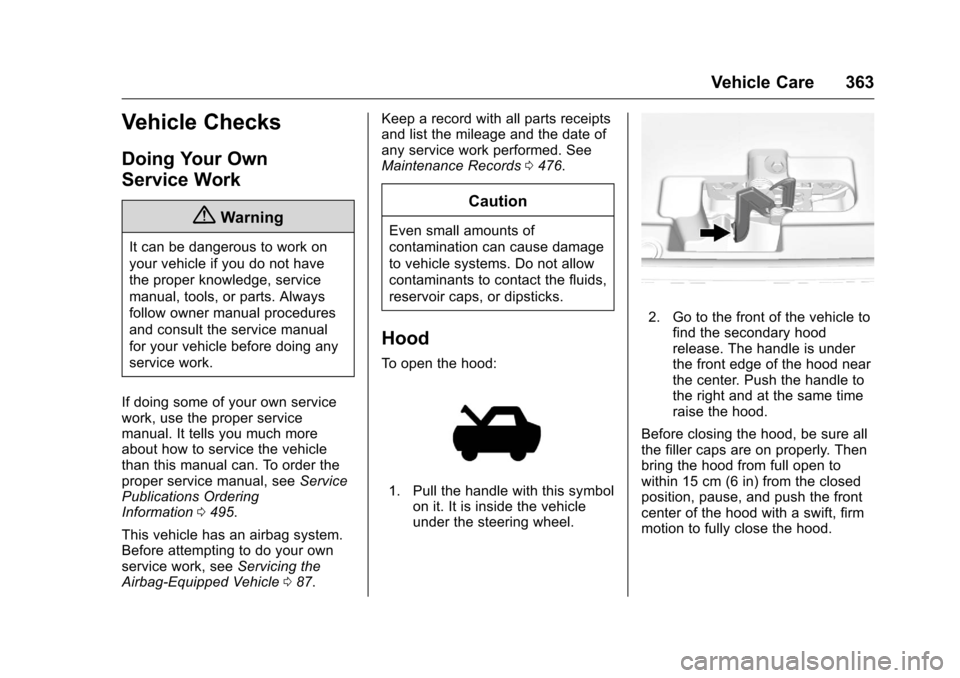
To open the hood:
1. Pull the handle with this symbol
on it. It is inside the vehicle
under the steering wheel.
2. Go to the front of the vehicle tofind the secondary hood
release. The handle is under
the front edge of the hood near
the center. Push the handle to
the right and at the same time
raise the hood.
Before closing the hood, be sure all
the filler caps are on properly. Then
bring the hood from full open to
within 15 cm (6 in) from the closed
position, pause, and push the front
center of the hood with a swift, firm
motion to fully close the hood.
Page 370 of 533
Chevrolet Silverado Owner Manual (GMNA-Localizing-U.S./Canada/Mexico-
9159338) - 2016 - crc - 10/21/15
Vehicle Care 369
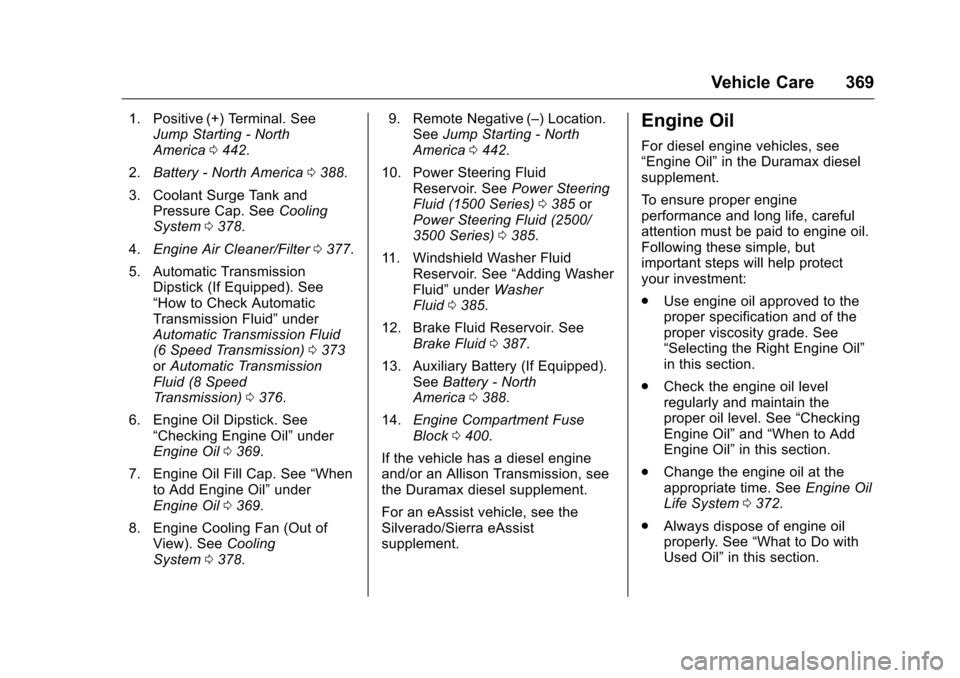
1. Positive (+) Terminal. SeeJump Starting - North
America 0442.
2. Battery - North America 0388.
3. Coolant Surge Tank and Pressure Cap. See Cooling
System 0378.
4. Engine Air Cleaner/Filter 0377.
5. Automatic Transmission Dipstick (If Equipped). See
“How to Check Automatic
Transmission Fluid” under
Automatic Transmission Fluid
(6 Speed Transmission) 0373
or Automatic Transmission
Fluid (8 Speed
Transmission) 0376.
6. Engine Oil Dipstick. See “Checking Engine Oil” under
Engine Oil 0369.
7. Engine Oil Fill Cap. See “When
to Add Engine Oil” under
Engine Oil 0369.
8. Engine Cooling Fan (Out of View). See Cooling
System 0378. 9. Remote Negative (–) Location.
See Jump Starting - North
America 0442.
10. Power Steering Fluid Reservoir. See Power Steering
Fluid (1500 Series) 0385 or
Power Steering Fluid (2500/
3500 Series) 0385.
11. Windshield Washer Fluid Reservoir. See “Adding Washer
Fluid” under Washer
Fluid 0385.
12. Brake Fluid Reservoir. See Brake Fluid 0387.
13. Auxiliary Battery (If Equipped). SeeBattery - North
America 0388.
14. Engine Compartment Fuse
Block 0400.
If the vehicle has a diesel engine
and/or an Allison Transmission, see
the Duramax diesel supplement.
For an eAssist vehicle, see the
Silverado/Sierra eAssist
supplement.Engine Oil
For diesel engine vehicles, see
“Engine Oil” in the Duramax diesel
supplement.
To ensure proper engine
performance and long life, careful
attention must be paid to engine oil.
Following these simple, but
important steps will help protect
your investment:
. Use engine oil approved to the
proper specification and of the
proper viscosity grade. See
“Selecting the Right Engine Oil”
in this section.
. Check the engine oil level
regularly and maintain the
proper oil level. See “Checking
Engine Oil” and“When to Add
Engine Oil” in this section.
. Change the engine oil at the
appropriate time. See Engine Oil
Life System 0372.
. Always dispose of engine oil
properly. See “What to Do with
Used Oil” in this section.