2016 CHEVROLET MALIBU mirror controls
[x] Cancel search: mirror controlsPage 6 of 420
Chevrolet Malibu Owner Manual (GMNA-Localizing-U.S./Canada/Mexico-
9087641) - 2016 - crc - 9/3/15
In Brief 5
In Brief
Instrument Panel
Instrument Panel Overview . . . . . . 6
Initial Drive Information
Initial Drive Information . . . . . . . . . . 8
Stop/Start System . . . . . . . . . . . . . . . 8
Remote Keyless Entry (RKE)System . . . . . . . . . . . . . . . . . . . . . . . . 8
Remote Vehicle Start . . . . . . . . . . . 8
Door Locks . . . . . . . . . . . . . . . . . . . . . 9
Windows . . . . . . . . . . . . . . . . . . . . . . . . 9
Seat Adjustment . . . . . . . . . . . . . . . 10
Memory Features . . . . . . . . . . . . . . 12
Second Row Seats . . . . . . . . . . . . 12
Heated and Ventilated Seats . . . 12
Head Restraint Adjustment . . . . 12
Safety Belts . . . . . . . . . . . . . . . . . . . . 13
Passenger Sensing System . . . 13
Mirror Adjustment . . . . . . . . . . . . . . 13
Steering Wheel Adjustment . . . . 14
Interior Lighting . . . . . . . . . . . . . . . . 14
Exterior Lighting . . . . . . . . . . . . . . . 15
Windshield Wiper/Washer . . . . . . 16
Climate Controls . . . . . . . . . . . . . . . 17
Transmission . . . . . . . . . . . . . . . . . . 18
Vehicle Features
Infotainment System . . . . . . . . . . . 19 Radio(s) . . . . . . . . . . . . . . . . . . . . . . . 20
Satellite Radio . . . . . . . . . . . . . . . . . 20
Portable Audio Devices . . . . . . . . 20
Bluetooth
®. . . . . . . . . . . . . . . . . . . . . 20
Steering Wheel Controls . . . . . . . 21
Cruise Control . . . . . . . . . . . . . . . . . 21
Driver Information
Center (DIC) . . . . . . . . . . . . . . . . . 22
Forward Collision Alert (FCA) System . . . . . . . . . . . . . . . . . . . . . . . 22
Front Automatic Braking (FAB) System . . . . . . . . . . . . . . . . . . . . . . . 22
Front Pedestrian Braking (FPB) System . . . . . . . . . . . . . . . . . . . . . . . 23
Lane Keep Assist (LKA) . . . . . . . 23
Lane Change Alert (LCA) . . . . . . 23
Rear Vision Camera (RVC) . . . . 23
Rear Cross Traffic Alert (RCTA) System . . . . . . . . . . . . . . . . . . . . . . . 23
Parking Assist . . . . . . . . . . . . . . . . . 24
Automatic Parking Assist (APA) . . . . . . . . . . . . . . . . . . 24
Power Outlets . . . . . . . . . . . . . . . . . 24
Universal Remote System . . . . . 24
Sunroof . . . . . . . . . . . . . . . . . . . . . . . . 25
Hybrid Features
Hybrid Features . . . . . . . . . . . . . . . 25
High Voltage Safety Information . . . . . . . . . . . . . . . . . . . 26
Regenerative Braking . . . . . . . . . . 26 Battery . . . . . . . . . . . . . . . . . . . . . . . . . 27
Service . . . . . . . . . . . . . . . . . . . . . . . . 27
Performance and Maintenance
Traction Control/Electronic
Stability Control . . . . . . . . . . . . . . 27
Tire Pressure Monitor . . . . . . . . . . 27
Engine Oil Life System . . . . . . . . 28
Driving for Better Fuel Economy . . . . . . . . . . . . . . . . . . . . . 28
Roadside Assistance Program . . . . . . . . . . . . . . . . . . . . . . 29
Page 15 of 420
Chevrolet Malibu Owner Manual (GMNA-Localizing-U.S./Canada/Mexico-
9087641) - 2016 - crc - 9/3/15
14 In Brief
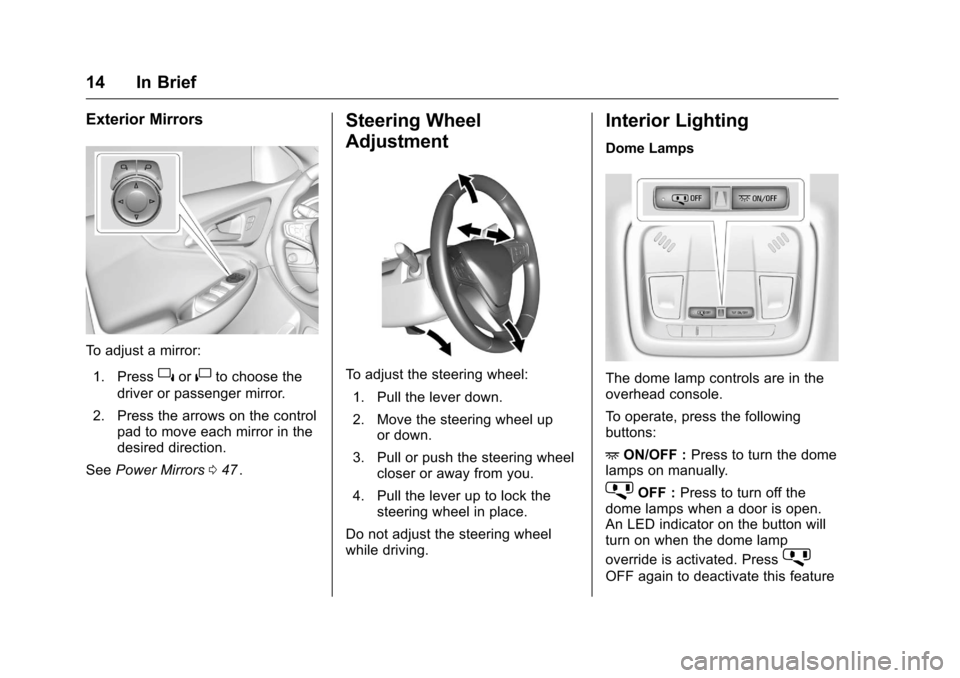
Exterior Mirrors
To adjust a mirror:1. Press
}or|to choose the
driver or passenger mirror.
2. Press the arrows on the control pad to move each mirror in the
desired direction.
See Power Mirrors 047
ii.
Steering Wheel
Adjustment
To adjust the steering wheel:
1. Pull the lever down.
2. Move the steering wheel up or down.
3. Pull or push the steering wheel closer or away from you.
4. Pull the lever up to lock the steering wheel in place.
Do not adjust the steering wheel
while driving.
Interior Lighting
Dome Lamps
The dome lamp controls are in the
overhead console.
To operate, press the following
buttons:
+ ON/OFF : Press to turn the dome
lamps on manually.
jOFF : Press to turn off the
dome lamps when a door is open.
An LED indicator on the button will
turn on when the dome lamp
override is activated. Press
j
OFF again to deactivate this feature
Page 31 of 420
Chevrolet Malibu Owner Manual (GMNA-Localizing-U.S./Canada/Mexico-
9087641) - 2016 - crc - 9/3/15
30 Keys, Doors, and Windows
Keys, Doors, and
Windows
Keys and Locks
Keys . . . . . . . . . . . . . . . . . . . . . . . . . . . 30
Remote Keyless Entry (RKE)System . . . . . . . . . . . . . . . . . . . . . . . 31
Remote Keyless Entry (RKE) System Operation . . . . . . . . . . . . 31
Remote Vehicle Start . . . . . . . . . . 37
Door Locks . . . . . . . . . . . . . . . . . . . . 38
Power Door Locks . . . . . . . . . . . . . 40
Delayed Locking . . . . . . . . . . . . . . . 40
Automatic Door Locks . . . . . . . . . 41
Lockout Protection . . . . . . . . . . . . . 41
Safety Locks . . . . . . . . . . . . . . . . . . . 41
Doors
Trunk . . . . . . . . . . . . . . . . . . . . . . . . . . 42
Vehicle Security
Vehicle Security . . . . . . . . . . . . . . . . 44
Vehicle Alarm System . . . . . . . . . 44
Immobilizer . . . . . . . . . . . . . . . . . . . . 45
Immobilizer Operation . . . . . . . . . 45
Exterior Mirrors
Convex Mirrors . . . . . . . . . . . . . . . . 46
Power Mirrors . . . . . . . . . . . . . . . . . . 47 Folding Mirrors . . . . . . . . . . . . . . . . . 47
Heated Mirrors . . . . . . . . . . . . . . . . . 47
Reverse Tilt Mirrors . . . . . . . . . . . . 47
Interior Mirrors
Interior Rearview Mirrors . . . . . . . 48
Manual Rearview Mirror . . . . . . . . 48
Automatic Dimming Rearview
Mirror . . . . . . . . . . . . . . . . . . . . . . . . . 48
Windows
Windows . . . . . . . . . . . . . . . . . . . . . . . 48
Power Windows . . . . . . . . . . . . . . . 48
Sun Visors . . . . . . . . . . . . . . . . . . . . . 50
Roof
Sunroof . . . . . . . . . . . . . . . . . . . . . . . . 51
Keys and Locks
Keys
{Warning
Leaving children in a vehicle with
a Remote Keyless Entry (RKE)
transmitter is dangerous and
children or others could be
seriously injured or killed. They
could operate the power windows
or other controls or make the
vehicle move. The windows will
function with the RKE transmitter
in the vehicle, and children or
others could be caught in the path
of a closing window. Do not leave
children in a vehicle with an RKE
transmitter.
Page 59 of 420
Chevrolet Malibu Owner Manual (GMNA-Localizing-U.S./Canada/Mexico-
9087641) - 2016 - crc - 9/3/15
58 Seats and Restraints
Memory Seats
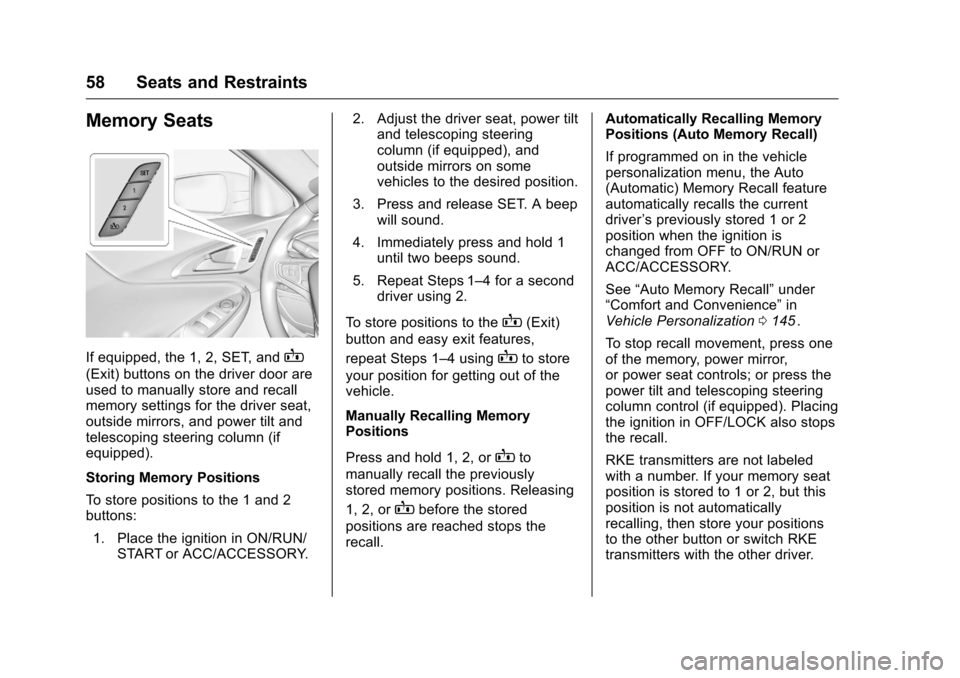
If equipped, the 1, 2, SET, andB
(Exit) buttons on the driver door are
used to manually store and recall
memory settings for the driver seat,
outside mirrors, and power tilt and
telescoping steering column (if
equipped).
Storing Memory Positions
To store positions to the 1 and 2
buttons:1. Place the ignition in ON/RUN/ START or ACC/ACCESSORY. 2. Adjust the driver seat, power tilt
and telescoping steering
column (if equipped), and
outside mirrors on some
vehicles to the desired position.
3. Press and release SET. A beep will sound.
4. Immediately press and hold 1 until two beeps sound.
5. Repeat Steps 1–4 for a second driver using 2.
To store positions to the
B(Exit)
button and easy exit features,
repeat Steps 1–4 using
Bto store
your position for getting out of the
vehicle.
Manually Recalling Memory
Positions
Press and hold 1, 2, or
Bto
manually recall the previously
stored memory positions. Releasing
1, 2, or
Bbefore the stored
positions are reached stops the
recall. Automatically Recalling Memory
Positions (Auto Memory Recall)
If programmed on in the vehicle
personalization menu, the Auto
(Automatic) Memory Recall feature
automatically recalls the current
driver
’s previously stored 1 or 2
position when the ignition is
changed from OFF to ON/RUN or
ACC/ACCESSORY.
See “Auto Memory Recall” under
“Comfort and Convenience” in
Vehicle Personalization 0145
ii.
To stop recall movement, press one
of the memory, power mirror,
or power seat controls; or press the
power tilt and telescoping steering
column control (if equipped). Placing
the ignition in OFF/LOCK also stops
the recall.
RKE transmitters are not labeled
with a number. If your memory seat
position is stored to 1 or 2, but this
position is not automatically
recalling, then store your positions
to the other button or switch RKE
transmitters with the other driver.
Page 60 of 420
Chevrolet Malibu Owner Manual (GMNA-Localizing-U.S./Canada/Mexico-
9087641) - 2016 - crc - 9/3/15
Seats and Restraints 59
In some vehicles the Driver ID may
be displayed for the first few ignition
cycles if the vehicle’s driver has
changed.
Easy Exit Recall
If programmed on in the vehicle
personalization menu, the easy exit
feature automatically recalls the
previously stored exit position when
exiting the vehicle. See“Storing
Memory Positions” previously in this
section. See also Vehicle
Personalization 0145
ii.
Easy exit recall automatically
activates when one of the following
occurs:
. The vehicle is turned off and the
driver door is opened within a
short time.
. The vehicle is turned off with the
driver door open.
To stop recall movement, press one
of the memory, driver seat, outside
mirror, or power tilt and telescoping
steering column controls. Obstructions
If something has blocked the driver
seat and/or power tilt and
telescoping steering column (if
equipped) while recalling a memory
position, the recall may stop.
Remove the obstruction. Then do
one of the following:
.
If automatically or manually
recalling the stored memory
position, press and hold the
appropriate manual control for
two seconds. Try recalling again
by pressing the appropriate
memory button.
. If automatically recalling the
position, press and hold the
appropriate manual control for
the memory item that is not
recalling for two seconds. Try
recalling again by opening the
driver door and pressing
Kon
the RKE transmitter.
. If recalling the exit position,
press and hold the appropriate
manual control for the exit
feature not recalling for
two seconds. Then try recalling
the exit position again. If the memory position is still not
recalling, see your dealer for
service.
Heated and Ventilated
Front Seats
{Warning
If you cannot feel temperature
change or pain to the skin, the
seat heater may cause burns. To
reduce the risk of burns, people
with such a condition should use
care when using the seat heater,
especially for long periods of
time. Do not place anything on
the seat that insulates against
heat, such as a blanket, cushion,
cover, or similar item. This may
cause the seat heater to
overheat. An overheated seat
heater may cause a burn or may
damage the seat.
Page 142 of 420
Chevrolet Malibu Owner Manual (GMNA-Localizing-U.S./Canada/Mexico-
9087641) - 2016 - crc - 9/3/15
Instruments and Controls 141
Adaptive Cruise Control (ACC),
some last-second automatic braking
capability is still provided, though
less likely to occur. SeeFront
Automatic Braking (FAB) System
0 259
ii.
AUTOMATIC COLLISION PREP
UNAVAILABLE
This message displays when the
Front Automatic Braking (FAB)
System has been unavailable for
some time. The FAB System does
not need service.
This can occur under the following
conditions:
.
The front of the vehicle or
windshield is not clean. Keep
these areas clean and free of
mud, dirt, snow, ice, and slush.
For cleaning instructions, see
Exterior Care 0358
ii.
. Heavy rain or snow is interfering
with the object detection
performance. This message may also be
displayed if there is a problem with
the StabiliTrak system. See
Traction
Control/Electronic Stability Control
0 241
ii
FORWARD COLLISION
ALERT OFF
This message displays when the
Forward Collision Alert has been
turned off.
FRONT CAMERA BLOCKED
CLEAN WINDSHIELD
This message displays when the
camera is blocked. Cleaning the
outside of the windshield behind the
rearview mirror may correct the
issue. The Front Pedestrian Braking
(FPB), Lane Keep Assist (LKA), and
Lane Departure Warning (LDW) will
not operate. Adaptive Cruise Control
(ACC), Forward Collision Alert
(FCA), and the Front Automatic
Braking (FAB) System may not work
or may not work as well.
LANE CHANGE ALERT OFF
This message indicates that the
driver has turned the Side Blind
Zone Alert (SBZA) and Lane
Change Alert (LCA) systems off.
LANE KEEPING ASSIST
UNAVAILABLE
This message displays when the
Lane Keep Assist (LKA) and Lane
Departure Warning (LDW) system is
temporarily unavailable. The LKA
system does not need service.
This message could be due to the
camera being blocked. Cleaning the
outside of the windshield behind the
rearview mirror may correct the
issue.
PARK ASSIST OFF
This message displays when the
Parking Assist system has been
turned off or when there is a
temporary condition causing the
system to be disabled.
Page 148 of 420
Chevrolet Malibu Owner Manual (GMNA-Localizing-U.S./Canada/Mexico-
9087641) - 2016 - crc - 9/3/15
Instruments and Controls 147
Auto Rear Defog
This allows the rear window
defogger to turn on automatically
when the interior temperature is cold
and the outside temperature is
about 7 °C (44 °F) and below. See
“Rear Window Defogger”inDual
Automatic Climate Control System
0 209
ii.
Select Off or On.
Comfort and Convenience
Select and the following may
display:
. Auto Memory Recall
. Easy Exit Options
. Chime Volume
. Reverse Tilt Mirror
. Extended Hill Start Assist
Auto Memory Recall
This feature automatically recalls
the current driver ’s previously stored
1 or 2 positions when the ignition is
changed from OFF to ON/RUN/
START or ACCESSORY. See
Memory Seats 058
ii. Select Off or On.
Easy Exit Options
This feature automatically recalls
the current driver
’s previously stored
Exit button position when exiting the
vehicle. See Memory Seats 058
ii.
Select Off or On.
Chime Volume
Select to set the chime volume
level.
Reverse Tilt Mirror
When on, both the driver and
passenger, driver, or passenger
mirrors will tilt downward when the
vehicle is shifted to R (Reverse) to
improve visibility of the ground near
the rear wheels. They will return to
their previous driving position when
the vehicle is shifted out of
R (Reverse) or the ignition is turned
to OFF.
Select Off, On - Driver and
Passenger, On - Driver, or On -
Passenger. Extended Hill Start Assist
This allows the duration of the Hill
Start Assist to be changed. See
“Extended Hill Start Assist (EHSA)”
in
Hill Start Assist (HSA) 0240
ii.
Select Extended Hold or
Standard Hold.
Languages
Select, then select from the
available language(s).
Lighting
Select the Lighting menu and the
following may be displayed:
. Exit Lighting
Exit Lighting
Select to set how long the exterior
lamps stay on when leaving the
vehicle and it is dark outside. See
Exit Lighting 0166
ii.
Select the desired time.
Power Door Locks
Select and the following may
display:
. Unlocked Door Anti Lock Out
Page 154 of 420
Chevrolet Malibu Owner Manual (GMNA-Localizing-U.S./Canada/Mexico-
9087641) - 2016 - crc - 9/3/15
Instruments and Controls 153
Comfort and Convenience
Select and the following may
display:
.Auto Memory Recall
. Easy Exit Options
. Chime Volume
. Reverse Tilt Mirror
. Extended Hill Start Assist
Auto Memory Recall
This feature automatically recalls
the current driver ’s previously stored
1 or 2 button positions when
entering the vehicle. See Memory
Seats 058
ii.
Select Off or On.
Easy Exit Options
This feature automatically recalls
the current driver ’s previously stored
exit button position when exiting the
vehicle. See Memory Seats 058
ii.
Select Off or On.
Chime Volume
Select to set the chime volume
level. Select Normal or High.
Reverse Tilt Mirror
When on, both the driver and
passenger outside mirrors will tilt
downward when the vehicle is
shifted to R (Reverse) to improve
visibility of the ground near the rear
wheels. They will return to their
previous driving position when the
vehicle is shifted out of R (Reverse)
or the engine is turned off. See
Reverse Tilt Mirrors
047
ii.
Select Off, On - Driver and
Passenger, On - Driver, or On -
Passenger.
Extended Hill Start Assist
This allows the duration of the Hill
Start Assist to be changed. See
“Extended Hill Start Assist (EHSA)”
in Hill Start Assist (HSA) 0240
ii.
Select Extended Hold or
Standard Hold.
Lighting
Select and the following may
display:
. Vehicle Locator Lights .
Exit Lighting
Vehicle Locator Lights
This feature will flash the exterior
lamps and allows the headlamps,
parking lamps, taillamps, and most
of the interior lamps to turn on
briefly when
Kon the Remote
Keyless Entry (RKE) transmitter is
pressed to locate the vehicle.
Select Off or On.
Exit Lighting
This allows the selection of how
long the exterior lamps stay on
when leaving the vehicle when it is
dark outside.
Select Off, 30 Seconds, 60
Seconds, or 120 Seconds.
Power Door Locks
Select and the following may
display:
. Unlocked Door Anti Lock Out
. Auto Door Unlock
. Delayed Door Lock