2016 CHEVROLET MALIBU headlamp
[x] Cancel search: headlampPage 4 of 420
Chevrolet Malibu Owner Manual (GMNA-Localizing-U.S./Canada/Mexico-
9087641) - 2016 - crc - 9/3/15
Introduction 3
{Danger
Danger indicates a hazard with a
high level of risk which will result
in serious injury or death.
{Warning
Warning indicates a hazard that
could result in injury or death.
Caution
Caution indicates a hazard that
could result in property or vehicle
damage.
A circle with a slash through it is a
safety symbol which means“Do
Not,” “Do not do this,” or“Do not let
this happen.”
Symbols
The vehicle has components and
labels that use symbols instead of
text. Symbols are shown along with
the text describing the operation or
information relating to a specific
component, control, message,
gauge, or indicator.
M: Shown when the owner
manual has additional instructions
or information.
*: Shown when the service
manual has additional instructions
or information.
0: Shown when there is more
information on another page —
“see page.”
Vehicle Symbol Chart
Here are some additional symbols
that may be found on the vehicle
and what they mean. For more
information on the symbol, refer to
the Index.
9: Airbag Readiness Light
#:Air Conditioning
!:Antilock Brake System (ABS)
%:Audio Steering Wheel Controls
or OnStar®(if equipped)
$: Brake System Warning Light
":Charging System
I: Cruise Control
`:Do Not Puncture
^:Do Not Service
B:Engine Coolant Temperature
O:Exterior Lamps
g: First Responder
_:Flame/Fire Prohibited
#:Fog Lamps
.:Fuel Gauge
+: Fuses
3:Headlamp High/Low-Beam
Changer
j: LATCH System Child Restraints
*:Malfunction Indicator Lamp
::Oil Pressure
Page 8 of 420
Chevrolet Malibu Owner Manual (GMNA-Localizing-U.S./Canada/Mexico-
9087641) - 2016 - crc - 9/3/15
In Brief 7
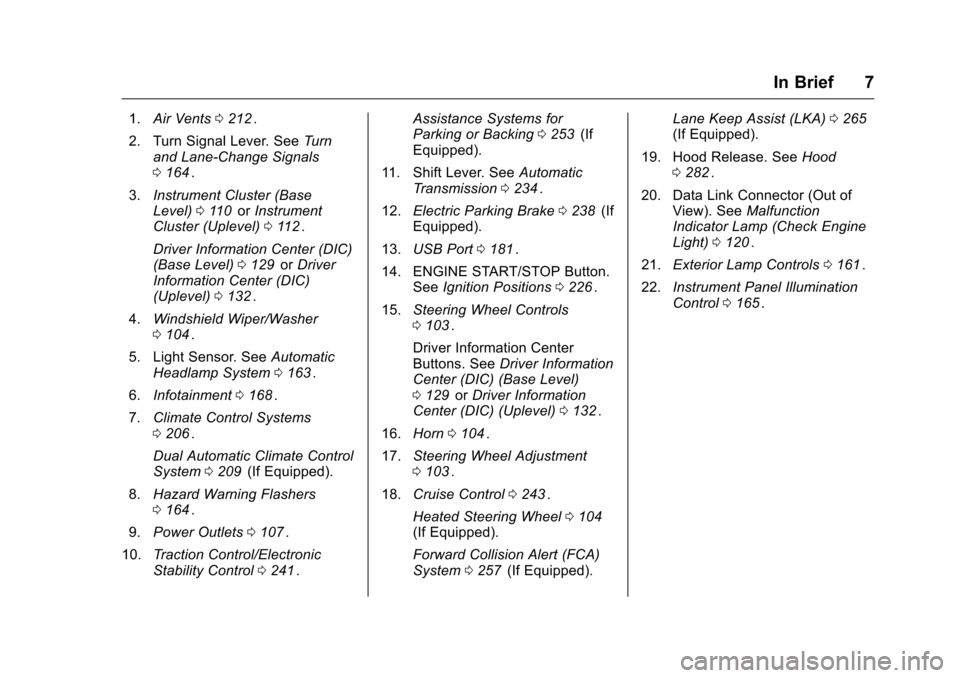
1.Air Vents 0212ii.
2. Turn Signal Lever. See Turn
and Lane-Change Signals
0 164
ii.
3. Instrument Cluster (Base
Level) 0110
iior Instrument
Cluster (Uplevel) 0112ii.
Driver Information Center (DIC)
(Base Level) 0129
iior Driver
Information Center (DIC)
(Uplevel) 0132
ii.
4. Windshield Wiper/Washer
0104
ii.
5. Light Sensor. See Automatic
Headlamp System 0163
ii.
6. Infotainment 0168
ii.
7. Climate Control Systems
0206
ii.
Dual Automatic Climate Control
System 0209
ii(If Equipped).
8. Hazard Warning Flashers
0164
ii.
9. Power Outlets 0107
ii.
10. Traction Control/Electronic
Stability Control 0241
ii. Assistance Systems for
Parking or Backing
0253
ii(If
Equipped).
11. Shift Lever. See Automatic
Transmission 0234
ii.
12. Electric Parking Brake 0238
ii(If
Equipped).
13. USB Port 0181
ii.
14. ENGINE START/STOP Button. SeeIgnition Positions 0226
ii.
15. Steering Wheel Controls
0103
ii.
Driver Information Center
Buttons. See Driver Information
Center (DIC) (Base Level)
0 129
iior Driver Information
Center (DIC) (Uplevel) 0132ii.
16. Horn 0104
ii.
17. Steering Wheel Adjustment
0103
ii.
18. Cruise Control 0243
ii.
Heated Steering Wheel 0104
ii(If Equipped).
Forward Collision Alert (FCA)
System 0257
ii(If Equipped). Lane Keep Assist (LKA)
0265
ii(If Equipped).
19. Hood Release. See Hood
0 282
ii.
20. Data Link Connector (Out of View). See Malfunction
Indicator Lamp (Check Engine
Light) 0120
ii.
21. Exterior Lamp Controls 0161
ii.
22. Instrument Panel Illumination
Control 0165
ii.
Page 14 of 420
Chevrolet Malibu Owner Manual (GMNA-Localizing-U.S./Canada/Mexico-
9087641) - 2016 - crc - 9/3/15
In Brief 13
while keeping the seat and the head
restraint height in the proper
position.
SeeHead Restraints 054
iiand Seat
Adjustment 055ii.
Safety Belts
Refer to the following sections for
important information on how to use
safety belts properly:
.
Safety Belts 063
ii.
. How to Wear Safety Belts
Properly 064
ii.
. Lap-Shoulder Belt 065
ii. .
Lower Anchors and Tethers for
Children (LATCH System) 088
ii.
Passenger Sensing
System
United States and Canada
Mexico
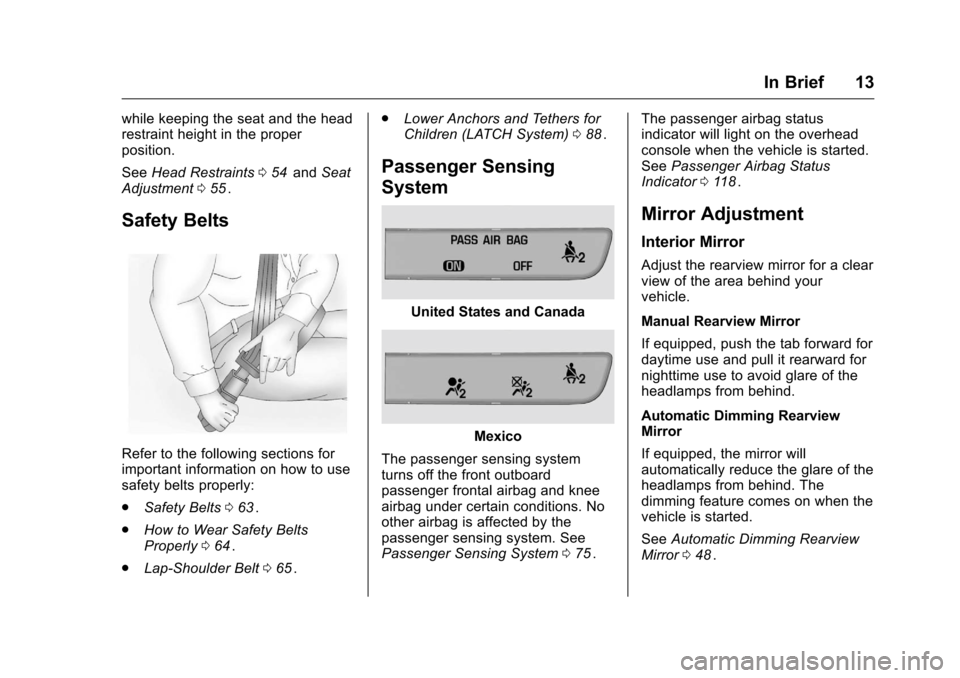
The passenger sensing system
turns off the front outboard
passenger frontal airbag and knee
airbag under certain conditions. No
other airbag is affected by the
passenger sensing system. See
Passenger Sensing System 075
ii. The passenger airbag status
indicator will light on the overhead
console when the vehicle is started.
See
Passenger Airbag Status
Indicator 0118
ii.
Mirror Adjustment
Interior Mirror
Adjust the rearview mirror for a clear
view of the area behind your
vehicle.
Manual Rearview Mirror
If equipped, push the tab forward for
daytime use and pull it rearward for
nighttime use to avoid glare of the
headlamps from behind.
Automatic Dimming Rearview
Mirror
If equipped, the mirror will
automatically reduce the glare of the
headlamps from behind. The
dimming feature comes on when the
vehicle is started.
See Automatic Dimming Rearview
Mirror 048
ii.
Page 17 of 420
Chevrolet Malibu Owner Manual (GMNA-Localizing-U.S./Canada/Mexico-
9087641) - 2016 - crc - 9/3/15
16 In Brief
AUTO :If equipped, turns the
exterior lamps on and off
automatically depending on outside
lighting.
;: Turns on the parking lamps
including all lamps, except the
headlamps.
5: Turns on the headlamps
together with the parking lamps and
instrument panel lights.
See:
. Exterior Lamp Controls 0161
ii
.
Daytime Running Lamps (DRL)
0163
ii
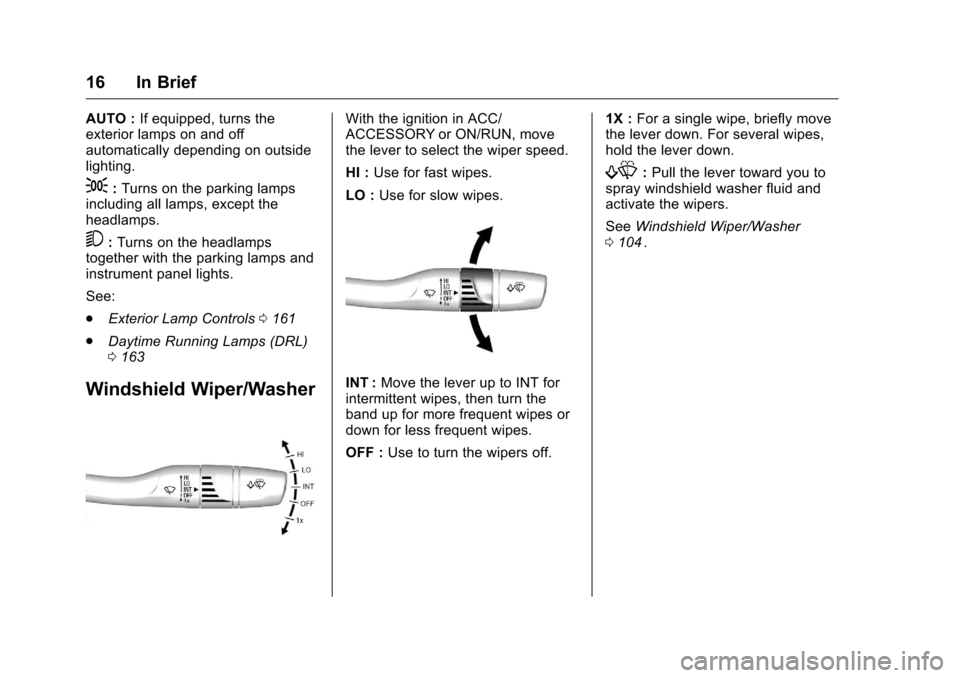
Windshield Wiper/Washer
With the ignition in ACC/
ACCESSORY or ON/RUN, move
the lever to select the wiper speed.
HI : Use for fast wipes.
LO : Use for slow wipes.
INT : Move the lever up to INT for
intermittent wipes, then turn the
band up for more frequent wipes or
down for less frequent wipes.
OFF : Use to turn the wipers off. 1X :
For a single wipe, briefly move
the lever down. For several wipes,
hold the lever down.
f: Pull the lever toward you to
spray windshield washer fluid and
activate the wipers.
See Windshield Wiper/Washer
0 104
ii.
Page 49 of 420
Chevrolet Malibu Owner Manual (GMNA-Localizing-U.S./Canada/Mexico-
9087641) - 2016 - crc - 9/3/15
48 Keys, Doors, and Windows
Interior Mirrors
Interior Rearview Mirrors
Adjust the rearview mirror for a clear
view of the area behind the vehicle.
Do not spray glass cleaner directly
on the mirror. Use a soft towel
dampened with water.
Manual Rearview Mirror
If equipped, push the tab forward for
daytime use and pull it rearward for
nighttime use to avoid glare of the
headlamps from behind.
Automatic Dimming
Rearview Mirror
If equipped, automatic dimming
reduces the glare of headlamps
from behind. The dimming feature
comes on when the vehicle is
started.
Windows
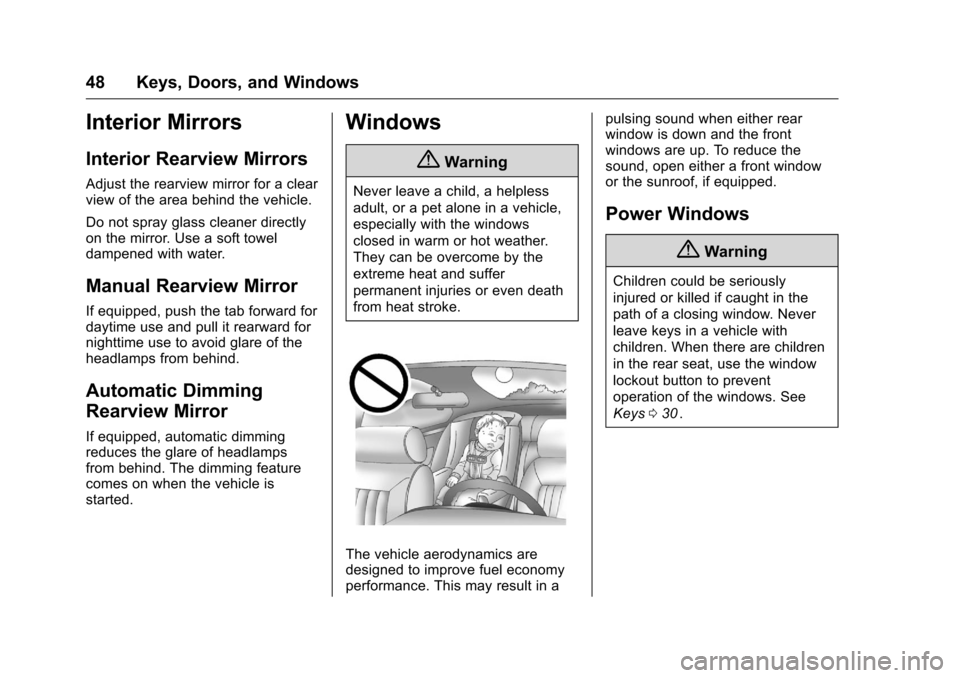
{Warning
Never leave a child, a helpless
adult, or a pet alone in a vehicle,
especially with the windows
closed in warm or hot weather.
They can be overcome by the
extreme heat and suffer
permanent injuries or even death
from heat stroke.
The vehicle aerodynamics are
designed to improve fuel economy
performance. This may result in apulsing sound when either rear
window is down and the front
windows are up. To reduce the
sound, open either a front window
or the sunroof, if equipped.
Power Windows
{Warning
Children could be seriously
injured or killed if caught in the
path of a closing window. Never
leave keys in a vehicle with
children. When there are children
in the rear seat, use the window
lockout button to prevent
operation of the windows. See
Keys
030
ii.
Page 128 of 420
Chevrolet Malibu Owner Manual (GMNA-Localizing-U.S./Canada/Mexico-
9087641) - 2016 - crc - 9/3/15
Instruments and Controls 127
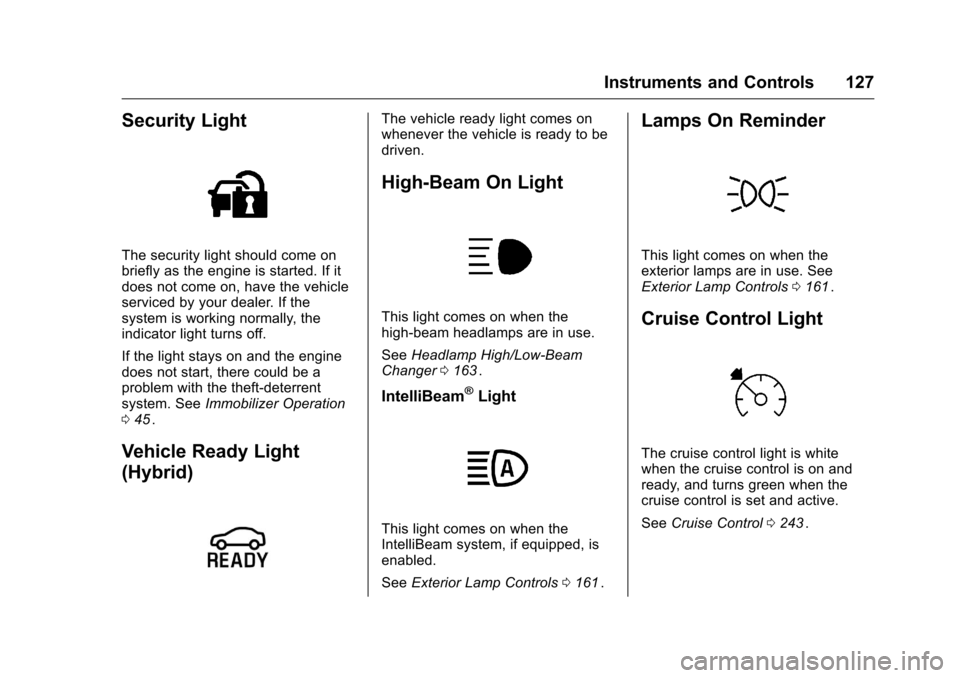
Security Light
The security light should come on
briefly as the engine is started. If it
does not come on, have the vehicle
serviced by your dealer. If the
system is working normally, the
indicator light turns off.
If the light stays on and the engine
does not start, there could be a
problem with the theft-deterrent
system. SeeImmobilizer Operation
0 45
ii.
Vehicle Ready Light
(Hybrid)
The vehicle ready light comes on
whenever the vehicle is ready to be
driven.
High-Beam On Light
This light comes on when the
high-beam headlamps are in use.
See Headlamp High/Low-Beam
Changer 0163
ii.
IntelliBeam®Light
This light comes on when the
IntelliBeam system, if equipped, is
enabled.
See Exterior Lamp Controls 0161
ii.
Lamps On Reminder
This light comes on when the
exterior lamps are in use. See
Exterior Lamp Controls 0161
ii.
Cruise Control Light
The cruise control light is white
when the cruise control is on and
ready, and turns green when the
cruise control is set and active.
See Cruise Control 0243
ii.
Page 141 of 420
Chevrolet Malibu Owner Manual (GMNA-Localizing-U.S./Canada/Mexico-
9087641) - 2016 - crc - 9/3/15
140 Instruments and Controls
NO REMOTE DETECTED
This message displays when the
transmitter battery may be weak.
See“Starting the Vehicle with a Low
Transmitter Battery” underRemote
Keyless Entry (RKE) System
Operation 031
ii.
NO REMOTE DETECTED
PRESS BRAKE TO RESTART
This message displays when
attempting to turn off the vehicle
and the RKE transmitter is no longer
detected. Restarting is allowed
without the RKE transmitter for
five minutes. Press the brake pedal
and ENGINE START/STOP to
restart the vehicle.
NUMBER OF KEYS
PROGRAMMED
This message displays when
programming new keys to the
vehicle.
REMOTE LEFT IN VEHICLE
This message displays when
leaving the vehicle with the RKE
transmitter still inside.
REPLACE BATTERY IN
REMOTE KEY
This message displays when the
battery in the RKE transmitter needs
to be replaced.
Lamp Messages
AUTOMATIC LIGHT CONTROL
ON/OFF
This message is displayed when the
automatic light control has been
turned on or off. See Automatic
Headlamp System 0163
ii.
CHECK XXX TURN
SIGNAL LAMP
When one of the turn signals is out,
this message displays to show
which bulb needs to be replaced.
See Bulb Replacement 0306
iiand
Replacement Bulbs 0310ii.
TURN SIGNAL ON
This message is displayed if the
turn signal has been left on. Turn off
the turn signal.
Object Detection System
Messages
24 GHz RADARS OFF
This message displays when driving
in certain areas where there may be
radar interference. Adaptive Cruise
Control (ACC), Forward Collision
Alert (FCA), and the Front
Automatic Braking (FAB) System
may not work or may not work as
well. The vehicle does not need
service.
AUTOMATIC COLLISION
PREP OFF
This message displays when the
Front Automatic Braking (FAB)
System has been turned off. See
Front Automatic Braking (FAB)
System 0259
ii.
AUTOMATIC COLLISION PREP
REDUCED
This message displays when the
Front Automatic Braking (FAB)
System has been set to the Alert
setting. This setting disables FAB
functions but if the vehicle has
Page 154 of 420
Chevrolet Malibu Owner Manual (GMNA-Localizing-U.S./Canada/Mexico-
9087641) - 2016 - crc - 9/3/15
Instruments and Controls 153
Comfort and Convenience
Select and the following may
display:
.Auto Memory Recall
. Easy Exit Options
. Chime Volume
. Reverse Tilt Mirror
. Extended Hill Start Assist
Auto Memory Recall
This feature automatically recalls
the current driver ’s previously stored
1 or 2 button positions when
entering the vehicle. See Memory
Seats 058
ii.
Select Off or On.
Easy Exit Options
This feature automatically recalls
the current driver ’s previously stored
exit button position when exiting the
vehicle. See Memory Seats 058
ii.
Select Off or On.
Chime Volume
Select to set the chime volume
level. Select Normal or High.
Reverse Tilt Mirror
When on, both the driver and
passenger outside mirrors will tilt
downward when the vehicle is
shifted to R (Reverse) to improve
visibility of the ground near the rear
wheels. They will return to their
previous driving position when the
vehicle is shifted out of R (Reverse)
or the engine is turned off. See
Reverse Tilt Mirrors
047
ii.
Select Off, On - Driver and
Passenger, On - Driver, or On -
Passenger.
Extended Hill Start Assist
This allows the duration of the Hill
Start Assist to be changed. See
“Extended Hill Start Assist (EHSA)”
in Hill Start Assist (HSA) 0240
ii.
Select Extended Hold or
Standard Hold.
Lighting
Select and the following may
display:
. Vehicle Locator Lights .
Exit Lighting
Vehicle Locator Lights
This feature will flash the exterior
lamps and allows the headlamps,
parking lamps, taillamps, and most
of the interior lamps to turn on
briefly when
Kon the Remote
Keyless Entry (RKE) transmitter is
pressed to locate the vehicle.
Select Off or On.
Exit Lighting
This allows the selection of how
long the exterior lamps stay on
when leaving the vehicle when it is
dark outside.
Select Off, 30 Seconds, 60
Seconds, or 120 Seconds.
Power Door Locks
Select and the following may
display:
. Unlocked Door Anti Lock Out
. Auto Door Unlock
. Delayed Door Lock