2016 CHEVROLET MALIBU climate settings
[x] Cancel search: climate settingsPage 13 of 420
Chevrolet Malibu Owner Manual (GMNA-Localizing-U.S./Canada/Mexico-
9087641) - 2016 - crc - 9/3/15
12 In Brief
Memory Features
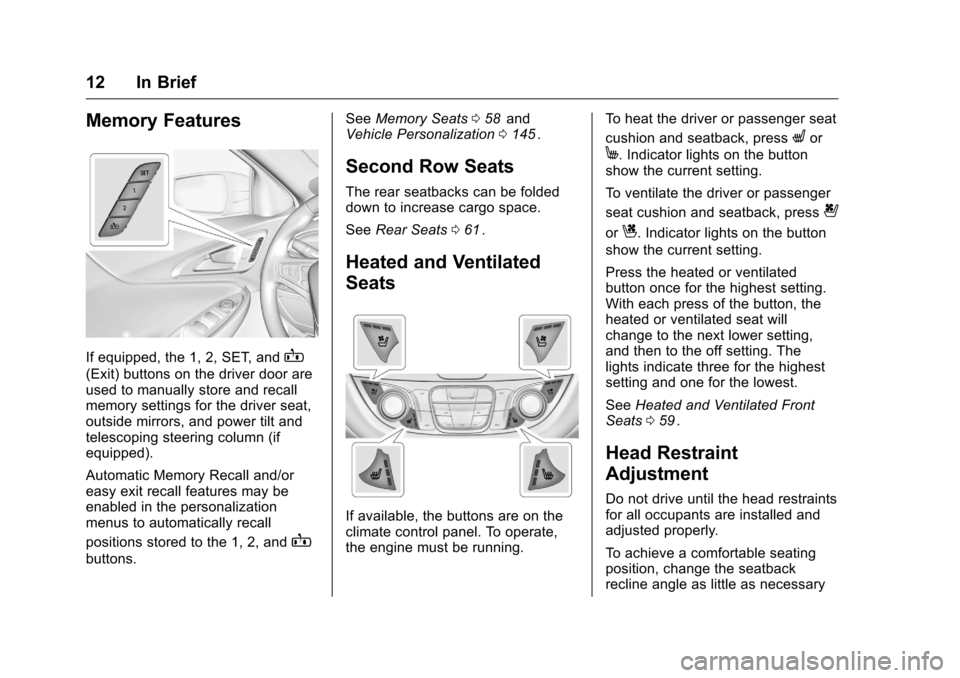
If equipped, the 1, 2, SET, andB
(Exit) buttons on the driver door are
used to manually store and recall
memory settings for the driver seat,
outside mirrors, and power tilt and
telescoping steering column (if
equipped).
Automatic Memory Recall and/or
easy exit recall features may be
enabled in the personalization
menus to automatically recall
positions stored to the 1, 2, and
B
buttons.See
Memory Seats 058
iiand
Vehicle Personalization 0145ii.
Second Row Seats
The rear seatbacks can be folded
down to increase cargo space.
See Rear Seats 061
ii.
Heated and Ventilated
Seats
If available, the buttons are on the
climate control panel. To operate,
the engine must be running. To heat the driver or passenger seat
cushion and seatback, press
Lor
M. Indicator lights on the button
show the current setting.
To ventilate the driver or passenger
seat cushion and seatback, press
{
orC. Indicator lights on the button
show the current setting.
Press the heated or ventilated
button once for the highest setting.
With each press of the button, the
heated or ventilated seat will
change to the next lower setting,
and then to the off setting. The
lights indicate three for the highest
setting and one for the lowest.
See Heated and Ventilated Front
Seats 059
ii.
Head Restraint
Adjustment
Do not drive until the head restraints
for all occupants are installed and
adjusted properly.
To achieve a comfortable seating
position, change the seatback
recline angle as little as necessary
Page 38 of 420
Chevrolet Malibu Owner Manual (GMNA-Localizing-U.S./Canada/Mexico-
9087641) - 2016 - crc - 9/3/15
Keys, Doors, and Windows 37
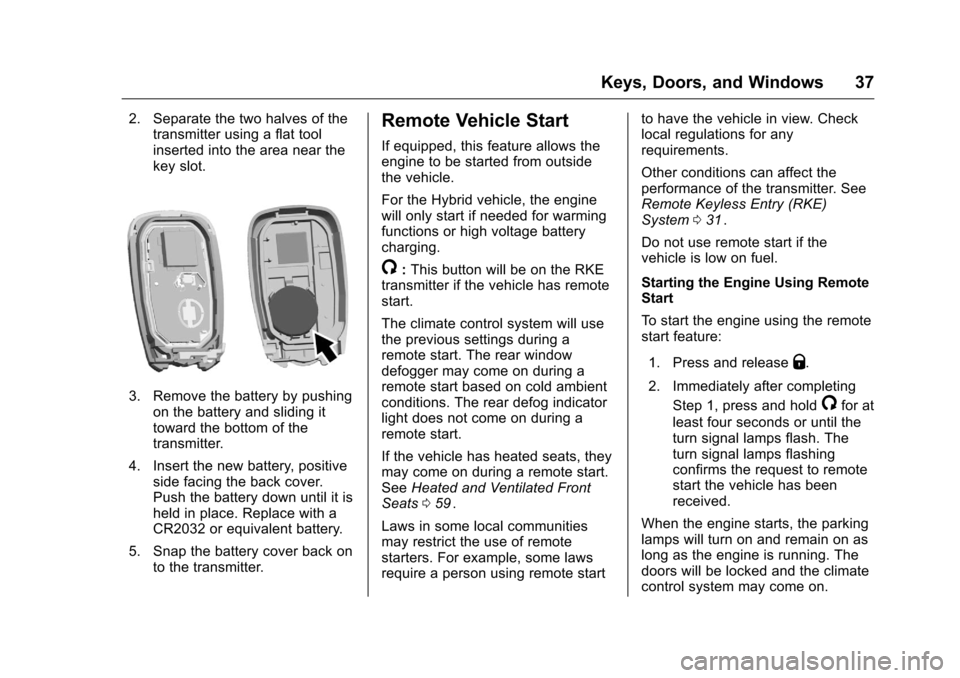
2. Separate the two halves of thetransmitter using a flat tool
inserted into the area near the
key slot.
3. Remove the battery by pushing
on the battery and sliding it
toward the bottom of the
transmitter.
4. Insert the new battery, positive side facing the back cover.
Push the battery down until it is
held in place. Replace with a
CR2032 or equivalent battery.
5. Snap the battery cover back on to the transmitter.
Remote Vehicle Start
If equipped, this feature allows the
engine to be started from outside
the vehicle.
For the Hybrid vehicle, the engine
will only start if needed for warming
functions or high voltage battery
charging.
/:This button will be on the RKE
transmitter if the vehicle has remote
start.
The climate control system will use
the previous settings during a
remote start. The rear window
defogger may come on during a
remote start based on cold ambient
conditions. The rear defog indicator
light does not come on during a
remote start.
If the vehicle has heated seats, they
may come on during a remote start.
See Heated and Ventilated Front
Seats 059
ii.
Laws in some local communities
may restrict the use of remote
starters. For example, some laws
require a person using remote start to have the vehicle in view. Check
local regulations for any
requirements.
Other conditions can affect the
performance of the transmitter. See
Remote Keyless Entry (RKE)
System
031
ii.
Do not use remote start if the
vehicle is low on fuel.
Starting the Engine Using Remote
Start
To start the engine using the remote
start feature:
1. Press and release
Q.
2. Immediately after completing Step 1, press and hold
/for at
least four seconds or until the
turn signal lamps flash. The
turn signal lamps flashing
confirms the request to remote
start the vehicle has been
received.
When the engine starts, the parking
lamps will turn on and remain on as
long as the engine is running. The
doors will be locked and the climate
control system may come on.
Page 108 of 420
Chevrolet Malibu Owner Manual (GMNA-Localizing-U.S./Canada/Mexico-
9087641) - 2016 - crc - 9/3/15
Instruments and Controls 107
4. Touch0to return to the
Time and Date menu.
Setting the 12/24 Hour Format
1. Press{, then touch Settings.
2. Touch Time and Date, then select 12h or 24h format.
3. Touch
0to return to the
Time and Date menu.
Setting the Month and Day
Format
1. Press{, then touch Settings.
2. Touch Time and Date, then Set Date Format.
3. Select DD/MM/YYYY (day/ month/year), MM/DD/YYYY
(month/day/year), or YYYY/
MM/DD (year/month/day)
format.
4. Touch
0to return to the
Time and Date menu.
Power Outlets
Power Outlet 12 Volt Direct
Current
The accessory power outlets can be
used to plug in electrical equipment,
such as a cell phone or MP3 player.
There are two accessory power
outlets:
. One on the center stack below
the climate control system.
. One on the rear of the center
floor console.
The outlet is powered when the
ignition is in ON/RUN or ACC/
ACCESSORY, or until the driver
door is opened within 10 minutes of
turning off the vehicle. See Retained
Accessory Power (RAP) 0231
ii.
Open the protective cover to use the
accessory power outlet.
Certain electrical accessories may
not be compatible with the
accessory power outlets and could
overload vehicle or adapter fuses.
If there is a problem, see your
dealer. When adding electrical equipment,
be sure to follow the installation
instructions included with the
equipment. See
Add-On Electrical
Equipment 0278
ii.
Caution
Hanging heavy equipment from
the power outlet can cause
damage not covered by the
vehicle warranty. The power
outlets are designed for
accessory power plugs only, such
as cell phone charge cords.
Always unplug electrical equipment
when not in use and do not plug in
equipment that exceeds the
maximum 20 amps rating.
Power Outlet 110/120 Volt
Alternating Current
If equipped with this power outlet it
can be used to plug in electrical
equipment that uses a maximum
limit of 150 watts.
Page 147 of 420
Chevrolet Malibu Owner Manual (GMNA-Localizing-U.S./Canada/Mexico-
9087641) - 2016 - crc - 9/3/15
146 Instruments and Controls
Turn MENU to highlight, then press
to select.
Scan Music Folder Only
This feature will scan and index
music folders on an MTP device
when connected to the USB port.
Turn MENU to highlight, then press
to select.
Scan All Folder
This feature will scan and index all
folders on a MTP device when
connected to the USB port.
Turn MENU to highlight, then press
to select.
Time and Date
Select Time and Date to adjust the
clock. SeeClock0106ii.
Tone Settings
Select to set the radio tone. See
“Tone Settings” under“Radio
Controls without Touchscreen” in
Operation 0173
ii.
Auto Volume Control
This feature automatically adjusts
the radio volume based on the
speed of the vehicle.
Select the desired value.
Maximum Startup Volume
When the vehicle is started and the
radio volume is greater than this set
level, the volume is adjusted to this
level.
Select the desired value.
Vehicle Settings
Select and the following may
display:
.
Climate and Air Quality
. Comfort and Convenience
. Languages
. Lighting
. Power Door Locks
. Remote Lock, Unlock, Start
. Return to Factory Settings
. Software Information
. Valet Mode
Climate and Air Quality
Select and the following may
display:
.Auto Fan Speed
. Air Quality Sensor
. Auto Defog
. Auto Rear Defog
Auto Fan Speed
This adjusts the blower level during
automatic operation.
Select Low, Medium, or High.
Air Quality Sensor
This automatically selects
recirculate when certain gases are
detected.
Select Off, Low Sensitivity, or High
Sensitivity.
Auto Defog
This allows the climate control
system to prevent fog on the inside
of the windows. See “Auto Defog”in
Dual Automatic Climate Control
System 0209
ii.
Select Off or On.
Page 152 of 420
Chevrolet Malibu Owner Manual (GMNA-Localizing-U.S./Canada/Mexico-
9087641) - 2016 - crc - 9/3/15
Instruments and Controls 151
.Audible Touch Feedback
. Text Scroll
. Tone Settings
. Auto Volume
. Maximum Startup Volume
. Audio Cue
Manage Favorites
This allows favorites to be edited.
See “Manage Favorites” in“Radio
Setup” underHome Page (Radio
with Touchscreen) 0172
iior
“Manage Favorites” in“Settings”
under “Radio” in the infotainment
manual.
Number of Favorites Shown
Press to set the number of favorites
to display.
Select the desired number or select
Auto and the infotainment system
will automatically adjust the number
of favorites shown.
Audible Touch Feedback
This allows Audible Touch
Feedback to be turned on or off.
Select Off or On. Text Scroll
Select to see text scroll on the
screen.
Select Off or On.
Tone Settings
Select to adjust the radio tone. See
Operation
0173
ii.
Auto Volume
This feature adjusts the volume
based on vehicle speed and
ambient noise.
Select Off, Low, Medium-Low,
Medium, Medium-High, or High.
Maximum Startup Volume
This feature sets the maximum
startup volume. If the vehicle is
started and the volume is greater
than this level, the volume is
adjusted to this level. To set the
maximum startup volume, press +
or −to increase or decrease. Audio Cue
If equipped, this feature adjusts the
startup and shutdown sounds. To
adjust the volume, select + or
−to
increase or decrease.
Vehicle
Select and the following may
display:
. Climate and Air Quality
. Collision/Detection Systems
. Comfort and Convenience
. Lighting
. Power Door Locks
. Remote Lock, Unlock, Start
Climate and Air Quality
Select and the following may
display:
. Auto Fan Speed
. Auto Defog
. Auto Rear Defog
Auto Fan Speed
This feature will set the maximum
auto fan speed.
Page 174 of 420
Chevrolet Malibu Owner Manual (GMNA-Localizing-U.S./Canada/Mexico-
9087641) - 2016 - crc - 9/3/15
Infotainment System 173
Settings :Touch to access the
Personalization menu. See Vehicle
Personalization 0145
ii.
Climate : If equipped, touch to
access the Climate menu. See
Climate Control Systems 0206
iior
Dual Automatic Climate Control
System 0209
ii.
OnStar : If equipped, touch to
access the OnStar menu. See
OnStar Overview 0398
ii.
Energy : If equipped, touch to
access the Energy menu.
Drive Mode : If equipped, touch to
access the Drive Mode menu.
Operation
Radio Controls without
Touchscreen
The infotainment system is operated
by using the pushbuttons,
multifunction knobs, and menus
shown on the display.
Turning the System On or Off
O: Press to turn the radio on.
Press and hold to turn the radio off.
Automatic Switch-Off
If the infotainment system has been
turned on after the ignition is turned
off, the system will turn off
automatically after 10 minutes.
Volume Control
O: Turn to adjust the volume or to
cancel mute when the audio system
is muted.
PHONE : Press to activate OnStar.
See OnStar Overview 0398
ii.
Press to mute the audio system.
Press again to cancel mute.
Menu System
Controls
The MENU knob and BACK button
are used to navigate the menu
system.
MENU Knob:
Turn to:
. Highlight a menu option.
. Select a value.
. Manually select radio stations. Press to:
.
Enter the menu system.
. Select or activate the highlighted
menu option.
. Confirm a set value.
. Turn a system setting on or off.
BACK:
Press to:
. Exit a menu.
. Go back to the previous menu
screen.
. Delete the last character in a
sequence.
. Press and hold to delete the
entire character sequence.
Submenus
A bar on the right-hand edge of the
menu indicates that it has a
submenu with other options.
Tone Settings
The tone settings can be set for
each radio band and each audio
player source.
Page 209 of 420
Chevrolet Malibu Owner Manual (GMNA-Localizing-U.S./Canada/Mexico-
9087641) - 2016 - crc - 9/3/15
208 Climate Controls
If the vehicle is equipped with
heated outside rearview mirrors,
they turn on when the rear window
defogger button is on and help to
clear fog or frost from the surface of
the mirror. SeeHeated Mirrors 047
ii.
Caution
Do not try to clear frost or other
material from the inside of the
front windshield and rear window
with a razor blade or anything
else that is sharp. This may
damage the rear window
defogger grid and affect the
radio's ability to pick up stations
clearly. The repairs would not be
covered by the vehicle warranty.
LorM:If equipped, pressLorMto heat the driver or passenger seat
cushion. See Heated and Ventilated
Front Seats 059
ii.
Remote Start Climate Control
Operation : If equipped with remote
start, the climate control system
may run when the vehicle is started
remotely. The system uses the driver
’s previous settings to heat or
cool the inside of the vehicle. The
rear defog may come on during
remote start based on cold ambient
conditions. The rear defog indicator
light does not come on during a
remote start. The front heated seats
will turn on if it is cold outside. The
heated seat indicator lights do not
come on during a remote start.
Page 210 of 420
Chevrolet Malibu Owner Manual (GMNA-Localizing-U.S./Canada/Mexico-
9087641) - 2016 - crc - 9/3/15
Climate Controls 209
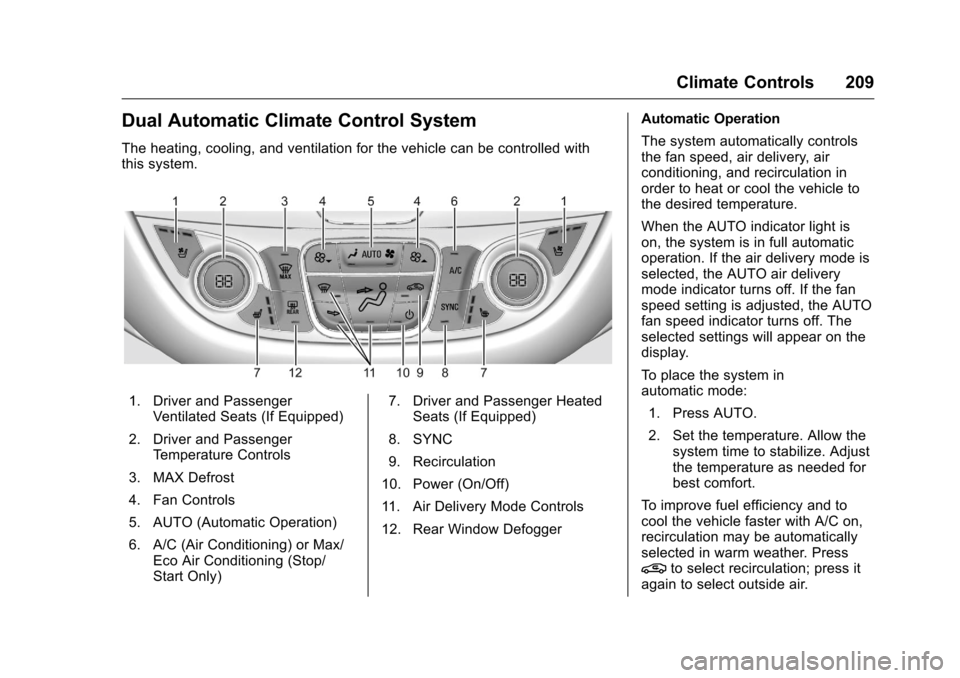
Dual Automatic Climate Control System
The heating, cooling, and ventilation for the vehicle can be controlled with
this system.
1. Driver and PassengerVentilated Seats (If Equipped)
2. Driver and Passenger Temperature Controls
3. MAX Defrost
4. Fan Controls
5. AUTO (Automatic Operation)
6. A/C (Air Conditioning) or Max/ Eco Air Conditioning (Stop/
Start Only) 7. Driver and Passenger Heated
Seats (If Equipped)
8. SYNC
9. Recirculation
10. Power (On/Off)
11. Air Delivery Mode Controls
12. Rear Window Defogger Automatic Operation
The system automatically controls
the fan speed, air delivery, air
conditioning, and recirculation in
order to heat or cool the vehicle to
the desired temperature.
When the AUTO indicator light is
on, the system is in full automatic
operation. If the air delivery mode is
selected, the AUTO air delivery
mode indicator turns off. If the fan
speed setting is adjusted, the AUTO
fan speed indicator turns off. The
selected settings will appear on the
display.
To place the system in
automatic mode:
1. Press AUTO.
2. Set the temperature. Allow the system time to stabilize. Adjust
the temperature as needed for
best comfort.
To improve fuel efficiency and to
cool the vehicle faster with A/C on,
recirculation may be automatically
selected in warm weather. Press
@to select recirculation; press it
again to select outside air.