2016 CHEVROLET IMPALA remote control
[x] Cancel search: remote controlPage 146 of 377
Chevrolet Impala Owner Manual (GMNA-Localizing-U.S/Canada-9086448) -
2016 - CRC - 5/20/15
Instruments and Controls 145
instructions refer to a garage door
opener, but can be used for other
devices.
Do not use the Universal Remote
system with any garage door opener
that does not have the stop and
reverse feature. This includes any
garage door opener model
manufactured before April 1, 1982.
Read these instructions completely
before programming the Universal
Remote system. It may help to have
another person assist with the
programming process.
Keep the original hand-held
transmitter for use in other vehicles
as well as for future programming.
Erase the programming when
vehicle ownership is terminated.
See“Erasing Universal Remote
System Buttons” later in this
section.
To program a garage door opener,
park outside directly in line with and
facing the garage door opener
receiver. Clear all people and
objects near the garage door. Make sure the hand-held transmitter
has a new battery for quick and
accurate transmission of the
radio-frequency signal.
Programming the Universal
Remote System
For questions or help programming
the Universal Remote system, call
1-800-355-3515 or see
www.homelink.com.
Programming involves
time-sensitive actions, and may time
out causing the procedure to be
repeated.
To program up to three devices:
1. Hold the end of the hand-held transmitter about 3 to 8 cm (1
to 3 in) away from the
Universal Remote system
buttons with the indicator light
in view. The hand-held
transmitter was supplied by the
manufacturer of the garage
door opener receiver.
2. At the same time, press and hold both the hand-held
transmitter button and one of
the three Universal Remote system buttons to be used to
operate the garage door. Do
not release either button until
the indicator light changes from
a slow to a rapid flash. Then
release both buttons.
Some garage door openers
may require substitution of
Step 2 with the procedure
under
“Radio Signals for
Canada and Some Gate
Operators” later in this section.
3. Press and hold the newly programmed Universal Remote
system button for five seconds
while watching the indicator
light and garage door
activation.
.If the indicator light stays on
continuously or the garage
door moves when the
button is pressed, then
programming is complete.
There is no need to
complete Steps 4–6.
. If the indicator light does
not come on or the garage
door does not move, a
second button press may
Page 147 of 377
Chevrolet Impala Owner Manual (GMNA-Localizing-U.S/Canada-9086448) -
2016 - CRC - 5/20/15
146 Instruments and Controls
be required. For a second
time, press and hold the
newly programmed button
for five seconds. If the light
stays on or the garage door
moves, programming is
complete.
. If the indicator light blinks
rapidly for two seconds,
then changes to a solid light
and the garage door does
not move, continue with
programming Steps 4–6.
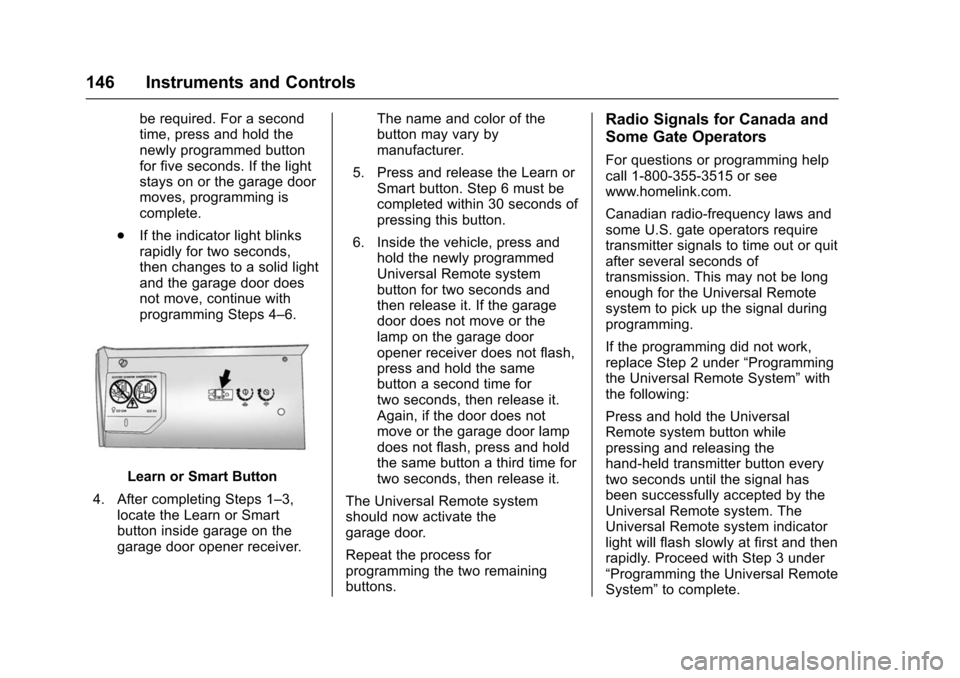
Learn or Smart Button
4. After completing Steps 1–3, locate the Learn or Smart
button inside garage on the
garage door opener receiver. The name and color of the
button may vary by
manufacturer.
5. Press and release the Learn or Smart button. Step 6 must be
completed within 30 seconds of
pressing this button.
6. Inside the vehicle, press and hold the newly programmed
Universal Remote system
button for two seconds and
then release it. If the garage
door does not move or the
lamp on the garage door
opener receiver does not flash,
press and hold the same
button a second time for
two seconds, then release it.
Again, if the door does not
move or the garage door lamp
does not flash, press and hold
the same button a third time for
two seconds, then release it.
The Universal Remote system
should now activate the
garage door.
Repeat the process for
programming the two remaining
buttons.
Radio Signals for Canada and
Some Gate Operators
For questions or programming help
call 1-800-355-3515 or see
www.homelink.com.
Canadian radio-frequency laws and
some U.S. gate operators require
transmitter signals to time out or quit
after several seconds of
transmission. This may not be long
enough for the Universal Remote
system to pick up the signal during
programming.
If the programming did not work,
replace Step 2 under “Programming
the Universal Remote System” with
the following:
Press and hold the Universal
Remote system button while
pressing and releasing the
hand-held transmitter button every
two seconds until the signal has
been successfully accepted by the
Universal Remote system. The
Universal Remote system indicator
light will flash slowly at first and then
rapidly. Proceed with Step 3 under
“Programming the Universal Remote
System” to complete.
Page 148 of 377
Chevrolet Impala Owner Manual (GMNA-Localizing-U.S/Canada-9086448) -
2016 - CRC - 5/20/15
Instruments and Controls 147
Universal Remote System
Operation
Using the Universal Remote
System
Press and hold the appropriate
Universal Remote system button for
at least one-half second. The
indicator light will come on while the
signal is being transmitted.
Erasing Universal Remote
System Buttons
Erase all programmed buttons when
vehicle ownership is terminated.
To erase:1. Press and hold the two outside buttons until the indicator light
begins to flash. This should
take about 10 seconds.
2. Release both buttons.
Reprogramming a Single
Universal Remote System
Button
To reprogram any of the system
buttons: 1. Press and hold any one of the buttons. Do not release the
button.
2. The indicator light will begin to flash after 20 seconds. Without
releasing the button, proceed
with Step 1 under
“Programming the Universal
Remote System.”
Page 154 of 377
Chevrolet Impala Owner Manual (GMNA-Localizing-U.S/Canada-9086448) -
2016 - CRC - 5/20/15
Lighting 153
Lighting Features
Entry Lighting
Some exterior lamps and most of
the interior lights turn on briefly
when the Remote Keyless Entry
(RKE) transmitter
Kbutton is
pressed. After about 30 seconds the
exterior lamps turn off, then the
dome lamps and remaining interior
lights dim to off. Entry lighting can
be disabled manually by changing
the ignition out of the OFF position,
or by pressing the RKE transmitter
Qbutton.
This feature can be changed. See
Vehicle Personalization 0138.
Exit Lighting
Some exterior lamps come on at
night, or in areas with limited
lighting, when the key is removed
from the ignition. The dome lamps
also come on when the key is
removed from the ignition. The
exterior lamps and dome lamps remain on after the door is closed
for a set amount of time, then
automatically turn off.
For vehicles with Keyless Access,
the exterior lamps automatically turn
on when a door is opened after the
ignition is changed to the OFF
position. The dome lamps also
come on after the ignition is
changed to the OFF position. See
Ignition Positions (Keyless Access)
0
201 orIgnition Positions (Key
Access) 0203.
The exterior lamps turn off
immediately by turning the exterior
lamps control off.
This feature can be changed. See
Vehicle Personalization 0138.
Battery Load
Management
The vehicle has Electric Power
Management (EPM), which
estimates the battery's temperature
and state of charge. It then adjusts
the voltage for best performance
and extended life of the battery. When the battery's state of charge
is low, the voltage is raised slightly
to quickly bring the charge back up.
When the state of charge is high,
the voltage is lowered slightly to
prevent overcharging. If the vehicle
has a voltage display on the Driver
Information Center (DIC), you may
see the voltage move up or down.
This is normal. If there is a problem,
an alert will be displayed.
The battery can be discharged at
idle if the electrical loads are very
high. This is true for all vehicles.
This is because the generator
(alternator) may not be spinning fast
enough at idle to produce all the
power that is needed for very high
electrical loads.
A high electrical load occurs when
several of the following are on, such
as: headlamps, high beams, fog
lamps, rear window defogger,
climate control fan at high speed,
heated seats, engine cooling fans,
trailer loads, and loads plugged into
accessory power outlets.
Page 188 of 377

Chevrolet Impala Owner Manual (GMNA-Localizing-U.S/Canada-9086448) -
2016 - CRC - 5/20/15
Climate Controls 187
Rear Window Defogger
K(Rear Window Defogger) :
Press to turn the rear window
defogger on or off. An indicator light
on the button comes on to show that
the rear window defogger is on.
The upper region of gridlines on the
rear window are antenna lines and
are not intended to heat when the
defogger is activated.
If equipped with heated outside
rearview mirrors, they turn on with
the rear window defogger and help
to clear fog or frost from the surface
of the mirror. See Heated Mirrors
0 46.
Caution
Using a razor blade or sharp
object on the inside rear window
can damage the antenna or
defogger. Repairs would not be
covered by the vehicle warranty.
Do not stick anything to the rear
window. Remote Start Climate Control
Operation :
If equipped with remote
start, the climate control system
may run when the vehicle is started
remotely. The system uses the
driver ’s previous settings to heat or
cool the inside of the vehicle. The
rear defog may come on during
remote start based on cold ambient
conditions. The rear defog indicator
light may not come on during a
remote start. The front heated seats
may turn on if it is cold outside. The
heated seat indicator lights may not
come on during a remote start. See
Remote Vehicle Start 035 and
Heated and Ventilated Front Seats
0 60, if equipped.
Sensors
The solar sensor on top of the
instrument panel near the
windshield monitors the solar heat.
The climate control system uses the
sensor information to adjust the
temperature, fan speed,
recirculation, and air delivery mode
for best comfort.
If the sensor is covered, the
automatic climate control system
may not work properly.
Page 361 of 377

Chevrolet Impala Owner Manual (GMNA-Localizing-U.S/Canada-9086448) -
2016 - CRC - 5/20/15
360 OnStar
.PressQto speak with an
Advisor.
OnStar services cannot work unless
the vehicle is in a place where
OnStar has an agreement with a
wireless service provider for service
in that area. The wireless service
provider must also have coverage,
network capacity, reception, and
technology compatible with OnStar
services. Service involving location
information about the vehicle cannot
work unless GPS signals are
available, unobstructed, and
compatible with the OnStar
hardware. OnStar services may not
work if the OnStar equipment is not
properly installed or it has not been
properly maintained. If equipment or
software is added, connected,
or modified, OnStar services may
not work. Other problems beyond
the control of OnStar —such as
hills, tall buildings, tunnels, weather,
electrical system design and
architecture of the vehicle, damage
to the vehicle in a crash, or wireless
phone network congestion or
jamming —may prevent service. See
Radio Frequency Statement
0 351.
Services for People with
Disabilities
Advisors provide services to help
Subscribers with physical disabilities
and medical conditions.
Press
Qto help:
. Locate a gas station with an
attendant to pump gas.
. Find a hotel, restaurant, etc.,
that meets accessibility needs.
. Provide directions to the closest
hospital or pharmacy in urgent
situations.
TTY Users
OnStar has the ability to
communicate to deaf,
hard-of-hearing, or speech-impaired
customers while in the vehicle. The
available dealer-installed TTY
system can provide in-vehicle
access to all OnStar services,
except Virtual Advisor and OnStar
Turn-by-Turn Navigation.
OnStar Personal Identification
Number (PIN)
A PIN is needed to access some
OnStar services. The PIN will need
to be changed the first time when
speaking with an Advisor. To
change the OnStar PIN, contact an
OnStar Advisor by pressing
Qor
calling 1-888-4ONSTAR.
Warranty
OnStar equipment may be
warranted as part of the vehicle
warranty.
Languages
The vehicle can be programmed to
respond in multiple languages.
Press
Qand ask for an Advisor.
Advisors are available in English,
Spanish, and French. Available
languages may vary by country.
Potential Issues
OnStar cannot perform Remote
Door Unlock or Stolen Vehicle
Assistance after the vehicle has
been off continuously for five days
without an ignition cycle. If the
Page 371 of 377

Chevrolet Impala Owner Manual (GMNA-Localizing-U.S/Canada-9086448) -
2016 - CRC - 5/20/15
370 Index
I
Ignition Positions . . . . . . . . . . 201, 203
Ignition Transmission LockCheck . . . . . . . . . . . . . . . . . . . . . . . . . 270
Immobilizer . . . . . . . . . . . . . . . . . . . . . . 43
Indicator
Vehicle Ahead . . . . . . . . . . . . . . . . 123
Infants and Young Children, Restraints . . . . . . . . . . . . . . . . . . . . . . 83
Infotainment . . . . . . . . . . . . . . . . . . . . 155
Infotainment System . . . . . . . . . . . . 354
Instrument Cluster . . . . . . . . . . . . . . 112
Instrument Panel Storage Area . . . . . . . . . . . . . . . . . . . 99
Interior Rearview Mirrors . . . . . . . . . 47
Introduction . . . . . . . . . . . . . . . . . . . . . . . 2
J
Jack Auxiliary . . . . . . . . . . . . . . . . . . . . . . 167
Jump Starting - North America . . . . . . . . . . . . . . . . . . . . . . . 310
K
Key and Lock Messages . . . . . . . . 133
Keyless EntryRemote (RKE) System . . . . . . . . . 30
Keys . . . . . . . . . . . . . . . . . . . . . . . . . . . . . 28
L
Labeling, Tire Sidewall . . . . . . . . . . 285
Lamps Courtesy . . . . . . . . . . . . . . . . . . . . . . 151
Daytime Running (DRL) . . . . . . 149
Dome . . . . . . . . . . . . . . . . . . . . . . . . . 152
Exterior Controls . . . . . . . . . . . . . . 148
Exterior Lamps OffReminder . . . . . . . . . . . . . . . . . . . 149
Exterior Lighting Battery
Saver . . . . . . . . . . . . . . . . . . . . . . . 154
License Plate . . . . . . . . . . . . . . . . . 275
Malfunction Indicator . . . . . . . . . 120
Messages . . . . . . . . . . . . . . . . . . . . 134
On Reminder . . . . . . . . . . . . . . . . . 126
Reading . . . . . . . . . . . . . . . . . . . . . . 152
Lane Change Alert (LCA) . . . . . . . 233
Lane Departure Warning (LDW) . . . . . . . . . . . . . . . . 235
Lane Departure Warning Light . . . . . . . . . . . . . . . . . . . . . . . . . . 123
Lap-Shoulder Belt . . . . . . . . . . . . . . . 65
LATCH System Replacing Parts after a
Crash . . . . . . . . . . . . . . . . . . . . . . . . . 94
LATCH, Lower Anchors and Tethers for Children . . . . . . . . . . . . 88
LED Lighting . . . . . . . . . . . . . . . . . . . . 272 Lighting
Entry . . . . . . . . . . . . . . . . . . . . . . . . . 153
Exit . . . . . . . . . . . . . . . . . . . . . . . . . . . 153
Illumination Control . . . . . . . . . . . 151
LED . . . . . . . . . . . . . . . . . . . . . . . . . . 272
Lights . . . . . . . . . . . . . . . . . . . . . . . . . . . 123 Airbag Readiness . . . . . . . . . . . . . .118
Antilock Brake System
(ABS) Warning . . . . . . . . . . . . . . 123
Brake System Warning . . . . . . . 121
Charging System . . . . . . . . . . . . . .119
Cruise Control . . . . . . . . . . . . . . . . 126
Door Ajar . . . . . . . . . . . . . . . . . . . . . 127
Electric Parking Brake . . . . . . . . 122
Engine Oil Pressure . . . . . . . . . . 125
Flash-to-Pass . . . . . . . . . . . . . . . . . 149
High-Beam On . . . . . . . . . . . . . . . . 126
High/Low Beam Changer . . . . . 149
Lane Departure Warning . . . . . . 123
Low Fuel Warning . . . . . . . . . . . . 125
Safety Belt Reminders . . . . . . . . .117
Security . . . . . . . . . . . . . . . . . . . . . . 126
Service Electric Parking Brake . . . . . . . . . . . . . . . . . . . . . . . 122
StabiliTrak
®OFF . . . . . . . . . . . . . 124
Tire Pressure . . . . . . . . . . . . . . . . . 125
Traction Control System (TCS)/StabiliTrak
®. . . . . . . . . . 124
Page 374 of 377

Chevrolet Impala Owner Manual (GMNA-Localizing-U.S/Canada-9086448) -
2016 - CRC - 5/20/15
Index 373
RecordsMaintenance . . . . . . . . . . . . . . . . . . 336
Recreational Vehicle Towing . . . . 313
Reimbursement Program, GM Mobility . . . . . . . . . . . . . . . . . . . 345
Remote Keyless Entry (RKE) System . . . . . . . . . . . . . . . . . . . . . . . . . 30
Remote Vehicle Start . . . . . . . . . . . . 35
Replacement Bulbs . . . . . . . . . . . . . 275
Replacement Parts Airbags . . . . . . . . . . . . . . . . . . . . . . . . . 80
Maintenance . . . . . . . . . . . . . . . . . . 335
Replacing Airbag System . . . . . . . . 80
Replacing LATCH System Parts after a Crash . . . . . . . . . . . . . 94
Replacing Safety Belt System
Parts after a Crash . . . . . . . . . . . . . 68
Reporting Safety Defects Canadian Government . . . . . . . . 352
General Motors . . . . . . . . . . . . . . . 352
U.S. Government . . . . . . . . . . . . . 351
Restraints Where to Put . . . . . . . . . . . . . . . . . . . 87
Retained Accessory Power (RAP) . . . . . . . . . . . . . . . . . . 208
Reverse Tilt Mirrors . . . . . . . . . . . . . . 46
Ride Control Systems Messages . . . . . . . . . . . . . . . . . . . . 136 Roads
Driving, Wet . . . . . . . . . . . . . . . . . . 195
Roadside Assistance Program . . . . . . . . . . . . . . . . . . . . . . . 345
Roof Sunroof . . . . . . . . . . . . . . . . . . . . . . . . . 50
Rotation, Tires . . . . . . . . . . . . . . . . . . 296
Routing, Engine Drive Belt . . . . . . 340
Running the Vehicle While
Parked . . . . . . . . . . . . . . . . . . . . . . . . 210
S
Safety Belts . . . . . . . . . . . . . . . . . . . . . 63Care . . . . . . . . . . . . . . . . . . . . . . . . . . . . 68
Extender . . . . . . . . . . . . . . . . . . . . . . . . 67
How to Wear Safety BeltsProperly . . . . . . . . . . . . . . . . . . . . . . . 64
Lap-Shoulder Belt . . . . . . . . . . . . . . 65
Reminders . . . . . . . . . . . . . . . . . . . . .117
Replacing after a Crash . . . . . . . . 68
Use During Pregnancy . . . . . . . . . . 67
Safety Defects Reporting Canadian Government . . . . . . . . 352
General Motors . . . . . . . . . . . . . . . 352
U.S. Government . . . . . . . . . . . . . 351
Safety Locks . . . . . . . . . . . . . . . . . . . . . 40
Safety System Check . . . . . . . . . . . . 68
Satellite Radio . . . . . . . . . . . . . . . . . . 162
Scheduling Appointments . . . . . . . 347 SD Card Reader . . . . . . . . . . . . . . . . 167
Seats
Adjustment, Front . . . . . . . . . . . . . . . 55
Head Restraints . . . . . . . . . . . . . . . . 53
Heated and Ventilated Front . . . . 60
Lumbar Adjustment, Front . . . . . . 56
Memory . . . . . . . . . . . . . . . . . . . . . . . . . 58
Power Adjustment, Front . . . . . . . 56
Rear . . . . . . . . . . . . . . . . . . . . . . . . . . . . 61
Reclining Seatbacks . . . . . . . . . . . . 57
Securing Child Restraints . . . . 94, 96
Security
Light . . . . . . . . . . . . . . . . . . . . . . . . . . 126
Messages . . . . . . . . . . . . . . . . . . . . 136
OnStar
®. . . . . . . . . . . . . . . . . . . . . . 356
Vehicle . . . . . . . . . . . . . . . . . . . . . . . . . 42
Vehicle Alarm . . . . . . . . . . . . . . . . . . . 42
Service . . . . . . . . . . . . . . . . . . . . . . . . . 189 Accessories andModifications . . . . . . . . . . . . . . . . 249
Climate Control System . . . . . . . 181
Doing Your Own Work . . . . . . . . 250
Engine Soon Light . . . . . . . . . . . . 120
Maintenance Records . . . . . . . . 336
Maintenance, General
Information . . . . . . . . . . . . . . . . . . 324
Parts Identification Label . . . . . 337