2016 CHEVROLET IMPALA air condition
[x] Cancel search: air conditionPage 136 of 377
Chevrolet Impala Owner Manual (GMNA-Localizing-U.S/Canada-9086448) -
2016 - CRC - 5/20/15
Instruments and Controls 135
FRONT CAMERA BLOCKED
CLEAN WINDSHIELD
This message displays when the
camera is blocked. Cleaning the
outside of the windshield behind the
rearview mirror may correct the
issue. The Lane Departure Warning
system will not operate. Forward
Collision Alert (FCA) may not work
or may not work as well.
LANE CHANGE ALERT OFF
This message indicates that the
driver has turned the Side Blind
Zone Alert (SBZA) and Lane
Change Alert (LCA) systems off.
LANE DEPARTURE WARNING
UNAVAILABLE
This message displays when
attempting to activate the Lane
Departure Warning (LDW) system
when it is temporarily unavailable.
The LDW system does not need
service.This message could be due to the
camera being blocked. Cleaning the
outside of the windshield behind the
rearview mirror may correct the
issue.
PARK ASSIST OFF
This message displays when the
Parking Assist system has been
turned off or when there is a
temporary condition causing the
system to be disabled.
REAR CROSS TRAFFIC
ALERT OFF
This message displays when the
Rear Cross Traffic Alert has been
turned off.
SERVICE AUTOMATIC
COLLISION PREP
If this message displays, take the
vehicle to your dealer to repair the
system. Adaptive Cruise Control
(ACC), Forward Collision Alert
(FCA), and/or the Front Automatic
Braking (FAB) System may not
work. Do not use these systems
until the vehicle has been repaired.
SERVICE FRONT CAMERA
If this message remains on after
continued driving, the vehicle needs
service. Do not use the Lane
Departure Warning (LDW) and
Forward Collision Alert (FCA)
features. Take the vehicle to your
dealer.
SERVICE PARKING ASSIST
This message displays if there is a
problem with the Parking Assist
system. Do not use this system to
help you park. See your dealer for
service.
SERVICE SIDE DETECTION
SYSTEM
If this message remains on after
continued driving, the vehicle needs
service. Side Blind Zone Alert
(SBZA), Lane Change Alert (LCA),
and Rear Cross Traffic Alert (RCTA)
features will not work. Take the
vehicle to your dealer.
Page 137 of 377

Chevrolet Impala Owner Manual (GMNA-Localizing-U.S/Canada-9086448) -
2016 - CRC - 5/20/15
136 Instruments and Controls
SIDE DETECTION SYSTEM
UNAVAILABLE
This message indicates that Side
Blind Zone Alert (SBZA), Lane
Change Alert (LCA), and Rear
Cross Traffic Alert (RCTA) are
disabled either because the sensor
is blocked and cannot detect
vehicles in the blind zone, or the
vehicle is passing through an open
area, such as the desert, where
there is insufficient data for
operation. This message may also
activate during heavy rain or due to
road spray. The vehicle does not
need service. For cleaning, see
"Washing the Vehicle" under
Exterior Care0315.
Ride Control System
Messages
SERVICE STABILITRAK
This message displays if there is a
problem with the StabiliTrak system.
If this message appears, try to reset
the system. Stop; turn off the engine
for at least 15 seconds; then start
the engine again. If this message still comes on, it means there is a
problem. See your dealer for
service. The vehicle is safe to drive;
however, you do not have the
benefit of StabiliTrak, so reduce
your speed and drive accordingly.
Airbag System Messages
SERVICE AIRBAG
This message displays if there is a
problem with the airbag system. See
your dealer for service.
Security Messages
THEFT ATTEMPTED
This message displays if the vehicle
detects a tamper condition.
Service Vehicle Messages
SERVICE POWER STEERING
This message displays and a chime
may sound when there may be a
problem with the power steering
system. If this message displays
and a reduction in steering
performance or loss of power
steering assistance is noticed, see
your dealer.
SERVICE VEHICLE SOON
This message is displayed if there is
a problem with the vehicle. Take the
vehicle to your dealer for service.
Starting the Vehicle
Messages
PRESS BRAKE TO START
VEHICLE
This message is displayed when
attempting to start the vehicle
without first pressing the brake
pedal.
SERVICE KEYLESS START
SYSTEM
This message is displayed if there is
a problem with the pushbutton start
system. Take the vehicle to your
dealer for service.
Page 138 of 377
Chevrolet Impala Owner Manual (GMNA-Localizing-U.S/Canada-9086448) -
2016 - CRC - 5/20/15
Instruments and Controls 137
Tire Messages
SERVICE TIRE MONITOR
SYSTEM
This message displays if there is a
problem with the Tire Pressure
Monitor System (TPMS). SeeTire
Pressure Monitor Operation 0293.
TIRE LEARNING ACTIVE
This message displays when the
system is learning new tires. See
Tire Pressure Monitor Operation
0293.
TIRE PRESSURE LOW ADD
AIR TO TIRE
On vehicles with the Tire Pressure
Monitor System (TPMS), this
message displays when the
pressure in one or more of the
vehicle's tires is low.
The low tire pressure warning light
will also come on. See Tire
Pressure Light 0125.
If a tire pressure message displays,
inflate the tires until the tire pressure
is equal to the values shown on the
Tire and Loading Information label. See
Tires 0283, Vehicle Load
Limits 0198, and Tire Pressure
0 290.
More than one tire pressure
message can be received at a time.
The DIC also shows the tire
pressure values. See Driver
Information Center (DIC) 0127.
Transmission Messages
SERVICE TRANSMISSION
This message displays if there is a
problem with the transmission. See
your dealer.
SHIFT DENIED
This message displays when using
the Driver Shift Control (DSC) and
attempting to shift to a gear not
appropriate for the vehicle speed
and engine revolutions per
minute (rpm). See Manual Mode
0 212.
SHIFT TO PARK
This message displays when the
transmission needs to be shifted to
P (Park). This may appear when
turning the ignition off if the vehicle
is not in P (Park).
TRANSMISSION HOT —IDLE
ENGINE
This message displays and a chime
sounds if the transmission fluid in
the vehicle gets hot. Driving with the
transmission fluid temperature high
can cause damage to the vehicle.
Stop the vehicle and let it idle to
allow the transmission to cool. This
message clears when the fluid
temperature reaches a safe level.
Vehicle Reminder
Messages
ICE POSSIBLE DRIVE
WITH CARE
This message is displayed when ice
conditions are possible.
Page 141 of 377

Chevrolet Impala Owner Manual (GMNA-Localizing-U.S/Canada-9086448) -
2016 - CRC - 5/20/15
140 Instruments and Controls
.Lighting
. Power Door Locks
. Remote Lock, Unlock, Start
Climate and Air Quality
Select and the following may
display:
. Auto Fan Max Speed
. Air Conditioning Mode
. Auto Defog
. Auto Rear Defog
Auto Fan Max Speed
This feature will set the maximum
auto fan speed.
Select Low, Medium, or High.
Air Conditioning Mode
This feature changes the mode of
the air conditioning.
Select Off, On, or Last Setting.
Auto Defog
When set to On, the front defog will
automatically react to temperature
and humidity conditions that may cause fogging. Only vehicles with
the dual automatic climate control
will have this option.
Select Off or On.
Auto Rear Defog
If equipped, this allows the Auto
Rear Defog to be turned on or off.
This feature will automatically turn
on the rear window defogger when it
is cold outside.
Select Off or On.
Collision/Detection Systems
Select and the following may
display:
.
Auto Collision Preparation
. Go Notifier
. Lane Change Alert
. Rear Cross Traffic Alert
Auto Collision Preparation
This feature will turn on or off the
Forward Collision Alert (FCA) and
Front Automatic Braking (FAB). The
Off setting disables all FCA and
FAB functions. With the Alert and
Brake setting, both FCA and FAB are available. The Alert setting
disables FAB, but some last-second
automatic braking capability is still
provided, though less likely to occur.
See
Front Automatic Braking (FAB)
System 0232.
Select Off, Alert and Brake, or Alert.
Go Notifier
This feature will give a reminder that
Adaptive Cruise Control provides
when it has brought the vehicle to a
complete stop behind another
stopping vehicle, and then that
vehicle drives on.
Select Off or On.
See Adaptive Cruise Control 0220.
Lane Change Alert
This allows the feature to be turned
on or off.
Select Off or On.
See Lane Change Alert (LCA)
0 233.
Rear Cross Traffic Alert
This allows the feature to be turned
on or off.
Page 182 of 377

Chevrolet Impala Owner Manual (GMNA-Localizing-U.S/Canada-9086448) -
2016 - CRC - 5/20/15
Climate Controls 181
Climate Controls
Climate Control Systems
Climate Control Systems . . . . . 181
Dual Automatic ClimateControl System . . . . . . . . . . . . . 184
Air Vents
Air Vents . . . . . . . . . . . . . . . . . . . . . 188
Maintenance
Passenger Compartment AirFilter . . . . . . . . . . . . . . . . . . . . . . . . 189
Service . . . . . . . . . . . . . . . . . . . . . . . 189
Climate Control Systems
The heating, cooling, and ventilation for the vehicle can be controlled with
this system.
1. Fan Control
2. Air Conditioning or Comfort/
Eco Air Conditioning (Stop/
Start Only)
3. Air Delivery Modes
4. Defrost
5. TEMP (Temperature Control)
6. Rear Window Defogger
7. Recirculation Climate Control Influence on Stop/
Start Operation and Fuel Economy
(If Equipped)
The climate control system is
dependent upon other vehicle
systems for heat and power input.
Certain climate control settings can
lead to higher fuel usage and/or
fewer auto stops.
The following are climate control
settings that use more fuel:
Page 183 of 377
Chevrolet Impala Owner Manual (GMNA-Localizing-U.S/Canada-9086448) -
2016 - CRC - 5/20/15
182 Climate Controls
.Comfort air conditioning mode.
. Defrost mode.
. Extreme temperature settings,
such as 15 °C (60 °F) or 32 °C
(90 °F).
. High fan speed settings.
To help reduce fuel usage:
. Use the full automatic control as
described under “Automatic
Operation.”
. Use eco air conditioning, instead
of the comfort air conditioning.
. Select a temperature setting that
is higher in hot weather and
lower in cold weather.
. Turn off the air conditioning
when it is not needed.
. Only use defrost when needed
to clear the windows.
Fan Control : Turn the knob
clockwise or counterclockwise to
increase or decrease the fan speed.
Temperature Control : Turn the
knob clockwise or counterclockwise
to increase or decrease the
temperature setting. Air Delivery Modes :
PressY,\,
[, or-to change the direction of
the airflow. An indicator light comes
on in the selected mode button.
Y(Vent) : Air is directed to the
instrument panel outlets.
\(Bi-Level) : Air is directed to the
instrument panel outlets and the
floor outlets.
[(Floor) : Air is directed to the
floor outlets.
-(Defog) : Air is directed to the
windshield and floor outlets to clear
the windows of fog or moisture.
0(Defrost) : Press to clear the
windshield of fog or frost more
quickly. Air is directed to the
windshield and side window outlets.
For best results, clear all snow and
ice from the windshield before
defrosting.
A/C (Air Conditioning) (For
Non-Stop/Start Vehicles) : Press
to turn the air conditioning on or off.
If the fan is turned off, the air
conditioner will not run and the
indicator light may turn off. A/C (Comfort/Eco Air
Conditioning) (For Stop/Start
Vehicles) :
Press to cycle between
the off, eco, and comfort air
conditioning modes. The indicator
will be lit in comfort and eco modes
and turns off when there is no A/C
function. If the fan is turned off, the
air conditioner will not run and the
indicator light may turn off.
For comfort a/c, press A/C. The
indicator will turn amber.
For eco a/c, press A/C again. The
indicator will turn green. This setting
balances fuel economy and air
conditioning comfort. In warm
weather conditions, auto stops may
occur more frequently and the
vehicle interior may be warmer as
compared to the comfort air
conditioning setting. This setting
allows higher humidity inside the
vehicle and window fogging before
the engine restarts.
Pressing the
0button during an
auto stop may restart the engine to
prevent window fogging. To reach
comfort levels quickly during an
Page 184 of 377
Chevrolet Impala Owner Manual (GMNA-Localizing-U.S/Canada-9086448) -
2016 - CRC - 5/20/15
Climate Controls 183
auto stop, the engine will restart if
the air conditioner is off and A/C is
selected.
If temperature controls are adjusted
cooler during an auto stop, the
engine may restart to ensure that
comfort is reached.
L(Recirculation) :Press to turn
on recirculation. An indicator light
comes on. Air is recirculated to
quickly cool the inside of the vehicle
or reduce the outside air and odors
that may enter.
Rear Window Defogger
K(Rear Window Defogger) :
Press to turn the rear window
defogger on or off. An indicator light
on the button comes on to show that
the rear window defogger is on.
The upper region of gridlines on the
rear window are antenna lines and
are not intended to heat when the
defogger is activated. If equipped with heated outside
rearview mirrors, they turn on with
the rear window defogger and help
to clear fog or frost from the surface
of the mirror. See
Heated Mirrors
0 46.
Caution
Using a razor blade or sharp
object on the inside rear window
can damage the antenna or
defogger. Repairs would not be
covered by the vehicle warranty.
Do not stick anything to the rear
window.
Page 185 of 377
Chevrolet Impala Owner Manual (GMNA-Localizing-U.S/Canada-9086448) -
2016 - CRC - 5/20/15
184 Climate Controls
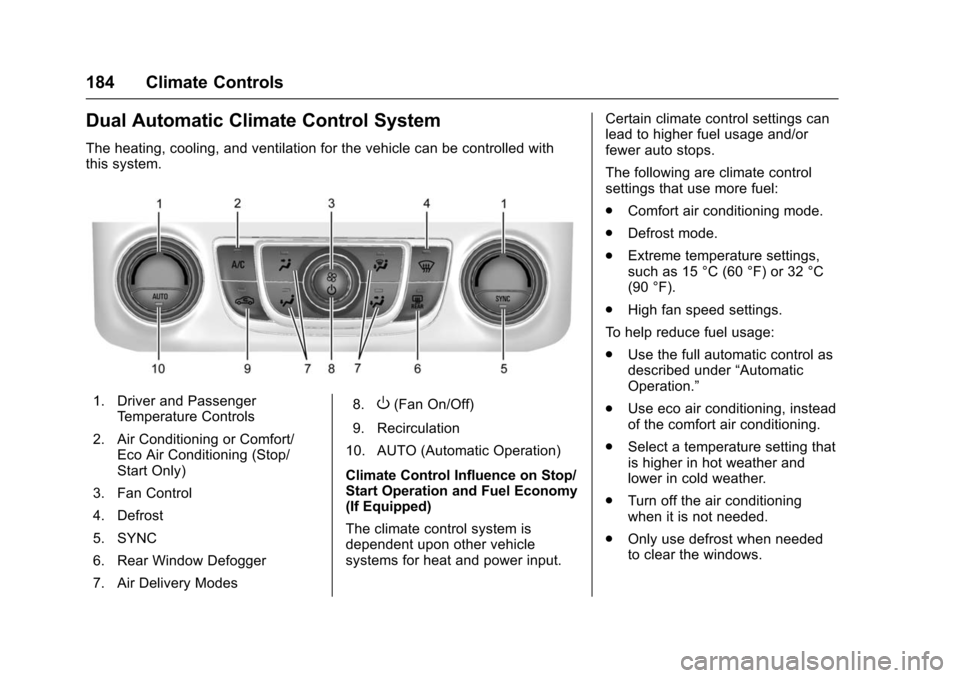
Dual Automatic Climate Control System
The heating, cooling, and ventilation for the vehicle can be controlled with
this system.
1. Driver and PassengerTemperature Controls
2. Air Conditioning or Comfort/ Eco Air Conditioning (Stop/
Start Only)
3. Fan Control
4. Defrost
5. SYNC
6. Rear Window Defogger
7. Air Delivery Modes 8.O(Fan On/Off)
9. Recirculation
10. AUTO (Automatic Operation)
Climate Control Influence on Stop/
Start Operation and Fuel Economy
(If Equipped)
The climate control system is
dependent upon other vehicle
systems for heat and power input. Certain climate control settings can
lead to higher fuel usage and/or
fewer auto stops.
The following are climate control
settings that use more fuel:
.
Comfort air conditioning mode.
. Defrost mode.
. Extreme temperature settings,
such as 15 °C (60 °F) or 32 °C
(90 °F).
. High fan speed settings.
To help reduce fuel usage:
. Use the full automatic control as
described under “Automatic
Operation.”
. Use eco air conditioning, instead
of the comfort air conditioning.
. Select a temperature setting that
is higher in hot weather and
lower in cold weather.
. Turn off the air conditioning
when it is not needed.
. Only use defrost when needed
to clear the windows.