2016 CHEVROLET EQUINOX infotainment
[x] Cancel search: infotainmentPage 178 of 324
Chevrolet Equinox Owner Manual (GMNA-Localizing-U.S./Canada/Mexico-
9234773) - 2016 - crc - 9/3/15
Driving and Operating 177
An image appears on the
infotainment screen when the
vehicle is shifted into R (Reverse).
The infotainment screen goes to the
previous screen after approximately
10 seconds once the vehicle is
shifted out of R (Reverse).
To see the previous screen sooner,
do one of the following:
.Press a hard key on the
navigation system.
. Shift into P (Park).
Press MENU to adjust the display
brightness while viewing the rear
camera display.
Symbols and Guidelines
The RVC system may have a
feature that lets the driver view
parking assist symbols on the
infotainment screen while using the
RVC. The Rear Parking Assist
(RPA) system must not be disabled
to use the caution symbols. The
error message Rear Parking Assist
Symbols Unavailable may display if
RPA has been disabled and the
symbols have been turned on. See
Parking Assist 0178
ii. Rear Cross Traffic Alert (RCTA)
On vehicles with RCTA, a triangle
with an arrow may display on the
RVC screen to warn of traffic
coming from either direction. This
system detects objects coming from
up to 20 m (65 ft) from the left or
right side, behind the vehicle. When
an object is detected, three beeps
sound from the left or right side,
depending on the direction of the
detected vehicle.
The parking assist and RCTA
symbols appear and may cover an
object when viewing the
infotainment screen when an object
is detected by the RPA or RCTA
system.
The RVC system may also have a
guideline overlay that can help the
driver align the vehicle when
backing into a parking spot.
To turn the symbols or guidelines on
or off:
1. Shift into P (Park).
2. Press the CONFIG button.
3. Select Display Settings. 4. Select Rear Camera Options.
5. Select Symbols or Guide Lines.
The feature is on when a check
mark appears next to it.
RCTA can be turned on or off
through vehicle personalization. See
“Collision Detection Systems” under
Vehicle Personalization 0120
ii.
Rear Vision Camera Error
Messages
SERVICE REAR VISION CAMERA
SYSTEM : This message can
display on the infotainment screen
when the system is not working
properly.
If any other problem occurs or if a
problem persists, see your dealer.
Page 180 of 324
Chevrolet Equinox Owner Manual (GMNA-Localizing-U.S./Canada/Mexico-
9234773) - 2016 - crc - 9/3/15
Driving and Operating 179
(5 mph), and the sensors on the rear
bumper detect objects up to 2.5 m
(8 ft) behind the vehicle, and at least
20 cm (8 in) off the ground. The
distance objects can be detected
may be less during warmer or humid
weather.
{Warning
The parking assist system does
not detect children, pedestrians,
bicyclists, animals, or objects
below the bumper or that are too
close or too far from the vehicle.
It is not available at speeds
greater than 8 km/h (5 mph). To
prevent injury, death, or vehicle
damage, even with parking assist,
always check the area around the
vehicle and check all mirrors
before backing.
How the System Works
RPA comes on automatically when
the shift lever is moved into
R (Reverse). A single beep sounds
to indicate the system is working.RPA operates only at speeds less
than 8 km/h (5 mph).
A detected obstacle is indicated by
audible beeps. The interval between
the beeps becomes shorter as the
vehicle gets closer to the obstacle.
When the distance is less than
30 cm (12 in) the beeping is
continuous for five seconds.
Turning the System On and Off
The RPA system can be turned on
and off using the infotainment
system controls. See
Vehicle
Personalization 0120
ii.
The On with Tow Bar Attached
setting allows for the parking assist
to work properly with a small item
attached to the trailer hitch.
When the system is off, PARK
ASSIST OFF displays on the Driver
Information Center (DIC). The
message disappears after a short
period of time.
RPA defaults to the On setting each
time the vehicle is started.
Turn RPA off when towing a trailer.
When the System Does Not
Seem to Work Properly
The following messages may be
displayed on the DIC:
SERVICE PARKING ASSIST : If
this message occurs, check the
following conditions:
. The sensors are not clean. Keep
the vehicle's rear bumper free of
mud, dirt, snow, ice, and slush.
For cleaning instructions, see
Exterior Care 0263
ii.
. The parking assist sensors are
covered by frost or ice. Frost or
ice can form around and behind
the sensors and may not always
be seen; this can occur after
washing the vehicle in cold
weather. The message may not
clear until the frost or ice has
melted.
If the above conditions do not exist,
take the vehicle to your dealer to
repair the system.
Page 229 of 324
Chevrolet Equinox Owner Manual (GMNA-Localizing-U.S./Canada/Mexico-
9234773) - 2016 - crc - 9/3/15
228 Vehicle Care
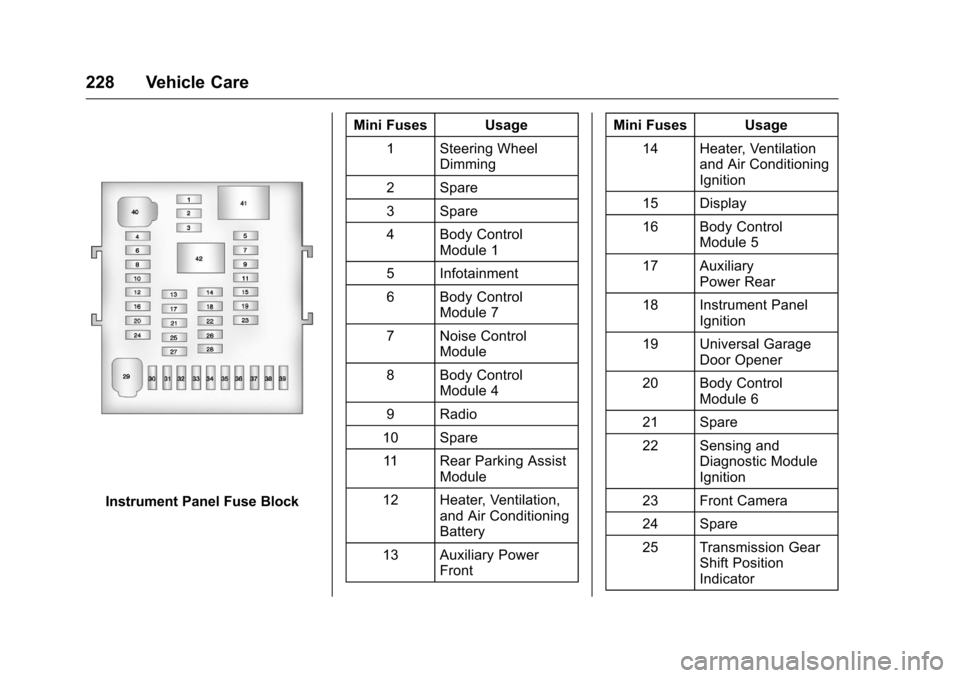
Instrument Panel Fuse BlockMini Fuses Usage
1 Steering Wheel Dimming
2 Spare
3 Spare
4 Body Control Module 1
5 Infotainment
6 Body Control Module 7
7 Noise Control Module
8 Body Control Module 4
9 Radio
10 Spare 11 Rear Parking Assist Module
12 Heater, Ventilation, and Air Conditioning
Battery
13 Auxiliary Power Front Mini Fuses Usage
14 Heater, Ventilation and Air Conditioning
Ignition
15 Display
16 Body Control Module 5
17 Auxiliary Power Rear
18 Instrument Panel Ignition
19 Universal Garage Door Opener
20 Body Control Module 6
21 Spare
22 Sensing and Diagnostic Module
Ignition
23 Front Camera
24 Spare
25 Transmission Gear Shift Position
Indicator
Page 290 of 324
Chevrolet Equinox Owner Manual (GMNA-Localizing-U.S./Canada/Mexico-
9234773) - 2016 - crc - 9/3/15
Customer Information 289
Customer
Information
Customer Information
Customer SatisfactionProcedure . . . . . . . . . . . . . . . . . . . 289
Customer Assistance Offices . . . . . . . . . . . . . . . . . . . . . . 291
Customer Assistance for Text Telephone (TTY) Users . . . . . 292
Online Owner Center . . . . . . . . . 292
GM Mobility Reimbursement Program . . . . . . . . . . . . . . . . . . . . 292
Roadside Assistance Program . . . . . . . . . . . . . . . . . . . . 293
Scheduling Service Appointments . . . . . . . . . . . . . . . 295
Courtesy Transportation Program . . . . . . . . . . . . . . . . . . . . 295
Collision Damage Repair . . . . . 296
Service Publications Ordering Information . . . . . . . . . . . . . . . . . . 298
Radio Frequency Statement . . . . . . . . . . . . . . . . . . . 299
Reporting Safety Defects
Reporting Safety Defects tothe United States
Government . . . . . . . . . . . . . . . . . 299 Reporting Safety Defects to
the Canadian
Government . . . . . . . . . . . . . . . . . 300
Reporting Safety Defects to General Motors . . . . . . . . . . . . . 300
Vehicle Data Recording and
Privacy
Vehicle Data Recording and
Privacy . . . . . . . . . . . . . . . . . . . . . . 300
Event Data Recorders . . . . . . . . 301
OnStar
®. . . . . . . . . . . . . . . . . . . . . . 301
Infotainment System . . . . . . . . . . 302
Customer Information
Customer Satisfaction
Procedure
Your satisfaction and goodwill are
important to your dealer and to
Chevrolet. Normally, any concerns
with the sales transaction or the
operation of the vehicle will be
resolved by your dealer's sales or
service departments. Sometimes,
however, despite the best intentions
of all concerned, misunderstandings
can occur. If your concern has not
been resolved to your satisfaction,
the following steps should be taken:
STEP ONE : Discuss your concern
with a member of dealership
management. Normally, concerns
can be quickly resolved at that level.
If the matter has already been
reviewed with the sales, service,
or parts manager, contact the owner
of your dealership or the general
manager.
STEP TWO : If after contacting a
member of dealership management,
it appears your concern cannot be
Page 303 of 324
Chevrolet Equinox Owner Manual (GMNA-Localizing-U.S./Canada/Mexico-
9234773) - 2016 - crc - 9/3/15
302 Customer Information
OnStar Terms and Conditions and
Privacy Statement on the OnStar
website.
SeeOnStar Additional Information
0 307
ii.
Infotainment System
If the vehicle is equipped with a
navigation system as part of the
infotainment system, use of the
system may result in the storage of
destinations, addresses, telephone
numbers, and other trip information.
See the infotainment manual for
information on stored data and for
deletion instructions.
Page 318 of 324
Chevrolet Equinox Owner Manual (GMNA-Localizing-U.S./Canada/Mexico-
9234773) - 2016 - crc - 9/3/15
Index 317
Gauges (cont'd)Odometer . . . . . . . . . . . . . . . . . . . . . . . 99
Speedometer . . . . . . . . . . . . . . . . . . . 99
Tachometer . . . . . . . . . . . . . . . . . . . . . 99
Warning Lights and
Indicators . . . . . . . . . . . . . . . . . . . . . 97
General Information Service and Maintenance . . . . . 272
Towing . . . . . . . . . . . . . . . . . . . . . . . . 190
Vehicle Care . . . . . . . . . . . . . . . . . . 198
Glove Box . . . . . . . . . . . . . . . . . . . . . . . 89
GM Mobility Reimbursement Program . . . . . . . . . . . . . . . . . . . . . . . 292
H
Halogen Bulbs . . . . . . . . . . . . . . . . . . 222
Hazard Warning Flashers . . . . . . . 132
Head Restraints . . . . . . . . . . . . . . . . . 44
HeadlampsAiming . . . . . . . . . . . . . . . . . . . . . . . . 221
Automatic . . . . . . . . . . . . . . . . . . . . . 131
Bulb Replacement . . . . . . . . . . . . 222
Daytime RunningLamps (DRL) . . . . . . . . . . . . . . . . 131
Flash-to-Pass . . . . . . . . . . . . . . . . . 131
High-Beam On Light . . . . . . . . . . 109
High/Low Beam Changer . . . . . 130
Lamps On Reminder . . . . . . . . . .110
Heated Front Seats . . . . . . . . . . . . . . 50 Heated Mirrors . . . . . . . . . . . . . . . . . . . 38
Heater
Engine Coolant . . . . . . . . . . . . . . . 163
Heating and Air Conditioning . . . . . . . . . . . . . . 137, 139
High-Beam On Light . . . . . . . . . . . . 109
Hill and Mountain Roads . . . . . . . . 153
Hill Start Assist (HSA) . . . . . . . . . . 172
Hood . . . . . . . . . . . . . . . . . . . . . . . . . . . 200
Horn . . . . . . . . . . . . . . . . . . . . . . . . . . . . . 93
How to Wear Safety Belts Properly . . . . . . . . . . . . . . . . . . . . . . . . 53
I
Ignition Positions . . . . . . . . . . . . . . . 160
Ignition Transmission LockCheck . . . . . . . . . . . . . . . . . . . . . . . . . 219
Immobilizer . . . . . . . . . . . . . . . . . . . . . . 37
Indicator Vehicle Ahead . . . . . . . . . . . . . . . . 106
Infants and Young Children,
Restraints . . . . . . . . . . . . . . . . . . . . . . 73
Infotainment . . . . . . . . . . . . . . . . . . . . 136
Infotainment System . . . . . . . . . . . . 302
Instrument Cluster . . . . . . . . . . . . . . . 98
Interior Rearview Mirrors . . . . . . . . . 39
Introduction . . . . . . . . . . . . . . . . . . . . . . . 2
J
Jump Starting - North America . . . . . . . . . . . . . . . . . . . . . . . 257
K
Key and Lock Messages . . . . . . . . 116
Keyless EntryRemote (RKE) System . . . . . . . . . 26
Keys . . . . . . . . . . . . . . . . . . . . . . . . . . . . . 24
L
Labeling, Tire Sidewall . . . . . . . . . . 231
Lamps Daytime Running (DRL) . . . . . . 131
Dome . . . . . . . . . . . . . . . . . . . . . . . . . 133
Exterior Controls . . . . . . . . . . . . . . 130
License Plate . . . . . . . . . . . . . . . . . 223
Malfunction Indicator . . . . . . . . . 103
On Reminder . . . . . . . . . . . . . . . . . .110
Reading . . . . . . . . . . . . . . . . . . . . . . 134
Lane Departure
Warning (LDW) . . . . . . . . . . . . . . . . 184
Lane Departure Warning Light . . . . . . . . . . . . . . . . . . . . . . . . . . 106
Lap-Shoulder Belt . . . . . . . . . . . . . . . 54
LATCH System
Replacing Parts after aCrash . . . . . . . . . . . . . . . . . . . . . . . . . 83
Page 322 of 324
Chevrolet Equinox Owner Manual (GMNA-Localizing-U.S./Canada/Mexico-
9234773) - 2016 - crc - 9/3/15
Index 321
Service (cont'd)Scheduling Appointments . . . . . 295
Vehicle Messages . . . . . . . . . . . . .118
Services
Special Application . . . . . . . . . . . 279
Servicing the Airbag . . . . . . . . . . . . . 69
Shift Lock Control Function Check, Automatic
Transmission . . . . . . . . . . . . . . . . . . 219
Shifting Into Park . . . . . . . . . . . . . . . . . . . . . . 164
Out of Park . . . . . . . . . . . . . . . . . . . 165
Side Blind Zone Alert (SBZA) . . . 182
Sidemarker Bulb Replacement . . . . . . . . . . . . 222
Signals, Turn and Lane-Change . . . . . . . . . . . . . . . . . 132
Spare Tire
Compact . . . . . . . . . . . . . . . . . . . . . . 256
Special Application Services . . . . 279
Specifications and Capacities . . . . . . . . . . . . . . . . . . . . . 286
Speedometer . . . . . . . . . . . . . . . . . . . . 99
StabiliTrak
OFF Light . . . . . . . . . . . . . . . . . . . . . 107
Start Assist, Hills . . . . . . . . . . . . . . . 172
Start Vehicle, Remote . . . . . . . . . . . 28
Starter Switch Check . . . . . . . . . . . 219 Starting the Engine . . . . . . . . . . . . . 161
Steering . . . . . . . . . . . . . . . . . . . . . . . . 146
Fluid, Power . . . . . . . . . . . . . . . . . . 215
Wheel Adjustment . . . . . . . . . . . . . . 93
Wheel Controls . . . . . . . . . . . . . . . . . 93
Stoplamps and Back-Up Lamps Bulb Replacement . . . . . . . . . . . . 222
Storage Areas Cargo Cover . . . . . . . . . . . . . . . . . . . . 90
Center Console . . . . . . . . . . . . . . . . . 89
Convenience Net . . . . . . . . . . . . . . . 90
Glove Box . . . . . . . . . . . . . . . . . . . . . . 89
Roof Rack System . . . . . . . . . . . . . . 90
Storage Compartments . . . . . . . . . . 89
Stuck Vehicle . . . . . . . . . . . . . . . . . . . 155
Summer Tires . . . . . . . . . . . . . . . . . . 231
Sun Visors . . . . . . . . . . . . . . . . . . . . . . . 41
Sunroof . . . . . . . . . . . . . . . . . . . . . . . . . . 41
Symbols . . . . . . . . . . . . . . . . . . . . . . . . . . 3
System Forward Collision
Alert (FCA) . . . . . . . . . . . . . . . . . . 180
Infotainment . . . . . . . . . . . . . 136, 302
Roof Rack . . . . . . . . . . . . . . . . . . . . . . 90T
Tachometer . . . . . . . . . . . . . . . . . . . . . . 99
Taillamps Bulb Replacement . . . . . . . . . . . . 222
Text Telephone (TTY) Users . . . . 292
Theft-Deterrent Systems . . . . . . . . . 37
Immobilizer . . . . . . . . . . . . . . . . . . . . . 37
Time . . . . . . . . . . . . . . . . . . . . . . . . . . . . . 95
Tires . . . . . . . . . . . . . . . . . . . . . . . . . . . . 229 All-Season . . . . . . . . . . . . . . . . . . . . 230
Buying New Tires . . . . . . . . . . . . . 244
Chains . . . . . . . . . . . . . . . . . . . . . . . . 248
Changing . . . . . . . . . . . . . . . . . . . . . 250
Compact Spare . . . . . . . . . . . . . . . 256
Designations . . . . . . . . . . . . . . . . . 233
Different Size . . . . . . . . . . . . . . . . . 245
If a Tire Goes Flat . . . . . . . . . . . . 249
Inspection . . . . . . . . . . . . . . . . . . . . 242
Messages . . . . . . . . . . . . . . . . . . . . .118
Pressure Light . . . . . . . . . . . . . . . . 107
Pressure Monitor Operation . . 239
Pressure Monitor System . . . . . 238
Rotation . . . . . . . . . . . . . . . . . . . . . . 242
Sidewall Labeling . . . . . . . . . . . . . 231
Terminology and Definitions . . 234
Uniform Tire Quality
Grading . . . . . . . . . . . . . . . . . . . . . 246