2016 CHEVROLET CRUZE driver seat adjustment
[x] Cancel search: driver seat adjustmentPage 6 of 377
Chevrolet Cruze Owner Manual (GMNA-Localizing-U.S./Canada/Mexico-
9234744) - 2016 - CRC - 3/9/16
In Brief 5
In Brief
Instrument Panel
Instrument Panel Overview . . . . . . 6
Initial Drive Information
Initial Drive Information . . . . . . . . . . 8
Stop/Start System . . . . . . . . . . . . . . . 8
Remote Keyless Entry (RKE)System . . . . . . . . . . . . . . . . . . . . . . . . 8
Remote Vehicle Start . . . . . . . . . . . 9
Door Locks . . . . . . . . . . . . . . . . . . . . . 9
Windows . . . . . . . . . . . . . . . . . . . . . . . 10
Seat Adjustment . . . . . . . . . . . . . . . 10
Heated Seats . . . . . . . . . . . . . . . . . . 12
Head Restraint Adjustment . . . . 13
Safety Belts . . . . . . . . . . . . . . . . . . . . 13
Passenger Sensing System . . . 13
Mirror Adjustment . . . . . . . . . . . . . . 14
Steering Wheel Adjustment . . . . 14
Interior Lighting . . . . . . . . . . . . . . . . 15
Exterior Lighting . . . . . . . . . . . . . . . 16
Windshield Wiper/Washer . . . . . . 16
Climate Controls . . . . . . . . . . . . . . . 17
Transmission . . . . . . . . . . . . . . . . . . 19
Vehicle Features
Infotainment System . . . . . . . . . . . 20
Radio(s) . . . . . . . . . . . . . . . . . . . . . . . 20
Satellite Radio . . . . . . . . . . . . . . . . . 21 Portable Audio Devices . . . . . . . . 21
Bluetooth
®. . . . . . . . . . . . . . . . . . . . . 21
Steering Wheel Controls . . . . . . . 21
Cruise Control . . . . . . . . . . . . . . . . . 22
Driver Information Center (DIC) . . . . . . . . . . . . . . . . . 22
Forward Collision Alert (FCA) System . . . . . . . . . . . . . . . . . . . . . . . 23
Lane Keep Assist (LKA) . . . . . . . 23
Lane Change Alert (LCA) . . . . . . 23
Rear Vision Camera (RVC) . . . . 23
Rear Cross Traffic Alert (RCTA) System . . . . . . . . . . . . . . . . . . . . . . . 24
Parking Assist . . . . . . . . . . . . . . . . . 24
Power Outlets . . . . . . . . . . . . . . . . . 24
Sunroof . . . . . . . . . . . . . . . . . . . . . . . . 24
Performance and Maintenance
Traction Control/Electronic Stability Control . . . . . . . . . . . . . . 25
Tire Pressure Monitor . . . . . . . . . . 25
Engine Oil Life System . . . . . . . . 26
Driving for Better Fuel Economy . . . . . . . . . . . . . . . . . . . . . 26
Roadside Assistance Program . . . . . . . . . . . . . . . . . . . . . . 27
Page 8 of 377

Chevrolet Cruze Owner Manual (GMNA-Localizing-U.S./Canada/Mexico-
9234744) - 2016 - CRC - 3/9/16
In Brief 7
1.Air Vents 0191.
2. Headlamp High/Low-Beam
Changer 0153.
Turn Signal Lever. See Turn
and Lane-Change
Signals 0155.
Driver Information Center (DIC)
Buttons (If Equipped). See
Driver Information Center (DIC)
(Uplevel Cluster) 0133 or
Driver Information Center (DIC)
(Base Level Cluster) 0130.
3. Instrument Cluster (Base
Level) 0112 orInstrument
Cluster (Uplevel) 0114.
4. Windshield Wiper/
Washer 0105.
5. Infotainment 0159.
6. Light Sensor. See Automatic
Headlamp System 0153.
7. Hazard Warning
Flashers 0154.
8. Heated Front Seats 060 (If
Equipped).
9. Instrument Panel Fuse
Block 0272. 10.
Climate Control Systems (With
Air Conditioning) 0185 or
Climate Control Systems (With
Heater Only) 0187.
Automatic Climate Control
System 0188 (If Equipped).
11. Power Outlets 0108.
USB Port 0167.
12. Wireless Charging Pocket (If Equipped). See Wireless
Charging 0110.
13. Traction Control/Electronic
Stability Control 0221.
Assistance Systems for
Parking or Backing 0226.
14. Shift Lever. See Automatic
Transmission 0214 orManual
Transmission 0217.
15. Steering Wheel Controls 0104.
Driver Information Center (DIC)
Controls (If Equipped). See
Driver Information Center (DIC)
(Uplevel Cluster) 0133 or
Driver Information Center (DIC)
(Base Level Cluster) 0130.
16. Horn 0105. 17.
Steering Wheel
Adjustment 0104.
18. Cruise Control 0223.
Heated Steering Wheel 0105
(If Equipped).
Forward Collision Alert (FCA)
System 0229 (If Equipped).
Lane Keep Assist (LKA) 0233
(If Equipped).
19. Hood Release. See Hood 0244.
20. Data Link Connector (DLC) (Out of View). See Malfunction
Indicator Lamp (Check Engine
Light) 0122.
21. Exterior Lamp Controls 0151.
Fog Lamps 0155 (If
Equipped).
Instrument Panel Illumination
Control 0156.
Page 11 of 377
Chevrolet Cruze Owner Manual (GMNA-Localizing-U.S./Canada/Mexico-
9234744) - 2016 - CRC - 3/9/16
10 In Brief
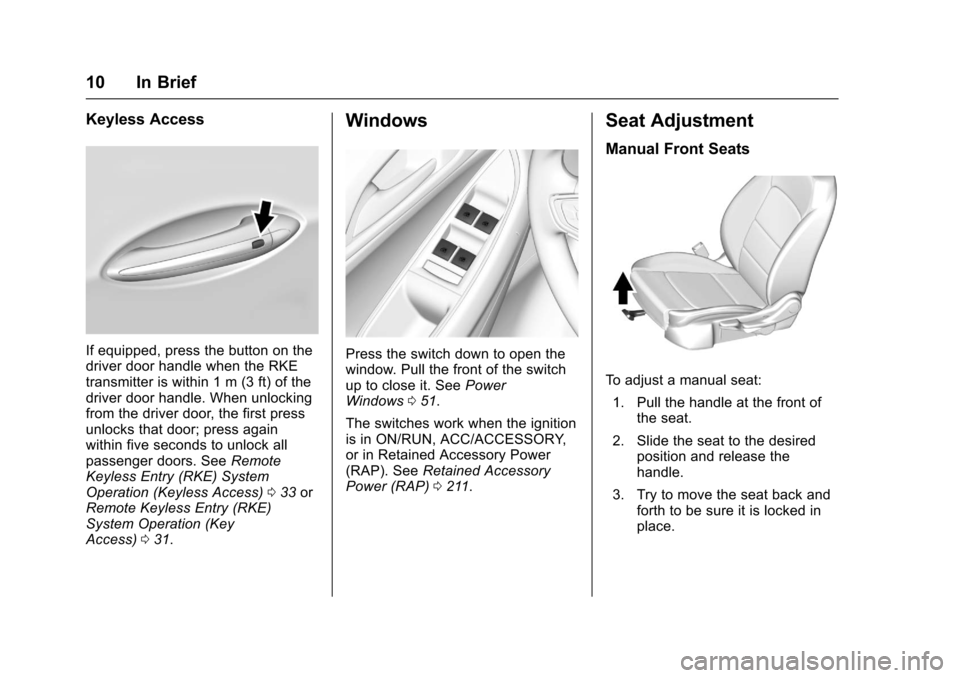
Keyless Access
If equipped, press the button on the
driver door handle when the RKE
transmitter is within 1 m (3 ft) of the
driver door handle. When unlocking
from the driver door, the first press
unlocks that door; press again
within five seconds to unlock all
passenger doors. SeeRemote
Keyless Entry (RKE) System
Operation (Keyless Access) 033 or
Remote Keyless Entry (RKE)
System Operation (Key
Access) 031.
Windows
Press the switch down to open the
window. Pull the front of the switch
up to close it. See Power
Windows 051.
The switches work when the ignition
is in ON/RUN, ACC/ACCESSORY,
or in Retained Accessory Power
(RAP). See Retained Accessory
Power (RAP) 0211.
Seat Adjustment
Manual Front Seats
To adjust a manual seat:
1. Pull the handle at the front of the seat.
2. Slide the seat to the desired position and release the
handle.
3. Try to move the seat back and forth to be sure it is locked in
place.
Page 13 of 377
Chevrolet Cruze Owner Manual (GMNA-Localizing-U.S./Canada/Mexico-
9234744) - 2016 - CRC - 3/9/16
12 In Brief
Power Driver Seat
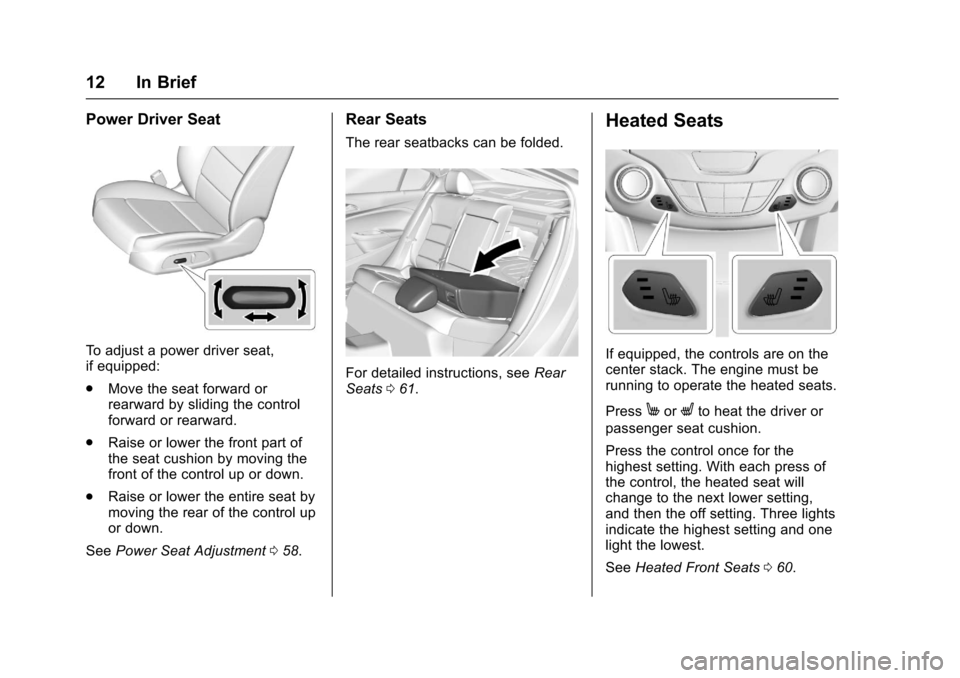
To adjust a power driver seat,
if equipped:
.Move the seat forward or
rearward by sliding the control
forward or rearward.
. Raise or lower the front part of
the seat cushion by moving the
front of the control up or down.
. Raise or lower the entire seat by
moving the rear of the control up
or down.
See Power Seat Adjustment 058.
Rear Seats
The rear seatbacks can be folded.
For detailed instructions, see Rear
Seats 061.
Heated Seats
If equipped, the controls are on the
center stack. The engine must be
running to operate the heated seats.
Press
MorLto heat the driver or
passenger seat cushion.
Press the control once for the
highest setting. With each press of
the control, the heated seat will
change to the next lower setting,
and then the off setting. Three lights
indicate the highest setting and one
light the lowest.
See Heated Front Seats 060.
Page 58 of 377
Chevrolet Cruze Owner Manual (GMNA-Localizing-U.S./Canada/Mexico-
9234744) - 2016 - CRC - 3/9/16
Seats and Restraints 57
The rear outboard head restraints
are designed to be removed. See
“Head Restraint Removal and
Reinstallation”underLower Anchors
and Tethers for Children (LATCH
System) 089.
If you are installing a child restraint
in the rear seat, see “Securing a
Child Restraint Designed for the
LATCH System” underLower
Anchors and Tethers for Children
(LATCH System) 089.Front Seats
Seat Adjustment
{Warning
You can lose control of the
vehicle if you try to adjust a driver
seat while the vehicle is moving.
Adjust the driver seat only when
the vehicle is not moving.
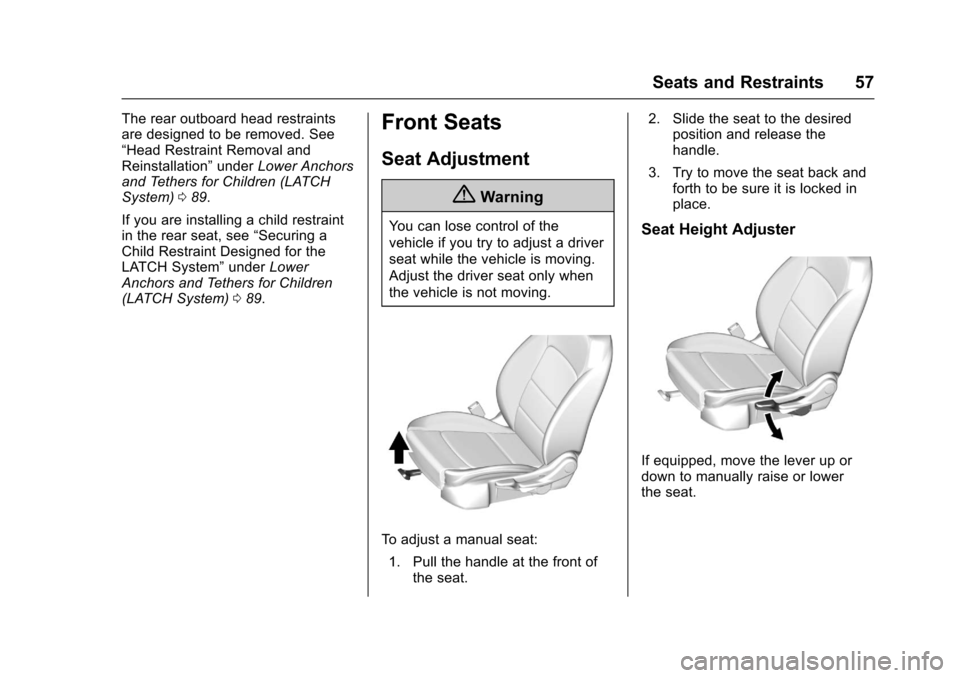
To adjust a manual seat:
1. Pull the handle at the front of the seat. 2. Slide the seat to the desired
position and release the
handle.
3. Try to move the seat back and forth to be sure it is locked in
place.
Seat Height Adjuster
If equipped, move the lever up or
down to manually raise or lower
the seat.
Page 59 of 377
Chevrolet Cruze Owner Manual (GMNA-Localizing-U.S./Canada/Mexico-
9234744) - 2016 - CRC - 3/9/16
58 Seats and Restraints
Power Seat Adjustment
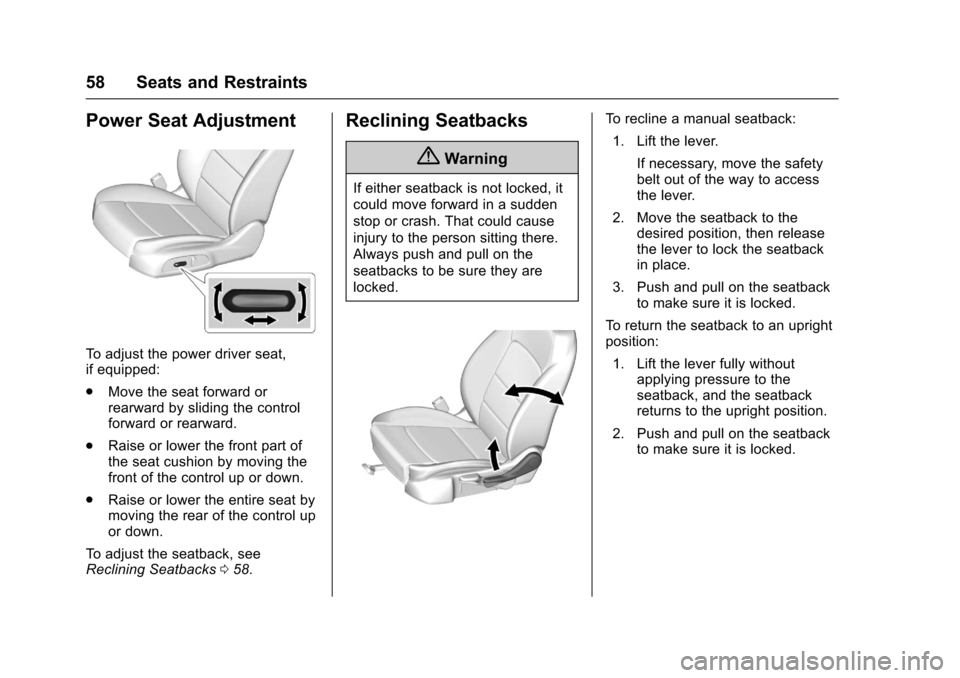
To adjust the power driver seat,
if equipped:
.Move the seat forward or
rearward by sliding the control
forward or rearward.
. Raise or lower the front part of
the seat cushion by moving the
front of the control up or down.
. Raise or lower the entire seat by
moving the rear of the control up
or down.
To adjust the seatback, see
Reclining Seatbacks 058.
Reclining Seatbacks
{Warning
If either seatback is not locked, it
could move forward in a sudden
stop or crash. That could cause
injury to the person sitting there.
Always push and pull on the
seatbacks to be sure they are
locked.
To recline a manual seatback:
1. Lift the lever.
If necessary, move the safety
belt out of the way to access
the lever.
2. Move the seatback to the desired position, then release
the lever to lock the seatback
in place.
3. Push and pull on the seatback to make sure it is locked.
To return the seatback to an upright
position: 1. Lift the lever fully without applying pressure to the
seatback, and the seatback
returns to the upright position.
2. Push and pull on the seatback to make sure it is locked.
Page 96 of 377
Chevrolet Cruze Owner Manual (GMNA-Localizing-U.S./Canada/Mexico-
9234744) - 2016 - CRC - 3/9/16
Seats and Restraints 95
{Warning
With head restraints that are not
installed and adjusted properly,
there is a greater chance that
occupants will suffer a neck/
spinal injury in a crash. Do not
drive until the head restraints for
all occupants are installed and
adjusted properly.
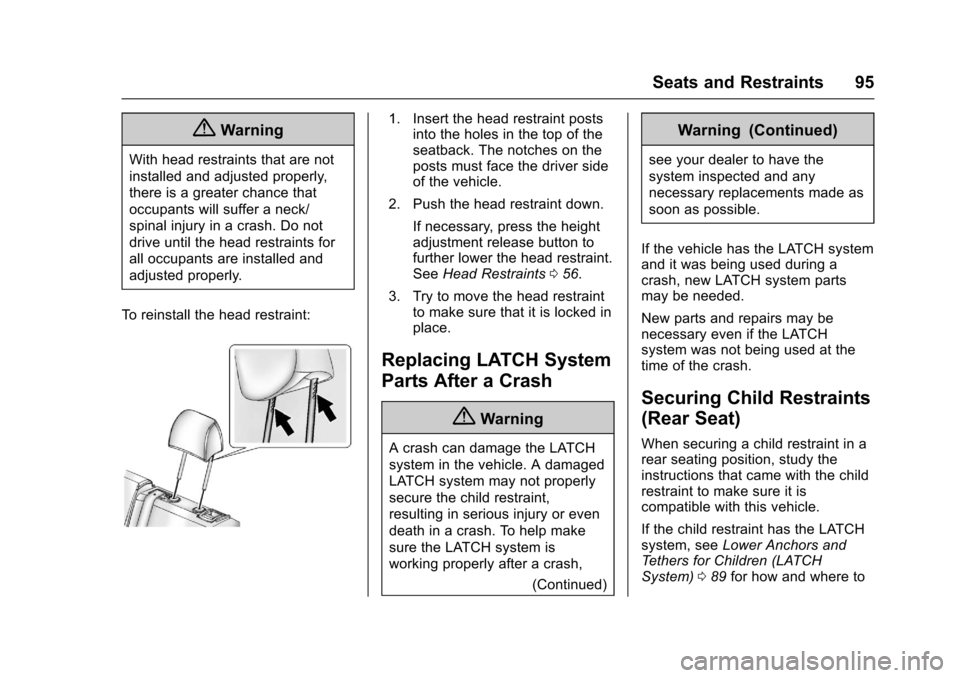
To reinstall the head restraint:
1. Insert the head restraint posts into the holes in the top of the
seatback. The notches on the
posts must face the driver side
of the vehicle.
2. Push the head restraint down.
If necessary, press the height
adjustment release button to
further lower the head restraint.
See Head Restraints 056.
3. Try to move the head restraint to make sure that it is locked in
place.
Replacing LATCH System
Parts After a Crash
{Warning
A crash can damage the LATCH
system in the vehicle. A damaged
LATCH system may not properly
secure the child restraint,
resulting in serious injury or even
death in a crash. To help make
sure the LATCH system is
working properly after a crash,
(Continued)
Warning (Continued)
see your dealer to have the
system inspected and any
necessary replacements made as
soon as possible.
If the vehicle has the LATCH system
and it was being used during a
crash, new LATCH system parts
may be needed.
New parts and repairs may be
necessary even if the LATCH
system was not being used at the
time of the crash.
Securing Child Restraints
(Rear Seat)
When securing a child restraint in a
rear seating position, study the
instructions that came with the child
restraint to make sure it is
compatible with this vehicle.
If the child restraint has the LATCH
system, see Lower Anchors and
Tethers for Children (LATCH
System) 089 for how and where to