2016 CHEVROLET CRUZE driver
[x] Cancel search: driverPage 6 of 377
Chevrolet Cruze Owner Manual (GMNA-Localizing-U.S./Canada/Mexico-
9234744) - 2016 - CRC - 3/9/16
In Brief 5
In Brief
Instrument Panel
Instrument Panel Overview . . . . . . 6
Initial Drive Information
Initial Drive Information . . . . . . . . . . 8
Stop/Start System . . . . . . . . . . . . . . . 8
Remote Keyless Entry (RKE)System . . . . . . . . . . . . . . . . . . . . . . . . 8
Remote Vehicle Start . . . . . . . . . . . 9
Door Locks . . . . . . . . . . . . . . . . . . . . . 9
Windows . . . . . . . . . . . . . . . . . . . . . . . 10
Seat Adjustment . . . . . . . . . . . . . . . 10
Heated Seats . . . . . . . . . . . . . . . . . . 12
Head Restraint Adjustment . . . . 13
Safety Belts . . . . . . . . . . . . . . . . . . . . 13
Passenger Sensing System . . . 13
Mirror Adjustment . . . . . . . . . . . . . . 14
Steering Wheel Adjustment . . . . 14
Interior Lighting . . . . . . . . . . . . . . . . 15
Exterior Lighting . . . . . . . . . . . . . . . 16
Windshield Wiper/Washer . . . . . . 16
Climate Controls . . . . . . . . . . . . . . . 17
Transmission . . . . . . . . . . . . . . . . . . 19
Vehicle Features
Infotainment System . . . . . . . . . . . 20
Radio(s) . . . . . . . . . . . . . . . . . . . . . . . 20
Satellite Radio . . . . . . . . . . . . . . . . . 21 Portable Audio Devices . . . . . . . . 21
Bluetooth
®. . . . . . . . . . . . . . . . . . . . . 21
Steering Wheel Controls . . . . . . . 21
Cruise Control . . . . . . . . . . . . . . . . . 22
Driver Information Center (DIC) . . . . . . . . . . . . . . . . . 22
Forward Collision Alert (FCA) System . . . . . . . . . . . . . . . . . . . . . . . 23
Lane Keep Assist (LKA) . . . . . . . 23
Lane Change Alert (LCA) . . . . . . 23
Rear Vision Camera (RVC) . . . . 23
Rear Cross Traffic Alert (RCTA) System . . . . . . . . . . . . . . . . . . . . . . . 24
Parking Assist . . . . . . . . . . . . . . . . . 24
Power Outlets . . . . . . . . . . . . . . . . . 24
Sunroof . . . . . . . . . . . . . . . . . . . . . . . . 24
Performance and Maintenance
Traction Control/Electronic Stability Control . . . . . . . . . . . . . . 25
Tire Pressure Monitor . . . . . . . . . . 25
Engine Oil Life System . . . . . . . . 26
Driving for Better Fuel Economy . . . . . . . . . . . . . . . . . . . . . 26
Roadside Assistance Program . . . . . . . . . . . . . . . . . . . . . . 27
Page 8 of 377

Chevrolet Cruze Owner Manual (GMNA-Localizing-U.S./Canada/Mexico-
9234744) - 2016 - CRC - 3/9/16
In Brief 7
1.Air Vents 0191.
2. Headlamp High/Low-Beam
Changer 0153.
Turn Signal Lever. See Turn
and Lane-Change
Signals 0155.
Driver Information Center (DIC)
Buttons (If Equipped). See
Driver Information Center (DIC)
(Uplevel Cluster) 0133 or
Driver Information Center (DIC)
(Base Level Cluster) 0130.
3. Instrument Cluster (Base
Level) 0112 orInstrument
Cluster (Uplevel) 0114.
4. Windshield Wiper/
Washer 0105.
5. Infotainment 0159.
6. Light Sensor. See Automatic
Headlamp System 0153.
7. Hazard Warning
Flashers 0154.
8. Heated Front Seats 060 (If
Equipped).
9. Instrument Panel Fuse
Block 0272. 10.
Climate Control Systems (With
Air Conditioning) 0185 or
Climate Control Systems (With
Heater Only) 0187.
Automatic Climate Control
System 0188 (If Equipped).
11. Power Outlets 0108.
USB Port 0167.
12. Wireless Charging Pocket (If Equipped). See Wireless
Charging 0110.
13. Traction Control/Electronic
Stability Control 0221.
Assistance Systems for
Parking or Backing 0226.
14. Shift Lever. See Automatic
Transmission 0214 orManual
Transmission 0217.
15. Steering Wheel Controls 0104.
Driver Information Center (DIC)
Controls (If Equipped). See
Driver Information Center (DIC)
(Uplevel Cluster) 0133 or
Driver Information Center (DIC)
(Base Level Cluster) 0130.
16. Horn 0105. 17.
Steering Wheel
Adjustment 0104.
18. Cruise Control 0223.
Heated Steering Wheel 0105
(If Equipped).
Forward Collision Alert (FCA)
System 0229 (If Equipped).
Lane Keep Assist (LKA) 0233
(If Equipped).
19. Hood Release. See Hood 0244.
20. Data Link Connector (DLC) (Out of View). See Malfunction
Indicator Lamp (Check Engine
Light) 0122.
21. Exterior Lamp Controls 0151.
Fog Lamps 0155 (If
Equipped).
Instrument Panel Illumination
Control 0156.
Page 9 of 377
Chevrolet Cruze Owner Manual (GMNA-Localizing-U.S./Canada/Mexico-
9234744) - 2016 - CRC - 3/9/16
8 In Brief
Initial Drive
Information
This section provides a brief
overview about some of the
important features that may or may
not be on your specific vehicle.
For more detailed information, refer
to each of the features which can be
found later in this owner manual.
Stop/Start System
The vehicle may have a fuel saving
stop/start system to shut off the
engine and help conserve fuel.
When the brakes are applied and
the vehicle is at a complete stop,
the engine may turn off. When the
brake pedal is released or the
accelerator pedal is pushed, the
engine will restart. SeeStarting the
Engine 0207.
Remote Keyless Entry
(RKE) System
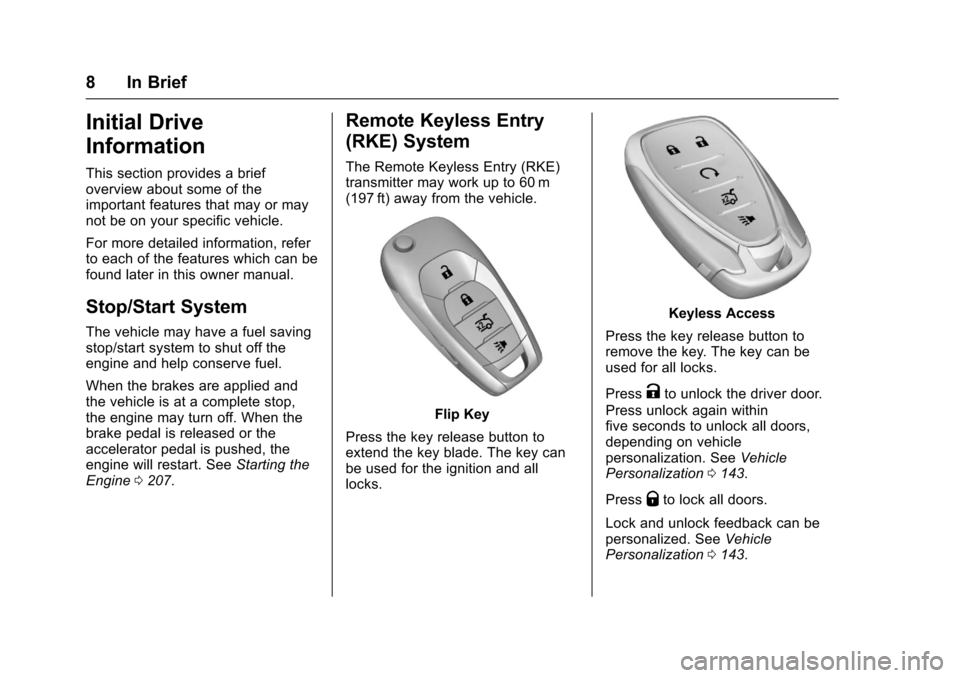
The Remote Keyless Entry (RKE)
transmitter may work up to 60 m
(197 ft) away from the vehicle.
Flip Key
Press the key release button to
extend the key blade. The key can
be used for the ignition and all
locks.
Keyless Access
Press the key release button to
remove the key. The key can be
used for all locks.
Press
Kto unlock the driver door.
Press unlock again within
five seconds to unlock all doors,
depending on vehicle
personalization. See Vehicle
Personalization 0143.
Press
Qto lock all doors.
Lock and unlock feedback can be
personalized. See Vehicle
Personalization 0143.
Page 11 of 377
Chevrolet Cruze Owner Manual (GMNA-Localizing-U.S./Canada/Mexico-
9234744) - 2016 - CRC - 3/9/16
10 In Brief
Keyless Access
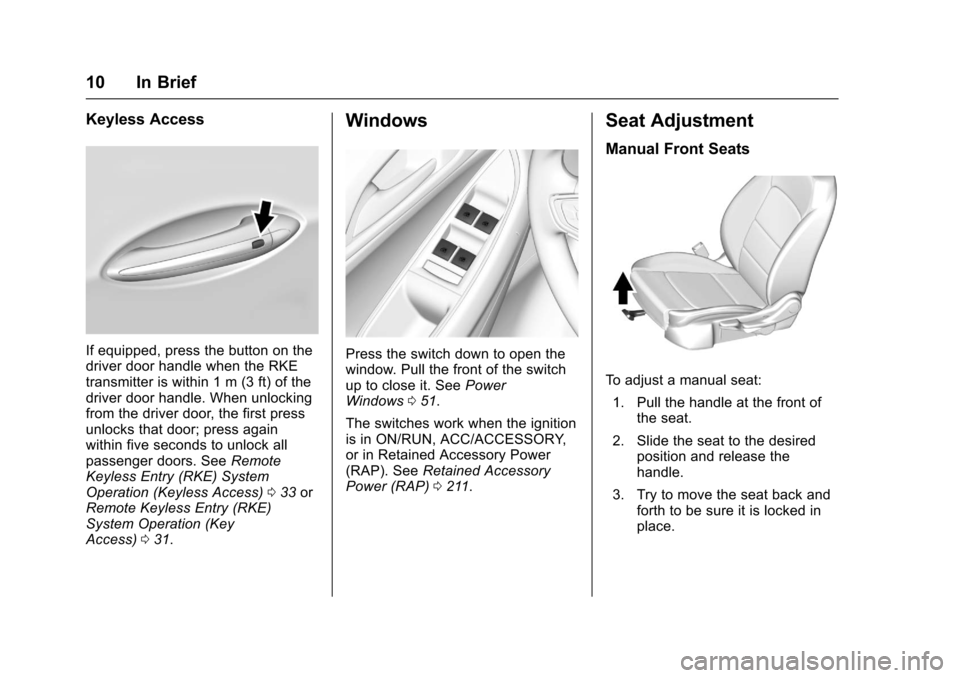
If equipped, press the button on the
driver door handle when the RKE
transmitter is within 1 m (3 ft) of the
driver door handle. When unlocking
from the driver door, the first press
unlocks that door; press again
within five seconds to unlock all
passenger doors. SeeRemote
Keyless Entry (RKE) System
Operation (Keyless Access) 033 or
Remote Keyless Entry (RKE)
System Operation (Key
Access) 031.
Windows
Press the switch down to open the
window. Pull the front of the switch
up to close it. See Power
Windows 051.
The switches work when the ignition
is in ON/RUN, ACC/ACCESSORY,
or in Retained Accessory Power
(RAP). See Retained Accessory
Power (RAP) 0211.
Seat Adjustment
Manual Front Seats
To adjust a manual seat:
1. Pull the handle at the front of the seat.
2. Slide the seat to the desired position and release the
handle.
3. Try to move the seat back and forth to be sure it is locked in
place.
Page 13 of 377
Chevrolet Cruze Owner Manual (GMNA-Localizing-U.S./Canada/Mexico-
9234744) - 2016 - CRC - 3/9/16
12 In Brief
Power Driver Seat
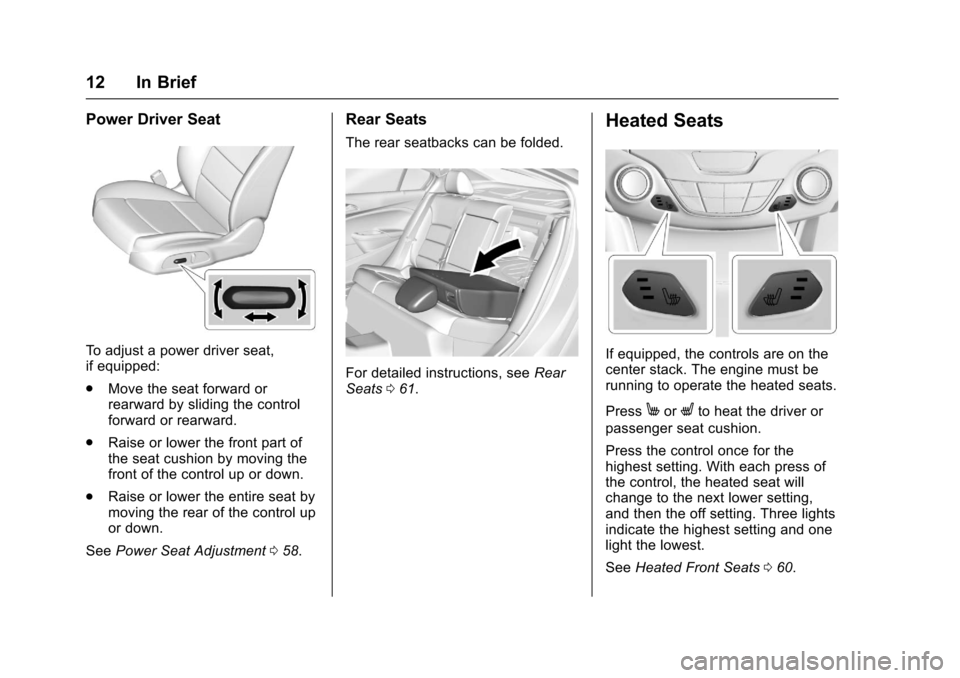
To adjust a power driver seat,
if equipped:
.Move the seat forward or
rearward by sliding the control
forward or rearward.
. Raise or lower the front part of
the seat cushion by moving the
front of the control up or down.
. Raise or lower the entire seat by
moving the rear of the control up
or down.
See Power Seat Adjustment 058.
Rear Seats
The rear seatbacks can be folded.
For detailed instructions, see Rear
Seats 061.
Heated Seats
If equipped, the controls are on the
center stack. The engine must be
running to operate the heated seats.
Press
MorLto heat the driver or
passenger seat cushion.
Press the control once for the
highest setting. With each press of
the control, the heated seat will
change to the next lower setting,
and then the off setting. Three lights
indicate the highest setting and one
light the lowest.
See Heated Front Seats 060.
Page 15 of 377
Chevrolet Cruze Owner Manual (GMNA-Localizing-U.S./Canada/Mexico-
9234744) - 2016 - CRC - 3/9/16
14 In Brief
Mirror Adjustment
Exterior
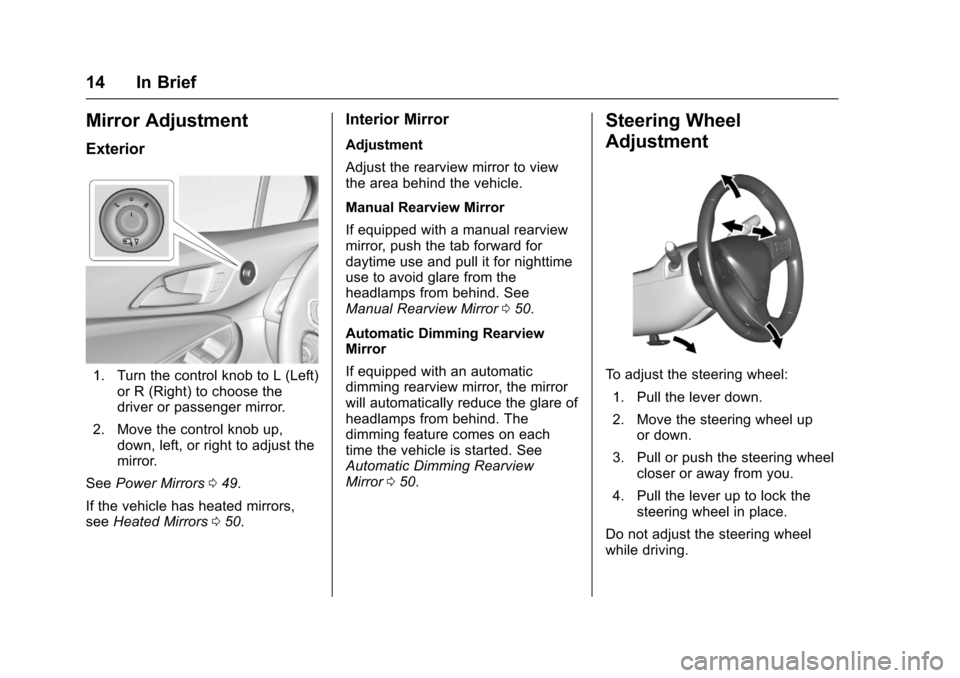
1. Turn the control knob to L (Left)or R (Right) to choose the
driver or passenger mirror.
2. Move the control knob up, down, left, or right to adjust the
mirror.
See Power Mirrors 049.
If the vehicle has heated mirrors,
see Heated Mirrors 050.
Interior Mirror
Adjustment
Adjust the rearview mirror to view
the area behind the vehicle.
Manual Rearview Mirror
If equipped with a manual rearview
mirror, push the tab forward for
daytime use and pull it for nighttime
use to avoid glare from the
headlamps from behind. See
Manual Rearview Mirror 050.
Automatic Dimming Rearview
Mirror
If equipped with an automatic
dimming rearview mirror, the mirror
will automatically reduce the glare of
headlamps from behind. The
dimming feature comes on each
time the vehicle is started. See
Automatic Dimming Rearview
Mirror 050.
Steering Wheel
Adjustment
To adjust the steering wheel:
1. Pull the lever down.
2. Move the steering wheel up or down.
3. Pull or push the steering wheel closer or away from you.
4. Pull the lever up to lock the steering wheel in place.
Do not adjust the steering wheel
while driving.
Page 17 of 377
Chevrolet Cruze Owner Manual (GMNA-Localizing-U.S./Canada/Mexico-
9234744) - 2016 - CRC - 3/9/16
16 In Brief
Exterior Lighting
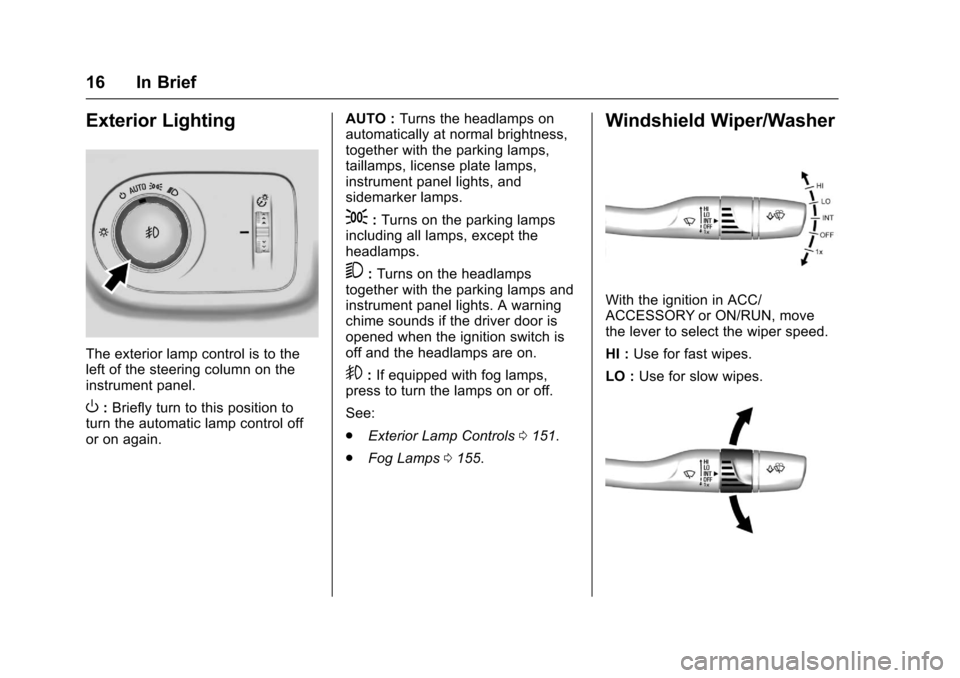
The exterior lamp control is to the
left of the steering column on the
instrument panel.
O:Briefly turn to this position to
turn the automatic lamp control off
or on again. AUTO :
Turns the headlamps on
automatically at normal brightness,
together with the parking lamps,
taillamps, license plate lamps,
instrument panel lights, and
sidemarker lamps.
;: Turns on the parking lamps
including all lamps, except the
headlamps.
5: Turns on the headlamps
together with the parking lamps and
instrument panel lights. A warning
chime sounds if the driver door is
opened when the ignition switch is
off and the headlamps are on.
9: If equipped with fog lamps,
press to turn the lamps on or off.
See:
. Exterior Lamp Controls 0151.
. Fog Lamps 0155.
Windshield Wiper/Washer
With the ignition in ACC/
ACCESSORY or ON/RUN, move
the lever to select the wiper speed.
HI : Use for fast wipes.
LO : Use for slow wipes.
Page 23 of 377
Chevrolet Cruze Owner Manual (GMNA-Localizing-U.S./Canada/Mexico-
9234744) - 2016 - CRC - 3/9/16
22 In Brief
c:Press to reject an incoming
call or end a current call. Press to
mute or unmute the infotainment
system when not on a call.
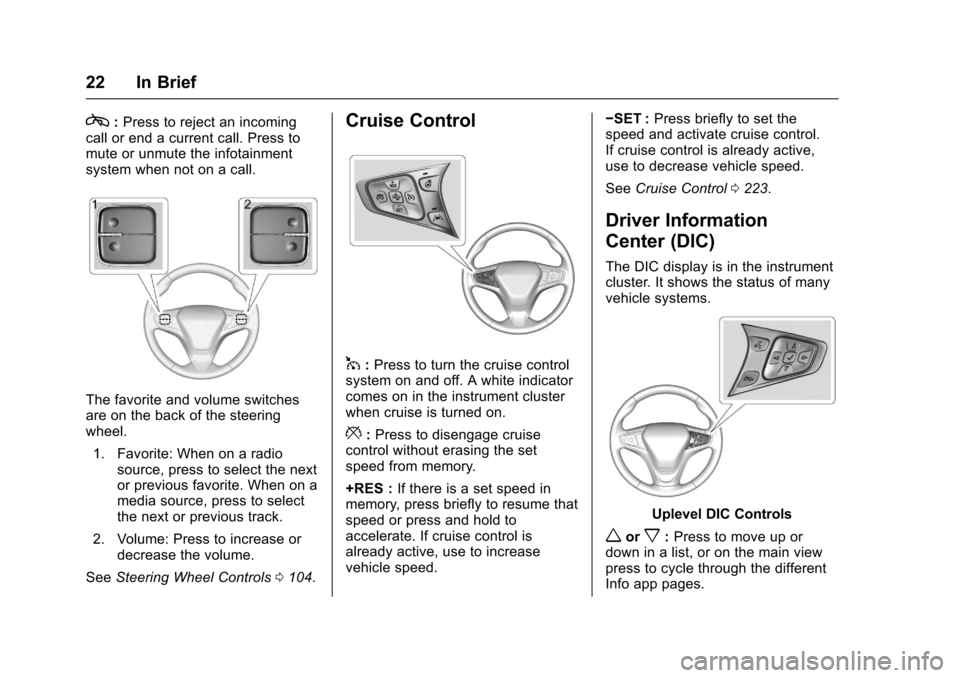
The favorite and volume switches
are on the back of the steering
wheel.
1. Favorite: When on a radio source, press to select the next
or previous favorite. When on a
media source, press to select
the next or previous track.
2. Volume: Press to increase or decrease the volume.
See Steering Wheel Controls 0104.
Cruise Control
1:Press to turn the cruise control
system on and off. A white indicator
comes on in the instrument cluster
when cruise is turned on.
*: Press to disengage cruise
control without erasing the set
speed from memory.
+RES : If there is a set speed in
memory, press briefly to resume that
speed or press and hold to
accelerate. If cruise control is
already active, use to increase
vehicle speed. −SET :
Press briefly to set the
speed and activate cruise control.
If cruise control is already active,
use to decrease vehicle speed.
See Cruise Control 0223.
Driver Information
Center (DIC)
The DIC display is in the instrument
cluster. It shows the status of many
vehicle systems.
Uplevel DIC Controls
worx:Press to move up or
down in a list, or on the main view
press to cycle through the different
Info app pages.