2016 CHEVROLET CORVETTE traction control
[x] Cancel search: traction controlPage 171 of 351
Chevrolet Corvette Owner Manual (GMNA-Localizing-U.S./Canada/Mexico-
9085364) - 2016 - crc - 9/15/15
170 Driving and Operating
.Turn on the hazard warning
flashers.
. Tie a red cloth to an outside
mirror.
{Warning
Snow can trap engine exhaust
under the vehicle. This may
cause exhaust gases to get
inside. Engine exhaust contains
carbon monoxide (CO), which
cannot be seen or smelled. It can
cause unconsciousness and even
death.
If the vehicle is stuck in snow:
. Clear snow from the base of
the vehicle, especially any
blocking the exhaust pipe.
. Open a window about 5 cm
(2 in) on the vehicle side
that is away from the wind,
to bring in fresh air.
. Fully open the air outlets on
or under the instrument
panel.
(Continued)
Warning (Continued)
.Adjust the climate control
system to circulate the air
inside the vehicle and set
the fan speed to the highest
setting. See “Climate
Control Systems.”
For more information about CO,
see Engine Exhaust 0181.
To save fuel, run the engine for
short periods to warm the vehicle
and then shut the engine off and
partially close the window. Moving
about to keep warm also helps.
If it takes time for help to arrive,
when running the engine, push the
accelerator pedal slightly so the
engine runs faster than the idle
speed. This keeps the battery
charged to restart the vehicle and to
signal for help with the headlamps.
Do this as little as possible, to
save fuel.
If the Vehicle Is Stuck
Slowly and cautiously spin the
wheels to free the vehicle when
stuck in sand, mud, ice, or snow.
If stuck too severely for the traction
system to free the vehicle, turn the
traction system off and use the
rocking method. See Traction
Control/Electronic Stability
Control 0192.
{Warning
If the vehicle's tires spin at high
speed, they can explode, and you
or others could be injured. The
vehicle can overheat, causing an
engine compartment fire or other
damage. Spin the wheels as little
as possible and avoid going
above 56 km/h (35 mph).
Page 172 of 351
Chevrolet Corvette Owner Manual (GMNA-Localizing-U.S./Canada/Mexico-
9085364) - 2016 - crc - 9/15/15
Driving and Operating 171
Rocking the Vehicle to Get
it Out
Turn the steering wheel left and
right to clear the area around the
front wheels. Turn off any traction
system. Shift back and forth
between R (Reverse) and a low
forward gear, spinning the wheels
as little as possible. To prevent
transmission wear, wait until the
wheels stop spinning before shifting
gears. Release the accelerator
pedal while shifting, and press
lightly on the accelerator pedal
when the transmission is in gear.
Slowly spinning the wheels in the
forward and reverse directions
causes a rocking motion that could
free the vehicle. If that does not get
the vehicle out after a few tries, it
might need to be towed out. If the
vehicle does need to be towed out,
seeTowing the Vehicle 0287.
Vehicle Load Limits
It is very important to know how
much weight the vehicle can
carry. This weight is called the
vehicle capacity weight and includes the weight of all
occupants, cargo, and all
nonfactory-installed options.
Two labels on the vehicle may
show how much weight it may
properly carry: the Tire and
Loading Information label and
the Certification label.
{Warning
Do not load the vehicle any
heavier than the Gross
Vehicle Weight Rating
(GVWR), or either the
maximum front or rear Gross
Axle Weight Rating (GAWR).
This can cause systems to
break and change the way the
vehicle handles. This could
cause loss of control and a
crash. Overloading can also
reduce stopping distance,
damage the tires, and shorten
the life of the vehicle.
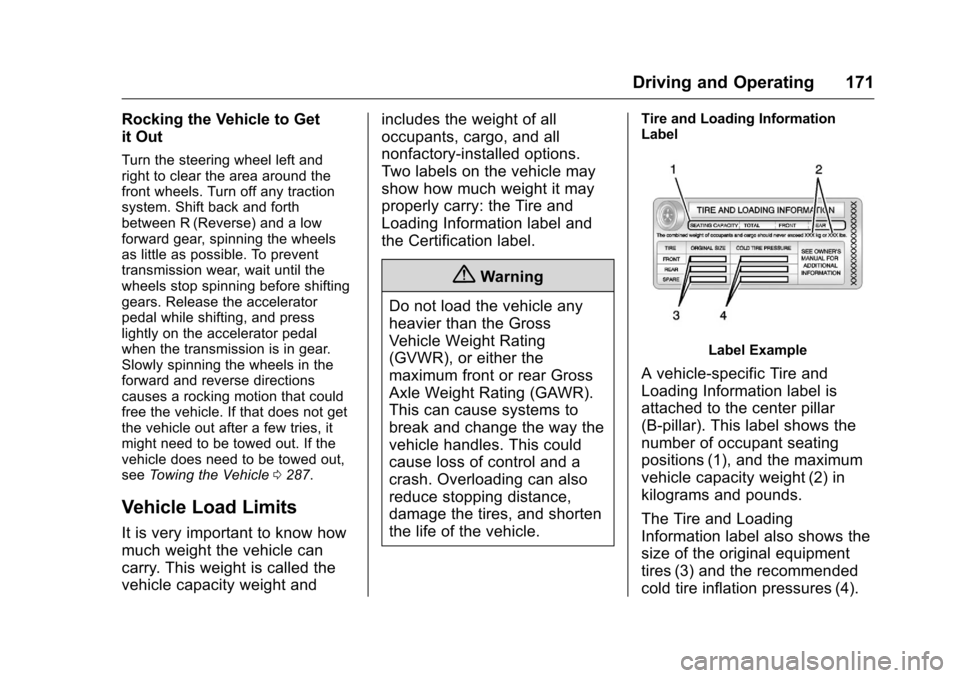
Tire and Loading Information
Label
Label Example
A vehicle-specific Tire and
Loading Information label is
attached to the center pillar
(B-pillar). This label shows the
number of occupant seating
positions (1), and the maximum
vehicle capacity weight (2) in
kilograms and pounds.
The Tire and Loading
Information label also shows the
size of the original equipment
tires (3) and the recommended
cold tire inflation pressures (4).
Page 185 of 351
Chevrolet Corvette Owner Manual (GMNA-Localizing-U.S./Canada/Mexico-
9085364) - 2016 - crc - 9/15/15
184 Driving and Operating
D :This position is for normal
driving. It provides the best fuel
economy. If more power is needed
for passing, push the pedal down to
achieve the desired level of
acceleration.
Downshifting the transmission in
slippery road conditions could result
in skidding. See “Skidding”under
Loss of Control 0161.
The transmission can be shifted like
a manual transmission using the
paddle shift controls while in
D (Drive). See Manual Mode0184.
M : In M (Manual Mode), the
transmission can be shifted like a
manual transmission using the
paddle shift controls. See Manual
Mode 0184.Manual Mode
Manual Paddle Shift
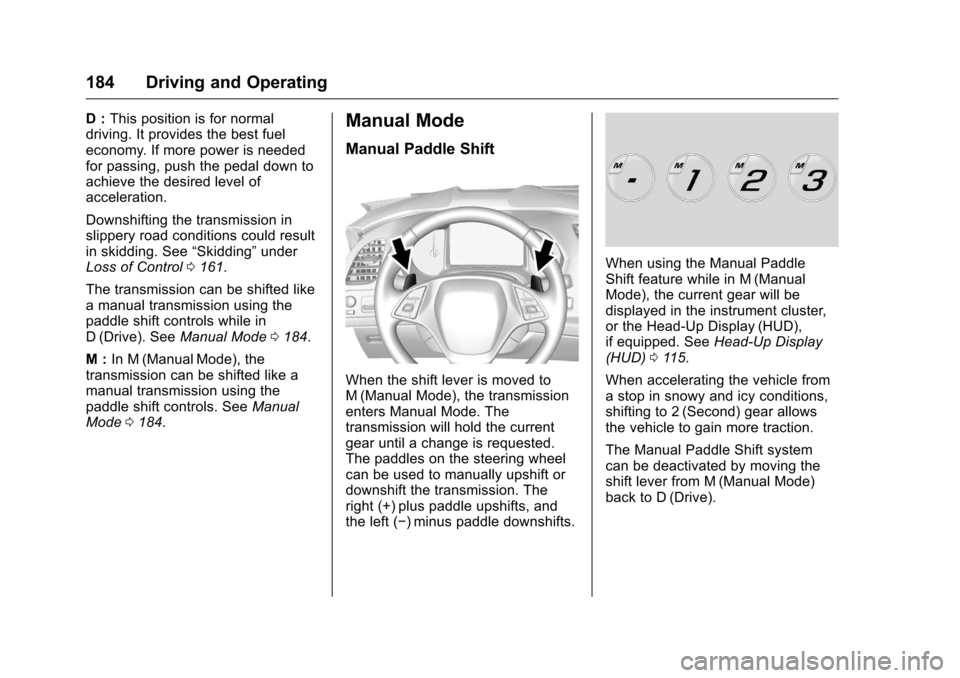
When the shift lever is moved to
M (Manual Mode), the transmission
enters Manual Mode. The
transmission will hold the current
gear until a change is requested.
The paddles on the steering wheel
can be used to manually upshift or
downshift the transmission. The
right (+) plus paddle upshifts, and
the left (−) minus paddle downshifts.
When using the Manual Paddle
Shift feature while in M (Manual
Mode), the current gear will be
displayed in the instrument cluster,
or the Head-Up Display (HUD),
if equipped. See Head-Up Display
(HUD) 0115.
When accelerating the vehicle from
a stop in snowy and icy conditions,
shifting to 2 (Second) gear allows
the vehicle to gain more traction.
The Manual Paddle Shift system
can be deactivated by moving the
shift lever from M (Manual Mode)
back to D (Drive).
Page 193 of 351
Chevrolet Corvette Owner Manual (GMNA-Localizing-U.S./Canada/Mexico-
9085364) - 2016 - crc - 9/15/15
192 Driving and Operating
accelerator pedals in preparation for
starting the vehicle moving in the
intended direction. In this case,
there is no need to push the switch
to release the EPB.
Brake Assist
The Brake Assist feature is
designed to assist the driver in
stopping or decreasing vehicle
speed in emergency driving
conditions. This feature uses the
stability system hydraulic brake
control module to supplement the
power brake system under
conditions where the driver has
quickly and forcefully applied the
brake pedal in an attempt to quickly
stop or slow down the vehicle. The
stability system hydraulic brake
control module increases brake
pressure at each corner of the
vehicle until the ABS activates.Minor brake pedal pulsation or
pedal movement during this time is
normal and the driver should
continue to apply the brake pedal as
the driving situation dictates. The
Brake Assist feature will
automatically disengage when the
brake pedal is released or brake
pedal pressure is quickly
decreased.
Hill Start Assist (HSA)
If equipped, HSA may automatically
activate when the vehicle is stopped
on a grade. This feature is designed
to prevent the vehicle from rolling,
either forward or rearward, during
vehicle drive off. During the
transition from releasing the brake
pedal to accelerating to drive off on
a grade, HSA holds the braking
pressure to prevent rolling. HSA will
not activate if the vehicle is in a
drive gear and facing downhill or if
the vehicle is facing uphill and in
R (Reverse).
Ride Control Systems
Traction Control/
Electronic Stability
Control
The vehicle has a Traction Control
System (TCS) and a StabiliTrak
system. These systems help limit
wheel spin and assist the driver in
maintaining control, especially on
slippery road conditions.
TCS activates if it senses that the
rear wheels are spinning too much
or are beginning to lose traction.
When this happens, TCS applies
the brakes to the spinning wheel
and reduces engine power (by
closing the throttle and managing
engine spark) to limit wheel spin.
StabiliTrak activates when the
vehicle senses a difference between
the intended path and the direction
the vehicle is actually traveling.
StabiliTrak selectively applies
braking pressure to any one of the
vehicle wheel brakes to assist the
driver in keeping the vehicle on the
intended path.
Page 195 of 351
Chevrolet Corvette Owner Manual (GMNA-Localizing-U.S./Canada/Mexico-
9085364) - 2016 - crc - 9/15/15
194 Driving and Operating
Caution
Do not repeatedly brake or
accelerate heavily when TCS is
off. The vehicle driveline could be
damaged.
To turn off only TCS, press and
release the
gbutton. The Traction
Off light
iilluminates in the
instrument cluster. To turn TCS on
again, press and release the
g
button. The Traction Off lighti
displayed in the instrument cluster
will turn off.
If TCS is limiting wheel spin when
the
gbutton is pressed, the system
will not turn off until the wheels stop
spinning.
To turn off both TCS and StabiliTrak,
press and hold the
gbutton until
the Traction Off light
iand
StabiliTrak OFF light
gilluminate
and stay on in the instrument
cluster. To turn TCS and StabiliTrak on
again, press and release the
g
button. The Traction Off lightiand
StabiliTrak OFF light
gin the
instrument cluster turn off.
If the Tire Pressure Monitor System
(TPMS) system is malfunctioning
and the DIC displays SERVICE
TIRE MONITOR SYSTEM,
StabiliTrak will be affected as
follows:
. StabiliTrak cannot be turned off
by the driver.
. If StabiliTrak is off, it will be
turned on automatically.
. Competitive Driving Mode or
Performance Traction
Management is unavailable.
. StabiliTrak will feel different in
aiding and maintaining
directional control.
Adding accessories can affect the
vehicle performance. See
Accessories and
Modifications 0213.
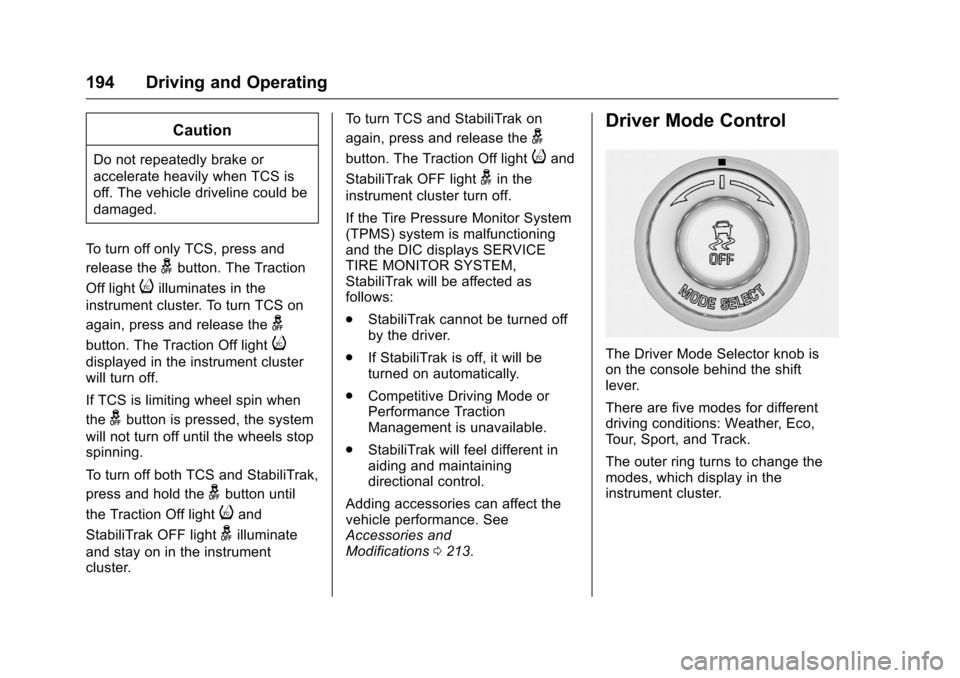
Driver Mode Control
The Driver Mode Selector knob is
on the console behind the shift
lever.
There are five modes for different
driving conditions: Weather, Eco,
Tour, Sport, and Track.
The outer ring turns to change the
modes, which display in the
instrument cluster.
Page 196 of 351
Chevrolet Corvette Owner Manual (GMNA-Localizing-U.S./Canada/Mexico-
9085364) - 2016 - crc - 9/15/15
Driving and Operating 195
Press the button in the center of the
knob for Stability Control and
Traction Control, or if the vehicle is
in Track mode with Performance
Traction Management (PTM). See
Traction Control/Electronic Stability
Control0192 or the information on
PTM in Competitive Driving
Mode 0198.
When PTM is active, the outer ring
will change the PTM mode and the
Driver mode will display in the
instrument cluster.
Each mode is configured for use in
different driving conditions. Use:
. Weather mode for rain
and snow.
. Eco mode to improve fuel
economy.
. Tour mode for comfortable
normal driving.
. Sport mode for spirited on road
driving.
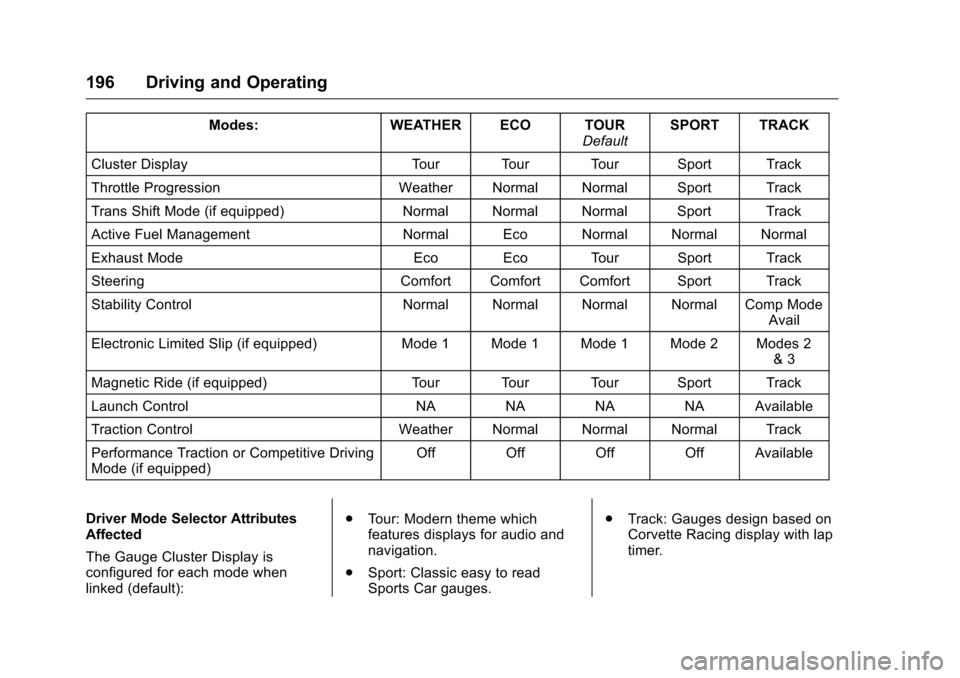
. Track mode for track use. There are 12 attributes that vary by
mode shown below. Not all vehicles
have all features, depending on the
vehicle options.
Page 197 of 351
Chevrolet Corvette Owner Manual (GMNA-Localizing-U.S./Canada/Mexico-
9085364) - 2016 - crc - 9/15/15
196 Driving and Operating
Modes:WEATHER ECO TOUR
DefaultSPORT TRACK
Cluster Display Tour Tour Tour Sport Track
Throttle Progression Weather Normal Normal Sport Track
Trans Shift Mode (if equipped) Normal Normal Normal Sport Track
Active Fuel Management Normal Eco Normal Normal Normal
Exhaust Mode Eco Eco Tour Sport Track
Steering Comfort Comfort Comfort Sport Track
Stability Control Normal Normal Normal Normal Comp Mode
Avail
Electronic Limited Slip (if equipped) Mode 1 Mode 1 Mode 1 Mode 2 Modes 2
& 3
Magnetic Ride (if equipped) Tour Tour Tour Sport Track
Launch Control NA NA NA NA Available
Traction Control Weather Normal Normal Normal Track
Performance Traction or Competitive Driving
Mode (if equipped) Off Off Off Off Available
Driver Mode Selector Attributes
Affected
The Gauge Cluster Display is
configured for each mode when
linked (default): .
Tour: Modern theme which
features displays for audio and
navigation.
. Sport: Classic easy to read
Sports Car gauges. .
Track: Gauges design based on
Corvette Racing display with lap
timer.
Page 198 of 351
Chevrolet Corvette Owner Manual (GMNA-Localizing-U.S./Canada/Mexico-
9085364) - 2016 - crc - 9/15/15
Driving and Operating 197
Throttle Progression
Adjusts throttle sensitivity by
selecting how quick or slow the
throttle reacts to input.
Transmission Shift Mode−Paddle
Shift Automatic
. Adjusts to either a smoother or
firmer shift.
. Sport –Performance Algorithm
Liftfoot (PAL) recognizes
aggressive throttle maneuvers
and holds lower gears for
greater engine braking and
enhanced vehicle control when
not using paddles. (Available in
Sport or Track mode.)
. Track –Performance Algorithm
Shift (PAS) recognizes
aggressive cornering, heavy
braking, and high acceleration to
select and hold lower gears
when not using paddles. Active Fuel Management (engine
cylinder shuts off)
4-Cylinder Mode
.
Normal with automatic
transmission: The engine uses
8-cylinder mode when
accelerating, but changes to
4-cylinder mode when coasting.
. With manual transmission:
Active Fuel Management only
active in Eco mode.
. Off in Manual mode with
automatic transmission unless in
Eco mode.
. Eco keeps the engine in
4-cylinder mode unless heavy
acceleration is needed.
Exhaust (variable mode exhaust
system)
Changes when the variable exhaust
valves open.
Steering (Assist Effort)
Adjusts from a lighter steering feel
to reduced assist for more
steering feel. Magnetic Ride Control (if
equipped)
Adjusts the shock dampening
firmness based on driving
conditions to improve comfort and
performance.
Launch Control
Available only in Track mode for
maximum
“off–the–line” acceleration
when in Competitive or PTM modes.
Stability Control
. Competitive Driving Mode allows
less computer control to permit
some slide and drift and is
selected with the
gbutton –only
available in Track mode.
. StabiliTrak can be turned off by
pressing and holding the
g
button for 10 seconds.
PTM (Performance Traction
Management) (if equipped)
. Available in Track mode.
. There are five selectable
settings if Competitive Driving
Mode is activated.