2016 CHEVROLET COLORADO Z71 change
[x] Cancel search: changePage 3 of 396
Chevrolet Colorado Owner Manual (GMNA-Localizing-U.S/Canada/Mexico-
9159327) - 2016 - crc - 8/28/15
2 Introduction
Introduction
The names, logos, emblems,
slogans, vehicle model names, and
vehicle body designs appearing in
this manual including, but not limited
to, GM, the GM logo, CHEVROLET,
the CHEVROLET Emblem, and
COLORADO are trademarks and/or
service marks of General Motors
LLC, its subsidiaries, affiliates,
or licensors.
For vehicles first sold in Canada,
substitute the name“General
Motors of Canada Limited” for
Chevrolet Motor Division wherever it
appears in this manual. This manual describes features that
may or may not be on the vehicle
because of optional equipment that
was not purchased on the vehicle,
model variants, country
specifications, features/applications
that may not be available in your
region, or changes subsequent to
the printing of this owner manual.
If this vehicle has the Duramax®
diesel engine, see the Duramax
diesel supplement for additional and
specific information on this engine.
Refer to the purchase
documentation relating to your
specific vehicle to confirm the
features.
Keep this manual in the vehicle for
quick reference.
Canadian Vehicle Owners
A French language manual can be
obtained from your dealer, at
www.helminc.com, or from:
Propriétaires Canadiens
On peut obtenir un exemplaire de
ce guide en français auprès du
concessionnaire ou à l'adresse
suivante:
Helm, Incorporated
Attention: Customer Service
47911 Halyard Drive
Plymouth, MI 48170
USA
Using this Manual
To quickly locate information about
the vehicle, use the Index in the
back of the manual. It is an
alphabetical list of what is in the
manual and the page number where
it can be found.
Litho in U.S.A.
Part No. 23142523 B Second Printing©2015 General Motors LLC. All Rights Reserved.
Page 5 of 396

Chevrolet Colorado Owner Manual (GMNA-Localizing-U.S/Canada/Mexico-
9159327) - 2016 - crc - 8/28/15
4 Introduction
+:Fuses
3:Headlamp High/Low-Beam
Changer
5: Hill Descent Control
j:LATCH System Child Restraints
*:Malfunction Indicator Lamp
::Oil Pressure
}:Power
>: Safety Belt Reminders
7:Tire Pressure Monitor
d:Traction Control/StabiliTrak®
a:Under Pressure
Page 8 of 396

Chevrolet Colorado Owner Manual (GMNA-Localizing-U.S/Canada/Mexico-
9159327) - 2016 - crc - 8/28/15
In Brief 7
1.Air Vents 0191ii.
2. Turn Signal Lever. See Turn
and Lane-Change Signals
0 146
ii.
Driver Information Center (DIC)
Controls. See Driver
Information Center (DIC) (Base
Level) 0123
iior Driver
Information Center (DIC)
(Uplevel) 0126
ii.
3. Instrument Cluster (Base
Level) 0107
iior Instrument
Cluster (Uplevel) 0109ii.
4. Windshield Wiper/Washer
0103
ii.
5. Light Sensor. See Automatic
Headlamp System 0145
ii.
Vehicle Alarm System Indicator
(If Equipped). See Vehicle
Alarm System 034
ii.
6. Infotainment 0150
ii.
7. Climate Control Systems 0187
ii(If Equipped).
Automatic Climate Control
System 0189
ii(If Equipped). 8.
Heated Front Seats 047
ii(If
Equipped).
9. Power Outlets 0105
ii(If
Equipped).
10. Shift Lever. See Automatic
Transmission 0220
iior Manual
Transmission 0225ii.
11. Auxiliary Jack 0164
ii.
USB Port 0161
ii.
12. Hazard Warning Flashers
0146
ii.
Traction Control/Electronic
Stability Control 0235
ii.
Cargo Lamp 0147
ii.
Lane Departure Warning
(LDW) 0244
ii(If Equipped).
Hill Descent Control (HDC)
0 237
ii(If Equipped).
Tow/Haul Selector Button (If
Equipped). See Tow/Haul
Mode 0224
ii.
13. Steering Wheel Controls 0103
ii(If Equipped).
14. Horn 0103
ii. 15.
Steering Wheel Adjustment
0102
ii(Out of View).
16. Cruise Control 0238
ii.
Forward Collision Alert (FCA)
System 0242
ii(If Equipped).
17. Transfer Case Knob (If Equipped). See Four-Wheel
Drive 0226
ii.
18. Hood Release. See Hood
0 261
ii.
19. Parking Brake 0233
ii.
20. Data Link Connector (DLC) (Out of View). See Malfunction
Indicator Lamp (Check Engine
Light) 0115
ii.
21. Exterior Lamp Controls 0143
ii.
Fog Lamps 0146
ii(If
Equipped).
22. Instrument Panel Illumination
Control 0147
ii.
Page 12 of 396
Chevrolet Colorado Owner Manual (GMNA-Localizing-U.S/Canada/Mexico-
9159327) - 2016 - crc - 8/28/15
In Brief 11
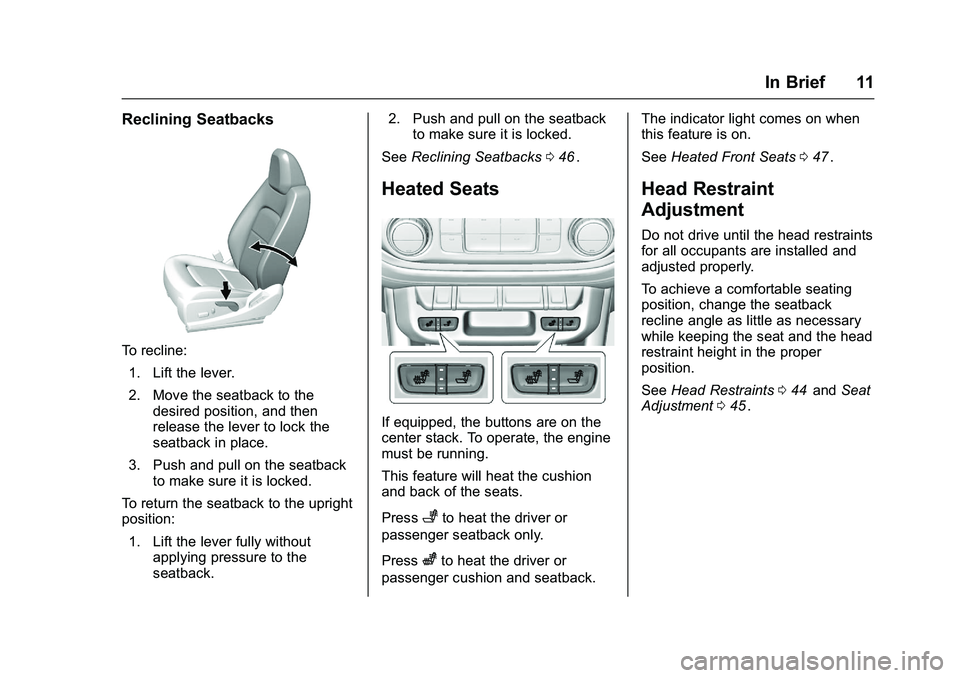
Reclining Seatbacks
To recline:1. Lift the lever.
2. Move the seatback to the desired position, and then
release the lever to lock the
seatback in place.
3. Push and pull on the seatback to make sure it is locked.
To return the seatback to the upright
position:
1. Lift the lever fully without applying pressure to the
seatback. 2. Push and pull on the seatback
to make sure it is locked.
See Reclining Seatbacks 046
ii.
Heated Seats
If equipped, the buttons are on the
center stack. To operate, the engine
must be running.
This feature will heat the cushion
and back of the seats.
Press
+to heat the driver or
passenger seatback only.
Press
zto heat the driver or
passenger cushion and seatback. The indicator light comes on when
this feature is on.
See
Heated Front Seats 047
ii.
Head Restraint
Adjustment
Do not drive until the head restraints
for all occupants are installed and
adjusted properly.
To achieve a comfortable seating
position, change the seatback
recline angle as little as necessary
while keeping the seat and the head
restraint height in the proper
position.
See Head Restraints 044
iiand Seat
Adjustment 045ii.
Page 20 of 396

Chevrolet Colorado Owner Manual (GMNA-Localizing-U.S/Canada/Mexico-
9159327) - 2016 - crc - 8/28/15
In Brief 19
Vehicle Features
Infotainment System
The base radio and base radio with
connectivity information is included
in this manual. See the infotainment
manual for information on the
uplevel radios, audio players,
phone, navigation system, Rear
Seat Entertainment (RSE), and
voice or speech recognition,
if equipped.
Radio(s)
O
:Press to turn the system on.
Press and hold to turn it off. When
on, press to mute; press again to
unmute. Turn to increase or
decrease the volume.
RADIO : Press to choose between
FM, AM, and SiriusXM
®,
if equipped.
MEDIA : Press to change the audio
source between USB, AUX, and
Bluetooth
®Audio, if equipped.
{: Press to go to the Home Page.
MENU : Press to select a menu.
g:Press to seek the previous
station.
l: Press to seek the next station.
See Overview 0152
iiabout these
and other radio features.
Storing Radio Station Presets
Up to 25 preset stations from all
bands can be stored in the favorite
lists in any order. Up to five stations
can be stored in each favorite page
and the number of favorite pages
can be set.
To store the station to a position in
the list, while on the active source
main page, such as AM, FM,
or SiriusXM (if equipped), press and
hold a favorites/soft key button on
the faceplate.
See “Storing Radio Station Presets”
under AM-FM Radio 0156
ii.
Setting the Clock
See Clock 0104ii.
Satellite Radio
Vehicles with a SiriusXM®satellite
radio tuner and a valid SiriusXM
satellite radio subscription can
receive SiriusXM programming.
SiriusXM Satellite Radio
Service
SiriusXM is a satellite radio service
based in the 48 contiguous United
States and 10 Canadian provinces.
SiriusXM satellite radio has a wide
variety of programming and
commercial-free music, coast to
coast, and in digital-quality sound.
A fee is required to receive the
SiriusXM service.
For more information refer to:
. www.siriusxm.com or call
1-866-635-2349 (U.S.).
. www.xmradio.ca or call
1-877-209-0079 (Canada).
See Satellite Radio 0157
ii.
Page 23 of 396

Chevrolet Colorado Owner Manual (GMNA-Localizing-U.S/Canada/Mexico-
9159327) - 2016 - crc - 8/28/15
22 In Brief
signal in that direction, the light will
change to amber and flash. In
addition, beeps will sound.
SeeLane Departure Warning (LDW)
0 244
ii.
Rear Vision
Camera (RVC)
If equipped, RVC displays a view of
the area behind the vehicle, on the
infotainment system display, when
the vehicle is shifted into
R (Reverse).
See Rear Vision Camera (RVC)
0 240
ii.
Power Outlets
Accessory power outlets can be
used to plug in electrical equipment,
such as a cell phone, MP3
player, etc.
The vehicle may have accessory
power outlets:
.
On the center stack below the
climate control system,
if equipped.
. On the center floor console,
if equipped.
. On the rear of the center storage
console.
Lift the cover to access and replace
when not in use.
See Power Outlets 0105
ii.
Performance and
Maintenance
Traction Control/
Electronic Stability
Control
The Traction Control System (TCS)
limits wheel spin. The system is on
when the vehicle is started.
The StabiliTrak system assists with
directional control of the vehicle in
difficult driving conditions. The
system is on when the vehicle is
started.
.
To turn off traction control, press
and release the TCS/StabiliTrak
button
gon the center stack.i
illuminates in the instrument
cluster.
. To turn off both traction control
and StabiliTrak, press and hold
gon the center stack, untili
andgilluminate in the
instrument cluster.
Page 24 of 396
Chevrolet Colorado Owner Manual (GMNA-Localizing-U.S/Canada/Mexico-
9159327) - 2016 - crc - 8/28/15
In Brief 23
.Press and releasegto turn on
both systems.
iandgturn off
in instrument cluster.
StabiliTrak will automatically turn on
if the vehicle exceeds 56 km/h
(35 mph). Traction control will
remain off until the driver presses
the
gbutton or the ignition is cycled
from Off then On.
See Traction Control/Electronic
Stability Control 0235
ii.
Tire Pressure Monitor
This vehicle may have a Tire
Pressure Monitor System (TPMS).
The low tire pressure warning light
alerts to a significant loss in
pressure of one of the vehicle's
tires. If the warning light comes on,
stop as soon as possible and inflate
the tires to the recommended pressure shown on the Tire and
Loading Information label. See
Vehicle Load Limits
0205
ii. The
warning light will remain on until the
tire pressure is corrected.
The low tire pressure warning light
may come on in cool weather when
the vehicle is first started, and then
turn off as the vehicle is driven. This
may be an early indicator that the
tire pressures are getting low and
the tires need to be inflated to the
proper pressure.
The TPMS does not replace normal
monthly tire maintenance. Maintain
the correct tire pressures.
See Tire Pressure Monitor System
0 303
ii.
Engine Oil Life System
The engine oil life system calculates
engine oil life based on vehicle use
and, on most vehicles, displays a
Driver Information Center (DIC)
message when it is necessary to
change the engine oil and filter. The
oil life system should be reset to
100% only following an oil change. Resetting the Oil Life System
To reset the engine oil life system:
1. Display the OIL LIFE REMAINING on the Driver
Information System (DIC). See
Driver Information Center (DIC)
(Base Level) 0123
iior Driver
Information Center (DIC)
(Uplevel) 0126
ii.
2. Press and hold SET/CLR for several seconds. The oil life
will change to 100%.
The oil life system can also be reset
as follows: 1. Turn the ignition to ON/RUN with the engine off.
2. Display OIL LIFE REMAINING on the DIC.
3. Fully press the accelerator pedal slowly three times within
five seconds. If the display
shows 100%, the system is
reset.
See Engine Oil Life System 0267
ii.
Page 27 of 396

Chevrolet Colorado Owner Manual (GMNA-Localizing-U.S/Canada/Mexico-
9159327) - 2016 - crc - 8/28/15
26 Keys, Doors, and Windows
{Warning
If the key is unintentionally
rotated while the vehicle is
running, the ignition could be
moved out of the RUN position.
This could be caused by heavy
items hanging from the key ring,
or by large or long items attached
to the key ring that could be
contacted by the driver or
steering wheel. If the ignition
moves out of the RUN position,
the engine will shut off, braking
and steering power assist may be(Continued)
Warning (Continued)
impacted, and airbags may not
deploy. To reduce the risk of
unintentional rotation of the
ignition key, do not change the
way the ignition key and Remote
Keyless Entry (RKE) transmitter,
if equipped, are connected to the
provided key rings.
The ignition key and key rings, and
RKE transmitter, if equipped, are
designed to work together as a
system to reduce the risk of
unintentionally moving the key out
of the RUN position. The ignition
key has a small hole to allow
attachment of the provided key ring.
It is important that any replacement
ignition keys have a small hole. See
your dealer if a replacement key is
required.
The combination and size of the
rings that came with your keys were
specifically selected for your
vehicle. The rings are connected to
the key like two links of a chain to
reduce the risk of unintentionally moving the key out of the RUN
position. Do not add any additional
items to the ring attached to the
ignition key. Attach additional items
only to the second ring, and limit
added items to a few essential keys
or small, light items no larger than
an RKE transmitter.