2016 CADILLAC ESCALADE mode
[x] Cancel search: modePage 3 of 357

Cadillac Escalade Owner Manual (GMNA-Localizing-MidEast-9369153) -
2016 - crc - 6/19/15
2 Introduction
Introduction
The names, logos, emblems,
slogans, vehicle model names, and
vehicle body designs appearing in
this manual including, but not limited
to, GM, the GM logo, CADILLAC,
the CADILLAC Emblem, and
ESCALADE are trademarks and/or
service marks of General Motors
LLC, its subsidiaries, affiliates,
or licensors.
This manual describes features that
may or may not be on the vehicle
because of optional equipment that
was not purchased on the vehicle,
model variants, country
specifications, features/applicationsthat may not be available in your
region, or changes subsequent to
the printing of this owner manual.
Refer to the purchase
documentation relating to your
specific vehicle to confirm the
features.
Keep this manual in the vehicle for
quick reference.
Danger, Warning, and
Caution
Warning messages found on vehicle
labels and in this manual describe
hazards and what to do to avoid or
reduce them.
{Danger
Danger indicates a hazard with a
high level of risk which will result
in serious injury or death.
{Warning
Warning indicates a hazard that
could result in injury or death.
Caution
Caution indicates a hazard that
could result in property or vehicle
damage.
A circle with a slash through it is a
safety symbol which means
“Do
Not,” “Do not do this,” or“Do not let
this happen.”
Litho in U.S.A.
Part No. 23133525_US©2015 General Motors LLC. All Rights Reserved.
Page 4 of 357
Cadillac Escalade Owner Manual (GMNA-Localizing-MidEast-9369153) -
2016 - crc - 6/19/15
Introduction 3
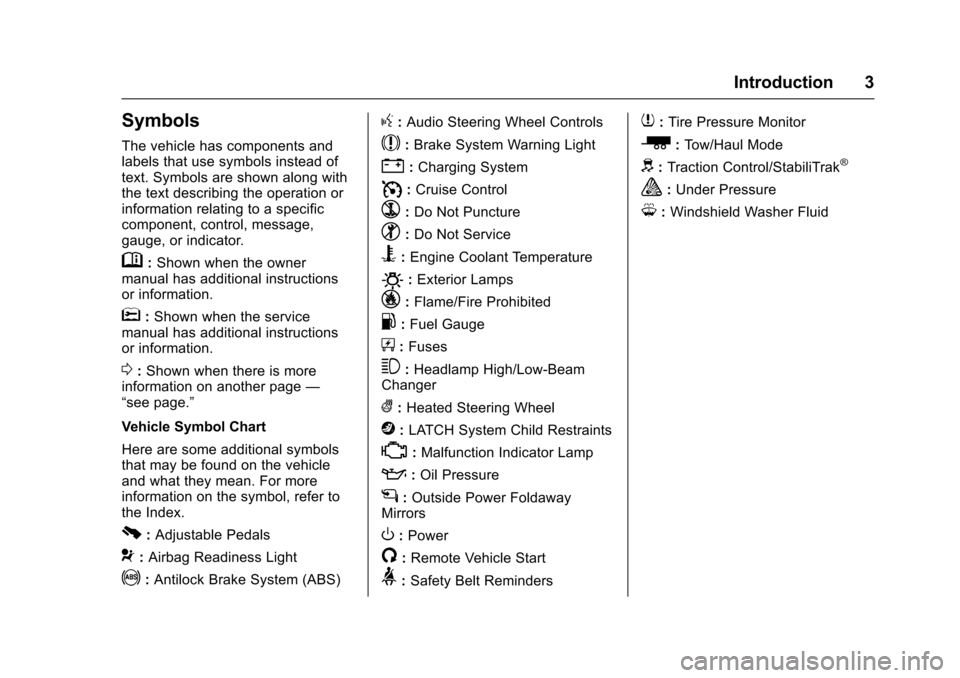
Symbols
The vehicle has components and
labels that use symbols instead of
text. Symbols are shown along with
the text describing the operation or
information relating to a specific
component, control, message,
gauge, or indicator.
M:Shown when the owner
manual has additional instructions
or information.
*: Shown when the service
manual has additional instructions
or information.
0: Shown when there is more
information on another page —
“see page.”
Vehicle Symbol Chart
Here are some additional symbols
that may be found on the vehicle
and what they mean. For more
information on the symbol, refer to
the Index.
0: Adjustable Pedals
9: Airbag Readiness Light
!:Antilock Brake System (ABS)
g: Audio Steering Wheel Controls
$:Brake System Warning Light
":Charging System
I: Cruise Control
`:Do Not Puncture
^:Do Not Service
B:Engine Coolant Temperature
O:Exterior Lamps
_: Flame/Fire Prohibited
.:Fuel Gauge
+: Fuses
3:Headlamp High/Low-Beam
Changer
(: Heated Steering Wheel
j:LATCH System Child Restraints
*:Malfunction Indicator Lamp
::Oil Pressure
g:Outside Power Foldaway
Mirrors
O: Power
/:Remote Vehicle Start
>: Safety Belt Reminders
7:Tire Pressure Monitor
_:Tow/Haul Mode
d:Traction Control/StabiliTrak®
a:Under Pressure
M: Windshield Washer Fluid
Page 8 of 357

Cadillac Escalade Owner Manual (GMNA-Localizing-MidEast-9369153) -
2016 - crc - 6/19/15
In Brief 7
1.Air Vents 0182.
2. Head-Up Display (HUD) 0141
(If Equipped).
3. Turn Signal Lever. See Turn
and Lane-Change Signals
0 170.
Windshield Wiper/Washer
0 116.
Rear Window Wiper/Washer
0 118.
4. Hazard Warning Flashers
0170.
5. Instrument Cluster 0124.
6. Shift Lever. See Automatic
Transmission 0207.
Tow/Haul Mode Selector
Button. See Tow/Haul Mode
0 212.
Range Selection Mode Buttons
(If Equipped). See Manual
Mode 0210.
7. Power Assist Steps 042 (If
Equipped). Pedal Adjust Switch (If
Equipped). See
Adjustable
Throttle and Brake Pedal
0 200.
Magnetic Ride Control Button.
See Magnetic Ride Control
0 222.
8. Light Sensor. See Automatic
Headlamp System 0169.
9. Infotainment 0175.
10. Glove Box Button. See Glove
Box 0109.
Parking Assist Button. See
Assistance Systems for
Parking or Backing 0233.
Lane Keep Assist (LKA) 0244
(If Equipped).
Traction Control/Electronic
Stability Control 0220.
11. Dual Automatic Climate Control
System 0176.
Instrument Panel Storage
0 109.
12. CD Player. See the infotainment manual. 13. ENGINE START/STOP Button.
SeeIgnition Positions 0201.
14. Steering Wheel Controls 0115.
Driver Information Center (DIC)
Controls. See Driver
Information Center (DIC) 0139.
15. Horn 0116.
16. Steering Wheel Adjustment
0115.
17. Hood Release. See Hood
0 260.
18. Cruise Control 0223 (If
Equipped).
Adaptive Cruise Control 0225
(If Equipped).
Forward Collision Alert (FCA)
System 0238 (If Equipped).
Heated Steering Wheel 0115
(If Equipped).
Phone Button. See the
infotainment manual.
19. Automatic Transfer Case Knob (If Equipped). See Four-Wheel
Drive 0213.
Page 11 of 357

Cadillac Escalade Owner Manual (GMNA-Localizing-MidEast-9369153) -
2016 - crc - 6/19/15
10 In Brief
Keyless Access
The RKE transmitter must be within
1 m (3 ft) of the door being opened.
Pressing the button on the driver
door handle will unlock the driver
door. If the handle button is pressed
again within five seconds, the
passenger doors and liftgate will
unlock. See“Keyless Access
Operation” inRemote Keyless Entry
(RKE) System Operation 029.
Liftgate
To open the liftgate, pressKon the
power door lock switch or press
K
on the Remote Keyless Entry (RKE) transmitter twice to unlock all doors.
Press the touch pad (1) on the
underside of the liftgate handle and
lift up. See
Remote Keyless Entry
(RKE) System Operation 029.
Use the pull cup to lower and close
the liftgate. Do not press the touch
pad while closing the liftgate. This
will cause the liftgate to be
unlatched.
To open the liftglass, press the
button (2) above the license plate.
Close the liftglass before opening
the liftgate to avoid damaging it.
Power Liftgate Operation
If equipped with a power liftgate, the
switch is on the overhead console.
The vehicle must be in P (Park).
Choose the power liftgate mode by
selecting MAX or 3/4. Press
8on
the overhead console or on the RKE
transmitter press
btwice quickly.
Press any liftgate button while the
liftgate is moving to stop it. Pressing
again reverses the direction. To close, press
lon the bottom
of the liftgate next to the latch.
To disable the power liftgate
function, select OFF on the liftgate
switch. See Liftgate038.
Windows
The power windows work when the
ignition is in ON/RUN or ACC/
ACCESSORY, or in Retained
Accessory Power (RAP). Press the
switch to lower the window. Pull the
switch to raise it. See Retained
Accessory Power (RAP) 0204.
Page 20 of 357

Cadillac Escalade Owner Manual (GMNA-Localizing-MidEast-9369153) -
2016 - crc - 6/19/15
In Brief 19
Climate Controls
The climate control buttons and the
touch screen are used to adjust the
heating, cooling, and ventilation.
Climate Control Buttons
1. Driver and Passenger Temperature Controls
2. Fan Control
3. OFF (Fan)
4. Driver and Passenger Heated and Cooled Seats (If Equipped)
5. Recirculation
6. Rear Window Defogger
7. Defrost 8. AUTO (Automatic Operation)
Climate Touch Screen Controls
1. Outside Temperature Display
2. Driver and Passenger Temperature Controls
3. Fan Control
4. SYNC (Synchronized Temperature)
5. A/C Mode (Air Conditioning)
6. Climate Control Selection (Application Tray Button)
7. Rear (Rear Climate Control Touch Screen)
8. Air Delivery Mode Control See
Dual Automatic Climate Control
System 0176 andRear Climate
Control System 0180 (If Equipped).
Transmission
Range Selection Mode
The Range Selection Mode switch,
if equipped, is on the shift lever.
1. To enable the Range Selection feature, move the shift lever to
the M (Manual Mode) position.
The current range will appear
next to the M. This is the
highest attainable range with
all lower gears accessible. As
an example, when 5 (Fifth)
gear is selected, 1 (First)
through 5 (Fifth) gears are
available.
Page 21 of 357

Cadillac Escalade Owner Manual (GMNA-Localizing-MidEast-9369153) -
2016 - crc - 6/19/15
20 In Brief
2. Tap the plus/minus buttons onthe shift lever to select the
desired range of gears for
current driving conditions. See
Manual Mode 0210.
While using Range Selection Mode,
cruise control and the Tow/Haul
Mode can be used.
Grade Braking is not available when
Range Selection Mode is active.
See Tow/Haul Mode 0212.
Four-Wheel Drive
If equipped, four-wheel drive
engages the front axle for extra
traction.
Automatic Transfer Case
Two Speed Automatic
Transfer Case
The transfer case knob is to the left
of the steering wheel. Use this knob
to shift into and out of the different
four-wheel drive modes.
2
m: This setting is used for driving
in most street and highway
situations.
AUTO : This setting is ideal for use
when road surface traction
conditions are variable. 4
m:
Use the Four-Wheel Drive High
position when extra traction is
needed, such as on snowy or icy
roads or in most off-road situations.
4
n: This setting engages the front
axle and delivers extra torque.
Choose 4
nif you are driving
off-road in deep sand, mud,
or snow, and while climbing or
descending steep hills.
N (Neutral) : Shift the transfer case
to N (Neutral) only when towing the
vehicle. See Recreational Vehicle
Towing 0319 orTowing the Vehicle
0 318.
See Four-Wheel Drive 0213.
Page 40 of 357

Cadillac Escalade Owner Manual (GMNA-Localizing-MidEast-9369153) -
2016 - crc - 6/19/15
Keys, Doors, and Windows 39
Manual Liftgate
To open the liftgate, pressKon the
power door lock switch or press
K
on the RKE transmitter twice to
unlock all doors. Press the touch
pad (1) on the underside of the
liftgate handle and lift up.
Press the button (2) above the
license plate to open the liftglass,
or press
ctwice quickly on the
RKE transmitter. Do not leave the
liftglass open when raising the
liftgate. There will be a delay in the release
of the liftglass if there is an attempt
to open it while the rear wipers are
in motion.
Use the pull cup to lower and close
the liftgate. Do not press the touch
pad while closing the liftgate. This
will cause the liftgate to be
unlatched.
If equipped with Keyless Access,
the RKE transmitter must be within
1 m (3 ft) of the liftgate to
automatically unlock it. See
Remote
Keyless Entry (RKE) System
Operation 029.
The liftgate has an electric latch.
If the battery is disconnected or has
low voltage, the liftgate will not
open. The liftgate will resume
operation when the battery is
reconnected and charged.
Power Liftgate Operation
{Warning
You, or others, could be injured if
caught in the path of the power
liftgate. Make sure there is no one
in the way of the liftgate as it is
opening and closing.
If equipped, the switch is on the
overhead console. The vehicle must
be in P (Park).
The modes are:
MAX : Opens to maximum height.
Page 41 of 357
Cadillac Escalade Owner Manual (GMNA-Localizing-MidEast-9369153) -
2016 - crc - 6/19/15
40 Keys, Doors, and Windows
3/4 :Opens to a reduced height
that can be set from 3/4 to fully
open. Use to prevent the liftgate
from opening into overhead objects
such as a garage door or
roof-mounted cargo. The liftgate can
be opened all the way manually.
OFF : Opens manually only.
To open or close the liftgate, select
MAX or 3/4 mode and then:
. Press
btwice quickly on the
RKE transmitter until the liftgate
moves.
. Press
8on the overhead
console. The driver door must
be unlocked.
. Press the touch pad on the
outside liftgate handle after
unlocking all doors. If equipped
with Keyless Access, a locked
vehicle can be opened if the
RKE transmitter is within 1 m
(3 ft) of the touch pad.
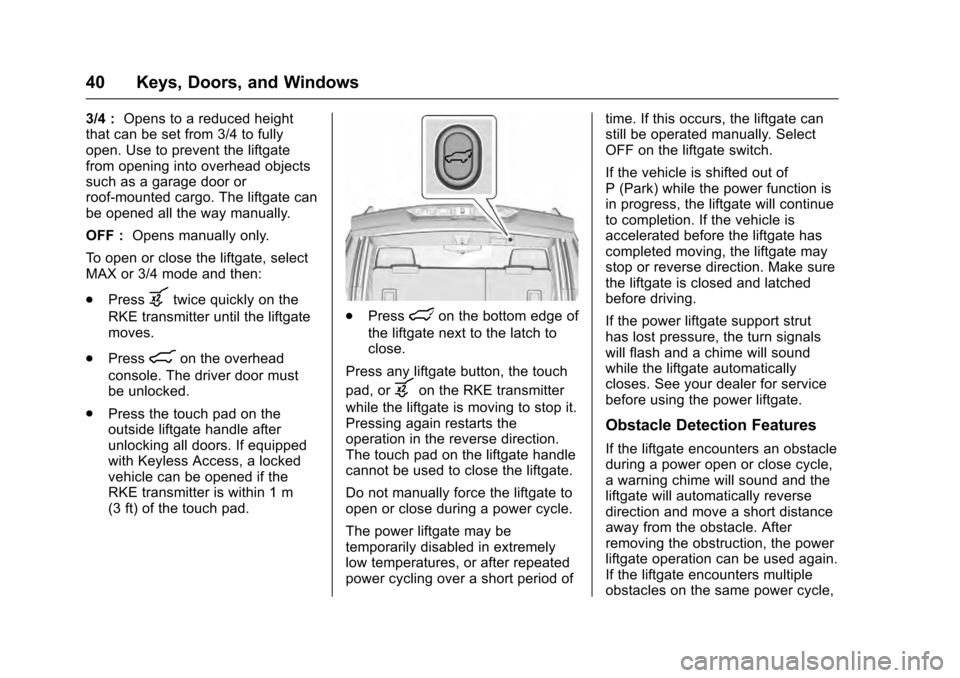
.Presslon the bottom edge of
the liftgate next to the latch to
close.
Press any liftgate button, the touch
pad, or
bon the RKE transmitter
while the liftgate is moving to stop it.
Pressing again restarts the
operation in the reverse direction.
The touch pad on the liftgate handle
cannot be used to close the liftgate.
Do not manually force the liftgate to
open or close during a power cycle.
The power liftgate may be
temporarily disabled in extremely
low temperatures, or after repeated
power cycling over a short period of time. If this occurs, the liftgate can
still be operated manually. Select
OFF on the liftgate switch.
If the vehicle is shifted out of
P (Park) while the power function is
in progress, the liftgate will continue
to completion. If the vehicle is
accelerated before the liftgate has
completed moving, the liftgate may
stop or reverse direction. Make sure
the liftgate is closed and latched
before driving.
If the power liftgate support strut
has lost pressure, the turn signals
will flash and a chime will sound
while the liftgate automatically
closes. See your dealer for service
before using the power liftgate.
Obstacle Detection Features
If the liftgate encounters an obstacle
during a power open or close cycle,
a warning chime will sound and the
liftgate will automatically reverse
direction and move a short distance
away from the obstacle. After
removing the obstruction, the power
liftgate operation can be used again.
If the liftgate encounters multiple
obstacles on the same power cycle,