2016 CADILLAC CTS brake
[x] Cancel search: brakePage 143 of 354

Cadillac CTS/CTS-V Owner Manual (GMNA-Localizing-MidEast-9369309) -
2016 - crc - 7/30/15
142 Instruments and Controls
SERVICE PARK ASSIST
This message displays if there is a
problem with the Parking Assist
system. Do not use this system to
help you park. See your dealer for
service.
SERVICE REAR AUTO BRAKE
AND PARK ASSIST
This message displays if there is a
problem with the parking and
backing features of the Driver
Assistance System. Do not use this
system to help park or back the
vehicle. See your dealer for service.
SERVICE SIDE DETECTION
SYSTEM
If this message remains on after
continued driving, the vehicle needs
service. Side Blind Zone Alert
(SBZA), Lane Change Alert (LCA),
and Rear Cross Traffic Alert (RCTA)
features will not work. Take the
vehicle to your dealer.
SIDE DETECTION SYSTEM
UNAVAILABLE
This message indicates that Side
Blind Zone Alert (SBZA), Lane
Change Alert (LCA), and Rear
Cross Traffic Alert (RCTA) are
disabled either because the sensor
is blocked and cannot detect
vehicles in the blind zone, or the
vehicle is passing through an open
area, such as the desert, where
there is insufficient data for
operation. This message may also
activate during heavy rain or due to
road spray. The vehicle does not
need service. For cleaning, see
"Washing the Vehicle" under
Exterior Care0318.
TAKE STEERING
If LKA does not detect active driver
steering, an alert and chime may be
provided. Move the steering wheel
to dismiss. See Lane Keep Assist
(LKA) 0238.
Ride Control System
Messages
ALL WHEEL DRIVE OFF
If the vehicle has the
All-Wheel-Drive (AWD) system, this
message displays when there is a
temporary condition making the
AWD system unavailable. The
vehicle will run in 2WD. This could
be caused by:
.
Loss of wheel or vehicle speed
. AWD system overheat
. Certain vehicle electrical
conditions
This message turns off when the
above conditions are no longer
present and the warning message is
reset.
See All-Wheel Drive 0203.
PERFORMANCE TRACTION 1 -
WET (V-Series Only)
This message displays when this
Performance Traction Management
(PTM) mode is selected. The TCS
and StabiliTrak OFF cluster lights
will also be on when this mode is
Page 146 of 354

Cadillac CTS/CTS-V Owner Manual (GMNA-Localizing-MidEast-9369309) -
2016 - crc - 7/30/15
Instruments and Controls 145
Safety Belt Messages
AUTOMATIC SEATBELT
TIGHTENING UNAVAILABLE
This message displays when the
Automatic Safety Belt Tightening
System, if equipped, becomes
unavailable. This could be caused
by a temporary condition. If the
message continues to display, see
your dealer.
SERVICE AUTOMATIC
SEATBELT TIGHTENING
SYSTEM
If this message displays, take the
vehicle to your dealer to repair the
Automatic Safety Belt Tightening
System, if equipped.
Security Messages
THEFT ATTEMPTED
This message displays if the vehicle
detects a tamper condition.
Service Vehicle Messages
SERVICE AC SYSTEM
This message displays if there is a
problem with the air conditioning
system. Take the vehicle to your
dealer for service.
SERVICE POWER STEERING
This message displays and a chime
may sound when there may be a
problem with the power steering
system. If this message displays
and a reduction in steering
performance or loss of power
steering assistance is noticed, see
your dealer.
SERVICE STEERING
COLUMN LOCK
This message displays if there is a
problem with the steering column
lock. Take the vehicle to your dealer
for service.
SERVICE VEHICLE SOON
This message displays if there is a
problem with the vehicle. Take the
vehicle to your dealer for service.
Starting the Vehicle
Messages
PRESS BRAKE TO START
This message is displayed when
attempting to start the vehicle
without first pressing the brake
pedal.
SERVICE KEYLESS START
SYSTEM
This message is displayed if there is
a problem with the pushbutton start
system. Take the vehicle to your
dealer for service.
TURN STEERING WHEEL
START VEHICLE AGAIN
This message may display when
you try to start the vehicle, but the
column remains locked. Try turning
the steering wheel while starting the
vehicle to unlock the steering
column. If the vehicle still does not
start, turn the steering wheel the
other way, and try starting the
vehicle again.
Page 150 of 354

Cadillac CTS/CTS-V Owner Manual (GMNA-Localizing-MidEast-9369309) -
2016 - crc - 7/30/15
Instruments and Controls 149
.Collision/Detection Systems
. Comfort and Convenience
. Lighting
. Power Door Locks
. Remote Lock, Unlock, Start
Climate and Air Quality
Select and the following may
display:
. Auto Fan Max Speed
. Air Quality Sensor
. Auto Heated Seats
. Auto Defog
. Auto Rear Defog
Auto Fan Max Speed
This feature will set the maximum
auto fan speed.
Select Low, Medium, or High.
Air Quality Sensor
This allows for selection of air
quality sensor operation at high or
low sensitivity.
Select Off, Low Sensitivity, or High
Sensitivity. Auto Heated Seats
When enabled, this feature will
automatically activate the heated
seats at the level required by the
interior temperature. The auto
heated seats can be turned off by
using the heated seat buttons on
the center stack.
Select Off or On.
Auto Defog
When set to On, the front defog will
automatically react to temperature
and humidity conditions that may
cause fogging.
Select Off or On.
Auto Rear Defog
When set to On, this feature will
automatically turn on the rear
window defogger when it is cold
outside.
Select Off or On.
Collision/Detection Systems
Select the Collision/Detection
Systems menu and the following
may display:
.
Alert Type
. Auto Collision Preparation
. Park Assist
. Go Notifier
. Rear Cross Traffic Alert
. Lane Change Alert
Alert Type
This feature will set crash alerts to
beeps or seat vibrations. This
setting affects all crash alerts
including:
. Forward Collision
. Lane Departure Warning
. Adaptive Cruise Control
. Parking Assist
. Backing Warning
Select Beeps or Safety Alert Seat.
Auto Collision Preparation
This feature will turn on or off the
Forward Collision Alert (FCA) and
Front Automatic Braking (FAB). The
Off setting disables all FCA and
FAB functions. With the Alert and
Brake setting, both FCA and FAB
Page 151 of 354

Cadillac CTS/CTS-V Owner Manual (GMNA-Localizing-MidEast-9369309) -
2016 - crc - 7/30/15
150 Instruments and Controls
are available. The Alert setting
disables FAB, but some last-second
automatic braking capability is still
provided, though less likely to occur.
SeeFront Automatic Braking (FAB)
System 0234.
Select Off, Alert and Brake, or Alert.
Park Assist
This allows the Ultrasonic Parking
Assist feature to be turned on or off.
See Assistance Systems for Parking
or Backing 0225.
Select Off or On.
Go Notifier
This feature will give a reminder
from Adaptive Cruise Control when
it has brought the vehicle to a
complete stop behind another
stopping vehicle, and then that
vehicle drives on. See Adaptive
Cruise Control 0217.
Select Off or On.
Rear Cross Traffic Alert
This allows the feature to be turned
on or off. See Assistance Systems
for Parking or Backing 0225. Select Off or On.
Lane Change Alert
This allows the feature to be turned
on or off. See
Lane Change Alert
(LCA) 0236.
Select Off or On.
Comfort and Convenience
Select and the following may
display:
. Auto Memory Recall
. Easy Exit Options
. Chime Volume
. Reverse Tilt Mirror
. Auto Mirror Folding
. Personalization by Driver
. Rainsense Wipers
Auto Memory Recall
This feature automatically recalls
the current driver ’s previously stored
1 or 2 button positions when
entering the vehicle. See Memory
Seats 058.
Select Off or On. Easy Exit Options
This feature automatically recalls
the current driver
’s previously stored
Exit button position when exiting the
vehicle. See Memory Seats 058.
Select Off or On.
Chime Volume
This allows the selection of the
chime volume level.
Press + or −to adjust the volume.
Reverse Tilt Mirror
This allows the feature to be turned
on or off.
Select Off, On - Driver and
Passenger, On - Driver, or On -
Passenger.
Auto Mirror Folding
When on, the outside rearview
mirrors will automatically fold or
unfold when the Remote Keyless
Entry (RKE) transmitter
QorK
button is pressed and held.
Select Off or On.
Page 159 of 354

Cadillac CTS/CTS-V Owner Manual (GMNA-Localizing-MidEast-9369309) -
2016 - crc - 7/30/15
158 Lighting
.The ignition is on.
. The exterior lamp control is
in AUTO.
. The light sensor determines it is
daytime.
. The parking brake is released or
the vehicle is not in P (Park).
The taillamps, instrument panel
lights, and other lamps will not
be on.
The DRL turn off when the
headlamps are turned to
;or the
ignition is off.
Automatic Headlamp
System
When the exterior lamp control is
set to AUTO and it is dark enough
outside, the headlamps come on
automatically.
If equipped, the light sensor is on
top of the instrument panel or on the
windshield near the rearview mirror.
Do not cover the sensor, otherwise
the headlamps will come on when
they are not needed.
The system may also turn on the
headlamps when driving through a
parking garage or tunnel.
If the vehicle is started in a dark
garage, the automatic headlamp
system comes on immediately. If it
is light outside when the vehicle
leaves the garage, there is a slight
delay before the automatic
headlamp system turns off the
headlamps. During that delay, the instrument cluster may not be as
bright as usual. Make sure the
instrument panel brightness control
is in the full bright position. See
Instrument Panel Illumination
Control
0160.
When it is bright enough outside,
the headlamps will turn off and the
Daytime Running Lamps (DRL) will
turn on.
The automatic headlamp system
turns off when the exterior lamp
control is turned toOor the ignition
is off.
Lights On with Wipers
If the windshield wipers are
activated in daylight with the engine
on, and the exterior lamp control is
in AUTO, the headlamps, parking
lamps, and other exterior lamps
come on. The transition time for the
lamps coming on varies based on
wiper speed. When the wipers are
not operating, these lamps turn off.
Move the exterior lamp control to
O
or;to disable this feature.
Page 167 of 354
Cadillac CTS/CTS-V Owner Manual (GMNA-Localizing-MidEast-9369309) -
2016 - crc - 7/30/15
166 Infotainment System
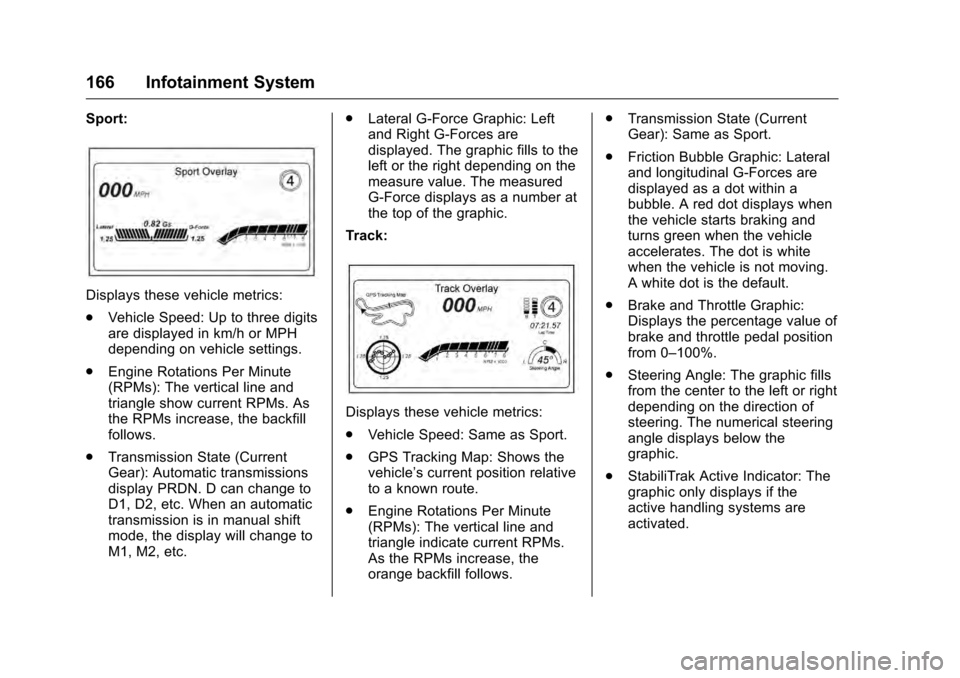
Sport:
Displays these vehicle metrics:
.Vehicle Speed: Up to three digits
are displayed in km/h or MPH
depending on vehicle settings.
. Engine Rotations Per Minute
(RPMs): The vertical line and
triangle show current RPMs. As
the RPMs increase, the backfill
follows.
. Transmission State (Current
Gear): Automatic transmissions
display PRDN. D can change to
D1, D2, etc. When an automatic
transmission is in manual shift
mode, the display will change to
M1, M2, etc. .
Lateral G-Force Graphic: Left
and Right G-Forces are
displayed. The graphic fills to the
left or the right depending on the
measure value. The measured
G-Force displays as a number at
the top of the graphic.
Track:
Displays these vehicle metrics:
. Vehicle Speed: Same as Sport.
. GPS Tracking Map: Shows the
vehicle’s current position relative
to a known route.
. Engine Rotations Per Minute
(RPMs): The vertical line and
triangle indicate current RPMs.
As the RPMs increase, the
orange backfill follows. .
Transmission State (Current
Gear): Same as Sport.
. Friction Bubble Graphic: Lateral
and longitudinal G-Forces are
displayed as a dot within a
bubble. A red dot displays when
the vehicle starts braking and
turns green when the vehicle
accelerates. The dot is white
when the vehicle is not moving.
A white dot is the default.
. Brake and Throttle Graphic:
Displays the percentage value of
brake and throttle pedal position
from 0–100%.
. Steering Angle: The graphic fills
from the center to the left or right
depending on the direction of
steering. The numerical steering
angle displays below the
graphic.
. StabiliTrak Active Indicator: The
graphic only displays if the
active handling systems are
activated.
Page 179 of 354

Cadillac CTS/CTS-V Owner Manual (GMNA-Localizing-MidEast-9369309) -
2016 - crc - 7/30/15
178 Driving and Operating
Driving and
Operating
Driving Information
Distracted Driving . . . . . . . . . . . . 179
Defensive Driving . . . . . . . . . . . . . 180
Control of a Vehicle . . . . . . . . . . . 180
Braking . . . . . . . . . . . . . . . . . . . . . . . 180
Steering . . . . . . . . . . . . . . . . . . . . . . 180
Off-Road Recovery . . . . . . . . . . . 181
Loss of Control . . . . . . . . . . . . . . . 182
Track Events and CompetitiveDriving . . . . . . . . . . . . . . . . . . . . . . 182
Driving on Wet Roads . . . . . . . . 186
Hill and Mountain Roads . . . . . 187
Winter Driving . . . . . . . . . . . . . . . . 187
If the Vehicle Is Stuck . . . . . . . . 189
Vehicle Load Limits . . . . . . . . . . . 189
Starting and Operating
New Vehicle Break-In . . . . . . . . . 193
Carbon Fiber . . . . . . . . . . . . . . . . . 193
Ignition Positions . . . . . . . . . . . . . 193
Starting the Engine . . . . . . . . . . . 195
Retained Accessory Power (RAP) . . . . . . . . . . . . . . . . 197
Shifting Into Park . . . . . . . . . . . . . 197
Shifting out of Park . . . . . . . . . . . 198 Parking over Things
That Burn . . . . . . . . . . . . . . . . . . . 199
Engine Exhaust
Engine Exhaust . . . . . . . . . . . . . . 199
Running the Vehicle WhileParked . . . . . . . . . . . . . . . . . . . . . . 199
Automatic Transmission
Automatic Transmission . . . . . . 200
Manual Mode . . . . . . . . . . . . . . . . . 202
Drive Systems
All-Wheel Drive . . . . . . . . . . . . . . . 203
Brakes
Antilock BrakeSystem (ABS) . . . . . . . . . . . . . . . 203
Electric Parking Brake . . . . . . . . 204
Brake Assist . . . . . . . . . . . . . . . . . . 206
Ride Control Systems
Traction Control/Electronic Stability Control . . . . . . . . . . . . . 206
Driver Mode Control . . . . . . . . . . 208
Competitive Driving Mode (V-Series Only) . . . . . . . . . . . . . . 211
Limited-Slip Differential (Except V-Series) . . . . . . . . . . . 214
Limited-Slip Differential (V-Series Only) . . . . . . . . . . . . . . 214
Cruise Control
Cruise Control . . . . . . . . . . . . . . . . 214
Adaptive Cruise Control . . . . . . 217
Driver Assistance Systems
Driver Assistance Systems . . . 224
Assistance Systems forParking or Backing . . . . . . . . . . 225
Assistance Systems for Driving . . . . . . . . . . . . . . . . . . . . . . 231
Forward Collision Alert (FCA) System . . . . . . . . . . . . . . . . . . . . . . 232
Front Automatic Braking (FAB) System . . . . . . . . . . . . . . . . . . . . . . 234
Side Blind Zone Alert (SBZA) . . . . . . . . . . . . . . . . 236
Lane Change Alert (LCA) . . . . . 236
Lane Departure Warning (LDW) . . . . . . . . . . . . . 238
Lane Keep Assist (LKA) . . . . . . 238
Fuel
Fuel . . . . . . . . . . . . . . . . . . . . . . . . . . 240
Fuel Additives . . . . . . . . . . . . . . . . 241
Filling the Tank . . . . . . . . . . . . . . . 241
Filling a Portable Fuel Container . . . . . . . . . . . . . . . . . . . 242
Trailer Towing
General TowingInformation . . . . . . . . . . . . . . . . . . 243
Page 181 of 354

Cadillac CTS/CTS-V Owner Manual (GMNA-Localizing-MidEast-9369309) -
2016 - crc - 7/30/15
180 Driving and Operating
See the infotainment manual for
information on that system or the
navigation system, if equipped,
including pairing and using a cell
phone.
Defensive Driving
Defensive driving means“always
expect the unexpected.” The first
step in driving defensively is to wear
the safety belt. See Safety Belts
0 64.
. Assume that other road users
(pedestrians, bicyclists, and
other drivers) are going to be
careless and make mistakes.
Anticipate what they might do
and be ready.
. Allow enough following distance
between you and the driver in
front of you.
. Focus on the task of driving.
Control of a Vehicle
Braking, steering, and accelerating
are important factors in helping to
control a vehicle while driving.
Braking
Braking action involves perception
time and reaction time. Deciding to
push the brake pedal is perception
time. Actually doing it is
reaction time.
Average driver reaction time is
about three-quarters of a second. In
that time, a vehicle moving at
100 km/h (60 mph) travels 20 m
(66 ft), which could be a lot of
distance in an emergency.
Helpful braking tips to keep in mind
include:
.Keep enough distance between
you and the vehicle in front
of you.
. Avoid needless heavy braking.
. Keep pace with traffic.
If the engine ever stops while the
vehicle is being driven, brake
normally but do not pump the
brakes. Doing so could make the
pedal harder to push down. If the
engine stops, there will be some
power brake assist but it will be
used when the brake is applied. Once the power assist is used up, it
can take longer to stop and the
brake pedal will be harder to push.
Steering
Variable Effort Steering
Some vehicles have a steering
system that varies the amount of
effort required to steer the vehicle in
relation to the speed of the vehicle.
The amount of steering effort
required is less at slower speeds to
make the vehicle more
maneuverable and easier to park. At
faster speeds, the steering effort
increases to provide a sport-like feel
to the steering. This provides
maximum control and stability.
Electric Power Steering
The vehicle has electric power
steering. It does not have power
steering fluid. Regular maintenance
is not required.