2016 CADILLAC ATS airbag
[x] Cancel search: airbagPage 140 of 348

Cadillac ATS/ATS-V Owner Manual (GMNA-Localizing-MidEast-9369639) -
2016 - crc - 12/9/15
Instruments and Controls 139
Ride Control System
Messages
SERVICE STABILITRAK
This message displays if there is a
problem with the StabiliTrak system.
SeeTraction Control/Electronic
Stability Control 0205.
SERVICE SUSPENSION
SYSTEM
This message displays when there
is a problem with the Magnetic Ride
Control™ system. See Driver Mode
Control 0207. Have the vehicle
serviced by your dealer.
SERVICE TRACTION
CONTROL
This message displays when there
is a problem with the Traction
Control System (TCS). See Traction
Control/Electronic Stability
Control 0205.
TRACTION CONTROL OFF
This message may display when the
Traction Control System (TCS) has
been turned off. See Traction
Control/Electronic Stability
Control 0205.
TRACTION CONTROL ON
This message may display when the
Traction Control System (TCS) has
been turned on. See Traction
Control/Electronic Stability
Control 0205.
Airbag System Messages
SERVICE AIRBAG
This message displays if there is a
problem with the airbag system. See
your dealer for service.
Safety Belt Messages
AUTOMATIC SEATBELT
TIGHTENING UNAVAILABLE
This message displays when the
Automatic Safety Belt Tightening
System, if equipped, becomes
unavailable. This could be caused by a temporary condition. If the
message continues to display, see
your dealer.
SERVICE AUTOMATIC
SEATBELT TIGHTENING
SYSTEM
If this message displays, take the
vehicle to your dealer to repair the
Automatic Safety Belt Tightening
System, if equipped.
Security Messages
THEFT ATTEMPTED
This message displays if the vehicle
detects a tamper condition.
Service Vehicle Messages
SERVICE AC SYSTEM
This message displays if there is a
problem with the air conditioning
system. Take the vehicle to your
dealer for service.
SERVICE POWER STEERING
This message displays and a chime
may sound when there may be a
problem with the power steering
Page 155 of 348
Cadillac ATS/ATS-V Owner Manual (GMNA-Localizing-MidEast-9369639) -
2016 - crc - 12/9/15
154 Lighting
Adaptive Forward
Lighting (AFL)
On vehicles with the AFL system,
the headlamps pivot horizontally to
provide greater road illumination
while turning. To enable AFL, set
the exterior lamp control on the turn
signal lever to the AUTO position.
Moving the control out of the AUTO
position will deactivate the system.
AFL will operate when the vehicle
speed is greater than 3 km/h
(2 mph). AFL will not operate when
the transmission is in R (Reverse).
AFL is not immediately operable
after starting the vehicle; driving a
short distance is required to
calibrate the AFL. SeeExterior
Lamp Controls 0150.
Hazard Warning Flashers
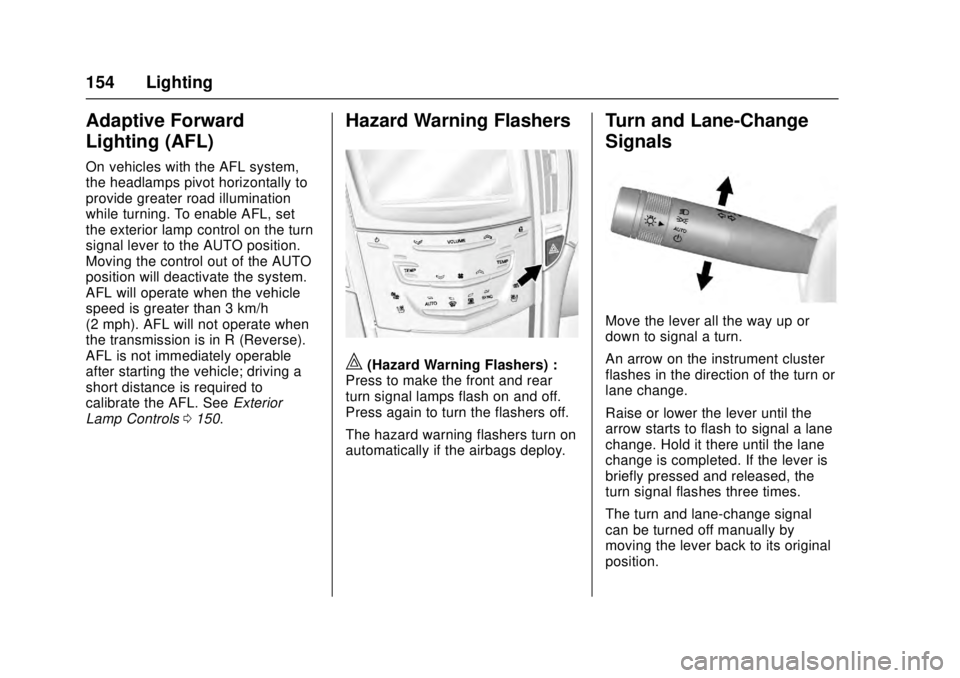
|(Hazard Warning Flashers) :
Press to make the front and rear
turn signal lamps flash on and off.
Press again to turn the flashers off.
The hazard warning flashers turn on
automatically if the airbags deploy.
Turn and Lane-Change
Signals
Move the lever all the way up or
down to signal a turn.
An arrow on the instrument cluster
flashes in the direction of the turn or
lane change.
Raise or lower the lever until the
arrow starts to flash to signal a lane
change. Hold it there until the lane
change is completed. If the lever is
briefly pressed and released, the
turn signal flashes three times.
The turn and lane-change signal
can be turned off manually by
moving the lever back to its original
position.
Page 193 of 348

Cadillac ATS/ATS-V Owner Manual (GMNA-Localizing-MidEast-9369639) -
2016 - crc - 12/9/15
192 Driving and Operating
Do not turn the engine off when the
vehicle is moving. This will cause a
loss of power assist in the brake
and steering systems and disable
the airbags.
If the vehicle must be shut off in an
emergency:1. Brake using a firm and steady pressure. Do not pump the
brakes repeatedly. This may
deplete power assist, requiring
increased brake pedal force.
2. Shift the vehicle to N (Neutral). This can be done while the
vehicle is moving. After shifting
to N (Neutral), firmly apply the
brakes and steer the vehicle to
a safe location.
3. Come to a complete stop, shift to P (Park), and turn the
ignition to OFF. On vehicles
with an automatic transmission,
the shift lever must be in
P (Park) to turn the ignition
switch to the OFF position. 4. Set the parking brake. See
Parking Brake (Manual) 0202
or Parking Brake
(Electric) 0203.
{Warning
Turning off the vehicle while
moving may cause loss of power
assist in the brake and steering
systems and disable the airbags.
While driving, only shut the
vehicle off in an emergency.
If the vehicle cannot be pulled over,
and must be shut off while driving,
press and hold the ENGINE START/
STOP button for longer than
two seconds, or press twice within
five seconds.
ACC/ACCESSORY (Amber
Indicator Light) : This mode allows
you to use some electrical
accessories when the engine is off.
With the ignition off, pressing the
button one time without the brake
pedal applied will place the ignition
system in ACC/ACCESSORY. The ignition will switch from ACC/
ACCESSORY to OFF after
five minutes to prevent battery
rundown.
ON/RUN/START (Green Indicator
Light) :
This mode is for driving and
starting. With the ignition off, and
the brake pedal applied, pressing
the button once will place the
ignition system in ON/RUN/START.
Once engine cranking begins,
release the button. Engine cranking
will continue until the engine starts.
See Starting the Engine 0193. The
ignition will then remain in ON/RUN.
Service Only Mode
This power mode is available for
service and diagnostics, and to
verify the proper operation of the
malfunction indicator lamp as may
be required for emission inspection
purposes. With the vehicle off, and
the brake pedal not applied,
pressing and holding the button for
more than five seconds will place
the vehicle in Service Only Mode.
The instruments and audio systems
will operate as they do in ON/RUN,
but the vehicle will not be able to be
Page 244 of 348
Cadillac ATS/ATS-V Owner Manual (GMNA-Localizing-MidEast-9369639) -
2016 - crc - 12/9/15
Driving and Operating 243
Safety Chains
Always attach chains between the
vehicle and the trailer. Cross the
safety chains under the tongue of
the trailer to help prevent the tongue
from contacting the road if it
becomes separated from the hitch.
Leave enough slack so the rig can
turn. Never allow safety chains to
drag on the ground.
Trailer Brakes
Does the trailer have its own
brakes? Be sure to read and follow
the instructions for the trailer brakes
so they are installed, adjusted, and
maintained properly.
Because the vehicle has antilock
brakes, do not tap into the vehicle's
brake system. If this is done, both
brake systems will not work well or
at all.
Conversions and
Add-Ons
Add-On Electrical
Equipment
{Warning
The Data Link Connector (DLC) is
used for vehicle service and
Emission Inspection/Maintenance
testing. SeeMalfunction Indicator
Lamp (Check Engine Light) 0118.
A device connected to the DLC —
such as an aftermarket fleet or
driver-behavior tracking device —
may interfere with vehicle
systems. This could affect vehicle
operation and cause a crash.
Such devices may also access
information stored in the vehicle’s
systems.
Caution
Some electrical equipment can
damage the vehicle or cause
components to not work and
would not be covered by the
vehicle warranty. Always check
with your dealer before adding
electrical equipment.
Add-on equipment can drain the
vehicle's 12-volt battery, even if the
vehicle is not operating.
The vehicle has an airbag system.
Before attempting to add anything
electrical to the vehicle, see
Servicing the Airbag-Equipped
Vehicle 081 and Adding Equipment
to the Airbag-Equipped
Vehicle 081.
Page 246 of 348

Cadillac ATS/ATS-V Owner Manual (GMNA-Localizing-MidEast-9369639) -
2016 - crc - 12/9/15
Vehicle Care 245
Jump Starting
Jump Starting . . . . . . . . . . . . . . . . 307
Towing the Vehicle
Towing the Vehicle . . . . . . . . . . . 310
Recreational VehicleTowing . . . . . . . . . . . . . . . . . . . . . . 311
Appearance Care
Exterior Care . . . . . . . . . . . . . . . . . 313
Interior Care . . . . . . . . . . . . . . . . . . 317
Floor Mats . . . . . . . . . . . . . . . . . . . . 320
General Information
For service and parts needs, visit
your dealer. You will receive
genuine parts and trained and
supported service people.
Accessories and
Modifications
Adding non-dealer accessories or
making modifications to the vehicle
can affect vehicle performance and
safety, including such things as
airbags, braking, stability, ride and
handling, emissions systems,
aerodynamics, durability, and
electronic systems like antilock
brakes, traction control, and stability
control. These accessories or
modifications could even cause
malfunction or damage not covered
by the vehicle warranty.
Damage to suspension components
caused by modifying vehicle height
outside of factory settings will not be
covered by the warranty.
Damage to vehicle components
resulting from modifications or the
installation or use of non-GM certified parts, including control
module or software modifications, is
not covered under the terms of the
vehicle warranty and may affect
remaining warranty coverage for
affected parts.
GM Accessories are designed to
complement and function with other
systems on the vehicle. See your
dealer to accessorize the vehicle
using genuine GM Accessories
installed by a dealer technician.
Also, see
Adding Equipment to the
Airbag-Equipped Vehicle 081.
Page 247 of 348

Cadillac ATS/ATS-V Owner Manual (GMNA-Localizing-MidEast-9369639) -
2016 - crc - 12/9/15
246 Vehicle Care
Vehicle Checks
Doing Your Own
Service Work
{Warning
It can be dangerous to work on
your vehicle if you do not have
the proper knowledge, service
manual, tools, or parts. Always
follow owner manual procedures
and consult the service manual
for your vehicle before doing any
service work.
If doing some of your own service
work, use the proper service
manual. It tells you much more
about how to service the vehicle
than this manual can.
This vehicle has an airbag system.
Before attempting to do your own
service work, see Airbag System
Check 082.
Keep a record with all parts receipts
and list the mileage and the date of
any service work performed.
Caution
Even small amounts of
contamination can cause damage
to vehicle systems. Do not allow
contaminants to contact the fluids,
reservoir caps, or dipsticks.
Hood
To open the hood:
1. Pull the hood release handle inside the vehicle. It is on the
lower left side of the instrument
panel.
2. Go to the front of the vehicleand move the secondary hood
release lever toward the right
side of the vehicle.
3. Lift the hood.
To close the hood:
Before closing the hood, be sure all
filler caps are on properly. Then,
bring the hood from full open to
within 152 mm (6 in) of the closed
position. Pause, then push the front
center of the hood with a swift, firm
motion to fully close the hood.
Page 297 of 348

Cadillac ATS/ATS-V Owner Manual (GMNA-Localizing-MidEast-9369639) -
2016 - crc - 12/9/15
296 Vehicle Care
{Warning
Using bias-ply tires on the
vehicle may cause the wheel
rim flanges to develop cracks
after many miles of driving.
A tire and/or wheel could fail
suddenly and cause a crash.
Use only radial-ply tires with
the wheels on the vehicle.
If the vehicle tires must be
replaced with a tire that does not
have a TPC Spec number, make
sure they are the same size,
load range, speed rating, and
construction (radial) as the
original tires.
Vehicles that have a tire
pressure monitoring system
could give an inaccurate
low-pressure warning if non-TPC
Spec rated tires are installed.
See Tire Pressure Monitor
Operation 0289. The Tire and Loading
Information label indicates the
original equipment tires on the
vehicle. See
Vehicle Load Limits
0 187 for the label location and
more information about the Tire
and Loading Information label.
Different Size Tires and
Wheels
If wheels or tires are installed that
are a different size than the original
equipment wheels and tires, vehicle
performance, including its braking,
ride and handling characteristics,
stability, and resistance to rollover
may be affected. If the vehicle has
electronic systems such as antilock
brakes, rollover airbags, roll bars,
traction control, electronic stability
control, or All-Wheel Drive, the
performance of these systems can
also be affected.
{Warning
If different sized wheels are used,
there may not be an acceptable
level of performance and safety if
tires not recommended for those
wheels are selected. This
increases the chance of a crash
and serious injury. Only use GM
specific wheel and tire systems
developed for the vehicle, and
have them properly installed by a
GM certified technician.
See Buying New Tires 0294 and
Accessories and
Modifications 0245.
Wheel Alignment and Tire
Balance
The tires and wheels were aligned
and balanced at the factory to
provide the longest tire life and best
overall performance. Adjustments to
wheel alignment and tire balancing
are not necessary on a regular
basis. Consider an alignment check
if there is unusual tire wear or the
Page 337 of 348

Cadillac ATS/ATS-V Owner Manual (GMNA-Localizing-MidEast-9369639) -
2016 - crc - 12/9/15
336 Customer Information
Customer
Information
Vehicle Data Recording and
Privacy
Vehicle Data Recording andPrivacy . . . . . . . . . . . . . . . . . . . . . . 336
Event Data Recorders . . . . . . . . 336
Infotainment System . . . . . . . . . . 337
Vehicle Data
Recording and
Privacy
The vehicle has a number of
computers that record information
about the vehicle’s performance and
how it is driven. For example, the
vehicle uses computer modules to
monitor and control engine and
transmission performance, to
monitor the conditions for airbag
deployment and deploy them in a
crash, and, if equipped, to provide
antilock braking to help the driver
control the vehicle. These modules
may store data to help the dealer
technician service the vehicle.
Some modules may also store data
about how the vehicle is operated,
such as rate of fuel consumption or
average speed. These modules may
retain personal preferences, such as
radio presets, seat positions, and
temperature settings.
Event Data Recorders
This vehicle is equipped with an
event data recorder (EDR). The
main purpose of an EDR is to
record, in certain crash or near
crash-like situations, such as an
airbag deployment or hitting a road
obstacle, data that will assist in
understanding how a vehicle's
systems performed. The EDR is
designed to record data related to
vehicle dynamics and safety
systems for a short period of time,
typically 30 seconds or less. The
EDR in this vehicle is designed to
record such data as:
. How various systems in your
vehicle were operating.
. Whether or not the driver and
passenger safety belts were
buckled/fastened;
. How far (if at all) the driver was
depressing the accelerator and/
or brake pedal; and
. How fast the vehicle was
traveling.