2016 BUICK LACROSSE set
[x] Cancel search: setPage 171 of 367

Buick LaCrosse Owner Manual (GMNA-Localizing-U.S./Canada/Mexico-
9159288) - 2016 - CRC - 10/5/15
170 Driving and Operating
Blizzard Conditions
Stop the vehicle in a safe place and
signal for help. Stay with the vehicle
unless there is help nearby.
If possible, use Roadside
Assistance. SeeRoadside
Assistance Program 0334. To get
help and keep everyone in the
vehicle safe:
. Turn on the hazard warning
flashers.
. Tie a red cloth to an outside
mirror.
{Warning
Snow can trap engine exhaust
under the vehicle. This may
cause exhaust gases to get
inside. Engine exhaust contains
carbon monoxide (CO), which
cannot be seen or smelled. It can
cause unconsciousness and even
death.
(Continued)
Warning (Continued)
If the vehicle is stuck in snow:
. Clear snow from the base of
the vehicle, especially any
blocking the exhaust pipe.
. Open a window about 5 cm
(2 in) on the vehicle side
that is away from the wind,
to bring in fresh air.
. Fully open the air outlets on
or under the instrument
panel.
. Adjust the climate control
system to circulate the air
inside the vehicle and set
the fan speed to the highest
setting. See “Climate
Control Systems.”
For more information about CO,
see Engine Exhaust 0185.
To save fuel, run the engine for
short periods to warm the vehicle
and then shut the engine off and
partially close the window. Moving
about to keep warm also helps. If it takes time for help to arrive,
when running the engine, push the
accelerator pedal slightly so the
engine runs faster than the idle
speed. This keeps the battery
charged to restart the vehicle and to
signal for help with the headlamps.
Do this as little as possible, to
save fuel.
If the Vehicle Is Stuck
Slowly and cautiously spin the
wheels to free the vehicle when
stuck in sand, mud, ice, or snow.
If stuck too severely for the traction
system to free the vehicle, turn the
traction system off and use the
rocking method. See
Traction
Control/Electronic Stability
Control 0192.
{Warning
If the vehicle's tires spin at high
speed, they can explode, and you
or others could be injured. The
vehicle can overheat, causing an
engine compartment fire or other
(Continued)
Page 177 of 367

Buick LaCrosse Owner Manual (GMNA-Localizing-U.S./Canada/Mexico-
9159288) - 2016 - CRC - 10/5/15
176 Driving and Operating
3. Come to a complete stop, shiftto P (Park), and turn the
ignition to OFF. On vehicles
with an automatic transmission,
the shift lever must be in
P (Park) to turn the ignition
switch to the OFF position.
4. Set the parking brake. See Parking Brake 0190.
{Warning
Turning off the vehicle while
moving may cause loss of power
assist in the brake and steering
systems and disable the airbags.
While driving, only shut the
vehicle off in an emergency.
If the vehicle cannot be pulled over,
and must be shut off while driving,
press and hold the ENGINE START/
STOP button for longer than
two seconds, or press twice in
five seconds.
ACC/ACCESSORY (Amber
Indicator Light) : This mode allows
you to use some electrical
accessories when the engine is off. With the ignition off, pressing the
button one time without the brake
pedal applied will place the ignition
system in ACC/ACCESSORY.
The ignition will switch from ACC/
ACCESSORY to OFF after
five minutes to prevent battery
rundown.
ON/RUN/START (Green Indicator
Light) :
This mode is for driving and
starting. With the ignition off, and
the brake pedal applied, pressing
the button once will place the
ignition system in ON/RUN/START.
Once engine cranking begins,
release the button. Engine cranking
will continue until the engine starts.
See Starting the Engine 0178. The
ignition will then remain in ON/RUN.
Service Only Mode
This power mode is available for
service and diagnostics, and to
verify the proper operation of the
malfunction indicator lamp as may
be required for emission inspection
purposes. With the vehicle off, and
the brake pedal not applied,
pressing and holding the button for
more than five seconds will place the vehicle in Service Only Mode.
The instruments and audio systems
will operate as they do in ON/RUN,
but the vehicle will not be able to be
driven. The engine will not start in
Service Only Mode. Press the
button again to turn the vehicle off.
Ignition Positions (Key
Access)
Page 178 of 367
Buick LaCrosse Owner Manual (GMNA-Localizing-U.S./Canada/Mexico-
9159288) - 2016 - CRC - 10/5/15
Driving and Operating 177
Caution
Using a tool to force the key to
turn in the ignition could cause
damage to the switch or break the
key. Use the correct key, make
sure it is all the way in, and turn it
only with your hand. If the key
cannot be turned by hand, see
your dealer.
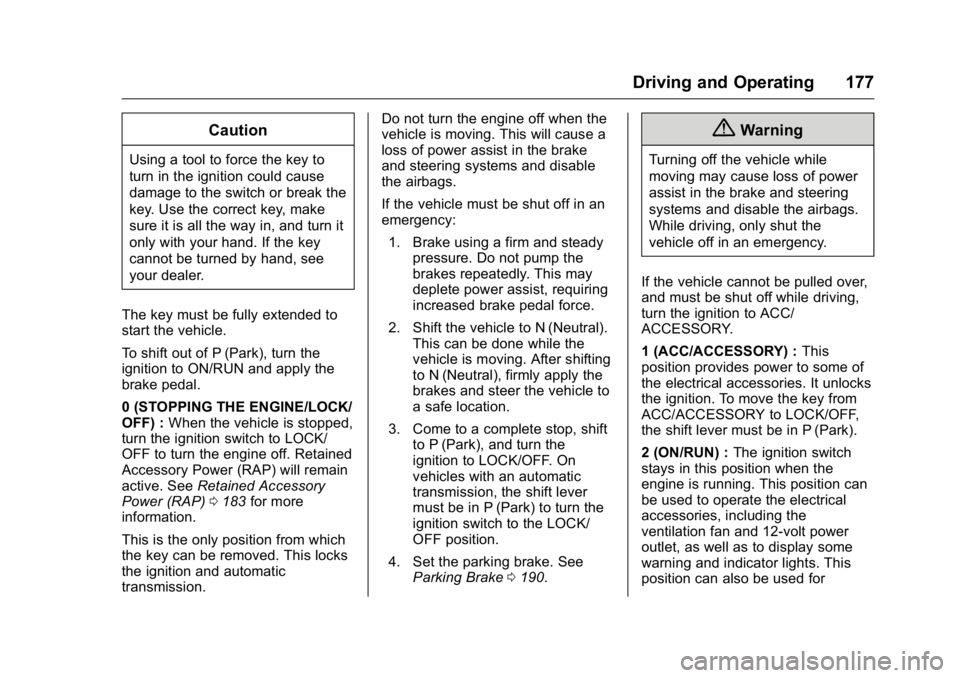
The key must be fully extended to
start the vehicle.
To shift out of P (Park), turn the
ignition to ON/RUN and apply the
brake pedal.
0 (STOPPING THE ENGINE/LOCK/
OFF) : When the vehicle is stopped,
turn the ignition switch to LOCK/
OFF to turn the engine off. Retained
Accessory Power (RAP) will remain
active. See Retained Accessory
Power (RAP) 0183 for more
information.
This is the only position from which
the key can be removed. This locks
the ignition and automatic
transmission. Do not turn the engine off when the
vehicle is moving. This will cause a
loss of power assist in the brake
and steering systems and disable
the airbags.
If the vehicle must be shut off in an
emergency:
1. Brake using a firm and steady pressure. Do not pump the
brakes repeatedly. This may
deplete power assist, requiring
increased brake pedal force.
2. Shift the vehicle to N (Neutral). This can be done while the
vehicle is moving. After shifting
to N (Neutral), firmly apply the
brakes and steer the vehicle to
a safe location.
3. Come to a complete stop, shift to P (Park), and turn the
ignition to LOCK/OFF. On
vehicles with an automatic
transmission, the shift lever
must be in P (Park) to turn the
ignition switch to the LOCK/
OFF position.
4. Set the parking brake. See Parking Brake 0190.
{Warning
Turning off the vehicle while
moving may cause loss of power
assist in the brake and steering
systems and disable the airbags.
While driving, only shut the
vehicle off in an emergency.
If the vehicle cannot be pulled over,
and must be shut off while driving,
turn the ignition to ACC/
ACCESSORY.
1 (ACC/ACCESSORY) : This
position provides power to some of
the electrical accessories. It unlocks
the ignition. To move the key from
ACC/ACCESSORY to LOCK/OFF,
the shift lever must be in P (Park).
2 (ON/RUN) : The ignition switch
stays in this position when the
engine is running. This position can
be used to operate the electrical
accessories, including the
ventilation fan and 12-volt power
outlet, as well as to display some
warning and indicator lights. This
position can also be used for
Page 184 of 367
Buick LaCrosse Owner Manual (GMNA-Localizing-U.S./Canada/Mexico-
9159288) - 2016 - CRC - 10/5/15
Driving and Operating 183
The length of time the heater should
remain plugged in depends on
several factors. Ask a dealer in the
area where you will be parking the
vehicle for the best advice on this.
Retained Accessory
Power (RAP)
These vehicle accessories can be
used for up to 10 minutes after the
engine is turned off:
.Infotainment System
. Power Windows
. Sunroof (If Equipped)
. Auxiliary Power Outlet
Power to the audio system will
continue to operate for up to
10 minutes or until the driver door is
opened.
Power to the power windows and
sunroof will continue to operate for
up to 10 minutes or until any door is
opened.
All of these features will work when
the ignition is in ON/RUN or ACC/
ACCESSORY.
Shifting Into Park
1. Hold the brake pedal down and set the parking brake. See
Parking Brake 0190.
2. Move the shift lever into P (Park) by pushing the lever
all the way toward the front of
the vehicle.
3. Turn the ignition off.
Leaving the Vehicle with the
Engine Running
{Warning
It can be dangerous to leave the
vehicle with the engine running.
It could overheat and catch fire.
It is dangerous to get out of the
vehicle if the shift lever is not fully
in P (Park) with the parking brake
firmly set. The vehicle can roll.
Do not leave the vehicle when the
engine is running. If you have left
the engine running, the vehicle
can move suddenly. You or others (Continued)
Warning (Continued)
could be injured. To be sure the
vehicle will not move, even when
you are on fairly level ground,
always set the parking brake and
move the shift lever to P (Park).
SeeShifting Into Park 0183.
If you are towing a trailer, see
Driving Characteristics and
Towing Tips 0220.
If you have to leave the vehicle with
the engine running, be sure the
vehicle is in P (Park) and the
parking brake is firmly set before
you leave it. After you have moved
the shift lever into P (Park), hold
down the regular brake pedal. See if
you can move the shift lever away
from P (Park) without first pulling it
toward you. If you can, it means that
the shift lever was not fully locked
into P (Park).
Page 185 of 367
Buick LaCrosse Owner Manual (GMNA-Localizing-U.S./Canada/Mexico-
9159288) - 2016 - CRC - 10/5/15
184 Driving and Operating
Torque Lock
Torque lock is when the weight of
the vehicle puts too much force on
the parking pawl in the
transmission. This happens when
parking on a hill and shifting the
transmission into P (Park) is not
done properly and then it is difficult
to shift out of P (Park). To prevent
torque lock, set the parking brake
and then shift into P (Park). To find
out how, see "Shifting Into P (Park)"
listed previously.
If torque lock does occur, your
vehicle may need to be pushed
uphill by another vehicle to relieve
the parking pawl pressure, so you
can shift out of P (Park).
If you are towing a trailer and
parking on a hill, seeDriving
Characteristics and Towing
Tips 0220.
Shifting out of Park
Automatic Transmission
Shift Lock
The vehicle has an automatic
transmission shift lock control
system. The shift lock control
system is designed to:
.
Prevent ignition key removal
unless the shift lever is in
P (Park).
. Prevent movement of the shift
lever out of P (Park), unless the
ignition is in ON/RUN and the
brake pedal is applied.
The shift lock is always functional
except in the case of an uncharged
or low voltage (less than 9-volt)
battery.
If the vehicle has an uncharged
battery or a battery with low voltage,
try charging or jump starting the
battery. See Jump Starting - North
America (On-board with eAssist
Only) 0297 orJump Starting - North
America (with or without
eAssist) 0298. If the shift lever cannot be moved
out of P (Park):
1. Apply and maintain the regular brakes.
2. Turn the ignition to the ON/ RUN position. See Ignition
Positions (Keyless Access)
0 175 orIgnition Positions (Key
Access) 0176 for more
information.
3. Let up on the shift lever and make sure the shift lever is
pushed all the way into
P (Park).
4. Press the shift lever button.
5. Move the shift lever into the desired gear.
If you still cannot move the shift
lever from P (Park), consult your
dealer or a professional towing
service.
Page 187 of 367
Buick LaCrosse Owner Manual (GMNA-Localizing-U.S./Canada/Mexico-
9159288) - 2016 - CRC - 10/5/15
186 Driving and Operating
Running the Vehicle
While Parked
It is better not to park with the
engine running.
If the vehicle is left with the engine
running, follow the proper steps to
be sure the vehicle will not move.
SeeShifting Into Park 0183 and
Engine Exhaust 0185.
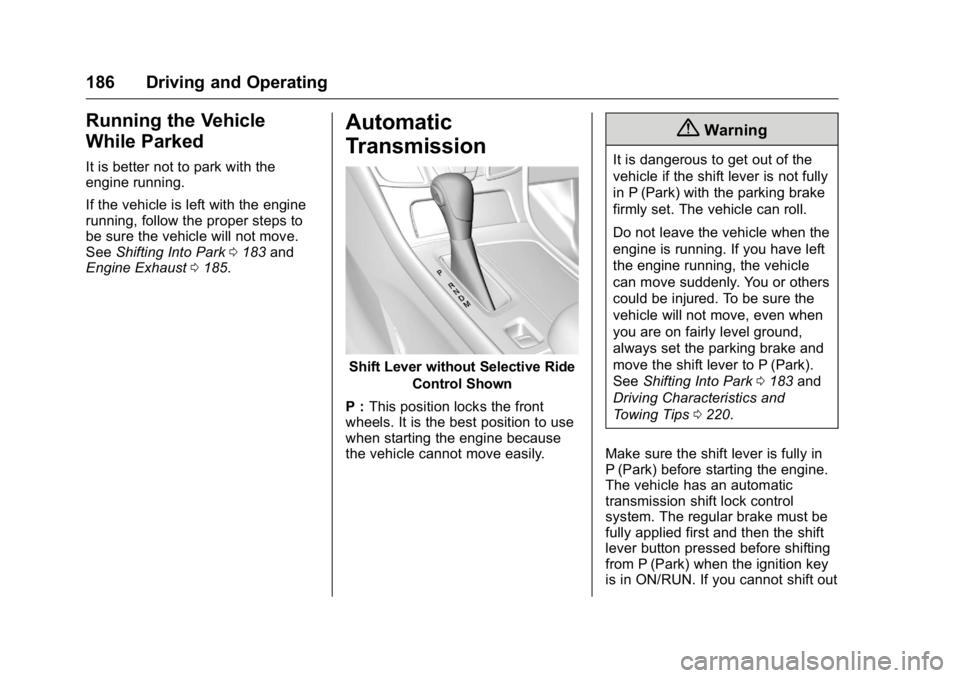
Automatic
Transmission
Shift Lever without Selective Ride
Control Shown
P : This position locks the front
wheels. It is the best position to use
when starting the engine because
the vehicle cannot move easily.
{Warning
It is dangerous to get out of the
vehicle if the shift lever is not fully
in P (Park) with the parking brake
firmly set. The vehicle can roll.
Do not leave the vehicle when the
engine is running. If you have left
the engine running, the vehicle
can move suddenly. You or others
could be injured. To be sure the
vehicle will not move, even when
you are on fairly level ground,
always set the parking brake and
move the shift lever to P (Park).
See Shifting Into Park 0183 and
Driving Characteristics and
Towing Tips 0220.
Make sure the shift lever is fully in
P (Park) before starting the engine.
The vehicle has an automatic
transmission shift lock control
system. The regular brake must be
fully applied first and then the shift
lever button pressed before shifting
from P (Park) when the ignition key
is in ON/RUN. If you cannot shift out
Page 196 of 367
Buick LaCrosse Owner Manual (GMNA-Localizing-U.S./Canada/Mexico-
9159288) - 2016 - CRC - 10/5/15
Driving and Operating 195
To switch from TOUR to SPORT
mode, move the shift lever to the M/
S (Manual/Sport) position.
TOUR :Use for normal city and
highway driving. This setting
provides a smooth, soft ride.
SPORT : Use where road conditions
or personal preference demand
more control. This setting provides
more “feel,” or response to road
conditions through increased
steering effort and suspension
tuning.
The setting can be changed at any
time. Based on road conditions,
steering wheel angle, and vehicle
speed, the system automatically
adjusts to provide the best handling
while providing a smooth ride. The
TOUR and SPORT modes will feel
similar on a smooth road.Cruise Control
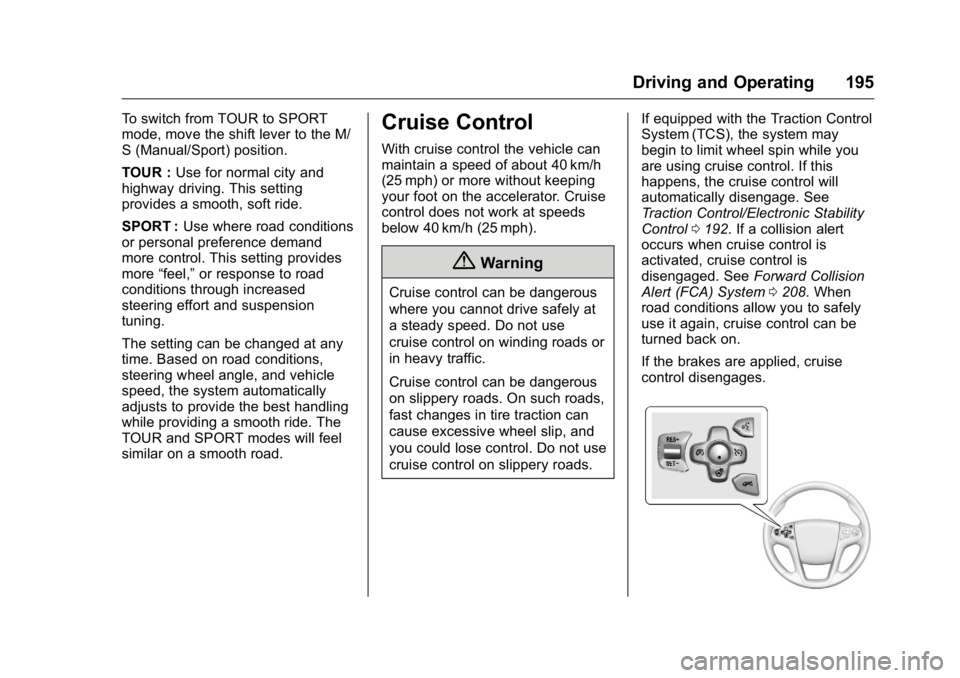
With cruise control the vehicle can
maintain a speed of about 40 km/h
(25 mph) or more without keeping
your foot on the accelerator. Cruise
control does not work at speeds
below 40 km/h (25 mph).
{Warning
Cruise control can be dangerous
where you cannot drive safely at
a steady speed. Do not use
cruise control on winding roads or
in heavy traffic.
Cruise control can be dangerous
on slippery roads. On such roads,
fast changes in tire traction can
cause excessive wheel slip, and
you could lose control. Do not use
cruise control on slippery roads. If equipped with the Traction Control
System (TCS), the system may
begin to limit wheel spin while you
are using cruise control. If this
happens, the cruise control will
automatically disengage. See
Traction Control/Electronic Stability
Control
0192. If a collision alert
occurs when cruise control is
activated, cruise control is
disengaged. See Forward Collision
Alert (FCA) System 0208. When
road conditions allow you to safely
use it again, cruise control can be
turned back on.
If the brakes are applied, cruise
control disengages.
Page 197 of 367
Buick LaCrosse Owner Manual (GMNA-Localizing-U.S./Canada/Mexico-
9159288) - 2016 - CRC - 10/5/15
196 Driving and Operating
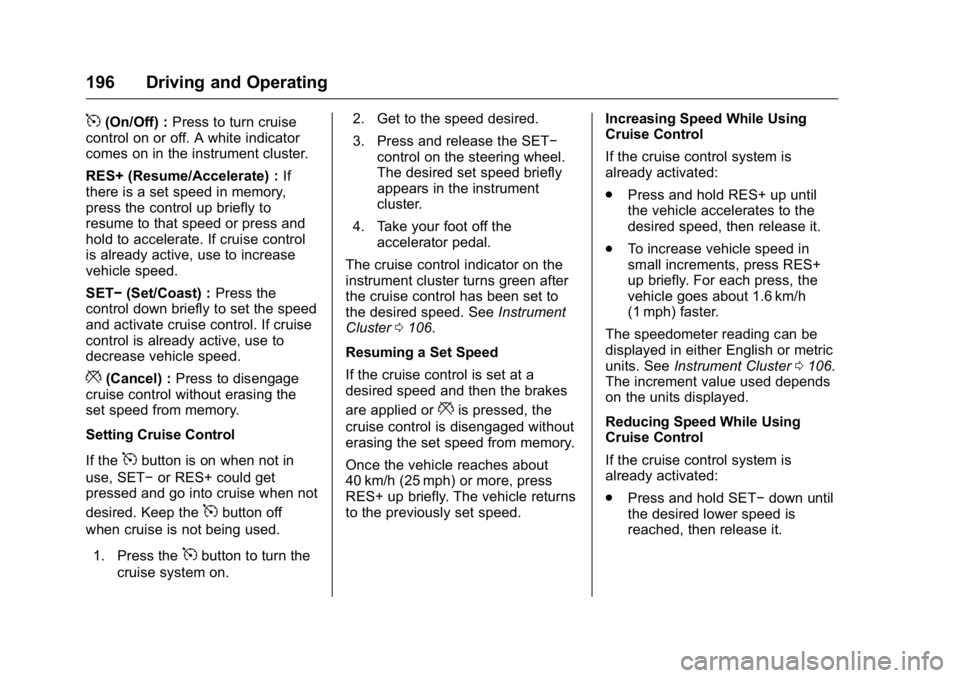
5(On/Off) :Press to turn cruise
control on or off. A white indicator
comes on in the instrument cluster.
RES+ (Resume/Accelerate) : If
there is a set speed in memory,
press the control up briefly to
resume to that speed or press and
hold to accelerate. If cruise control
is already active, use to increase
vehicle speed.
SET− (Set/Coast) : Press the
control down briefly to set the speed
and activate cruise control. If cruise
control is already active, use to
decrease vehicle speed.
*(Cancel) : Press to disengage
cruise control without erasing the
set speed from memory.
Setting Cruise Control
If the
5button is on when not in
use, SET− or RES+ could get
pressed and go into cruise when not
desired. Keep the
5button off
when cruise is not being used.
1. Press the
5button to turn the
cruise system on. 2. Get to the speed desired.
3. Press and release the SET−
control on the steering wheel.
The desired set speed briefly
appears in the instrument
cluster.
4. Take your foot off the accelerator pedal.
The cruise control indicator on the
instrument cluster turns green after
the cruise control has been set to
the desired speed. See Instrument
Cluster 0106.
Resuming a Set Speed
If the cruise control is set at a
desired speed and then the brakes
are applied or
*is pressed, the
cruise control is disengaged without
erasing the set speed from memory.
Once the vehicle reaches about
40 km/h (25 mph) or more, press
RES+ up briefly. The vehicle returns
to the previously set speed. Increasing Speed While Using
Cruise Control
If the cruise control system is
already activated:
.
Press and hold RES+ up until
the vehicle accelerates to the
desired speed, then release it.
. To increase vehicle speed in
small increments, press RES+
up briefly. For each press, the
vehicle goes about 1.6 km/h
(1 mph) faster.
The speedometer reading can be
displayed in either English or metric
units. See Instrument Cluster 0106.
The increment value used depends
on the units displayed.
Reducing Speed While Using
Cruise Control
If the cruise control system is
already activated:
. Press and hold SET− down until
the desired lower speed is
reached, then release it.