2016 BUICK ENVISION Start
[x] Cancel search: StartPage 5 of 432

Buick Envision Owner Manual (GMNA-Localizing-U.S./Canada/Mexico-
8534310) - 2016 - crc - 2/29/16
4 Introduction
*:Malfunction Indicator Lamp
::Oil Pressure
Q:OnStar®
}:Power
/:Remote Vehicle Start
>: Safety Belt Reminders
%:Steering Wheel Controls
7: Tire Pressure Monitor
d:Traction Control/StabiliTrak®
a:Under Pressure
M: Windshield Washer Fluid
Page 6 of 432
Buick Envision Owner Manual (GMNA-Localizing-U.S./Canada/Mexico-
8534310) - 2016 - crc - 2/29/16
In Brief 5
In Brief
Instrument Panel
Instrument Panel Overview . . . . . . 6
Initial Drive Information
Initial Drive Information . . . . . . . . . . 8
Remote Keyless Entry (RKE)System . . . . . . . . . . . . . . . . . . . . . . . . 8
Remote Vehicle Start . . . . . . . . . . . 9
Door Locks . . . . . . . . . . . . . . . . . . . . . 9
Liftgate . . . . . . . . . . . . . . . . . . . . . . . . . . 9
Seat Adjustment . . . . . . . . . . . . . . . 10
Memory Features . . . . . . . . . . . . . . 11
Heated and Cooled Front Seats . . . . . . . . . . . . . . . . . . . . . . . . . 11
Head Restraint Adjustment . . . . 12
Safety Belts . . . . . . . . . . . . . . . . . . . . 12
Passenger Sensing System . . . 12
Mirror Adjustment . . . . . . . . . . . . . . 13
Steering Wheel Adjustment . . . . 14
Interior Lighting . . . . . . . . . . . . . . . . 14
Exterior Lighting . . . . . . . . . . . . . . . 15
Windshield Wiper/Washer . . . . . . 15
Climate Controls . . . . . . . . . . . . . . . 17
Transmission . . . . . . . . . . . . . . . . . . 17
Vehicle Features
Steering Wheel Controls . . . . . . . 18
Cruise Control . . . . . . . . . . . . . . . . . 18 Driver Information
Center (DIC) . . . . . . . . . . . . . . . . . 19
Forward Collision Alert (FCA) System . . . . . . . . . . . . . . . . . . . . . . . 19
Front Automatic Braking (FAB)
System . . . . . . . . . . . . . . . . . . . . . . . 19
Lane Keep Assist (LKA) . . . . . . . 20
Lane Change Alert (LCA) . . . . . . 20
Surround Vision . . . . . . . . . . . . . . . 20
Rear Vision Camera (RVC) . . . . 20
Rear Cross Traffic Alert (RCTA) System . . . . . . . . . . . . . . . . . . . . . . . 20
Parking Assist . . . . . . . . . . . . . . . . . 21
Automatic Parking Assist (APA) . . . . . . . . . . . . . . . . . . 21
Power Outlets . . . . . . . . . . . . . . . . . 21
Universal Remote System . . . . . 21
Sunroof . . . . . . . . . . . . . . . . . . . . . . . . 22
Performance and Maintenance
Traction Control/Electronic Stability Control . . . . . . . . . . . . . . 23
Tire Pressure Monitor . . . . . . . . . . 23
Engine Oil Life System . . . . . . . . 23
Driving for Better Fuel Economy . . . . . . . . . . . . . . . . . . . . . 24
Roadside Assistance Program . . . . . . . . . . . . . . . . . . . . . . 24
Page 8 of 432

Buick Envision Owner Manual (GMNA-Localizing-U.S./Canada/Mexico-
8534310) - 2016 - crc - 2/29/16
In Brief 7
1.Air Vents 0244.
2. Turn Signal Lever. See Turn
and Lane-Change
Signals 0159.
3. Instrument Cluster 0111.
Driver Information Center
Display. See Driver Information
Center (DIC) (Base Level)
0 128 orDriver Information
Center (DIC) (Uplevel) 0131.
4. Windshield Wiper/
Washer 0104.
Rear Window Wiper/
Washer 0106.
5. Hazard Warning
Flashers 0159.
6. AM-FM Radio 0170.
7. Light Sensor. See Automatic
Headlamp System 0157.
8. Lane Keep Assist (LKA) 0296
(If Equipped).
Assistance Systems for
Parking or Backing 0285 (If
Equipped).
9. Clock 0107. 10.
Heated and Cooled Front
Seats 055 (If Equipped).
11. Dual Automatic Climate Control
System 0240.
12. Traction Control/Electronic
Stability Control 0273.
13. Electric Parking Brake 0271.
14. Shift Lever. See Automatic
Transmission 0267.
15. ENGINE START/STOP Button. SeeIgnition Positions 0259.
16. Steering Wheel Controls 0103
(If Equipped).
Driver Information Center (DIC)
Buttons. See Driver Information
Center (DIC) (Base Level)
0 128 orDriver Information
Center (DIC) (Uplevel) 0131.
17. Horn 0104.
18. Steering Wheel
Adjustment 0103.
19. Cruise Control 0275.
Adaptive Cruise Control 0277
(If Equipped). Heated Steering Wheel
0104
(If Equipped).
Forward Collision Alert (FCA)
System 0290 (If Equipped).
20. Data Link Connector (DLC) (Out of View). See Malfunction
Indicator Lamp (Check Engine
Light) 0119.
21. Front Storage 097.
22. Instrument Panel Illumination
Control 0160.
Head-Up Display (HUD) 0133
(If Equipped) (Out of View).
23. Exterior Lamp Controls 0155.
Fog Lamps 0160 (If
Equipped).
Page 9 of 432

Buick Envision Owner Manual (GMNA-Localizing-U.S./Canada/Mexico-
8534310) - 2016 - crc - 2/29/16
8 In Brief
Initial Drive
Information
This section provides a brief
overview about some of the
important features that may or may
not be on your specific vehicle.
For more detailed information, refer
to each of the features which can be
found later in this owner manual.
Remote Keyless Entry
(RKE) System
The Remote Keyless Entry (RKE)
transmitter may work up to
60 m (197 ft) away from the vehicle.
Press this button to remove the key.
The key can be used to open the
driver door.
K:Press to unlock the driver door
or all doors.
For vehicles with the manual
liftgate, press
Ktwice within
five seconds to unlock the liftgate.
Q: Press to lock all doors.
Lock and unlock feedback can be
personalized.
b: If equipped, press twice
quickly to open or close the liftgate.
Press and release once to stop the
liftgate from moving.
7: Press and release to initiate
vehicle locator. Press and hold for at
least three seconds to sound the
panic alarm. Press
7again to
cancel the panic alarm.
/: Press and releaseQand then
immediately press and hold
/for at
least four seconds to start the
engine from outside the vehicle
using the RKE transmitter.
See Keys 025 and Remote Keyless
Entry (RKE) System Operation 026.
Page 10 of 432

Buick Envision Owner Manual (GMNA-Localizing-U.S./Canada/Mexico-
8534310) - 2016 - crc - 2/29/16
In Brief 9
Remote Vehicle Start
If equipped, the engine can be
started from outside of the vehicle.
Starting the Vehicle
1. Press and releaseQon the
RKE transmitter.
2. Immediately press and hold
/
for at least four seconds or until
the turn signal lamps flash.
Start the vehicle normally after
entering.
When the vehicle starts, the parking
lamps will turn on.
Remote start can be extended.
Canceling a Remote Start
To cancel a remote start, do one of
the following:
. Press and hold
/until the
parking lamps turn off.
. Turn on the hazard warning
flashers.
. Turn the vehicle on and then off.
See Remote Vehicle Start 032.
Door Locks
See Door Locks 033.
Keyless Access
If equipped with Keyless Access,
the RKE transmitter must be within
1 m (3 ft) of the door being opened.
Press the button on the door handle
to open. The liftgate is also
unlocked when the RKE transmitter
is within range of the liftgate handle.
Press the touch pad underneath the
handle and lift.
See “Keyless Access Operation” in
Remote Keyless Entry (RKE)
System Operation 026.
Liftgate
To open the liftgate, pressKon the
power door lock switch or press
K
on the Remote Keyless Entry (RKE)
transmitter twice to unlock all doors.
Press the touch pad on the
underside of the liftgate handle and
lift up. See Remote Keyless Entry
(RKE) System Operation 026.
Use the pull cup to lower and close
the liftgate. Do not press the touch
pad while closing the liftgate. This
will cause the liftgate to be
unlatched.
Page 11 of 432

Buick Envision Owner Manual (GMNA-Localizing-U.S./Canada/Mexico-
8534310) - 2016 - crc - 2/29/16
10 In Brief
Power Liftgate Operation
If equipped with a power liftgate, the
switch is on the driver door. The
vehicle must be in P (Park).
Choose the power liftgate mode by
selecting MAX or 3/4. Press
8on
the driver door. The driver door
must be unlocked. On the RKE
transmitter press
btwice quickly
until the liftgate starts moving.
Press any liftgate button while the
liftgate is moving to stop it. Pressing
again reverses the direction.
To close, press
lon the bottom
of the liftgate next to the pull cup.
To disable the power liftgate
function, select OFF on the liftgate
switch. See Liftgate036.
Seat Adjustment
Power Seat
To adjust a power seat:
.
Move the seat forward or
rearward by sliding the control
forward or rearward.
. Raise or lower the front part of
the seat cushion by moving the
front of the control up or down.
. Raise or lower the entire seat by
moving the rear of the control up
or down.
See Power Seat Adjustment 052.
Lumbar Support
To adjust the lumbar support,
if equipped:
.
Press the front or rear of the
switch to increase or decrease
lumbar support.
. Press the top or bottom of the
switch to raise or lower the
lumbar support.
. Release the switch when the
level of support is reached.
See Lumbar Adjustment 052.
Page 14 of 432
Buick Envision Owner Manual (GMNA-Localizing-U.S./Canada/Mexico-
8534310) - 2016 - crc - 2/29/16
In Brief 13
The passenger airbag status
indicator lights on the overhead
console are visible when the vehicle
is started. SeePassenger Airbag
Status Indicator 0118.
Mirror Adjustment
Interior Mirrors
Adjust the rearview mirror for a clear
view of the area behind your
vehicle.
Automatic Rearview Mirror
If equipped, automatic dimming
reduces the glare of headlamps
from behind. The dimming feature
comes on when the vehicle is
started.
Exterior Mirrors
Power Mirrors
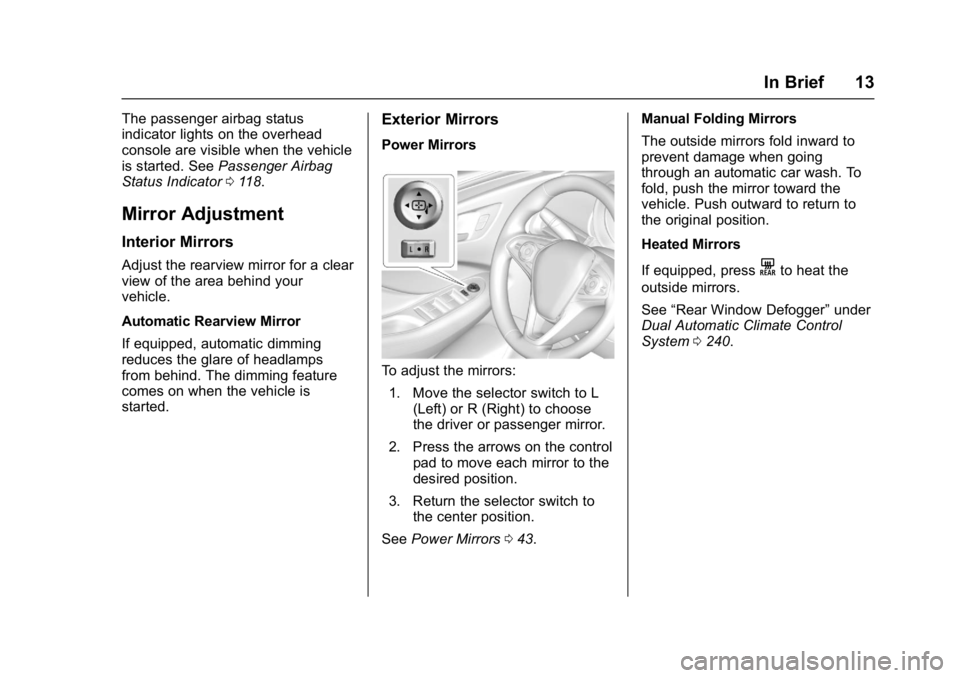
To adjust the mirrors:
1. Move the selector switch to L (Left) or R (Right) to choose
the driver or passenger mirror.
2. Press the arrows on the control pad to move each mirror to the
desired position.
3. Return the selector switch to the center position.
See Power Mirrors 043. Manual Folding Mirrors
The outside mirrors fold inward to
prevent damage when going
through an automatic car wash. To
fold, push the mirror toward the
vehicle. Push outward to return to
the original position.
Heated Mirrors
If equipped, press
Kto heat the
outside mirrors.
See “Rear Window Defogger” under
Dual Automatic Climate Control
System 0240.
Page 16 of 432

Buick Envision Owner Manual (GMNA-Localizing-U.S./Canada/Mexico-
8534310) - 2016 - crc - 2/29/16
In Brief 15
Rear Reading Lamps
Press the lamp lens to turn the rear
passenger reading lamps on or off.
For more information on interior
lighting, see Instrument Panel
Illumination Control 0160.
Exterior Lighting
The exterior lamp control is on the
instrument panel on the outboard
side of the steering wheel.
Turn the control to the following
positions:
O:Turns off the exterior lamps.
The knob returns to the AUTO
position after it is released. Turn to
Oagain to reactivate the
AUTO mode.
AUTO : Automatically turns the
exterior lamps on and off,
depending on outside lighting.
;: Turns on the parking lamps
including all lamps, except the
headlamps.
2: Turns on the headlamps
together with the parking lamps and
instrument panel lights.
See:
. Exterior Lamp Controls 0155.
. Fog Lamps 0160.
Windshield Wiper/Washer
Windshield Wiper with Rainsense
(AUTO Shown)
Windshield Wiper with IntermittentWipes (INT Shown)
With the ignition in ACC/
ACCESSORY or ON/RUN/START,
move the windshield wiper lever to
select the wiper speed.
HI : Use for fast wipes.