2016 BMW Z4 top
[x] Cancel search: topPage 36 of 289

▷Trunk lid.▷Fuel filler flap.▷Center armrest.
Operating from the outside
▷Via the remote control.▷Via the driver's door lock.▷In cars with Comfort Access, via the door
handles on the driver's and front passen‐
ger sides.
The following takes place simultaneously
when locking/unlocking the vehicle via the re‐
mote control:
▷The welcome lamps, interior lamps and
courtesy lamps are switched on and off.▷The alarm system is armed or disarmed,
refer to page 39.
Operating from the inside
Via the button for the central locking system.
If the vehicle is locked from the inside, the fuel
filler flap remains unlocked.
If an accident of a certain severity occurs, the
central locking system unlocks automatically.
The hazard warning system and interior lamps
come on.
Opening and closing: from
the outside
Using the remote control
General information Take the remote control with you
People or animals left unattended in a
parked vehicle can lock the doors from the in‐
side. Always take the remote control with you
when leaving the vehicle so that the vehicle
can then be opened from the outside.◀
Conditions for operating the retractable hard‐
top using the remote control:▷The doors and trunk lid are closed.▷The cargo area partition is folded down
and engaged on both sides, refer to
page 43.
Unlocking
Press the button. The vehicle is unlocked.
You can set how the vehicle is to be unlocked.
The setting is stored for the remote control
currently in use.
1."Settings"2."Door locks"3."Unlock button:"4.Select a menu item:▷"All doors"
The entire vehicle is unlocked.
▷"Driver's door only"Seite 32ControlsOpening and closing32
Online Edition for Part no. 01 40 2 957 403 - X/14
Page 37 of 289

Only the driver's door and the fuel
filler flap are unlocked. Pressing again
unlocks the entire vehicle.5.Press the controller.
Convenient opening: window and hardtop
When you are close to the vehicle, the remote
control for Comfort Access can be used to
open the retractable hardtop.
Press and hold the button on the remote
control.
The windows and the retractable hardtop are
opened if the doors are closed.
Hold the button down. When you are close
to the vehicle, the windows move up after the
hardtop is opened.
Monitor the opening process
Monitor the opening process to ensure
that no one becomes trapped; otherwise, inju‐
ries may result. Releasing the button interrupts
the opening process.◀
Locking
Press the button on the remote con‐
trol.
Locking from the outside
Do not lock the vehicle from the outside
if there are people in it, as the vehicle cannot
be unlocked from inside without special knowl‐
edge.◀
Convenient closing
When you are close to the vehicle, the remote
control for Comfort Access can be used to
close the retractable hardtop and the windows.
Press and hold the button on the re‐
mote control.
The retractable hardtop and the windows are
closed.
Monitor the closing process
Monitor the closing process to ensure
that no one becomes trapped.
Releasing the button stops the motion.◀
Switching on the interior lamps and courtesy lamps
Press the button on the remote con‐
trol with the vehicle locked.
Unlocking the trunk lid
Press the button on the remote control for
approx. one second.
Note the opening height of the trunk lid
During opening, the trunk lid pivots back
and up. Ensure that there is sufficient clear‐
ance when the trunk lid opens; otherwise,
damage may result.◀
To avoid locking yourself out of the vehicle, do
not place the remote control into the cargo
area. A previously locked trunk lid is locked
again after closing.
Before and after each trip, check that the trunk
lid has not been inadvertently unlocked.
Convenient loading
When you are close to the vehicle, the remote
control for Comfort Access can be used to par‐
tially tilt the open hardtop for more convenient
loading of the trunk.
1. Briefly press the button on the remote
control.
Press again within one second and hold
until the retractable hardtop stops in an in‐
termediate position. The trunk lid opens
slightly.2.Open the trunk lid, press the cargo area
partition upward and stow the cargo in the
cargo area.Seite 33Opening and closingControls33
Online Edition for Part no. 01 40 2 957 403 - X/14
Page 38 of 289

3.Press down the cargo area partition until it
engages on both sides and close the trunk
lid.4. Press the button on the remote control
for an extended period to fold the retracta‐
ble hardtop back in.
Confirmation signals from the vehicle
1."Settings"2."Door locks"3."Flash when lock/unlock"4.Press the controller
Retrieving the seat and mirror settings
The driver's seat and exterior mirror positions
used last are stored for the remote control cur‐
rently in use.
When the vehicle is being unlocked, these po‐
sitions are automatically retrieved if the setting
is activated.
Keep the footwell behind the driver's
seat clear
When this Personal Profile function is used,
first make sure that the footwell behind the
driver's seat is free of obstacles. Failure to do
so could result in damage to the objects if the
seat were to move rearward.◀
The adjustment procedure is interrupted:
▷When a seat position switch is pressed.▷When a button of the seat and mirror mem‐
ory is pressed briefly.1."Settings"2."Door locks"3."Last seat position auto."
Malfunctions
Local radio waves may interfere with the re‐
mote control.
In this case, unlock and lock the car at the door
lock with the integrated key.
In vehicles without an alarm system or Comfort
Access, only the driver's door can be unlocked
and locked using the integrated key in the door
lock.
If the car can no longer be locked with a re‐
mote control, the battery in the remote control
is discharged. Use the remote control during
an extended drive in order to recharge the bat‐
tery, refer to page 30.
The remote control for Comfort Access con‐
tains a battery that may need to be replaced,
refer to page 39.
For US owners only
The transmitter and receiver units comply with
part 15 of the FCC/Federal Communication
Commission regulations. Operation is gov‐
erned by the following:
FCC ID:
LX8766S
LX8766E
LX8CAS
Compliance statement:
Seite 34ControlsOpening and closing34
Online Edition for Part no. 01 40 2 957 403 - X/14
Page 40 of 289

Unlocking and opening doors▷Press the button. The doors are
unlocked. To open, pull the door
handle above the armrest.▷Pull the door handle above the armrest
twice: the door is unlocked the first time
and opened the second time.
Locking
▷Press the button. The doors are
locked.▷Press the lock button of a door. To prevent
you from being locked out, the opened
driver's door cannot be locked using the
lock button.
Take the remote control with you
People or animals left unattended in a
parked vehicle can lock the doors from the in‐
side. Always take the remote control with you
when leaving the vehicle so that the vehicle
can then be opened from the outside.◀
Trunk lid Note the opening height of the trunk lid
During opening, the trunk lid pivots back
and up. Ensure that there is sufficient clear‐
ance when the trunk lid opens; otherwise,
damage may result.◀
Opening from the inside
Press the button.
The trunk lid opens unless it has been locked.
Opening from the outside▷Press on the top half of the BMW emblem.▷ Press the button on the remote control
for approx. one second.
The trunk lid can be opened.
Closing
Recessed grips in the interior trim of the trunk
lid make it easier to pull down the lid.
Danger of pinching
Make sure that the closing path of the
trunk lid is clear; otherwise, injuries may re‐
sult.◀
Press the trunk lid down lightly.
It is closed automatically.
Seite 36ControlsOpening and closing36
Online Edition for Part no. 01 40 2 957 403 - X/14
Page 41 of 289

Emergency unlocking
Pull the lever in the cargo area.
The trunk lid unlocks.
Comfort Access
The concept The vehicle can be accessed without activat‐
ing the remote control.
All you need to do is to have the remote con‐ trol with you, e.g., in your jacket pocket.
The vehicle automatically detects the remote
control when it is nearby or in the passenger
compartment.
Comfort Access supports the following func‐
tions:
▷Unlocking/locking of the vehicle.▷Convenient closing.▷Convenient opening▷Unlocking of the trunk lid separately.▷Starting the engine.
Functional requirement
▷To lock the vehicle, the remote control
must be located outside of the vehicle.▷The vehicle cannot be unlocked or locked
again for approx. the next two seconds.▷The engine can only be started if the re‐
mote control is inside the vehicle.Comparison to the standard remote
control
The specified functions can be controlled by
pressing the button or via Comfort Access.
If you notice a brief delay while opening or
closing the windows or retractable hardtop, the
system is checking whether a remote control is
inside the vehicle. Repeat the opening or clos‐
ing procedure, if necessary.
Unlocking
Pull the handle up, arrow 1. This corresponds
to pressing the
button.
Locking
Press on the surface, arrow 2.
This corresponds to pressing the
but‐
ton.
To save battery power, ensure that the ignition
and all electronic systems and/or power con‐
sumers are switched off before locking the ve‐
hicle.
Seite 37Opening and closingControls37
Online Edition for Part no. 01 40 2 957 403 - X/14
Page 42 of 289

Window and convertible top operation
With the ignition in the radio ready state or be‐
yond, the windows and the convertible top can
be opened and closed when a remote control
is located inside the vehicle.
Unlocking the trunk lid separately
Press on the top half of the BMW emblem.
This corresponds to pressing the
button.
If a remote control accidentally left in the cargo
area is detected in the locked vehicle, then the
trunk lid opens again. The hazard warning sys‐
tem flashes and, depending on the vehicle
equipment, a signal sounds.
Switching on the radio ready state
Pressing the Start/Stop button switches on the
radio ready state, refer to page 56.
Do not depress the brake or the clutch; other‐
wise, the engine will start.
Starting the engine
The engine can be started or the ignition can
be switched on when a remote control is inside
the vehicle. It is not necessary to insert a re‐
mote control into the ignition lock, refer to
page 55.
Switching off the engine in cars with
Sport automatic transmission
When the engine is switched off, transmission
position P is engaged automatically unless N is
engaged and the remote control is inserted in
the ignition lock.
Driving into an automatic car wash with a
Sport automatic transmission
To make it possible for the vehicle to roll, such
as in an automatic car wash, follow the instruc‐
tions in Car washes, refer to page 255.
Malfunction
The Comfort Access functions can be distur‐
bed by local radio waves, such as by a mobile
phone in the immediate vicinity of the remote
control or when a mobile phone is being
charged in the vehicle.
If this occurs, open or close the vehicle using
the buttons on the remote control or use the
integrated key in the door lock.
To start the engine afterward, insert the re‐
mote control into the ignition switch.
Warning lights The warning light in the instrument
cluster lights up when you attempt to
start the engine: the engine cannot
be started.
The remote control is not inside the vehicle or
is malfunctioning. Take the remote control with
you inside the vehicle or have it checked. If
necessary, insert another remote control into
the ignition switch.
The warning light in the instrument
cluster lights up while the engine is
running: the remote control is no lon‐
ger inside the vehicle.
After the engine is switched off, the engine can
only be restarted within approx. 10 seconds.
The indicator lamp in the instrument
cluster comes on and a message ap‐
pears on the Control Display: replace
the remote control battery.Seite 38ControlsOpening and closing38
Online Edition for Part no. 01 40 2 957 403 - X/14
Page 44 of 289

Indicator lamp on the interior rearview
mirror▷The indicator lamp flashes briefly every
2 seconds:
The system is armed.▷The indicator lamp flashes after locking:
The doors, hood or trunk lid is not closed
properly, but the rest of the vehicle is se‐
cured.
The indicator lamp flashes continuously af‐
ter approx. 10 seconds. The interior motion
sensor and tilt alarm sensor are not active.▷The indicator lamp goes out after unlock‐
ing:
The vehicle has not been tampered with.▷If the indicator lamp flashes after unlocking
until the remote control is inserted in the
ignition, but for no longer than approx.
5 minutes:
An alarm has been triggered.
Tilt alarm sensor The tilt of the vehicle is monitored.
The alarm system responds in situations such
as attempts to steal a wheel or tow the car.
Interior motion sensor The interior of the car is monitored up to the
height of the seat cushions. Thus the alarm
system is armed together with the interior mo‐
tion sensor even if the hardtop is open. An
alarm can be triggered unintentionally by fall‐
ing objects such as leaves, refer to Avoiding
unintentional alarms.
Avoiding unintentional alarms
The tilt alarm sensor and interior motion sen‐
sor can be switched off together, such as in
the following situations:▷In automatic car washes.▷In duplex garages.▷During transport on car-carrying trains, at
sea or on a trailer.▷When animals are to remain in the vehicle.
Switching off the tilt alarm sensor and
interior motion sensor
Press the remote control button again
within 10 seconds after the vehicle is locked.
The indicator lamp lights up for approx. 2 sec‐
onds and then continues flashing.
The tilt alarm sensor and interior motion sen‐
sor remain switched off until the vehicle is
locked again.
Power windows General information Take the remote control with youTake the remote control with you when
leaving the vehicle so that children, for exam‐
ple, cannot operate the power windows and in‐
jure themselves.◀
Danger of pinching
Monitor the closing process and make
sure that the closing path of the window is
clear; otherwise, injuries may result.◀
Seite 40ControlsOpening and closing40
Online Edition for Part no. 01 40 2 957 403 - X/14
Page 45 of 289
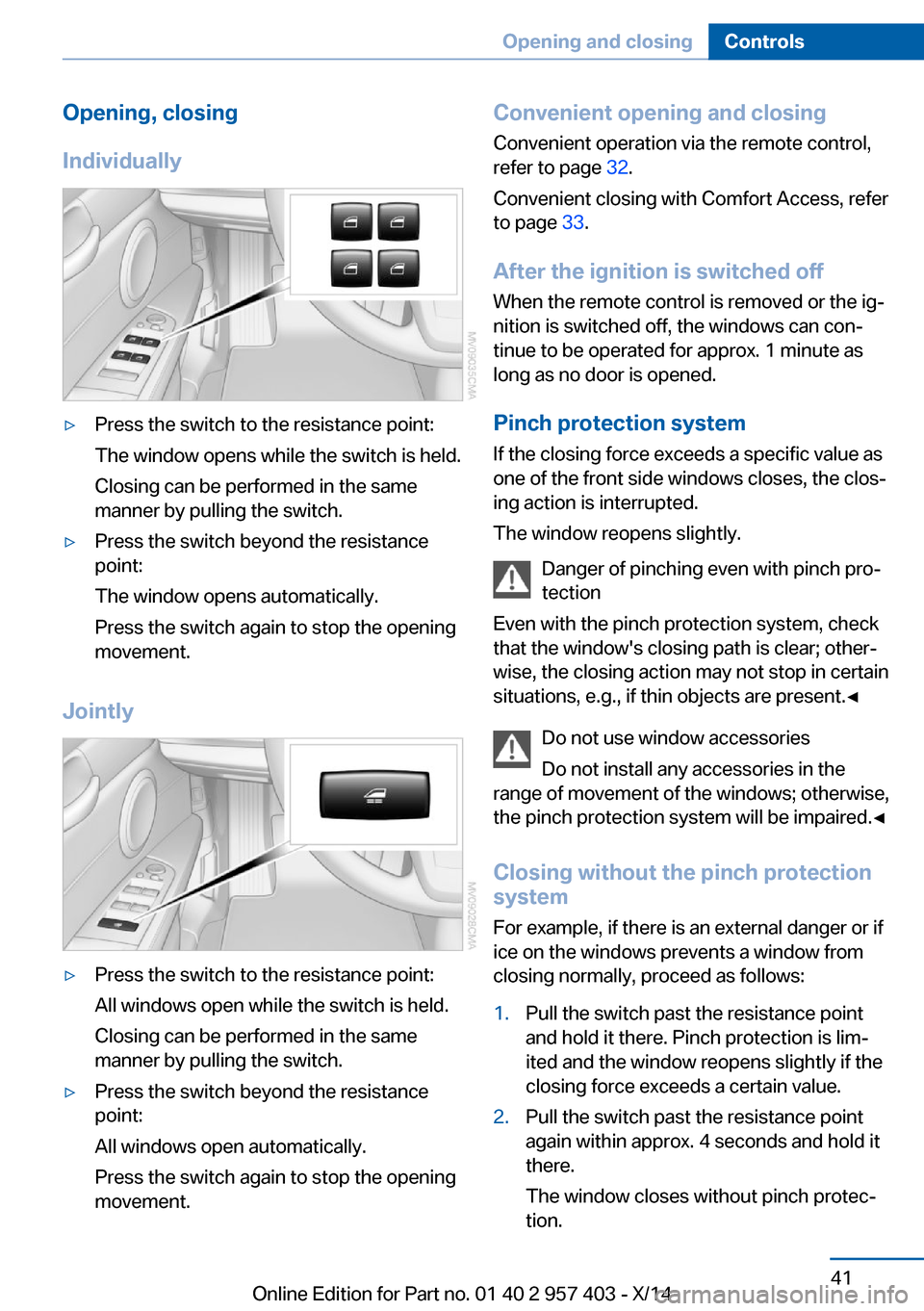
Opening, closing
Individually▷Press the switch to the resistance point:
The window opens while the switch is held.
Closing can be performed in the same
manner by pulling the switch.▷Press the switch beyond the resistance
point:
The window opens automatically.
Press the switch again to stop the opening
movement.
Jointly
▷Press the switch to the resistance point:
All windows open while the switch is held.
Closing can be performed in the same
manner by pulling the switch.▷Press the switch beyond the resistance
point:
All windows open automatically.
Press the switch again to stop the opening
movement.Convenient opening and closing
Convenient operation via the remote control,
refer to page 32.
Convenient closing with Comfort Access, refer
to page 33.
After the ignition is switched off
When the remote control is removed or the ig‐
nition is switched off, the windows can con‐ tinue to be operated for approx. 1 minute as
long as no door is opened.
Pinch protection system
If the closing force exceeds a specific value as
one of the front side windows closes, the clos‐
ing action is interrupted.
The window reopens slightly.
Danger of pinching even with pinch pro‐
tection
Even with the pinch protection system, check
that the window's closing path is clear; other‐
wise, the closing action may not stop in certain
situations, e.g., if thin objects are present.◀
Do not use window accessories
Do not install any accessories in the
range of movement of the windows; otherwise,
the pinch protection system will be impaired.◀
Closing without the pinch protection
system
For example, if there is an external danger or if
ice on the windows prevents a window from
closing normally, proceed as follows:1.Pull the switch past the resistance point
and hold it there. Pinch protection is lim‐
ited and the window reopens slightly if the
closing force exceeds a certain value.2.Pull the switch past the resistance point
again within approx. 4 seconds and hold it
there.
The window closes without pinch protec‐
tion.Seite 41Opening and closingControls41
Online Edition for Part no. 01 40 2 957 403 - X/14