2016 BMW X4 Light cargo area
[x] Cancel search: Light cargo areaPage 38 of 253

if the interior lamps were switched off man‐
ually.▷The welcome lamps are switched on, if this
function was activated.▷The alarm system, refer to page 46, is
disarmed.
Convenient opening
Press and hold this button on the re‐
mote control after unlocking.
The windows and the glass sunroof are
opened, as long as the button on the remote
control is pressed.
Locking WARNING
Unlocking from the inside is only possi‐
ble with special knowledge.
If people must spend a longer time in the vehi‐
cle while it is very hot or cold outside, there is
risk of injuries or danger to life. Do not lock the
vehicle from the outside when there are people
in it.◀
The driver's door must be closed. Press button on the remote control.
All doors, the tailgate, and the fuel filler flap are
being locked.
The alarm system, refer to page 46, is armed.
Switching on interior lights and
courtesy lights
Press button on the remote control with
the vehicle locked.
The courtesy lamps are only switched on when
it is dark outside. This function is not available,
if the interior lamps were switched off man‐ ually.
If the button is pressed again within 10 sec‐
onds after vehicle was locked, the interior mo‐
tion sensor and tilt alarm sensor of the anti-
theft warning system, refer to page 47, are
turned off. After locking, wait 10 seconds be‐
fore pressing the button again.
Panic mode
You can trigger the alarm system if you find
yourself in a dangerous situation.
Press button on the remote control for
at least 3 seconds.
To switch off the alarm: press any button.
Opening the tailgate CAUTION
The tailgate swings back and up when it
opens. There is risk of property damage. Make
sure that the area of movement of the tailgate
is clear during opening and closing.◀
To avoid locking it into the vehicle, do not
place the remote control in the cargo area.
Press button on the remote control for
approx. 1 second.
The closed tailgate is automatically opened,
whether or not the vehicle is locked or un‐
locked.
Depending on the features and the country
version, it is also possible to have door un‐
locked. Create the settings, refer to page 45.
If the doors were not unlocked, the tailgate is
locked again as soon as it closes. Take the re‐
mote control with you and do not leave it in the
cargo area; otherwise, the remote control is
locked inside the vehicle when the tailgate is
closed.
CAUTION
Sharp-edged or pointed objects can hit
the rear window and heat conductors while
driving. There is risk of property damage.
Cover the edges and ensure that pointed ob‐
jects do not hit the rear window.◀Seite 38ControlsOpening and closing38
Online Edition for Part no. 01 40 2 964 144 - VI/15
Page 40 of 253

Unlock or lock the driver's door via the door
lock using the integrated key, refer to page 34.
The other doors must be unlocked or locked
from the inside.
Alarm system
The alarm system is not armed if the vehicle is
locked with the integrated key.
The alarm system is triggered when the door is
opened, if the vehicle was unlocked via the door lock.
In order to terminate this alarm, unlock vehicle
with the remote control or switch on the igni‐
tion, if needed, through emergency detection
of the remote control, refer to page 35.
From the inside
Unlocking and locking
Via the buttons for the central locking system.
▷ By pressing the button, the vehicle
is locked with the doors closed.▷ Pressing the button unlocks the
vehicle.
The vehicle is not secured against theft when
locking.
The fuel filler flap remains unlocked.
In the event of a severe accident, the vehicle is
automatically unlocked. The hazard warning
system and interior lights come on.
Unlocking and opening
▷Press the central locking system
button to unlock the doors to‐
gether, and then pull the door handle
above the armrest.▷On the door to be opened, pull the door
handle twice: the first time unlocks the
door, the second time opens it. The other
doors remain locked.
Tailgate
Information
To avoid locking it into the vehicle, do not
place the remote control in the cargo area.
Automatic tailgate operation
Adjusting the opening height
You can set how far the tailgate should open.
CAUTION
The tailgate swings back and up when it
opens. There is risk of property damage. Make
sure that the area of movement of the tailgate
is clear during opening and closing.◀
When adjusting the opening height, ensure
that there is a clearance of at least 4 in/10 cm
above the tailgate.
1."Settings"2."Tailgate"Seite 40ControlsOpening and closing40
Online Edition for Part no. 01 40 2 964 144 - VI/15
Page 144 of 253

System limits
Limits of ultrasonic measurement
Ultrasonic measuring might not function under
the following circumstances:▷For small children and animals.▷For persons with certain clothing, e.g.
coats.▷With external interference of the ultra‐
sound, e.g. from passing vehicles or loud
machines.▷When sensors are dirty, iced over, dam‐
aged or out of position.▷Under certain weather conditions such as
high relative humidity, rain, snowfall, ex‐
treme heat or strong wind.▷With tow bars and trailer couplings of other
vehicles.▷With thin or wedge-shaped objects.▷With moving objects.▷With elevated, protruding objects such as
ledges or cargo.▷With objects with corners and sharp edges.▷With objects with a fine surface structure
such as fences.▷For objects with porous surfaces.
Low objects already displayed, e.g., curbs, can
move into the blind area of the sensors before
or after a continuous tone sounds.
False warnings
PDC may issue a warning under the following conditions even though there is no obstacle
within the detection range:
▷In heavy rain.▷When sensors are very dirty or covered
with ice.▷When sensors are covered in snow.▷On rough road surfaces.▷On uneven surfaces, such as speed
bumps.▷In large buildings with right angles and
smooth walls, e.g., in underground ga‐
rages.▷In automatic car washes.▷Through heavy pollution.▷Due to other ultrasound sources, e.g.,
sweeping machines, high pressure steam
cleaners or neon lights.
Malfunction
A Check Control message is displayed.
The range of the sensors is shown as a shaded
area on the Control Display.
PDC has failed. Have the system checked.
Surround View
The concept Surround View comprises various camera as‐
sistance systems that help the driver when
parking, maneuvering, and at complex exits
and intersections.
▷Rearview camera, refer to page 144.▷Top View, refer to page 147.▷Side View, refer to page 149.
Rearview camera
The concept The rearview camera provides assistance in
parking and maneuvering backwards. The area
behind the vehicle is shown on the Control
Display.
Information WARNING
The system does not relieve from the
personal responsibility to correctly assess the
traffic situation. There is risk of an accident.
Adjust the driving style to the traffic condi‐
Seite 144ControlsDriving comfort144
Online Edition for Part no. 01 40 2 964 144 - VI/15
Page 172 of 253
CAUTION
With an open cup holder, the center arm‐
rest cannot be folded back up. There is risk of
property damage. Press back the covers be‐
fore the center armrest is folded up.◀
Clothes hooks WARNING
Clothing articles on the clothes hooks
can obstruct the view while driving. There is
risk of an accident. When suspending clothing
articles from the hooks, ensure that they will
not obstruct the driver's view.◀
WARNING
Improper use of the clothes hooks can
lead to a danger of objects flying about during
braking and evasive maneuvers. There is risk
of injuries and risk of property damage. Only
hang lightweight objects, e.g. clothing articles,
from the clothes hooks.◀
The clothes hooks are located in the rear.
Storage compartments in the
trunk
Storage space under cargo floor panel
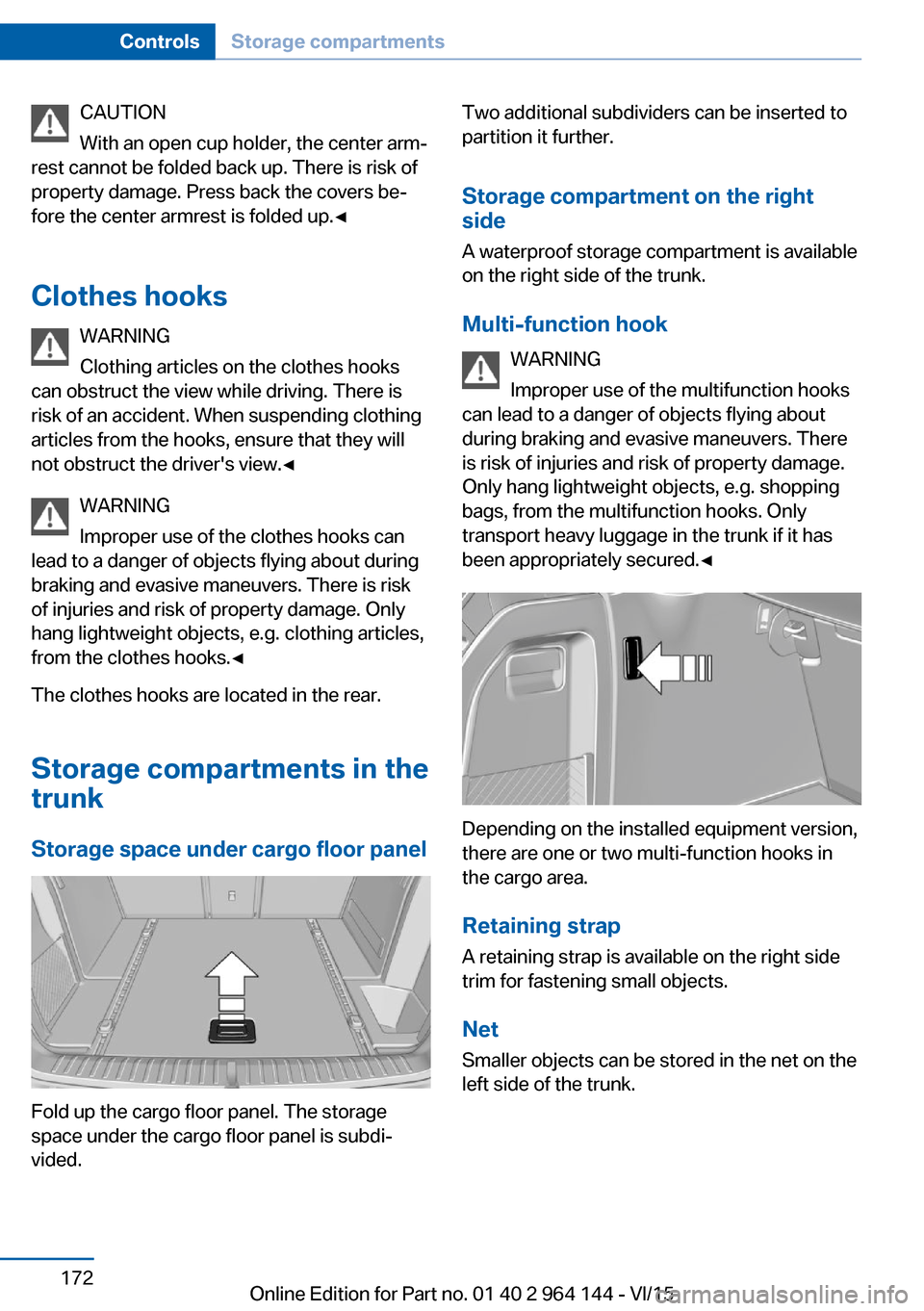
Fold up the cargo floor panel. The storage
space under the cargo floor panel is subdi‐
vided.
Two additional subdividers can be inserted to
partition it further.
Storage compartment on the right
side
A waterproof storage compartment is available
on the right side of the trunk.
Multi-function hook WARNING
Improper use of the multifunction hooks
can lead to a danger of objects flying about
during braking and evasive maneuvers. There
is risk of injuries and risk of property damage.
Only hang lightweight objects, e.g. shopping
bags, from the multifunction hooks. Only
transport heavy luggage in the trunk if it has
been appropriately secured.◀
Depending on the installed equipment version,
there are one or two multi-function hooks in
the cargo area.
Retaining strap A retaining strap is available on the right side
trim for fastening small objects.
Net
Smaller objects can be stored in the net on the
left side of the trunk.
Seite 172ControlsStorage compartments172
Online Edition for Part no. 01 40 2 964 144 - VI/15
Page 182 of 253
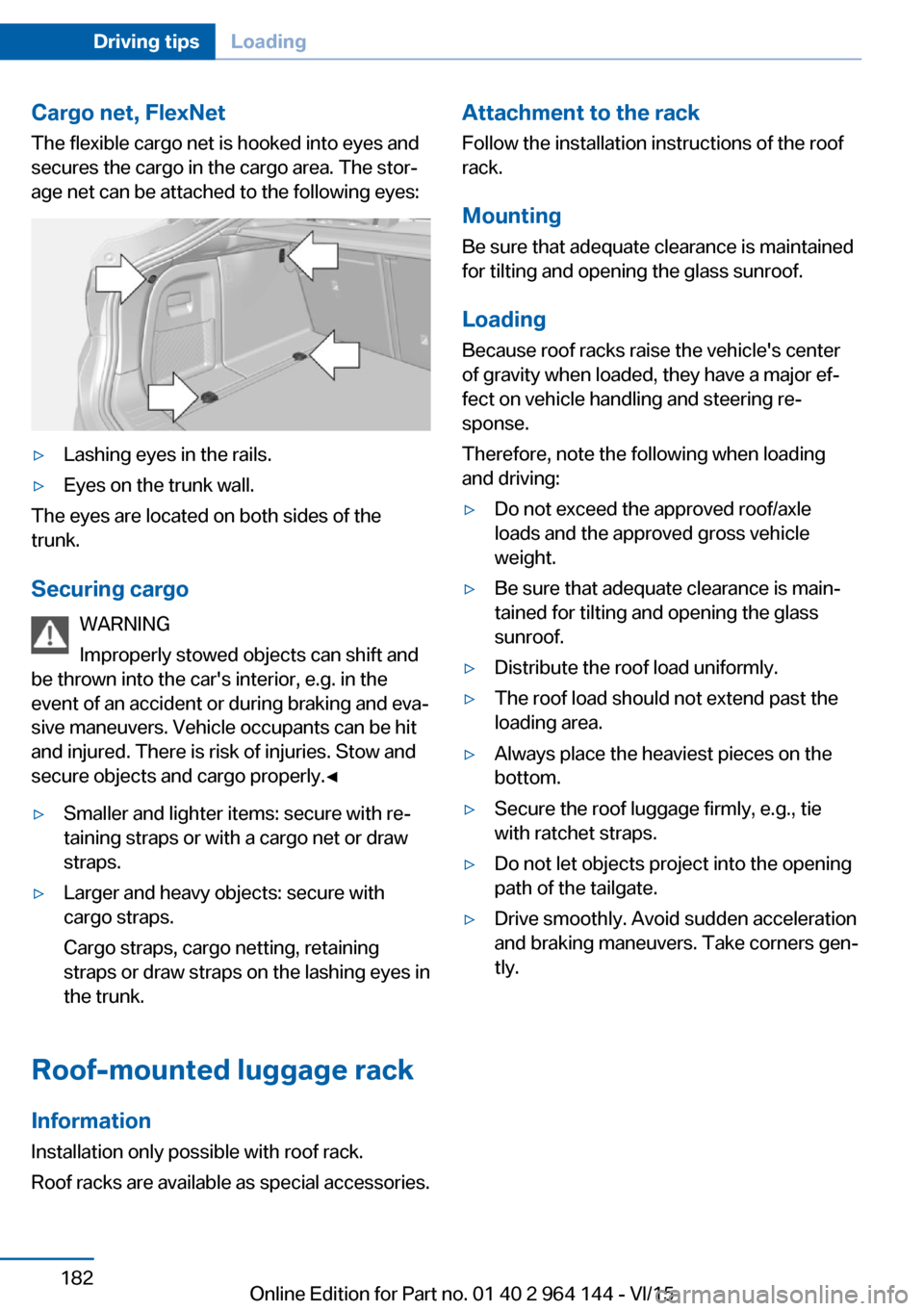
Cargo net, FlexNetThe flexible cargo net is hooked into eyes and
secures the cargo in the cargo area. The stor‐
age net can be attached to the following eyes:▷Lashing eyes in the rails.▷Eyes on the trunk wall.
The eyes are located on both sides of the
trunk.
Securing cargo WARNING
Improperly stowed objects can shift and
be thrown into the car's interior, e.g. in the
event of an accident or during braking and eva‐
sive maneuvers. Vehicle occupants can be hit
and injured. There is risk of injuries. Stow and
secure objects and cargo properly.◀
▷Smaller and lighter items: secure with re‐
taining straps or with a cargo net or draw
straps.▷Larger and heavy objects: secure with
cargo straps.
Cargo straps, cargo netting, retaining
straps or draw straps on the lashing eyes in
the trunk.
Roof-mounted luggage rack
Information
Installation only possible with roof rack.
Roof racks are available as special accessories.
Attachment to the rack Follow the installation instructions of the roof
rack.
Mounting
Be sure that adequate clearance is maintained
for tilting and opening the glass sunroof.
LoadingBecause roof racks raise the vehicle's centerof gravity when loaded, they have a major ef‐
fect on vehicle handling and steering re‐
sponse.
Therefore, note the following when loading
and driving:▷Do not exceed the approved roof/axle
loads and the approved gross vehicle
weight.▷Be sure that adequate clearance is main‐
tained for tilting and opening the glass
sunroof.▷Distribute the roof load uniformly.▷The roof load should not extend past the
loading area.▷Always place the heaviest pieces on the
bottom.▷Secure the roof luggage firmly, e.g., tie
with ratchet straps.▷Do not let objects project into the opening
path of the tailgate.▷Drive smoothly. Avoid sudden acceleration
and braking maneuvers. Take corners gen‐
tly.Seite 182Driving tipsLoading182
Online Edition for Part no. 01 40 2 964 144 - VI/15
Page 243 of 253

BMW maintenance sys‐tem 215
Bonus range, ECO PRO 185
Bottle holder, see Cu‐ pholder 171
Brake assistant 126
Brake discs, break-in 176
Brake force display 125
Brake lights, adaptive 125
Brake lights, brake force dis‐ play 125
Brake pads, break-in 176
Braking, hints 178
Breakdown assistance 226
Break-in 176
Brightness of Control Dis‐ play 95
Bulb replacement 217
Bulb replacement, front 218
Bulb replacement, rear 221
Bulbs and lights 217
Button, RES 136
Button, Start/Stop 67
Bypassing, see Jump-start‐ ing 227
C
California Proposition 65 Warning 8
Camera lenses, care 234
Camera, rearview cam‐ era 145
Camera, Side View 149
Camera, Top View 148
Can holder, see Cu‐ pholder 171
Car battery 224
Car care products 232
Care, displays 234
Care, vehicle 232
Cargo 180
Cargo area 168
Cargo area, enlarging 168
Cargo area, storage compart‐ ments 172 Cargo cover 168
Cargo, securing 181
Cargo straps, securing cargo 181
Car key, see Remote con‐ trol 34
Carpet, care 234
Car wash 231
Catalytic converter, see Hot exhaust system 177
CBS Condition Based Serv‐ ice 215
CD/Multimedia, see user's manual for Navigation, En‐
tertainment and Communi‐
cation
Center armrest 171
Center console 16
Central locking system 40
Central screen, see Control Display 18
Changes, technical, see Own Safety 7
Changing parts 217
Changing wheels 223
Changing wheels/tires 201
Chassis number, see vehicle identification number 10
Check Control 83
Checking the oil level elec‐ tronically 209
Children, seating position 63
Children, transporting safely 63
Child restraint fixing sys‐ tem 63
Child restraint fixing system LATCH 65
Child restraint fixing systems, mounting 64
Child safety locks 66
Child seat, mounting 64
Child seats 63
Chrome parts, care 233
Cigarette lighter 165
Cleaning displays 234 Climate control 155, 158
Clock 87
Closing/opening via door lock 39
Closing/opening with remote control 37
Closing the tailgate with no- touch activation 44
Clothes hooks 172
Coasting 187
Coasting with engine decou‐ pled, coasting 187
Coasting with idling en‐ gine 187
Cockpit 14
Combination switch, see Turn signals 73
Combination switch, see Wiper system 74
Comfort Access 42
COMFORT program, Dy‐ namic Driving Control 131
Compartments in the doors 171
Compass 93
Compressor 203
Condensation on win‐ dows 157, 160
Condensation under the vehi‐ cle 179
Condition Based Service CBS 215
Confirmation signal 45
ConnectedDrive, see user's manual for Navigation, En‐
tertainment and Communi‐
cation
ConnectedDrive Services
Connecting electrical devi‐ ces 166
Continued driving with a flat tire 108 , 111
Control Display 18
Control Display, settings 94
Controller 19 Seite 243Everything from A to ZReference243
Online Edition for Part no. 01 40 2 964 144 - VI/15