2016 BMW X4 instrument cluster
[x] Cancel search: instrument clusterPage 186 of 253
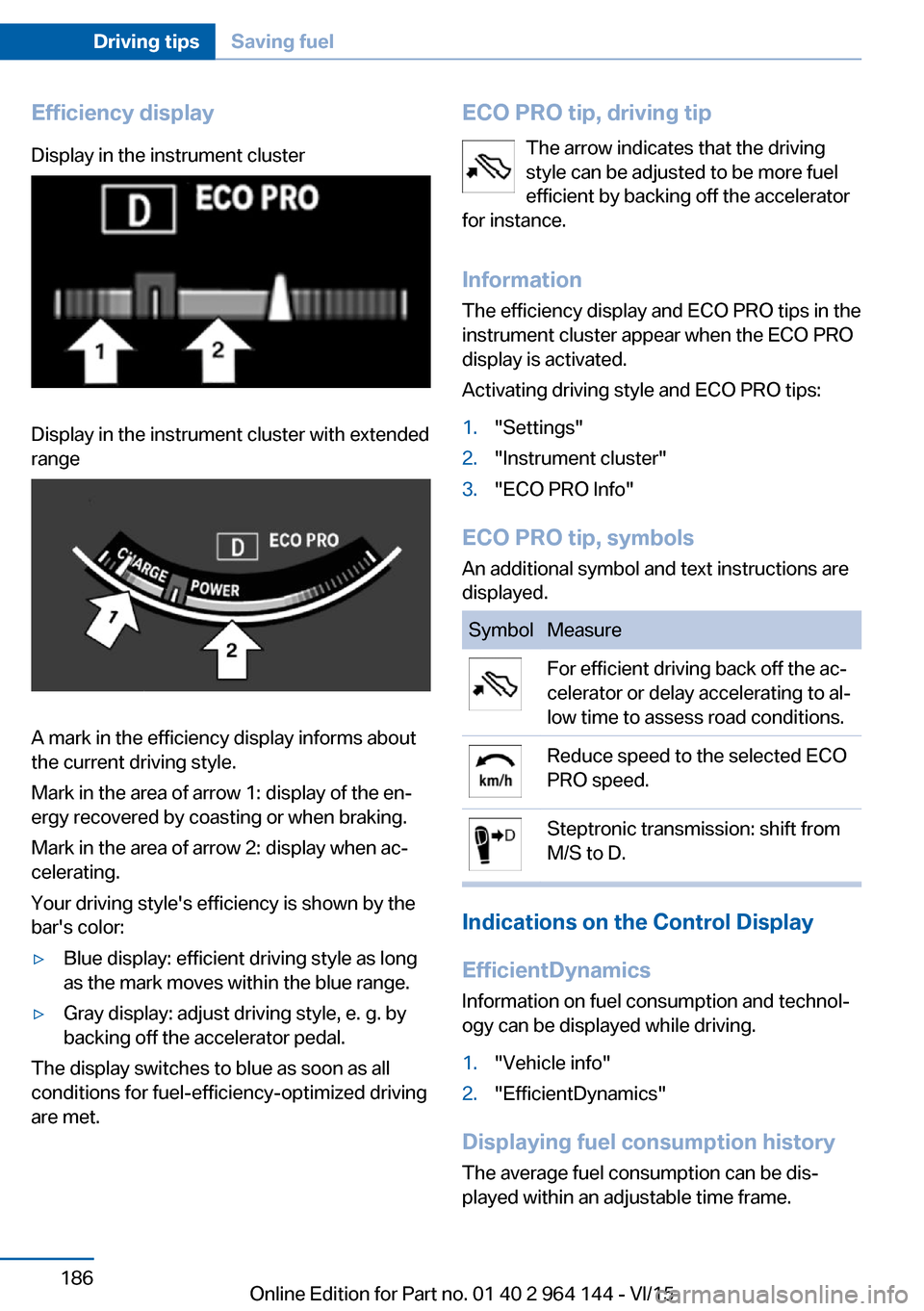
Efficiency displayDisplay in the instrument clusterDisplay in the instrument cluster with extended
range
A mark in the efficiency display informs about
the current driving style.
Mark in the area of arrow 1: display of the en‐
ergy recovered by coasting or when braking.
Mark in the area of arrow 2: display when ac‐
celerating.
Your driving style's efficiency is shown by the
bar's color:
▷Blue display: efficient driving style as long
as the mark moves within the blue range.▷Gray display: adjust driving style, e. g. by
backing off the accelerator pedal.
The display switches to blue as soon as all
conditions for fuel-efficiency-optimized driving
are met.
ECO PRO tip, driving tip
The arrow indicates that the driving
style can be adjusted to be more fuel
efficient by backing off the accelerator
for instance.
Information The efficiency display and ECO PRO tips in the
instrument cluster appear when the ECO PRO
display is activated.
Activating driving style and ECO PRO tips:1."Settings"2."Instrument cluster"3."ECO PRO Info"
ECO PRO tip, symbols
An additional symbol and text instructions are
displayed.
SymbolMeasureFor efficient driving back off the ac‐
celerator or delay accelerating to al‐
low time to assess road conditions.Reduce speed to the selected ECO
PRO speed.Steptronic transmission: shift from
M/S to D.
Indications on the Control Display
EfficientDynamics Information on fuel consumption and technol‐
ogy can be displayed while driving.
1."Vehicle info"2."EfficientDynamics"
Displaying fuel consumption history
The average fuel consumption can be dis‐
played within an adjustable time frame.
Seite 186Driving tipsSaving fuel186
Online Edition for Part no. 01 40 2 964 144 - VI/15
Page 188 of 253
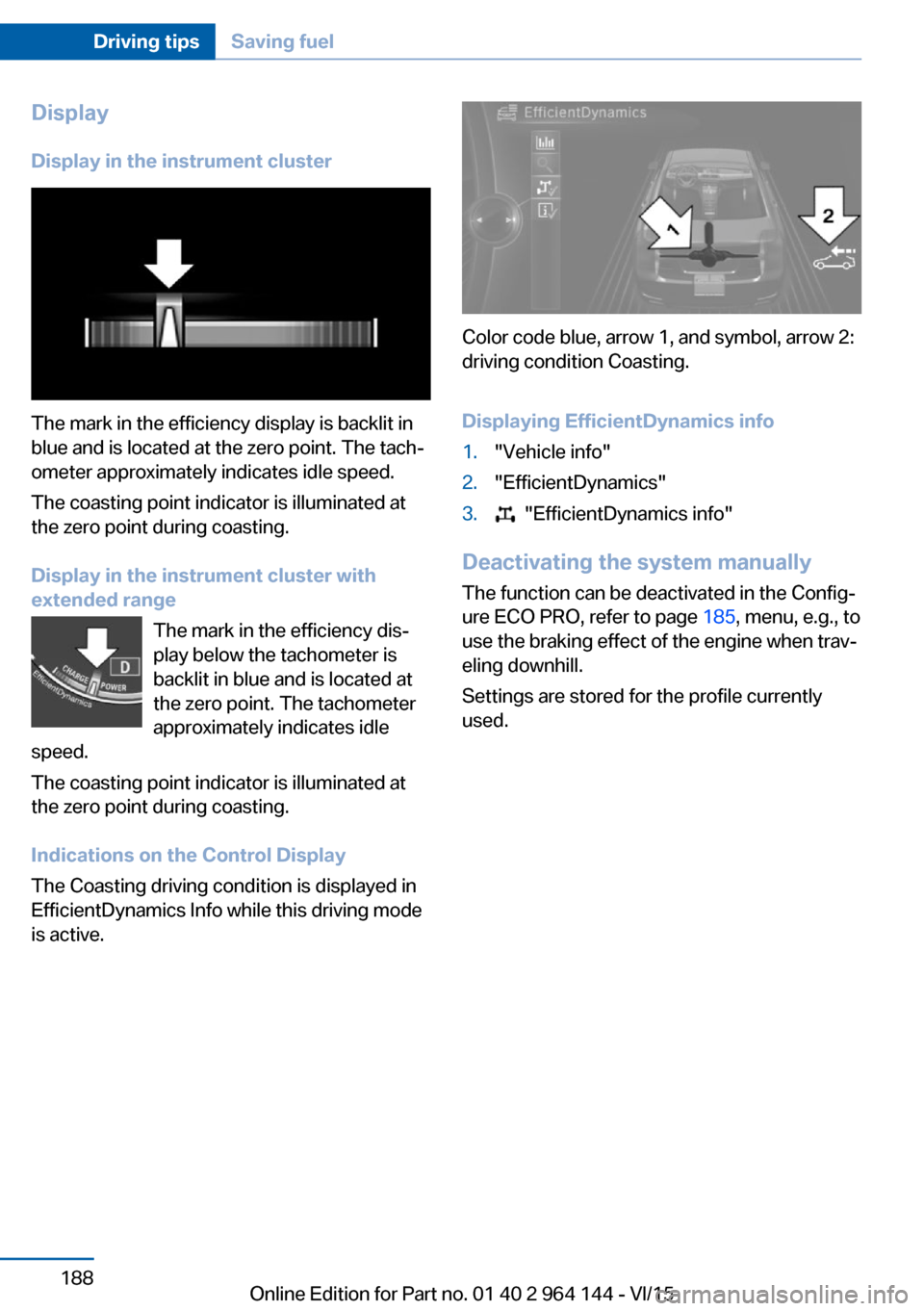
Display
Display in the instrument cluster
The mark in the efficiency display is backlit in
blue and is located at the zero point. The tach‐
ometer approximately indicates idle speed.
The coasting point indicator is illuminated at
the zero point during coasting.
Display in the instrument cluster with
extended range
The mark in the efficiency dis‐
play below the tachometer is
backlit in blue and is located at
the zero point. The tachometer
approximately indicates idle
speed.
The coasting point indicator is illuminated at
the zero point during coasting.
Indications on the Control Display
The Coasting driving condition is displayed in
EfficientDynamics Info while this driving mode
is active.
Color code blue, arrow 1, and symbol, arrow 2:
driving condition Coasting.
Displaying EfficientDynamics info
1."Vehicle info"2."EfficientDynamics"3. "EfficientDynamics info"
Deactivating the system manually The function can be deactivated in the Config‐
ure ECO PRO, refer to page 185, menu, e.g., to
use the braking effect of the engine when trav‐
eling downhill.
Settings are stored for the profile currently
used.
Seite 188Driving tipsSaving fuel188
Online Edition for Part no. 01 40 2 964 144 - VI/15
Page 210 of 253
Different messages appear on the display de‐
pending on the engine oil level. Pay attention
to these messages.
If the engine oil level is too low, within the next
125 miles/200 km Add engine oil, refer to
page 210.
Detailed measurement
The concept In the detailed measurement the engine oil
level is checked and displayed via a scale.
Gasoline engine:
If the engine oil level reaches the minimum
level, a check control message is displayed.
During the measurement, the idle speed is in‐
creased somewhat.
General information A detailed measurement is only possible with
certain engines.
Requirements▷Vehicle is on level road.▷Steptronic transmission: selector lever in
selector lever position N or P and accelera‐
tor pedal not depressed.▷Engine is running and is at operating tem‐
perature.
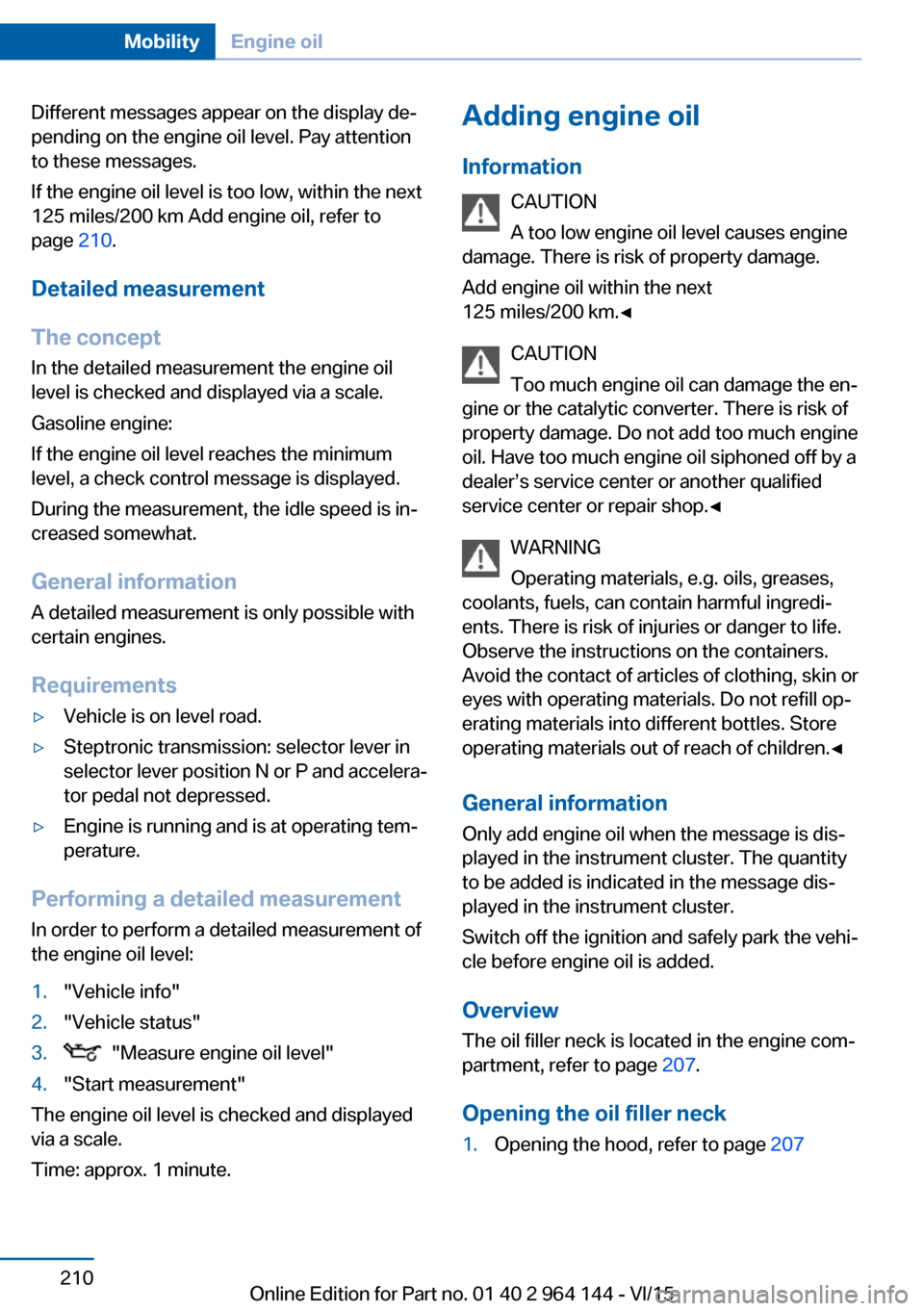
Performing a detailed measurement
In order to perform a detailed measurement of
the engine oil level:
1."Vehicle info"2."Vehicle status"3. "Measure engine oil level"4."Start measurement"
The engine oil level is checked and displayed
via a scale.
Time: approx. 1 minute.
Adding engine oil
Information CAUTION
A too low engine oil level causes engine
damage. There is risk of property damage.
Add engine oil within the next
125 miles/200 km.◀
CAUTION
Too much engine oil can damage the en‐
gine or the catalytic converter. There is risk of
property damage. Do not add too much engine
oil. Have too much engine oil siphoned off by a
dealer’s service center or another qualified
service center or repair shop.◀
WARNING
Operating materials, e.g. oils, greases,
coolants, fuels, can contain harmful ingredi‐
ents. There is risk of injuries or danger to life.
Observe the instructions on the containers.
Avoid the contact of articles of clothing, skin or
eyes with operating materials. Do not refill op‐
erating materials into different bottles. Store
operating materials out of reach of children.◀
General information
Only add engine oil when the message is dis‐
played in the instrument cluster. The quantity
to be added is indicated in the message dis‐
played in the instrument cluster.
Switch off the ignition and safely park the vehi‐
cle before engine oil is added.
Overview
The oil filler neck is located in the engine com‐
partment, refer to page 207.
Opening the oil filler neck1.Opening the hood, refer to page 207Seite 210MobilityEngine oil210
Online Edition for Part no. 01 40 2 964 144 - VI/15
Page 233 of 253
Clean light-colored leather more frequently be‐
cause soiling on such surfaces is substantially
more visible.
Use leather care products; otherwise, dirt and
grease will gradually break down the protective
layer of the leather surface.
Suitable care products are available from a
dealer’s service center or another qualified
service center or repair shop.
Upholstery material careVacuum regularly with a vacuum cleaner.
If upholstery is very dirty, e.g., with beverage
stains, use a soft sponge or microfiber cloth
with a suitable interior cleaner.
Clean the upholstery down to the seams using
large sweeping motions. Avoid rubbing the
material vigorously.
CAUTION
Open Velcro® fasteners on articles of
clothing can damage the seat covers. There is
risk of property damage. Ensure that any Vel‐
cro® fasteners are closed.◀
Caring for special components
Light-alloy wheels When cleaning the vehicle, use only neutral
wheel cleaners having a pH value from 5 to 9.
Do not use abrasive cleaning agents or steam jets above 140 ℉/60 ℃. Follow the manufac‐
turer's instructions.
Aggressive, acidic or alkaline cleaning agents
can destroy the protective layer of adjacent
components, such as the brake disk.
Chrome surfaces
Carefully clean components such as the radia‐
tor grille or door handles with an ample supply
of water, possibly with shampoo added, partic‐
ularly when they have been exposed to road
salt.Rubber components
Environmental influences can cause surface
soiling of rubber parts and a loss of gloss. For
cleaning, use only water and suitable care
products, the manufacturer of your vehicle rec‐
ommends original BMW care products.
Treat especially worn rubber parts with rubber
care agents at regular intervals. When cleaning
rubber seals, do not use any silicon-containing
car care products in order to avoid damage or
noises.
Fine wood partsClean fine wood facing and fine wood compo‐
nents only with a moist rag. Then dry with a
soft cloth.
Plastic components
These include:▷Imitation leather surfaces.▷Roofliner.▷Lamp lenses.▷Instrument cluster cover.▷Matt black spray-coated components.▷Painted parts in the interior.
Clean with a microfiber cloth.
Dampen cloth lightly with water.
Do not soak the roofliner.
CAUTION
Cleansers that contain alcohol or sol‐
vents, such as lacquer thinners, heavy-duty
grease removers, fuel, or such, can damage
plastic parts. There is risk of property damage.
Clean with a microfiber cloth. Dampen cloth
lightly with water.◀
Safety belts
Dirty belt straps impede the reeling action and
thus have a negative impact on safety.
Seite 233CareMobility233
Online Edition for Part no. 01 40 2 964 144 - VI/15
Page 246 of 253

Hood 207
Horn 14
Hot exhaust system 177
HUD Head-up Display 95
Hydroplaning 177
I Ice warning, see External temperature warning 87
Icy roads, see External tem‐ perature warning 87
Identification marks, tires 199
Identification number, see ve‐ hicle identification num‐
ber 10
iDrive 18
Ignition key, see Remote con‐ trol 34
Ignition off 67
Ignition on 67
Indication of a flat tire 107 , 110
Indicator and alarm lamps, see Check Control 83
Indicator lamp, see Check Control 83
Individual air distribu‐ tion 157, 160
Individual settings, see Per‐ sonal Profile 35
Inflation pressure, tires 196
Inflation pressure warning, tires 110
Info display, refer to On- Board computer 92
Information 6
Initialize, Tire Pressure Moni‐ tor TPM 107
Initializing, Flat Tire Monitor FTM 110
Instrument cluster 82
Instrument cluster, electronic displays 82
Instrument lighting 102
Integrated key 34 Integrated Owner's Manual in
the vehicle 30
Intelligent Emergency Re‐ quest 226
Intelligent Safety 112
Intensity, AUTO pro‐ gram 159
Interior equipment 163
Interior lights 102
Interior lights during unlock‐ ing 37
Interior lights with the vehicle locked 38
Interior motion sensor 47
Interior rearview mirror, auto‐ matic dimming feature 61
Interior rearview mirror, man‐ ually dimmable 61
Internet page 6
Interval display, service re‐ quirements 89
Interval mode 75
J
Jacking points for the vehicle jack 224
Joystick, Steptronic transmis‐ sion 78
Jump-starting 227
K
Key/remote control 34
Keyless Go, see Comfort Ac‐ cess 42
Key Memory, see Personal Profile 35
Kickdown, Steptronic trans‐ mission 77
Knee airbag 104
L Label on recommended tires 201 Lamp in the exterior mirror,
see Active Blind Spot De‐
tection 123
Lamp replacement 217
Lamp replacement, front 218
Lamp replacement, rear 221
Lane departure warning 121
Lane margin, warning 121
Language on Control Dis‐ play 95
Lashing eyes, securing cargo 181
LATCH child restraint sys‐ tem 65
Launch Control 80
Leather, care 232
LEDs, light-emitting di‐ odes 218
Letters and numbers, enter‐ ing 25
Light 98
Light alloy wheels, care 233
Light control 100
Light-emitting diodes, LEDs 218
Lighter 165
Lighting 98
Lights and bulbs 217
Light switch 98
Load 181
Loading 180
Lock, door 39
Locking/unlocking via door lock 39
Locking/unlocking with re‐ mote control 37
Locking, automatic 46
Locking, settings 45
Lock, power window 49
Locks, doors, and win‐ dows 66
Low beams 98
Low beams, automatic, see High-beam Assistant 100
Lower back support 54 Seite 246ReferenceEverything from A to Z246
Online Edition for Part no. 01 40 2 964 144 - VI/15
Page 249 of 253

Sealant 203
Seat and mirror memory 58
Seat belts, see Safety belts 55
Seat heating, front 55
Seat heating, rear 55
Seating position for chil‐ dren 63
Seats 52
Selection list in instrument cluster 91
Selector lever, Steptronic transmission 78
Sensors, care 234
Service and warranty 8
Service requirements, Condi‐ tion Based Service
CBS 215
Service requirements, dis‐ play 89
Services, ConnectedDrive
Servotronic 130
SET button, see Active Cruise Control, ACC 133
SET button, see Cruise con‐ trol 139
Settings, locking/unlock‐ ing 45
Settings on Control Dis‐ play 94
Settings, storing for seat, mir‐ ror 58
Shift paddles on the steering wheel 79
Side airbags 103
Side View 149
Signaling, horn 14
Signals when unlocking 45
Sitting safely 52
Size 238
Ski and snowboard bag 169
Slide/tilt glass roof 49
Snow chains 206
Socket 166
Socket, OBD Onboard Diag‐ nostics 216 SOS button 226
Spare fuse 225
Speed, average 92
Speed limit detection, on- board computer 93
Speed limiter, display 90
Speed Limit Information 90
Speed warning 94
Split screen 23
SPORT+ - program, Dynamic Driving Control 130
Sport displays, torque dis‐ play, performance dis‐
play 93
SPORT program, Dynamic Driving Control 131
Sport program, transmis‐ sion 78
Sport steering, variable 129
Stability control systems 126
Start/stop, automatic func‐ tion 69
Start/Stop button 67
Start function during malfunc‐ tion 35
Starting the engine 68
Status control display, tires 107
Status information, iDrive 23
Status of Owner's Manual 7
Steering assistance 130
Steering wheel, adjusting 61
Steering wheel heating 61
Steptronic Sport transmis‐ sion, refer to Steptronic
transmission 77
Steptronic transmission 77
Stopping the engine 68
Storage compartments 170
Storage compartments, loca‐ tions 170
Storage, tires 202
Storing the vehicle 234
Suitable engine oil types 211
Summer tires, tread 200
Sun visor 165 Supplementary text mes‐
sages 86
Surround View 144
Switch for Dynamic Driv‐ ing 130
Switch-on times, parked-car ventilation 162
Switch, refer to Cockpit 14
Symbols 6
Symbols in the status field 23
SYNC program, automatic cli‐ mate control 160
T Tachometer 87
Tailgate, automatic 40
Tailgate, closing with no- touch activation 44
Tailgate, emergency unlock‐ ing 42
Tailgate, opening with no- touch activation 44
Tailgate via remote con‐ trol 38
Tail lights 221
Technical changes, see Own Safety 7
Technical data 238
Telephone, see user's manual for Navigation, Entertain‐
ment and Communication
Temperature, automatic cli‐ mate control 156, 158
Temperature display for ex‐ ternal temperature 87
Temperature, engine oil 87
Tempomat, see Active Cruise Control 133
Terminal, starting aid 228
Text messages, supplemen‐ tary 86
Theft alarm system, see Alarm system 46
Thigh support 54
Tilt alarm sensor 47 Seite 249Everything from A to ZReference249
Online Edition for Part no. 01 40 2 964 144 - VI/15