Page 208 of 257

StorageStore wheels and tires in a cool, dry place with
as little exposure to light as possible.
Always protect tires against all contact with oil,
grease and fuels.
Do not exceed the maximum tire inflation pres‐
sure indicated on the side wall of the tire.
Run-flat tires Label
RSC label on the tire sidewall.
The wheels consist of tires that are self-sup‐
porting, to a limited degree, and possibly spe‐
cial rims.
The support of the sidewall allows the tire to
remain drivable to a restricted degree in the
event of a tire inflation pressure loss.
Follow the instructions for continued driving
with a flat tire.
Changing run-flat tires
For your own safety, only use run-flat tires. No
spare tire is available in the case of a flat tire.
Your service center will be glad to advise you.
Mobility System
The concept With the Mobility System, minor tire damagecan be sealed quickly to enable continued
travel. To accomplish this, sealant is pumped
into the tires, which seals the damage from the inside.
The compressor can be used to check the tire inflation pressure.
Hints▷Follow the instructions on using the Mobi‐
lity System found on the compressor and
sealant container.▷Use of the Mobility System may be ineffec‐
tive if the tire puncture measures approx.
1/8 in/4 mm or more.▷Contact the nearest service center if the
tire cannot be made drivable.▷If possible, do not remove foreign bodies
that have penetrated the tire.▷Pull the speed limit sticker off the sealant
container and apply it to the steering
wheel.▷The use of a sealant can damage the TPM
wheel electronics. In this case, have the
electronics checked at the next opportu‐
nity and have them replaced if needed.
Enclosed areas
Do not let the engine run in enclosed
areas, since breathing in exhaust fumes may
lead to loss of consciousness and death. The
exhaust gases contain carbon monoxide, an
odorless and colorless but highly toxic gas.◀
Storage The Mobility System is located under the
cargo floor panel.
Seite 204MobilityWheels and tires204
Online Edition for Part no. 01 40 2 960 386 - II/15
Page 211 of 257

This prevents leftover sealant from escap‐
ing from the container.4.Wrap the empty sealant container in suita‐
ble material to avoid dirtying the cargo
area.5.Stow the Mobility System back in the vehi‐
cle.
Distributing the sealant
Immediately drive approx. 5 miles/10 km to en‐
sure that the sealant is evenly distributed in the
tire.
Do not exceed a speed of 50 mph/80 km/h.
If possible, do not drive at speeds less than
12 mph/20 km/h.
To correct the tire inflation pressure
1.Stop at a suitable location.2.Screw the connection hose of the com‐
pressor directly onto the tire valve stem.3.Insert the connector into the power socket
inside the vehicle.4.Correct the tire inflation pressure to
2.5 bar.▷Increase pressure: with the ignition
turned on or the engine running, reel
on the compressor.▷To reduce the pressure: press the but‐
ton on the compressor.
Continuing the trip
Do not exceed the maximum permissible
speed of 50 mph/80 km/h.
Reinitialize the Flat Tire Monitor.
Reinitialize the Tire Pressure Monitor.
Replace the defective tire and the sealant con‐
tainer of the Mobility System as soon as possi‐
ble.
Snow chains
Fine-link snow chains Only certain types of fine-link snow chains
have been tested by the manufacturer of the
vehicle, classified as road-safe and approved.
Information about the approved snow chains
are available from the service center.
Use Use only in pairs on the rear wheels, equipped
with the tires of the following size:▷205/65 R 17.▷225/60 R 17.▷245/50 R 18.▷245/45 R 19.
No snow chains on size 245/55 R 17 tires
Do not mount snow chains on size
245/55 R 17 tires; otherwise, the vehicle may
become damaged.◀
Follow the snow chain manufacturer's instruc‐
tions.
Make sure that the snow chains are always
sufficiently tight. Retighten as needed accord‐
ing to the chain manufacturer's instructions.
Do not initialize the Flat Tire Monitor after
mounting snow chains, as doing so may result
in incorrect readings.
Do not initialize the Tire Pressure Monitor after
mounting snow chains, as doing so may result
in incorrect readings.
When driving with snow chains, briefly activate
Dynamic Traction Control if needed.
Maximum speed with snow chains Do not exceed a speed of 30 mph/50 km/hwhen using snow chains.
Seite 207Wheels and tiresMobility207
Online Edition for Part no. 01 40 2 960 386 - II/15
Page 229 of 257
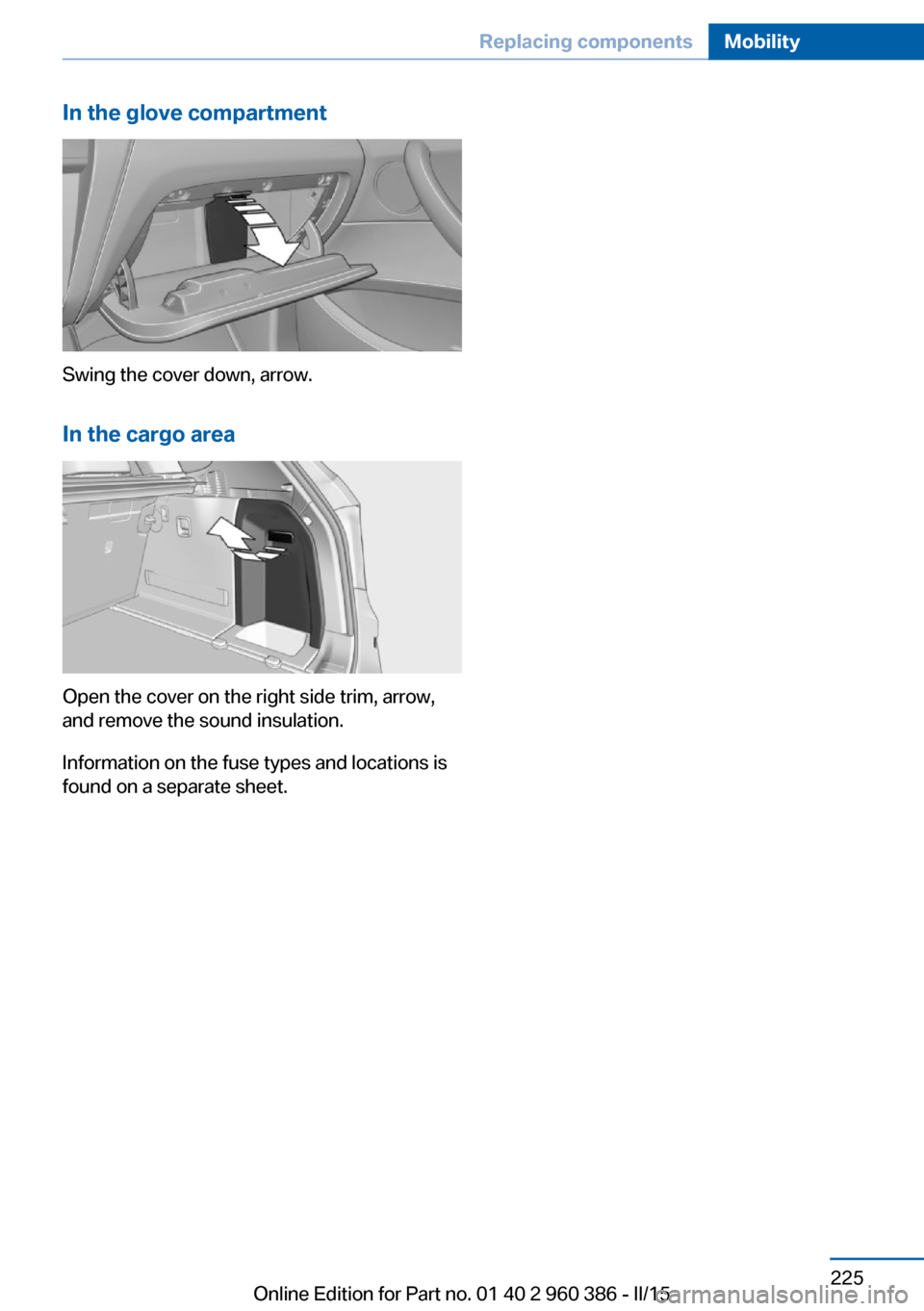
In the glove compartment
Swing the cover down, arrow.In the cargo area
Open the cover on the right side trim, arrow,
and remove the sound insulation.
Information on the fuse types and locations is
found on a separate sheet.
Seite 225Replacing componentsMobility225
Online Edition for Part no. 01 40 2 960 386 - II/15
Page 243 of 257
Weights
X3 sDrive28iApproved gross vehicle weightlbs/kg4,970/2,254Loadlbs/kg910/413Approved front axle loadlbs/kg2,280/1,034Approved rear axle loadlbs/kg2,820/1,279Approved roof load capacitylbs/kg220/100Cargo area capacitycu ft27.6–63.3Canada: cargo area capacityL550–1,600
X3 xDrive28iApproved gross vehicle weightlbs/kg5,080/2,304Loadlbs/kg910/413Approved front axle loadlbs/kg2,400/1,089Approved rear axle loadlbs/kg2,820/1,279Approved roof load capacitylbs/kg220/100Cargo area capacitycu ft27.6–63.3Canada: cargo area capacityL550–1,600
X3 xDrive35iApproved gross vehicle weightlbs/kg5,150/2,336Loadlbs/kg910/413Approved front axle loadlbs/kg2,470/1,120Approved rear axle loadlbs/kg2,800/1,270Approved roof load capacitylbs/kg220/100Cargo area capacitycu ft27.6–63.3Canada: cargo area capacityL550–1,600Seite 239Technical dataReference239
Online Edition for Part no. 01 40 2 960 386 - II/15
Page 244 of 257
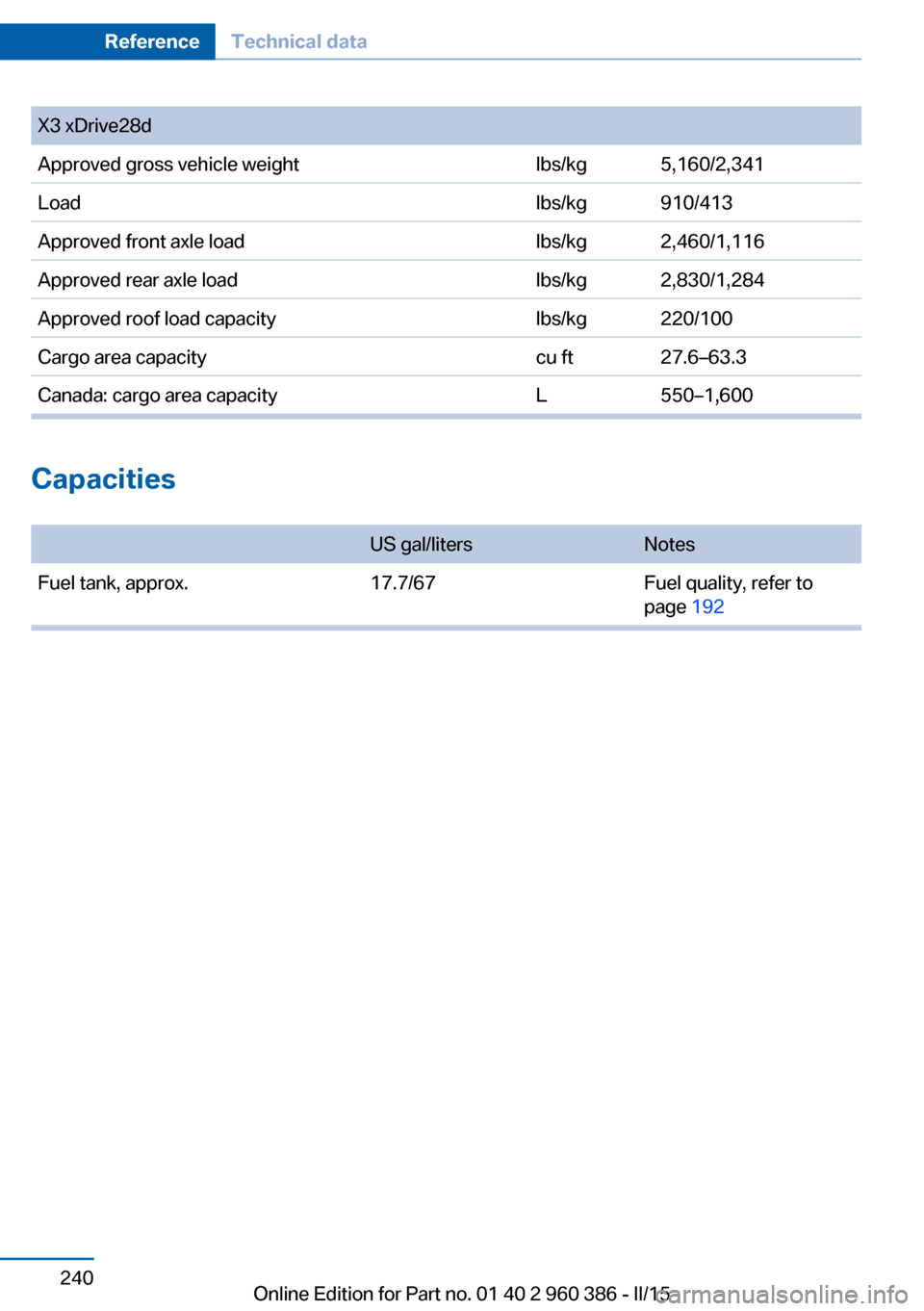
X3 xDrive28dApproved gross vehicle weightlbs/kg5,160/2,341Loadlbs/kg910/413Approved front axle loadlbs/kg2,460/1,116Approved rear axle loadlbs/kg2,830/1,284Approved roof load capacitylbs/kg220/100Cargo area capacitycu ft27.6–63.3Canada: cargo area capacityL550–1,600
Capacities
US gal/litersNotesFuel tank, approx.17.7/67Fuel quality, refer to
page 192Seite 240ReferenceTechnical data240
Online Edition for Part no. 01 40 2 960 386 - II/15
Page 247 of 257

tertainment and Communi‐
cation
BMW Driver’s Guide App 6
BMW Homepage 6
BMW Internet page 6
BMW maintenance sys‐ tem 215
Bonus range, ECO PRO 183
Bottle holder, refer to Cu‐ pholder 169
Brake assistant 123
Brake discs, break-in 174
Brake force display 122
Brake lights, adaptive 122
Brake lights, brake force dis‐ play 122
Brake pads, break-in 174
Braking, hints 176
Breakdown assistance 226
Break-in 174
Brightness of Control Dis‐ play 93
Bulb replacement 218
Bulb replacement, front 219
Bulb replacement, rear 222
Bulbs and lights 218
Button, RES 133
Button, Start/Stop 66
Bypassing, refer to Jump- starting 227
C
California Proposition 65 Warning 7
Camera lenses, care 234
Camera, rearview cam‐ era 142
Camera, Side View 146
Camera, Top View 145
Can holder, refer to Cu‐ pholder 169
Car battery 223
Car care products 232
Care, displays 234
Care, vehicle 232 Cargo 178
Cargo area 165
Cargo area, enlarging 165
Cargo area partition net 166
Cargo area, storage compart‐ ments 170
Cargo cover 165
Cargo, securing 179
Cargo straps, securing cargo 179
Car key, refer to Remote con‐ trol 34
Carpet, care 234
Car wash 231
Catalytic converter, refer to Hot exhaust system 175
CBS Condition Based Serv‐ ice 215
CD/Multimedia, see user's manual for Navigation, En‐
tertainment and Communi‐
cation
Center armrest 169
Center console 16
Central locking system 40
Central screen, refer to Con‐ trol Display 18
Changes, technical, refer to Safety 7
Changing parts 217
Changing wheels 223
Changing wheels/tires 202
Chassis number, see vehicle identification number 9
Check Control 81
Checking the oil level elec‐ tronically 210
Children, seating position 62
Children, transporting safely 62
Child restraint fixing sys‐ tem 62
Child restraint fixing system LATCH 64
Child restraint fixing systems, mounting 62 Child safety locks 65
Child seat, mounting 62
Child seats 62
Chrome parts, care 233
Cigarette lighter 162
Cleaning displays 234
Climate control 152, 155
Clock 85
Closing/opening via door lock 39
Closing/opening with remote control 37
Closing the tailgate with no- touch activation 44
Clothes hooks 170
Coasting 185
Coasting with engine decou‐ pled, coasting 185
Coasting with idling en‐ gine 185
Cockpit 14
Cold starting, refer to Starting the engine 67
Combination reel, refer to Turn signals 72
Combination switch, refer to Wiper system 73
Comfort Access 42
COMFORT program, Dy‐ namic Driving Control 128
Compartments in the doors 169
Compass 91
Compressor 204
Condensation on win‐ dows 153, 156
Condensation under the vehi‐ cle 177
Condition Based Service CBS 215
Confirmation signal 45
ConnectedDrive, see user's manual for Navigation, En‐
tertainment and Communi‐
cation
ConnectedDrive Services Seite 243Everything from A to ZReference243
Online Edition for Part no. 01 40 2 960 386 - II/15
Page:
< prev 1-8 9-16 17-24