2016 BMW X1 mount
[x] Cancel search: mountPage 215 of 242

Reset the Tire Pressure Monitor.5.Check to make sure the lug bolts are tight
with a calibrated torque wrench.6.Replace the damaged tires as soon as pos‐
sible.
Driving with emergency wheel
WARNING
The emergency wheel has particular di‐
mensions. When driving with an emergency
wheel, changed driving properties may occur
at higher speeds, e.g. reduced lane stability
when braking, longer braking distance and
changed self-steering properties in the limit
area. There is risk of an accident. Drive moder‐
ately and do not exceed a speed of
50 mph/80 km/h.◀
Vehicle battery Maintenance
The battery is maintenance-free.
The added amount of acid is sufficient for the
service life of the battery.
More information about the battery can be re‐
quested from a dealer’s service center or an‐
other qualified service center or repair shop.
Battery replacement CAUTION
Vehicle batteries that are not compatible
can damage vehicle systems and impair vehi‐
cle functions.There is risk of property damage.
Information on the compatible vehicle batteries
is available at your dealer's service center.◀
After a battery replacement, the manufacturer
of your vehicle recommends that the vehicle
battery be registered on the vehicle by a
dealer’s service center or another qualified
service center or repair shop to ensure that all
comfort features are fully available and that any
Check Control messages of these comfort fea‐
tures are no longer displayed.
Charging the battery
General information
Make sure that the battery is always suffi‐
ciently charged to guarantee that the battery
remains usable for its full service life.
The battery may need to be charged in the fol‐
lowing cases:▷When making frequent short-distance
drives.▷If the vehicle is not used for prolonged pe‐
riods, longer than a month.▷Steptronic transmission: when parked for
long periods of time in selector lever posi‐
tion D, R or N.
Information
CAUTION
Battery chargers for the vehicle battery
can work with high voltages and currents,
which means that the 12V on-board network
can be overloaded or damaged. There is risk of
property damage. Only connect battery charg‐
ers for the vehicle battery to the starting aid
terminals in the engine compartment.◀
Starting aid terminals
In the vehicle, only charge the battery via the
starting aid terminals, refer to page 219, in the
engine compartment with the engine off.
Power failure
After a temporary power loss, some equipment
needs to be newly initialized or individual set‐
tings updated, e. g.:
▷Seat and mirror memory: store the posi‐
tions again.▷Time: update.▷Date: update.Seite 215Replacing componentsMobility215
Online Edition for Part no. 01 40 2 964 303 - VI/15
Page 221 of 242
a sign or a warning triangle in the rear win‐
dow.
Tow bar
The tow fittings used should be on the same
side on both vehicles.
Should it prove impossible to avoid mounting
the tow bar at an offset angle, please observe
the following:
▷Maneuvering capability is limited going
around corners.▷The tow bar will generate lateral forces if it
is secured with an offset.
Tow rope
When starting to tow the vehicle, make sure
that the tow rope is taut.
To avoid jerking and the associated stresses
on the vehicle components when towing, al‐
ways use nylon ropes or nylon straps.
Tow fitting
General information
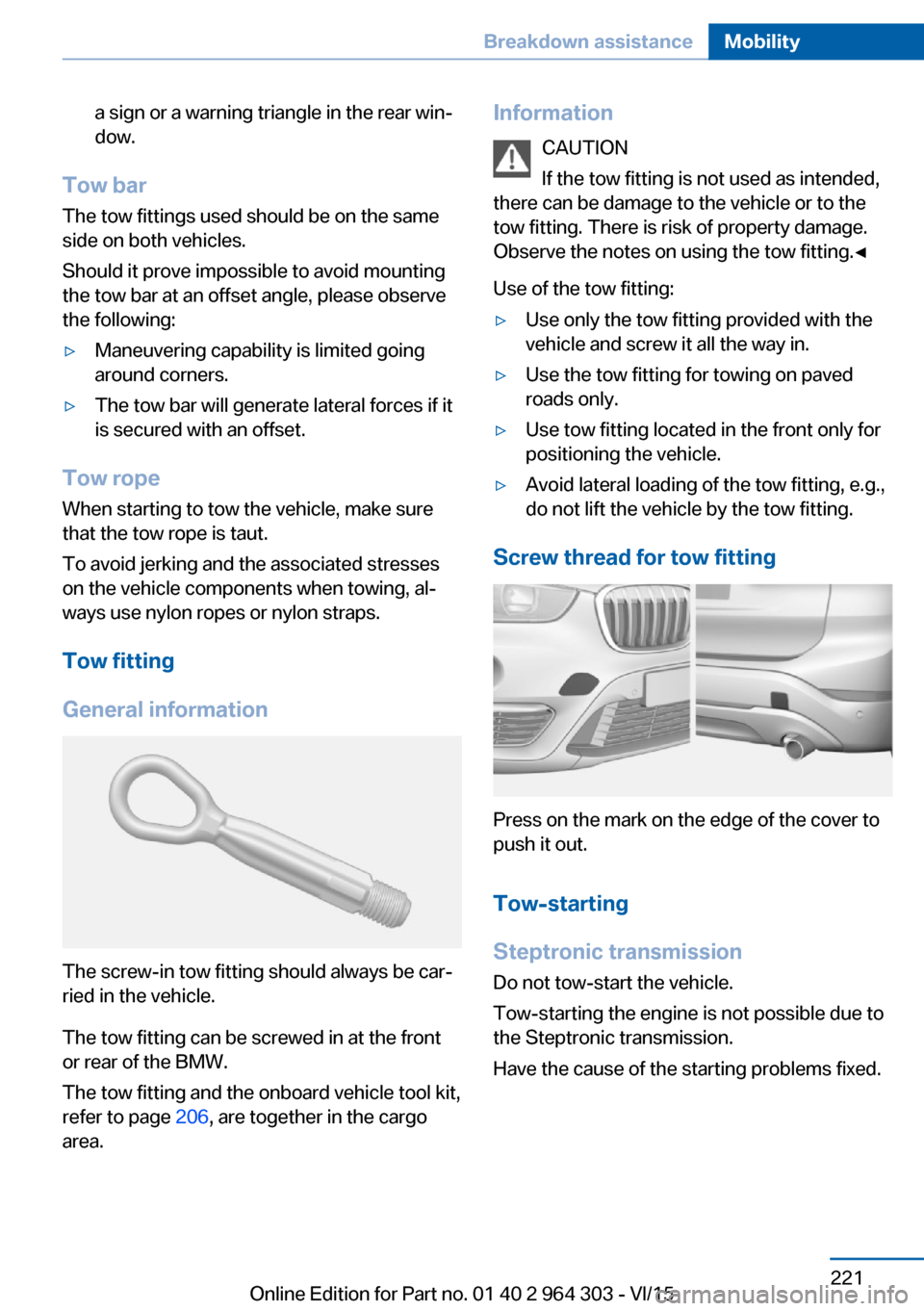
The screw-in tow fitting should always be car‐
ried in the vehicle.
The tow fitting can be screwed in at the front
or rear of the BMW.
The tow fitting and the onboard vehicle tool kit,
refer to page 206, are together in the cargo
area.
Information
CAUTION
If the tow fitting is not used as intended,
there can be damage to the vehicle or to the
tow fitting. There is risk of property damage.
Observe the notes on using the tow fitting.◀
Use of the tow fitting:▷Use only the tow fitting provided with the
vehicle and screw it all the way in.▷Use the tow fitting for towing on paved
roads only.▷Use tow fitting located in the front only for
positioning the vehicle.▷Avoid lateral loading of the tow fitting, e.g.,
do not lift the vehicle by the tow fitting.
Screw thread for tow fitting
Press on the mark on the edge of the cover to
push it out.
Tow-starting
Steptronic transmission
Do not tow-start the vehicle.
Tow-starting the engine is not possible due to
the Steptronic transmission.
Have the cause of the starting problems fixed.
Seite 221Breakdown assistanceMobility221
Online Edition for Part no. 01 40 2 964 303 - VI/15
Page 225 of 242

floor mats that are suitable for the vehicle and
can be safely attached to the floor. Do not use
loose floor mats and do not layer several floor
mats. Make sure that there is sufficient clear‐
ance for the pedals. Ensure that the floor mats
are securely fastened again after they were re‐
moved, e.g. for cleaning.◀
Floor mats can be removed from the car's inte‐
rior for cleaning.
If the floor carpets are very dirty, clean with a
microfiber cloth and water or a textile cleaner.
To prevent matting of the carpet, rub back and
forth in the direction of travel only.
Sensor/camera lenses To clean sensors and camera lenses, use a
cloth moistened with a small amount of glass
detergent.
Displays/Screens/protective glass of
the Head-up Display
CAUTION
Chemical cleansers, moisture or fluids of
any kind can damage the surface of displays
and screens. There is risk of property damage.
Clean with a clean, antistatic microfiber cloth.◀
CAUTION
The surface of displays can be damaged
with improper cleaning. There is risk of prop‐
erty damage. Avoid pressure that is too high
and do not use any scratching materials.◀
Clean with a clean, antistatic microfiber cloth.
Clean the protective glass of the Head-up Dis‐
play using a microfiber cloth and commercially
available dish-washing soap.
Long-term
When the vehicle is shut down for longer than
three months, special measures must be
taken. Further information is available from a
dealer’s service center or another qualified
service center or repair shop.Seite 225CareMobility225
Online Edition for Part no. 01 40 2 964 303 - VI/15
Page 233 of 242

Brake lights, brake force dis‐play 118
Brake pads, break-in 168
Braking, hints 170
Breakdown assistance 217
Break-in 168
Brightness of Control Dis‐ play 94
Bulb replacement 206
Bulb replacement, front 207
Bulb replacement, rear 211
Bulbs and lights 206
Button, Start/Stop 68
Bypassing, see Jump-start‐ ing 218
C
California Proposition 65 Warning 8
Camera-based cruise control, ACC 126
Camera lenses, care 225
Camera, rearview cam‐ era 138
Can holder, see Cu‐ pholder 162
Car battery 215
Car care products 223
Care, displays 225
Care, vehicle 223
Cargo 172
Cargo area 157
Cargo area, enlarging 158
Cargo area, storage compart‐ ments 163
Cargo floor panel 157
Cargo position, rear seat backrest 159
Cargo, securing 173
Cargo straps, securing cargo 173
Car key, see Remote con‐ trol 34
Carpet, care 224
Car wash 222 Catalytic converter, see Hot
exhaust system 169
CBS Condition Based Serv‐ ice 204
Center armrest 161
Center console 16
Central locking system 40
Central screen, see Control Display 18
Changes, technical, see Own Safety 7
Changing parts 206
Changing wheels 213
Changing wheels/tires 190
Chassis number, see vehicle identification number 10
Check Control 82
Checking the oil level elec‐ tronically 199
Children, seating position 64
Children, transporting safely 64
Child restraint fixing sys‐ tem 64
Child restraint fixing system LATCH 66
Child restraint fixing systems, mounting 65
Child safety locks 67
Child seat, mounting 65
Child seats 64
Chrome parts, care 224
Cigarette lighter 155
Cleaning displays 225
Climate control 144, 146
Clock 86
Closing/opening via door lock 39
Closing/opening with remote control 37
Closing the tailgate with no- touch activation 44
Cockpit 14
Combination switch, see Turn signals 73 Combination switch, see
Wiper system 74
Comfort Access 43
COMFORT program, Dy‐ namic Driving Control 124
Compact wheel, see Emer‐ gency wheel 213
Compartments in the doors 161
Compass 153
Compressor 192
Condensation on win‐ dows 148
Condensation under the vehi‐ cle 171
Condition Based Service CBS 204
Confirmation signal 46
ConnectedDrive 6
ConnectedDrive Services 6
Connecting electrical devi‐ ces 155
Continued driving with a flat tire 107 , 110
Control Display 18
Control Display, settings 93
Controller 19
Control systems, driving sta‐ bility 120
Convenient opening with the remote control 38
Coolant 202
Cooling function 145, 147
Cooling, maximum 147
Cooling system 202
Cornering lamp 99
Corrosion on brake discs 170
Cosmetic mirror 155
Courtesy lamps during un‐ locking 37
Courtesy lamps with the vehi‐ cle locked 38
Cruise control 132
Cruise control, active 126 Seite 233Everything from A to ZReference233
Online Edition for Part no. 01 40 2 964 303 - VI/15
Page 236 of 242

Ignition off 68
Ignition on 68
Indication of a flat tire 106 , 109
Indicator and alarm lamps, see Check Control 82
Indicator lamp, see Check Control 82
Individual air distribu‐ tion 145, 148
Individual settings, see Per‐ sonal Profile 35
Inflation pressure, tires 186
Inflation pressure warning, tires 109
Info display, refer to On- Board computer 90
Information 6
Initialize, Tire Pressure Moni‐ tor TPM 106
Initializing, Flat Tire Monitor FTM 109
Instrument cluster 81
Instrument cluster, electronic displays 81
Instrument lighting 100
Integrated key 34
Integrated Owner's Manual in the vehicle 29
Intelligent Emergency Re‐ quest 217
Intelligent Safety 111
Intensity, AUTO pro‐ gram 147
Interior equipment 151
Interior lights 100
Interior lights during unlock‐ ing 37
Interior lights with the vehicle locked 38
Interior motion sensor 47
Interior rearview mirror, auto‐ matic dimming feature 62
Interior rearview mirror, com‐ pass 153 Interior rearview mirror, man‐
ually dimmable 62
Internet page 6
Interval display, service re‐ quirements 87
Interval mode 75
J Jacking points for the vehicle jack 213
Joystick, Steptronic transmis‐ sion 77
Jump-starting 218
K
Key/remote control 34
Keyless Go, see Comfort Ac‐ cess 43
Key Memory, see Personal Profile 35
Kickdown, Steptronic trans‐ mission 77
Knee airbag 103
L Label on recommended tires 191
Lamp replacement 206
Lamp replacement, front 207
Lamp replacement, rear 211
Lane departure warning 117
Lane margin, warning 117
Language on Control Dis‐ play 94
Lashing eyes, securing cargo 173
LATCH child restraint sys‐ tem 66
Launch Control 80
Leather, care 223
LEDs, light-emitting di‐ odes 207 Letters and numbers, enter‐
ing 25
Light 97
Light alloy wheels, care 224
Light-emitting diodes, LEDs 207
Lighting 97
Lights and bulbs 206
Light switch 97
Load 173
Loading 172
Loading position 158
Lock, door 39
Locking/unlocking via door lock 39
Locking/unlocking with re‐ mote control 37
Locking, automatic 46
Locking, settings 45
Locking via tailgate 41
Lock, power window 49
Locks, doors, and win‐ dows 67
Low beams 97
Low beams, automatic, see High-beam Assistant 99
Low beams, bulb replace‐ ment 208
Lower back support 54
Luggage rack, see Roof- mounted luggage rack 173
Lumbar support 54
M
Maintenance 204
Maintenance require‐ ments 204
Maintenance, service require‐ ments 87
Maintenance system, BMW 204
Make-up mirror 155
Malfunction displays, see Check Control 82 Seite 236ReferenceEverything from A to Z236
Online Edition for Part no. 01 40 2 964 303 - VI/15
Page 237 of 242

Manual air distribu‐tion 145, 148
Manual air flow 145, 148
Manual brake, see Parking brake 72
Manual mode, Steptronic transmission 78
Manual operation, door lock 39
Manual operation, exterior mirrors 61
Manual operation, fuel filler flap 182
Manual operation, Park Dis‐ tance Control PDC 136
Manual operation, rearview camera 138
Marking, run-flat tires 192
Master key, see Remote con‐ trol 34
Maximum cooling 147
Maximum speed, display 88
Maximum speed, winter tires 191
Measurement, units of 94
Medical kit 218
Memory, seat, mirror 59
Menu in instrument clus‐ ter 90
Menus, operating, iDrive 18
Menus, refer to iDrive operat‐ ing concept 20
Messages, see Check Con‐ trol 82
Microfilter 146, 148
Minimum tread, tires 190
Mirror 60
Mirror memory 59
Mobile communication devi‐ ces in the vehicle 169
Mobility System 192
Modifications, technical, see Own Safety 7
Moisture in headlight 207
Monitor, see Control Dis‐ play 18 Mounting of child restraint
systems 65
Multifunction steering wheel, buttons 14
Multimedia 6
N
Navigation 6
Neck restraints, front, see Head restraints 58
Neck restraints, rear, see Head restraints 59
Neutral cleaner, see wheel cleaner 224
New wheels and tires 190
Nylon rope for tow-starting/ towing 220
O OBD Onboard Diagnosis 205
OBD, see OBD Onboard Di‐ agnosis 205
Obstacle marking, rearview camera 139
Octane rating, see Recom‐ mended fuel grade 184
Odometer 86
Office 6
Offroad trips 168
Oil 199
Oil, adding 200
Oil additives 201
Oil change 201
Oil change interval, service requirements 87
Oil filler neck 200
Oil types, alternative 201
Oil types, suitable 201
Old batteries, disposal 216
On-board computer 90
On-board computer, refer to On-board computer 90
Onboard monitor, see Control Display 18 Onboard vehicle tool kit 206
Opening/closing via door lock 39
Opening and closing 34
Opening and closing, without remote control 39
Opening and closing, with re‐ mote control 37
Opening the tailgate with no- touch activation 44
Operating concept, iDrive 18
Optional equipment, standard equipment 7
Outside air, refer to Auto‐ matic recirculated-air con‐
trol 147
Own Safety 7
P Paint, vehicle 223
Panoramic glass sunroof 49
Parallel parking assistant 140
Park Distance Control PDC 135
Parked-car ventilation 149
Parked vehicle, condensa‐ tion 171
Parking aid, see PDC 135
Parking assistant 140
Parking brake 72
Parking lights 97
Parts and accessories 7
Passenger side mirror, tilting downward 61
Pathway lines, rearview cam‐ era 139
PDC Park Distance Con‐ trol 135
Pedestrian warning with city braking function 114
Performance Control 122
Personal Profile 35
Personal Profile, exporting profiles 36 Seite 237Everything from A to ZReference237
Online Edition for Part no. 01 40 2 964 303 - VI/15
Page 238 of 242

Pinch protection system,glass sunroof 51
Pinch protection system, win‐ dows 49
Plastic, care 224
Power failure 215
Power windows 48
Prescribed engine oil types 201
Pressure, tire air pres‐ sure 186
Pressure warning, tires 109
Profile, see Personal Pro‐ file 35
Programmable memory but‐ tons, iDrive 24
Protective function, glass sunroof 51
Protective function, win‐ dows 49
Push-and-turn switch, see Controller 19
R Radiator fluid 202
Radio 6
Radio-operated key, see Re‐ mote control 34
Radio ready state 68
Rain sensor 75
Rear lights 211
Rear seat backrest tilt 55
Rear seats 55
Rear socket 156
Rearview camera 137
Rearview mirror 60
Rear window de‐ froster 145, 148
Recirculated-air filter 148
Recirculated-air mode 145, 147
Recommended fuel grade 184
Recommended tire brands 191 Refueling 182
Remaining range 86
Remote control/key 34
Remote control, malfunc‐ tion 38
Remote control, univer‐ sal 151
Replacement fuse 216
Replacing parts 206
Replacing wheels/tires 190
Reporting safety malfunc‐ tions 10
RES button, see Camera- based cruise control,
ACC 126
RES button, see Cruise con‐ trol 132
Reserve warning, see Range 86
Reset, Tire Pressure Monitor TPM 106
Retaining straps, securing cargo 173
Retreaded tires 191
Roadside parking lights 98
RON recommended fuel grade 184
Roofliner 17
Roof load capacity 229
Roof-mounted luggage rack 173
Rope for tow-starting/ towing 220
RSC Run Flat System Com‐ ponent, see Run-flat
tires 192
Rubber components, care 224
Run-flat tires 192
S Safe braking 170
Safety belt reminder for driv‐ er's seat and front passen‐
ger seat 57 Safety belts 56
Safety belts, care 224
Safety switch, windows 49
Safety systems, airbags 102
Saving fuel 175
Screen, see Control Dis‐ play 18
Screwdriver, see Onboard ve‐ hicle tool kit 206
Screw thread, refer to Screw thread for tow fitting, screw
thread for tow fitting 221
Sealant 192
Seat and mirror memory 59
Seat belts, see Safety belts 56
Seat heating, front 55
Seating position for chil‐ dren 64
Seats 52
Seats, front 52
Seats, rear 55
Selection list in instrument cluster 90
Selector lever, Steptronic transmission 77
Sensors, care 225
Service and warranty 8
Service requirements, Condi‐ tion Based Service
CBS 204
Service requirements, dis‐ play 87
Services, ConnectedDrive 6
Servotronic 123
SET button, see Camera- based cruise control,
ACC 126
SET button, see Cruise con‐ trol 132
Settings, locking/unlock‐ ing 45
Settings on Control Dis‐ play 93
Settings, storing for seat, mir‐ ror 59 Seite 238ReferenceEverything from A to Z238
Online Edition for Part no. 01 40 2 964 303 - VI/15