2016 BMW X1 Fluid
[x] Cancel search: FluidPage 208 of 242

Accessing the turn signals, low beams,
high beams/headlight flasher
Follow general instructions, refer to page 206.
Open the hood.
Turn signal
Bulb A23571.Access to the turn signal on the right side:
unhook and fold away the filler neck for the
wiper fluid with the screwdriver from the
onboard vehicle tool kit.2.Turn the bulb socket counterclockwise and
remove.3.Press the bulb gently into the socket, turn
counterclockwise and remove.4.Install the new bulb and bulb holder in re‐
verse order of removal.
Low beams
55 watt bulb, H7LL.
1.Access to the low beams on the right side:
unhook and fold away the filler neck for thewiper fluid with the screwdriver from the
onboard vehicle tool kit.2.Turn the cover counterclockwise and re‐
move.3.Pull the bulb holder directly to the rear, ar‐
row 1, and remove.4.Remove the bulb from the bulb holder.5.Install the new bulb with bulb holder in re‐
verse order of removal.
In doing so, ensure that the bulb tab is cor‐
rectly positioned in the headlight housing
and the bulb holder perceptibly engages.6.Close the headlight housing with the lid.
Make sure that the lid engages.Seite 208MobilityReplacing components208
Online Edition for Part no. 01 40 2 964 303 - VI/15
Page 210 of 242

wiper fluid with the screwdriver from the
onboard vehicle tool kit.2.Turn the bulb socket counterclockwise and
remove.3.Press the bulb gently into the socket, turn
counterclockwise and remove.4.Install the new bulb and bulb holder in re‐
verse order of removal.
Front fog lights
Follow general instructions, refer to page 206.
35-watt bulb, H8.1.Insert the screwdriver from the onboard
vehicle tool kit, with the flat side on the clip,
arrow 1.2.Turn the screwdriver by 90°, arrow 2.3.Remove the front fog lamp toward the
front.4.Detach the connector.5.Turn the bulb bracket and remove it.6.Remove the bulb and replace it.7.Proceed in reverse order to insert the front
fog lamp. Note the guide rails in doing so.Seite 210MobilityReplacing components210
Online Edition for Part no. 01 40 2 964 303 - VI/15
Page 219 of 242
Starting aid terminalsWARNING
If the jumper cables are connected in the
incorrect order, sparks formation can occur.
There is risk of injuries. Pay attention to the
correct order during connection.◀
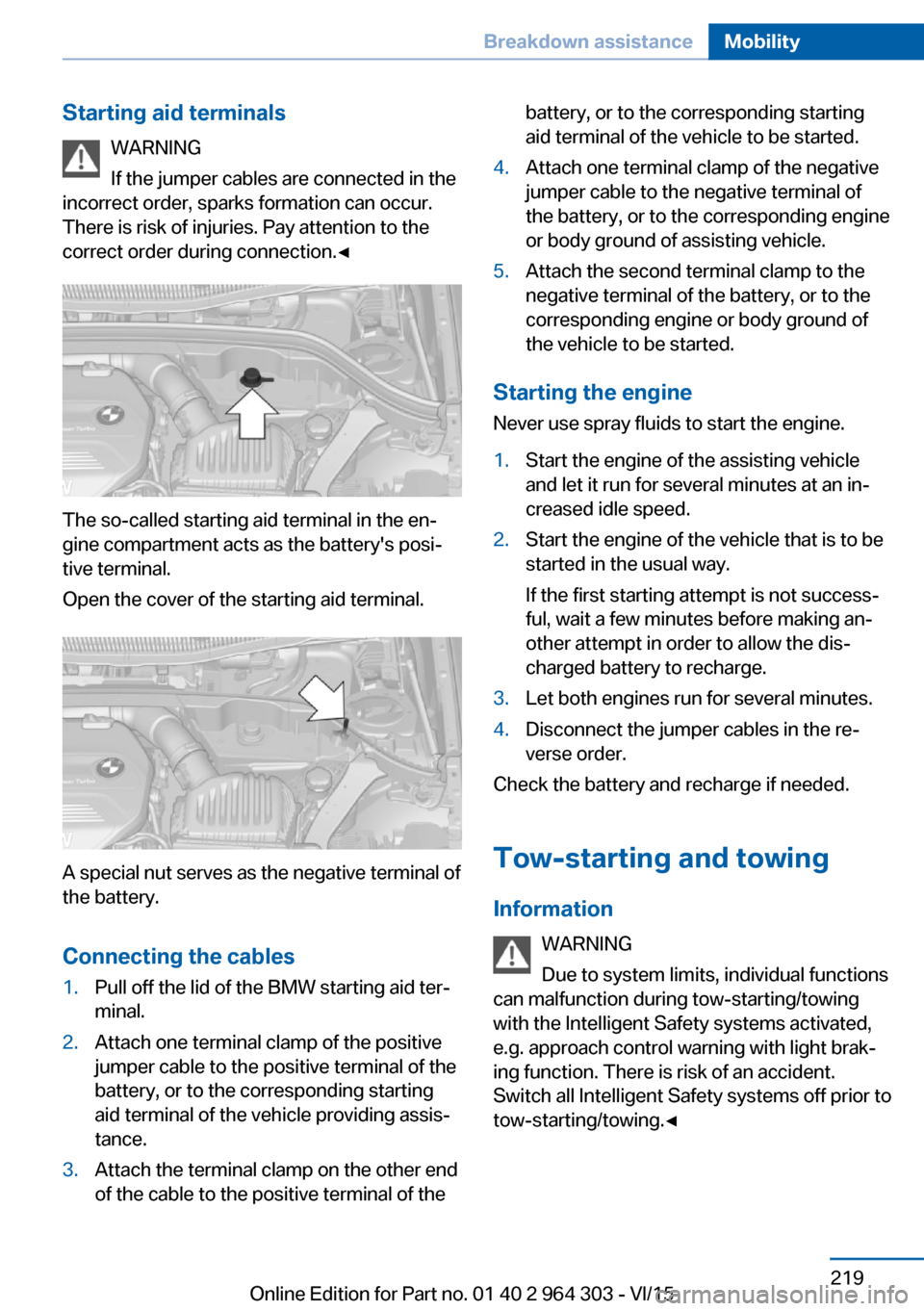
The so-called starting aid terminal in the en‐
gine compartment acts as the battery's posi‐
tive terminal.
Open the cover of the starting aid terminal.
A special nut serves as the negative terminal of
the battery.
Connecting the cables
1.Pull off the lid of the BMW starting aid ter‐
minal.2.Attach one terminal clamp of the positive
jumper cable to the positive terminal of the
battery, or to the corresponding starting
aid terminal of the vehicle providing assis‐
tance.3.Attach the terminal clamp on the other end
of the cable to the positive terminal of thebattery, or to the corresponding starting
aid terminal of the vehicle to be started.4.Attach one terminal clamp of the negative
jumper cable to the negative terminal of
the battery, or to the corresponding engine
or body ground of assisting vehicle.5.Attach the second terminal clamp to the
negative terminal of the battery, or to the
corresponding engine or body ground of
the vehicle to be started.
Starting the engine
Never use spray fluids to start the engine.
1.Start the engine of the assisting vehicle
and let it run for several minutes at an in‐
creased idle speed.2.Start the engine of the vehicle that is to be
started in the usual way.
If the first starting attempt is not success‐
ful, wait a few minutes before making an‐
other attempt in order to allow the dis‐
charged battery to recharge.3.Let both engines run for several minutes.4.Disconnect the jumper cables in the re‐
verse order.
Check the battery and recharge if needed.
Tow-starting and towing Information WARNING
Due to system limits, individual functions
can malfunction during tow-starting/towing
with the Intelligent Safety systems activated,
e.g. approach control warning with light brak‐
ing function. There is risk of an accident.
Switch all Intelligent Safety systems off prior to
tow-starting/towing.◀
Seite 219Breakdown assistanceMobility219
Online Edition for Part no. 01 40 2 964 303 - VI/15
Page 225 of 242

floor mats that are suitable for the vehicle and
can be safely attached to the floor. Do not use
loose floor mats and do not layer several floor
mats. Make sure that there is sufficient clear‐
ance for the pedals. Ensure that the floor mats
are securely fastened again after they were re‐
moved, e.g. for cleaning.◀
Floor mats can be removed from the car's inte‐
rior for cleaning.
If the floor carpets are very dirty, clean with a
microfiber cloth and water or a textile cleaner.
To prevent matting of the carpet, rub back and
forth in the direction of travel only.
Sensor/camera lenses To clean sensors and camera lenses, use a
cloth moistened with a small amount of glass
detergent.
Displays/Screens/protective glass of
the Head-up Display
CAUTION
Chemical cleansers, moisture or fluids of
any kind can damage the surface of displays
and screens. There is risk of property damage.
Clean with a clean, antistatic microfiber cloth.◀
CAUTION
The surface of displays can be damaged
with improper cleaning. There is risk of prop‐
erty damage. Avoid pressure that is too high
and do not use any scratching materials.◀
Clean with a clean, antistatic microfiber cloth.
Clean the protective glass of the Head-up Dis‐
play using a microfiber cloth and commercially
available dish-washing soap.
Long-term
When the vehicle is shut down for longer than
three months, special measures must be
taken. Further information is available from a
dealer’s service center or another qualified
service center or repair shop.Seite 225CareMobility225
Online Edition for Part no. 01 40 2 964 303 - VI/15
Page 232 of 242

Everything from A to Z
IndexA ABS, Antilock Brake Sys‐ tem 120
ACC, Active Cruise Con‐ trol 126
Acceleration Assistant, refer to Launch Control 80
Accessories and parts 7
Activated-charcoal filter 148
Active cruise control, ACC 126
Adaptive brake lights, see Brake force display 118
Additives, oil 201
Adjustments, seats/head re‐ straints 52
After washing vehicle 223
Airbags 102
Airbags, indicator/warning light 103
Air circulation, refer to Recir‐ culated-air mode 147
Air circulation, see Recircu‐ lated-air mode 145
Air conditioner 144
Air, dehumidifying, see Cool‐ ing function 145, 147
Air distribution, manual 145, 148
Air flow, air conditioner 145
Air flow, automatic climate control 148
Air pressure, tires 186
Air vents, refer to Ventila‐ tion 149
Alarm system 46
Alarm, unintentional 47
All around the center con‐ sole 16
All around the roofliner 17 All around the steering
wheel 14
All-season tires, see Winter tires 191
All-wheel-drive 122
Alternating-code hand-held transmitter 152
Alternative oil types 201
Ambient light 101
Antifreeze, washer fluid 76
Antilock Brake System, ABS 120
Anti-slip control, see DSC 120
Approved axle load 229
Arrival time 91
Ashtray 155
Assistance when driving off 125
Assist system, see Intelligent Safety 111
Attentiveness assistant 118
AUTO intensity 147
Automatic car wash 222
Automatic climate con‐ trol 146
Automatic cruise control with Stop & Go 126
Automatic Curb Monitor 61
Automatic deactivation, Front-seat passenger air‐
bags 104
Automatic headlight con‐ trol 98
Automatic locking 46
Automatic recirculated-air control 147
Automatic tailgate 41
Automatic transmission, see Steptronic transmission 77 AUTO program, automatic cli‐
mate control 147
AUTO program, intensity 147
Auto Start/Stop function 70
Average fuel consumption 91
Average speed 91
Axle loads, weights 229
B Backrest curvature, refer to Lumbar support 54
Backrest, seats 52
Backrest, width 54
Bad road trips 168
Band-aids, see First-aid kit 218
Bar for tow-starting/ towing 220
Battery replacement, vehicle battery 215
Battery replacement, vehicle remote control 35
Battery, vehicle 215
Belts, safety belts 56
Beverage holder, cu‐ pholder 162
BMW Assist 6
BMW Driver’s Guide App 6
BMW Homepage 6
BMW Internet page 6
BMW maintenance sys‐ tem 204
Bonus range, ECO PRO 177
Bottle holder, see Cu‐ pholder 162
Brake assistant 120
Brake discs, break-in 168
Brake force display 118
Brake lights, adaptive 118 Seite 232ReferenceEverything from A to Z232
Online Edition for Part no. 01 40 2 964 303 - VI/15
Page 238 of 242

Pinch protection system,glass sunroof 51
Pinch protection system, win‐ dows 49
Plastic, care 224
Power failure 215
Power windows 48
Prescribed engine oil types 201
Pressure, tire air pres‐ sure 186
Pressure warning, tires 109
Profile, see Personal Pro‐ file 35
Programmable memory but‐ tons, iDrive 24
Protective function, glass sunroof 51
Protective function, win‐ dows 49
Push-and-turn switch, see Controller 19
R Radiator fluid 202
Radio 6
Radio-operated key, see Re‐ mote control 34
Radio ready state 68
Rain sensor 75
Rear lights 211
Rear seat backrest tilt 55
Rear seats 55
Rear socket 156
Rearview camera 137
Rearview mirror 60
Rear window de‐ froster 145, 148
Recirculated-air filter 148
Recirculated-air mode 145, 147
Recommended fuel grade 184
Recommended tire brands 191 Refueling 182
Remaining range 86
Remote control/key 34
Remote control, malfunc‐ tion 38
Remote control, univer‐ sal 151
Replacement fuse 216
Replacing parts 206
Replacing wheels/tires 190
Reporting safety malfunc‐ tions 10
RES button, see Camera- based cruise control,
ACC 126
RES button, see Cruise con‐ trol 132
Reserve warning, see Range 86
Reset, Tire Pressure Monitor TPM 106
Retaining straps, securing cargo 173
Retreaded tires 191
Roadside parking lights 98
RON recommended fuel grade 184
Roofliner 17
Roof load capacity 229
Roof-mounted luggage rack 173
Rope for tow-starting/ towing 220
RSC Run Flat System Com‐ ponent, see Run-flat
tires 192
Rubber components, care 224
Run-flat tires 192
S Safe braking 170
Safety belt reminder for driv‐ er's seat and front passen‐
ger seat 57 Safety belts 56
Safety belts, care 224
Safety switch, windows 49
Safety systems, airbags 102
Saving fuel 175
Screen, see Control Dis‐ play 18
Screwdriver, see Onboard ve‐ hicle tool kit 206
Screw thread, refer to Screw thread for tow fitting, screw
thread for tow fitting 221
Sealant 192
Seat and mirror memory 59
Seat belts, see Safety belts 56
Seat heating, front 55
Seating position for chil‐ dren 64
Seats 52
Seats, front 52
Seats, rear 55
Selection list in instrument cluster 90
Selector lever, Steptronic transmission 77
Sensors, care 225
Service and warranty 8
Service requirements, Condi‐ tion Based Service
CBS 204
Service requirements, dis‐ play 87
Services, ConnectedDrive 6
Servotronic 123
SET button, see Camera- based cruise control,
ACC 126
SET button, see Cruise con‐ trol 132
Settings, locking/unlock‐ ing 45
Settings on Control Dis‐ play 93
Settings, storing for seat, mir‐ ror 59 Seite 238ReferenceEverything from A to Z238
Online Edition for Part no. 01 40 2 964 303 - VI/15
Page 240 of 242
Triple turn signal activa‐tion 73
Trip odometer 86
Trip on-board computer 92
Trip recorder, see Trip odom‐ eter 86
Turning circle lines, rearview camera 139
Turn signal, bulb replace‐ ment 208, 209
Turn signals, operation 73
Turn signals, rear, bulb re‐ placement 211
U
Unintentional alarm 47
Units of measurement 94
Universal remote control 151
Unlock button, Steptronic transmission 78
Unlocking/locking via door lock 39
Unlocking/locking with re‐ mote control 37
Unlocking, settings 45
Unpaved roads, cross-coun‐ try trips 168
Updates made after the edito‐ rial deadline 7
Upholstery care 223
USB interface 156
V
Vanity mirror 155
Variable sport steering 123
Vehicle battery 215
Vehicle battery, replac‐ ing 215
Vehicle, break-in 168
Vehicle care 223
Vehicle features and op‐ tions 7
Vehicle identification num‐ ber 10 Vehicle jack 213
Vehicle paint 223
Vehicle storage 225
Vehicle wash 222
Ventilation 149
Ventilation, refer to Parked- car ventilation 149
VIN, see vehicle identification number 10
Voice activation system 26
W Warning and indicator lamps, see Check Control 82
Warning displays, see Check Control 82
Warning messages, see Check Control 82
Warning triangle 218
Warranty 7
Washer fluid 76
Washer nozzles, wind‐ shield 76
Washer system 74
Washing, vehicle 222
Water on roads 169
Weights 229
Welcome lamps during un‐ locking 37
Welcome lights 98
Wheel cleaner 224
Wheels, changing 190
Wheels, everything on wheels and tires 186
Wheels, Flat Tire Monitor FTM 109
Wheels, Tire Pressure Moni‐ tor TPM 105
Window defroster, rear 145, 148
Windows, powered 48
Windshield washer fluid 76
Windshield washer noz‐ zles 76 Windshield washer sys‐
tem 74
Windshield wiper, see wiper system 74
Winter storage, care 225
Winter tires, suitable tires 191
Winter tires, tread 190
Wiper 74
Wiper blades, replacing 206
Wiper fluid 76
Wiper, fold-out position 76
Wiper system 74
Wood, care 224
Word match concept, naviga‐ tion 25
Wrench, see Onboard vehicle tool kit 206
X
xDrive 122 Seite 240ReferenceEverything from A to Z240
Online Edition for Part no. 01 40 2 964 303 - VI/15