2016 BMW ACTIVE HYBRID 5 cruise control
[x] Cancel search: cruise controlPage 146 of 263

Driving comfortVehicle features and options
This chapter describes all standard, country-
specific and optional features offered with the
series. It also describes features that are not
necessarily available in your car, e. g., due to
the selected options or country versions. This
also applies to safety-related functions and
systems. The respectively applicable country
provisions must be observed when using the
respective features and systems.
Active Cruise Control with Stop & Go function, ACC
The concept
Use this system to select a desired speed that
the vehicle will maintain automatically on clear
roads.
To the extent possible, the system automati‐
cally adjusts the speed to a slower vehicle
ahead of you.
The distance that the vehicle maintains to the
vehicle ahead of you can be varied.
For safety reasons, it depends on the speed.
To maintain a certain distance, the system au‐
tomatically reduces the speed, applies the
brakes lightly, or accelerates again if the vehi‐
cle ahead begins moving faster.
If the vehicle ahead of you brakes to a halt, and
then proceeds to drive again within a brief pe‐
riod, the system is able to detect this within the
given system limits. Your own vehicle will
brake automatically and then accelerate again.
If the vehicle ahead of you drives away again
after a prolonged period, briefly press the ac‐
celerator pedal or press the appropriate button
to reactivate the system. The vehicle will auto‐
matically accelerate.As soon as the road is clear, the vehicle accel‐
erates to the desired speed.
The speed is also maintained downhill, but
may not be maintained uphill if engine power is
insufficient.
General information
Depending on the driving settings, the features
of the cruise control can change in certain
areas.
Information WARNING
The system does not relieve from the
personal responsibility to correctly assess the
traffic situation. Based on the limits of the sys‐
tem, it cannot independently react to all traffic
situations. There is risk of an accident. Adjust
the driving style to the traffic conditions. Watch
traffic closely and actively interfere in the re‐
spective situations.◀
WARNING
An unsecured vehicle can put itself into
motion and roll away. There is risk of an acci‐
dent. Before exiting, secure the vehicle against
rolling.
In order to ensure that the vehicle is secured
against rolling away, observe the following:▷Set the parking brake.▷On uphill grades or on a slope, turn the
front wheels in the direction of the curb.▷On uphill grades or on a slope, also secure
the vehicle, e.g. with a wheel chock.◀Seite 146ControlsDriving comfort146
Online Edition for Part no. 01 40 2 963 694 - VI/15
Page 147 of 263

Overview
Buttons on the steering wheelPress but‐
tonFunctionCruise control on/off, interrupt,
refer to page 147Store/maintain speed, refer to
page 148Resume speed, refer to
page 149Reduce distance, refer to
page 149Increase distance, refer to
page 149Rocker switch:
Maintain, store, change speed,
refer to page 148
Buttons are arranged according to vehicle's
series, optional features and country specifica‐
tions.
Radar sensor
A radar sensor is located in the front bumper for detecting vehicles on the road ahead of the
vehicle.
Always keep radar sensor clean and unob‐
structed.
Camera
A camera serves to detect vehicles.
The camera is installed near the interior rear‐
view mirror.
Keep the windshield in the area behind the in‐
terior rearview mirror clean and clear.
Switching on/off and interrupting
cruise control
Switching on Press button on the steering wheel.
The indicator lights in the instrument cluster
light up and the mark in the speedometer is set
to the current speed.
Cruise control can be used.
DSC Dynamic Stability Control will be
switched on if needed.
Switch off To switch off the system while standing, step
on brake pedal at the same time.
Press button on the steering wheel.
▷If active: press twice.▷If interrupted: press once.
The displays go out. The stored desired speed
is deleted.
Interrupting Press button on the steering wheel.
Seite 147Driving comfortControls147
Online Edition for Part no. 01 40 2 963 694 - VI/15
Page 150 of 263
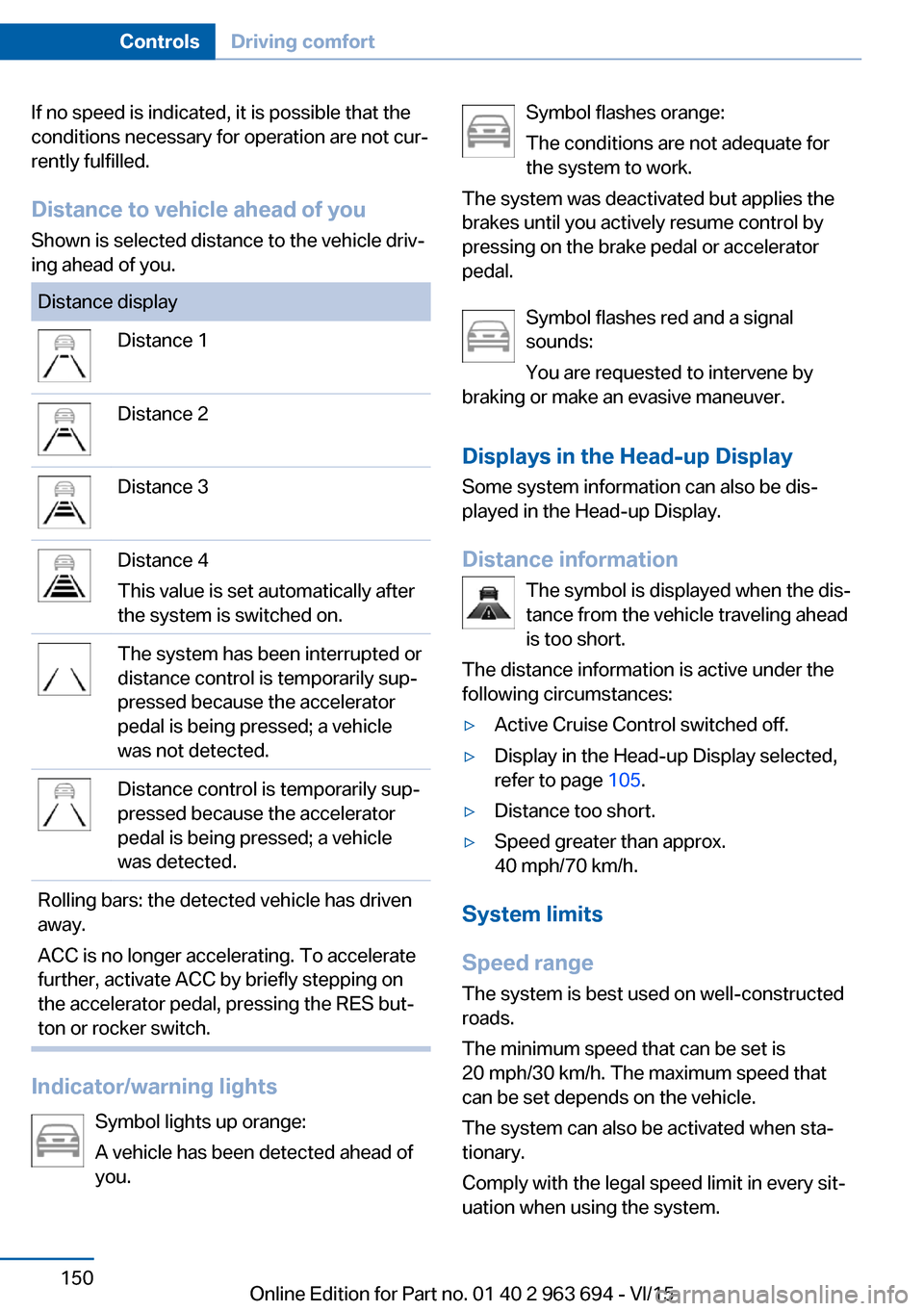
If no speed is indicated, it is possible that the
conditions necessary for operation are not cur‐
rently fulfilled.
Distance to vehicle ahead of you
Shown is selected distance to the vehicle driv‐
ing ahead of you.Distance displayDistance 1Distance 2Distance 3Distance 4
This value is set automatically after
the system is switched on.The system has been interrupted or
distance control is temporarily sup‐
pressed because the accelerator
pedal is being pressed; a vehicle
was not detected.Distance control is temporarily sup‐
pressed because the accelerator
pedal is being pressed; a vehicle
was detected.Rolling bars: the detected vehicle has driven
away.
ACC is no longer accelerating. To accelerate
further, activate ACC by briefly stepping on
the accelerator pedal, pressing the RES but‐
ton or rocker switch.
Indicator/warning lights
Symbol lights up orange:
A vehicle has been detected ahead of
you.
Symbol flashes orange:
The conditions are not adequate for
the system to work.
The system was deactivated but applies the
brakes until you actively resume control by
pressing on the brake pedal or accelerator
pedal.
Symbol flashes red and a signal
sounds:
You are requested to intervene by
braking or make an evasive maneuver.
Displays in the Head-up Display Some system information can also be dis‐
played in the Head-up Display.
Distance information The symbol is displayed when the dis‐
tance from the vehicle traveling ahead
is too short.
The distance information is active under the
following circumstances:▷Active Cruise Control switched off.▷Display in the Head-up Display selected,
refer to page 105.▷Distance too short.▷Speed greater than approx.
40 mph/70 km/h.
System limits
Speed range The system is best used on well-constructedroads.
The minimum speed that can be set is
20 mph/30 km/h. The maximum speed that
can be set depends on the vehicle.
The system can also be activated when sta‐
tionary.
Comply with the legal speed limit in every sit‐
uation when using the system.
Seite 150ControlsDriving comfort150
Online Edition for Part no. 01 40 2 963 694 - VI/15
Page 152 of 263

the bend of the curve. If the system deceler‐
ates you may compensate it by briefly acceler‐
ating.
After releasing the gas pedal the system is re‐
activated and controls speed independently.
Driving away In some situations, the vehicle cannot drive off
automatically; for example:▷On steep inclines.▷From behind bumps in the road.
In these cases, step on the accelerator pedal.
Weather
In the event of unfavorable weather and light conditions, e. g. if there is rain, snowfall, slush,
fog or glare, this may result in poorer recogni‐
tion of vehicles as well as short-term interrup‐
tions for vehicles that are already detected. Drive attentively, and react to the current trafficsituation. If necessary, intervene actively, e.g.
by braking, steering or evading.
Malfunction
The system cannot be activated if the radar sensor is not aligned correctly. This may be
caused by damage incurred during parking,
e.g.
A Check Control message is displayed if the
system fails.
The function for detecting and responding
when approaching stationary vehicles may be limited in the following situations:
▷During calibration of the camera immedi‐
ately after vehicle delivery.▷If the camera is malfunctioning or dirty. A
Check Control message is displayed.Cruise control
The concept The system maintains a preset speed via the
buttons on the steering wheel. The system
brakes on downhill gradients if engine braking
is insufficient.
General information
Depending on the driving settings, the features
of the cruise control can change in certain
areas.
Information WARNING
The use of the system can lead to an in‐
creased risk of accidents in the following situa‐
tions:▷On winding roads.▷In heavy traffic.▷On slippery roads, in fog, snow or rain, or
on a loose road surface.
There is risk of accidents or risk of property
damage. Only use the system if driving at con‐
stant speed is possible.◀
Overview
Buttons on the steering wheel
Press but‐
tonFunctionCruise control on/off, interrupt,
refer to page 153Store/maintain speed, refer to
page 153Seite 152ControlsDriving comfort152
Online Edition for Part no. 01 40 2 963 694 - VI/15
Page 153 of 263

Press but‐
tonFunctionResume speed, refer to
page 154Rocker switch:
Maintain, store, change speed,
refer to page 154
Controls
Switching on Press button on the steering wheel.
The marking in the speedometer is set to the
current speed.
The cruise control can be used.
DSC Dynamic Stability Control will be
switched on if needed.
Switch off WARNING
The system does not relieve from the
personal responsibility to correctly assess the
traffic situation. Based on the limits of the sys‐
tem, it cannot independently react to all traffic
situations. There is risk of an accident. Adjust
the driving style to the traffic conditions. Watch
traffic closely and actively interfere in the re‐
spective situations.◀
Press button on the steering wheel.
▷If active: press twice.▷If interrupted: press once.
The displays go out. The stored desired speed
is deleted.
Interrupting When active, press the button.
The system is automatically interrupted in the
following situations:▷When the brakes are applied.▷If selector lever position D is disengaged.▷If DTC Dynamic Traction Control is acti‐
vated or DSC is deactivated.▷When DSC is actively controlling stability.▷When SPORT+ is activated with Driving
Dynamics Control.
Maintaining, storing, and changing the
speed
Information WARNING
The desired speed can be incorrectly ad‐
justed or called up by mistake. There is risk of
an accident. Adjust the desired speed to the
traffic conditions. Watch traffic closely and ac‐
tively interfere in the respective situations.◀
Maintaining/storing the speed Press button.
Or:
Press the rocker switch while the system is in‐
terrupted.
When the system is switched on, the current
speed is maintained and stored as the desired
speed.
This is displayed, refer to page 154, in the
speedometer and briefly in the instrument
cluster.
Seite 153Driving comfortControls153
Online Edition for Part no. 01 40 2 963 694 - VI/15
Page 252 of 263

Everything from A to Z
IndexA ABS, Antilock Brake Sys‐ tem 141
ACC, Active Cruise Control with Stop & Go 146
Accessories and parts 8
Activated-charcoal filter 170
Activate drive readiness 76
Active Blind Spot Detec‐ tion 137
Active Cruise Control with Stop & Go, ACC 146
ActiveHybrid, system 31
Active Protection 139
Active seat, front 61
Active seat ventilation, front 62
Adapting to the course of the road, hybrid system 93
Adaptive brake assistant 141
Adaptive brake lights, see Brake force display 138
Adaptive Light Control 110
Additives, oil 221
Adjustments, seats/head re‐ straints 58
After washing vehicle 242
Airbags 114
Airbags, indicator/warning light 115
Air circulation, refer to Recir‐ culated-air mode 169
Air, dehumidifying, see Cool‐ ing function 168
Air distribution, manual 169
Air flow, automatic climate control 169
Air outlets, see ventila‐ tion 170
Air pressure, tires 206 Alarm system 51
Alarm, unintentional 52
All around the center con‐ sole 16
All around the roofliner 17
All around the steering wheel 14
All-season tires, see Winter tires 211
Alternating-code hand-held transmitter 176
Alternative oil types 221
Ambient light 112
Animal detection, see Night Vision 132
Antifreeze, washer fluid 85
Antilock Brake System, ABS 141
Anti-slip control, see DSC 141
Approved axle load 249
Armrest, refer to Center arm‐ rest 182
Arrival time 103
Ashtray 177
Ashtray, front 177
Ashtray, rear 178
Assistance for the combus‐ tion engine, ASSIST 79
Assistance for the combus‐ tion engine, eBOOST 79
Assistance when driving off 141
ASSIST, assistance for the combustion engine 79
Attentiveness assistant 139
AUTO H button 81
AUTO H button, refer to Au‐ tomatic Hold 81
AUTO intensity 169
Automatic car wash 241 Automatic climate con‐
trol 167
Automatic Cruise Control with Stop & Go 146
Automatic Curb Monitor 68
Automatic deactivation, Front-seat passenger air‐
bags 116
Automatic deactivation of the hybrid system 34
Automatic headlight con‐ trol 109
Automatic Hold 81
Automatic locking 51
Automatic recirculated-air control 169
Automatic Soft Closing, doors 44
Automatic transmission, see Steptronic transmission 86
Automatic trunk lid 45
AUTO program, automatic cli‐ mate control 168
AUTO program, intensity 169
Auto Start/Stop function 77
Auxiliary air conditioning 173
Average fuel consump‐ tion 102
Average speed 102
Axle loads, weights 249
B Backrest curvature, see Lum‐ bar support 60
Backrest, width 61
Band-aids, see First-aid kit 236
Bar for tow-starting/ towing 238 Seite 252ReferenceEverything from A to Z252
Online Edition for Part no. 01 40 2 963 694 - VI/15
Page 254 of 263

Combination switch, see Turnsignals 82
Combustion engine, start‐ ing 77
COMFORT+ program, Driving Dynamics Control 144
Comfort Access 47
COMFORT program, Driving Dynamics Control 144
Compressor 212
Condensation on win‐ dows 170
Condensation under the vehi‐ cle 192
Condition Based Service CBS 225
Confirmation signal 51
ConnectedDrive, see user's manual for Navigation, En‐
tertainment and Communi‐
cation
ConnectedDrive Services
Contact with water, hybrid system 34
Continued driving with a flat tire 119 , 122
Control Display 18
Control Display, settings 104
Controller 19
Control systems, driving sta‐ bility 141
Convenient opening with the remote control 42
Coolant 223
Coolant level 223
Coolant temperature 97
Cooling function 168
Cooling, maximum 168
Cooling system 223
Cornering light 110
Corrosion on brake discs 192
Cosmetic mirror 177
Courtesy lamps during un‐ locking 41
Courtesy lamps with the vehi‐ cle locked 42 Cruise control 152
Cruise control, active with Stop & Go 146
Cruise Control, refer to Active Cruise Control 146
Cruising range 98
Cupholder 183
D
Damage, tires 210
Damping control, dy‐ namic 143
Data, technical 248
Date 98
Daytime running lights 110
Deactivating drive readi‐ ness 77
Defrosting, see Windows, de‐ frosting 170
Dehumidifying, air 168
Deleting personal data 24
Deletion of personal data 24
Destination distance 103
Digital clock 98
Dimensions 248
Dimmable exterior mirrors 69
Dimmable interior rearview mirror 69
Direction indicator, see Turn signals 82
Display, electronic, instru‐ ment cluster 90
Display in windshield 105
Display lighting, see Instru‐ ment lighting 112
Displays, cleaning 244
Displays, hybrid system 91
Disposal, coolant 224
Disposal, vehicle battery 233
Distance control, see PDC 154
Distance to destination 103
Divided screen view, split screen 23
Door lock 43 Door lock, see Remote con‐
trol 38
Doors, Automatic Soft Clos‐ ing 44
DRIVE, driving with combus‐ tion engine 79
Drive mode 143
Drive-off assistant 141
Drive-off assistant, see DSC 141
Driver assistance, refer to In‐ telligent Safety 123
Drive readiness in detail 76
Drive readiness states 75
Drive readuness, deacti‐ vate 77
Driving Assistant, refer to In‐ telligent Safety 123
Driving Dynamics Con‐ trol 143
Driving instructions, break- in 188
Driving instructions, hybrid system 188
Driving notes, general 190
Driving stability control sys‐ tems 141
Driving tips 190
Driving with combustion en‐ gine, DRIVE 79
DSC Dynamic Stability Con‐ trol 141
DTC Dynamic Traction Con‐ trol 142
Dynamic Damping Con‐ trol 143
Dynamic Stability Control DSC 141
Dynamic Traction Control DTC 142
E eBOOST, assistance for the combustion engine 79
ECO PRO 197 Seite 254ReferenceEverything from A to Z254
Online Edition for Part no. 01 40 2 963 694 - VI/15
Page 259 of 263

Remote control, auxiliary airconditioning, key 174
Remote control, malfunc‐ tion 43
Remote control, univer‐ sal 175
Replacement fuse 233
Replacing parts 227
Replacing wheels/tires 211
Reporting safety malfunc‐ tions 10
RES button 149
RES button, see Active Cruise Control, ACC 146
RES button, see Cruise con‐ trol 152
Reserve warning, see Range 98
Reset, Tire Pressure Monitor TPM 118
Residual cooling 172
Residual heat, automatic cli‐ mate control 169
Retaining straps, securing cargo 194
Retreaded tires 211
Reversing lamp, bulb replace‐ ment 231
Roadside parking lights 109
Roller sunblinds 54
RON recommended fuel grade 204
Roofliner 17
Roof load capacity 249
Roof-mounted luggage rack 194
Rope for tow-starting/ towing 238
RSC Run Flat System Com‐ ponent, see Run-flat
tires 212
Rubber components, care 243
Run-flat tires 212 S
Safe braking 191
Safety belt reminder for driv‐ er's seat and front passen‐
ger seat 63
Safety belts 62
Safety belts, care 243
Safety of the high-voltage system 34
Safety Package, see Active Protection 139
Safety switch, windows 54
Safety systems, airbags 114
Saving fuel 196
Screen, see Control Dis‐ play 18
Screwdriver, see Onboard ve‐ hicle tool kit 227
Screw thread, refer to Screw thread for tow fitting, screw
thread for tow fitting 239
Sealant 212
Seat belts, see Safety belts 62
Seat heating, front 61
Seat heating, rear 62
Seating position for chil‐ dren 71
Seat, mirror, and steering wheel memory 66
Seats 58
Seat ventilation, front 62
Selection list in instrument cluster 101
Selector lever, Steptronic transmission 87
Sensors, care 244
Service and warranty 8
Service requirements, Condi‐ tion Based Service
CBS 225
Service requirements, dis‐ play 99
Services, ConnectedDrive SET button, see Active Cruise Control, ACC 146
SET button, see Cruise con‐ trol 152
Settings, locking/unlock‐ ing 50
Settings on Control Dis‐ play 104
Settings, storing for seat, mir‐ rors, steering wheel 66
Shift paddles on the steering wheel 88
Shoulder support 61
Side airbags 114
Side View 159
Signaling, horn 14
Signals when unlocking 51
Silent Start, electric drive readiness 77
Sitting safely 58
Size 248
Slide/tilt glass roof 55
Smallest turning radius 248
Smoker's package 177
Snow chains 216
Socket 179
Socket, OBD Onboard Diag‐ nostics 226
SOS button 235
Spare fuse 233
Speaker lighting 112
Speed, average 102
Speed limit detection, on- board computer 103
Speed limiter, display 100
Speed Limit Information 100
Speed warning 103
Split screen 23
SPORT+ - program, Dynamic Driving Control 144
Sport displays, torque dis‐ play, performance dis‐
play 103
SPORT program, driving dy‐ namics 144 Seite 259Everything from A to ZReference259
Online Edition for Part no. 01 40 2 963 694 - VI/15