2016 BMW 6 SERIES GRAN COUPE Ac compressor
[x] Cancel search: Ac compressorPage 210 of 255
Follow the instructions for continued driving
with a flat tire.
Changing run-flat tires
For your own safety, only use run-flat tires. No
spare tire is available in the case of a flat tire.
Your service center will be glad to advise you.
Mobility System
The concept With the Mobility System, minor tire damagecan be sealed quickly to enable continued
travel. To accomplish this, sealant is pumped
into the tires, which seals the damage from the inside.
The compressor can be used to check the tire
inflation pressure.
Hints▷Follow the instructions on using the Mobi‐
lity System found on the compressor and
sealant container.▷Use of the Mobility System may be ineffec‐
tive if the tire puncture measures approx.
1/8 in/4 mm or more.▷Contact the nearest service center if the
tire cannot be made drivable.▷If possible, do not remove foreign bodies
that have penetrated the tire.▷Pull the speed limit sticker off the sealant
container and apply it to the steering
wheel.▷The use of a sealant can damage the TPM
wheel electronics. In this case, have the
electronics checked at the next opportu‐
nity and have them replaced if needed.
Enclosed areas
Do not let the engine run in enclosed
areas, since breathing in exhaust fumes may
lead to loss of consciousness and death. The
exhaust gases contain carbon monoxide, an
odorless and colorless but highly toxic gas.◀
Storage The Mobility System is located under the
cargo floor panel.
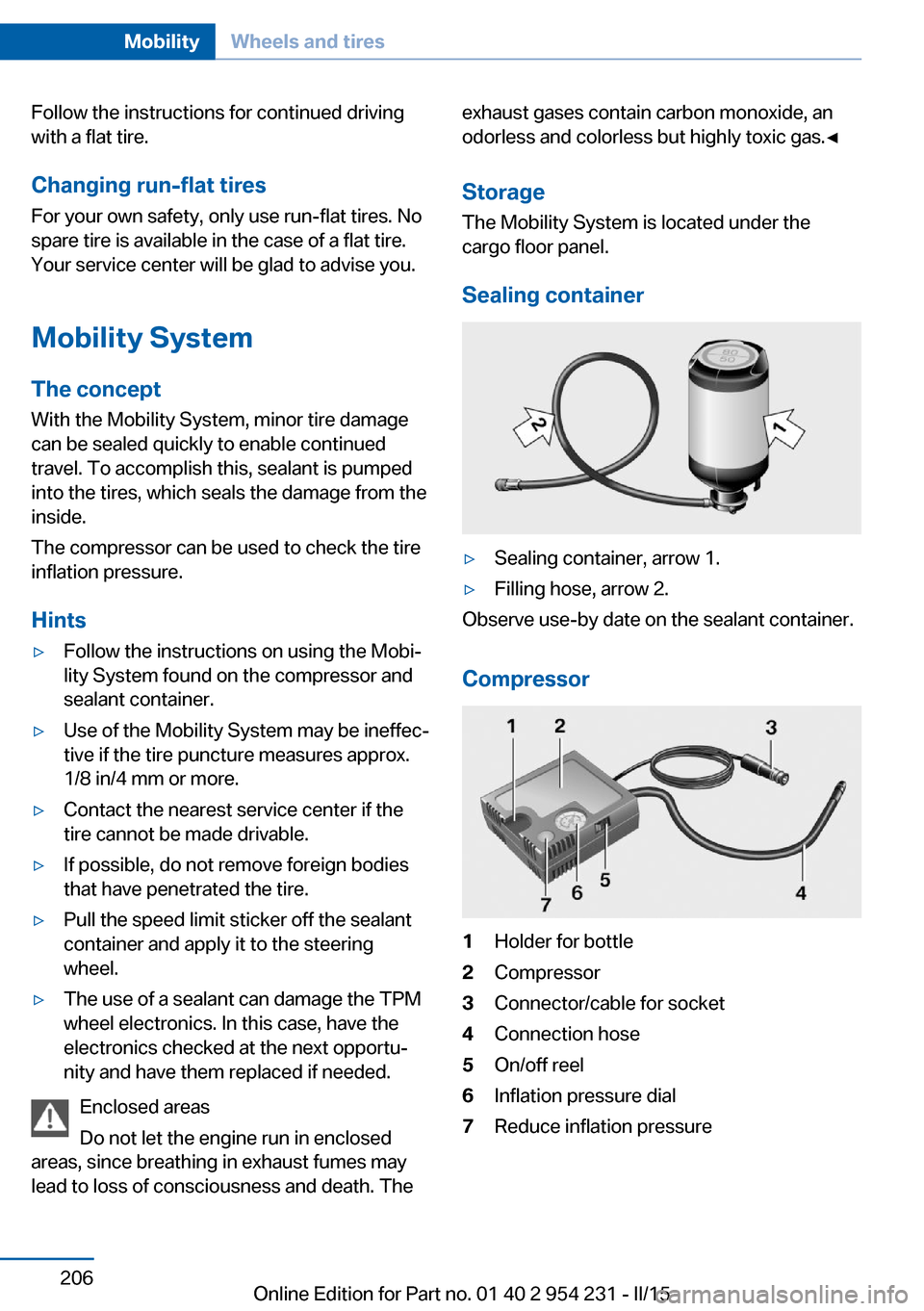
Sealing container▷Sealing container, arrow 1.▷Filling hose, arrow 2.
Observe use-by date on the sealant container.
Compressor
1Holder for bottle2Compressor3Connector/cable for socket4Connection hose5On/off reel6Inflation pressure dial7Reduce inflation pressureSeite 206MobilityWheels and tires206
Online Edition for Part no. 01 40 2 954 231 - II/15
Page 211 of 255
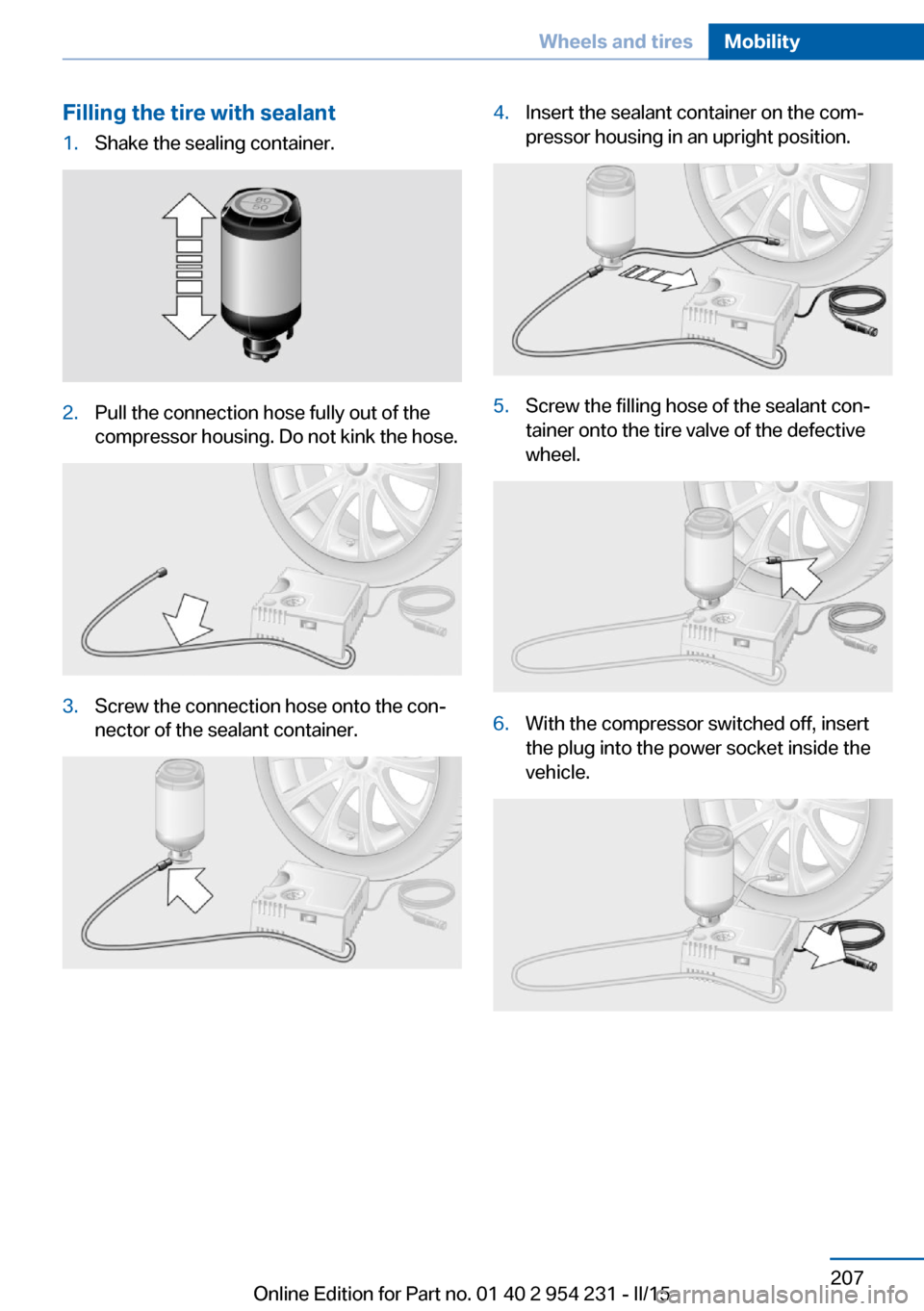
Filling the tire with sealant1.Shake the sealing container.2.Pull the connection hose fully out of the
compressor housing. Do not kink the hose.3.Screw the connection hose onto the con‐
nector of the sealant container.4.Insert the sealant container on the com‐
pressor housing in an upright position.5.Screw the filling hose of the sealant con‐
tainer onto the tire valve of the defective
wheel.6.With the compressor switched off, insert
the plug into the power socket inside the
vehicle.Seite 207Wheels and tiresMobility207
Online Edition for Part no. 01 40 2 954 231 - II/15
Page 212 of 255
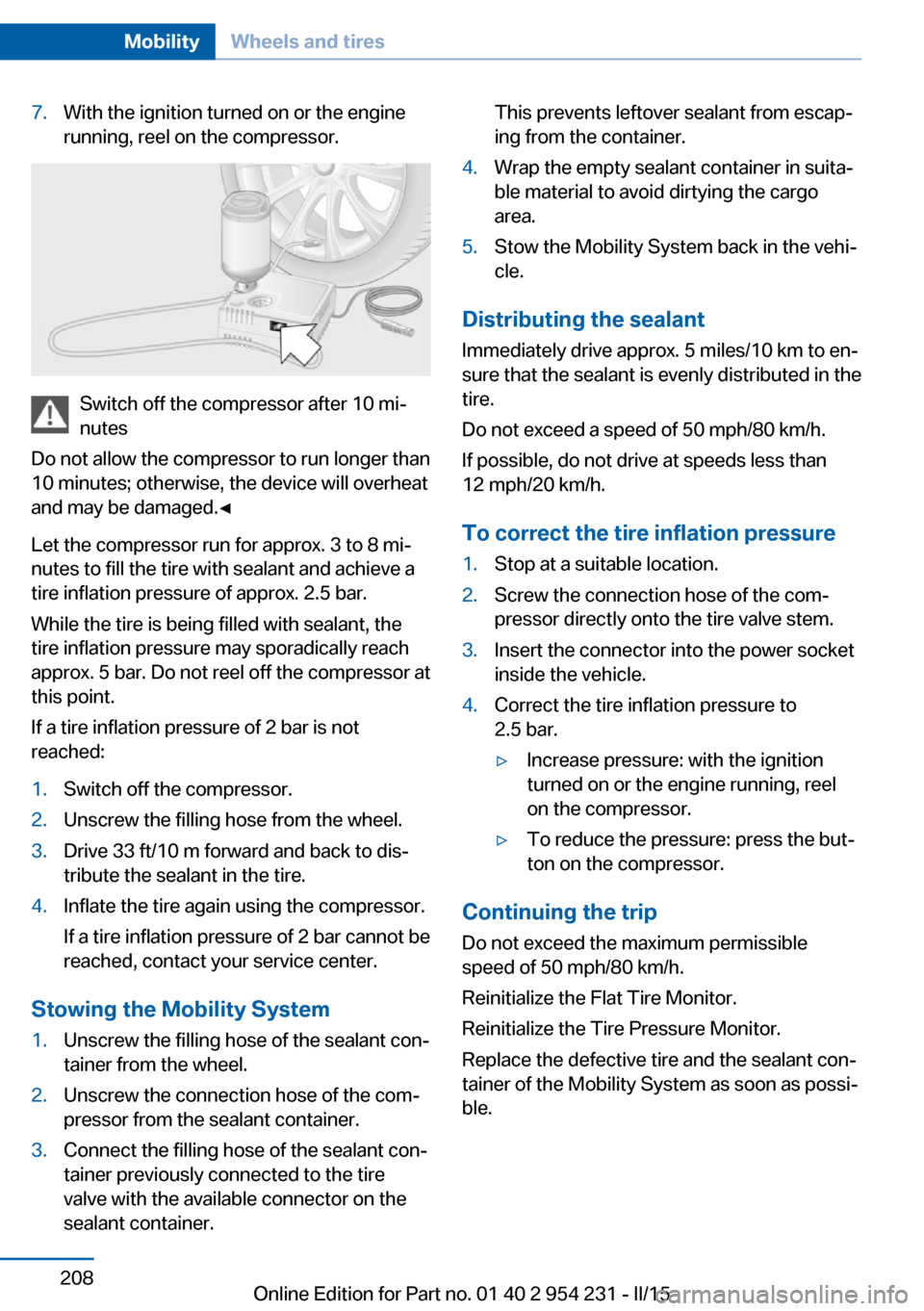
7.With the ignition turned on or the engine
running, reel on the compressor.
Switch off the compressor after 10 mi‐
nutes
Do not allow the compressor to run longer than
10 minutes; otherwise, the device will overheat
and may be damaged.◀
Let the compressor run for approx. 3 to 8 mi‐
nutes to fill the tire with sealant and achieve a
tire inflation pressure of approx. 2.5 bar.
While the tire is being filled with sealant, the
tire inflation pressure may sporadically reach
approx. 5 bar. Do not reel off the compressor at
this point.
If a tire inflation pressure of 2 bar is not
reached:
1.Switch off the compressor.2.Unscrew the filling hose from the wheel.3.Drive 33 ft/10 m forward and back to dis‐
tribute the sealant in the tire.4.Inflate the tire again using the compressor.
If a tire inflation pressure of 2 bar cannot be
reached, contact your service center.
Stowing the Mobility System
1.Unscrew the filling hose of the sealant con‐
tainer from the wheel.2.Unscrew the connection hose of the com‐
pressor from the sealant container.3.Connect the filling hose of the sealant con‐
tainer previously connected to the tire
valve with the available connector on the
sealant container.This prevents leftover sealant from escap‐
ing from the container.4.Wrap the empty sealant container in suita‐
ble material to avoid dirtying the cargo
area.5.Stow the Mobility System back in the vehi‐
cle.
Distributing the sealant
Immediately drive approx. 5 miles/10 km to en‐
sure that the sealant is evenly distributed in the
tire.
Do not exceed a speed of 50 mph/80 km/h.
If possible, do not drive at speeds less than
12 mph/20 km/h.
To correct the tire inflation pressure
1.Stop at a suitable location.2.Screw the connection hose of the com‐
pressor directly onto the tire valve stem.3.Insert the connector into the power socket
inside the vehicle.4.Correct the tire inflation pressure to
2.5 bar.▷Increase pressure: with the ignition
turned on or the engine running, reel
on the compressor.▷To reduce the pressure: press the but‐
ton on the compressor.
Continuing the trip
Do not exceed the maximum permissible
speed of 50 mph/80 km/h.
Reinitialize the Flat Tire Monitor.
Reinitialize the Tire Pressure Monitor.
Replace the defective tire and the sealant con‐
tainer of the Mobility System as soon as possi‐
ble.
Seite 208MobilityWheels and tires208
Online Edition for Part no. 01 40 2 954 231 - II/15
Page 245 of 255

Belts, safety belts 53
Beverage holder, cu‐ pholder 174
Blinds, sun protection 47
BMW Assist, see user's manual for Navigation, En‐
tertainment and Communi‐
cation
BMW Driver’s Guide App 6
BMW Homepage 6
BMW Internet page 6
BMW maintenance sys‐ tem 217
Bonus range, ECO PRO 185
Bottle holder, refer to Cu‐ pholder 174
Brake assistant 128
Brake assistant, adaptive 128
Brake discs, break-in 178
Brake force display 125
Brake lights, adaptive 125
Brake lights, brake force dis‐ play 125
Brake lights, bulb replace‐ ment 221
Brake pads, break-in 178
Braking, hints 179
Breakdown assistance 224
Break-in 178
Brightness of Control Dis‐ play 93
Bulb replacement, front 219
Bulb replacement, rear 221
Button, RES 139
Button, Start/Stop 64
Bypassing, refer to Jump- starting 225
C
California Proposition 65 Warning 7
Calling up mirror adjust‐ ment 44
Calling up seat adjust‐ ment 44 Calling up steering wheel ad‐
justment 44
Camera lenses, care 232
Camera, rearview cam‐ era 148
Camera, Side View 150
Camera, Top View 152
Can holder, refer to Cu‐ pholder 174
Car battery 222
Car care products 230
Care, displays 232
Care, vehicle 230
Cargo 181
Cargo area, enlarging 169
Cargo area, storage compart‐ ments 175
Cargo, securing 182
Cargo straps, securing cargo 182
Car key, refer to Remote con‐ trol 34
Carpet, care 232
Car wash 229
Catalytic converter, refer to Hot exhaust system 178
CBS Condition Based Serv‐ ice 217
CD/Multimedia, see user's manual for Navigation, En‐
tertainment and Communi‐
cation
Center console 16
Central locking system 40
Central screen, refer to Con‐ trol Display 18
Changes, technical, refer to Safety 7
Changing parts 219
Changing wheels 222
Changing wheels/tires 204
Chassis number, see vehicle identification number 9
Check Control 81
Checking the engine oil level electronically 212 Checking the oil level elec‐
tronically 212
Children, seating position 60
Children, transporting safely 60
Child restraint fixing sys‐ tem 60
Child restraint fixing system LATCH 62
Child restraint fixing systems, mounting 60
Child safety locks 63
Child seat, mounting 60
Child seats 60
Chrome parts, care 231
Cigarette lighter 167
Cleaning displays 232
Climate control 157
Climate control laminated tinted safety glass 179
Climate control wind‐ shield 179
Clock 86
Closing/opening via door lock 39
Closing/opening with remote control 37
Clothes hooks 174
Coasting 187
Coasting with engine decou‐ pled, coasting 187
Coasting with idling en‐ gine 187
Combination reel, refer to Turn signals 70
Combination switch, refer to Wiper system 71
COMFORT+ program, Driving Dynamics Control 134
Comfort Access 41
COMFORT program, Driving Dynamics Control 134
Compressor 206
Computer, refer to On-board computer 90 Seite 241Everything from A to ZReference241
Online Edition for Part no. 01 40 2 954 231 - II/15