2016 BMW 4 SERIES COUPE indicator
[x] Cancel search: indicatorPage 177 of 247

Avoid high engine speeds
As a rule: driving at low engine speeds lowers
fuel consumption and reduces wear.
Use 1st gear to get the vehicle moving. Start‐
ing with the 2nd gear, accelerate rapidly. When
accelerating, shift up before reaching high en‐
gine speeds.
When you reach the desired speed, shift into
the highest applicable gear and drive with the
engine speed as low as possible and at a con‐
stant speed.
If necessary, observe the gear shift indicator of
the vehicle, refer to page 83.
Use coasting
When approaching a red light, take your foot
off the accelerator and let the vehicle coast to
a halt.
For going downhill take your foot off the accel‐
erator and let the vehicle roll.
The flow of fuel is interrupted while coasting.
Switch off the engine during longer stops
Switch off the engine during longer stops, e.g.,
at traffic lights, railroad crossings or in traffic
congestion.
Auto Start/Stop function The Auto Start/Stop function of your vehicle
automatically switches off the engine during a
stop.
If the engine is switched off and then restarted
rather than leaving the engine running con‐
stantly, fuel consumption and emissions are
reduced. Savings can begin within a few sec‐
onds of switching off the engine.
In addition, fuel consumption is also deter‐
mined by other factors, such as driving style,road conditions, maintenance or environmental
factors.
Switch off any functions that
are not currently needed
Functions such as seat heating and the rear
window defroster require a lot of energy and
reduce the range, especially in city and stop-
and-go traffic.
Reel off these functions if they are not needed. The ECO PRO driving program supports the
energy conserving use of comfort features.
These functions are automatically deactivated
partially or completely.
Have maintenance carriedout
Have vehicles maintained regularly to achieve
optimal vehicle efficiency and operating life.
The maintenance should be carried out by
your service center.
Also note the BMW Maintenance System, refer
to page 205.
ECO PRO
The concept ECO PRO supports a driving style that saves
on fuel consumption. For this purpose, the en‐
gine control and comfort features, e. g. the cli‐
mate control output, are adjusted.
Under certain conditions the engine is auto‐
matically decoupled from the transmission in
the D selector lever position. The vehicle con‐
tinues traveling with the engine idling to re‐
duce fuel consumption. Selector lever position
D remains engaged.
In addition, context-sensitive instructions are
displayed to assist with an optimized fuel con‐
sumption driving style.Seite 173Saving fuelDriving tips173
Online Edition for Part no. 01 40 2 960 520 - II/15
Page 181 of 247
prox. 50 km/h to 100 mph, approx. 160 km/h, if
the following conditions are met:▷Accelerator pedal and brake pedal are not
operated.▷The selector lever is in selector lever posi‐
tion D.▷Engine and transmission are at operating
temperature.
The driving status Coast can be influenced
with the shift paddles.
Display Display in the instrument cluster
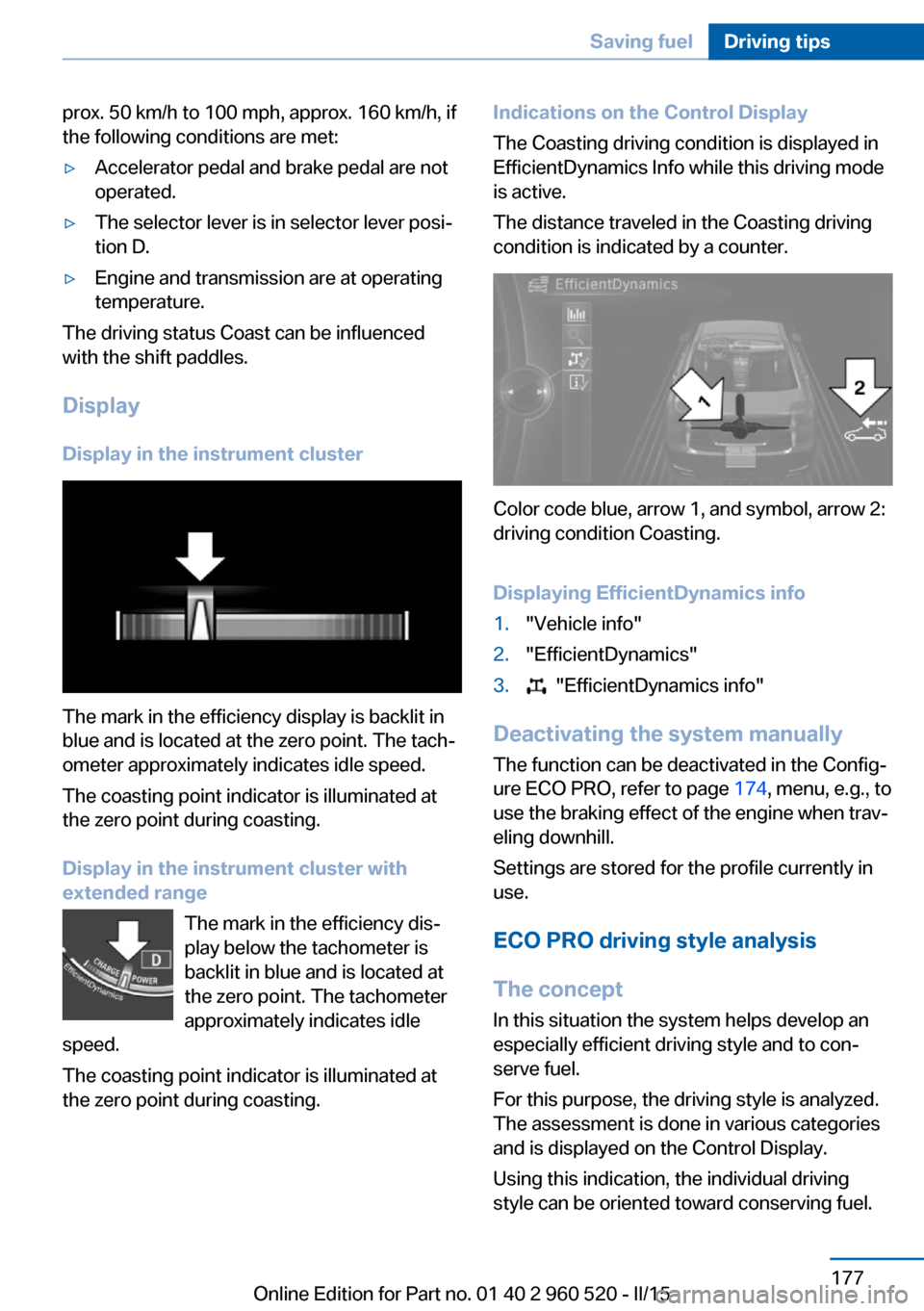
The mark in the efficiency display is backlit in
blue and is located at the zero point. The tach‐
ometer approximately indicates idle speed.
The coasting point indicator is illuminated at
the zero point during coasting.
Display in the instrument cluster with
extended range
The mark in the efficiency dis‐
play below the tachometer is
backlit in blue and is located at
the zero point. The tachometer
approximately indicates idle
speed.
The coasting point indicator is illuminated at
the zero point during coasting.
Indications on the Control Display
The Coasting driving condition is displayed in
EfficientDynamics Info while this driving mode
is active.
The distance traveled in the Coasting driving
condition is indicated by a counter.
Color code blue, arrow 1, and symbol, arrow 2:
driving condition Coasting.
Displaying EfficientDynamics info
1."Vehicle info"2."EfficientDynamics"3. "EfficientDynamics info"
Deactivating the system manually The function can be deactivated in the Config‐
ure ECO PRO, refer to page 174, menu, e.g., to
use the braking effect of the engine when trav‐
eling downhill.
Settings are stored for the profile currently in
use.
ECO PRO driving style analysis
The concept
In this situation the system helps develop an
especially efficient driving style and to con‐
serve fuel.
For this purpose, the driving style is analyzed.
The assessment is done in various categories
and is displayed on the Control Display.
Using this indication, the individual driving
style can be oriented toward conserving fuel.
Seite 177Saving fuelDriving tips177
Online Edition for Part no. 01 40 2 960 520 - II/15
Page 196 of 247

Minimum tread depth
Wear indicators are distributed around the
tire's circumference and have the legally re‐
quired minimum height of 0.063 in/1.6 mm.
They are marked on the side of the tire with
TWI, Tread Wear Indicator.
Tire damage
General information
Inspect your tires often for damage, foreign
objects lodged in the tread, and tread wear.
Hints
Driving over rough or damaged road surfaces,
as well as debris, curbs and other obstacles
can cause serious damage to wheels, tires and
suspension parts. This is more likely to occur
with low-profile tires, which provide less cush‐
ioning between the wheel and the road. Be
careful to avoid road hazards and reduce your
speed, especially if your vehicle is equipped
with low-profile tires.
Indications of tire damage or other vehicle de‐
fects:
▷Unusual vibrations while driving.▷Unusual handling such as a strong ten‐
dency to pull to the left or right.
Damage can, e. g., be caused by driving over
curbs, road damage, or similar things.
In case of tire damage
If there are indications of tire damage, re‐
duce your speed immediately and have the
rims and tires checked right away; otherwise,
there is the increased risk of an accident.
Drive carefully to the nearest service center. If
necessary, have the vehicle towed or trans‐
ported there. Otherwise, tire damage can be‐
come life threatening for vehicle occupants
and also other traffic.◀
Repair of tire damage
For safety reasons, the manufacturer of
your vehicle recommends that you do not have
damaged tires repaired; they should be re‐
placed. Otherwise, damage can occur as a re‐
sult.◀
Changing wheels and tires
Mounting Information on mounting tires
Have mounting and balancing performed
only by a service center.
If work is not carried out properly, there is a
danger of subsequent damage and related
safety hazards.◀
Wheel and tire combination
You can ask the service center about the right
wheel/tire combination and wheel rim versions
for the vehicle.
Incorrect wheel and tire combinations impair
the function of a variety of systems such as
ABS or DSC.
To maintain good handling and vehicle re‐
sponse, use only tires with a single tread con‐
figuration from a single manufacturer.
Following tire damage, have the original wheel
and tire combination remounted on the vehicle
as soon as possible.Seite 192MobilityWheels and tires192
Online Edition for Part no. 01 40 2 960 520 - II/15
Page 204 of 247

Hood
Hints Working in the engine compartment
Never attempt to perform any service or
repair operations on your vehicle without the
necessary professional technical training.
If you are unfamiliar with the statutory guide‐
lines, have any work on the vehicle performed
only by a service center.
If work is not carried out properly, there is a
danger of subsequent damage and related
safety hazards.◀
Never reach into the engine compart‐
ment
Never reach into spaces or gaps in the engine
compartment; otherwise, there is a risk of in‐
jury, e.g., from rotating or hot parts.◀
Fold down wiper arm
Before opening the hood, ensure that the
wiper arms are against the windshield, or this
may result in damage.◀
Opening the hood1.Pull lever, arrow 1.
Hood is unlocked2.After the lever is released, pull the lever
again, arrow 2.
Hood can be opened.Indicator/warning lights
When the hood is unlocked, a Check Control
message is displayed.
Closing the hood Hood open when driving
If you see any signs that the hood is not
completely closed while driving, pull over im‐
mediately and close it securely.◀
Danger of jamming
Make sure that the closing path of the
hood is clear; otherwise, injuries may result.◀
Let the hood drop from a height of approx. 16
in/40 cm and push down on it to lock it fully.
The hood must audibly engage on both sides.
Seite 200MobilityEngine compartment200
Online Edition for Part no. 01 40 2 960 520 - II/15
Page 213 of 247

Headlights1Parking lights / daytime running lights2Low beams/high beams/headlight flasher3Turn signal
Low beams and high beams are designed with
xenon technology.
The parking lights and daylight running lights
are made using LED technology.
Contact your service center in the event of a
malfunction.
Turn signal
Follow general instructions, refer to page 207.
21-watt bulb, PY21W1.In the wheel house, loosen the two brack‐
ets and remove the cover.2.If necessary, pull the inside trim of the
wheel house slightly inward. Turn the bulb
socket counterclockwise and remove.3.Press the bulb gently into the socket, turn
counterclockwise and remove.4.Install the new bulb and bulb holder in re‐
verse order of removal.5.Attach the cover to the wheel house.
LED headlights
Light-emitting diodes (LEDs)
With LED headlights, all front lights and side
indicators are designed with LED technology.
If an LED fails, switch on the front fog lights
and continue the trip with great care. Comply
with local regulations.
Contact your service center in the event of a
malfunction.
Seite 209Replacing componentsMobility209
Online Edition for Part no. 01 40 2 960 520 - II/15
Page 236 of 247
Everything from A to Z
IndexA ABS, Antilock Brake Sys‐ tem 118
ACC, Active Cruise Control with Stop & Go 123
Acceleration Assistant, refer to Launch Control 74
Accessories and parts 7
Activated-charcoal filter 149
Active Blind Spot Detec‐ tion 115
Active Cruise Control with Stop & Go, ACC 123
Adaptive brake lights, refer to Brake force display 117
Adaptive Light Control 92
Additives, oil 202
Adjustments, seats/head re‐ straints 49
After washing vehicle 223
Airbags 96
Airbags, indicator/warning light 97
Air circulation, refer to Recir‐ culated-air mode 145, 148
Air, dehumidifying, refer to Cooling function 145, 148
Air distribution, manual 145, 148
Air flow, air conditioner 145
Air flow, automatic climate control 148
Air pressure, tires 186
Air vents, refer to Ventila‐ tion 149
Alarm system 44
Alarm, unintentional 45
All around the center con‐ sole 16
All around the roofliner 17 All around the steering
wheel 14
All-season tires, refer to Win‐ ter tires 193
All-wheel-drive 119
Alternating-code hand-held transmitter 152
Alternative oil types 203
Ambient light 95
Antifreeze, washer fluid 70
Antilock Brake System, ABS 118
Anti-slip control, refer to DSC 118
Approved axle load 228
Approved engine oils, see Suitable engine oil
types 203
Arrival time 87
Ash tray 155
Assistance when driving off 122
Assist system information, on Control Display 89
Attentiveness assistant 117
AUTO intensity 147
Automatic car wash 222
Automatic climate con‐ trol 144
Automatic climate control with enhanced features 146
Automatic Cruise Control with Stop & Go 123
Automatic Curb Monitor 57
Automatic deactivation, front- seat passenger airbags 98
Automatic headlight con‐ trol 92
Automatic locking 44
Automatic recirculated-air control 148 Automatic transmission, see
Steptronic transmission 71
AUTO program, automatic cli‐ mate control 147
AUTO program, climate con‐ trol 145
AUTO program, intensity 147
Auto Start/Stop function 65
Average fuel consumption 86
Average speed 86
Axle loads, weights 228
B Backrest curvature, refer to Lumbar support 51
Backrest, width 51
Band-aids, refer to First aid kit 217
Bar for tow-starting/ towing 220
Battery replacement, vehicle battery 214
Battery replacement, vehicle remote control 35
Battery, vehicle 213
Belt carrier 54
Belts, safety belts 53
Beverage holder, cu‐ pholder 161
Blinds, sun protection 47
BMW Assist, see user's manual for Navigation, En‐
tertainment and Communi‐
cation
BMW Driver’s Guide App 6
BMW Homepage 6
BMW Internet page 6
BMW maintenance sys‐ tem 205
Bonus range, ECO PRO 174 Seite 232ReferenceEverything from A to Z232
Online Edition for Part no. 01 40 2 960 520 - II/15
Page 238 of 247

Controller 18, 19
Control systems, driving sta‐ bility 118
Convenient opening with the remote control 37
Coolant 204
Coolant level 204
Coolant temperature 81
Cooling function 145, 148
Cooling, maximum 147
Cooling system 204
Cornering light 92
Corrosion on brake discs 168
Cosmetic mirror 155
Courtesy lamps during un‐ locking 37
Courtesy lamps with the vehi‐ cle locked 38
Cruise control 129
Cruise control, active with Stop & Go 123
Cruising range 81
Cupholders 161
Current fuel consumption 82
D
Damage, tires 192
Damping control, dy‐ namic 120
Data, technical 228
Date 81
Daytime running lights 92
Defrosting, refer to defrosting the windows 145
Defrosting, refer to Windows, defrosting 149
Defrosting the windows 145
Dehumidifying, air 145, 148
Deleting personal data 25
Deletion of personal data 25
Destination distance 86
Digital clock 81
Digital compass 153
Dimensions 228
Dimmable exterior mirrors 57 Dimmable interior rearview
mirror 58
Direction indicator, refer to Turn signals 67
Display, electronic, instru‐ ment cluster 76
Display in windshield 89
Display lighting, refer to In‐ strument lighting 94
Displays, cleaning 225
Disposal, coolant 204
Disposal, vehicle battery 214
Distance control, refer to PDC 131
Distance to destination 86
Divided screen view, split screen 23
Door lock 39
Door lock, refer to Remote control 34
Drive-off assistant 122
Drive-off assistant, refer to DSC 118
Driver assistance, refer to In‐ telligent Safety 105
Driving Assistant, refer to In‐ telligent Safety 105
Driving Dynamics Con‐ trol 120
Driving instructions, break- in 166
Driving mode 120
Driving notes, general 166
Driving stability control sys‐ tems 118
Driving style analysis 177
Driving tips 166
DSC Dynamic Stability Con‐ trol 118
DTC Dynamic Traction Con‐ trol 119
Dynamic Damping Con‐ trol 120
Dynamic Stability Control DSC 118 Dynamic Traction Control
DTC 119
E ECO PRO 173
ECO PRO, bonus range 174
ECO PRO display 173
ECO PRO driving mode 173
ECO PRO driving style analy‐ sis 177
ECO PRO mode 173
ECO PRO Tip - driving in‐ struction 175
EfficientDynamics 176
Electronic displays, instru‐ ment cluster 76
Electronic oil measure‐ ment 201
Electronic Stability Program ESP, refer to DSC 118
Emergency detection, remote control 35
Emergency release, fuel filler flap 182
Emergency Request 216
Emergency start function, en‐ gine start 35
Emergency unlocking, trans‐ mission lock 74
Emergency unlocking, trunk lid 41
Energy Control 82
Energy recovery 82
Engine, automatic Start/Stop function 65
Engine, automatic switch- off 65
Engine compartment 199
Engine compartment, work‐ ing in 200
Engine coolant 204
Engine idling when driving, coasting 176
Engine oil 201
Engine oil, adding 202 Seite 234ReferenceEverything from A to Z234
Online Edition for Part no. 01 40 2 960 520 - II/15
Page 239 of 247

Engine oil additives 202
Engine oil change 203
Engine oil filler neck 202
Engine oil temperature 80
Engine oil types, alterna‐ tive 203
Engine oil types, ap‐ proved 203
Engine start during malfunc‐ tion 35
Engine start, jump-start‐ ing 217
Engine start, refer to Starting the engine 64
Engine stop 64
Engine temperature 80
Entering a car wash 222
Equipment, interior 151
Error displays, see Check Control 77
ESP Electronic Stability Pro‐ gram, refer to DSC 118
Exchanging wheels/tires 192
Exhaust system 167
Exterior mirror, automatic dimming feature 57
Exterior mirrors 56
External start 217
External temperature dis‐ play 81
External temperature warn‐ ing 81
Eyes for securing cargo 170
F
Failure message, see Check Control 77
False alarm, refer to Uninten‐ tional alarm 45
Fan, refer to Air flow 145, 148
Filler neck for engine oil 202
Fine wood, care 224
First aid kit 217 Fitting for towing, see Tow fit‐
ting 220
Flat tire, changing wheels 213
Flat Tire Monitor FTM 103
Flat tire, Tire Pressure Moni‐ tor TPM 99
Flat tire, warning lamp 100, 103
Flooding 167
Floor carpet, care 225
Floor mats, care 225
Fogged up windows 145
Fold down the rear seat back‐ rest, see Though-loading
system 157
Fold-out position, wiper 70
Foot brake 167
Front airbags 96
Front-end collision warning with braking function 108
Front-end collision warning with City Braking func‐
tion 106
Front fog lights 94
Front fog lights, front, bulb re‐ placement 210
Front lights 208
front-seat passenger airbags, automatic deactivation 98
Front-seat passenger airbags, indicator lamp 98
FTM Flat Tire Monitor 103
Fuel 184
Fuel consumption, current 82
Fuel consumption, refer to Average fuel consump‐
tion 86
Fuel filler flap 182
Fuel gauge 80
Fuel lid 182
Fuel quality 184
Fuel recommendation 184
Fuel, tank capacity 231
Fuse 214 G
Garage door opener, refer to Universal Integrated Remote
Control 151
Gasoline 184
Gear change, Steptronic transmission 72
Gear shift indicator 83
General driving notes 166
Glare shield 155
Glass sunroof, powered 47
Glove compartment 159
Gross vehicle weight, ap‐ proved 228
H
Handbrake, refer to parking brake 67
Hand-held transmitter, alter‐ nating code 152
Hazard warning flashers 216
Head airbags 96
Headlight control, auto‐ matic 92
Headlight courtesy delay fea‐ ture 92
Headlight flasher 68
Headlight glass 208
Headlights 208
Headlights, care 223
Headlight washer system 68
Head restraints 49
Head restraints, front 54
Head-up Display 89
Head-up Display, care 225
Heavy cargo, stowing 170
Height, vehicle 228
High-beam Assistant 93
High beams 68
High beams/low beams, refer to High-beam Assistant 93
Hills 168
Hill start assistant, refer to Drive-off assistant 122 Seite 235Everything from A to ZReference235
Online Edition for Part no. 01 40 2 960 520 - II/15