2016 BMW 228I COUPE Wheel speed sensor
[x] Cancel search: Wheel speed sensorPage 19 of 232

Automatic headlight con‐
trol 91
Daytime running lights 91
Adaptive Light Control 91
High-beam Assistant 92Instrument lighting 935Steering column stalk, leftTurn signal 67High beams, head‐
light flasher 67High-beam Assistant 92Roadside parking lights 91On-board computer 856Steering wheel buttons, leftStore speed 118Resume speed 118Cruise control on/off, inter‐
rupt 118Cruise control rocker switch 1187Instrument cluster 768Steering wheel buttons, rightEntertainment sourceVolumeVoice activation 27Telephone, see user's manual for
Navigation, Entertainment and
CommunicationThumbwheel for selection lists 849Start/stop the engine and switch
the ignition on/off 64Auto Start/Stop function 6510Steering column stalk, rightWiper 68Rain sensor 69Clean the windshields and head‐
lights 7011Horn, total area12Steering wheel heating 5813Adjust steering wheel 5714Unlock hood 186Seite 15CockpitAt a glance15
Online Edition for Part no. 01 40 2 961 270 - II/15
Page 73 of 232
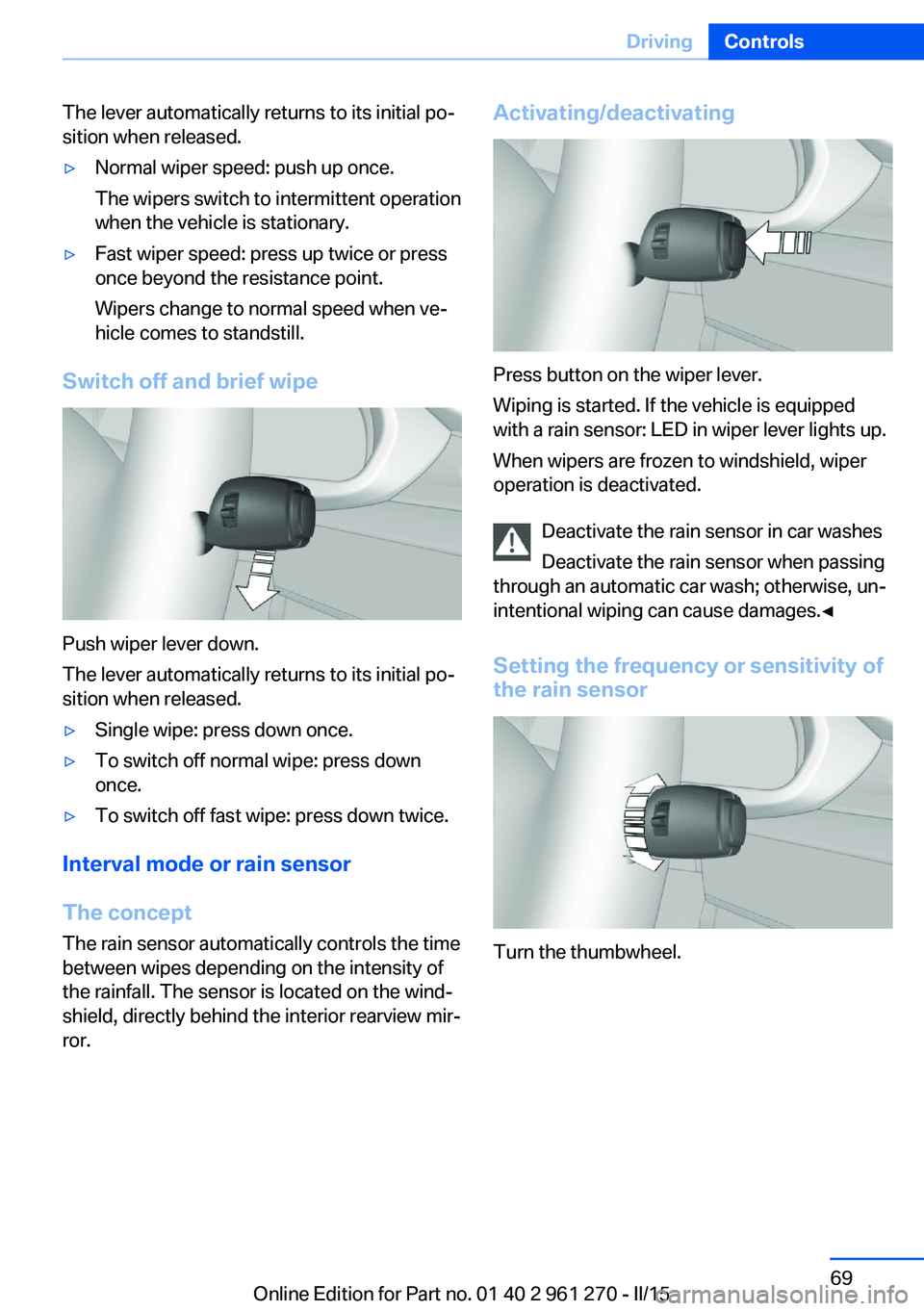
The lever automatically returns to its initial po‐
sition when released.▷Normal wiper speed: push up once.
The wipers switch to intermittent operation
when the vehicle is stationary.▷Fast wiper speed: press up twice or press
once beyond the resistance point.
Wipers change to normal speed when ve‐
hicle comes to standstill.
Switch off and brief wipe
Push wiper lever down.
The lever automatically returns to its initial po‐
sition when released.
▷Single wipe: press down once.▷To switch off normal wipe: press down
once.▷To switch off fast wipe: press down twice.
Interval mode or rain sensor
The concept The rain sensor automatically controls the time
between wipes depending on the intensity of the rainfall. The sensor is located on the wind‐
shield, directly behind the interior rearview mir‐
ror.
Activating/deactivating
Press button on the wiper lever.
Wiping is started. If the vehicle is equipped
with a rain sensor: LED in wiper lever lights up.
When wipers are frozen to windshield, wiper
operation is deactivated.
Deactivate the rain sensor in car washes
Deactivate the rain sensor when passing
through an automatic car wash; otherwise, un‐
intentional wiping can cause damages.◀
Setting the frequency or sensitivity of
the rain sensor
Turn the thumbwheel.
Seite 69DrivingControls69
Online Edition for Part no. 01 40 2 961 270 - II/15
Page 130 of 232

Curbs
The parking assistant may steer the vehi‐
cle over or onto curb if need be.
Therefore, always be alert and ready to inter‐
vene; otherwise, the wheels, tires, or the vehi‐
cle may become damaged.◀
An engine that has been switched off by the
Auto Start Stop function is restarted automati‐
cally when the parking assistant is activated.
Requirements
For measuring parking spaces▷Maximum speed while driving forward ap‐
prox. 22 mph/35 km/h.▷Maximum distance to row of parked vehi‐
cles: 5 ft/1.5 m.
Suitable parking space
General information:
▷Gap behind an object that has a min. length
of 1.7 ft/0.5 m.▷Gap between two objects with a minimum
length of approx. 1.7 ft/0.5 m.
Parallel parking to the road:
▷Min. length of gap between two objects:
your vehicle's length plus approx.
2.6 ft/0.8 m.▷Minimum depth: approx. 5 ft/1.5 m.
Diagonal parking:
▷Width of gap between two objects: your
vehicle's width plus approx. 2.3 ft/0.7 m up
to maximum 16 ft/5 m.▷Minimum depth: your vehicle's length.
The depth of diagonal parking spaces must
be estimated by the driver. Dur to technical
limitations, the system can approximate
the depth of diagonal parking spaces only.
Regarding the parking procedure
▷Doors and trunk lid closed.▷Parking brake released.▷When parking in parking spaces on the
driver's side, the corresponding turn signal
must be set where applicable.
Overview
Button in the vehicle
Parking assistant
Ultrasound sensors
The four ultrasound sensors for measuring
parking spaces are located in the front and rear
on the side of the vehicle.
To ensure full functionality:
▷Keep the sensors clean and free of ice.▷When using high-pressure washers, do not
spray the sensors for long periods and
maintain a distance of at least 12 in/30 cm.▷Do not put stickers over sensors.Seite 126ControlsDriving comfort126
Online Edition for Part no. 01 40 2 961 270 - II/15
Page 132 of 232

vehicle - wait for the automatic steering
wheel move.
The end of the parking procedure is indi‐
cated on the Control Display.3.Adjust the parking position yourself if
needed.
Interrupting manually
The parking assistant can be interrupted at any
time:
▷ "Parking Assistant" Select the symbol
on the Control Display.▷Press button.
Interrupting automatically
The system is interrupted automatically in the
following situations:
▷If the driver grasps the steering wheel or if
he takes over steering.▷If a gear is selected that does not match
the instruction on the Control Display.▷If the vehicle speed exceeds approx.
6 mph/10 km/h.▷Possible on snow-covered or slippery road
surfaces.▷When there are obstacles that are hard to
overcome, such as curbs.▷When there are obstacles that suddenly
arise.▷If the Park Distance Control PDC displays
clearances that are too small.▷If a maximum number of parking attempts
or the time taken for parking is exceeded.▷If DSC is being deactivated.▷When switching to another function on the
Control Display.
A Check Control message is displayed.
Resume An interrupted parking procedure can be con‐
tinued if needed.
Follow the instructions on the Control Display
to do this.
System limits
No parking assistance
The parking assistant does not offer assis‐
tance in the following situations:▷In tight curves.▷When DSC is deactivated.
Functional limitations
The system may not be fully functional in the
following situations:
▷On bumpy road surfaces such as gravel
roads.▷On slippery ground.▷On steep uphill or downhill grades.▷With accumulations of leaves/snow in the
parking space.
Limits of ultrasonic measurement
Ultrasonic measuring might not function under
the following circumstances:
▷For small children and animals.▷For persons with certain clothing, e.g.
coats.▷With external interference of the ultra‐
sound, e.g. from passing vehicles or loud
machines.▷When sensors are dirty, iced over, dam‐
aged or out of position.▷Under certain weather conditions such as
high relative humidity, rain, snowfall, ex‐
treme heat or strong wind.▷With tow bars and trailer couplings of other
vehicles.▷With thin or wedge-shaped objects.▷With moving objects.▷With elevated, protruding objects such as
ledges or cargo.Seite 128ControlsDriving comfort128
Online Edition for Part no. 01 40 2 961 270 - II/15
Page 228 of 232

Pressure, tire air pres‐sure 172
Pressure warning, tires 102
Profile, refer to Personal Pro‐ file 35
Programmable memory but‐ tons, iDrive 24
Protective function, glass sunroof 47
Protective function, win‐ dows 46
Push-and-turn switch, refer to Controller 18, 19
R Radiator fluid 190
Radio-operated key, refer to Remote control 34
Radio ready state 63
Radio, see user's manual for Navigation, Entertainment
and Communication
Rain sensor 69
Rear lights 198
Rear socket 142
Rearview camera 123
Rearview mirror 55
Rear window de‐ froster 131, 134
Recirculated-air filter 135
Recirculated-air mode 131, 134
Recommended fuel grade 170
Recommended tire brands 179
Refueling 168
Remaining range 81
Remote control/key 34
Remote control, malfunc‐ tion 38
Remote control, univer‐ sal 137
Replacement fuse 201
Replacing parts 193 Replacing wheels/tires 178
Reporting safety defects 9
RES button, see Cruise con‐ trol 118
Reserve warning, refer to Range 81
Reset, Tire Pressure Monitor TPM 99
Retaining straps, securing cargo 156
Retreaded tires 179
Roadside parking lights 91
RON recommended fuel grade 170
Roofliner 17
Roof load capacity 214
Roof-mounted luggage rack 157
Rope for tow-starting/ towing 206
RSC Run Flat System Com‐ ponent, refer to Run-flat
tires 180
Rubber components, care 210
Run-flat tires 180
S Safe braking 153
Safety 7
Safety belt reminder for driv‐ er's seat and front passen‐
ger seat 53
Safety belts 52
Safety belts, care 211
Safety systems, airbags 95
Saving fuel 158
Screen, refer to Control Dis‐ play 18
Screwdriver, see Onboard ve‐ hicle tool kit 193
Screw thread, see screw thread for tow fitting, screw
thread for tow fitting 207
Sealant 180 Seat and mirror memory 55
Seat belts, refer to Safety belts 52
Seat heating, front 51
Seating position for chil‐ dren 59
Seats 48
Selection list in instrument cluster 84
Selector lever, Steptronic transmission 72
Sensors, care 211
Service and warranty 8
Service requirements, Condi‐ tion Based Service
CBS 191
Service requirements, dis‐ play 82
Services, ConnectedDrive
Servotronic 114
SET button, see Cruise con‐ trol 118
Settings, locking/unlock‐ ing 43
Settings on Control Dis‐ play 87
Settings, storing for seat, mir‐ ror 55
Shift paddles on the steering wheel 73
Side airbags 95
Signaling, horn 14
Signals when unlocking 43
Sitting safely 48
Size 214
Slide/tilt glass roof 46
Snow chains 183
Socket 141
Socket, OBD Onboard Diag‐ nostics 192
SOS button 202
Spare fuse 201
Specified engine oil types 189
Speed, average 86 Seite 224ReferenceEverything from A to Z224
Online Edition for Part no. 01 40 2 961 270 - II/15
Page 229 of 232
Speed limit detection, on-board computer 86
Speed limiter, display 83
Speed Limit Information 83
Speed warning 87
Split screen 23
SPORT+ - program, Dynamic Driving Control 115
Sport displays, torque dis‐ play, performance dis‐
play 87
SPORT program, Dynamic Driving Control 115
Sport program, transmis‐ sion 72
Sport steering, variable 114
Stability control systems 112
Start/stop, automatic func‐ tion 65
Start/Stop button 63
Start function during malfunc‐ tion 35
Starting the engine 64
Status control display, tires 99
Status information, iDrive 23
Status of Owner's Manual 7
Steering assistance 114
Steering wheel, adjusting 57
Steering wheel heating 58
Steptronic Sport transmis‐ sion, refer to Steptronic
transmission 71
Steptronic transmission 71
Stopping the engine 64
Storage compartment in the rear 147
Storage compartments 145
Storage, tires 180
Storing the vehicle 211
Suitable engine oils 189
Summer tires, tread 177
Sun visor 141
Supplementary text mes‐ sages 79 Switch for Dynamic Driv‐
ing 114
Switch-on times, parked-car ventilation 136
Switch, refer to Cockpit 14
Symbols 6
Symbols in the status field 23
T Tachometer 80
Tail lights 198
Technical changes, refer to Safety 7
Technical data 214
Telephone, see user's manual for Navigation, Entertain‐
ment and Communication
Temperature, automatic cli‐ mate control 131, 133
Temperature display for ex‐ ternal temperature 81
Terminal, starting aid 204
Text messages, supplemen‐ tary 79
Theft alarm system, refer to Alarm system 44
Thigh support 50
Through-loading system 143
Tilt alarm sensor 44
Time of arrival 86
Tire damage 178
Tire identification marks 176
Tire inflation pressure 172
Tire inflation pressure moni‐ tor, refer to FTM 102
Tire Pressure Monitor TPM 98
Tires, changing 178
Tire sealant 180
Tires, everything on wheels and tires 172
Tires, run-flat tires 180
Tire tread 177 Tone, see user's manual for
Navigation, Entertainment
and Communication
Tool 193
Total vehicle weight 214
Touchpad 21
Tow fitting 206
Towing 205
Tow lug, see Tow fitting 206
Tow-starting 205
Tow truck 205
TPM Tire Pressure Moni‐ tor 98
Traction control 113
TRACTION, driving dynam‐ ics 113
Transmission lock, electronic unlocking 74
Transmission, manual trans‐ mission 71
Transmission, Steptronic transmission 71
Transporting children safely 59
Tread, tires 177
Trip computer 86
Triple turn signal activa‐ tion 68
Trip odometer 80
Truck for tow-starting/ towing 205
Trunk lid closing 40
Trunk lid, emergency unlock‐ ing 41
Trunk lid, hotel function 41
Trunk lid opening 40
Trunk lid via remote con‐ trol 38
Turning circle lines, rearview camera 124
Turn signals, operation 67
Turn signals, rear, bulb re‐ placement 198 Seite 225Everything from A to ZReference225
Online Edition for Part no. 01 40 2 961 270 - II/15