2016 AUDI A4 brake light
[x] Cancel search: brake lightPage 91 of 278

-For reasons of safety, cruise control should
not be used in the city, in stop-and-go traf
fic, on twisting roads and when road condi
t ions are poor (such as ice, fog, gravel,
heavy ra in and hydroplan ing) -risk of acci
dent .
- Turn
off the cruise control temporar ily when
enter ing turn lanes, h ighway exit lanes o r in
construction zones.
- Please note that inadvertently "rest ing"
your foot on the accelerator pedal causes
the cruise control not to brake. This is be
cause the cruise cont rol is overridden by the
dr iver's acceleration.
- If a brake system ma lf u nction such as over
heating occu rs when the c ruise contro l sys
tem is switched on, the braking function in
the system may be switched
off . The other
cruise contro l functions remain active as
long as the indicator light
[lj;(i )~i~ (US mod
els)/ .. (Canadian models) is on .
(D Tips
-Vehicles with manual transmission: You can
attain the set speed only if the gear that is
currently engaged will allow it, or if it does
not tax the engine and allows it to run
smooth ly. Therefore sh ift into a higher or
lower gear in a timely ma nner.
- The brake lights illuminate as soon as the
brakes apply automatically .
Changing speed
.,. To inc rease/decrease the speed in increments,
tap the lever in the
0 10 direction r:!> page 88,
fig. 102.
.,. To inc rease/decrease the speed qu ickly , ho ld
the leve r in the
0 10 direction until the de
si red speed is displayed .
You can a lso press the accelerator pedal down to
increase yo ur speed, e.g. if you want to pass
someone . The speed you saved earlier wi ll re -
,.... sume as soon as you let
off of the acce lerator N
~ pedal.
co
I f, however, you exceed your saved speed by
6 mph
( 1 0 km/h) for longer than 5 minutes, the
D riv ing
cruise contro l wi ll be turned off temporarily. The
green symbol in the display turns white. The
saved speed remains t he same.
Presetting your speed
You can preset your desired speed while the vehi
cle is not moving.
.,. Switch on the ign ition.
.,. Pull lever into position
(D r:!> page 88, fig . 102.
.,. Press the lever in the 0 or 0 direction to in-
crease or decrease your speed.
.,. Release the lever to save that speed.
This function makes it possible, for example, to save the speed you want before driving on the
highway . Once on the highway, activate the
cruise contro l by pull ing the lever toward
(D .
Switching off
Temporar y de acti vation
.,. Press the brake pedal, or
.,. Manual transmission: Keep the clutch pedal
pressed down
longer, or
.,. Press the lever into position @ (not clicked into
place)
~ page 88, fig. 102, or
.,. Dr ive fo r longer than 5 m inutes a t more than
6 mph (1 0 km/h) above the s to red speed.
Switching off completely
.,. Press lever into posit ion @ (clicked into p lace),
or
.,. Switch the ignit ion
off .
T he speed you saved will be retained if the cruise
control has been switched off temporarily . To re
s u me the saved speed , let up on the bra ke or
cl utch pedal and pull the lever to position
(D .
Switch ing the ignition off erases the saved speed .
A WARNING
--
You should only return to the saved speed if it
i s not too fast for the current t raffic condi
tions -ris k of an accident!
89
Page 93 of 278

,....,
N
0
""' CX) ,....,
I.Cl U"I ,....,
I.Cl ,....,
tiptronic transmission
In the tiptron ic tr ansmission, power is transfer
red by a torque converter.
Selector lever positions
Applies to vehicles: with multitronic/S tronic/tiptronic
Fig. 105 Display in the instrume nt clus ter: selector lever in
pos it io n P
The selector lever position engaged appears next
to the selector lever as well as in the instrument
cluster display .
P • Pa rk
In this selector lever pos ition the transmission is
mechanically locked. Engage P only when the ve
hicle is
completely stopped¢ A in Driving the
automatic transmission on page 93.
To shift in or out of position P, you must first
press and ho ld the brake pedal and then press
the re lease button in the selector lever handle
while moving the selector lever to or from P. You can shift out of this position only with the igni
tion on .
R - Reverse
Select R only when the vehicle is at a full stop
and the engine is running at idle speed ¢&. in
Driving the automatic transmission on
page 93 .
Before you move the se lector lever to R, press
both the release button in the handle of these
lector lever
and the brake pedal at the same
time.
When the ignition is on, the backup lights illumi
nate when the selector lever is moved into R.
Automatic transmission
N -Neutral
The transmission is in neutra l in this position.
Shift to this position for stand ing with the brakes
applied
c:> A in Driving the automatic transmis
sion on page 93.
When the vehicle is stationary or at speeds below
1 mph (2 km/h), you must always apply the foot
brake before and whi le moving the lever out of N.
DIS -Normal position for driving forward
In the D/S position, the transmission can be op
erated either in the normal mode Dor in the
spo rt mode S. To select the sport mode S, pull
the selector lever back briefly. Pulling the lever
back aga in will select the normal mode D. The in
strument cluster display shows the selected driv
ing mode.
In the
normal mode D, the transmission auto
matically selects the suitable gear ratio.
It de
pends on engine load , vehicle speed and driving
style.
Se lect the
sport mode S for sporty driving. The
vehicle makes fu ll use of the engine 's power.
Shifting may become noticeable when accelerat
ing.
When the vehicle is stationary or at speeds be low
1 mph (2 km/h), you must always apply the foot
brake before and whi le moving the lever to D/S
out of N.
A WARNING
-Read and follow all WARNINGS¢ & in Driv-
ing the automatic transmission on
page 93 .
(D Note
Coasting downhill with the transmission in N
and the engine not running w ill result in dam
age to the automatic transmiss ion and possi
bly the catalytic converter.
@ Tips
-On vehicles with dr ive select*, you can ad
just the sporty shift characteristics in the
Dynamic driving mode.Swill appear in the
instrument cluster display instead of D.
91
Page 94 of 278

Automatic transmission
-If you accidenta lly select N while driving,
take your foot off the accelerator pedal im
mediately and wa it for the engine to slow
down to idle before select ing 0/5 .
- If there is a power fa ilure, the selecto r lever
will not
move out of the P pos it ion. T he
emergency release can be used if this hap
pens
c:;, page 97.
Automatic Shift Lock (ASL)
App lies to veh icles: w ith multitronic/S tronic/tiptronic
The Automatic Shift Lock safeguards you against
accidentally shi~ing into a forward or the re
verse gear and causing the vehicle to move unin
tentionally.
F ig. 106 S hi ft gate : selector leve r loc k pos it io ns and re
l ease butto n high lig hte d
The selector lever lock is released as follows :
.. Turn the ign it ion on .
a, 0 ~ N ~ OJ ID
.,. Step on the b rake pedal. At the same time
press and hold the release button on the side of
the gear selector knob
c:;, fig . 106 with your
th umb until you have
moved the selector lever
to the des ired posi tion .
Automatic selecto r lever lock
The se lector lever is locked in the P and N pos i
tions when the ignition is tur ned on. You must
press the brake pedal and the release b utton to
selec t anothe r pos ition. As a reminder to the
d river, the following warning appears in t he in
s tru men t clus ter display when the sele ctor is in P
a nd N :
When stationary apply brake pedal while select
ing gear
92
The Au tomatic Shift Lock o nly functions whe n the
veh icle is stationa ry o r at speeds be low 1 mph
(2 km/h).
A t spee ds above abou t 1 mp h (2 km/ h) the A uto
m at ic Shift Lock is automatically deact ivated in
the N pos ition .
A time de lay ele men t pr event s the se lec tor lever
fr om lo cking whe n it i s
move d through the N po
s ition (going from R to 0/5) . T he locking eleme nt
will lock the selector leve r if the lever is left i n N
(Ne utral) for mo re than approximate ly 2 sec
onds, witho ut the brake peda l being pressed .
Release button
The release butto n on the sele ctor lever p reve nts
the leve r from being accidenta lly shifted into cer
tain positions. Depend ing on the direction of the
shi ft, the selector lever locks at different pos i
tions. The positions are highlighted i n the ill us
tration
c:;, fig. 106.
Ignition key safety interlock
The key cannot be removed from the ignition un
l ess the se lector lever is in the P park position.
When the ignition key is removed, the selector
l ever wi ll be locked in the P posit ion.
Driving the automatic transmission
Applies to vehicles: with mult itro nic/S tro nic/ti ptronic
Fig. 107 Sh ift ga te o n th e ce nter co nso le : se lec tor leve r
w it h re lease b utton
Starting the engine
.,. The se lector lever must be in P or N.
Starting off
.. Press an d hold the brake peda l.
Page 95 of 278
..... N
0 ::..:: co .....
tor lever handle, select the desired selector lev
er position such as D/5 and release the button.
~ Wait briefly until the transmission has shifted
(you w ill fee l a slight movement) .
~ Remove your foot from the brake pedal and ac
celerate .
Stopp ing tem pora ril y
~ Keep the vehicle stationary using the braking
pedal, for example at traffic lights.
~ Do not press the accelerator pedal when doing
th is .
~ To prevent the vehicle from rolling when you
start driving, set the park ing brake when stop
ping on steep inclines ¢
,&.
~ The pa rking brake w ill release automatically
and the vehicle will start moving once you press
the accelerator pedal.
Stopping /park ing
If the se lecto r lever is not in the P position when
you open the d river 's door, the vehicle could roll.
The message
Tr an smi ssion: Car ma y roll! Shift
t o pa rk!
appears .
~ Press and hold the brake pedal unt il the vehicle
has come to a comp lete stop.
~ Apply the pa rking brake ¢ page 86, Parking .
~ Select the P selector leve r position ¢ .&,.
Stopp ing on an incline
~ Always press the brake peda l to hold the vehi
cl e in place and prevent it from "rolling back"
¢
,& . Do not try to prevent the vehicle from
"ro lling back" when a gear is engaged by in
c reasing the eng ine speed ¢(!).
Starting on an incline
~ Activate the parki ng b rake .
~ With the driving gea r se lected, press the acce l
erator pedal caref ully. The parking b rake will
r e lease automatically if your seat belt is fas
tened .
Unde r ce rtain c ircumstances, suc h as dr iv ing in
the mountai ns, it may be usef ul to switch tempo
rari ly to the manua l shift program in order to ad-
Autom atic tran sm iss ion
just the gears to the driv ing conditions by hand
¢ page 94.
On slopes, act ivate the park ing brake first and
then move the selec to r l ever to the P posi tion .
T his prevents too m uch stress from being placed
on the locking mechanism .
Vehicles with mult itro nic tr ansmission : Your ve
hicle is equipped wi th
hill hold assist allowing
you to start whi le on an incl ine. The system is ac
tivated when the brake peda l is pressed down
and held
for a few second s. The brake pressure
will ho ld for
a momen t after the brake peda l
loosens to prevent the veh icle from rolling back
wards while starting up .
A WARNING
--The vehicle can also ro ll when the eng ine is
stopped .
- Unintended vehicle movement can cause se rious injury .
- Never leave your veh icle with the engine
running while in gear .
If you must leave
your ve hicle when the eng ine is running, ac
tivate t he pa rking brake and move the selec
tor lever to P.
- Power is still transmi tted to the wheels
when the engine is runn ing at idle. To pre
vent the vehicle from "creepi ng", yo u m ust
keep your foot on the brake when the en
gine is running and the selector lever is in D/
Sor R or "tiptronic" mode is se lected .
- Do not press the acce le ra t or peda l when
changing the se lector lever position while
the vehicle is stationary and the engine is
running.
- Never sh ift into R or P whi le driving.
- Before driving down a steep slope, reduce your speed and sh ift into a lower gear w ith
"t i ptronic".
- Do not ride the brakes or press the brake
pedal too often or too long when driving
down a hi ll. Constant brak ing causes the
brakes to overheat and substant ially re
duces brak ing performance, increases brak
ing d istance or causes comp lete failure of
the brake system.
~
93
Page 97 of 278

..... N
0 ::..:: co .....
An M appears in the instrument cluster display as soon as the transmiss ion has shifted.
~ To upshift, push the selector lever forward to
the p lus position
0 ¢ fig. 108.
~ To downshift, push the lever to the minus posi -
t ion
0 .
Gear selection with shift paddles*
The shift paddles are act ivated when the se lector
lever is in D/S or the tiptronic manual shift pro
gram.
~ To upshift, touch the shift padd le on the right
G) ¢fig.109 .
~ To downshift, touch the shift paddle on the left
0.
~ If you do not press a shift paddle within a short
t ime while in the D/S position, the transmission
will return to automatic mode. To keep shift ing
using the sh ift paddles, move the selector lever
to the right out of the D/S position.
The transm ission automatically shifts up or down
before critical engine speed is reached.
The transm ission only allows manual shifting
when the engine speed is within the permitted
range.
{O) Tips
- When you sh ift into the next lower gear, the
transmission will downsh ift only when there
i s no poss ibility of over-rew ing the engine.
- When the kick-down comes on, the trans
mission will shift down to a lower gear, de
pending on vehicle and engine speeds.
- Tiptron ic is inoperative when the transmis
s ion is in the fail-safe mode.
Kick-down
Appl ies to vehicles: with multitronic/S t ronic/tiptronic
Kick-down enables maximum acceleration .
Applies to vehicles with a multitronic
transmission
When you depress the accelerator pedal beyond
the res istance point, the transmission downshifts
in to a lower gear rat io depending on the vehicle
Automatic transm ission
speed and engine speed. As long as the accelera
tor pedal is depressed, the engine speed is auto
matically regulated for maximum accelerat ion .
Applies to vehicles with a S tronic-/ tiptronic
transmission
When you depress the accelerator pedal beyond
the resistance point, the automat ic transmission
downsh ifts into a lower gear, depending on vehi
cle speed and engine speed. The upsh ift into the
next higher gear takes place once the maximum
specified engine speed is reached .
A WARNING
Please note that the drive wheels can spin if
kick-down is used on a smooth slippery road -
there is a risk of skidding.
Launch Control Program
Applies to vehicles: wi th S tronic
The Launch Control Program provides the best
acceleration possible when starting from a stop .
Requirement: The engine must be at operating
temperature and the steering wheel must not be
turned .
~ Sedan: Press the I~ OF FI button¢ page 178
while the eng ine is running. The II indicator
light illuminates in the instrument cluster and
Stabilization control (ESC): Sport. Warning!
Restricted stability
appears in the driver infor
mation system display.
~ allroad: Press the I~ OFFI button¢ page 178
while the engine is ru nning . The II indicator
light illuminates in the instrument cluster and
Stabilization control (ESC): Offroad . Warning!
Restricted stability
appears in the driver infor
mation system display .
~ Move the selector lever to the D/S posit ion to
select sport mode (S) or select the
dynamic
driving mode in drive select*¢ page 112.
~ Press the brake pedal strongly w ith your left
foot and hold i t down for at least 1 second.
~ At the same time, press the accelerator pedal
down comp lete ly with your right foot unti l the
engine reaches and maintains a h igh RPM.
~ Remove your foot from the brake peda l within
S seconds¢ ,&. ..,.
95
Page 106 of 278
Audi adaptive cruise control and braking guard
Audi braking guard
Description
Applies to vehicles: with Audi adaptive cruise contro l
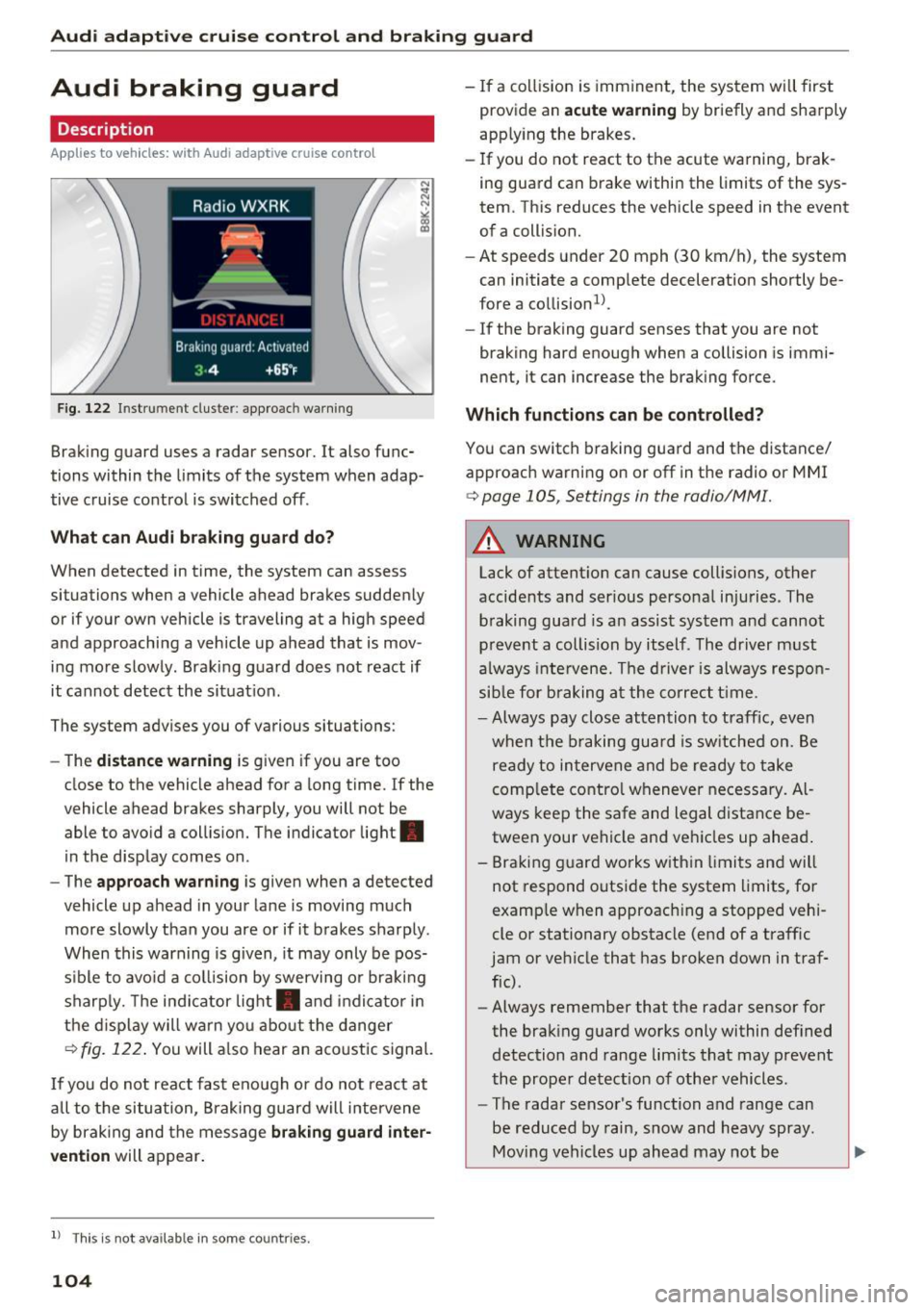
Fig. 122 In strument cluste r: appro ach warning
Braking guard uses a radar sensor. It also func
tions within the limits of the system when adap
tive cruise control is switched off .
What can Audi braking guard do?
When detected in time, the system can assess
si tuation s when a veh icle ahead brakes suddenly
or if your own vehicle is traveling at a high speed
and approaching a vehicle up ahead that is mov
ing more slowly . Braking guard does not react if
it cannot detect the situat ion.
The system advises you of variou s situations:
- The
distance warning is given if you are too
close to the vehicle ahead for a long time. If the
vehicle ahead brakes sharply, you will not be
able to avoid a collision. The indicator light .
in the display comes on.
- The
approach warning is given when a detected
vehicle up ahead in your lane is moving much
more slowly than you are or if it brakes sharply .
When this warning is given, it may only be pos
s ib le to avo id a collision by swerving or braking
sharply. The indicator light . and indicator in
the d isplay will warn you about the danger
¢fig. 122. You will also hear an acoustic signal.
If you do not react fast enough or do not react at
a ll to the situation, Braking guard will intervene
by braking and the message
braking guard inter
vention
will appear.
l) This is no t a vail able in som e coun trie s.
104
- If a collision is imminent , the system will first
provid e an
acute warning by briefly and sharply
app lying the b rakes.
- If you do not react to the acute warning, brak
ing guard can brake within the limits of the sys
tem . This reduces the vehicle speed in the event
of a collision.
- At speeds under 20 mph (30 km/h), the system
can initiate a complete deceleration shortly be
fore a collision ll.
- If the braking gua rd senses that you are not
braking hard enough when a collision is immi
nent, it can increase the braking force.
Which functions can be controlled?
You can switch braking guard and the distance/
approach warning on or off in the radio or MMI
¢page 105, Settings in the radio/MM!.
A WARNING
Lack of attent ion can cause collisions, other
accidents and ser ious personal injuries . The
braking guard is an assist system and cannot
prevent a collision by itself . The driver must
always inte rvene. The driver is always respon
sible for braking at the correct time .
- Always pay close attention to traffic, even
when the braking guard is switched on. Be
ready to intervene and be ready to take
complete control whenever necessary. Al
ways keep the safe and legal distance be
tween your vehicle and vehicles up ahead .
- Braking guard works within limits and will
not respond outside the system limits, for
example when approach ing a stopped vehi
cle or stationary obstacle (end of a traffic
jam or vehicle that has broken down in traf
fic) .
- Always remember that the radar sensor for
the braking guard works only within defined
detection and range limits that may prevent
the proper detection of other vehicles.
- The radar sensor's function and range can
be reduced by rain, snow and heavy spray.
Moving vehicles up ahead may not be
-
Page 179 of 278

..... N
0 ::..:: co .....
wireless telecommunications provider and the
"About Aud i connect" tab in your vehicle's
MMI*:
IMENU I button> Audi connect > About
Audi conn ect.
Electronic Stabilization
Control (ESC)
Description
ESC helps to improve road ho ld ing and vehicle
dynamics to help reduce the probability of skid
d ing and loss of veh icle control. It works only
when the engine is runn ing . E SC detects certain
d ifficult dr iving sit uat ions, including when t he
ve hicl e is begin ning to spin (yaw) out of co ntro l
a nd helps you to ge t the veh icle back under con
tro l by se lective ly bra king the wheels, and/or re
d ucing engine powe r and provid ing steering as
sistance to help hold the vehicle on the dr iver's
intended course. The indicator light
GJ in the in
strument cluster blinks when ESC is taking action
to help you co ntro l the vehicle.
ESC has limitations. It is important to remember
that ESC cannot overcome the laws of physics. It
will not a lways be able to help out under all con
d itions you may come up aga inst. For example,
ESC may not always be able to help you master
situations where there is a sudde n change in the
coeff icient of friction of the road surface. When
there is a section of dry road that is sudde nly cov
e red with wate r, slush o r snow, ESC cannot pe r
form the same way i t wo uld on the dry s urface . If
the vehicle hydrop lanes (rides on a cushion of wa
ter i nstead of t he road su rface), ESC wi ll not be
ab le to he lp you steer the ve hicle because contact
with the pavement has been interrupted and the
ve hicle cannot be b raked or steered. Dur ing fast
cornering, pa rticula rly on w inding roads, ESC
cannot always deal as effect ively w it h difficult
d riving si tuations tha n at lowe r speeds. When
tow ing a t raile r, ESC is no t able to help you re
g ai n con trol as it would if you we re not towing a
tra iler .
A lways adjust yo ur speed and driving sty le to
road, traffic and weathe r co nd itions. ESC canno t
override the vehicle's physical lim its, increase the
Intellig ent Technology
available t ract ion, or keep a vehicle on the road if
road depart ure is a resu lt of driver inattention .
Instead, ESC improves the possib ility o f keeping
the vehicle under contro l and on the road d uring
extreme maneuvers by us ing the driver's steer ing
i nputs to help keep the veh icle go ing in the in
tended direction.
If you are traveling at a speed
that causes you to run off the road before ESC
c an p rovide any assistan ce, you may not exper i
en ce the benefi ts of ESC.
ESC is swi tched o n all the time . In certa in s itua
t ions when you need less tract ion, you can sw itch
off AS R by press ing the button
11) c:> page 178,
fig. 173 o r c:> page 178, fig . 174. Be s ure to
swi tch ASR on again w hen you no longe r need
l ess trac tion.
T he following systems are integ ra ted in the ESC:
Anti-lock brak ing system (ABS)
ABS prevents the wheels from locking up w hen
braking. The vehicle can still be steered even d ur
i ng hard braking. Apply steady p ressure to the
brake pedal. Do not pump the peda l. A p uls ing in
t h e br ake peda l indicates that the system is help
i ng yo u to b rake the vehi cle.
Brake assist system
T he brake assist system can decrease braking dis
tance . It increases b raking powe r when the dr iver
presses the b rake peda l quickly in emergency sit
u at io ns. You mus t press and ho ld the br ake pedal
u nt il t he s ituat ion is ove r. In vehicles wi th adap
tive cru ise control *, the brake assist system is
more sensitive if the distance detected to the ve
hicle ahead is too sma ll.
Anti-slip regulation (ASR )
ASR reduces engine powe r whe n the dr ive whee ls
begi n to spin and adapts the fo rce to the road
co ndit ions . Thi s makes it easier to start, acce ler
ate and d rive up hills .
Electronic differential lock (EDL)
T he ED L brakes wheels t hat are spi nning and
transfe rs the dr ive power to the o ther dr ive
whee l or wheels if the vehicle is equ ip p ed with
all -wheel drive*. This function is not ava ilab le at
higher speeds. .,.
177
Page 182 of 278

Intelligent Technology
Braking
What affects braking efficiency?
New brake pads
During the firs t 25 0 miles (400 km), new b rake
pads do not possess their full braking effect , they
have to be "broken i n" first ¢& . You can com
pensate for this slight ly reduced braking power
by push ing harder on the brake pedal. Avoid
heavy braking loads during the break-in period .
Operating conditions and driving habits
The brakes on today's automobiles a re still sub
ject to wear, depend ing largely on ope rating con
ditions and driving habits¢& . On vehicles that
are either dr iven most ly in stop-and-go city traf
f ic or are driven hard, the brake pads should be
checked by you r authorized Aud i dea ler more of
ten than spec ified in the
Warranty & Mainte
nance booklet .
Failu re to have your brake pads
i n spected c an resu lt in reduced bra ke pe rform
ance.
O n steep slopes, you sho uld use the braking ef
fect of the eng ine . This way, you prevent unnec
es sary wear on t he b rake system. If yo u m ust use
your b rake s, d o not hold the brakes down cont in
uously. Pum p th e b rakes at intervals.
Operating noise
Noises may occur when brak ing depend ing on the
speed, b raking force and outs ide cond it ions such
as tempe ra tu re and humidi ty.
Effect of water and road salt
In certain s ituations, for example after driving
through water, in heavy ra in, afte r ove rnig ht con
densat ion or after washing your car, the b raking
effect can be reduced by mo isture or ice on the
b rake rotors and b rake pads . T he brakes must be
d ried first w ith a few careful b rake a pplica tions.
At highe r speeds and with t he windsh ield wipers
tur ned on, the br ake pads press aga inst the brake
rotors for a sho rt amoun t of time. This occur s at
regular intervals w it h out t he dr iver noticing and
p rov ides for better bra ke response time under
wet conditions.
180
The effectiveness of the brakes can be reduced
when the vehicle is driven on a salt-covered road
and t he b rakes are not used . Likewise, yo u clean
off accum ulated salt coating from brake discs
and pads with a few caut ious app lications of the
brake ¢& .
Corrosi on
There may be a tendency fo r dirt to build up on
the b rake pads and corrosion to form on the discs
i f the car is not driven regu larly or only for short
trips with little use of the brakes .
If the bra kes are not used frequent ly, or if corro
s ion has formed on the discs, it is advisable to
clean off the pads and discs by braking firmly a
few times from a moderately high speed ¢ &.
Faults in th e brake system
If you shou ld notice a sudden increase in brake
pedal travel , then one of t he two brake circu its
may have failed¢& .
Low brake fluid level
Malfu nctions can occu r in the brake system if the
br ake fluid level is too low . The brake fluid leve l
is mo nitored electronica lly .
Brake booster
The bra ke booster i ncreases the press ure t hat
yo u ge nera te with the brake ped al.
It works only
whe n the eng ine is ru nning .¢ &
Brake lining wear status
Brake lining wea r may be c hecked by visua l in
spection o f the condition of the brake pads
t hr ough t he openings in t he wheel. If necessary,
t h e wheel m ay be removed fo r thi s inspe ction
¢ page 240, Replacing wheel s.
_& WARNING
- New brake pads don't have the be st sto p
ping power and m ust be " broken-in" du ring
the initial 250 miles (400 kilometers). You
can compensate for this by p ressing the
brake pedal more firmly. This also app lies
later w hen new pads are installed.